
celery-rmq
celery-rmq is a python library to implement Celery and RabbitMQ message broker. it's a standalone library required celery and kombu (python library for rabbitmq). Celery and RabbitMQ producer and consumer made easy with celery-rmq
Quick Start
First of all, install rabbitmq and start.
Create a python app and create an virtual environment too. Activate the virtual environment.
1:: Install it:
pip install celery-rmq
2:: Basic Usage:
** app.py **
from celery_rmq.app import CeleryAppProvider
from celery_rmq.exchange import register_exchange
from celery_rmq.queue import register_queue

from .consumers.testconsumer import BasicTestConsumer

apps = ['tests.testapp']

app_provider = CeleryAppProvider(app_name='test_celery_broker', installed_apps=apps)

app = app_provider.get_app()


# adding exchanges

def register_exchanges():
    register_exchange(app_provider, "test_exchange")


def register_queues():
    register_queue(app_provider, "test_queue", "test_routing", "test_exchange")


def add_consumers():
    app_provider.add_consumer(BasicTestConsumer)


# execution of following two functions
# "register_exchanges()" and "register_queues()"
# needs to be synced
# i.e one after another.
# because queues are depended on exchanges

register_exchanges()
register_queues()

add_consumers()

app.start()
register as many as exchanges, queues and consumers
3:: consumer.py
import kombu
from celery import bootsteps

from celery_rmq.registry import get_queue


class BasicTestConsumer(bootsteps.ConsumerStep):

    def handle_message(self, body, message):
        print(body)
        message.ack()

    def get_consumers(self, channel):
        queue = get_queue("test_queue", "test_routing")
        return [kombu.Consumer(
            channel,
            queues=[queue],
            callbacks=[self.handle_message],
            accept=['json']
        )]
4:: If you want to add this with any framework, create an app (example: Django apps) and create a tasks.py file under the app:
from __future__ import absolute_import, unicode_literals

from celery import shared_task

from tests.app import app_provider


@shared_task
def simple_json_message(message, exchange_name, route_key):
    producer = app_provider.get_producer()
    producer.publish(message, content_type='application/json', exchange=exchange_name, routing_key=route_key)
and call the simple_json_message function from the view as per your need.
5:: Run the celery worker:
celery worker -l info -A app
here app is app.py file
Done.
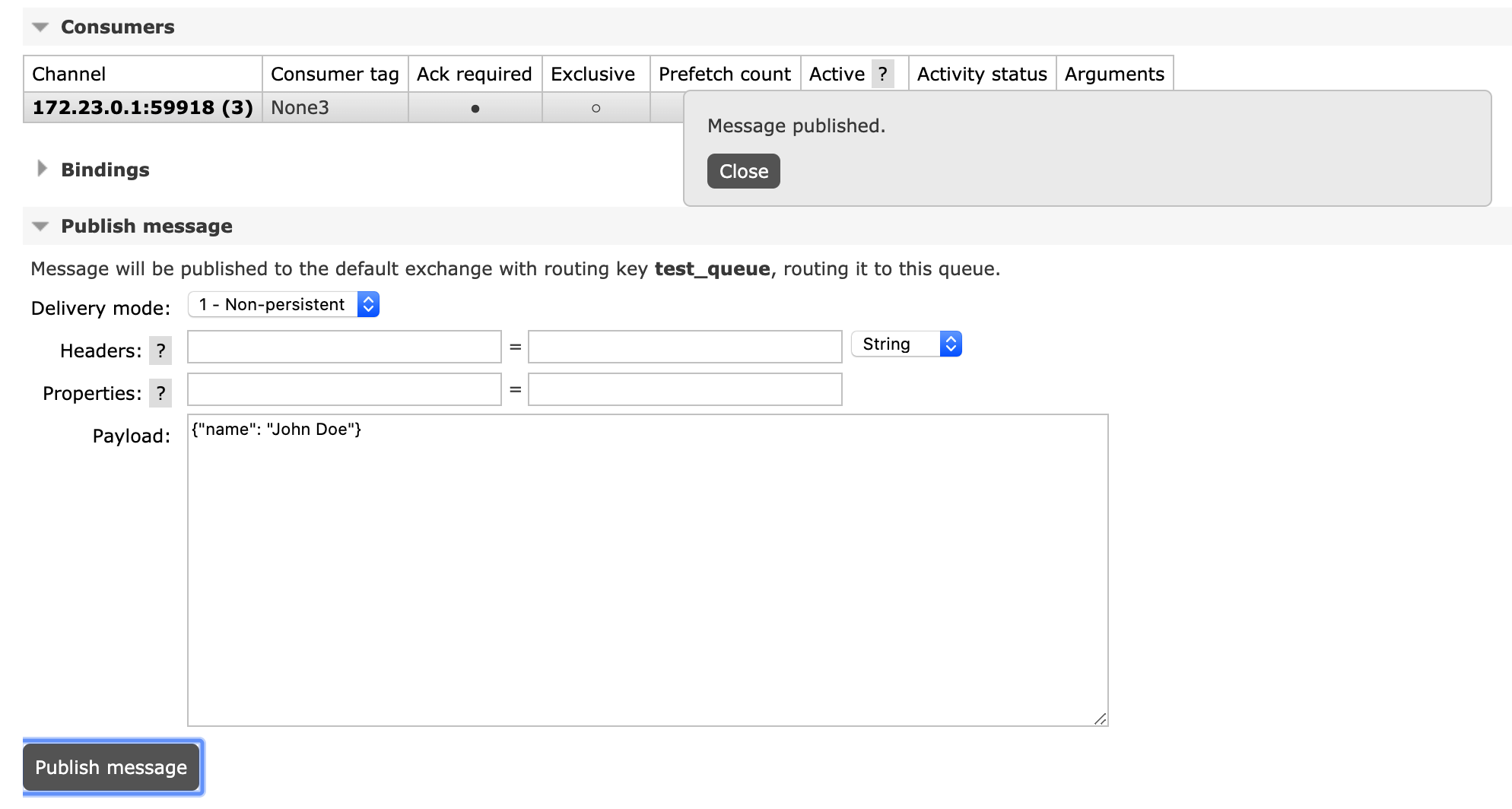
for testing purpose, we would like to send messages directly from RabbitMQ web panel. Go the the queue section and publish message.

1 maintainer

Metadata
1 maintainer
Release files for celery-rmq 0.0.2
For a detailed explanation of source distributions (sdists) and built distributions (wheels), please see the package formats documentation.
Source distribution (sdist)
| File | Size | Uploaded | |
|---|---|---|---|
| celery-rmq-0.0.2.tar.gz | 6.7 kB | Details |
Built distribution (wheel)
| File | Interpreter | ABI | Platform | Reset |
|---|---|---|---|---|
| celery_rmq-0.0.2-py3-none-any.whl | Python 3 | none | any | Details |
Total release size: 15.7 kB
Release files / celery-rmq-0.0.2.tar.gz
| Download URL | celery-rmq-0.0.2.tar.gz |
|---|---|
| Size | 6.7 kB |
| Tags | Source |
|
SHA-256 checksum How to use checksums |
21e5cdf760268caec8f0cb1424172cf205f6d04e202dfd9533b44d922b4676fa
|
|
BLAKE2b-256 checksum How to use checksums |
15e245a6bd568f74dfc9b47b6481416f0b96469c73e8044ee472d83a47020a27
|
| Upload date | |
|
Uploaded using Trusted Publishing? What is trusted publishing? |
No |
| Uploaded via |
twine/3.1.1 pkginfo/1.5.0.1 requests/2.23.0 setuptools/46.1.3 requests-toolbelt/0.9.1 tqdm/4.45.0 CPython/3.8.0
|
Release files / celery_rmq-0.0.2-py3-none-any.whl
| Download URL | celery_rmq-0.0.2-py3-none-any.whl |
|---|---|
| Size | 9.0 kB |
| Tags | Python 3 |
|
SHA-256 checksum How to use checksums |
4b39379dca6ae446a472ecb03dfdbc2679ed54c4aff28c728d753b02b8eccb9c
|
|
BLAKE2b-256 checksum How to use checksums |
8c58e92d29b880c12aa2e735589ff458ad71b88547470e88b1cbc570f4792bb8
|
| Upload date | |
|
Uploaded using Trusted Publishing? What is trusted publishing? |
No |
| Uploaded via |
twine/3.1.1 pkginfo/1.5.0.1 requests/2.23.0 setuptools/46.1.3 requests-toolbelt/0.9.1 tqdm/4.45.0 CPython/3.8.0
|














