
celery-slack





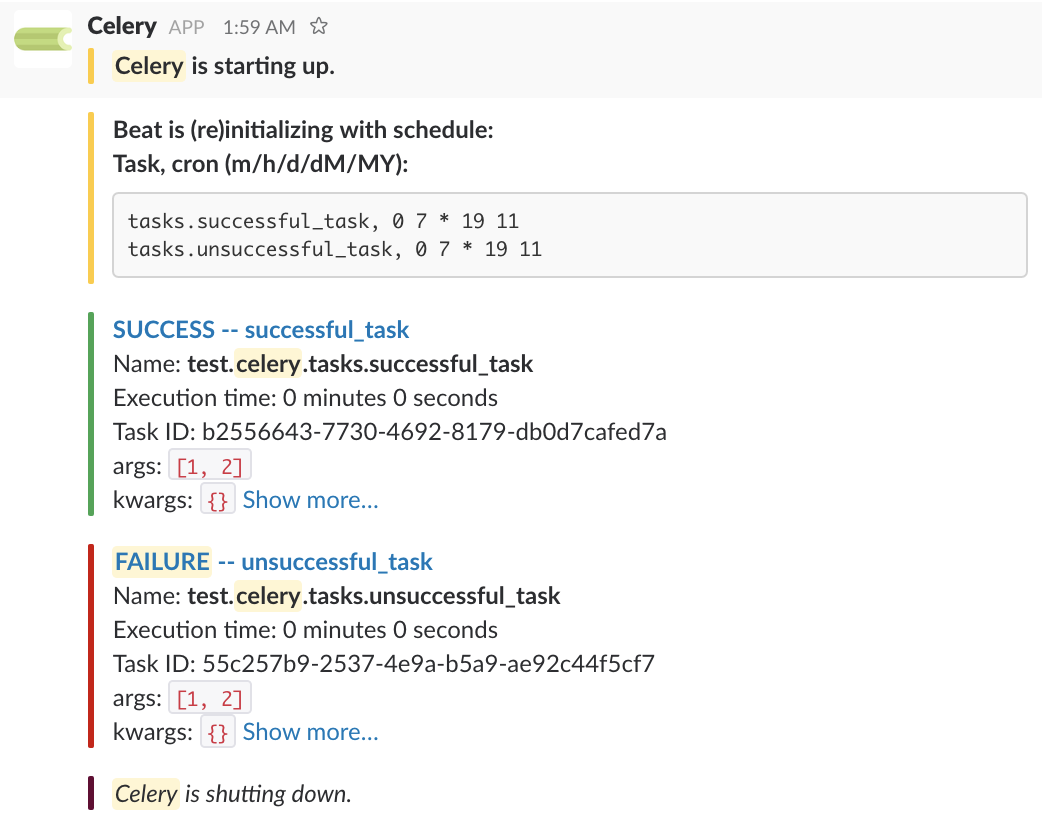
Celery-slack is a Celery extension that posts messages to a Slack channel regarding a Celery application, its beat schedule, and its worker task execution. Optionally those messages can link to Flower task pages.
Prerequisites
To use this package you will need a Slack App that is part of your Slack workspace. You can create an App from this page. This App should have an incoming webhook registered to one of your Slack channels. See Slack incoming webhooks for more information.
Installation
Celery-slack is a python package available on pypi. It can be installed using pip:
pip install celery-slackBasic usage
The most basic implementation of celery-slack requires a Celery instance object and a Slack webhook corresponding to a Slack channel. A simple example might look something like this:
from celery import Celery
from celery_slack import Slackify


SLACK_WEBHOOK = 'https://hooks.slack.com/services/XXX/YYY/ZZZ'

app = Celery('project')
app.config_from_object('project.config')

slack_app = Slackify(app, SLACK_WEBHOOK)


if __name__ == '__main__':
    app.start()
Advanced usage
Celery-slack offers a number of configuration options to customize the look and output of Slack messages. The following are the default options of the extension:
DEFAULT_OPTIONS = {
    "slack_beat_init_color": "#FFCC2B",
    "slack_broker_connect_color": "#36A64F",
    "slack_broker_disconnect_color": "#D00001",
    "slack_celery_startup_color": "#FFCC2B",
    "slack_celery_shutdown_color": "#660033",
    "slack_task_prerun_color": "#D3D3D3",
    "slack_task_success_color": "#36A64F",
    "slack_task_failure_color": "#D00001",
    "slack_request_timeout": 1,
    "flower_base_url": None,
    "show_celery_hostname": False,
    "show_task_id": True,
    "show_task_execution_time": True,
    "show_task_args": True,
    "show_task_kwargs": True,
    "show_task_exception_info": True,
    "show_task_return_value": True,
    "show_task_prerun": False,
    "show_startup": True,
    "show_shutdown": True,
    "show_beat": True,
    "show_broker": False,
    "use_fixed_width": True,
    "include_tasks": None,
    "exclude_tasks": None,
    "failures_only": False,
    "webhook": None,
    "beat_schedule": None,
    "beat_show_full_task_path": False,
}
Any subset of these options can be passed to the constructor in the form of keyword arguments. e.g.
options = {
    # Some subset of options
}
app = Celery('project')
slack_app = Slackify(app, SLACK_WEBHOOK, **options)
Most of the options are self explanatory, but here are some additional details:
slack_*_color: The left vertical bar color associated with the slack message attachments
slack_request_timeout: The Slack message request timeout in seconds
flower_base_url: e.g. https://flower.example.com, if provided, the slack message titles will link to task pages in Flower
show_task_id: Show the uuid for the task.
show_task_execution_time: Show time to complete task in minutes/seconds
show_celery_hostname: Show the machine hostname on celery/beat messages
show_task_args: Show the task’s args
show_task_kwargs: Show the task’s keyword args
show_task_exception_info: Show the traceback for failed tasks
show_task_return_value: Show the return value of a successful task
show_task_prerun: Post messages at start of task execution
show_startup: Post message when celery starts
show_shutdown: Post message when celery stops
show_beat: Post message when beat starts
show_broker: Post messages when celery/beat disconnect from or reconnect to the broker
use_fixed_width: Use slack fixed width formatting for args, kwargs, retval, and exception info
include_tasks: A list of task paths to include. If used, post task messages only for these tasks. Uses regex pattern matching. e.g. module.submodule.taskname for a specific task or just module.submodule for all tasks in that submodule. Cannot be used in conjunction with exclude_tasks.
exclude_tasks: A list of task paths to exclude. If used, suppress task messages only for these tasks. All other tasks will generate slack messages. Cannot be used in conjunction with include_tasks. Uses regex pattern matching.
failures_only: Only post messages on task failures.
webhook: The only required parameter. A slack webhook corresponding to a slack channel.
beat_schedule: The celery beat schedule. If provided, the beat_init message will display the schedule.
beat_show_full_task_path: Show the full module-task path. If False (default) only show submodule.taskname.
Warnings
Note that Slack has rate limits for incoming webhook requests which is more or less 1 request per second. This extension makes little effort to abide by these rate limits. You should ensure that your implementation of celery-slack does not violate these limits by adjusting your task schedule or restricting the set of tasks which generate Slack messages using the include_tasks or exclude_tasks options.
If a webhook response contains response code 429, celery-slack will suppress all messages for a time period given by the Retry-After response header. Upon returning, celery-slack will post a WARNING message to Slack.
1 maintainer

Release files for celery-slack 0.4.1
For a detailed explanation of source distributions (sdists) and built distributions (wheels), please see the package formats documentation.
Source distribution (sdist)
| File | Size | Uploaded | |
|---|---|---|---|
| celery_slack-0.4.1.tar.gz | 13.0 kB | Details |
Built distribution (wheel)
| File | Interpreter | ABI | Platform | Reset |
|---|---|---|---|---|
| celery_slack-0.4.1-py2.py3-none-any.whl | Python 3, Python 2 | none | any | Details |
Total release size: 25.1 kB
Release files / celery_slack-0.4.1.tar.gz
| Download URL | celery_slack-0.4.1.tar.gz |
|---|---|
| Size | 13.0 kB |
| Tags | Source |
|
SHA-256 checksum How to use checksums |
6ad21dbd30e046d0a1688415f7d955cc3dac0a49ca5cb63aa62d23b1cb3ba7d8
|
|
BLAKE2b-256 checksum How to use checksums |
b9fc4a07f01c8eeed87e5fe52b7de3c5e50623e80a39e3f0e31ee7db6d5afa7d
|
| Upload date | |
|
Uploaded using Trusted Publishing? What is trusted publishing? |
No |
| Uploaded via |
twine/1.13.0 pkginfo/1.5.0.1 requests/2.22.0 setuptools/40.8.0 requests-toolbelt/0.9.1 tqdm/4.32.2 CPython/3.7.3
|
Release files / celery_slack-0.4.1-py2.py3-none-any.whl
| Download URL | celery_slack-0.4.1-py2.py3-none-any.whl |
|---|---|
| Size | 12.1 kB |
| Tags | Python 2 Python 3 |
|
SHA-256 checksum How to use checksums |
7c9bdfe25045033b605221f8eb2004ee39a066aab53080366086327a05f18339
|
|
BLAKE2b-256 checksum How to use checksums |
7010171617fc50b901736d2959e13ac60b847922d605574e80e8d7180976a939
|
| Upload date | |
|
Uploaded using Trusted Publishing? What is trusted publishing? |
No |
| Uploaded via |
twine/1.13.0 pkginfo/1.5.0.1 requests/2.22.0 setuptools/40.8.0 requests-toolbelt/0.9.1 tqdm/4.32.2 CPython/3.7.3
|














