
Celery monitoring SDK — task events, worker heartbeats, beat schedules, and queue depths.

Project description
celeryradar-sdk



Celery monitoring SDK for CeleryRadar. Hooks Celery's standard signals to ship task events, worker heartbeats, beat schedules, and queue depth.
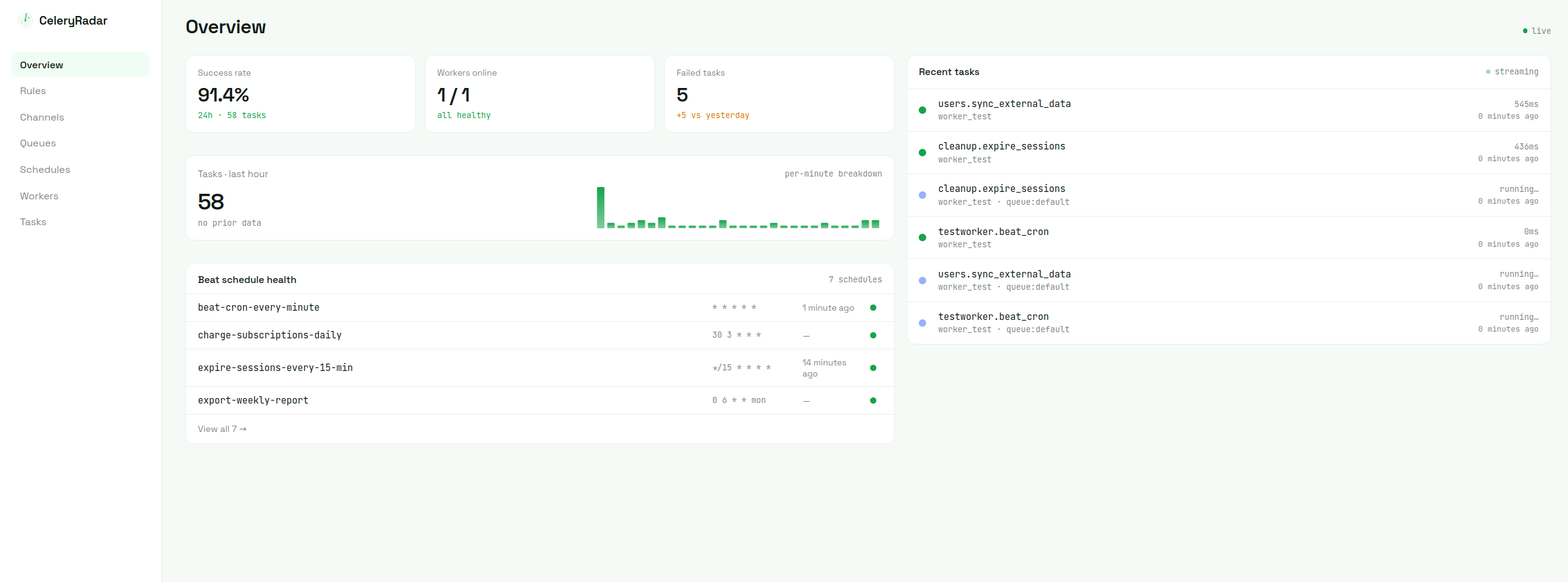
What gets monitored
- Task events — start, success, failure, retry, runtime, exception type
- Worker heartbeats — online/offline detection per worker hostname
- Beat schedules — fires, misses, and drift from the expected interval
- Queue depth — Redis broker depth per queue (single-instance only; RabbitMQ, SQS, and Redis Cluster planned)
Install
Requires Python 3.9+ and Celery 5.0+.
pip install celeryradar-sdk
Use
Sign up at celeryradar.com to get your API key, then:
import celeryradar_sdk

celeryradar_sdk.connect(api_key="cr_...", app_name="myapp")
That's it. The SDK is async and non-blocking — if the ingest endpoint is slow or unreachable, your workers don't notice; events drop with a warning rather than back up your task queue.
app_name is required. If you run multiple Celery apps under one API key —
even on separate Redis brokers — give each a distinct app_name. It scopes
the queue-depth poller's broker-side leader lock and disambiguates colliding
queue names in the dashboard (two apps that both have a queue called celery
stay separate by app).
Configuration
Common options:
celeryradar_sdk.connect(
    api_key="cr_...",
    app_name="myapp",
    capture_args=False,         # don't send task args/kwargs (default True)
    worker_name="api-worker-1", # override hostname; useful in k8s/Docker
    broker_url="redis://...",   # override app.conf.broker_url for the depth poller
)
CELERYRADAR_WORKER_NAME is also read from the environment and takes precedence
over worker_name=. See the configuration docs
for the full reference.
How it differs from Flower
Flower is a real-time inspector and admin tool — great for browsing the current task queue and revoking tasks. CeleryRadar is the persistence layer above it: history, alerts, dashboards, and trend analysis. They don't conflict.
Documentation
- Quick start — get connected in five minutes
- Configuration — every kwarg and env var
- How the SDK works — async ingest, retry queue, fork safety
- What gets monitored — signals and detection
- Troubleshooting — common issues and fixes
License
MIT
Release history Release notifications | RSS feed


Download files
Download the file for your platform. If you're not sure which to choose, learn more about installing packages.
Source Distribution
Built Distribution
Filter files by name, interpreter, ABI, and platform.
If you're not sure about the file name format, learn more about wheel file names.
Copy a direct link to the current filters
File details
Details for the file celeryradar_sdk-0.2.1.tar.gz.
File metadata
- Download URL: celeryradar_sdk-0.2.1.tar.gz
- Upload date:
- Size: 23.6 kB
- Tags: Source
- Uploaded using Trusted Publishing? No
- Uploaded via: twine/6.2.0 CPython/3.12.3
File hashes
| Algorithm | Hash digest | |
|---|---|---|
| SHA256 |
78b1d0f9c1899e270e1694e162e40aaf6801a34e1092514dd0b18d291653ad15
|
|
| MD5 |
d35391eab4c61e0a3bbf01e100fef4c1
|
|
| BLAKE2b-256 |
6d413630caea8fe53b6a7c81b25ec2729e3a7556a5769709390b6c81b8b3b729
|
File details
Details for the file celeryradar_sdk-0.2.1-py3-none-any.whl.
File metadata
- Download URL: celeryradar_sdk-0.2.1-py3-none-any.whl
- Upload date:
- Size: 15.5 kB
- Tags: Python 3
- Uploaded using Trusted Publishing? No
- Uploaded via: twine/6.2.0 CPython/3.12.3
File hashes
| Algorithm | Hash digest | |
|---|---|---|
| SHA256 |
de4e04c47d88ad3da0649ccf49e35535d4d52722ed121d9bea9a492ba1f9c6d4
|
|
| MD5 |
5d093dd2cc8bc08e0b34597d5421c467
|
|
| BLAKE2b-256 |
89ec9e9559852c6866adda4c10f23be9d56a4ed817c1e3cbc9cd500bed3b0253
|






