
CelestialFlow Web - CelestialFlow 的独立任务监控与交互界面




GitHub | CelestialFlow | 中文文档
CelestialFlow Web 是从 CelestialFlow 主仓库中拆分出的独立 Web 仓库,提供基于 FastAPI + TypeScript 的任务图监控界面,用于展示任务结构、节点状态、错误日志、图分析信息,以及通过页面向运行中的任务图注入任务或终止符。
它本身不负责任务调度,而是作为 TaskReporter 与浏览器之间的中转层:
- 后端通过
push_*接口持续上报结构、状态、分析和错误 - 前端通过
pull_*接口按版本号增量拉取数据 - Web 页面可直接下发任务注入和终止符注入请求
- 错误记录持久化到 SQLite,支持分页、过滤和错误类型聚合
项目结构(Project Structure)
flowchart LR

    %% ===== WebUI =====
    subgraph WU[WebUI]
        JS
        HTML
    end

    style WU fill:#f0e9ff,stroke:#8a6bc9,stroke-width:1px,rx:10px,ry:10px
    style JS fill:#ffffff,stroke:#8a6bc9,rx:5px,ry:5px
    style HTML fill:#ffffff,stroke:#8a6bc9,rx:5px,ry:5px

    %% ===== WebServer =====
    WS[WebServer]
    style WS fill:#f0e9ff,stroke:#8a6bc9,stroke-width:1px,rx:10px,ry:10px

    %% ===== CelestialFlow Web =====
    subgraph CFB[CelestialFlow Web]
        WU
        WS
    end

    style CFB fill:#ffeaf0,stroke:#d66b8c,stroke-width:2px,rx:10px,ry:10px

    %% ===== Links =====
    CF[TaskGraph] --> WS
    WS --> CF
    WS --> WU
    WU --> WS

    %% 美化 TaskGraph 外框
    style CF fill:#e8f2ff,stroke:#6b93d6,stroke-width:2px,color:#0b1e3f,rx:10px,ry:10px
快速开始(Quick Start)
如果你只想启动 Web 服务本身,可以单独安装本项目。
如果你希望它与 CelestialFlow 任务图联动,则还需要在同一环境中安装 celestialflow。
安装
# 推荐用 uv
uv pip install celestialflow-web

# 或者使用 pip
pip install celestialflow-web
如果你要接入实际运行中的 CelestialFlow 图任务,还需要额外安装主框架:
uv pip install celestialflow
启动 Web 服务
# 默认监听 0.0.0.0:5000
celestialflow-web

# 指定端口
celestialflow-web --port 5005

# 指定主机和端口
celestialflow-web --host 127.0.0.1 --port 5005
也可以直接在代码中启动:
from celestialflow_web import TaskWebServer

server = TaskWebServer(host="127.0.0.1", port=5005, log_level="info")
server.start_server()
启动后访问:
页面可查看任务结构、节点状态、错误日志、错误类型分布,以及实时注入任务。
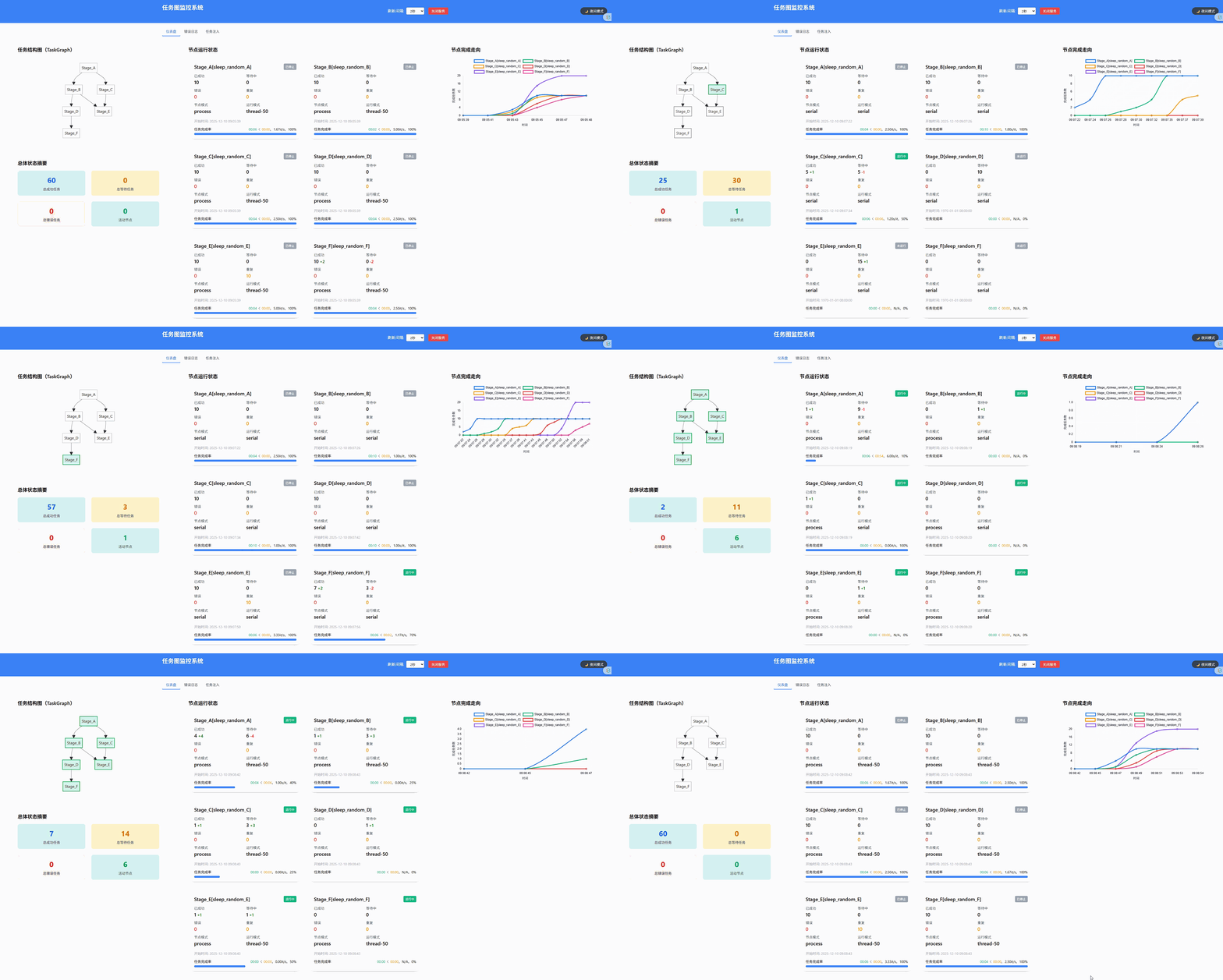
gif图压缩了过多细节(。•́︿•̀。)
在 CelestialFlow 中启用 Reporter
以当前主机和端口为例:
graph.set_reporter(True, host="127.0.0.1", port=5005)
一个更完整的接入示例:
from celestialflow import TaskGraph, TaskStage


def process(x: int) -> int:
    return x * 2


stage = TaskStage("StageA", process, execution_mode="thread")
graph = TaskGraph(name="DemoGraph")
graph.set_stages(stages=[stage])
graph.set_reporter(True, host="127.0.0.1", port=5005)
graph.start_graph({stage.get_name(): [1, 2, 3]})
深入阅读(Further Reading)
如果你想了解这个 Web 仓库的后端结构和前端模块,下面这些文档最值得先看:
推荐阅读顺序:
flowchart TD
    classDef core fill:#e6efff,stroke:#3b82f6,color:#1e3a8a;
    classDef runtime fill:#e9f8ef,stroke:#22c55e,color:#14532d;
    classDef route fill:#fff6e6,stroke:#f59e0b,color:#78350f;
    classDef templates fill:#f3e8ff,stroke:#a855f7,color:#581c87;

    A[TaskWebServer.md]
    A --> B[PullRoute.md]
    A --> C[PushRoute.md]
    A --> D[UtilModels.md]
    A --> E[UtilConfig.md]
    B --> H[index.md]
    C --> H[index.md]

    class A core;
    class D,E runtime;
    class B,C route;
    class H templates;
API 概览(API Overview)
Pull 接口
用于前端拉取数据,核心特点是 known_rev 版本号守卫:
| 端点 | 作用 |
|---|---|
GET /api/pull_server_state |
获取 Reporter 同步所需的服务端状态 |
GET /api/pull_config |
获取前端配置 |
GET /api/pull_status |
获取节点状态快照 |
GET /api/pull_structure |
获取图结构 |
GET /api/pull_errors |
获取分页错误日志 |
GET /api/pull_analysis |
获取图分析结果 |
GET /api/pull_error_type_counts |
获取错误类型聚合统计 |
GET /api/pull_injection |
取出并清空待注入任务与终止符 |
Push 接口
用于 Reporter 或前端向服务端推送数据:
| 端点 | 作用 |
|---|---|
POST /api/push_config |
保存前端配置并更新刷新间隔 |
POST /api/push_structure |
推送图结构 |
POST /api/push_analysis |
推送图分析结果 |
POST /api/push_status |
推送状态快照 |
POST /api/push_errors |
推送错误记录 |
POST /api/push_injection_tasks |
前端提交任务注入 |
POST /api/push_injection_terminations |
前端提交终止符注入 |
环境要求(Requirements)
| 依赖项 | 说明 |
|---|---|
| Python >= 3.12 | 运行环境 |
| fastapi | Web API 服务 |
| uvicorn | ASGI Server |
| jinja2 | HTML 模板渲染 |
| pydantic | 请求/响应与配置模型 |
开发与测试常用依赖:
| 依赖项 | 说明 |
|---|---|
| pytest | 单元测试 |
| pytest-asyncio | 异步测试支持 |
| httpx2 | FastAPI TestClient 相关依赖 |
| build / twine | 打包与发布 |
开发命令(Development)
# 安装开发依赖
uv sync --group dev

# 运行测试
uv run pytest -q

# 构建包
uv build

# 本地编译前端 TS
cd src/celestialflow_web
npm install
npm run build
文件结构(File Structure)
当前仓库主要分为以下几个区域:
src/celestialflow_web/
  __init__.py
  config.json
  server/
  routes/
  runtime/
  templates/
  static/
tests/
docs/zh-CN/
server/:TaskWebServer与 CLI 入口routes/:Pull / Push 接口注册runtime/:配置、模型、SQLite 和参数归一化工具templates/:Jinja2 HTML 模板static/ts/:前端 TypeScript 源码tests/:服务端 API 与状态一致性测试
版本日志(Version Log)
0.1.0- 从
CelestialFlow主仓库拆分为独立 Web 项目 - 收口为合法 Python 包
celestialflow_web - 将后端结构整理为
server/、routes/、runtime/ - 保留 FastAPI + TypeScript 的独立任务监控与交互能力
- 从
Star History
如果这个项目对你有帮助,欢迎点一个 Star。
如果你在使用过程中遇到问题,也欢迎提交 Issues 或 Discussions。

许可(License)
This project is licensed under the MIT License - see the LICENSE file for details.
作者(Author)
Author: Mr-xiaotian
Email: mingxiaomingtian@gmail.com
Project Link: https://github.com/Mr-xiaotian/celestialflow-web
1 maintainer

Release files for celestialflow-web 0.1.1
For a detailed explanation of source distributions (sdists) and built distributions (wheels), please see the package formats documentation.
Source distribution (sdist)
| File | Size | Uploaded | |
|---|---|---|---|
| celestialflow_web-0.1.1.tar.gz | 1.5 MB | Details |
Built distribution (wheel)
| File | Interpreter | ABI | Platform | Reset |
|---|---|---|---|---|
| celestialflow_web-0.1.1-py3-none-any.whl | Python 3 | none | any | Details |
Total release size: 3.1 MB
Release files / celestialflow_web-0.1.1.tar.gz
| Download URL | celestialflow_web-0.1.1.tar.gz |
|---|---|
| Size | 1.5 MB |
| Tags | Source |
|
SHA-256 checksum How to use checksums |
3fd7fcd840615ed755926639251109d3074aca4ae82e48fae3affbb4d964702c
|
|
BLAKE2b-256 checksum How to use checksums |
82e2482ca2dcd4118597acca15d08de70c12ec7f2226560095a0bd9971618d24
|
| Upload date | |
|
Uploaded using Trusted Publishing? What is trusted publishing? |
No |
| Uploaded via |
uv/0.10.6 {"installer":{"name":"uv","version":"0.10.6","subcommand":["publish"]},"python":null,"implementation":{"name":null,"version":null},"distro":null,"system":{"name":null,"release":null},"cpu":null,"openssl_version":null,"setuptools_version":null,"rustc_version":null,"ci":null}
|
Release files / celestialflow_web-0.1.1-py3-none-any.whl
| Download URL | celestialflow_web-0.1.1-py3-none-any.whl |
|---|---|
| Size | 1.6 MB |
| Tags | Python 3 |
|
SHA-256 checksum How to use checksums |
c5c93adc2a3c80c2f920dc7ac9b332a14f06377090b03aed120481d90535595b
|
|
BLAKE2b-256 checksum How to use checksums |
fce801f1730527c3f30788d00d3edfc67aaf370c2a8c412b1ea77747fd19856f
|
| Upload date | |
|
Uploaded using Trusted Publishing? What is trusted publishing? |
No |
| Uploaded via |
uv/0.10.6 {"installer":{"name":"uv","version":"0.10.6","subcommand":["publish"]},"python":null,"implementation":{"name":null,"version":null},"distro":null,"system":{"name":null,"release":null},"cpu":null,"openssl_version":null,"setuptools_version":null,"rustc_version":null,"ci":null}
|














