
Collateral Smart Contract for Bittensor
Purpose: Manage miner collaterals in the Bittensor ecosystem, allowing validators to slash misbehaving miners.
Design: One collateral contract per validator and subnet.
This smart contract is generic and works with any Bittensor subnet.
⚖️ A Note on Slashing Philosophy
The power to slash collateral carries weight — it protects subnet quality, but also risks abuse if unchecked.
This contract encourages automated enforcement wherever possible, ensuring consistency and fairness across validators.
Manual slashing is supported for edge cases where misbehavior is clear but not yet detectable by automated logic.
However, validators should approach this capability with restraint and responsibility.
Every manual slash must be:
- Justified — supported by strong evidence (logs, signatures, links).
- Transparent — the justification URL and content hash are stored on-chain.
- Proportional — reflecting the severity and intent of the violation.
Whenever possible, validators are encouraged to automate detection and slashing logic so that actions are data-driven and reproducible. Automation helps ensure miners are treated consistently across validators — and enables retroactive enforcement without requiring on-the-spot judgment.
Slashing is a last-resort accountability tool, not a convenience.
Validators who use it impulsively risk undermining miner trust — and their own reputation.
This model is designed for trust-minimized collaboration, not permissionless aggression.
Use slashing to protect the network, not to punish disagreement.
Overview
This contract creates a trust-minimized interaction between miners and validators in the Bittensor ecosystem.
-
Miners Lock Collateral
Miners demonstrate their commitment by staking collateral into the validator's contract. Miners can now specify an executor UUID during deposit to associate their collateral with specific executors.
-
Collateral-Based Prioritization
Validators may choose to favor miners with higher collateral when assigning tasks, incentivizing greater stakes for reliable performance.
-
Arbitrary Slashing
Validators can penalize a misbehaving miner by slashing any portion of the miner's collateral.
-
Automatic Release
If a validator does not respond to a miner's reclaim request within a configured deadline, the miner can reclaim their stake, preventing indefinite lock-ups.
-
Trustless & Auditable
All operations (deposits, reclaims, slashes) are publicly logged on-chain, enabling transparent oversight for both validators and miners.
-
Off-Chain Justifications
Functions
slashCollateral,reclaimCollateral, anddenyReclaiminclude URL fields (and content MD5 checksums) to reference off-chain explanations or evidence for each action, ensuring decisions are transparent and auditable. -
Configurable Minimum Bond & Decision Deadline
Defines a minimum stake requirement and a strict timeline for validator responses.
Important Notice on Addressing
This contract uses H160 (Ethereum) addresses for both miner and validator identities.
- Before interacting with the contract (depositing, slashing, reclaiming, etc.), all parties must have an Ethereum wallet (including a plain text private key) to sign the required transactions.
- An association between these H160 wallet addresses and the respective SS58 hotkeys (used in Bittensor) is strongly recommended so validators can reliably identify miners.
- Best practices for managing and verifying these address associations are still under development within the broader Bittensor ecosystem, but Subtensor is now able to associate H160 with an UID
Transaction Fees
All on-chain actions (deposits, slashes, reclaims, etc.) consume gas, so both miners and validators must hold enough TAO in their Ethereum (H160) wallets to cover transaction fees.
- Make sure to keep a sufficient balance to handle any deposits, reclaims, or slashes you need to perform.
- Convert H160 to SS58 (
celium_collateral_contracts/h160_to_ss58.pyto transfer TAO to it.- You can transfer TAO back to your SS58 wallet when no more contract interactions are required. See
scripts/celium_collateral_contracts.py.
Demo
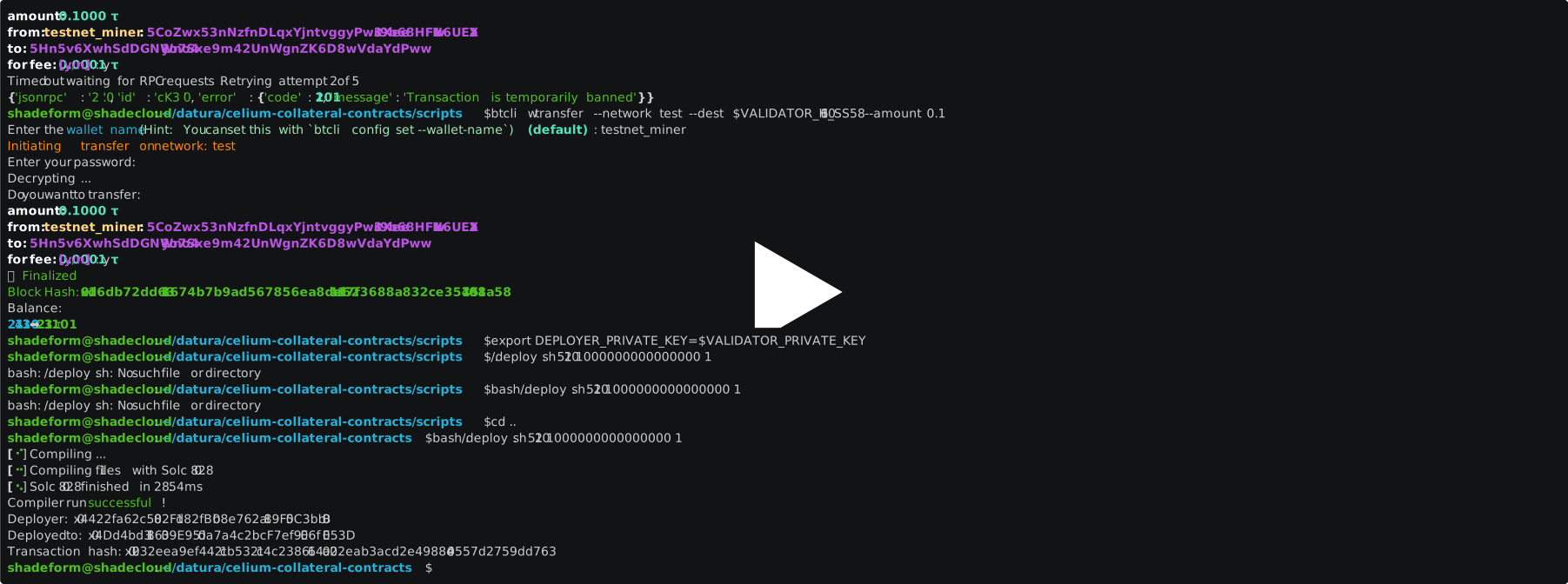
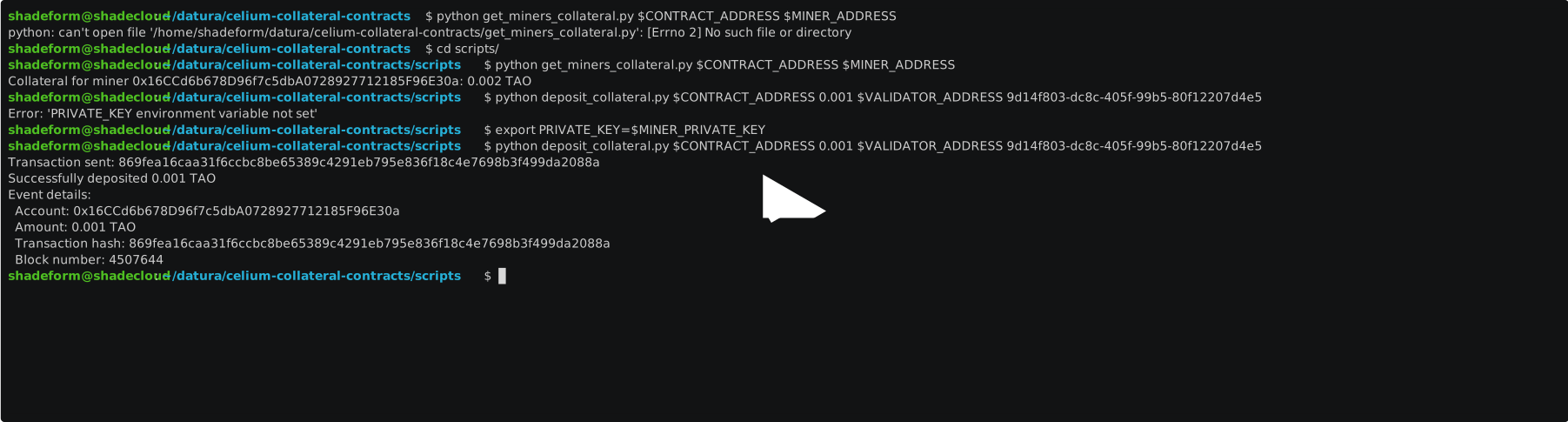
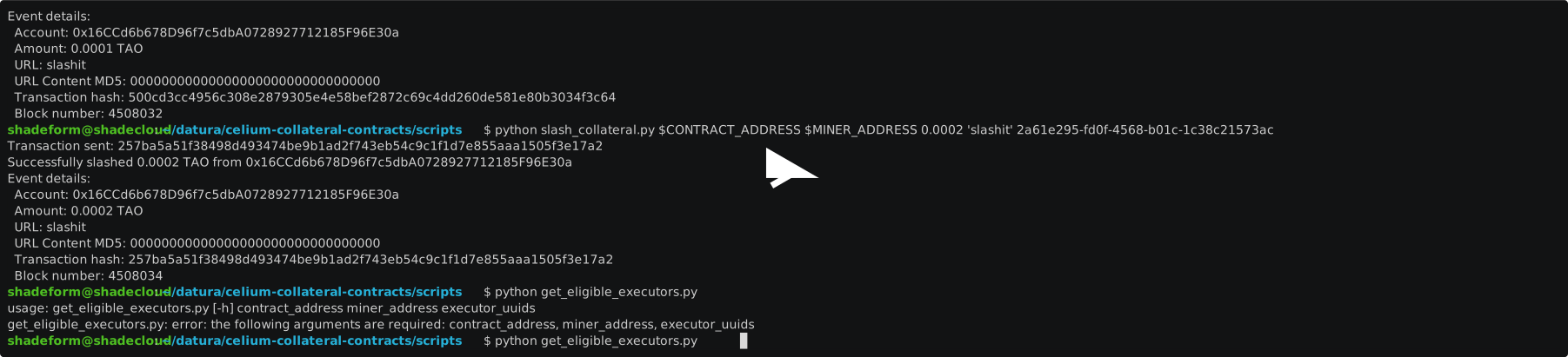
Collateral Smart Contract Lifecycle
Below is a typical sequence for integrating and using this collateral contract within a Bittensor subnet:
-
Subnet Integration
- The subnet owner updates validator software to prioritize miners with higher collateral when assigning tasks.
- Validators adopt this updated code and prepare to enforce collateral requirements.
-
Owner Deployment
- The owner creates an Ethereum (H160) wallet, links it to their hotkey, and funds it with enough TAO to cover transaction fees.
- The owner deploys the contract, requiring participating miners to stake collateral.
- The owner publishes the contract address on-chain, allowing miners to discover and verify it.
- Once ready, the owner enables collateral-required mode and prioritizes miners based on their locked amounts.
-
Miner Deposit
- Each miner creates an Ethereum (H160) wallet, links it to their hotkey, and funds it with enough TAO for transaction fees.
- Miners retrieve the owner's contract address from the chain or another trusted source.
- Upon confirmation, miners deposit collateral by calling the contract's
deposit(executorUuid)function, specifying the executor UUID to associate the collateral with specific executors. - Confirm on-chain that your collateral has been successfully locked for that miner -
celium_collateral_contracts/get_miners_collateral.py - Confirm on-chain that your collateral has been successfully locked for that your executor -
celium_collateral_contracts/get_miners_collateral.py
-
Slashing Misbehaving Miners
- If a miner is found violating subnet rules (e.g., returning invalid responses), the validator calls
slashCollateral()with theminer,slashAmount,executorUuid, and other details to penalize the miner by reducing their staked amount.
- If a miner is found violating subnet rules (e.g., returning invalid responses), the validator calls
-
Reclaiming Collateral
- When miners wish to withdraw their stake, they initiate a reclaim by calling
reclaimCollateral(), specifying the executor UUID associated with the collateral. - If the validator does not deny the request before the deadline, miners (or anyone) can finalize it using
finalizeReclaim(), thus unlocking and returning the collateral.
- When miners wish to withdraw their stake, they initiate a reclaim by calling
Usage Guides
Below are step-by-step instructions tailored to miners, validators, and subnet owners.
Refer to the repository's celium_collateral_contracts/ folder for sample implementations and helper scripts.
As a Miner, you can:
-
Deposit Collateral If you plan to stake for multiple validators, simply repeat these steps for each one:
- Obtain the validator's contract address (usually via tools provided by the subnet owner).
- Verify that code deployed at the address is indeed the collateral smart contract, the trustee and netuid kept inside are as expected - see
celium_collateral_contracts/verify_contract.py. - Run
celium_collateral_contracts/deposit_collateral.pyto initiate the deposit transaction with your specified amount of $TAO. - Confirm on-chain that your collateral has been successfully locked for that validator -
celium_collateral_contracts/get_miners_collateral.py
-
Reclaim Collateral
- Initiate the reclaim process by running
celium_collateral_contracts/reclaim_collateral.pywith your desired withdrawal amount. - Wait for the validator's response or for the configured inactivity timeout to pass.
- If the validator does not deny your request by the deadline, run
celium_collateral_contracts/finalize_reclaim.pyto unlock and retrieve your collateral. - Verify on-chain that your balance has been updated accordingly.
- Initiate the reclaim process by running
As a Owner, you can:
-
Deploy the Contract
- Install Foundry.
# Install Forge
curl -L https://foundry.paradigm.xyz | bash
source /home/ubuntu/.bashrc  # Or start a new terminal session
foundryup
forge --version
- Clone this repository.
- Install project dependencies:
pdm install - Compile and deploy the contract, use
deploy.shwith your details as arguments. - Record the deployed contract address and publish it via a subnet-owner-provided tool so that miners can discover and verify it.
UUPS Proxy Deployment (Upgradeability)
This contract uses the UUPS (Universal Upgradeable Proxy Standard) proxy pattern to enable seamless upgrades without losing contract state.
With UUPS, the proxy contract holds all storage and delegates logic to an implementation contract. When you upgrade, you deploy a new implementation and point the proxy to it—all balances and mappings are preserved.Deployment Steps
-
Install dependencies:
npm install -
Deploy or upgrade the contract:
Deploy on localnet
```bash
bash build.sh
rm -rf deployments.json
export RPC_URL="http://127.0.0.1:9944"
export PRIVATE_KEY="434469242ece0d04889fdfa54470c3685ac226fb3756f5eaf5ddb6991e1698a3"
export MIN_COLLATERAL_INCREASE=1000000000000000
export DENY_TIMEOUT=3600
export NET_UID=1
bash deploy.sh
```
Deploy on testnet
```bash
bash build.sh
rm -rf deployments.json
export RPC_URL="https://test.finney.opentensor.ai"
export PRIVATE_KEY="434469242ece0d04889fdfa54470c3685ac226fb3756f5eaf5ddb6991e1698a3"
export MIN_COLLATERAL_INCREASE=1000000000000000
export DENY_TIMEOUT=3600
export NET_UID=1
bash deploy.sh
```
Deploy on mainnet
```bash
bash build.sh
rm -rf deployments.json
export RPC_URL="https://lite.chain.opentensor.ai"
export PRIVATE_KEY="434469242ece0d04889fdfa54470c3685ac226fb3756f5eaf5ddb6991e1698a3"
export MIN_COLLATERAL_INCREASE=1000000000000000
export DENY_TIMEOUT=3600
export NET_UID=1
bash deploy.sh
```
Result
  New Collateral implementation deployed at: 0x25AA43D78bB3F6EE3bBB906554033358E5D0a3af
  Owner check before upgrade: Proxy owner = 0xE1A07A44ac6f8423bA3b734F0cAfC6F87fd385Fc, Wallet = 0xE1A07A44ac6f8423bA3b734F0cAfC6F87fd385Fc
  Attempting to upgrade proxy...
  Proxy at 0x91d1b1BF9539Cd535402FDE0FC30417CaF8CC631 upgraded to new implementation: 0x25AA43D78bB3F6EE3bBB906554033358E5D0a3af
  Contract Address: 0x91d1b1BF9539Cd535402FDE0FC30417CaF8CC631
  Proxy owner after upgrade: 0xE1A07A44ac6f8423bA3b734F0cAfC6F87fd385Fc
  Proxy NETUID value: 1
Final contract address is 0x91d1b1BF9539Cd535402FDE0FC30417CaF8CC631
This script will:
- Deploy the implementation contract if needed.
- Deploy the proxy contract (if not already deployed) or upgrade it to the latest implementation.
- Save deployment addresses to
deployments.json.
Always interact with the proxy address for all contract calls.
- Install Foundry.
-
Enable Regular Operation
- Enable the deployed contract address in your owner's code (provided by the subnet owner), so that
- task assignment prioritizes miners with higher collateral balances.
- misbehaviour checks causing slashing are automated.
- Enable the deployed contract address in your owner's code (provided by the subnet owner), so that
-
Monitor Activity
- Use Ethereum JSON-RPC API or a blockchain explorer to view events (
Deposit,ReclaimProcessStarted,Slashed,Reclaimed). - Query contract mappings (
collaterals,reclaims) to check staked amounts and pending reclaim requests. - Maintain a local script or UI to stay updated on changes in miner collateral.
- Use Ethereum JSON-RPC API or a blockchain explorer to view events (
-
Manually Deny a Reclaim
- Identify the relevant
reclaimRequestId(fromReclaimProcessStartedevent, for example). - Use
scripts/deny_reclaim.py(calling the contract'sdenyReclaim(reclaimRequestId)) before the deadline. - Verify on-chain that the reclaim request is removed and the miner's
hasPendingReclaimis reset tofalse.
- Identify the relevant
-
Manually Slash Collateral
- Confirm miner misconduct based on subnetwork rules (e.g., invalid blocks, spam, protocol violations).
- Use
scripts/slash_collateral.py(calling the contract'sslashCollateral(miner, slashAmount, executorUuid)) to penalize the miner by reducing their staked amount. - Verify the transaction on-chain and confirm the miner's
collaterals[miner]value has changed.
As a Subnet Owner, you can
-
Provide Deployment Tools for contract owner
Offer a script to help contract owner:
- Create H160 wallet & assosiate it with their SS58.
- Transfer Tao.
- Deploy the contract.
- Publish the resulting contract address (e.g., as a knowledge commitment) so miners can easily verify and deposit collateral.
-
Provide Tools for Miners
Offer a script that retrieves a list of active validator contract addresses from your on-chain registry or other trusted source. This helps miners discover the correct contract for depositing collateral.
-
Track Miner Collateral Usage
- Query each validator's contract (using, for example, a script based on
scripts/get_collaterals.py) to see how much collateral is staked by each miner. - Aggregate this data into a subnet-wide dashboard for real-time oversight of miner participation.
- Query each validator's contract (using, for example, a script based on
-
Facilitate Result-Based Slashing
Provide validators with automated checks that periodically verify a small subset (e.g., 1–2%) of the miner's submissions. If a miner's responses fall below the desired quality threshold, the code should call
slashCollateral()to penalize substandard performance. For example, in the ComputeHorde SDK, slashing is triggered via thereport_cheated_job()method. -
Facilitate Collateral Verification
Provide validator code that checks each miner's staked amount before assigning tasks. This code can:
- Prioritize miners who have staked more collateral.
- Reject miners who do not meet a minimum collateral requirement.
By coupling task assignment with the collateral balance, the subnetwork ensures more consistent performance and discourages low-quality or malicious contributions.
FAQ
Why should miners deposit into the smart contract?
Depositing collateral not only demonstrates a miner's commitment to the network and ensures accountability but also enables them to become eligible for mining rewards. The miners who didn't deposit collateral or penalized won't get any rewards.
When will a miner's deposit be slashed?
Validator will slash when miner stop rental container. so customer lost SSH access to the rental container;
When will a miner's reclaim request be declined?
Miner's reclaim request will be declined when his executor is rented by customer in the platform.
What will happen when a miner's deposit is slashed?
Miner will lose deposited amount for violated executor; miner need to deposit for that executor again if they want to keep getting rewards for executor.
How can we keep smart contract states during deployment?
To preserve contract states during deployment, ensure that the contract's storage variables and mappings are migrated correctly. Use tools like forge or custom scripts to verify and transfer state data between deployments.
1 maintainer

Metadata
1 maintainer
Release files for celium-collateral-contracts 1.0.63
For a detailed explanation of source distributions (sdists) and built distributions (wheels), please see the package formats documentation.
Source distribution (sdist)
| File | Size | Uploaded | |
|---|---|---|---|
| celium_collateral_contracts-1.0.63.tar.gz | 38.0 kB | Details |
Built distribution (wheel)
| File | Interpreter | ABI | Platform | Reset |
|---|---|---|---|---|
| celium_collateral_contracts-1.0.63-py3-none-any.whl | Python 3 | none | any | Details |
Total release size: 84.2 kB
Release files / celium_collateral_contracts-1.0.63.tar.gz
| Download URL | celium_collateral_contracts-1.0.63.tar.gz |
|---|---|
| Size | 38.0 kB |
| Tags | Source |
|
SHA-256 checksum How to use checksums |
ddcd8765cc6450f9393e2ca72121867711252436e6dd2f663ba7d828cf97d22d
|
|
BLAKE2b-256 checksum How to use checksums |
b39f28d4fcd56992a4afc2373e5603e6de2c5362cfc7e1a49e4702b409553a11
|
| Upload date | |
|
Uploaded using Trusted Publishing? What is trusted publishing? |
No |
| Uploaded via |
twine/6.1.0 CPython/3.10.12
|
Release files / celium_collateral_contracts-1.0.63-py3-none-any.whl
| Download URL | celium_collateral_contracts-1.0.63-py3-none-any.whl |
|---|---|
| Size | 46.2 kB |
| Tags | Python 3 |
|
SHA-256 checksum How to use checksums |
1f9468ed1dd1012d70d9ede29fe188736745703570dcfaf7045d5fe3a3c7687e
|
|
BLAKE2b-256 checksum How to use checksums |
741c6816ac842e586ec21e40b55732792db4736fd6c39bd4d1f169ce33881271
|
| Upload date | |
|
Uploaded using Trusted Publishing? What is trusted publishing? |
No |
| Uploaded via |
twine/6.1.0 CPython/3.10.12
|














