
Celldetective










Celldetective is an open-source Python platform designed for biologists to study interacting cell populations in multimodal time-lapse microscopy
- Check the full documentation
- Report a bug or request a new feature
- Explore the datasets, models and demos
Overview
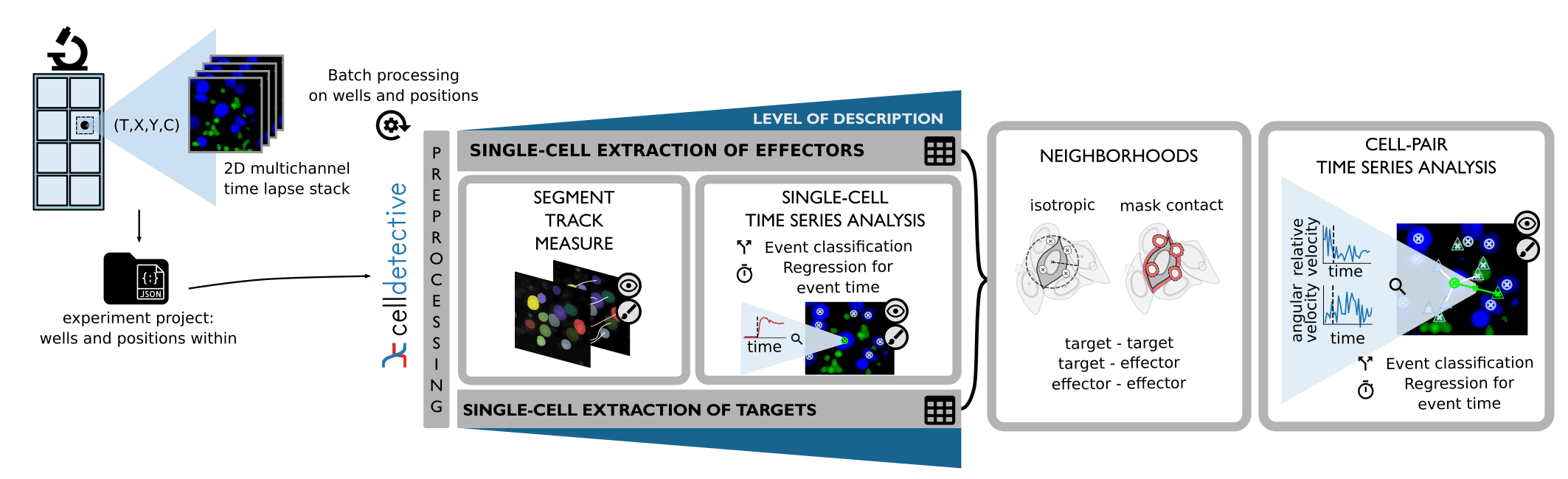
Celldetective was designed to analyze time-lapse microscopy images in difficult situations: mixed cell populations that are only separable through multimodal information. This software provides a toolkit for the analysis of cell population interactions.
Key features:
- Achieve single-cell description (segment / track / measure) for up to two populations of interest
- Signal annotation and traditional or Deep learning automation
- Mask annotation in napari1 and retraining of Deep learning models
- Neighborhood linking within and across populations and interaction annotations
- Everything is done graphically, no coding is required!
Check out the highlights in the documentation!
Instead of reinventing the wheel and out of respect for the amazing work done by these teams, we chose to build around StarDist2 & Cellpose34 (BSD-3 license) for the Deep-learning segmentation and the Bayesian tracker bTrack5 (MIT license) for tracking. If you use these models or methods in your Celldetective workflow, don't forget to cite the respective papers!
Target Audience: The software is targeted to scientists who are interested in quantifying dynamically (or not) cell populations from microscopy images. Experimental scientists who produce such images can also analyze their data, thanks to the graphical interface, that completely removes the need for coding, and the many helper functions that guide the user in the analysis steps. Finally, the modular structure of Celldetective welcomes users with a partial need.

System requirements
Hardware requirements
The software was tested on several machines, including:
- An Intel(R) Core(TM) i9-10850K CPU @ 3.60GHz, with a single NVIDIA GeForce RTX 3070 (8 Gb of memory) and 16 Gb of memory
- An Intel(R) Core(TM) i7-9750H CPU @ 2.60 GHz, with 16 Gb of memory
In GPU mode, succesive segmentation and DL signal analysis could be performed without saturating the GPU memory thanks to the subprocess formulation for the different modules. The GPU can be disabled in the startup window. The software does not require a GPU (but model inference will be longer).
A typical analysis of a single movie with a GPU takes between 3 to 15 minutes. Depending on the number of cells and frames on the images, this computation time can increase to the order of half an hour on a CPU.
Processing is performed frame by frame, therefore the memory requirement is extremely low. The main bottleneck is in the visualization of segmentation and tracking output. Whole stacks (typically 1-9 Gb) have to be loaded in memory at once to be viewed in napari.
Software requirements
The software was developed simulateously on Ubuntu 20.04 and Windows 11. It was tested on MacOS, but Tensorflow installation can require extra steps.
- Linux: Ubuntu 20.04.6 LTS (Focal Fossa)
- Windows: Windows 11 Home 23H2
To use the software, you must install python, e.g. through Anaconda. Celldetective is routinely tested on both Ubuntu and Windows for Python versions 3.9, 3.10 and 3.11.
Installation
Stable release
Celldetective requires a version of Python between 3.9 and 3.11 (included). If your Python version is older or more recent, consider using conda to create an environment as described below.
With the proper Python version, Celldetective can be directly installed with pip.
Important: By default, pip install celldetective will not install deep-learning libraries (tensorflow, cellpose, stardist) to allow users to manage their own GPU environment (e.g. torch, cuda).
If you want the standard full installation (recommended for most users), use:
pip install celldetective[all]
We recommend that you create an environment to use Celldetective, to protect your package versions and fix the Python version e.g.
with conda:
conda create -n celldetective python=3.11 pyqt
conda activate celldetective
pip install celldetective[all]
Need an update? Simply type the following in the terminal (in your environment):
pip install --upgrade celldetective
For more installation options, please check the documentation.
Quick start
You can launch the GUI by 1) opening a terminal and 2) typing the following:
# conda activate celldetective
python -m celldetective
For more information about how to get started, please check the documentation.
How to cite?
If you use this software in your research, please cite the Celldetective paper (currently a reviewed preprint at eLife):
@article{torroCelldetectiveAIenhancedImage2025,
  title = {Celldetective: An {{AI-enhanced}} Image Analysis Tool for Unraveling Dynamic Cell Interactions},
  shorttitle = {Celldetective},
  author = {Torro, Rémy and Díaz-Bello, Beatriz and Arawi, Dalia El and Dervanova, Ksenija and Ammer, Lorna and Dupuy, Florian and Chames, Patrick and Sengupta, Kheya and Limozin, Laurent},
  date = {2025-03-10},
  journaltitle = {eLife},
  volume = {14},
  publisher = {eLife Sciences Publications Limited},
  doi = {10.7554/eLife.105302.1},
  url = {https://elifesciences.org/reviewed-preprints/105302},
  urldate = {2025-03-20},
  abstract = {A current challenge in bioimaging for immunology and immunotherapy research lies in analyzing multimodal and multidimensional data that capture dynamic interactions between diverse cell populations. Here, we introduce Celldetective, an open-source Python-based software designed for high-performance, end-to-end analysis of image-based in vitro immune and immunotherapy assays. Purpose-built for multicondition, 2D multichannel time-lapse microscopy of mixed cell populations, Celldetective is optimized for the needs of immunology assays. The software seamlessly integrates AI-based segmentation, Bayesian tracking, and automated single-cell event detection, all within an intuitive graphical interface that supports interactive visualization, annotation, and training capabilities. We demonstrate its utility with original data on immune effector cell interactions with an activating surface, mediated by bispecific antibodies, and further showcase its potential for analyzing extensive sets of pairwise interactions in antibody-dependent cell cytotoxicity events.},
  langid = {english},
  file = {/home/torro/Zotero/storage/VFYBBMQF/Torro et al. - 2025 - Celldetective an AI-enhanced image analysis tool .pdf;/home/torro/Zotero/storage/UGMCKKST/105302.html}
}
Make sure you to cite the papers of any segmentation model (StarDist, Cellpose) or tracker (bTrack, TrackPy) you used through Celldetective.
Bibliography
-
Ahlers, J. et al. napari: a multi-dimensional image viewer for Python. Zenodo https://doi.org/10.5281/zenodo.8115575 (2023). ↩
-
Schmidt, U., Weigert, M., Broaddus, C. & Myers, G. Cell Detection with Star-Convex Polygons. in Medical Image Computing and Computer Assisted Intervention -- MICCAI 2018 (eds. Frangi, A. F., Schnabel, J. A., Davatzikos, C., Alberola-López, C. & Fichtinger, G.) 265--273 (Springer International Publishing, Cham, 2018). doi:10.1007/978-3-030-00934-2_30. ↩
-
Stringer, C., Wang, T., Michaelos, M. & Pachitariu, M. Cellpose: a generalist algorithm for cellular segmentation. Nat Methods 18, 100--106 (2021). ↩
-
Pachitariu, M. & Stringer, C. Cellpose 2.0: how to train your own model. Nat Methods 19, 1634--1641 (2022). ↩
-
Ulicna, K., Vallardi, G., Charras, G. & Lowe, A. R. Automated Deep Lineage Tree Analysis Using a Bayesian Single Cell Tracking Approach. Frontiers in Computer Science 3, (2021). ↩
1 maintainer

Metadata
1 maintainer
Release files for celldetective 1.6.3
For a detailed explanation of source distributions (sdists) and built distributions (wheels), please see the package formats documentation.
Source distribution (sdist)
| File | Size | Uploaded | |
|---|---|---|---|
| celldetective-1.6.3.tar.gz | 45.2 MB | Details |
Built distribution (wheel)
| File | Interpreter | ABI | Platform | Reset |
|---|---|---|---|---|
| celldetective-1.6.3-py3-none-any.whl | Python 3 | none | any | Details |
Total release size: 47.0 MB
Release files / celldetective-1.6.3.tar.gz
| Download URL | celldetective-1.6.3.tar.gz |
|---|---|
| Size | 45.2 MB |
| Tags | Source |
|
SHA-256 checksum How to use checksums |
d84bb1dc8a2f0014017d7dff356a31bc85b0b5fb8a9d7b5850dc8587084656b3
|
|
BLAKE2b-256 checksum How to use checksums |
81d9641d58a72911d05dec5edebd57e692effc81684585c5d775bb01a6c56285
|
| Upload date | |
|
Uploaded using Trusted Publishing? What is trusted publishing? |
Yes |
| Uploaded via |
twine/7.0.0 CPython/3.13.14
|
Provenance
Provenance describes where a file came from. On PyPI, provenance is shared via attestations, which provide a verifiable record of the build or publishing details. View details, limitations and caveats.


PyPI Publish Attestation
PyPI verified that this artifact, at this checksum, originated from the publisher listed below.
Signed by GitHub Actions, verified by PyPI on Sep 19, 2026.
Transparency logRelease files / celldetective-1.6.3-py3-none-any.whl
| Download URL | celldetective-1.6.3-py3-none-any.whl |
|---|---|
| Size | 1.8 MB |
| Tags | Python 3 |
|
SHA-256 checksum How to use checksums |
8b0855f8672e3c283dd551338159c1082f4d65bace0a6d896957b8a6bef48cdd
|
|
BLAKE2b-256 checksum How to use checksums |
e50b9dd09c55464aaf021b45ae808695f7c9992bea219eeb4453ef3b547a57d2
|
| Upload date | |
|
Uploaded using Trusted Publishing? What is trusted publishing? |
Yes |
| Uploaded via |
twine/7.0.0 CPython/3.13.14
|
Provenance
Provenance describes where a file came from. On PyPI, provenance is shared via attestations, which provide a verifiable record of the build or publishing details. View details, limitations and caveats.
PyPI Publish Attestation
PyPI verified that this artifact, at this checksum, originated from the publisher listed below.
Signed by GitHub Actions, verified by PyPI on Sep 19, 2026.
Transparency log













