
Cellestial








The Grammar of Graphics for single-cell omics.
Cellestial is an interactive and a highly customizable Single-Cell & Spatial omics data visualization library. Built on top Lets-Plot, it offers a ggplot-like layered and modular approach offering high customizability and publication-ready figures.
Cellestial is highly integrated with scverse's AnnData with room for integration with any upcoming single-cell omics data type in the Python single-cell omics ecosystem.
Cellestial leverages the performance of Polars ensuring speed and scalability.
Installation
pip install cellestial
uv add cellestial
poetry add cellestial
Quickstart
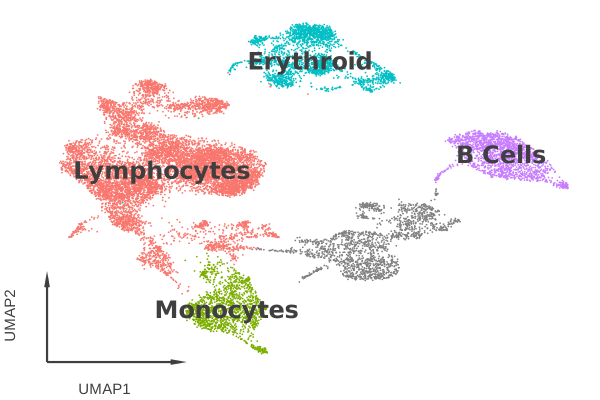
Cellestial accepts a standard AnnData directly. The same function plots a categorical column or a gene, and everything composes through + like ggplot.
from lets_plot import *
import cellestial as cl

data = cl.datasets.pbmc3k(cache_directory="data")

cl.umap(
    data,
    key="cell_type_lvl1",
    axis_type="arrow",
    legend_ondata=True,
) + scale_color_hue()
Examples
Spatial omics
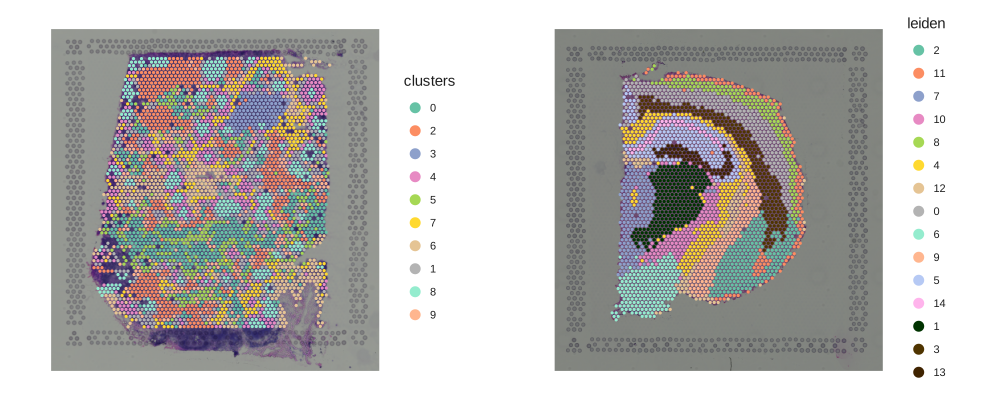
Overlay categorical labels or gene expression on tissue coordinates.
Show code
import squidpy as sq

lymph_node = cl.datasets.human_lymph_node(cache_directory="data")
hne = sq.datasets.visium_hne_adata()

gggrid(
    [
        cl.spatial(lymph_node, key="clusters"),
        cl.spatial(hne, key="leiden"),
    ],
    ncol=2,
) + ggsize(1000, 400)
Dimensionality reduction with layers
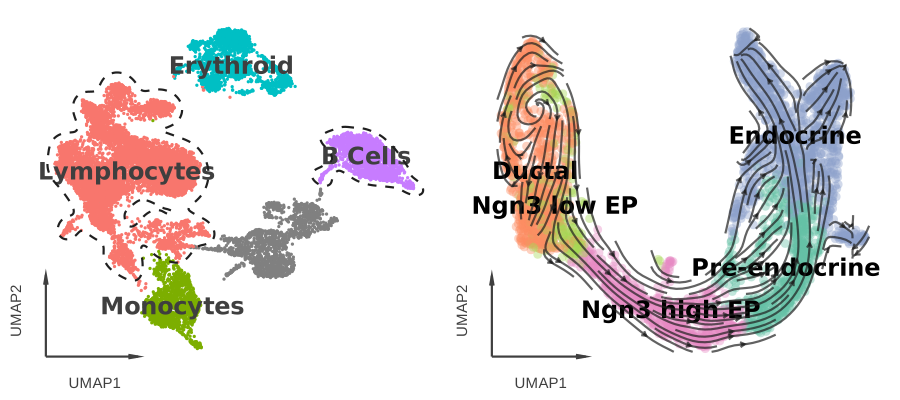
Cellestial ships single-cell-specific layers (cluster_outlines, stream, arrow_axis, ondata_legend) that compose with + like any geom.
Show code
velocity_data = cl.datasets.pancreas(cache_directory="data")

outlined = cl.umap(
    data,
    key="cell_type_lvl1",
    axis_type="arrow",
    size=1.5,
    legend_ondata=True,
) + scale_color_hue() + cl.cluster_outlines(groups=["Lymphocytes", "B Cells"])

streamed = cl.umap(
    velocity_data,
    key="clusters_coarse",
    axis_type="arrow",
    size=4,
    alpha=0.4,
    legend_ondata=True,
    ondata_color="black",
) + cl.stream()

gggrid([outlined, streamed])
Marker genes
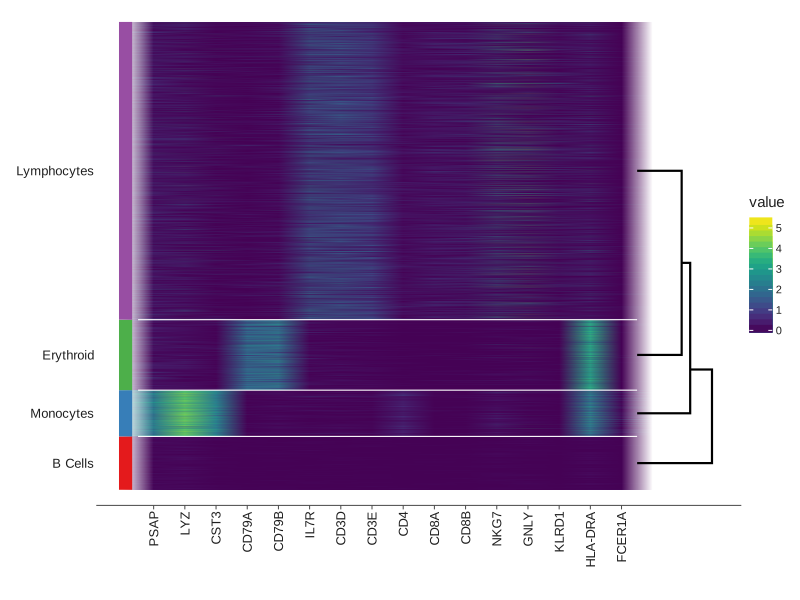
Heatmaps, dotplots, matrixplots and stacked violins share the same call shape and ship with built-in dendrograms and group bars.
Show code
markers = [
    "PSAP", "LYZ", "CST3",          # Monocytes
    "CD79A", "CD79B",                # B cells
    "IL7R", "CD3D", "CD3E", "CD4",   # T cells (CD4+)
    "CD8A", "CD8B",                  # T cells (CD8+)
    "NKG7", "GNLY", "KLRD1",         # NK cells
    "HLA-DRA", "FCER1A",             # Dendritic cells
]

cl.heatmap(
    data,
    group_by="cell_type_lvl1",
    keys=markers,
    geom="raster",
    group_lines_size=0.5,
    group_lines_color="white",
    group_bars=True,
    group_bars_labels=True,
    dendrogram=True,
    dendrogram_size=1,
) + scale_fill_viridis()
Statistical comparisons
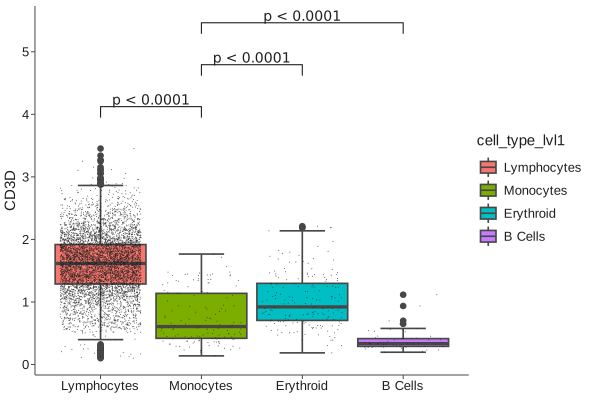
cl.bracket runs pairwise tests on a cl.boxplot or cl.violin and draws annotated significance brackets.
Show code
cl.boxplot(
    data,
    key="CD3D",
    fill="cell_type_lvl1",
    threshold=0.1,
) + scale_fill_hue() + cl.bracket(
    y_padding=0.2,
    label="pvalue",
    prefix="p",
    prefix_style="<",
    comparisons=[
        ("Lymphocytes", "Monocytes"),
        ("Monocytes", "Erythroid"),
        ("Monocytes", "B Cells"),
    ],
)
Ridge plots
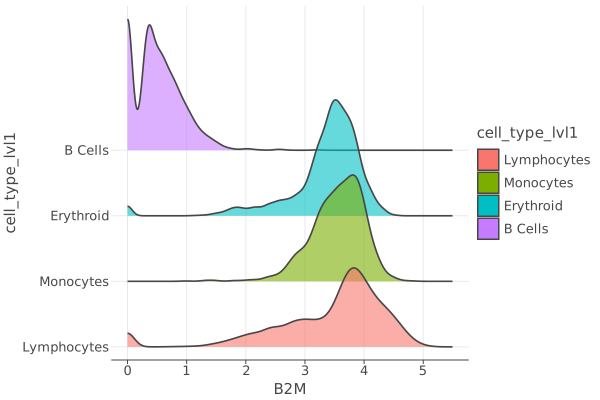
Quick exploratory views of expression distributions across groups.
Show code
cl.ridge(
    data,
    key="B2M",
    alpha=0.6,
    group_by="cell_type_lvl1",
) + scale_fill_hue()
Migrating from Scanpy
Cellestial mirrors most of scanpy.pl with a few naming shifts:
color=becomeskey=.- Multi-panel calls use a plural function (
cl.umaps,cl.violins, ...). groupbybecomesgroup_by,var_namesbecomeskeys.- Saving is a separate
cl.save(plot, "umap.png")call.
See the migration guide for a side-by-side mapping.
Documentation
- Quickstart — guided tour of the API.
- Features — tooltips, layers, grids, colors, faceting.
- API reference — every function.
- Migrating from Scanpy.
Citation
If you use Cellestial, please cite:
@misc{https://doi.org/10.5281/zenodo.21710312,
  doi = {10.5281/ZENODO.21710312},
  url = {https://zenodo.org/doi/10.5281/zenodo.21710312},
  author = {Kosar, Zafer},
  title = {Cellestial: A grammar of graphics for single-cell omics},
  publisher = {Zenodo},
  year = {2026},
  copyright = {Apache License 2.0}
}
License
Apache 2.0. See LICENSE.
1 maintainer

Metadata
1 maintainer
Release files for cellestial 0.60.0
For a detailed explanation of source distributions (sdists) and built distributions (wheels), please see the package formats documentation.
Source distribution (sdist)
| File | Size | Uploaded | |
|---|---|---|---|
| cellestial-0.60.0.tar.gz | 120.8 kB | Details |
Built distribution (wheel)
| File | Interpreter | ABI | Platform | Reset |
|---|---|---|---|---|
| cellestial-0.60.0-py3-none-any.whl | Python 3 | none | any | Details |
Total release size: 291.8 kB
Release files / cellestial-0.60.0.tar.gz
| Download URL | cellestial-0.60.0.tar.gz |
|---|---|
| Size | 120.8 kB |
| Tags | Source |
|
SHA-256 checksum How to use checksums |
b18e43d7ba9f0ff7713556400f8fa092c311587d990c94b7c4fe5294a7cec4a5
|
|
BLAKE2b-256 checksum How to use checksums |
920ef93571f8ebce8937b7f00b0b8d3416cd975260e0dc0d8f0f0223c5a8f72e
|
| Upload date | |
|
Uploaded using Trusted Publishing? What is trusted publishing? |
No |
| Uploaded via |
poetry/2.4.1 CPython/3.14.6 Darwin/25.6.0
|
Release files / cellestial-0.60.0-py3-none-any.whl
| Download URL | cellestial-0.60.0-py3-none-any.whl |
|---|---|
| Size | 171.0 kB |
| Tags | Python 3 |
|
SHA-256 checksum How to use checksums |
6362eb2da52838a54a55c176c2bbe50ee89d8e981385dfc763b11ec977749c95
|
|
BLAKE2b-256 checksum How to use checksums |
dfb63d6e23e8abc0db4e82654ce01c826db98399b44236c73be640d67e8cd11f
|
| Upload date | |
|
Uploaded using Trusted Publishing? What is trusted publishing? |
No |
| Uploaded via |
poetry/2.4.1 CPython/3.14.6 Darwin/25.6.0
|














