
Cellium Agent








Traditional Agents repeat mistakes, get stuck in loops, and never learn from experience. That's why we chose to make Agents evolve infinitely.
Based on microkernel architecture (EventBus + DI + BaseTool), supporting any OpenAI-compatible API.
Core design: Self-learning Agent driven by Control Loop, with adaptive decision optimization through Bayesian Bandit.
Thanks to the Strategy Gene research team. This project adopts their compact experience representation method, enabling the Agent to automatically learn avoidance strategies from failures.
What Can It Do
Cellium Agent is a versatile AI assistant that helps you with various tasks:
| Feature | Example |
|---|---|
| File Operations | Read, write, search files, manage directory structures |
| Code Development | Write code, debug, refactor, explain code logic |
| Web Search | Search the internet for real-time information, summarize web content |
| Data Analysis | Process data files, generate reports and visualizations |
| Automation | Create scheduled tasks, e.g., "check weather every morning at 8 AM" |
| Component Extension | Create new components via natural language to extend Agent capabilities |
| Multi-Platform | Support WebUI, QQ, Telegram, Feishu (Lark), WeChat and other platforms |
Usage Examples:
- "Read all files in the workspace directory and count the number of functions in each file"
- "Search for the latest AI technology developments, create a word component, and summarize into a report for me"
- "Create a scheduled task to check server status every hour, and notify me automatically when the status is abnormal"
- "Help me write a Python script to process CSV files and automatically generate data visualization charts"
- "Create a new component to monitor stock prices and notify me automatically when the price fluctuates by more than 5%"
Features
| Feature | Description |
|---|---|
| Runtime Self-Awareness | Real-time perception of running state (progress, stagnation, loops, saturation), dynamically adjusting decisions |
| Control Loop Architecture | Closed-loop control of decision - execution - feedback - learning in each iteration |
| Self-Learning System | Action selection based on Bayesian Bandit, continuously optimizing decision strategies |
| Three-Layer Memory | Personality memory + Session memory + Long-term memory (FTS5 full-text retrieval + vector retrieval hybrid recall) |
| Heuristic Decision Engine | Rule-based feature extraction + Bandit for tie-breaking, balancing interpretability and learning ability |
| Tool Usage Control | Dynamic prohibition/recommendation of tool switching, avoiding loops from repeated tool calls |
| Sensitive Info Control | Auto-detect and redact sensitive info like private keys, tokens, passwords; supports write blocking |
| Component Hot-Plug | Files in app/components/ automatically load and take effect within 3 seconds |
| Component Sandbox Security | Three-layer protection: Process isolation + transparent path mapping + dangerous method interception |
| Event-Driven Architecture | Publish-subscribe pattern based on EventBus, loose coupling between components |
| Flash Mode | Skip memory injection to accelerate simple tasks |
| Multi-Channel Access | Support external platforms like QQ, Telegram, Feishu (Lark), WeChat, unified message routing, file transfer and injection through ChannelManager |
| Scheduled Tasks | Support interval tasks, daily tasks, weekly tasks. Create tasks via natural language, Agent executes and pushes results to the corresponding platform when triggered |
| Background Component Events | Components can run in background and actively trigger Agent execution, supporting real-time scenarios (e.g., crypto price monitoring, real-time data push, Agent auto-analysis) |
Quick Start
One-Line Install (with Environment)
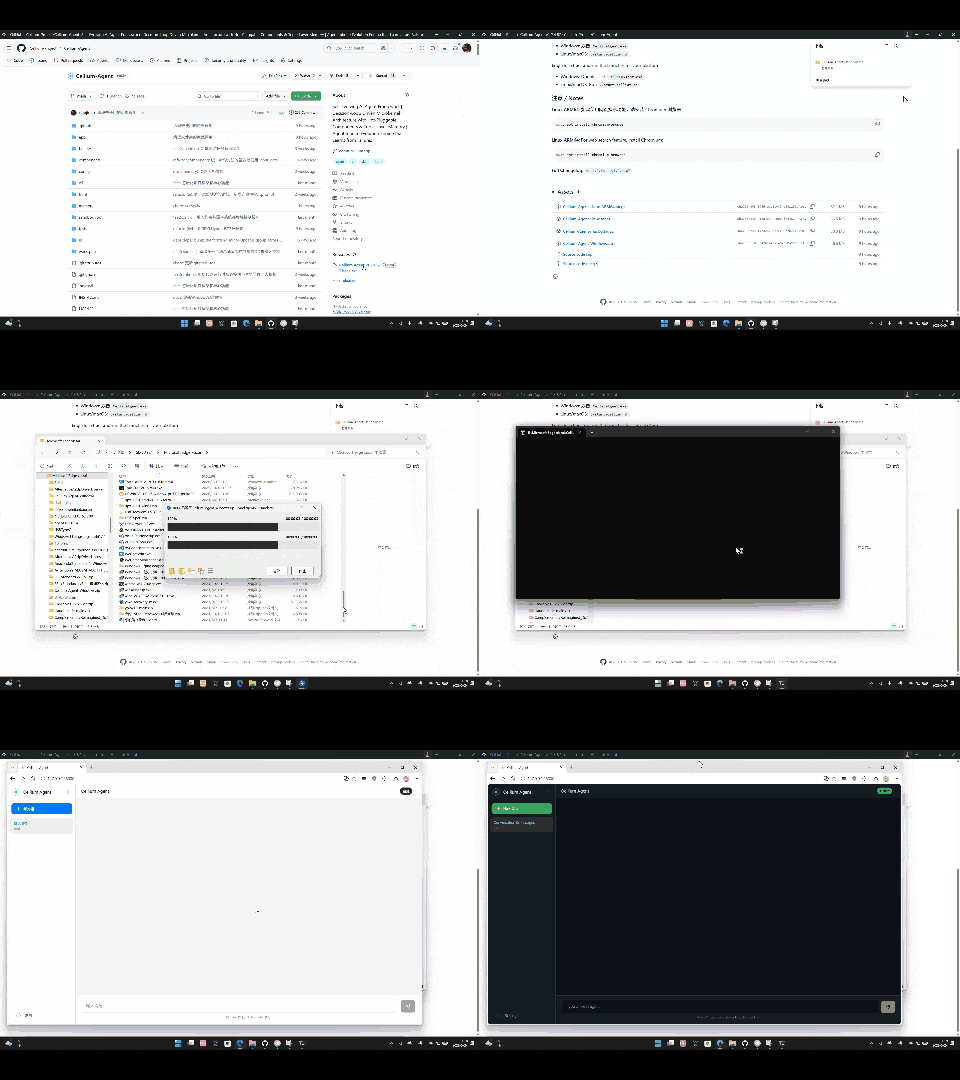
No complex configuration required, just download, extract and run
Windows
powershell -Command "Invoke-WebRequest -Uri 'https://github.com/Cellium-Project/Cellium-Agent/releases/latest/download/Cellium-Agent-Windows.zip' -OutFile 'Cellium-Agent-Windows.zip'; Expand-Archive -Path 'Cellium-Agent-Windows.zip' -DestinationPath '.' -Force; cd Cellium-Agent-Windows; .\CelliumAgent.exe"
Linux x64:
curl -LO https://github.com/Cellium-Project/Cellium-Agent/releases/latest/download/Cellium-Agent-Linux.tar.gz && tar -xzf Cellium-Agent-Linux.tar.gz && cd Cellium-Agent-Linux && ./start-cellium.sh
Linux ARM64:
curl -LO https://github.com/Cellium-Project/Cellium-Agent/releases/latest/download/Cellium-Agent-Linux-ARM64.tar.gz && tar -xzf Cellium-Agent-Linux-ARM64.tar.gz && cd Cellium-Agent-Linux-ARM64 && ./start-cellium.sh
macOS:
curl -LO https://github.com/Cellium-Project/Cellium-Agent/releases/latest/download/Cellium-Agent-macOS.tar.gz && tar -xzf Cellium-Agent-macOS.tar.gz && cd Cellium-Agent-macOS && ./start-cellium.sh
See INSTALL.md for more installation options
Install via pip (PyPI)
pip install cellium-agent
Launch the TUI interface after installation:
cellium
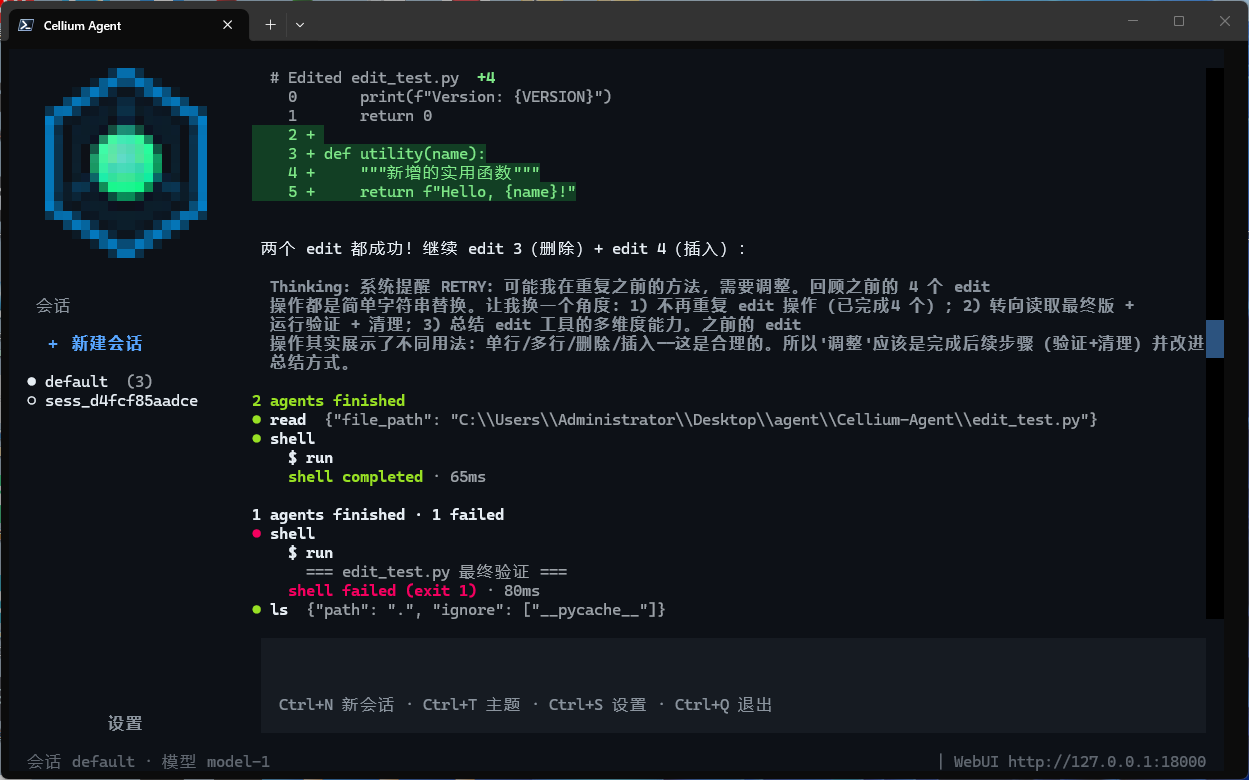
Launch the web service:
cellium-web
Optional: Feishu/Lark support requires lark-oapi:
pip install cellium-agent[lark]
Run from Source
pip install -r requirements.txt
python main.py
Main dependencies:
- FastAPI + Uvicorn (Web framework)
- PyYAML (Configuration parsing)
- DrissionPage (Web search and browser automation)
- websockets (QQ Bot WebSocket client)
- httpx (HTTP client for OpenAI-compatible API calls and external platform file upload)
Configure Models
Edit the config/agent/llm.yaml file to configure API keys, service addresses, and model names.
Start Service
python main.py
After startup, visit http://localhost:18000 to open the chat interface, and http://localhost:18000/docs to view API documentation. (Default port 18000, will automatically switch if occupied, check startup logs for actual port)
Core Architecture: Control Loop + Self-Learning
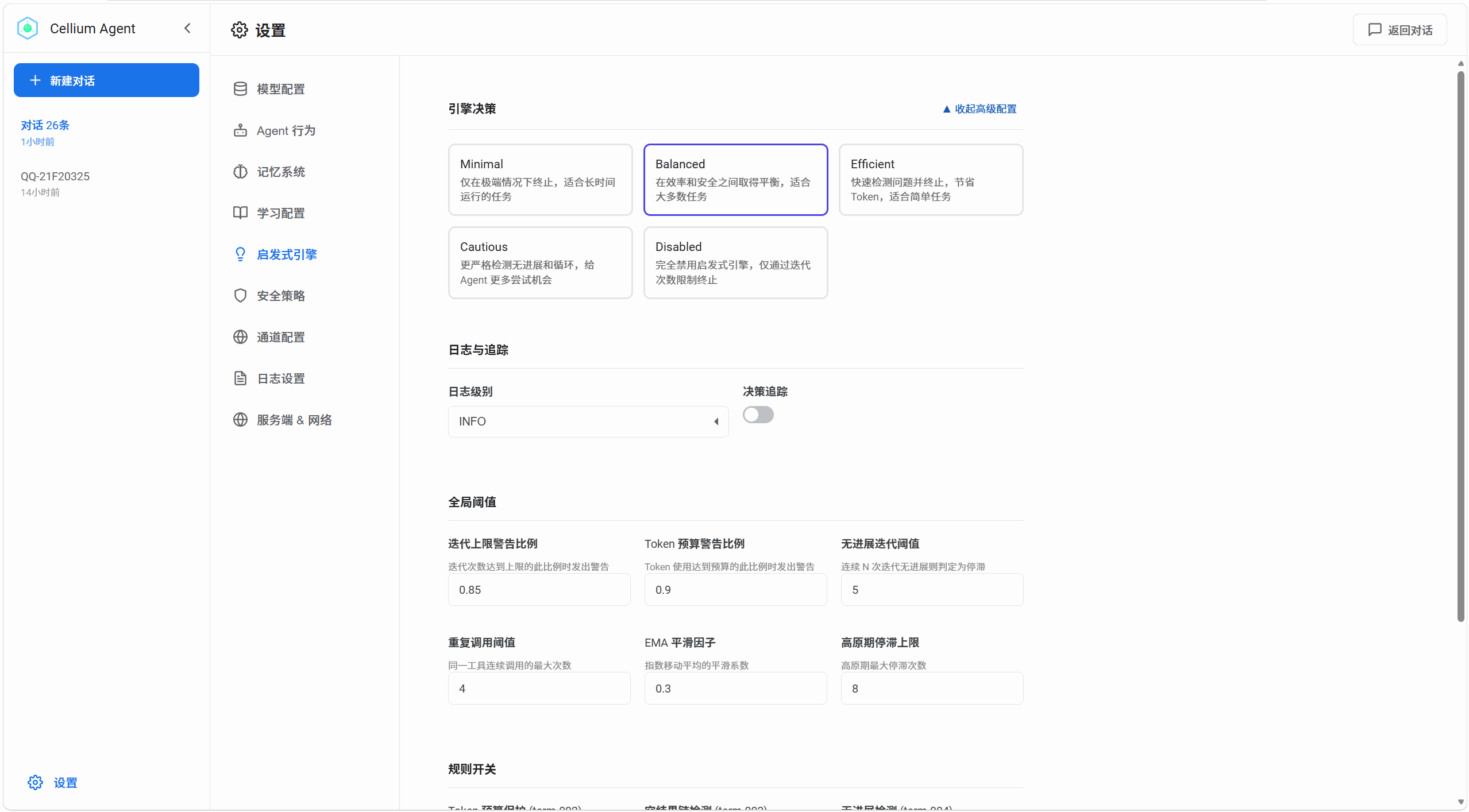
The core of Cellium Agent is a Control Loop driven decision-making system, combined with Bayesian Bandit for self-learning optimization.
┌─────────────────────────────────────────────────────────────────────────┐
│                           Learning Layer                                │
│  ┌─────────────┐    ┌─────────────┐    ┌─────────────────────────────┐  │
│  │   Policy    │    │  Bayesian   │    │      PolicyBanditMemory     │  │
│  │  Templates  │───▶│   Bandit    │◄───│  (Thompson Sampling Stats)  │  │
│  │             │    │             │    │                             │  │
│  └─────────────┘    └──────┬──────┘    └─────────────────────────────┘  │
│                            │                                            │
└────────────────────────────┼────────────────────────────────────────────┘
                             │ Select Policy
                             ▼
┌─────────────────────────────────────────────────────────────────────────┐
│                          Control Loop Layer                             │
│                                                                         │
│   ┌──────────┐     ┌──────────────┐     ┌──────────────┐               │
│   │   Step   │────▶│   Feature    │────▶│    Rule      │               │
│   │ (Start)  │     │  Extraction  │     │  Evaluation  │               │
│   └──────────┘     │              │     │              │               │
│        │           └──────────────┘     └──────┬───────┘               │
│        │                                        │                       │
│        │           ┌────────────────────────────┘                       │
│        │           ▼                                                    │
│        │     ┌──────────────┐     ┌──────────────┐                     │
│        │     │   Action     │◄────│   Action     │                     │
│        │     │  Candidates  │     │   Bandit     │                     │
│        │     │              │     │ (Tie-break)  │                     │
│        │     └──────┬───────┘     └──────────────┘                     │
│        │            │                                                  │
│        │            ▼                                                  │
│        │     ┌──────────────┐                                         │
│        │     │   Control    │                                         │
│        │     │   Decision   │                                         │
│        │     │   (Output)   │                                         │
│        │     └──────┬───────┘                                         │
│        │            │                                                  │
│        │     ┌──────┴───────┐     ┌──────────────┐                    │
│        └────▶│   Execute    │────▶│  End Round   │                    │
│              │              │     │              │                    │
│              └──────────────┘     └──────┬───────┘                    │
│                                          │                             │
│                                          ▼                             │
│                              ┌──────────────────────┐                  │
│                              │  Feedback Evaluator  │                  │
│                              │  (Feedback Eval)     │                  │
│                              │   - Segmented Eval   │                  │
│                              │   - n-step return    │                  │
│                              └──────────┬───────────┘                  │
│                                         │                              │
│                              ┌──────────┴───────────┐                  │
│                              ▼                      ▼                  │
│                    ┌─────────────────┐   ┌─────────────────┐          │
│                    │   Bandit Update │   │   Stats Persist │          │
│                    │   (Update Stats)│   │   (Persistence) │          │
│                    └─────────────────┘   └─────────────────┘          │
│                                                                         │
└─────────────────────────────────────────────────────────────────────────┘
Control Loop Workflow
-
Feature Extraction
- Heuristic engine extracts current state features
- Includes: stagnation iterations, progress trends, repetition scores, context saturation, etc.
-
Rule Evaluation
- Hard rules provide action candidate sets
- Example: detect loops and candidate [redirect, compress]
-
Bandit Tie-break (Action Selection)
- When candidate actions > 1, Bandit intervenes
- Uses Thompson Sampling + Heuristic Bias to select optimal action
-
Execute & Feedback
- Execute selected action (continue/retry/redirect/compress/terminate)
- FeedbackEvaluator performs segmented evaluation of this round's performance
-
Learning & Update
- Use n-step return to accumulate rewards
- Update Bandit's Beta distribution parameters
- Regularly decay old data to prevent overfitting
PEOP Loop (Plan-Execute-Observe-RePlan Loop)
The PEOP Loop is an extension module of the Control Loop, implementing an adaptive plan-execute cycle. This module dynamically adjusts strategy based on task complexity: simple tasks receive direct responses, complex tasks automatically enable multi-step planning; during execution, results are continuously validated, and local replanning is triggered when deviations are detected, achieving efficient and reliable task decomposition through explicit state management:
┌─────────────────────────────────────────────────────────────┐
│              Plan-Execute Engine State Machine               │
│                                                              │
│  ┌─────────┐    ┌─────────┐    ┌─────────┐                  │
│  │ OBSERVE │───▶│  PLAN   │───▶│ EXECUTE │◄──────────────┐  │
│  │ Observe │    │  Plan   │    │ Execute │  Validation    │  │
│  └─────────┘    └─────────┘    └────┬────┘  Success → Next │  │
│       ▲                             │                      │  │
│       │                   Validation│                      │  │
│       │                      Failed │                      │  │
│       │                             ▼                      │  │
│       │                        ┌─────────┐  Replan Success │  │
│       │                        │ REPLAN  │─────────────────┘  │
│       │                        │ Replan  │                   │  │
│       │                        └────┬────┘                   │  │
│       │                             │                      │  │
│       └─────────────────────────────┘  Max Replan Reached   │  │
│                                        or Task Complete     │  │
│                                        ▼                    │  │
│                                      ┌─────┐                │  │
│                                      │DONE │                │  │
│                                      │Done │                │  │
│                                      └─────┘                │  │
└─────────────────────────────────────────────────────────────┘
Core Mechanisms:
| Mechanism | Description |
|---|---|
| Batch Planning | Generate multi-step execution plan at once (1-5 steps), reducing LLM call frequency |
| State-Driven | 5-phase explicit state machine (OBSERVE/PLAN/EXECUTE/REPLAN/DONE) |
| In-Execution Validation | Automatic result validation after each step (semantic matching + Jaccard similarity + purpose-driven) |
| Local Replanning | Preserve successful steps on validation failure, only replan failed and subsequent steps |
Workflow:
- OBSERVE: Analyze user input, understand task goals and context
- PLAN: LLM generates structured plan, each step contains: tool name, parameters, execution purpose, expected result
- EXECUTE: Execute plan steps sequentially, automatic validation after each step
- Validation Success → Continue to next step
- Validation Failed → Enter REPLAN phase
- REPLAN: Preserve successful steps, only regenerate plan for failed and subsequent steps
- DONE: All steps executed successfully, or max replanning reached
Design Characteristics:
- Efficient: Multi-step plan generated once, zero LLM calls during execution phase
- Reliable: Expectation validation uses semantic matching, avoiding misjudgment (e.g., "function X" and "get_X" considered matching)
- Stable: Local replanning avoids total overhaul, maintaining context continuity
- Observable: 5-phase state machine provides clear execution trace for debugging and monitoring
- Collaborative: State information synchronized to Control Loop in real-time, replanning triggers redirect decision
Configuration:
max_plan_steps=5: Maximum 5 steps per planmax_replans=3: Maximum 3 replanning attempts
Action Types & Strategies
Code definition: ACTION_TYPES = ["continue", "retry", "redirect", "compress", "terminate"]
| Action | Description | Heuristic Bias Condition |
|---|---|---|
| continue | Continue current direction | Progress score > 0.5 or stagnation iterations = 0 |
| retry | Maintain direction but correct strategy | Mild stagnation (1 <= stuck < threshold) or progress trend 0~0.3 |
| redirect | Change direction/tool | Repetition score > 0.5 or stagnation >= stuck_threshold |
| compress | Compress context | Context saturation > 0.6 or stagnation >= stuck_threshold // 2 |
| terminate | Terminate session | Hard rule triggered: output loop and exact_repetition_count >= 5 |
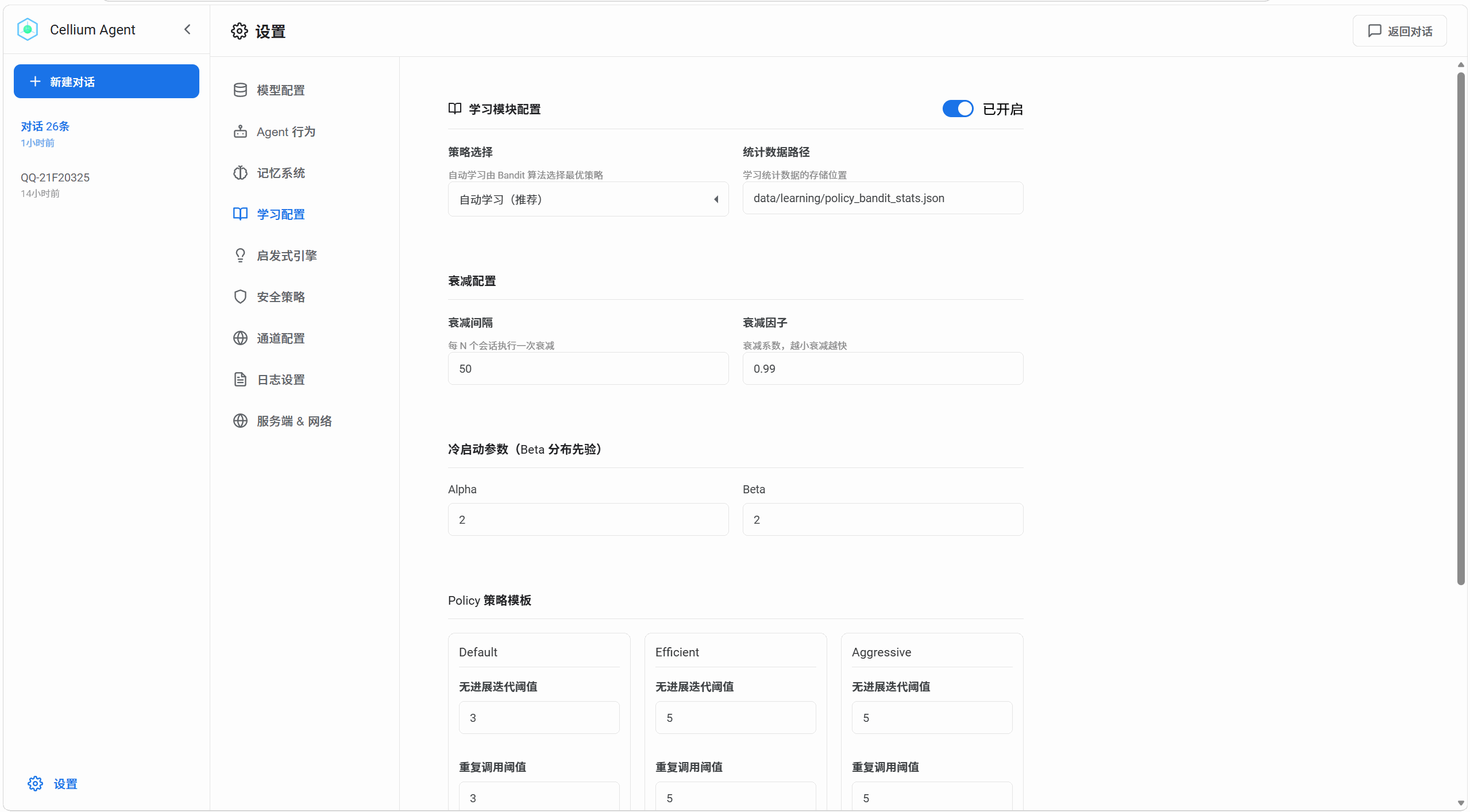
Self-Learning Mechanism
┌─────────────────────────────────────────┐
│           Policy Templates              │
│  ┌─────────┬───────────┬─────────────┐  │
│  │ default │ efficient │ aggressive  │  │
│  │(stuck=3)│ (stuck=2) │  (stuck=5)  │  │
│  └────┬────┴─────┬─────┴──────┬──────┘  │
│       │          │            │         │
│       ▼          ▼            ▼         │
│  ┌─────────────────────────────────┐    │
│  │      Bayesian Bandit            │    │
│  │  Thompson Sampling selects      │    │
│  │  optimal Policy                 │    │
│  │  - Sample from Beta dist        │    │
│  │  - Select highest expected      │    │
│  │    return Policy                │    │
│  └─────────────┬───────────────────┘    │
│                │                        │
│                ▼                        │
│  ┌─────────────────────────────────┐    │
│  │        Action Bandit            │    │
│  │  Tie-break within candidates    │    │
│  │  - Heuristic provides bias      │    │
│  │  - Dynamic threshold adjustment │    │
│  └─────────────────────────────────┘    │
└─────────────────────────────────────────┘
Learning Process:
- Policy Selection: At session start, Bayesian Bandit selects current optimal policy from multiple Policies (default/efficient/aggressive)
- Threshold Injection: Selected Policy parameters (e.g., stuck_iterations=3) inject into HeuristicEngine and ActionBandit
- Action Learning: After each round, update Action's Beta distribution based on FeedbackEvaluator's score
- n-step return: Accumulate rewards from recent n rounds, supporting delayed feedback and sequence optimization
- Data Decay: Decay old data every 50 sessions (decay factor 0.99) to prevent overfitting
Feedback Evaluation
Uses segmented design, first distinguishing success/failure, then optimizing details:
-
Success Branch: Base score 1.0, deduct efficiency and cost
- Iteration penalty: fewer iterations = higher score
- Token penalty: deduct points if exceeding threshold
- Smoothness reward: bonus for no stagnation
-
Failure Branch: Base score 0.0, deduct points based on stagnation degree
- More stagnation iterations = more points deducted
- Error type affects deduction magnitude
Microkernel Architecture
┌─────────────────────────────────────────────────────────────┐
│                        EventBus                              │
│              (Publish-Subscribe, Loose Coupling)            │
├─────────────────────────────────────────────────────────────┤
│  ┌──────────┐  ┌──────────┐  ┌──────────┐  ┌───────────┐  │
│  │  LLM     │  │  Memory  │  │  Tools   │  │ Heuristics│  │
│  │  Engine  │  │  System  │  │          │  │  Engine   │  │
│  └──────────┘  └──────────┘  └──────────┘  └───────────┘  │
├─────────────────────────────────────────────────────────────┤
│                     AgentLoop (Main Loop)                  │
│  ┌────────────┐  ┌────────────┐  ┌────────────────────┐    │
│  │   Control  │  │   Tool     │  │   Prompt           │    │
│  │   Loop     │  │  Executor  │  │   Context Builder  │    │
│  └────────────┘  └────────────┘  └────────────────────┘    │
└─────────────────────────────────────────────────────────────┘
Core Components
| Component | Description |
|---|---|
| AgentLoop | Event-driven core main loop, coordinating LLM, tools, memory |
| LLM Engine | Unified LLM interface, built-in 40+ model registry, auto-detecting context window, tool support, max output |
| ThreeLayerMemory | Three-layer memory: Personality + Session + FTS5 + optional vector retrieval |
| HeuristicEngine | Heuristic rule engine, serves as feature extractor for Bandit |
| ControlLoop | Control loop core, decision - execution - feedback - learning each round |
| ActionBandit | Action selector, Thompson Sampling + Heuristic Bias |
| LearningIntegration | Learning module integration, Policy selection and parameter injection |
| EventBus | Event bus, loose coupling communication between components |
| BaseTool | Tool base class, declarative command registration pattern |
Component Sandbox Security
Agent-written component code runs in an isolated sandbox environment with three-layer security protection:
| Layer | Mechanism | Function |
|---|---|---|
| Process Isolation | Components run in separate subprocess | Crash won't affect main process, communicate via Queue |
| Transparent Path Mapping | File operation paths mapped to sandbox_root | Prevent path traversal, protect real system files |
| Dangerous Method Interception | Runtime interception of os.system/subprocess | Block system command execution |
Component code can use open(), os.listdir() normally, but paths are transparently mapped to the sandbox_root/ folder in the project directory. Meanwhile, dangerous methods like os.system(), subprocess.run() are intercepted at runtime.
Agent Runtime Self-State Awareness
Agent perceives running state in real-time through FeatureExtractor, dynamically adjusting decision strategies:
| State Dimension | Feature | Description |
|---|---|---|
| Progress | progress_score | Task completion progress estimate (0-1) |
| stuck_iterations | Consecutive non-progress iterations | |
| is_making_progress | Whether progress is being made | |
| Trend | progress_trend | EMA-smoothed progress trend (-1 to 1) |
| convergence_rate | Convergence speed | |
| is_plateau | Whether in plateau phase | |
| Tool | unique_tools_used | Number of different tools used |
| tool_diversity_score | Tool diversity score | |
| repetition_score | Tool repetition call score | |
| pattern_detected | Detected loop pattern | |
| Context | context_saturation | Context saturation (0-1) |
| context_saturation_level | Saturation level: idle/normal/warn/redirect/stop | |
| Quality | error_rate | Tool call error rate |
| empty_result_rate | Empty result rate | |
| result_quality_score | Comprehensive result quality score | |
| Output | exact_repetition_count | LLM output exact repetition count |
| is_output_loop | Whether in output loop |
Adaptive Adjustment Mechanisms:
- Stagnation Detection: Trigger redirect/retry when stuck_iterations > threshold
- Context Pressure Awareness: Trigger compress when saturation > 0.7, stop when > 0.95
- Tool Loop Detection: Trigger redirect to change tool when repetition_score > 0.5
- Output Loop Detection: Force terminate when exact_repetition_count >= 5
- Dynamic HardConstraint: Real-time generation of control commands (e.g., REDIRECT/COMPRESS/RETRY) based on state
Three-Layer Memory
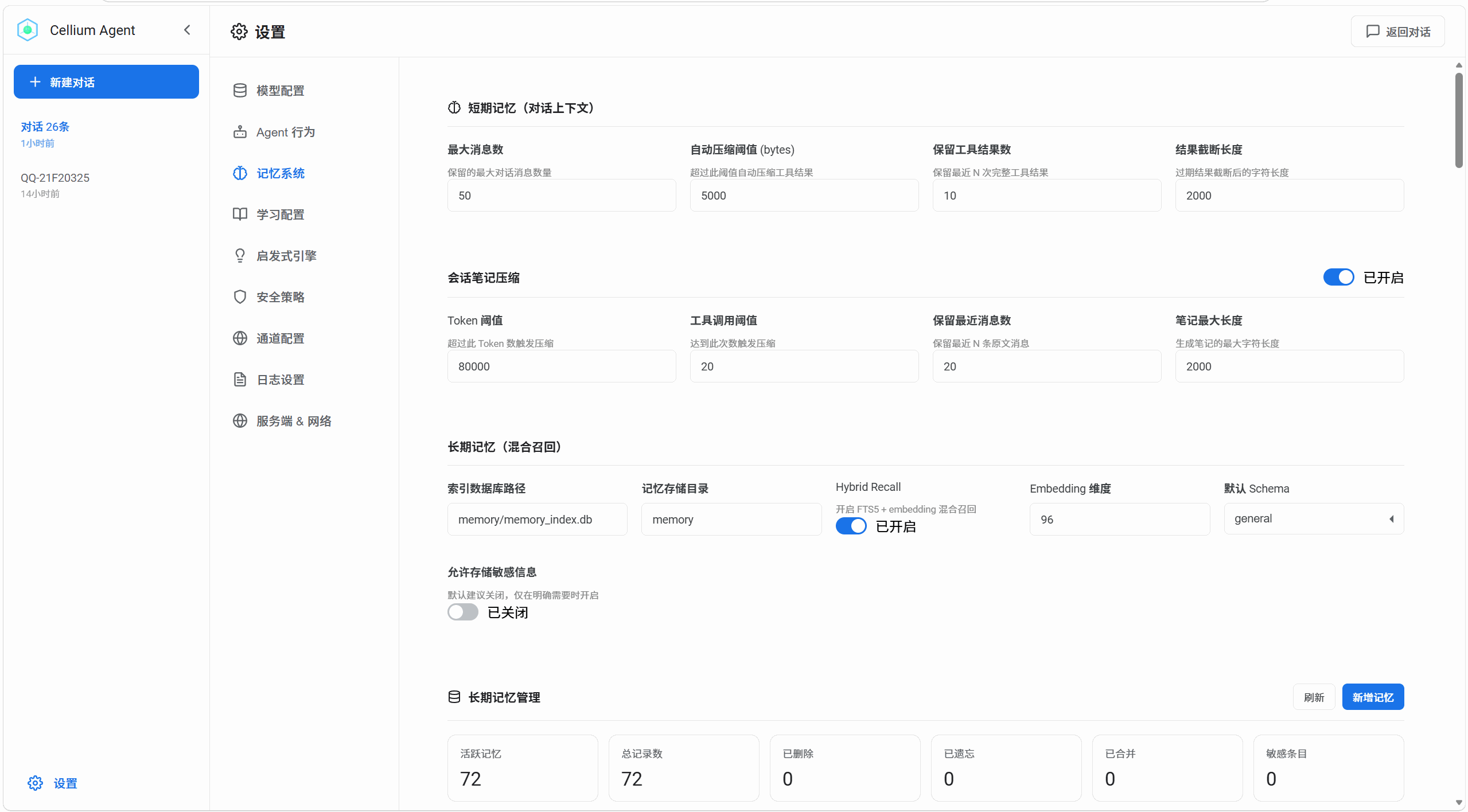
| Layer | Implementation | Description |
|---|---|---|
| Personality | personality.md | Static personality setting file |
| Session | MemoryManager | Short-term context, automatically maintains bounded history |
| Long-term | FTS5 + Repository | Vector retrieval + hybrid recall, supports knowledge extraction and archiving |
Vector Retrieval:
Long-term memory supports optional API-based vector embedding for semantic search:
- Dimensions: Configurable (default 1536 for text-embedding-3-small)
- Provider: Any OpenAI-compatible embedding API
- Similarity: Cosine similarity
- Hybrid Recall: FTS5 full-text retrieval + vector similarity fusion sorting
- Configuration:
config/agent/embedding.yaml— enable/disable, set API key, model, base URL - On-Demand: Disabled by default, no external dependencies required when off
Structured Schema & Category System:
Long-term memory uses a hierarchical classification design. Schema types determine data structure, while Categories determine content types:
Schema Types (4 types):
| Schema Type | Purpose | Included Categories |
|---|---|---|
general |
General memory, session notes | general, user_info, command, project |
profile |
User profile | preference |
project |
Project-related | project |
issue |
Troubleshooting | troubleshooting, code |
Category Classification (7 types):
| Category | Description | Source |
|---|---|---|
general |
Daily conversations, Q&A | General memory |
user_info |
User preferences, session goals | Session notes (goal/goal_history) |
command |
Executed operation commands | Session notes (completed) |
project |
Project config, key findings | General memory / Session notes (finding) |
preference |
User profile information | General memory |
troubleshooting |
Error records, solutions | General memory / Session notes (error) |
code |
Code-related records | General memory / Session notes |
Session Compression Auto-Extraction:
During session compression, the following note types are automatically extracted and mapped to corresponding Categories for long-term memory storage:
goal/goal_history→user_infocompleted→command/codefinding→project/code/commanderror→troubleshootingpending→general
Sensitive Information Control:
The memory system has built-in sensitive information detection and protection mechanisms:
- Auto-Detection: Identifies sensitive content like private keys, AWS keys, GitHub tokens, API keys
- Redaction: Automatically replaces sensitive values with
[REDACTED] - Write Blocking: High-risk sensitive information (e.g., private keys) is blocked from memory by default
- Classification Marking: Sensitive memories are tagged and can be filtered out during retrieval
Heuristic Decision Rules
| Rule | Description |
|---|---|
| MaxIterationRule | Iteration count limit termination |
| TokenBudgetRule | Token budget exhaustion termination |
| EmptyResultChainRule | Empty result chain detection |
| NoProgressRule | No progress detection (EMA smoothing) |
| SameToolRepetitionRule | Same tool + parameter repeated call detection |
| PatternLoopRule | Pattern loop detection |
| ParameterSimilarityRule | Parameter similarity detection |
Component System
| Feature | Description |
|---|---|
| Auto Discovery | Scan components/ directory, auto-discover component classes inheriting BaseCell |
| Hot-Plug | ComponentWatcher background monitoring, 3-second interval scanning, dynamic load/unload |
| Tool Wrapping | ComponentToolRegistry wraps BaseCell as BaseTool, injects into AgentLoop |
| Trust Whitelist | Components require user /trust confirmation, persisted to trusted_components.json |
| Config Auto-Maintenance | Auto-append discovered new components to settings.yaml enabled_components |
Reserved Tool Names (cannot be overridden by components):
shell— ShellToolmemory— MemoryTool
QQBot File Transfer Component (qq_files)
Supports file transfer between QQBot and local:
| Command | Function | Example |
|---|---|---|
download |
Download file from QQ | {"url": "...", "filename": "doc.pdf"} |
send_file |
Send file to QQ | {"target_id": "...", "file_path": "...", "is_group": false} |
send_image |
Send image to QQ | {"target_id": "...", "image_path": "..."} |
list_downloads |
List downloaded files | {} |
File Save Path: workspace/downloads/qq/
Native Browser Operation Component (web_fetch)
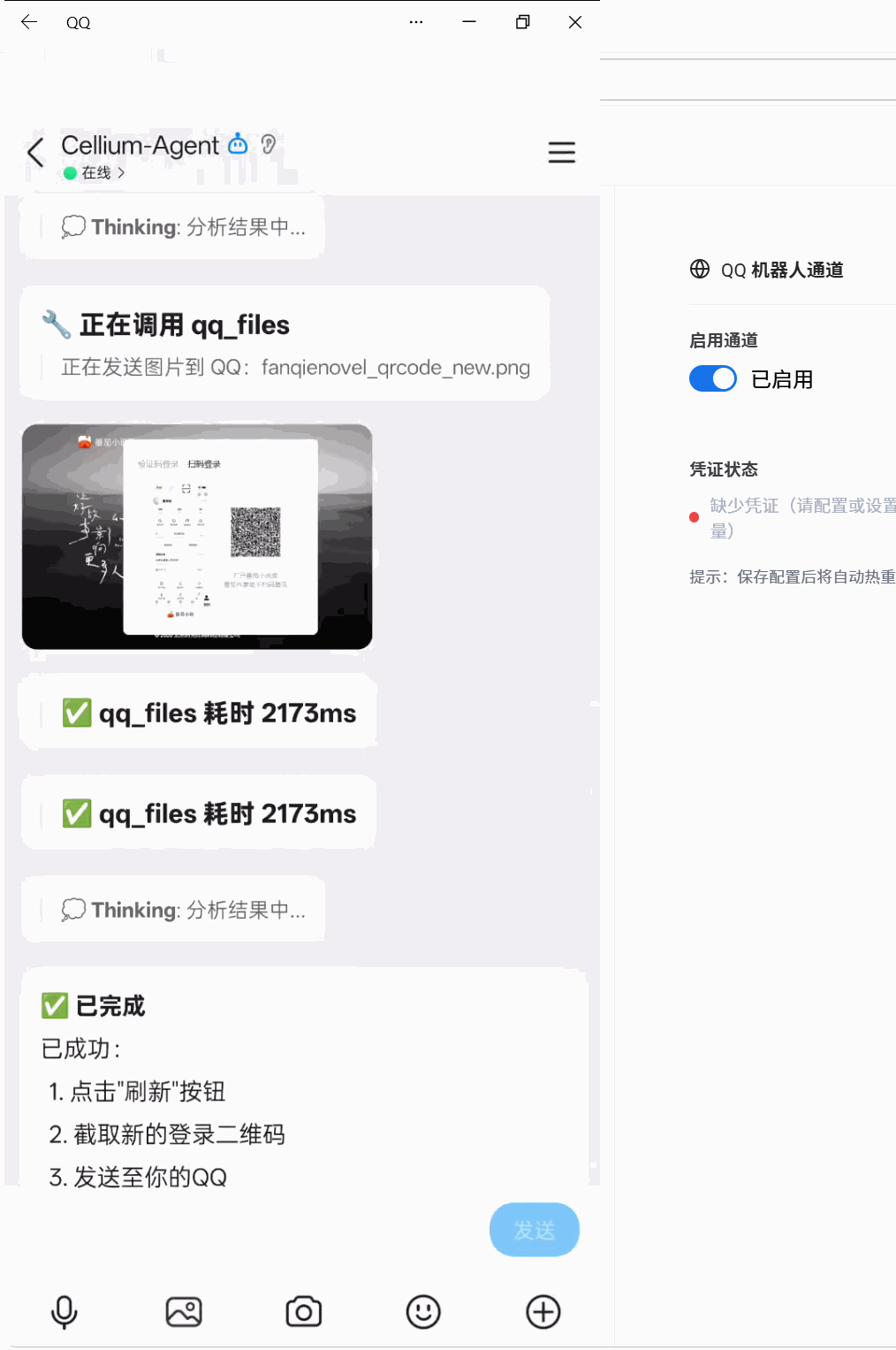
| Command | Function | Example |
|---|---|---|
navigate |
Visit specified URL | {"url": "https://example.com"} |
get_screenshot |
Screenshot (supports element-level) | {"full_page": false, "selector": "#content"} |
find_qrcode |
Find page QR code | {} |
js_action |
Page action (click/input/scroll_to) | {"selector": "button", "action": "click"} |
find_button |
Find button element | {"value": "Login"} |
get_page_info |
Get page info | {} |
scroll |
Scroll page | {"direction": "down", "amount": 500} |
save_cookies / load_cookies |
Cookie persistence | {"path": "cookies.json"} |
Use Cases:
- Web content crawling and analysis
- Automated login flow (supports QR code recognition)
- Web screenshots and visual verification
- Form auto-fill and submission
Screenshot Save Path: workspace/web_fetch_screenshots/domain_timestamp.png
Core Mechanisms:
_cell_registry: cell_name → ICell instanceget_all_tools(): AgentLoop dynamically reads component tools at runtimeget_tool_definitions(): Returns LLM-format tool definitions
Tool Operation Visibility:
- All tool calls generate user-friendly operation descriptions
- Supports
_intentparameter for custom description (highest priority) - Example:
{"command": "read", "path": "test.py", "_intent": "Reading configuration file"}
Skill Management System (skill_installer + skill_manager)
Complete Skill package management solution, supporting installation from archives, list display, search, detail view, and uninstallation.
Installation Methods:
- Supports
.zip,.tar.gz,.tgz,.tararchive formats - Archive must contain
SKILL.mdfile - Auto-parses YAML Frontmatter metadata from
SKILL.md
Management Functions:
| Component | Function | Command/Interface |
|---|---|---|
skill_installer |
Install Skill | install_from_archive(path) |
skill_installer |
Refresh Index | refresh_index() |
skill_manager |
List all Skills | list(show_details=True) |
skill_manager |
Search Skills | search(query) |
skill_manager |
Get Details | get_info(name) |
skill_manager |
Uninstall Skill | uninstall(name) |
Frontend Interface:
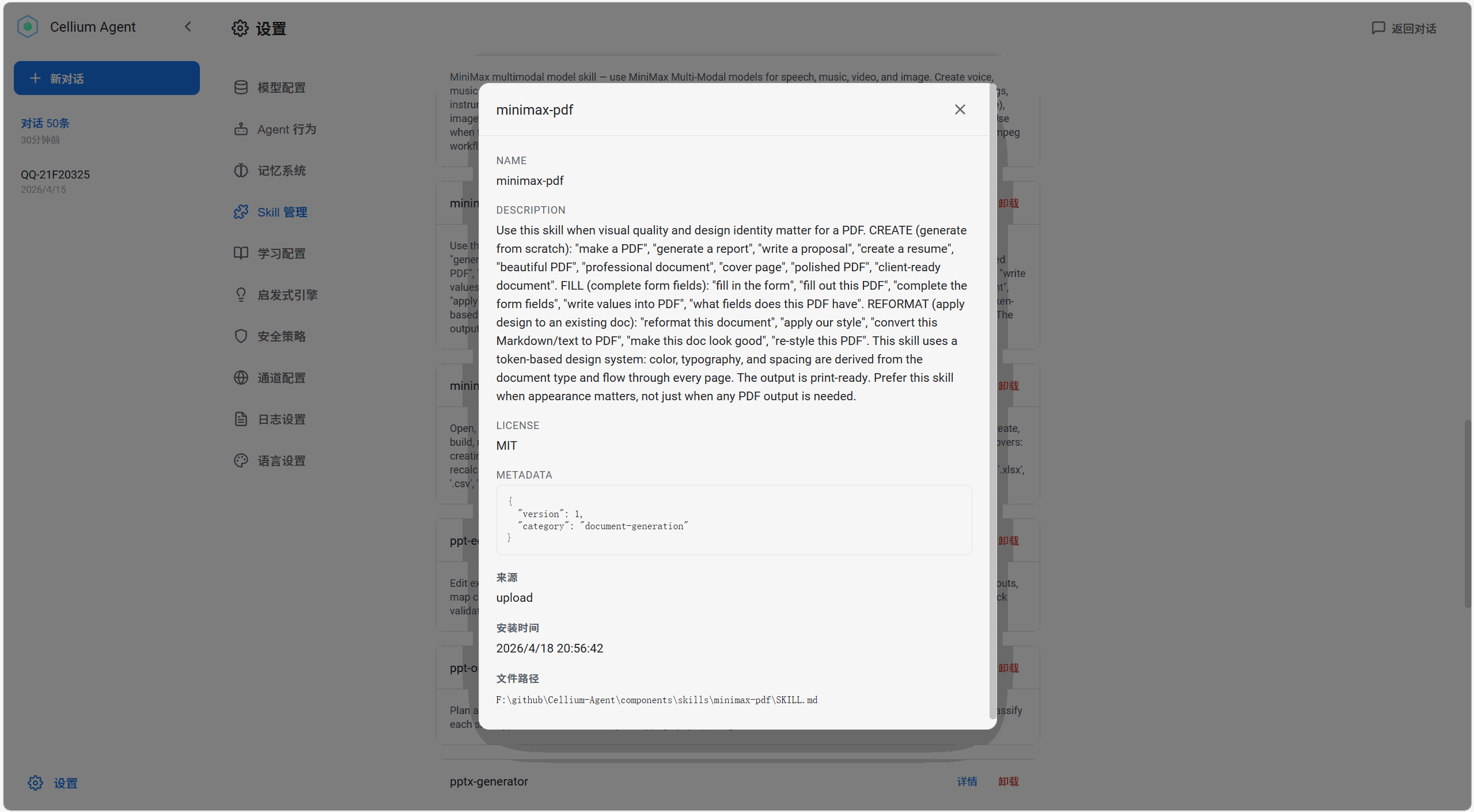
- Settings page provides Skill management panel
- Supports archive upload installation
- Supports filtering by name, description, category
- Detail modal displays complete metadata
Directory Convention:
components/
├── skill_installer.py        # Skill installer
├── skill_manager.py          # Skill manager
└── skills/                   # Skill installation directory
    ├── skill-a/              # Installed Skill
    │   └── SKILL.md
    ├── skill-b/
    │   └── SKILL.md
    └── _index.json           # Index file (auto-generated)
Scheduled Tasks (scheduler)
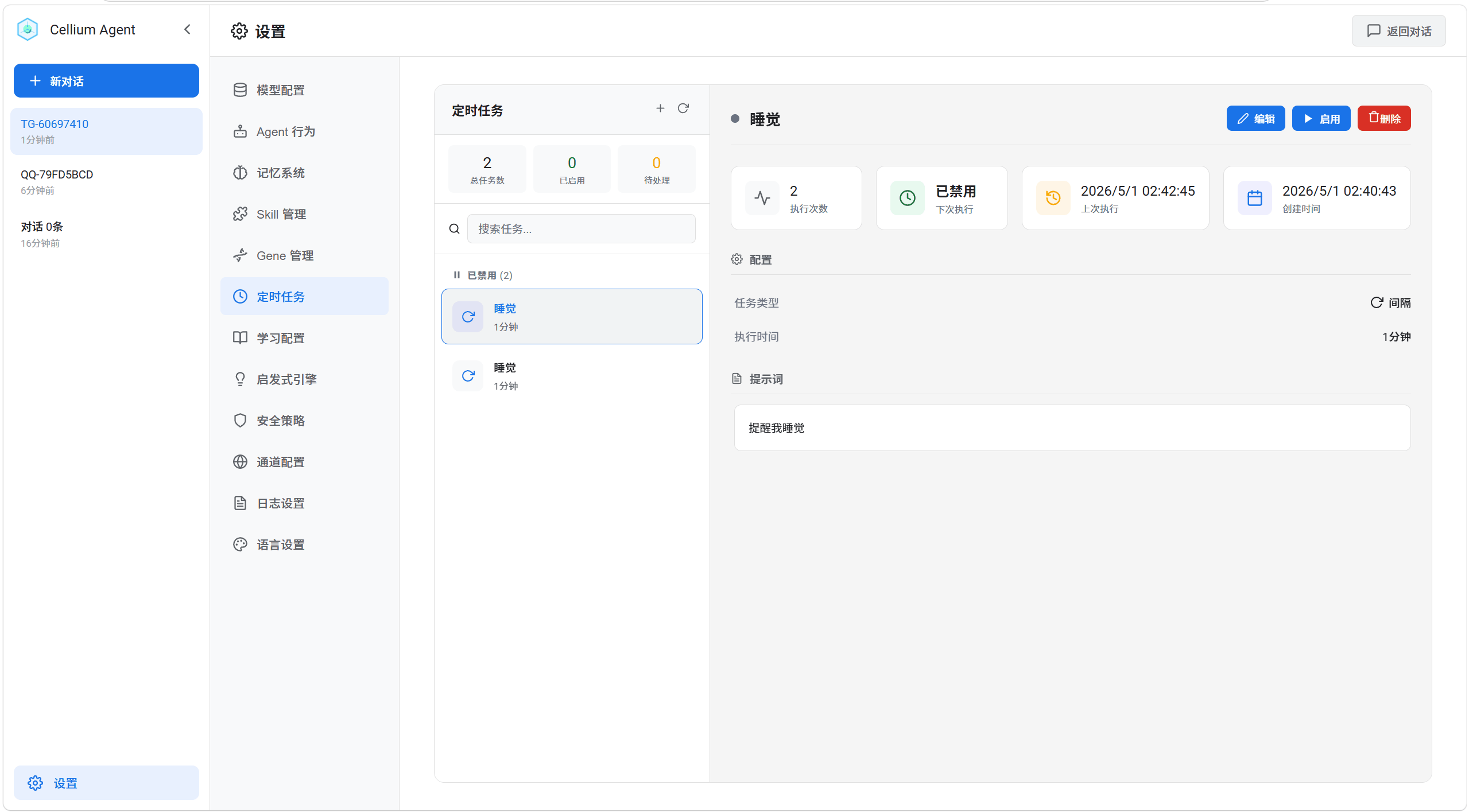
Three task types are supported:
| Type | Description | Example |
|---|---|---|
| Interval Task | Execute at fixed intervals | Remind to drink water every 30 minutes |
| Daily Task | Execute at a fixed time every day | Send daily report at 9 AM |
| Weekly Task | Execute at a fixed time every week | Send weekly report at 10 AM every Monday |
Usage: Create scheduled tasks via natural language. When triggered, Agent automatically executes the task content. Supports complex task scenarios:
- "Check server status and report results every hour"
- "Query today's weather at 8 AM every day"
- "Summarize this week's work progress every Friday at 5 PM"
Task execution results are automatically pushed to the platform where the task was created (WebUI/QQ/Telegram/Feishu/WeChat).
Background Component Event Trigger
Components can run in the background and actively trigger Agent execution, enabling real-time data push and auto-analysis.
Real-time Scenario Examples:
- Crypto price monitoring: Push data when price breaks threshold, Agent auto-analyzes trends
- Server status monitoring: Push alerts when CPU/memory is abnormal, Agent generates diagnostic reports
- Real-time news subscription: Push when keyword news detected, Agent auto-summarizes key points
- Database change listening: Push when critical data changes, Agent executes corresponding logic
Event trigger results are automatically pushed to the corresponding session (WebUI/QQ/Telegram/Feishu/WeChat).
Strategy Gene (GEP) Integration
This project adopts the Strategy Gene design proposed in the paper "From Procedural Skills to Strategy Genes: Towards Experience-Driven Test-Time Evolution" (arXiv:2604.15097).
Implementation
The paper proposes encoding experience into compact Gene objects (~230 tokens) instead of documentation-heavy Skill packages (~2,500 tokens). This project implements this in the Control Loop's Hard Constraint layer:
- Task Matching: Match Gene templates via LLM intent classification on user input
- Dynamic Injection: Inject matched Gene as runtime state into LLM (task-level dynamic injection, does not pollute conversation history)
- Experience Evolution: Automatically extract Avoid_Cues from failure feedback and update Gene
Implemented Features
| Paper Concept | This Project Implementation |
|---|---|
| Gene Structure | [HARD CONSTRAINTS] + [CONTROL ACTION] + [AVOID] |
| Task Matching | TaskSignalMatcher LLM intent matching |
| Avoid_Cues | Auto-extract from failure feedback, write to [AVOID] section |
| Version Management | version field + evolution_history tracking changes |
| Effect Evaluation | success_rate, avg_reward, consecutive_success/failure |
| Cross Combination | GeneComposer merges multiple Genes for multi-task scenarios |
Star History
License
Apache 2.0
1 maintainer

Download files
Download the file for your platform. If you're not sure which to choose, learn more about installing packages.
Source Distributions
Built Distribution
Filter files by name, interpreter, ABI, and platform.
If you're not sure about the file name format, learn more about wheel file names.
Copy a direct link to the current filters
File details
Details for the file cellium_agent-1.4.2.post4-py3-none-any.whl.
File metadata
- Download URL: cellium_agent-1.4.2.post4-py3-none-any.whl
- Upload date:
- Size: 8.5 MB
- Tags: Python 3
- Uploaded using Trusted Publishing? No
- Uploaded via: twine/6.2.0 CPython/3.13.12
File hashes
| Algorithm | Hash digest | |
|---|---|---|
| SHA256 |
934d5d2545391e081d16034e82fd03271120610198299137e89307a1496b47cc
|
|
| MD5 |
8a475e17f37fedbd36aff749fe2ef956
|
|
| BLAKE2b-256 |
d3ce9300c370d4439f4461c18f11ad641acedca3669bd70c09fa2d79a8956fe7
|







