
CellQC: standardized quality control pipeline of single-cell RNA-Seq data
CellQC standardizes the quality control of single-cell RNA-Seq (scRNA) data, turning Cell Ranger output into clean feature count matrices. It is implemented in Snakemake for reproducibility and scalability.
The pipeline starts from the Cell Ranger filtered matrix and, per sample:
- Ambient RNA — SoupX (default) or DecontX estimates background contamination and subtracts it. Other methods can be run alongside for comparison without touching the counts.
- Filtering — cells are removed on total UMI, detected genes and mitochondrial percentage, with every exclusion attributed to a specific criterion. Ribosomal and hemoglobin percentages are computed, plotted and recorded beside them, but nothing is filtered on those.
- Doublets — DoubletFinder and/or scDblFinder. All callers score every cell; one configured caller decides removal.
- Nuclear fraction — the intronic read fraction per cell, from the Cell Ranger BAM, computed when a BAM is present. Reported, not used for filtering.
Output is .h5ad matrices, a self-contained HTML report, and a presentation-ready PDF slide deck.
Cell calling is Cell Ranger EmptyDrops; CellQC does not re-call cells. Cell-type annotation is out of scope as of v0.2.0 — annotate downstream.
Human, mouse and macaque references work out of the box: the QC gene sets are configuration
(geneset), and the mitochondrial set falls back to bare mtDNA symbols for references such as Ensembl
Mmul_10 that carry no MT-/mt- prefix. Any other organism is a config edit, not a code change.
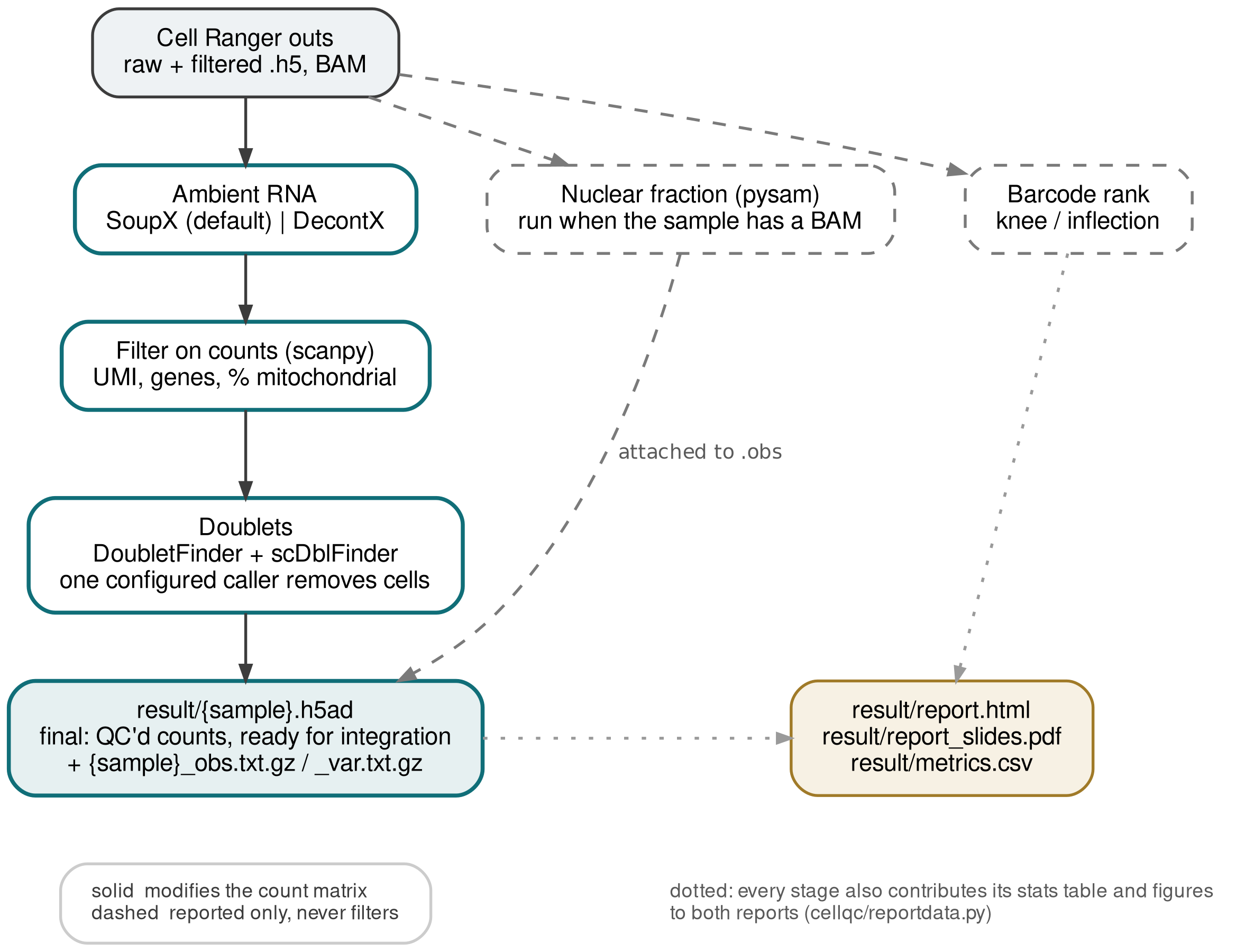
The diagram is generated from source: bash docs/make_figures.sh renders it from docs/workflow.dot.
Installation
From conda (recommended — this pulls the whole analysis stack):
mamba create -n cellqc -c conda-forge -c bioconda cellqc
conda activate cellqc
From the environment file, if you want the exact development environment or are working from a clone:
mamba env create -n cellqc -f envs/cellqc.yaml
conda activate cellqc
pip install -U cellqc          # or `pip install -e .` from a clone
pip install cellqc on its own installs the CLI and the workflow, but not the analysis stack: scanpy,
pysam and the entire R side come from conda, because pip cannot install R packages. Use one of the two
routes above.
Both routes install DoubletFinder from bioconda (r-doubletfinder). No GitHub build is needed. Before
v0.3.6 DoubletFinder had to be built from GitHub with remotes::install_github() after the conda step; an
environment set up that way keeps working.
v0.2.0 removed five of the six GitHub builds v0.1.0 needed (SeuratDisk, harmony, scPred, DropletQC and the
lijinbio/DoubletFinder fork) and all four version pins (Seurat v4, r-matrix, pandas<2, anndata).
v0.3.6 removed the sixth, DoubletFinder itself.
Dependent software:
| Software | Role | Source |
|---|---|---|
| Snakemake | workflow engine | conda |
| SoupX | ambient RNA correction (default) | conda |
| DecontX (celda) | ambient RNA correction (alternative) | conda |
| Scanpy / AnnData | filtering, I/O | conda |
| pysam | nuclear fraction from the Cell Ranger BAM | conda |
| Seurat | doublet detection backend | conda |
| zellkonverter | .h5ad -> R, native reader |
conda |
| scDblFinder | doublet detection | conda |
| DropletUtils | 10x matrix I/O | conda |
| tectonic | builds the PDF slide report | conda |
| DoubletFinder | doublet detection (default caller) | conda |
To test the installation:
cellqc -h
Run the pipeline
cellqc requires a sample file and an optional configuration file.
-
The sample file (e.g.
samples.txt) is tab-delimited with headerssample,cellranger, and optionallynreaction.sampleis the sample ID.cellrangeris the Cell Ranger output directory. Relative paths are resolved against the sample file's directory.nreactionis the number of reactions in the library prep, used to infer the expected doublet rate when one Cell Ranger run combines several reactions. A sample without its own value takesdoublet.nreactionfrom the config, which defaults to 1 — so a cohort on one chemistry sets it once instead of per row.
-
The configuration file is YAML and optional. The defaults are:
seed: 42                  # every stochastic step is seeded; v0.1.0 seeded nothing
ambient:
  method: soupx           # soupx | decontx | none -- the ONE method applied to the counts
  compare: []             # e.g. [decontx] -- estimated and reported, never applied
nuclear_fraction:         # runs automatically when the sample has an indexed BAM
  numthreads: 12
  cbtag: CB
  retag: RE
  exontag: E
  introntag: N
filterbycount:
  mincount: 500
  minfeature: 300
  mito: 10
geneset:                  # QC gene sets; only `mt` is filtered on
  mt:
    label: '% mitochondrial'
    patterns: ['^MT-']            # case-insensitive: human MT-ND1, mouse mt-Nd1
    symbols: [ND1, ND2, ND3, ND4, ND4L, ND5, ND6,
              COX1, COX2, COX3, ATP6, ATP8, CYTB]   # fallback: macaque & other prefix-free references
    exclude: []
  ribo:
    label: '% ribosomal'
    patterns: ['^RP[SL]\d', '^RPLP\d', '^RPSA$']
    symbols: []
    exclude: ['^RPS6K', '^RPS19BP']   # kinases and a binding protein, not ribosomal proteins
  hb:
    label: '% hemoglobin'
    patterns: ['^HB[ABDEGMQZ]([0-9][AB]?)?$', '^HB[AB]-[A-Z0-9]+$']
    symbols: []
    exclude: []
doublet:
  run: [doubletfinder, scdblfinder]   # callers to execute
  decider: doubletfinder              # the single caller whose call removes cells
  findpK: false
  numthreads: 5
  pK: 0.01
  rate: 0.1               # 10x multiplet rate at `capacity` cells recovered
  capacity: 13000
  nreaction: 1            # per-sample default; the sample-file column wins
Inspection of configuration
ambient— ambient RNA correction
| Parameter | Description |
|---|---|
| ambient.method | The one method whose corrected counts are written: soupx, decontx, or none. |
| ambient.compare | Methods run for their contamination estimate only. They never modify counts; they exist so disagreement between methods is visible. Choosing a correction after seeing which one flatters the downstream result is not supported by design. |
nuclear_fraction
Fraction of intronic reads per cell, intronic / (intronic + exonic), computed from the Cell Ranger BAM
with pysam. There is no skip flag: the step runs for any sample with an indexed
possorted_genome_bam.bam and is dropped for those without, so mixed cohorts work. The result is
reported and plotted against log10(UMI) but is not used for filtering — DropletQC-style empty-drop and
damaged-cell thresholds are sample- and tissue-dependent, so applying them automatically would be
unreviewed auto-filtering.
filterbycount
| Parameter | Description |
|---|---|
| filterbycount.mincount | Minimum total UMI per cell. |
| filterbycount.minfeature | Minimum detected genes per cell. |
| filterbycount.mito | Maximum percentage of mitochondrial counts. |
All three are applied to the ambient-corrected counts, and .obs reports them as total_counts,
n_genes_by_counts and pct_counts_mt, plus one pct_counts_<set> per further gene set
(pct_counts_ribo, pct_counts_hb by default — see geneset below; recorded, never filtered on). The
same metrics computed on the uncorrected Cell Ranger counts are carried alongside as raw_total_counts,
raw_n_genes_by_counts, raw_pct_counts_mt, raw_pct_counts_ribo, raw_pct_counts_hb; they are
informative only, no threshold is applied to them. raw_ means before ambient correction — the
source is filtered_feature_bc_matrix.h5, the same cells, not the all-droplets
raw_feature_bc_matrix.h5. The per-cell fraction the correction removed is
1 - total_counts / raw_total_counts.
geneset— what counts as mitochondrial, ribosomal, hemoglobin
Which genes belong to a QC gene set is a property of the reference, not of the pipeline, so the sets
are configuration. Each set becomes a pct_counts_<set> column in .obs, a panel in the QC violins and a
pair of columns in result/metrics.csv. Sets may be added freely — a new key here is a new column and a
new panel, no code change.
| Key | Description |
|---|---|
| geneset.<set>.label | Axis label in the QC violins. Defaults to % <set>. |
| geneset.<set>.patterns | Case-insensitive regexes — the primary definition. Case insensitivity is what lets one pattern cover human MT-ND1, mouse mt-Nd1 and macaque alike. |
| geneset.<set>.symbols | Exact gene symbols, case-insensitive, used only when no pattern matched anything. |
| geneset.<set>.exclude | Case-insensitive regexes removed from the match. |
Naming a set in your config replaces that set's definition outright rather than merging key by key —
inheriting a default symbols under your own patterns would apply the prefix-free fallback to a
reference you had just told the pipeline how to read.
Why symbols is a fallback and not a union: references disagree about mitochondrial gene names. Human
GRCh38 and mouse GRCm39 prefix them with the contig (MT-ND1, mt-Nd1), so a pattern is enough.
Ensembl Mmul_10 (macaque, and several other non-model references) name them bare — ND1, COX1,
CYTB, with nothing to prefix-match. Those bare symbols are ambiguous elsewhere (COX1 is also a legacy
alias of the nuclear gene PTGS1), so they are claimed only in a reference where no prefixed
mitochondrial gene exists at all. In GRCh38 the pattern matches first and the fallback never runs; in
Mmul_10 all 13 protein-coding mtDNA genes are found. Which route was taken is recorded per sample as
filter_mt_matched_by (pattern, symbol or none) in metrics.csv, alongside filter_n_mt_genes —
a median % is not comparable across cohorts without knowing which genes it was computed over.
The exclude lists exist for names that start like a set member but are not one: RPS6KA1–RPS6KA6,
RPS6KB1/RPS6KB2, RPS6KC1, RPS6KL1 are kinases and RPS19BP1 is a binding protein. The hemoglobin
patterns are written as full matches for the same reason — a bare ^HB prefix would swallow HBEGF,
HBP1 and HBS1L.
Only mt is filtered on (filterbycount.mito). ribo and hb are computed, plotted and written to
.obs, and no cell is excluded on them: a defensible cut-off for either is tissue-dependent — retina and
blood-contaminated tissue disagree by an order of magnitude — and cellqc does not exclude cells on a
number nobody has looked at. Their violin panels carry no threshold line and are labelled (not
filtered). They are still worth having: a cell whose UMI are dominated by ribosomal protein transcripts
reads differently from one dominated by hemoglobin (red-blood-cell carry-over), and both are visible at a
glance next to the criteria that do remove cells.
doublet
There is no skip flag, for the same reason nuclear_fraction has none: what runs is the list of
callers, and a caller you do not want is left out of doublet.run. Doublet detection itself always runs.
| Parameter | Description |
|---|---|
| doublet.run | Which callers to execute: any of doubletfinder, scdblfinder. Every caller's score and class are written to .obs under namespaced columns. |
| doublet.decider | The single caller whose call removes cells. Keeping the decision with one caller avoids an undeclared ensemble: a union removes more cells than the assumed multiplet rate, an intersection fewer. |
| doublet.findpK | Estimate pK by mean-variance bimodality coefficient (DoubletFinder only). |
| doublet.pK | Preset neighbourhood size, used when findpK: false. |
| doublet.rate, doublet.capacity | Expected doublet fraction is rate * ncell / (nreaction * capacity) — a straight line through the origin in the number of cells recovered. Hard-coded in v0.1.0; exposed so the assumption is visible. See below. |
Why the expected doublet rate is linear in cell yield
Cells are loaded into GEMs at limiting dilution, so the number of cells per droplet is Poisson with mean λ = (cells loaded) / (number of GEMs). Among droplets that contain at least one cell, the fraction holding two or more is
P(≥2 | ≥1) = 1 − λ / (e^λ − 1) ≈ λ/2 for small λ
λ is proportional to how many cells were loaded, and the cells recovered are proportional to λ as well, so
over the loading range the instrument supports, the multiplet fraction is proportional to the number of
cells recovered. That is why the multiplet rate is quoted as a rate per thousand cells rather than as a
single number: 10x Genomics user guides give ≈0.8% multiplets per 1,000 cells recovered (≈8% at 10,000
cells), and scDblFinder's default dbr uses the same rule of thumb at ≈1% per 1,000 cells captured.
Bloom (2018) derives the Poisson treatment exactly, including the correction needed when the mixed cell
types are not in equal proportion.
doublet.rate and doublet.capacity are the two ends of that line: rate multiplets at capacity cells
recovered. The defaults (0.1 at 13,000) give 0.77% per 1,000 cells, i.e. the 10x specification, and
reproduce v0.1.0's hard-coded constants exactly. To use scDblFinder's 1% per 1,000 instead, set
rate: 0.1, capacity: 10000.
Two limits are worth knowing. The linear form is the small-λ limit: the exact Poisson expression bends
below the line as loading increases (at λ = 0.2 it is 9.7% rather than 10%), so the linear rule slightly
over-estimates at high yields. And nreaction divides the fraction because pooled reactions are separate
emulsions — a cell from one reaction cannot share a droplet with a cell from another.
References:
- Bloom JD (2018) Estimating the frequency of multiplets in single-cell RNA sequencing from cell-mixing experiments. PeerJ 6:e5578. https://peerj.com/articles/5578/
- 10x Genomics Chromium Single Cell reagent user guides / technical notes, multiplet rate vs targeted cell recovery (e.g. CG000422).
- McGinnis CS, Murrow LM, Gartner ZJ (2019) DoubletFinder. Cell Systems 8:329–337 — takes
nExpfrom the 10x multiplet-rate table. https://doi.org/10.1016/j.cels.2019.03.003 - Germain P-L et al. (2021) Doublet identification in single-cell sequencing data using scDblFinder. F1000Research 10:979 — "roughly 1% per 1000 cells captured". https://f1000research.com/articles/10-979/v2
Both callers are given the same expected doublet rate, so a difference between them reflects the methods rather than differing priors. Their concordance (2×2 table and Cohen's κ) is reported. Concordance is a consistency measure, not an accuracy measure — with no ground-truth doublets, neither caller can be shown superior on real data.
Note that homotypic doublets are not modelled (modelHomotypic is deliberately not called), so the
expected count over-estimates the detectable doublet count and the step removes slightly more cells than
the true heterotypic count. The bias direction is known, constant, and stated in every report.
Result files
| Path | Contents |
|---|---|
result/{sample}.h5ad |
The final matrix. QC'd counts prepared for integration: sample-prefixed barcodes, unique var names, no raw layer, nuclear fraction attached when available. .obs carries the QC metrics on the corrected counts (total_counts, …) and their pre-correction counterparts (raw_total_counts, …), plus every doublet caller's score/class; .uns records which caller decided removal. |
result/{sample}_obs.txt.gz, result/{sample}_var.txt.gz |
.obs and .var as gzipped TSVs, indexed by barcode and gene. Everything the matrix knows about each cell and each feature, readable without anndata. |
result/metrics.csv |
Every scalar the run produced, one row per sample: Cell Ranger metrics, knee/inflection, ambient contamination per method, per-criterion filter counts, each doublet caller's count and their concordance, nuclear-fraction quartiles, and the retained fraction. Assembled from the same collected data as the reports, so it cannot disagree with them — join on sampleid instead of scraping a number out of the HTML. Every sample has a row, including one that failed a step: what was not computed is NA. The last columns are status_<step> for each step, qc_included and qc_excluded_reason. |
result/qc_status.csv |
sample, step, status, message for every step of every sample. status is ok, fallback (completed on a substitute, e.g. uncorrected counts after SoupX failed), failed (the message is the error) or skipped (a step it needs was unusable; the message carries that step's reason). A final result row per sample says whether it reached result/. |
result/manifest.tsv |
One row per sample: included, final ncell, and for an excluded sample the reason; fallback lists any substitutions. |
result/report.html |
Self-contained HTML QC report; all figures inlined. |
result/report_slides.pdf |
Presentation-ready beamer deck: Cell Ranger metrics, barcode rank, ambient RNA, QC violins, nuclear fraction, doublet calls, and a limitations slide. |
Per-stage outputs (ambient/, barcoderank/, nuclear_fraction/, filterbycount/, doubletfinder/,
scdblfinder/, filterdoublet/) keep the statistics tables and figures, plus a
{stage}/{sample}_status.tsv each. Every figure is written as a vector PDF with
editable text alongside a 300 dpi PNG for the HTML report.
The intermediate matrices (filterbycount/{sample}.h5ad, filterdoublet/{sample}.h5ad) are working files.
filterdoublet/'s is marked temp and deleted once the final matrix is written: it held the same
cells and the same counts, differing only in the barcode prefix and the nuclear-fraction columns, so
keeping it wrote every count matrix to disk twice. To keep it, run the workflow through Snakemake directly
with --notemp — the cellqc CLI does not pass Snakemake flags through.
When a sample fails a step
One sample failing one step does not stop the run. Every per-sample step records its outcome in
{stage}/{sample}_status.tsv and never fails the Snakemake job on a sample's account; the sample goes as
far as it can, and the other samples are unaffected.
| Step fails | What happens to that sample |
|---|---|
ambient (the applied method, e.g. SoupX) |
Fallback: the uncorrected Cell Ranger counts are used, and the sample continues. The contamination table keeps a row for the failed method with NA estimates and adds a none row for what was applied; the figure says the method failed and why. |
ambient comparison method (compare) |
Recorded as ambient.<method>: failed; nothing else changes — it never touched the counts. |
barcoderank, nuclear_fraction |
Recorded; both are diagnostic. The final matrix is written without the nuclear fraction. |
filterbycount (e.g. every cell removed) |
Doublet detection, filterdoublet and postproc are skipped; excluded from result/. |
the doublet decider |
Excluded from result/. The other caller does not take over: that would make one sample's doublet removal differ in method from the rest of the cohort. |
| a non-deciding doublet caller | Recorded; the decider alone decides, and that caller's metrics and the concordance are NA. |
filterdoublet, postproc |
Excluded from result/. |
A failed or skipped step still leaves each of its declared outputs, as a 0-byte placeholder, so the DAG
never changes shape; downstream steps read the status, not the file, and nothing that stands in for a matrix
reaches result/. The qcstatus checkpoint collects the statuses into result/qc_status.csv and
result/manifest.tsv and publishes only the samples that made it through. Both reports carry a Sample
status section, keep every sample in every table, and show the reason in place of any figure that was not
produced.
cellqc exits 0 when at least one sample reaches result/, logging each excluded sample and why. It exits
non-zero when none does, and on anything that is not about one sample — a bad configuration, a missing Cell
Ranger directory, a missing R package, a report that will not compile — which still stops the run.
To retry a failed step after fixing its cause, delete that step's status file: Snakemake then re-runs it and everything downstream of it for that sample.
An example
One sample
No sample file needed — -D writes one for you:
cellqc -d out -t 8 \
  -D sample:=:S1 \
  -D cellranger:=:/path/to/cellranger/S1/outs
The cellranger path must be absolute here: -D writes out/samples_<timestamp>.txt, and relative
paths in a sample file are resolved against that file's directory, which is the outdir. Add
-D nreaction:=:2 if the run pooled more than one 10x reaction, and -c config.yaml to change any
threshold. That gives:
out/result/S1.h5ad            the final QC'd matrix
out/result/S1_obs.txt.gz      per-cell QC metrics and doublet scores, indexed by barcode
out/result/S1_var.txt.gz      the feature table, indexed by gene
out/result/report.html        self-contained QC report
out/result/report_slides.pdf  slide deck
Equivalently, with a one-line sample file — this is the form to prefer, because the file is a record of what was run and relative paths work in it:
sample	cellranger	nreaction
S1	/path/to/cellranger/S1/outs	1
cellqc -d out -t 8 -- samples.txt
A cohort
A sample file (e.g. samples.txt) for two samples:
sample	cellranger	nreaction
AMD1	/path/to/cellranger/AMD1/outs	1
AMD2	/path/to/cellranger/AMD2/outs	1
Run it with the installed entry point:
cellqc -d out -t 8 -- samples.txt                 # default parameters
cellqc -d out -t 8 -c config.yaml -- samples.txt  # customized parameters
cellqc -d out -t 8 -n -- samples.txt              # dry run; writes out/config_<timestamp>.yaml
The dry run writes the fully resolved configuration, defaults included, to outdir/config_<timestamp>.yaml
— copy that file, edit it, and pass it back with -c.
To see the jobs Snakemake will run before running them, use the dry run above; snakemake --dag renders
the graph itself if you want a picture of a particular cohort.
Example outputs from the reference run (GSE188280, 13,559 cells) are in docs/tests/:
report.html,
report_slides.pdf and
metrics.csv.
1 maintainer

Metadata
1 maintainer
Release files for cellqc 0.3.6
For a detailed explanation of source distributions (sdists) and built distributions (wheels), please see the package formats documentation.
Source distribution (sdist)
| File | Size | Uploaded | Provenance | |
|---|---|---|---|---|
| cellqc-0.3.6.tar.gz | 91.9 kB | Without provenance | Details |
Built distribution (wheel)
| File | Interpreter | ABI | Platform | Reset |
|---|---|---|---|---|
| cellqc-0.3.6-py3-none-any.whl | Python 3 | none | any | Details |
Total release size: 181.1 kB
Release files / cellqc-0.3.6.tar.gz
| Download URL | cellqc-0.3.6.tar.gz |
|---|---|
| Size | 91.9 kB |
| Tags | Source |
|
SHA-256 checksum How to use checksums |
4106ed727110c3b66c93d16cf454b2055f5144d1b78a82269058326927759e20
|
|
BLAKE2b-256 checksum How to use checksums |
5c296eef79f7bb7017d57c7137dc7198cd21f8bf6b23541f9d7a78291734ba43
|
| Upload date | |
|
Uploaded using Trusted Publishing? What is trusted publishing? |
No |
| Uploaded via |
twine/7.0.0 CPython/3.12.0
|
Release files / cellqc-0.3.6-py3-none-any.whl
| Download URL | cellqc-0.3.6-py3-none-any.whl |
|---|---|
| Size | 89.2 kB |
| Tags | Python 3 |
|
SHA-256 checksum How to use checksums |
35cba24cf41876ee0a3b08b52193f5e54df83401b8e301600fb09959d1419463
|
|
BLAKE2b-256 checksum How to use checksums |
146a0e23b63819dac5640b7a56e88845e5a20f6b15496ba5ca9fcae1d2b3a532
|
| Upload date | |
|
Uploaded using Trusted Publishing? What is trusted publishing? |
No |
| Uploaded via |
twine/7.0.0 CPython/3.12.0
|
Security for cellqc 0.3.6
Provenance
Provenance describes where a file came from. On PyPI, provenance is shared via attestations, which provide a verifiable record of the build or publishing details. View details, limitations and caveats.
No provenance found
None of the files in this release were uploaded with provenance metadata.
A note on package security
PyPI is a repository for distributing packages, not a service for auditing them. While third-party security researchers and our staff do their best to detect and remove malicious packages, PyPI cannot guarantee the quality, security or suitability of any given package.
To learn more about protecting yourself from malicious actors, visit our package security documentation.














