
CellRepair.AI - Evolutionäres KI-Framework mit 12 Genie-Level-Features

Project description

OpenHands: Code Less, Make More








Welcome to OpenHands (formerly OpenDevin), a platform for software development agents powered by AI.
OpenHands agents can do anything a human developer can: modify code, run commands, browse the web, call APIs, and yes—even copy code snippets from StackOverflow.
Learn more at docs.all-hands.dev, or sign up for OpenHands Cloud to get started.
[!IMPORTANT] Using OpenHands for work? We'd love to chat! Fill out this short form to join our Design Partner program, where you'll get early access to commercial features and the opportunity to provide input on our product roadmap.
☁️ OpenHands Cloud
The easiest way to get started with OpenHands is on OpenHands Cloud, which comes with $20 in free credits for new users.
💻 Running OpenHands Locally
Option 1: CLI Launcher (Recommended)
The easiest way to run OpenHands locally is using the CLI launcher with uv. This provides better isolation from your current project's virtual environment and is required for OpenHands' default MCP servers.
Install uv (if you haven't already):
See the uv installation guide for the latest installation instructions for your platform.
Launch OpenHands:
# Launch the GUI server
uvx --python 3.12 --from openhands-ai openhands serve

# Or launch the CLI
uvx --python 3.12 --from openhands-ai openhands
You'll find OpenHands running at http://localhost:3000 (for GUI mode)!
Option 2: Docker
Click to expand Docker command
You can also run OpenHands directly with Docker:
docker pull docker.all-hands.dev/all-hands-ai/runtime:0.58-nikolaik

docker run -it --rm --pull=always \
    -e SANDBOX_RUNTIME_CONTAINER_IMAGE=docker.all-hands.dev/all-hands-ai/runtime:0.58-nikolaik \
    -e LOG_ALL_EVENTS=true \
    -v /var/run/docker.sock:/var/run/docker.sock \
    -v ~/.openhands:/.openhands \
    -p 3000:3000 \
    --add-host host.docker.internal:host-gateway \
    --name openhands-app \
    docker.all-hands.dev/all-hands-ai/openhands:0.58
Note: If you used OpenHands before version 0.44, you may want to run
mv ~/.openhands-state ~/.openhandsto migrate your conversation history to the new location.
[!WARNING] On a public network? See our Hardened Docker Installation Guide to secure your deployment by restricting network binding and implementing additional security measures.
Getting Started
When you open the application, you'll be asked to choose an LLM provider and add an API key.
Anthropic's Claude Sonnet 4.5 (anthropic/claude-sonnet-4-5-20250929)
works best, but you have many options.
See the Running OpenHands guide for system requirements and more information.
💡 Other ways to run OpenHands
[!WARNING] OpenHands is meant to be run by a single user on their local workstation. It is not appropriate for multi-tenant deployments where multiple users share the same instance. There is no built-in authentication, isolation, or scalability.
If you're interested in running OpenHands in a multi-tenant environment, check out the source-available, commercially-licensed OpenHands Cloud Helm Chart
You can connect OpenHands to your local filesystem, interact with it via a friendly CLI, run OpenHands in a scriptable headless mode, or run it on tagged issues with a github action.
Visit Running OpenHands for more information and setup instructions.
If you want to modify the OpenHands source code, check out Development.md.
Having issues? The Troubleshooting Guide can help.
📖 Documentation
To learn more about the project, and for tips on using OpenHands, check out our documentation.
There you'll find resources on how to use different LLM providers, troubleshooting resources, and advanced configuration options.
🤝 How to Join the Community
OpenHands is a community-driven project, and we welcome contributions from everyone. We do most of our communication through Slack, so this is the best place to start, but we also are happy to have you contact us on Github:
- Join our Slack workspace - Here we talk about research, architecture, and future development.
- Read or post Github Issues - Check out the issues we're working on, or add your own ideas.
See more about the community in COMMUNITY.md or find details on contributing in CONTRIBUTING.md.
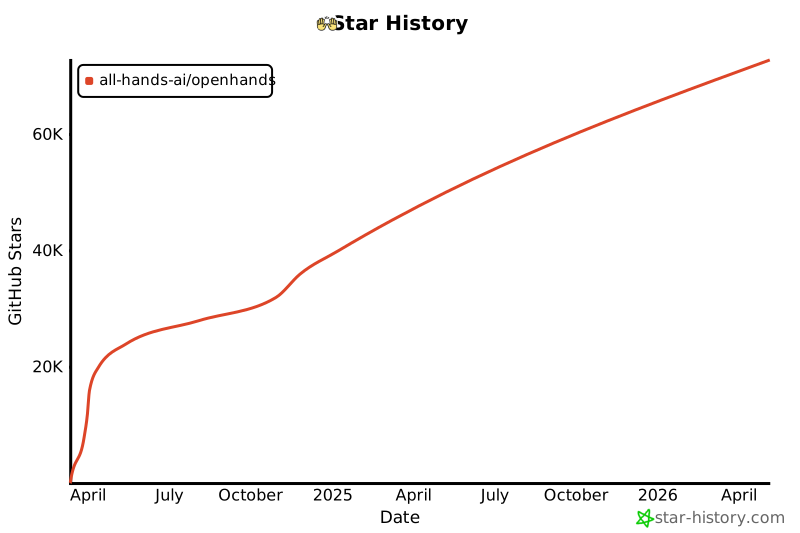
📈 Progress
See the monthly OpenHands roadmap here (updated at the maintainer's meeting at the end of each month).
📜 License
Distributed under the MIT License, with the exception of the enterprise/ folder. See LICENSE for more information.
🙏 Acknowledgements
OpenHands is built by a large number of contributors, and every contribution is greatly appreciated! We also build upon other open source projects, and we are deeply thankful for their work.
For a list of open source projects and licenses used in OpenHands, please see our CREDITS.md file.
📚 Cite
@inproceedings{
  wang2025openhands,
  title={OpenHands: An Open Platform for {AI} Software Developers as Generalist Agents},
  author={Xingyao Wang and Boxuan Li and Yufan Song and Frank F. Xu and Xiangru Tang and Mingchen Zhuge and Jiayi Pan and Yueqi Song and Bowen Li and Jaskirat Singh and Hoang H. Tran and Fuqiang Li and Ren Ma and Mingzhang Zheng and Bill Qian and Yanjun Shao and Niklas Muennighoff and Yizhe Zhang and Binyuan Hui and Junyang Lin and Robert Brennan and Hao Peng and Heng Ji and Graham Neubig},
  booktitle={The Thirteenth International Conference on Learning Representations},
  year={2025},
  url={https://openreview.net/forum?id=OJd3ayDDoF}
}


Download files
Download the file for your platform. If you're not sure which to choose, learn more about installing packages.
Source Distribution
Built Distribution
Filter files by name, interpreter, ABI, and platform.
If you're not sure about the file name format, learn more about wheel file names.
Copy a direct link to the current filters
File details
Details for the file cellrepair_ai-2.0.0.tar.gz.
File metadata
- Download URL: cellrepair_ai-2.0.0.tar.gz
- Upload date:
- Size: 112.8 kB
- Tags: Source
- Uploaded using Trusted Publishing? No
- Uploaded via: twine/6.2.0 CPython/3.12.3
File hashes
| Algorithm | Hash digest | |
|---|---|---|
| SHA256 |
0f77fdf4257f7f0169f064847cf41ece5676e66f34f630c4a311660df60f9e64
|
|
| MD5 |
1b398f485443a082d34a4280c959cc18
|
|
| BLAKE2b-256 |
e4378531f00820dd1c347a8967daf1d996835ecb20b9158070011f20e15275f3
|
File details
Details for the file cellrepair_ai-2.0.0-py3-none-any.whl.
File metadata
- Download URL: cellrepair_ai-2.0.0-py3-none-any.whl
- Upload date:
- Size: 77.3 kB
- Tags: Python 3
- Uploaded using Trusted Publishing? No
- Uploaded via: twine/6.2.0 CPython/3.12.3
File hashes
| Algorithm | Hash digest | |
|---|---|---|
| SHA256 |
426d328bada9c5a2f429321f2c237964b796cd6afc24380d02937cd7ae8b2fa1
|
|
| MD5 |
24b1e150e6c0dc19540f5d4e395424c6
|
|
| BLAKE2b-256 |
11c3b5ef3674c94b6614f7f28b3c5160a9f67e31cf1a389344eb845e8b982ef5
|






