
Aruba Central API CLI





A CLI app for interacting with Aruba Central Cloud Management Platform. With cross-platform shell support. Auto Completion, easy device/site/group/template identification (fuzzy match), support for batch import, and a lot more.
As commands are built out the CLI hierarchy may evolve. Refer to the documentation or help text for CLI structure/syntax.
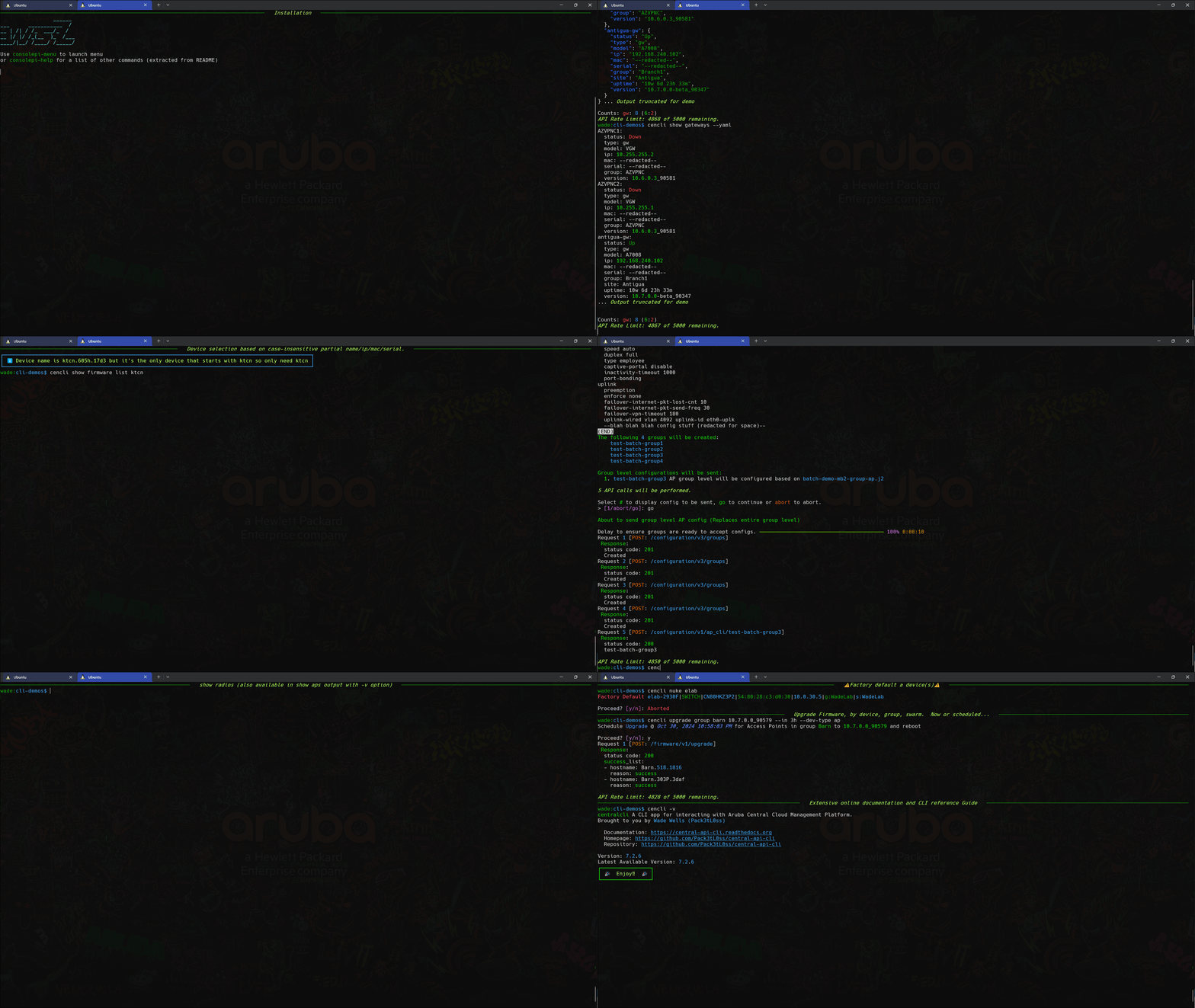
Features
- Cross Platform Support
- Auto/TAB Completion
- Specify device, site, etc. by fuzzy match of multiple fields (i.e. name, mac, serial#, ip address)
- Multiple output formats
- Output to file
- Numerous import formats (csv, yaml, json, etc.)
- Multiple workspace support (easily switch between different central workspaces
--ws myotheraccount) - Batch Operation based on data from input file. i.e. Add sites, devices, groups, etc. in batch based on data from a csv.
- Mass AP rename, that automatically constructs the name based on whatever format specifier you provide. This can use portions or all of the AP model / MAC / serial, the upstream switch hostname / port, switch port, and the site name.
- Automatic Token refresh. With prompt to paste in a new token if it becomes invalid.
If using Tokens, dedicate the token to the CLI alone, using it in swagger or on another system, will eventually lead to a refresh that invalidates the tokens on the other systems using it.
- You can also use username/Password Auth. which will facilitate automatic retrieval of new Tokens even if they do become invalid.
This option is only possible with a non SSO account.
Installation
The recommended method is to use uv, which is a single Rust binary that you can use to install Python apps. It's significantly faster than alternative tools, and will get you up and running with Central CLI in seconds. uv will install centralcli in an isolated environment and expose the cencli command in PATH.
You don't even need to worry about installing Python yourself - uv will manage everything for you.
uv
Install uv on Linux/Mac:
# quick install on MacOS/Linux
curl -LsSf https://astral.sh/uv/install.sh | sh
Install uv on Windows:
# quick install on Windows via PowerShell
powershell -ExecutionPolicy ByPass -c "irm https://astral.sh/uv/install.ps1 | iex"
Changing the execution policy allows running a script from the internet.
uv can also be installed via Homebrew, Cargo, Winget, pipx, and more. See the installation guide for more information.
Install centralcli via uv
# install centralcli (showing command with optional `--python 3.14` flag see note below)
uv tool install --python 3.14 centralcli
Including
--python 3.14above is optional. However uv facilitates deploying a stand-alone version of python with the package. There are likely speed advantages to doing this if your current version is dated (check withpython -V)
Run
cencli --install-completionto enable auto/tab completion in your shell once installed. Shell needs to be restarted to take effect.
Then to Upgrade centralcli
uv tool upgrade centralcli
Alternative (less preferred) installation methods using pipx or pip are described here.
Configuration
✨ pre-populating the config as described below is optional. Central CLI will prompt for the information it needs on first run if no config exists.
It's still a good idea to look over the example config to see the optional config items.
Refer to config.yaml.example to guide in the creation of config.yaml and place in the config directory.
Central CLI will look in <Users home dir>/.config/centralcli, and <Users home dir>\.centralcli.
i.e. on Windows c:\Users\wade\.centralcli or on Linux /home/wade/.config/centralcli
Once config.yaml is populated per config.yaml.example, run some test commands to validate the config.
For Example cencli show all
wade@wellswa6:~ $ cencli show all
                                                                                       All Devices
 ─────────────────────────────────────────────────────────────────────────────────────────────────────────────────────────────────────────────────────────────────────────────────────
  name                  type   model                            ip                mac                 serial       group          site             labels        version       status
 ─────────────────────────────────────────────────────────────────────────────────────────────────────────────────────────────────────────────────────────────────────────────────────
  6100F-48-LAB          cx     6100 48G CL4 4SFP+ Swch          10.0.40.11        --redacted--   --redacted--    WadeLab8x                                     10.08.1010       Down
                               (JL675A)
  SDBranch1:7008        gw     A7008                            192.168.240.101   --redacted--   --redacted--    Branch1        Antigua          Branch View   10.3.0.0_82528   Up
  br1-2930F-sw          sw     Aruba2930F-8G-PoE+-2SFP+         10.101.5.4        --redacted--   --redacted--    Branch1        Antigua          Branch View   16.11.0002       Up
                               Switch(JL258A)
  br1-315.0c88-ap       ap     315                              10.101.6.200      --redacted--   --redacted--    Branch1        Antigua          Branch View   10.3.0.0_82528   Up
  MB1-505h              ap     505H                             10.10.1.101       --redacted--   --redacted--    MicroBranch1   Champions Hill                 10.3.0.0_82528   Up
  6200F-Bot             cx     6200F 48G CL4 4SFP+740W Swch     10.0.40.16        --redacted--   --redacted--    WadeLab8x      Pommore                        10.08.1010       Down
                               (JL728A)
  6200F-Top             cx     6200F 48G CL4 4SFP+740W Swch     10.0.40.6         --redacted--   --redacted--    WadeLab8x      Pommore                        10.08.1010       Down
                               (JL728A)
  APGW1                 gw     A9004-LTE                        10.0.35.10        --redacted--   --redacted--    WLNET          WadeLab                        10.3.0.0_82528   Up
  APGW2                 gw     A9004                            10.0.35.20        --redacted--   --redacted--    WLNET          WadeLab                        10.3.0.0_82528   Up
  VPNC1                 gw     A7005                            172.30.0.242      --redacted--   --redacted--    VPNC           WadeLab          Branch View   10.3.0.0_82528   Up
  VPNC2                 gw     A7005                            172.30.0.243      --redacted--   --redacted--    VPNC           WadeLab          Branch View   10.3.0.0_82528   Up
  av-555.11b8-ap        ap     555                              10.0.31.155       --redacted--   --redacted--    WLNET          WadeLab                        10.3.0.0_82463   Down
  barn-303p.2c30-ap     ap     303P                             10.1.30.151       --redacted--   --redacted--    WLNET          WadeLab                        10.3.0.0_82528   Up
  barn-4100i            cx     4100i 12G CL4/6 POE 2SFP+ DIN    10.1.30.152       --redacted--   --redacted--    WadeLab        WadeLab                        10.08.1010       Up
                               Sw (JL817A)
  barn-518.2816-ap      ap     518                              10.1.30.101       --redacted--   --redacted--    WLNET          WadeLab                        10.3.0.0_82528   Up
  bsmt-515.51s9-ap      ap     515                              10.0.30.233       --redacted--   --redacted--    WLNET          WadeLab                        10.3.0.0_82463   Down
  craft-2930F           sw     Aruba2930F-8G-PoE+-2SFP+         10.0.30.5         --redacted--   --redacted--    WadeLab        WadeLab                        16.11.0002       Up
                               Switch(JL258A)
  garage-345.5136-ap    ap     345                              10.0.31.148       --redacted--   --redacted--    WLNET          WadeLab                        10.3.0.0_82463   Down
  ktcn-505H.206c-ap     ap     505H                             10.0.30.212       --redacted--   --redacted--    WLNET          WadeLab                        10.3.0.0_82463   Down
  lwrptio-575.0824-ap   ap     575                              10.0.30.219       --redacted--   --redacted--    WLNET          WadeLab                        10.3.0.0_82463   Down
  zrm-535.70be-ap       ap     535                              10.0.31.101       --redacted--   --redacted--    WLNET          WadeLab                        10.3.0.0_82463   Down
 ─────────────────────────────────────────────────────────────────────────────────────────────────────────────────────────────────────────────────────────────────────────────────────
  Show all displays fields common to all device types. To see all columns for a given device type use show <DEVICE TYPE>
  API Rate Limit: 925 of 1000 remaining.
Use cencli ? to become familiar with the command options.
Auto Completion
The CLI supports auto-completion. To configure auto-completion run cencli --install-completion. This will auto-detect the type of shell you are running in, and install the necessary completion into your profile. You'll need to exit the shell and start a new session for it to take effect.
Note for OSX 11: Additional step, edit .zshrc and add "autoload -Uz compinit && compinit -i" then exit and start new session.
Usage Notes
Caching & Friendly identifiers
- Caching: The CLI caches information on all devices, sites, groups and templates along with some other items. It's a minimal amount per device, and is done to allow human friendly identifiers. The API typically accepts serial #, site id, etc. This function allows you to specify a device by name, IP, mac (any format), and serial.
The lookup sequence for a device:
- Exact Match of any of the identifier fields (name, ip, mac, serial)
- case insensitive match
- case insensitive match disregarding all hyphens and underscores (in case you type 6200f_bot and the device name is 6200F-Bot)
- Case insensitive Fuzzy match with implied wild-card, otherwise match any devices that start with the identifier provided.
cencli show switches 6200Fwill result in a match of6200F-Bot. - If a typo was made, and an item is a close match, you will be prompted to confirm that's what you meant.
If there is no match found, a cache update is triggered, and the match rules are re-tried.
-
Caching works in a similar manner for groups, templates, and sites. Sites can match on name and nearly any address field. So if you only had one site in San Antonio you could specify that site with
show sites 'San Antonio'<-- Note the use of quotes because there is a space in the name. -
Multiple Matches: If a provided identifier is ambiguous, meaning there are multiple matches. You will be prompted to select the intended device from a list of the matches.
Output Formats
There are a number of output formats available. Most commands default to what is likely the easiest to view given the number of fields. Otherwise longer outputs are typically displayed vertically by default. If the output can reasonably fit, it's displayed in tabular format horizontally.
You can specify the output format with command line flags --json, --yaml, --csv, --table rich is tabular format with folding (multi line within the same row) and truncating.
Most outputs will evolve to support an output with the most commonly desired fields by default and expanded vertical output via the
-voption (not implemented yet.). Currently the output is tabular horizontally if the amount of data is likely to fit most displays, and vertical otherwise.
File Output
Just use --out \<filename\> (or <path\filename>), and specify the desired format.
CLI Tree
Use ? or --help from the cli, which you can do at any level. ccenli ?, cencli bounce --help etc.
You can also see the entire supported tree via the CLI Reference Guide. NOTE: The Reference Guide documents a few commands that are hidden in the CLI
1 maintainer

Metadata
1 maintainer
Release files for centralcli 10.0.2
For a detailed explanation of source distributions (sdists) and built distributions (wheels), please see the package formats documentation.
Source distribution (sdist)
| File | Size | Uploaded | |
|---|---|---|---|
| centralcli-10.0.2.tar.gz | 745.9 kB | Details |
Built distribution (wheel)
| File | Interpreter | ABI | Platform | Reset |
|---|---|---|---|---|
| centralcli-10.0.2-py3-none-any.whl | Python 3 | none | any | Details |
Total release size: 1.6 MB
Release files / centralcli-10.0.2.tar.gz
| Download URL | centralcli-10.0.2.tar.gz |
|---|---|
| Size | 745.9 kB |
| Tags | Source |
|
SHA-256 checksum How to use checksums |
9be80015935d0526943de8309686c8236b55d0233e909a66fd54ec6c9b6fab83
|
|
BLAKE2b-256 checksum How to use checksums |
04be12a17a4244a9abd965d5b5f6757f94ce03db31573eb8bd0ff806d2820aa3
|
| Upload date | |
|
Uploaded using Trusted Publishing? What is trusted publishing? |
Yes |
| Uploaded via |
twine/7.0.0 CPython/3.13.14
|
Provenance
Provenance describes where a file came from. On PyPI, provenance is shared via attestations, which provide a verifiable record of the build or publishing details. View details, limitations and caveats.


PyPI Publish Attestation
PyPI verified that this artifact, at this checksum, originated from the publisher listed below.
Signed by GitHub Actions, verified by PyPI on Aug 25, 2026.
Transparency logRelease files / centralcli-10.0.2-py3-none-any.whl
| Download URL | centralcli-10.0.2-py3-none-any.whl |
|---|---|
| Size | 817.2 kB |
| Tags | Python 3 |
|
SHA-256 checksum How to use checksums |
e77e08f97ec99879a2fe6be73f0ef0b1a36fc4a8182fdd101742b860d1575d14
|
|
BLAKE2b-256 checksum How to use checksums |
5f0fbdf5ecc803ebc754503cdea78550f139efca3facd246e59b9f24f0153d2a
|
| Upload date | |
|
Uploaded using Trusted Publishing? What is trusted publishing? |
Yes |
| Uploaded via |
twine/7.0.0 CPython/3.13.14
|
Provenance
Provenance describes where a file came from. On PyPI, provenance is shared via attestations, which provide a verifiable record of the build or publishing details. View details, limitations and caveats.
PyPI Publish Attestation
PyPI verified that this artifact, at this checksum, originated from the publisher listed below.
Signed by GitHub Actions, verified by PyPI on Aug 25, 2026.
Transparency log













