

certbot-dns-nicmanager
Wildcard certificates for nicmanager domains. Issued and renewed without you.








PyPI · Troubleshooting · Changelog
A Certbot plugin for
nicmanager AnycastDNS. It answers the dns-01
challenge through the nicmanager API:
*.example.com certificates, with an account that can touch nothing but the
challenge record.
🇩🇪 Let's-Encrypt-Wildcard-Zertifikate für Domains bei nicmanager (InterNexum): Certbot-Plugin für die AnycastDNS-API, mit eingeschränktem API-ACME-Account und Zwei-Faktor-Authentifizierung.
Quick start
pip install certbot-dns-nicmanager      # into the same environment as Certbot
certbot certonly --authenticator dns-nicmanager \
  --dns-nicmanager-credentials ~/.secrets/certbot/nicmanager.ini \
  -d 'example.com' -d '*.example.com'
certbot plugins should list dns-nicmanager. There is no snap package: if your
Certbot came from snap, run Certbot from a pip environment with both packages.
✨ Features
- Wildcard certificates —
dns-01is the only ACME challenge that issues them, and it needs no inbound port - Least privilege — works with nicmanager's restricted API-ACME account; it does not even need to read the zone
- Two-factor authentication — a fresh TOTP code with every request
- Cleanup by id — the challenge record is deleted by the id the API returned; if that fails, zone and id are logged for manual removal
- The only nicmanager plugin that needs no zone read access — see compared to lego
- Fewer hostnames in public logs — one wildcard instead of a certificate per host keeps service names out of Certificate Transparency
- Small and tested — three runtime dependencies, typed, ~95 % test coverage, Python 3.10 to 3.15, in production since June 2026
Credentials
- In nicmanager, create an API-ACME account (rights: Nameserver view + manage, nothing else) and make sure API access is enabled for it.
- Write
/etc/letsencrypt/nicmanager.iniandchmod 600it:
# login.username — or the email, if the account logs in with "E-Mail + Passwort"
dns_nicmanager_username = mylogin.acmeuser
# Quote the password if it contains '#' (the plugin stops otherwise).
dns_nicmanager_password = "0123456789abcdef0123456789abcdef"
# Only if the account has 2FA:
# dns_nicmanager_totp_secret = JBSWY3DPEHPK3PXP
Details: account setup · all options, renewal · troubleshooting
How it works
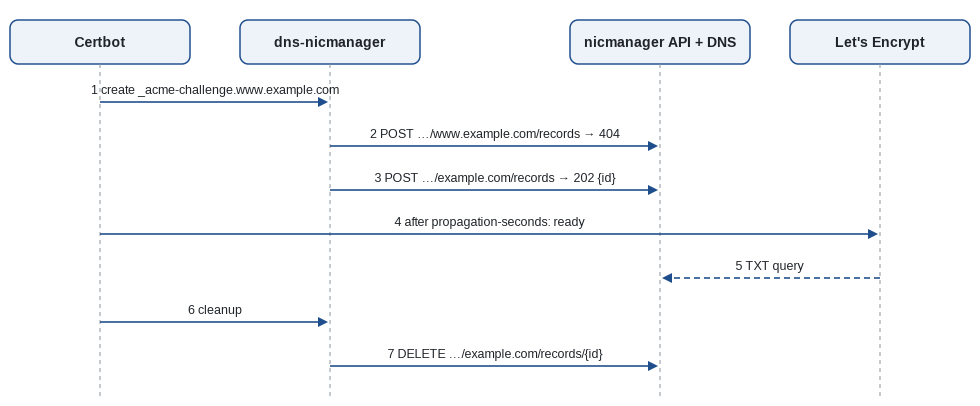
The zone is found by trying the create, most specific candidate first — the API-ACME account cannot read zones. Cleanup deletes by the id the API returned.
Compared to lego
lego (also inside certbot-dns-multi and Traefik) supports the same API and 2FA. The difference is the account it needs:
| certbot-dns-nicmanager | lego nicmanager |
|
|---|---|---|
| Reads the zone before writing | no | yes (GET /anycast/{zone}) |
| Works with the restricted API-ACME account | yes | no: that account cannot read zones |
| Cleanup | by the id the API returned | looks the record up by name and value |
The lego column is read from its source, not tested against a live API-ACME account.
Troubleshooting
| Response | Fix |
|---|---|
401 Authentication error |
Wrong username form: email for "E-Mail + Passwort" accounts, login.username otherwise |
401 Missing 2FA token header |
Set dns_nicmanager_totp_secret |
403 API usage not allowed |
Ask nicmanager support to enable API access |
401 Too many invalid attempts, or no response |
IP blocked after failed logins: stop and wait, never loop over credential variants |
Everything else: docs/TROUBLESHOOTING.md.
Contributing
Issues and pull requests are welcome; see CONTRIBUTING.md. Security issues go through private vulnerability reporting. The design and its decisions are in docs-tech/.
pip install -e '.[test,dev]' && pytest && ruff check . && mypy certbot_dns_nicmanager
License
Apache License 2.0. An independent plugin, not affiliated with or endorsed by InterNexum GmbH / nicmanager or the EFF / Certbot project.
1 maintainer

Metadata
1 maintainer
Release files for certbot-dns-nicmanager 1.1.3
For a detailed explanation of source distributions (sdists) and built distributions (wheels), please see the package formats documentation.
Source distribution (sdist)
| File | Size | Uploaded | Provenance | Actions |
|---|---|---|---|---|
| certbot_dns_nicmanager-1.1.3.tar.gz | 38.2 kB | With provenance | Details for certbot_dns_nicmanager-1.1.3.tar.gz |
Built distribution (wheel)
| File | Interpreter | ABI | Platform | Actions Reset |
|---|---|---|---|---|
| certbot_dns_nicmanager-1.1.3-py3-none-any.whl | Python 3 | none | any | Details for certbot_dns_nicmanager-1.1.3-py3-none-any.whl |
Total release size: 57.2 kB
Release files / certbot_dns_nicmanager-1.1.3.tar.gz
| Download URL | certbot_dns_nicmanager-1.1.3.tar.gz |
|---|---|
| Size | 38.2 kB |
| Tags | Source |
|
SHA-256 checksum How to use checksums |
332f028745fd3c05ea0e98657a33cc3ed8fc8ce731a3d915057337bb1639a76a
|
|
BLAKE2b-256 checksum How to use checksums |
e51707ea18aa796f83ac0c2b2c2428a7038e214e31878a0f230c72579569ba54
|
| Upload date | |
|
Uploaded using Trusted Publishing? What is trusted publishing? |
Yes |
| Uploaded via |
twine/7.0.0 CPython/3.13.16
|
Provenance
Provenance describes where a file came from. On PyPI, provenance is shared via attestations, which provide a verifiable record of the build or publishing details. View details, limitations and caveats.


PyPI Publish Attestation
PyPI verified that this artifact, at this checksum, originated from the publisher listed below.
Signed by GitHub Actions, verified by PyPI on Nov 24, 2026.
Transparency logRelease files / certbot_dns_nicmanager-1.1.3-py3-none-any.whl
| Download URL | certbot_dns_nicmanager-1.1.3-py3-none-any.whl |
|---|---|
| Size | 19.0 kB |
| Tags | Python 3 |
|
SHA-256 checksum How to use checksums |
535002a35644cd6cea2bd32429aa99e0171839bf115e37536db5ec5504f87778
|
|
BLAKE2b-256 checksum How to use checksums |
09370595133122b89a3fb52ba21e27178ac802d507aaa4ec6bf02e4faa290db4
|
| Upload date | |
|
Uploaded using Trusted Publishing? What is trusted publishing? |
Yes |
| Uploaded via |
twine/7.0.0 CPython/3.13.16
|
Provenance
Provenance describes where a file came from. On PyPI, provenance is shared via attestations, which provide a verifiable record of the build or publishing details. View details, limitations and caveats.
PyPI Publish Attestation
PyPI verified that this artifact, at this checksum, originated from the publisher listed below.
Signed by GitHub Actions, verified by PyPI on Nov 24, 2026.
Transparency logSecurity for certbot-dns-nicmanager 1.1.3
Provenance
Provenance describes where a file came from. On PyPI, provenance is shared via attestations, which provide a verifiable record of the build or publishing details. View details, limitations and caveats.
Full provenance
Both files in this release have been uploaded with provenance metadata.
Attestation for certbot_dns_nicmanager-1.1.3.tar.gz
PyPI Publish Attestation
PyPI verified that this artifact, at this checksum, originated from the publisher listed below.
Signed by GitHub Actions, verified by PyPI on Nov 24, 2026.
Transparency logA note on package security
PyPI is a repository for distributing packages, not a service for auditing them. While third-party security researchers and our staff do their best to detect and remove malicious packages, PyPI cannot guarantee the quality, security or suitability of any given package.
To learn more about protecting yourself from malicious actors, visit our package security documentation.














