
Certbot plugin for authentication using Gandi LiveDNS - modern
This is a plugin for Certbot that uses the Gandi LiveDNS API to allow Gandi customers to prove control of a domain name.
This plugin is originally based on https://github.com/obynio/certbot-plugin-gandi by Yohann Leon. Due to some missing bugfixes I have forked and published this "modern" version of the plugin to make it usable again.
Usage
-
Obtain a Gandi API token from Gandi LiveDNS API
-
Install the modern plugin and ensure the "non-modern" variant is not present:
pip uninstall certbot-plugin-gandi
pip install certbot-plugin-gandi-modern>=1.6.0
-
Create a
/etc/letsencrypt/gandi.iniconfig file with the following contents:# Gandi personal access token dns_gandi_token=PERSONAL_ACCESS_TOKEN
Replace
PERSONAL_ACCESS_TOKENwith your Gandi personal access token. You can also use a Gandi LiveDNS API Key instead, see FAQ below. -
Ensure permissions are set to disallow access from other users, e.g., using
chmod 0600 gandi.ini -
Run
certbotand direct it to use the plugin for authentication with the config file:certbot certonly --authenticator dns-gandi --dns-gandi-credentials /etc/letsencrypt/gandi.ini -d example.com # or certbot renew --authenticator dns-gandi --dns-gandi-credentials /etc/letsencrypt/gandi.ini
For backwards-compatibility with the "non-modern" variant of the plugin, the modern variant uses the same authenticator and credentials CLI argument names. Make sure to uninstall any "non-modern" packages to avoid shadowing of CLI argument names.
Please note that this solution is usually not relevant if you're using Gandi's web hosting services as Gandi offers free automated certificates for all simplehosting plans having SSL in the admin interface.
Be aware that the plugin configuration must be provided by CLI, configuration for third-party plugins in cli.ini is not supported by certbot for the moment. Please refer to #4351, #6504 and #7681 for details.
Distribution
PyPI is currently the only distribution mechanism for this "modern" variant of the certbot-plugin-gandi-modern package.
Other channels, as well as the "non-modern" variants are not maintained by me.
pip uninstall certbot-plugin-gandi
pip install certbot-plugin-gandi-modern>=1.6.0
Installing this plugin from PyPI using pip will also install a recent version of certbot itself, which may conflict with any other certbot already installed on your system. See the provided Dockerfile on how to containerize certbot + the plugin to run together.
Wildcard certificates
This plugin is particularly useful when you need to obtain a wildcard certificate using dns challenges:
certbot certonly --authenticator dns-gandi --dns-gandi-credentials /etc/letsencrypt/gandi.ini -d example.com -d \*.example.com
Automatic renewal
You can setup automatic renewal using crontab with the following job for weekly renewal attempts:
0 0 * * 0 certbot renew -q --authenticator dns-gandi --dns-gandi-credentials /etc/letsencrypt/gandi.ini
Reading material
- A blog post by @realEmaRocca describing how to use this plugin on Debian.
Keep in mind that this blog post references the "non-modern" variant - so make to install and use the correct "modern" variant if needed.
FAQ
Make sure to uninstall and remove any trace of the "non-modern" certbot-plugin-gandi package.
I don't have a personal access token, only a Gandi LiveDNS API Key
Use the following configuration in your gandi.ini file instead:
# live dns v5 api key
dns_gandi_api_key=APIKEY

# optional organization id, remove it if not used
dns_gandi_sharing_id=SHARINGID
Replace APIKEY with your Gandi API key and ensure permissions are set
to disallow access to other users.
I have a warning telling me
Plugin legacy name certbot-plugin-gandi:dns may be removed in a future version. Please use dns instead.
Certbot had moved to remove 3rd party plugins prefixes since v1.7.0. Please switch to the new configuration format and remove any used prefix-based configuration. For the time being, you can still use prefixes, but if you do so and keep using prefix-based cli arguments, stay consistent and use prefix-based configuration in the ini file.
Why do you keep this plugin a third-party plugin ? Just merge it with certbot ?
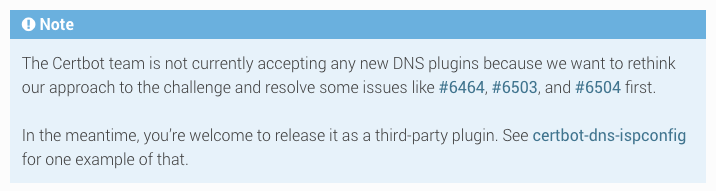
This Gandi plugin is a third-party plugin mainly because this plugin is not officially backed by Gandi and because Certbot does not accept new plugin submissions.
New post-prefix configuration for certbot>=1.7.0
--authenticator dns-gandi --dns-gandi-credentialsgandi.ini
# live dns v5 api key
dns_gandi_api_key=APIKEY

# optional organization id, remove it if not used
# if you use certbot<1.7.0 please use certbot_plugin_gandi:dns_sharing_id=SHARINGID
dns_gandi_sharing_id=SHARINGID
Credits
Huge thanks to Michael Porter for its original work !
Huge thanks to Yohann Leon for the continuation of this work !
1 maintainer

Metadata
1 maintainer
Release files for certbot-plugin-gandi-modern 1.6.0
For a detailed explanation of source distributions (sdists) and built distributions (wheels), please see the package formats documentation.
Source distribution (sdist)
| File | Size | Uploaded | |
|---|---|---|---|
| certbot_plugin_gandi_modern-1.6.0.tar.gz | 6.0 kB | Details |
Built distribution (wheel)
| File | Interpreter | ABI | Platform | Reset |
|---|---|---|---|---|
| certbot_plugin_gandi_modern-1.6.0-py3-none-any.whl | Python 3 | none | any | Details |
Total release size: 13.4 kB
Release files / certbot_plugin_gandi_modern-1.6.0.tar.gz
| Download URL | certbot_plugin_gandi_modern-1.6.0.tar.gz |
|---|---|
| Size | 6.0 kB |
| Tags | Source |
|
SHA-256 checksum How to use checksums |
996471711a4b2ad9245ccf4c2adaf5022b8dfa15670de8d7a92012d27e332be9
|
|
BLAKE2b-256 checksum How to use checksums |
54796ec3a7034c513d6275941b3bc1e05e2276c1d61e02e2a1ccd83ab511e1da
|
| Upload date | |
|
Uploaded using Trusted Publishing? What is trusted publishing? |
No |
| Uploaded via |
python-httpx/0.28.1
|
Release files / certbot_plugin_gandi_modern-1.6.0-py3-none-any.whl
| Download URL | certbot_plugin_gandi_modern-1.6.0-py3-none-any.whl |
|---|---|
| Size | 7.4 kB |
| Tags | Python 3 |
|
SHA-256 checksum How to use checksums |
f3d4bc64238a9ad64e4e9cf51ed18e3fa2d760dd212c9eca8fce41f0989d39a7
|
|
BLAKE2b-256 checksum How to use checksums |
2ded7e8793aa11696a3cbdeae9f4cd5571ab1fc2a2715407083bcad613798c1f
|
| Upload date | |
|
Uploaded using Trusted Publishing? What is trusted publishing? |
No |
| Uploaded via |
python-httpx/0.28.1
|













