

CertLord
TLS certificate lifecycle automation.
Version: 1.0.0 — stable. See the release notes.
CertLord automates TLS certificate issuance, renewal and deployment. It supports ACME through Certbot and importing existing PEM certificates, stores certificates in Vault and deploys them through Auton. Optional destination TLS verification checks the certificate actually served before acknowledgement. StatusCake/Updown adapters are optional; expiry observations are exposed for an external supervision system. It uses DWho, HTTPdis and Sonicprobe.
Redis stores temporary ACME HTTP-01 challenge responses and tracks pending work, retries and deployment leases. Vault stores certificate material. Both services must be provisioned separately; see the installation guide.
Command line and terminal interface
Use ordinary commands in scripts, or explicitly open the read-only terminal browser
with certlord tui. View the illustrated guide.
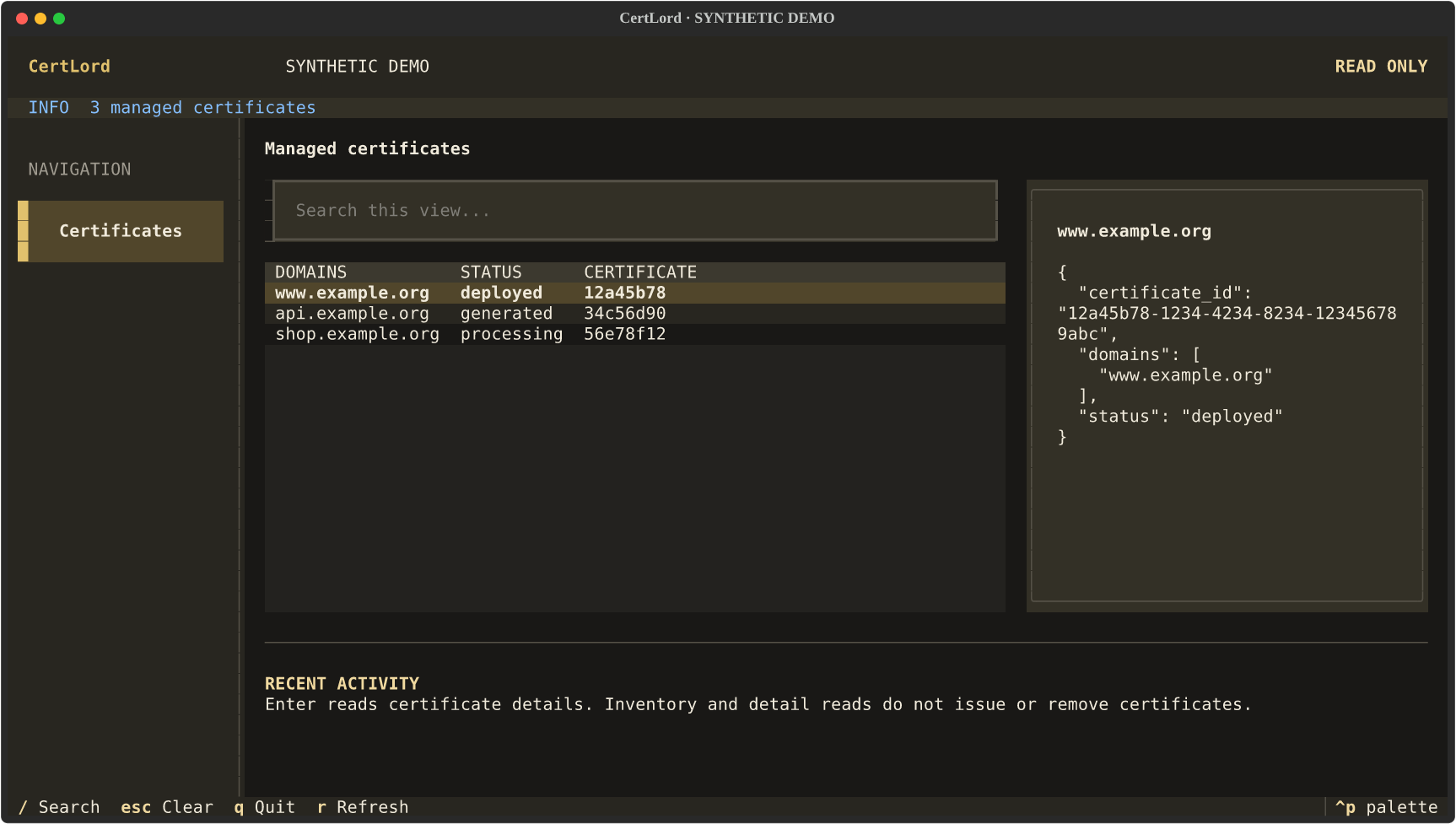
Real client capture with synthetic demonstration data; this is not deployment evidence.
Names and installation
- Python distribution and package:
certlord - Command and system service:
certlord - Default configuration:
/etc/certlord/certlord.yml - Service user and group:
certlord
Requires Python 3.11+ on POSIX; CI validates Python 3.11 and 3.12.
Newer interpreters are not yet validated. Install the Python package with python -m pip install ..
System configuration and external services must also be provisioned. The
Debian 12 package includes an isolated Python environment and the service account;
follow the installation guide before enabling the service.
Repository: https://github.com/decryptus/certlord.
Validate configuration, recovery and credentials in an isolated environment before deploying your service.
See MIGRATION.md before updating an existing installation.
Project documentation
- CLI and TUI screenshots
- Evaluate your installation
- Certificate UUIDs, HTTP API, CLI and TUI
- ACME HTTP Connector integration
- Debian 12 installation and isolated dependencies
- External certificate import and replacement
- Operations and recovery
- Operation correlation and optional Auton receipts
- Coding conventions and contributions
Guide: Certificate observations and supervision.
Post-deployment TLS verification checks configured destinations before acknowledgement.
Operations and recovery: health, queues, retries and first-version limits.
See configuration validation for YAML schema coverage and compatibility.
Documentation
- Users: installation, configuration, operation and API usage in this README and the user guide.
- Contributors: architecture, tests and development.
Textual terminal interface
See the Textual guide for installation, navigation and operation confirmations.
1 maintainer

Metadata
1 maintainer
Release files for certlord 1.0.0
For a detailed explanation of source distributions (sdists) and built distributions (wheels), please see the package formats documentation.
Source distribution (sdist)
| File | Size | Uploaded | |
|---|---|---|---|
| certlord-1.0.0.tar.gz | 1.4 MB | Details |
Built distribution (wheel)
| File | Interpreter | ABI | Platform | Reset |
|---|---|---|---|---|
| certlord-1.0.0-py3-none-any.whl | Python 3 | none | any | Details |
Total release size: 1.5 MB
Release files / certlord-1.0.0.tar.gz
| Download URL | certlord-1.0.0.tar.gz |
|---|---|
| Size | 1.4 MB |
| Tags | Source |
|
SHA-256 checksum How to use checksums |
de2572696a419f66f79a207646e6016315b30202dad68605289a2b4011890b61
|
|
BLAKE2b-256 checksum How to use checksums |
14310e19dfcaf18542ddd32131b38852bbe0d52af3cba810e7e148eca2e3c437
|
| Upload date | |
|
Uploaded using Trusted Publishing? What is trusted publishing? |
Yes |
| Uploaded via |
twine/7.0.0 CPython/3.13.14
|
Provenance
Provenance describes where a file came from. On PyPI, provenance is shared via attestations, which provide a verifiable record of the build or publishing details. View details, limitations and caveats.


PyPI Publish Attestation
PyPI verified that this artifact, at this checksum, originated from the publisher listed below.
Signed by GitHub Actions, verified by PyPI on Oct 8, 2026.
Transparency logRelease files / certlord-1.0.0-py3-none-any.whl
| Download URL | certlord-1.0.0-py3-none-any.whl |
|---|---|
| Size | 81.9 kB |
| Tags | Python 3 |
|
SHA-256 checksum How to use checksums |
39f70e5af704411c5b165502e063af275e650632736c447d17d72af9702c996f
|
|
BLAKE2b-256 checksum How to use checksums |
3897a06c7769e19d70ea0c561a284951e81eade27f109f3cc7758f0a6f51d6c3
|
| Upload date | |
|
Uploaded using Trusted Publishing? What is trusted publishing? |
Yes |
| Uploaded via |
twine/7.0.0 CPython/3.13.14
|
Provenance
Provenance describes where a file came from. On PyPI, provenance is shared via attestations, which provide a verifiable record of the build or publishing details. View details, limitations and caveats.
PyPI Publish Attestation
PyPI verified that this artifact, at this checksum, originated from the publisher listed below.
Signed by GitHub Actions, verified by PyPI on Oct 8, 2026.
Transparency log













