
Certo
Your coding agent shouldn't depend on one model, or one provider.



Documentation · Getting started · Troubleshooting
Certo is a coding-agent harness: the layer around the model that runs the agent, gives it its tools, chooses the model, sets the limits, and checks the result. The model writes the code; the harness decides what counts as done. The agent loop and the basic tools come from the OpenHands SDK; Certo adds the model choice, the limits and the verification.
Certo runs coding tasks on any model, local or cloud. It can pick the best model for each task. When a model can't finish, or its provider goes down, it hands the task to the next one, with a note on where things stand.
It knows when to switch because it doesn't take the agent's word for it: when the agent says it's done, Certo runs your real tests and build itself, with no AI involved, and ends with one verdict and an exit code a script can rely on. Certo is Italian for "sure".
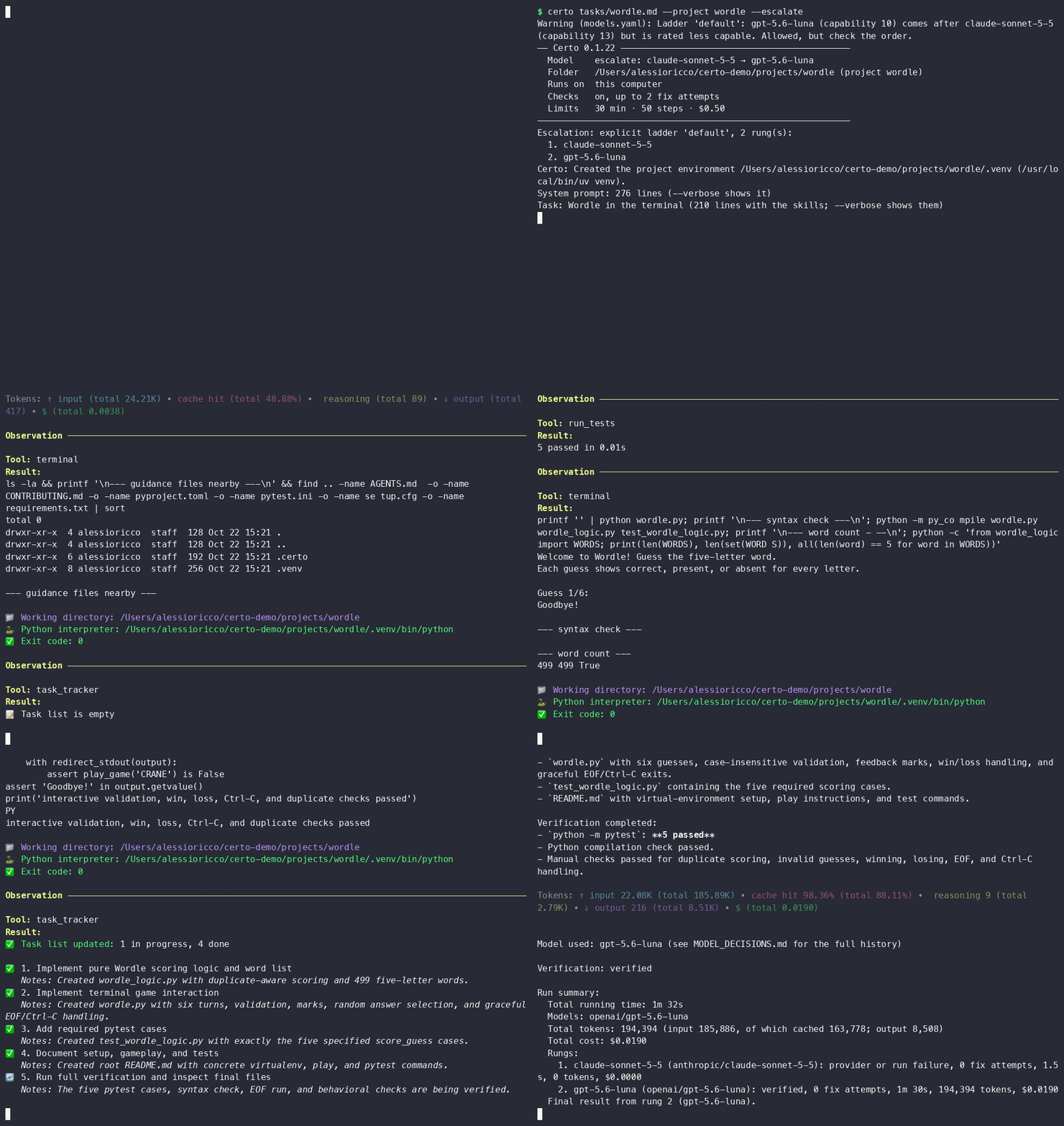
A real run: the first model's key was rejected (invalid on purpose, for the demo), so Certo handed the task to the next model, which passed the checks. 1m 32s, $0.02. The record of this run.
uv tool install certo           # or: pip install certo
certo init                      # pick Ollama for a local model, or a cloud provider
cd certo-workspace && certo tasks/wordle.md --project wordle
One task, more than one model
With --escalate, Certo runs a task on the first model of a ladder you write, and hands it to the next model only when the verdict shows the model couldn't finish, or when its provider fails. Three ladders, three uses. Each goes in escalation.yaml; certo ... --escalate NAME picks one by name, and --escalate alone uses the one called default.
Local first, cloud when needed
Keep the code on your machine, and pay for a cloud model only for the tasks the local one can't do.
# escalation.yaml
escalation:
  ladders:
    default:
      - model: qwen3.8-27b-local
        retries: 1          # one fix attempt locally, then hand over
      - model: claude-haiku-5-5
certo "Add a --verbose flag, with a test" --escalate
This is the ladder Certo has measured. On its 9 benchmark tasks, graded by hidden tests the agent never sees:
| Hidden tests passed | Solved on the local model | Median time per task | Cloud cost | |
|---|---|---|---|---|
qwen3.8:27b → claude-haiku-5-5 |
9/9 | 7 of 9 | 7m 44s | $0.019 |
claude-haiku-5-5 alone |
9/9 | none | 45s | $0.085 |
Seven tasks stayed on the machine. In the other two the local model did no work, and haiku solved both. The price is time: minutes per task locally, seconds in the cloud. On nine small tasks the saving is a few cents; the point is that the cloud became the exception. Details: Escalation in 0.1.17 (haiku alone is from the 0.1.15 baseline).
One real run of the quickstart's Wordle task with a six-model ladder, where the local model finished and no cloud model was called (the folder path is shortened and the agent's work is left out; the full record: One escalation run):
── Certo 0.1.19 ────────────────────────────────────────────
  Model    escalate: qwen3.8-27b-local → claude-haiku-5-5 → claude-sonnet-5-5 → gpt-6-luna → claude-opus-5-5 → gpt-6.1-sol
  Folder   …/projects/wordle (project wordle)
  Runs on  this computer
  Checks   on, up to 2 fix attempts
  Limits   30 min · 50 steps · $0.50
────────────────────────────────────────────────────────────
[… 16 minutes of agent work …]
Verification: verified

Run summary:
  Total running time: 16m 00s
  Models: ollama/qwen3.8:27b (effort default)
  Total tokens: 554,997 (input 536,968, of which cached 0; output 18,029)
  Total cost: $0.0000
  Rungs:
    1. qwen3.8-27b-local (ollama/qwen3.8:27b): verified, 0 fix attempts, 16m 00s, 554,997 tokens, $0.0000
  Final result from rung 1 (qwen3.8-27b-local).
Cheap cloud first, frontier when needed
Start on a fast, cheap cloud model, and move to a stronger one when it can't finish.
# escalation.yaml
escalation:
  ladders:
    cheap-first:
      - model: claude-haiku-5-5
        retries: 1
      - model: claude-sonnet-5-5
certo "Fix the failing test in payments.py" --escalate cheap-first
On Certo's 13 benchmark tasks, Haiku alone solved all 13, so this ladder never climbed: it cost what Haiku costs, about a tenth of Sonnet alone, for the same results (the run). Where it pays off, on tasks Haiku fails, hasn't been measured yet.
Another provider when one is down
Two models from different providers, so an outage doesn't stop the task.
# escalation.yaml
escalation:
  ladders:
    other-provider:
      - model: claude-sonnet-5-5
      - model: gpt-6.1-sol
certo "Fix the failing test in payments.py" --escalate other-provider
When the first provider fails (an outage, a rate limit, a rejected key), the task climbs to the next model, and Certo records it as a provider failure, not as a model that couldn't do the work. This ladder hasn't been benchmarked yet.
Each rung but the last gets half of the time left, so a slow model hands on while there is time for the next. Your own limits stop the climb: a task that uses up its whole time budget (budget_exhausted), or reaches CERTO_MAX_TASK_COST, keeps the verdict it has. What makes Certo climb, rung by rung: Escalate between models.
Any model, and the right one for each task
Certo isn't tied to any provider: the model is one setting, and the same task runs on Ollama, Anthropic, OpenAI, Gemini, DeepSeek or any LiteLLM model. The same task, run with only that setting changed, was verified on both OpenAI and Anthropic (provider swap). Because Certo checks the result itself, it can also decide which model to use:
| What Certo does | Add | |
|---|---|---|
| Best model per task | Reads the task, matches it to one of Certo's task profiles (each says what its kind of task needs: "debugging" needs reasoning and code 4 or more, "scaffolding" only code 3), and runs the least costly model you enabled that meets those needs. One choice per task, not per step, with no extra model call to decide. Falls back to the next model when a provider fails or a fix attempt still fails the checks. | --auto-model |
| Escalation | Runs the task on the first model of your ladder, and moves to the next one when the verdict shows the model couldn't finish, or its provider fails (see above). The next model is told what the last one left. | --escalate |
| Measure it | Runs the same tasks on your models and strategies, graded by hidden tests, so you choose from your own numbers. | certo bench |
--auto-model and --escalate are two ways to choose, and can't be combined in one run. Certo has its own model list (ids and ratings, which certo models refresh can compute from current benchmark data) and task profiles; you write models.yaml (the models you enabled, with keys), and other files only for what is different for you. Every choice is written down: MODEL_DECISIONS.md says why each model was picked, and .certo/RUNS.md which models worked on the project. Of the ladders, only local first, cloud when needed has been measured; auto-model has been measured on hand-written and computed ratings (benchmark). Guides: Escalate between models, Pick models automatically, Auto-model or escalation.
Measured
Each model alone, from the 0.1.15 baseline (135 runs):
| Model | Hidden tests passed | Median time per task |
|---|---|---|
claude-sonnet-5-5 (cloud) |
9/9 | 31s |
claude-haiku-5-5 (cloud) |
9/9 | 45s |
gemma4:31b-it-qat (local) |
26/27 | 12m 40s |
qwen3.8:27b (local) |
24/27 | 4m 37s |
A later local run, on Certo 0.1.18, set the default local model: qwen3.8:27b passed 27 of 27, and qwen3-coder:30b, the old default, 18 of 27 (details).
In the 0.1.15 runs, Certo was fooled 3 times in 135: it said verified while the hidden tests failed, each time because the code broke a rule the task stated and the agent's own tests never tried it. Of the 54 runs that failed the hidden tests, it caught all the others. These are small tasks with few repeats, and escalation has so far been measured only after a local model did no work, not after it wrote wrong code. All the numbers and their limits: Benchmark results.
Why the verdict can be trusted
Agents say "done", and sometimes they're wrong. Two real runs from building Certo, both asking a model for a Tower of Hanoi game:
- "There are errors in the tests around sequence handling and state transitions." The truth: the file didn't even run. An
IndentationErrorstopped every test before it started. The agent never re-ran the tests; the diagnosis was made up. - Every unit test passed, and the game crashed the moment a user picked "solve". The agent said success, and so did pytest.
The agent's report is a claim, not evidence. Certo looks at the evidence, and its verdict is also what decides when a model's work is good enough to keep:
| When the agent... | Certo... | Verdict |
|---|---|---|
| says it's done | runs the project's own tests, build, lint and typecheck | verified or a failure |
| left a check failing | sends the real error back and lets it try again | retry_exhausted if it never gets there |
| tries a fix that changes nothing | stops early instead of burning tokens | no_progress |
| "fixes" a bug without touching a file | asks once more, then refuses to call it verified | unchanged |
| leaves its own to-do list half done | doesn't run the checks at all | incomplete |
| builds something with no tests | never counts "nothing to check" as a pass | inconclusive |
With --escalate, the failing verdicts are what move a task to the next model. Eight cases, and how each one changed Certo: Why agents lie.
Quickstart
uv tool install certo
certo init
cd certo-workspace
certo tasks/wordle.md --project wordle
uv installs Certo as a command in its own environment. With pip, install it inside a virtual environment: python3 -m venv ~/.venvs/certo, then ~/.venvs/certo/bin/pip install certo (on systems that protect their Python, pip install outside one fails). Upgrade with uv tool upgrade certo or pip install -U certo. See Getting started.
certo init asks which provider you use (OpenAI, Anthropic, Gemini, a local Ollama, or any LiteLLM model), takes your API key at a hidden prompt, saves the settings, and makes one real call to check the model works. It also leaves five sample tasks in tasks/: Wordle and the Tower of Hanoi in the terminal, in Python, and three browser games (a space-rocks shooter, a maze chase and an alien-fleet shooter), which need Node 18+. With a cloud model a run uses your credits, and Certo prints the cost at the end. The generated project lands in projects/wordle.
In a terminal, certo alone opens the interactive session: each message is a task, and the next ones continue it.
More than one model
--escalate and --auto-model read the model files. You need one, models.yaml: the models you use, with their key or server address (certo init models writes it). Certo has its own model list and task profiles; write these only for what is different for you:
models_list.yaml: models Certo's list lacks, or ratings you know better.task_profiles.yaml: kinds of task and what each needs, for--auto-model.escalation.yaml: your ladders, for--escalate; without it, Certo builds a ladder from the ratings.
Then add --escalate (with a ladder from One task, more than one model) or --auto-model to a run. certo check --models tests every model you enabled before you rely on it.
Or work on one project at a time, new or existing:
cd any-project && certo "Add a --verbose flag, with a test"
This works in any folder when certo init saved your settings for "all projects on this computer", its default. Before the agent edits a folder that already has files, Certo prints a one-line warning if it has uncommitted git changes, or isn't a git repository. certo check shows where each setting comes from and re-runs the model check.
Already have a project? Check it with no agent and no model, for free:
certo verify ./my-project
Without certo init
Set two variables instead, in your shell, in a .env in the folder you run certo from, or in ~/.config/certo/.env for every folder (details):
export CERTO_LLM_MODEL=anthropic/claude-sonnet-5-5   # or openai/..., gemini/..., deepseek/...
export CERTO_LLM_API_KEY=sk-...

certo "Build a CLI todo app in Python, with tests" --project todo
With a local model (no API key):
ollama pull qwen3.8:27b
export CERTO_LLM_MODEL=ollama/qwen3.8:27b
export CERTO_LLM_BASE_URL=http://localhost:11434
qwen3.8:27b passed all 27 runs of Certo's local benchmark and needs roughly 20 GB of GPU or unified memory. With less, try a smaller coder model such as qwen2.5-coder:7b (CERTO_LLM_MODEL=ollama/qwen2.5-coder:7b); Certo hasn't benchmarked it, so expect weaker results on multi-step tasks.
What the verdict means
The last line of every run is the verdict:
| State | Meaning |
|---|---|
verified |
The project's own tests or build ran and passed. |
inconclusive |
Nothing could be checked (no tests yet, unknown project type, missing toolchain). |
unchanged |
The checks passed, but the agent changed no file, so they don't show the task was done. |
retry_exhausted |
A check kept failing after the automatic fix attempts. |
no_progress |
A fix attempt changed nothing in the failing output, so Certo stopped early. |
incomplete |
The agent left items on its own to-do list unfinished. |
budget_exhausted |
The task ran out of its time budget. |
The exit code is nonzero for every failure state, so Certo works in scripts and CI. Add --require-verification to make inconclusive and unchanged fail too. Every state and its exit code: Verdicts. What to do next, verdict by verdict: After the verdict.
Features
Any model
- Any model, one setting. Ollama, Anthropic, OpenAI, Gemini, DeepSeek, Moonshot or any LiteLLM model, local or cloud. Switching is one environment variable, never a code change.
Model choice and escalation
- Picks a model per task. Enable the models you have keys for in
models.yaml; Certo's own list rates them and its task profiles say what each kind of task needs, so each task goes to the least costly model that fits, with fallback when a provider fails. No extra LLM call to decide. Add--auto-model. - Hands over when a model fails. Give Certo a ladder of models. Each task starts on the first, and moves to the next when verification shows the model couldn't finish, or its provider fails. Add
--escalate. See Escalate between models. - A benchmark.
certo benchcompares models and strategies on tasks graded by hidden tests, and counts how often Certo itself was fooled. See Benchmark models and strategies. - Compare models on your own task. A small script runs one task on a list of models, each in its own folder, and ends with a table of verdicts, times and costs. See Compare models on one task, and a real example with screenshots: five models build an Asteroids-style game, where the cheapest cloud model, GPT-5.6 Luna, built a verified game for $0.07.
Checks you can trust
- Independent verification. Re-runs the project's real test, build, lint and typecheck commands after the agent finishes. It never invents a command the project doesn't configure.
- Works across languages. Detects and verifies Python, Node/JS/TS, Go, Rust and Java (Maven/Gradle) projects. Each Python project gets its own virtual environment, used by both the agent and the checks.
- Verify without an agent.
certo verify [PATH]runs the same checks on any project, with no model needed. - Hard limits. An iteration cap, a wall-clock budget across all retries, and an optional approve-every-action mode.
Fits how you work
- Resume.
certo --resume "hint"continues a run with its earlier conversation, or with a stronger--model. - Run records. Full transcript, token counts and cost per run, plus a log of which model was picked and why.
certo reportputs a run's problems in one file, keys hidden, to send to Certo's maintainers. - An interactive session.
certoalone in a terminal: each message is a task, the next ones continue it, with/commands. See The interactive session. - Answers from the docs.
certo ask "how do I give a run more time?"answers from Certo's docs for your version, with links. Seecerto ask. - Over MCP.
certo mcpgives an editor's agent Certo's runs, checks and docs. See Use Certo over MCP. - Sandboxed runs (experimental). Add
--execution dockerto run the agent in a container. - Server mode. REST and WebSocket streaming. The OpenAI-compatible
/v1/chat/completionsendpoint and the SQL and Redis task stores are experimental. - Skills and custom tools.
certo skills addgives the agent your conventions, for every project or one, kept out of git;certo skills list --task "..."shows what a task would get. Downloading skills from git is experimental. See Manage skills.
More ways to run it
# Work inside a sandbox
certo "Add a /version endpoint" --project my-api --execution docker

# Hand the task to the next model of your ladder if one can't finish
certo "Fix the failing test in payments.py" --project my-api --escalate

# Let Certo choose the model for the task
certo "Fix the failing test in payments.py" --project my-api --auto-model

# Run one task on several models, side by side (examples/compare-models.sh.example)
./compare-models.sh tasks/spec.md

# Take the task from a file or URL
certo ./tasks/spec.md --project my-api

# Open the interactive session with this task (in a terminal):
# your next messages continue it
certo -i "Scaffold a FastAPI service" --project my-api

# Check a project with Certo's verification only: no agent, no model
certo verify ./projects/my-api
How it works
Certo is built on the OpenHands Software Agent SDK, which runs the agent loop and tools. Certo adds the parts the SDK leaves open: what counts as verified, which model runs and when to fall back, the budgets, and the CLI and server you talk to. The details: How verification works.
Known limits
- Server mode has no authentication. Run it on localhost or behind your own gateway.
- Java projects are detected, but verification needs Maven or Gradle installed.
- Docker execution, the OpenAI-compatible endpoint, the SQL and Redis task stores, milestone mode, the MCP server, skills downloaded from git and trusted skill repositories are experimental: tested, not yet proven in real use. Under Docker, automatic model selection makes the initial pick but does not fall back mid-task.
- Some local models, on some Ollama setups, write their tool calls as plain text and end the run with no work done.
certo checktests for it; with--escalate, such a task goes to the next model. Which models worked in Certo's benchmark: Choose a local model. verifiedproves what the project's tests test, and nothing more. Read the tests: Write a task Certo can check.
The full list is in the documentation.
Documentation
- Documentation home: guides, reference and concepts, organised by what you want to do
- Getting started: install,
certo init, your first task, and reading the verdict - Write a task Certo can check: the habits that turn a vague request into a verified result
- Troubleshooting: the problems people actually hit, with their fix
- Questions and answers: how Certo decides to hand a task to another model, what that model gets, and verdicts in CI
- Why agents lie: the real cases of agents claiming "done", and how Certo catches each one
- ROADMAP.md: where Certo is going; TODO.md: what's left to do
Contributing
Issues and pull requests are welcome. Issues labelled good first issue are a good place to start, and so is adding a benchmark task. Questions and ideas go in Discussions. To work on the code:
git clone https://github.com/alessioricco/certo.git
cd certo
uv pip install -e ".[dev]"
uv run pytest -q     # no API key needed
License
MIT. Built and maintained by Alessio Ricco (LinkedIn, Medium).
1 maintainer

Metadata
1 maintainer
Release files for certo 0.2.4
For a detailed explanation of source distributions (sdists) and built distributions (wheels), please see the package formats documentation.
Source distribution (sdist)
| File | Size | Uploaded | Provenance | Actions |
|---|---|---|---|---|
| certo-0.2.4.tar.gz | 807.0 kB | With provenance | Details for certo-0.2.4.tar.gz |
Built distribution (wheel)
| File | Interpreter | ABI | Platform | Actions Reset |
|---|---|---|---|---|
| certo-0.2.4-py3-none-any.whl | Python 3 | none | any | Details for certo-0.2.4-py3-none-any.whl |
Total release size: 1.4 MB
Release files / certo-0.2.4.tar.gz
| Download URL | certo-0.2.4.tar.gz |
|---|---|
| Size | 807.0 kB |
| Tags | Source |
|
SHA-256 checksum How to use checksums |
10e2184bbbffb7e1414d3d2220b94294fbd694bdfa1cbe65f3d46c771466aece
|
|
BLAKE2b-256 checksum How to use checksums |
658d0eec63cae6e6cdcc4197462bf473c891f3a2b60109e1e98899716ca0ea65
|
| Upload date | |
|
Uploaded using Trusted Publishing? What is trusted publishing? |
Yes |
| Uploaded via |
twine/7.0.0 CPython/3.13.16
|
Provenance
Provenance describes where a file came from. On PyPI, provenance is shared via attestations, which provide a verifiable record of the build or publishing details. View details, limitations and caveats.


PyPI Publish Attestation
PyPI verified that this artifact, at this checksum, originated from the publisher listed below.
Signed by GitHub Actions, verified by PyPI on Nov 19, 2026.
Transparency logRelease files / certo-0.2.4-py3-none-any.whl
| Download URL | certo-0.2.4-py3-none-any.whl |
|---|---|
| Size | 610.6 kB |
| Tags | Python 3 |
|
SHA-256 checksum How to use checksums |
9b4f7379b5cd976b33a609454ddf1206fb8d45edbf0582d45356a48330f684f9
|
|
BLAKE2b-256 checksum How to use checksums |
40c70a1a0dc8567d22b6f82f2a070bce6e9b9ddf489e664a9afc75e364c772c5
|
| Upload date | |
|
Uploaded using Trusted Publishing? What is trusted publishing? |
Yes |
| Uploaded via |
twine/7.0.0 CPython/3.13.16
|
Provenance
Provenance describes where a file came from. On PyPI, provenance is shared via attestations, which provide a verifiable record of the build or publishing details. View details, limitations and caveats.
PyPI Publish Attestation
PyPI verified that this artifact, at this checksum, originated from the publisher listed below.
Signed by GitHub Actions, verified by PyPI on Nov 19, 2026.
Transparency logSecurity for certo 0.2.4
Provenance
Provenance describes where a file came from. On PyPI, provenance is shared via attestations, which provide a verifiable record of the build or publishing details. View details, limitations and caveats.
Full provenance
Both files in this release have been uploaded with provenance metadata.
Attestation for certo-0.2.4.tar.gz
PyPI Publish Attestation
PyPI verified that this artifact, at this checksum, originated from the publisher listed below.
Signed by GitHub Actions, verified by PyPI on Nov 19, 2026.
Transparency logA note on package security
PyPI is a repository for distributing packages, not a service for auditing them. While third-party security researchers and our staff do their best to detect and remove malicious packages, PyPI cannot guarantee the quality, security or suitability of any given package.
To learn more about protecting yourself from malicious actors, visit our package security documentation.














