
python wrapper of cesium.js for 3D geospatial visualization

Project description
Lightweight Python wrapper for Cesium.js. Mainly intended to be used with Jupyter Notebook.
Installation
Use pip.
pip install cesiumpyExample
Running following script on Jupyter Notebook will show an embedded interactive 3D map.
>>> import cesiumpy

>>> v = cesiumpy.Viewer()
>>> v.entities.add(cesiumpy.Box(dimensions=(40e4, 30e4, 50e4),
...                             material=cesiumpy.color.RED, position=(-120, 40, 0))
>>> v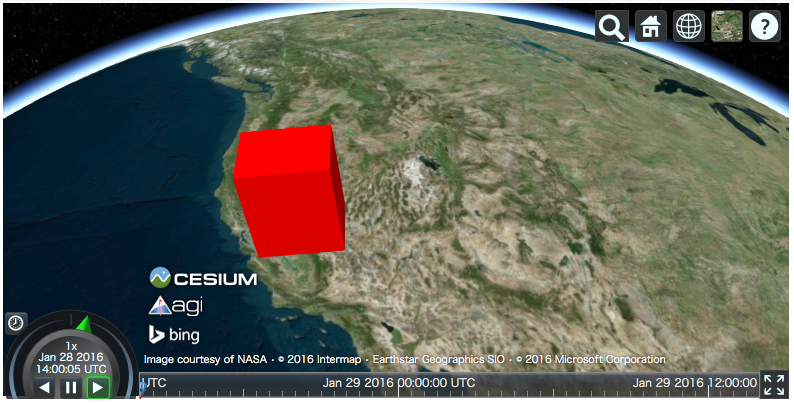
Documentation
Bundled Datasets
World countries: https://github.com/mledoze/countries (ODbL)
Dependencies
geopy, traitlets, six and enum34 (Python 3.3 or earlier)
(Optional) scipy and shapely


Download files
Download the file for your platform. If you're not sure which to choose, learn more about installing packages.
Source Distribution
cesiumpy-0.3.1.tar.gz
(4.6 MB
view details)
File details
Details for the file cesiumpy-0.3.1.tar.gz.
File metadata
- Download URL: cesiumpy-0.3.1.tar.gz
- Upload date:
- Size: 4.6 MB
- Tags: Source
- Uploaded using Trusted Publishing? No
File hashes
| Algorithm | Hash digest | |
|---|---|---|
| SHA256 |
3c10de43eb5700c21129de9e58c018d9c29d4cb02a69b3d1f8d52d4dbf82c824
|
|
| MD5 |
a0f63c6e199ae7d0c577a3bd1752ec66
|
|
| BLAKE2b-256 |
f8061b2d8174a011b993d6088320ffb979b4d182129db773172d486b58054e09
|






