
CeWLeR - Custom Word List generator Redefined
CeWLeR crawls from a specified URL and collects words to create a custom wordlist.
It's a great tool for security testers and bug bounty hunters. The lists can be used for password cracking, subdomain enumeration, directory and file brute forcing, API endpoint discovery, etc. It's good to have an additional target specific wordlist that is different than what everybody else use.
CeWLeR was sort of originally inspired by the really nice tool CeWL. I had some challenges with CeWL on a site I wanted a wordlist from, but without any Ruby experience I didn't know how to contribute or work around it. So instead I created a custom wordlist generator in Python to get the job done.
At a glance
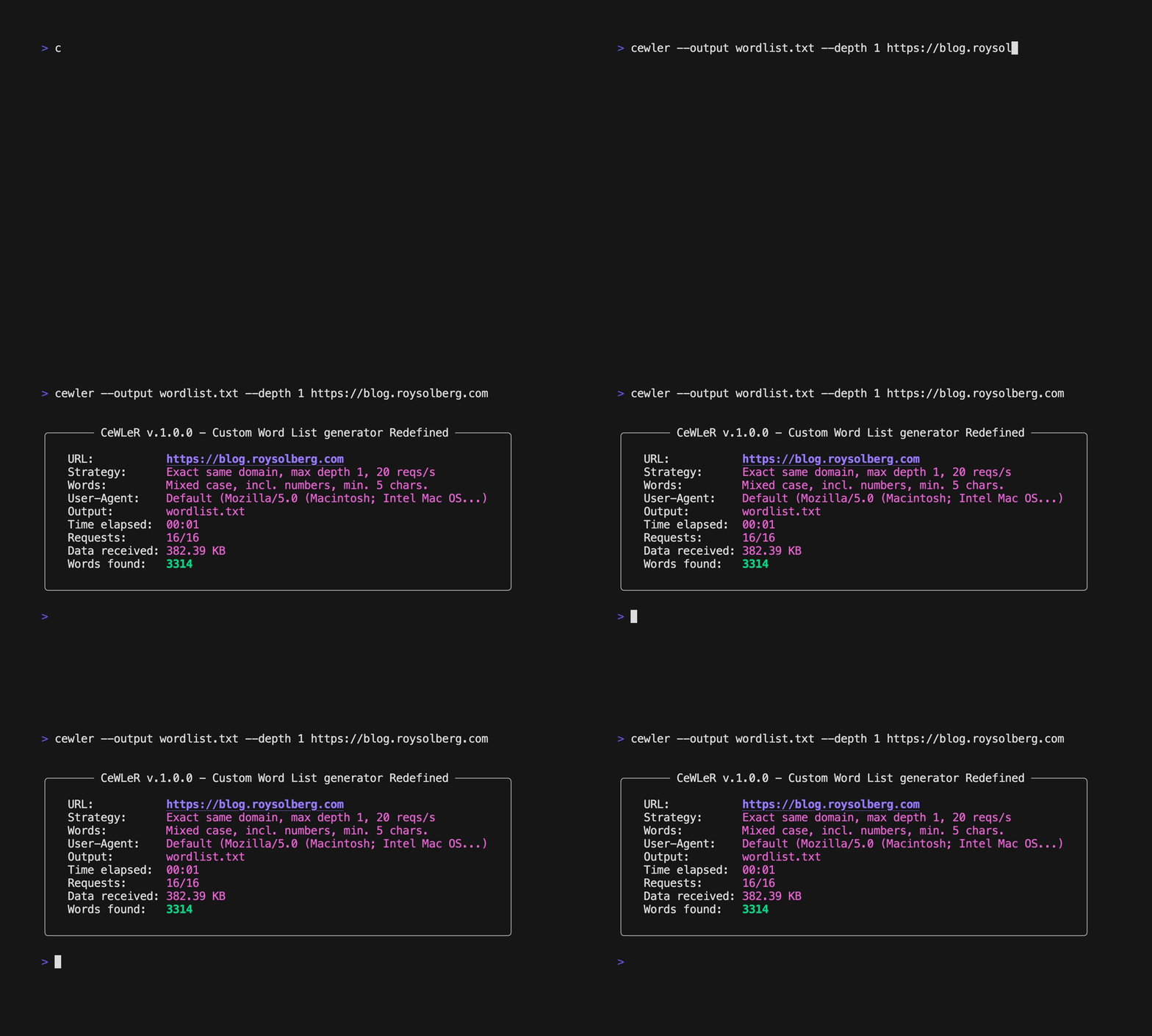
Features
- Generates custom wordlists by scraping words from web sites
- A lot of options:
- Output to screen or file
- Can stay within subdomain, or visit sibling and child subdomains, or visit anything within the same top domain
- Can stay within a certain depth of a website
- Speed can be controlled
- Word length and casing can be configured
- JavaScript and CSS can be included
- Text can be extracted from PDF files (using pypdf)
- Crawled URLs can be output to separate file
- Scraped e-mail addresses can also be output to separate file
- Custom HTTP headers can be added
- ++
- Using the excellent Scrapy framework for scraping and using the beautiful rich library for terminal output
Commands and options
Quick examples
Output to file
Will output to screen unless a file is specified.
cewler --output wordlist.txt https://example.com
Control speed and depth
The rate is specified in requests per second. Please play nicely and don't break any rules.
cewler --output wordlist.txt --rate 5 --depth 2 https://example.com
Change User-Agent header
The default User-Agent is a common browser.
cewler --output wordlist.txt --user-agent "Cewler" https://example.com
Add custom HTTP headers
It's possible to specify custom HTTP headers for the requests. Multiple headers can be specified.
cewler -H "X-Bounty: d14c14ec" https://httpbin.org/headers
Control casing, word length and characters
Unless specified the words will have mixed case and be of at least 5 in length.
cewler --output wordlist.txt --lowercase --min-word-length 2 --without-numbers https://example.com
Visit all domains - including parent, children and siblings
The default is to just visit exactly the same (sub)domain as specified.
cewler --output wordlist.txt -s all https://example.com
Visit same (sub)domain + any belonging child subdomains
cewler --output wordlist.txt -s children https://example.com
Include JavaScript and/or CSS
If you want you can include links from <script> and <link> tags, plus words from within JavaScript and CSS.
cewler --output wordlist.txt --include-js --include-css https://example.com
Include PDF files
It's easy to extract text from PDF files as well.
cewler --output wordlist.txt --include-pdf https://example.com
Output visited URLs to file
It's also possible to store the crawled files to a file.
cewler --output wordlist.txt --output-urls urls.txt https://example.com
Output e-mails to file
It's also possible to store the scraped e-mail addresses to a separate file (they are always added to the wordlist).
cewler --output wordlist.txt --output-emails emails.txt https://example.com
HTTP proxy
You can specify a HTTP proxy.
cewler --proxy http://localhost:8080 https://example.com
Ninja trick 🥷
If it just takes too long to crawl a site you can press ctrl + c once(!) and wait while the spider finishes the current requests and then whatever words have been found so far is stored to the output file.
All options
cewler -h
usage: cewler [-h] [-d DEPTH] [-css] [-js] [-pdf] [-l] [-m MIN_WORD_LENGTH] [-o OUTPUT] [-oe OUTPUT_EMAILS]
              [-ou OUTPUT_URLS] [-r RATE] [-s {all,children,exact}] [--stream] [-u USER_AGENT] [-H HEADER] [-p PROXY]
              [-v] [-w]
              url

CeWLeR - Custom Word List generator Redefined

positional arguments:
  url                   URL to start crawling from

options:
  -h, --help            show this help message and exit
  -d, --depth DEPTH     directory path depth to crawl, 0 for unlimited (default: 2)
  -css, --include-css   include CSS from external files and <style> tags
  -js, --include-js     include JavaScript from external files and <script> tags
  -pdf, --include-pdf   include text from PDF files
  -l, --lowercase       lowercase all parsed words
  -m, --min-word-length MIN_WORD_LENGTH
                        minimum word length to include (default: 5)
  -o, --output OUTPUT   file were to stream and store wordlist instead of screen (default: screen)
  -oe, --output-emails OUTPUT_EMAILS
                        file were to stream and store e-mail addresses found (they will always be outputted in the
                        wordlist)
  -ou, --output-urls OUTPUT_URLS
                        file were to stream and store URLs visited (default: not outputted)
  -r, --rate RATE       requests per second (default: 20)
  -s, --subdomain_strategy {all,children,exact}
                        allow crawling [all] domains, including children and siblings, only [exact] the same (sub)domain
                        (default), or same domain and any belonging [children]
  --stream              writes to file after each request (may produce duplicates because of threading) (default: false)
  -u, --user-agent USER_AGENT
                        User-Agent header to send (default: Mozilla/5.0 (Windows NT 10.0; Win64; x64) AppleWebKit/537.36
                        (KHTML, like Gecko) Chrome/142.0.0.0 Safari/537.36)
  -H, --header HEADER   custom header in 'Name: Value' format (can be used multiple times, overrides -u if 'User-Agent'
                        is specified)
  -p, --proxy PROXY     proxy URL ([http(s)://[user:pass@]]host[:port])
  -v, --verbose         a bit more detailed output
  -w, --without-numbers
                        ignore words are numbers or contain numbers
Subdomain strategies
Example URL to scan https://sub.example.com:
-s exact* |
-s children |
-s all |
|
|---|---|---|---|
sub.example.com |
✅ | ✅ | ✅ |
child.sub.example.com |
❌ | ✅ | ✅ |
sibling.example.com |
❌ | ❌ | ✅ |
example.com |
❌ | ❌ | ✅ |
| * Default strategy |
Digging into the code
If you want to do some tweaking you yourself you can probably find what you want in src/cewler/constants.py and src/cewler/spider.py
Installation and upgrade
Alternative 1 - installing from PyPI
Package homepage: https://pypi.org/project/cewler/
python3 -m pip install cewler
Upgrade
python3 -m pip install cewler --upgrade
Alternative 2 - installing from GitHub
1. Clone repository
git clone https://github.com/roys/cewler.git --depth 1
cd cewler
2. Create virtual environment (optional, but recommended)
This keeps dependencies isolated and avoids affecting your system Python.
python3 -m venv venv
source venv/bin/activate
3. Install cewler in editable mode
python3 -m pip install -e .
This installs cewler and all its dependencies, creating the cewler command that you can run from anywhere (while the venv is active). Any changes you make to the source code will be immediately reflected when you run the command.
Upgrade
git pull
Docker
To run CeWLeR with docker you first build the docker container:
docker build . -t cewler
After the container finishes building you can run CeWLeR like this to store the output in the current folder:
docker run -v "$(pwd):/app" cewler --output /app/wordlist.txt --depth 1 https://blog.roysolberg.com
Pronunciation
CeWLeR is pronounced "cooler".
Contributors
A huge thank you to everyone who has contributed to making CeWLeR better! Your contributions, big and small, make a significant difference.
Contributions of any kind are welcome and recognized. From bug reports to coding, documentation to design, every effort is appreciated:
- Chris Dale - for testing, bug reporting and fixing
- Mathies Svarrer-Lanthén - for adding support for PDF extraction
- webhak - for adding Docker support
License
1 maintainer

Metadata
1 maintainer
Release files for cewler 1.4.1
For a detailed explanation of source distributions (sdists) and built distributions (wheels), please see the package formats documentation.
Source distribution (sdist)
| File | Size | Uploaded | |
|---|---|---|---|
| cewler-1.4.1.tar.gz | 22.9 kB | Details |
Built distribution (wheel)
| File | Interpreter | ABI | Platform | Reset |
|---|---|---|---|---|
| cewler-1.4.1-py3-none-any.whl | Python 3 | none | any | Details |
Total release size: 43.2 kB
Release files / cewler-1.4.1.tar.gz
| Download URL | cewler-1.4.1.tar.gz |
|---|---|
| Size | 22.9 kB |
| Tags | Source |
|
SHA-256 checksum How to use checksums |
65e8448ec1354fb53af0caf6c745534d7b68f063fcf15086cf92ae7fe0d0d827
|
|
BLAKE2b-256 checksum How to use checksums |
99dcd776c790ee2f3fd6eaf67a859395ea536ddefc4419e0c0cb8b37906343f2
|
| Upload date | |
|
Uploaded using Trusted Publishing? What is trusted publishing? |
No |
| Uploaded via |
twine/6.2.0 CPython/3.13.5
|
Release files / cewler-1.4.1-py3-none-any.whl
| Download URL | cewler-1.4.1-py3-none-any.whl |
|---|---|
| Size | 20.3 kB |
| Tags | Python 3 |
|
SHA-256 checksum How to use checksums |
0eb615762e79b3481179ba71e1294979ff9d351a3fa2070884cb06f7126ba01c
|
|
BLAKE2b-256 checksum How to use checksums |
6954dd77ab5769fe53b5e9332b828849424ce4f46dd9eaf974c8727ef56e8377
|
| Upload date | |
|
Uploaded using Trusted Publishing? What is trusted publishing? |
No |
| Uploaded via |
twine/6.2.0 CPython/3.13.5
|














