
CFAST MCP








CFAST MCP is an MCP server that lets an AI assistant build, run, and analyze CFAST (Consolidated Fire and Smoke Transport, NIST) fire simulations through conversation. It is built on top of PyCFAST and exposes the CFAST model as a set of tools. The AI assistant is able to create a model, add compartments, materials, vents, fires and devices step by step, run CFAST, and make summaries of the results.
Example
Ask your assistant something like:
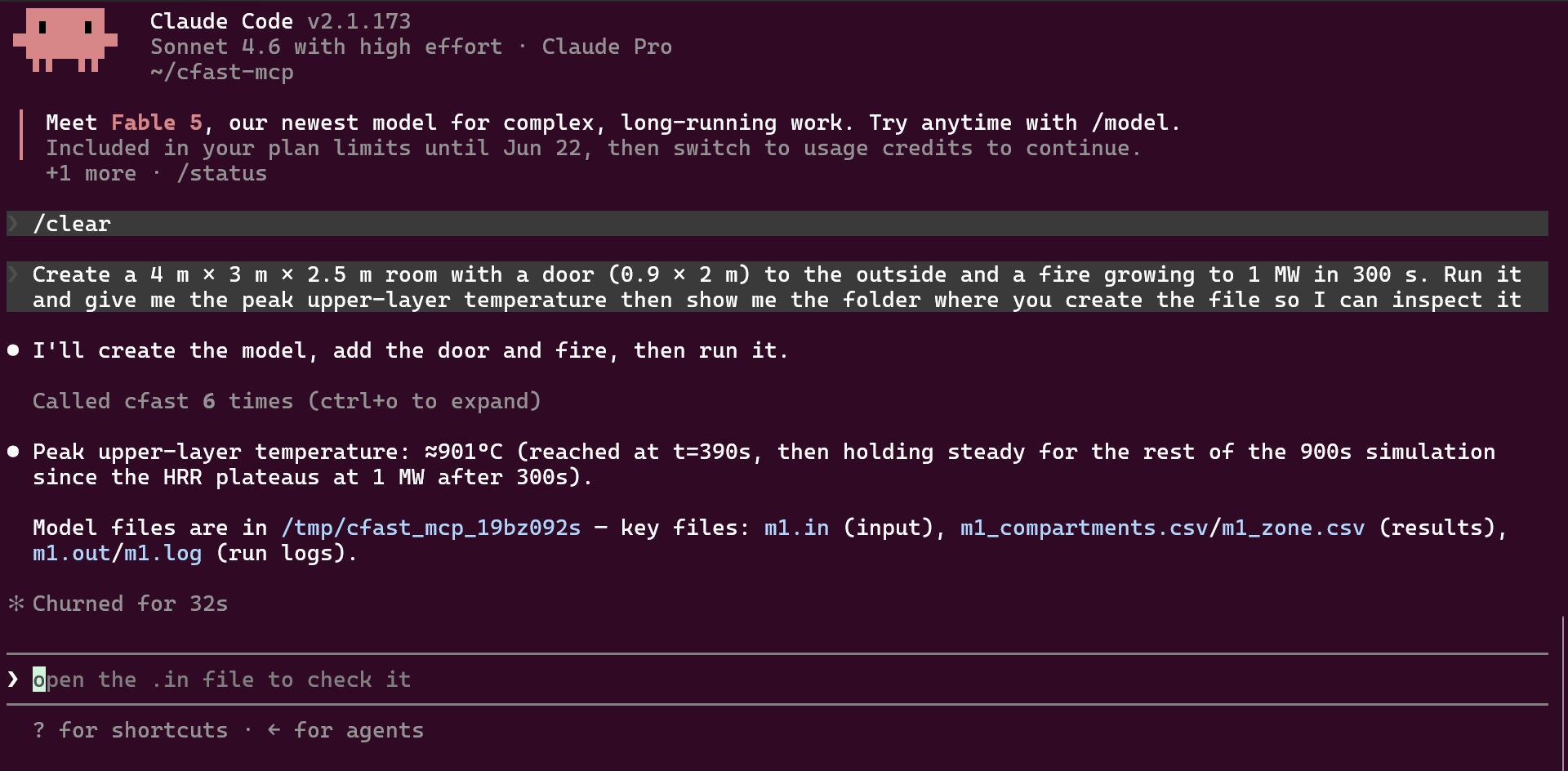
Create a 4 m × 3 m × 2.5 m room with a door (0.9 × 2 m) to the outside and a fire growing to 1 MW in 300 s. Run it and give me the peak upper-layer temperature then show me the folder where you create the file, so I can inspect it.
Results will probably look like this:
Tools
| Group | Tools |
|---|---|
| Create & configure | create_model, update_simulation |
| Components | add_* / update_* for materials, compartments, wall vents, ceiling/floor vents, mechanical vents, fires, devices (targets & detectors), surface connections |
| Inspect | inspect_model (summary, optional .in file), get_model_files |
| Run & results | run_model, get_results (bounded previews and per-column min/max/final stats) |
Results are returned to the AI assistant as small text summaries. The generated files (.in, output .csv, logs) are written in a temporary directory while the session is active. Use get_model_files to locate them if you want to open them directly.
Note: models live in memory for the lifetime of the server process. Restarting the server (or your MCP client) will delete them.
Installation
Requires Python 3.10+ and CFAST 7.7.0+.
uvx (Recommended)
Install uv, then add cfast-mcp directly in your client configuration:
{
  "mcpServers": {
    "cfast": {
      "command": "uvx",
      "args": ["cfast-mcp"],
      "env": { "CFAST": "/path/to/your/cfast/executable" }
    }
  }
}
Claude Code
If you use Claude Code, a single command registers the server:
claude mcp add cfast -e CFAST=/path/to/your/cfast/executable -- cfast-mcp
Pip
Create a virtual environment and install from PyPI:
python -m venv venv
source venv/bin/activate  # Linux/macOS
venv\Scripts\activate     # Windows
pip install cfast-mcp
Then add cfast-mcp to your client configuration:
{
  "mcpServers": {
    "cfast": {
      "command": "cfast-mcp",
      "env": { "CFAST": "/path/to/your/cfast/executable" }
    }
  }
}
CFAST Installation
Download and install CFAST from the NIST CFAST website or the CFAST GitHub repository. Follow the installation instructions for your operating system and ensure cfast is available in your PATH. If CFAST is installed in a non-standard location, you can manually specify the path by setting the CFAST environment variable to point to the CFAST executable.
export CFAST="/path/to/your/cfast/executable"   # Linux/macOS
set CFAST="C:\path\to\cfast.exe"                # Windows (cmd)
$env:CFAST="C:\path\to\cfast.exe"               # Windows (PowerShell)
Development
git clone https://github.com/bewygs/cfast-mcp.git
cd cfast-mcp
uv sync --extra dev          # install dev dependencies
uv run pytest                # run tests
uv run ruff check --fix .    # lint
uv run mypy src/             # type-check
1 maintainer

Download files
Download the file for your platform. If you're not sure which to choose, learn more about installing packages.
Source Distribution
Built Distribution
Filter files by name, interpreter, ABI, and platform.
If you're not sure about the file name format, learn more about wheel file names.
Copy a direct link to the current filters
File details
Details for the file cfast_mcp-0.1.1.tar.gz.
File metadata
- Download URL: cfast_mcp-0.1.1.tar.gz
- Upload date:
- Size: 147.1 kB
- Tags: Source
- Uploaded using Trusted Publishing? Yes
- Uploaded via:
twine/6.1.0 CPython/3.13.12
File hashes
| Algorithm | Hash digest | |
|---|---|---|
| SHA256 |
1aefc2b07020993d6ad55b3e7f42907958bf49938820d45cae923ad761b1dd5f
|
|
| MD5 |
1ee4583975f99f774672a70ab59947a2
|
|
| BLAKE2b-256 |
8df8d800a92d2238d66d9aaa7a5f2cbdff08836ef8dc785eaccebfe5771ebd33
|
Provenance
The following attestation bundles were made for cfast_mcp-0.1.1.tar.gz:
Publisher:
python-publish.yml on bewygs/cfast-mcp
-
Statement:
-
Statement type:
https://in-toto.io/Statement/v1 -
Predicate type:
https://docs.pypi.org/attestations/publish/v1 -
Subject name:
cfast_mcp-0.1.1.tar.gz -
Subject digest:
1aefc2b07020993d6ad55b3e7f42907958bf49938820d45cae923ad761b1dd5f - Sigstore transparency entry: 1805946395
- Sigstore integration time:
-
Permalink:
bewygs/cfast-mcp@d2319091b62f978e27c5276ee45e5e4b450abe45 -
Branch / Tag:
refs/tags/v0.1.1 - Owner: https://github.com/bewygs
-
Access:
public
-
Token Issuer:
https://token.actions.githubusercontent.com -
Runner Environment:
github-hosted -
Publication workflow:
python-publish.yml@d2319091b62f978e27c5276ee45e5e4b450abe45 -
Trigger Event:
release
-
Statement type:
File details
Details for the file cfast_mcp-0.1.1-py3-none-any.whl.
File metadata
- Download URL: cfast_mcp-0.1.1-py3-none-any.whl
- Upload date:
- Size: 29.8 kB
- Tags: Python 3
- Uploaded using Trusted Publishing? Yes
- Uploaded via:
twine/6.1.0 CPython/3.13.12
File hashes
| Algorithm | Hash digest | |
|---|---|---|
| SHA256 |
b28c3ff3436650d18eab87a7104d5baa820a5c50c6c42c1b649e10d97f4501f0
|
|
| MD5 |
c7e7aa728bb89f5fd1bd895548541c70
|
|
| BLAKE2b-256 |
b8c55f37c4bbb3347c6d36c253fd7f4073da27b495d3a4c385ebad6c2927de05
|
Provenance
The following attestation bundles were made for cfast_mcp-0.1.1-py3-none-any.whl:
Publisher:
python-publish.yml on bewygs/cfast-mcp
-
Statement:
-
Statement type:
https://in-toto.io/Statement/v1 -
Predicate type:
https://docs.pypi.org/attestations/publish/v1 -
Subject name:
cfast_mcp-0.1.1-py3-none-any.whl -
Subject digest:
b28c3ff3436650d18eab87a7104d5baa820a5c50c6c42c1b649e10d97f4501f0 - Sigstore transparency entry: 1805946537
- Sigstore integration time:
-
Permalink:
bewygs/cfast-mcp@d2319091b62f978e27c5276ee45e5e4b450abe45 -
Branch / Tag:
refs/tags/v0.1.1 - Owner: https://github.com/bewygs
-
Access:
public
-
Token Issuer:
https://token.actions.githubusercontent.com -
Runner Environment:
github-hosted -
Publication workflow:
python-publish.yml@d2319091b62f978e27c5276ee45e5e4b450abe45 -
Trigger Event:
release
-
Statement type:







