
cfdi-kit
Turn a folder of SAT CFDI invoices (XML) into Excel, pandas DataFrames, a monthly income / expense / VAT summary and a one-file HTML report. Everything runs on your machine; no invoice data is sent anywhere.


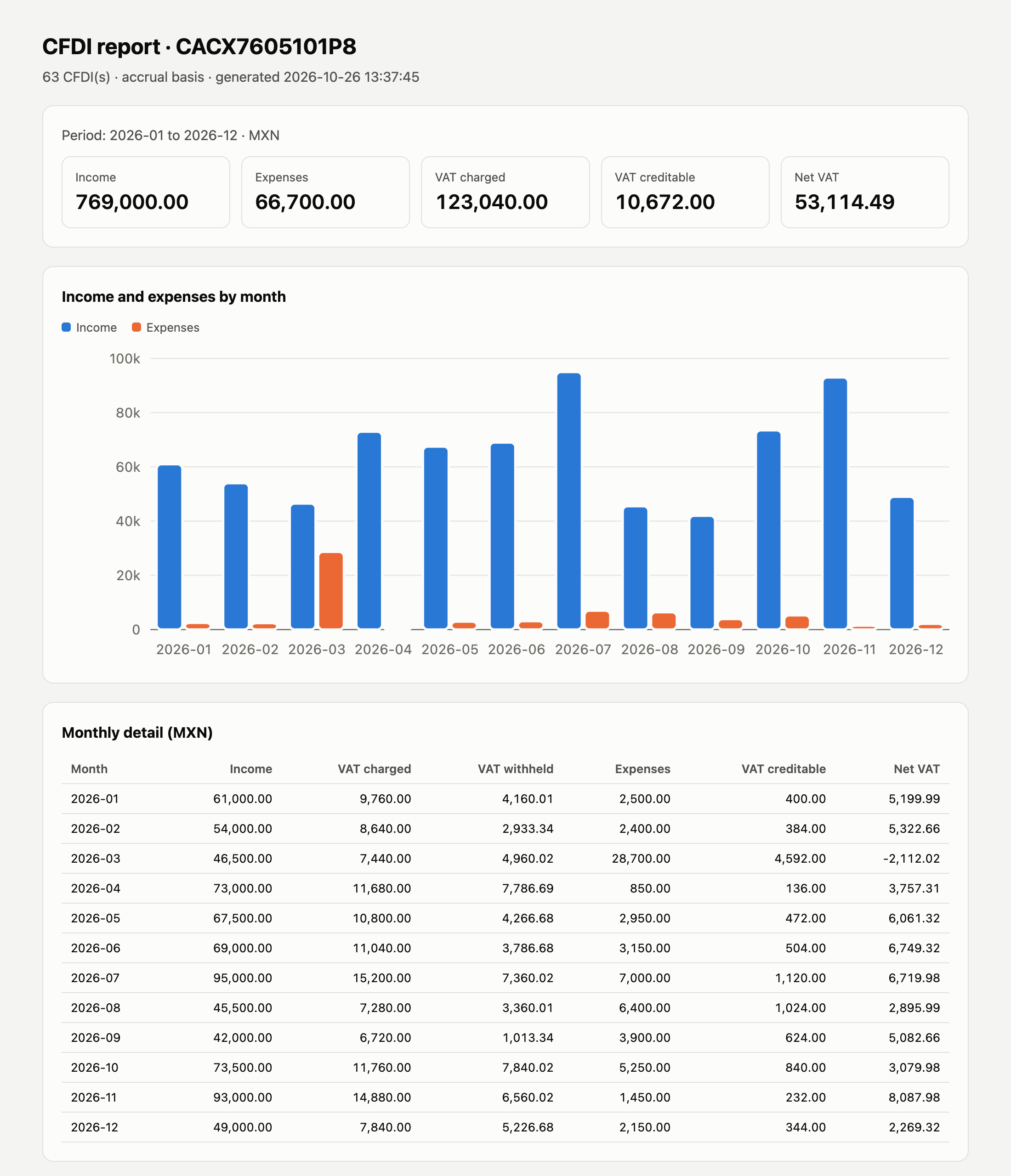
cfdi-kit report on the synthetic invoices in examples/demo.
Why
Every Mexican invoice is an XML file. Reading a month of them means opening files one by one, retyping amounts into a spreadsheet or uploading your tax data to a cloud service. cfdi-kit reads hundreds of CFDIs in a second, straight from the folder or the ZIP the SAT portal gives you, and keeps them on your computer.
Install
pip install cfdi-kit
or run it without installing, with uv:
uvx cfdi-kit --help
Requires Python 3.11+.
Quickstart
Try it on the bundled demo (a fictional freelancer, RFC CACX7605101P8, one year of invoices):
git clone https://github.com/DiegoTepichin/cfdi-kit && cd cfdi-kit
uv run cfdi-kit summary examples/demo --rfc CACX7605101P8 --basis cash
CACX7605101P8 · cash basis · MXN

  Month     Income  VAT charged  VAT withheld   Expenses  VAT creditable   Net VAT
-------  ---------  -----------  ------------  ---------  --------------  --------
2026-01  61,000.00     9,760.00      4,160.01   2,500.00          400.00  5,199.99
2026-02  26,500.00     4,240.00          0.00   2,400.00          384.00  3,856.00
2026-03  74,000.00    11,840.00      7,893.36  28,700.00        4,592.00   -645.36
...
With your own invoices:
cfdi-kit parse ~/Downloads/facturas -o facturas.xlsx --rfc YOUR_RFC   # Excel with 3 sheets
cfdi-kit summary ~/Downloads/facturas --rfc YOUR_RFC                  # monthly table
cfdi-kit report ~/Downloads/facturas --rfc YOUR_RFC -o reporte.html   # HTML report
cfdi-kit validate ~/Downloads/facturas                                # consistency checks
Every command accepts any mix of .xml files, folders (searched recursively) and .zip archives. Unreadable files are listed and skipped; repeated UUIDs are counted once.
What it reads
| Supported | |
|---|---|
| CFDI | 4.0 and 3.3 (types I, E, T, N and P) |
| Complements | Timbre Fiscal Digital 1.1, Pagos 2.0 and 1.0, Nómina 1.2 |
| Money | Decimal end to end; foreign currency converted with the invoice or payment exchange rate |
CFDI 3.2 and earlier are reported as unsupported.
Commands
parse: Excel or CSV
cfdi-kit parse PATHS -o out.xlsx [--rfc RFC] writes three sheets: invoices (one row per CFDI, with taxes, totals in MXN and SAT catalog labels), line_items and payments (each invoice settled by a payment complement). With -o out.csv it writes the invoices table only. --rfc adds a direction column (issued / received). Invoice text comes from third parties, so Excel stores it as plain text, never as a formula; in CSV, text starting with =, +, -, @, a tab or a line break gets a leading apostrophe.
summary: income, expenses and VAT per month
cfdi-kit summary PATHS --rfc RFC [--basis accrual|cash] [-o file]
- accrual (default): every invoice counts on its issue date.
- cash:
PUEinvoices count on their issue date;PPDinvoices count when a payment complement settles them, on the payment date. Pagos 2.0 tax breakdowns are used as written; Pagos 1.0 payments are prorated against the original invoice when it is in the folder.
Credit notes (E) subtract. Payroll (N) is reported in separate columns. Net VAT is VAT charged, minus VAT withheld by your clients, minus creditable VAT.
report: one HTML file
cfdi-kit report PATHS --rfc RFC [--basis] [-o report.html] writes a single file with no scripts or external assets: totals, an income vs expense chart, the monthly table, top clients and suppliers, PPD invoices with an open balance and every validation issue. It follows the system's light or dark theme.
validate: catch errors before they reach your books
$ cfdi-kit validate broken.xml
error    total-mismatch                broken.xml  Total is 99999.99 but SubTotal - Descuento + taxes is 34796.65
1 error(s), 0 warning(s)
Checks: missing stamp, total / subtotal / discount that don't add up (one cent of rounding per line allowed), invoice vs line-item tax totals, malformed RFCs, PPD invoices with a payment form other than 99, foreign currency without an exchange rate and duplicate UUIDs. The command exits with status 1 when it finds errors, so you can use it in scripts.
risk: check suppliers against the SAT 69-B list
The SAT publishes the taxpayers it presumes issue invoices for non-existent operations (article 69-B of the Código Fiscal de la Federación). Download the file once and check your suppliers against it, offline:
curl -o Listado_completo_69-B.csv http://omawww.sat.gob.mx/cifras_sat/Documents/Listado_completo_69-B.csv
cfdi-kit risk PATHS --list Listado_completo_69-B.csv [--rfc RFC]
$ cfdi-kit risk examples/demo --list examples/demo-69b.csv --rfc CACX7605101P8
Definitivo           KIJ0906199R1   2026-01-04  AF67D461-E416-3207-D094-499602F0EE99      1,044.00 MXN  KERNEL INDUSTIA JUGUETERA
Presunto             MAG041126GT8   2026-02-17  D1711CBD-2106-119E-C40D-31B5397A7623        522.00 MXN  MINERA AGUILAR
...
29 match(es) against the 69-B list dated 2025-12-31, 18 presumed or definitive
examples/demo-69b.csv is a synthetic list for the demo invoices, not the SAT's. With the real file (14,234 rows, dated 31 December 2025), the same 63 demo invoices are checked in about 0.3 seconds.
- The command reads one local file and your invoices; it never goes online. Download the list yourself and note its date: it is printed with every result.
- Each invoice whose issuer is on the list is shown with the SAT's status:
Definitivo,Presunto,DesvirtuadoorSentencia Favorable. With--rfc, only invoices you received are checked. - The SAT file can list one RFC in several rows (separate proceedings, for example
DefinitivoandSentencia Favorable). The rows are not in chronological order, so a result shows the most serious one and a later row never clears an earlier one. - The command exits with status 1 if any match is
PresuntoorDefinitivo. report --risk-list FILEadds the same table to the HTML report.
A match is a coincidence with a public list, not an accusation. The list changes, taxpayers can be cleared, and the tool does not replace an accountant.
Python API
from pathlib import Path

import cfdi_kit

result = cfdi_kit.load(["examples/demo"])  # files, folders or ZIPs
print(len(result.cfdis), "invoices,", len(result.errors), "errors")

cfdi = result.cfdis[0]
cfdi.uuid, cfdi.issuer.rfc, cfdi.total, cfdi.iva_transferred  # typed, Decimal

invoices = cfdi_kit.invoices_frame(result.cfdis, rfc="CACX7605101P8")  # pandas
invoices.groupby("direction")["total_mxn"].sum()

summary = cfdi_kit.summarize(result.cfdis, "CACX7605101P8", cfdi_kit.Basis.CASH)
cfdi_kit.summary_frame(summary)

issues = cfdi_kit.validate(result.cfdis)

snapshot = cfdi_kit.load_snapshot(Path("Listado_completo_69-B.csv"))  # your own download
matches = cfdi_kit.find_matches(result.cfdis, snapshot, rfc="CACX7605101P8")
Also available: parse_file, parse_bytes, concepts_frame, payments_frame, to_csv and to_excel. The package ships type hints (py.typed).
Limits
- It reads the XML only. It does not verify the digital seals or ask the SAT whether an invoice was cancelled; remove cancelled invoices before summarizing.
- The summary is an aid to review a period. It is not a tax return and does not replace an accountant.
- It does not issue, stamp, cancel or download invoices, and it does not download the 69-B list for you.
Development
uv sync
uv run pytest
uv run ruff check . && uv run ruff format --check . && uv run mypy .
uv run python examples/generate_demo.py examples/demo   # regenerate the demo invoices
The test fixtures and demo invoices are synthetic and use the SAT's public test RFCs. See CONTRIBUTING.md. A CFDI that fails to parse is the most useful bug report you can send: anonymize it and open an issue.
License
MIT © Diego Tepichin
1 maintainer

Metadata
1 maintainer
Release files for cfdi-kit 1.1.0
For a detailed explanation of source distributions (sdists) and built distributions (wheels), please see the package formats documentation.
Source distribution (sdist)
| File | Size | Uploaded | Provenance | Actions |
|---|---|---|---|---|
| cfdi_kit-1.1.0.tar.gz | 49.1 kB | Without provenance | Details for cfdi_kit-1.1.0.tar.gz |
Built distribution (wheel)
| File | Interpreter | ABI | Platform | Actions Reset |
|---|---|---|---|---|
| cfdi_kit-1.1.0-py3-none-any.whl | Python 3 | none | any | Details for cfdi_kit-1.1.0-py3-none-any.whl |
Total release size: 84.1 kB
Release files / cfdi_kit-1.1.0.tar.gz
| Download URL | cfdi_kit-1.1.0.tar.gz |
|---|---|
| Size | 49.1 kB |
| Tags | Source |
|
SHA-256 checksum How to use checksums |
3b14386f38a5ff6628268143b02ebc1cc11bc1dfda98d75ee12d227ad31bf8bf
|
|
BLAKE2b-256 checksum How to use checksums |
3fe3dce0d147184f4eff1d59626af1d114d3c600d0f022f305898c62077e44fe
|
| Upload date | |
|
Uploaded using Trusted Publishing? What is trusted publishing? |
No |
| Uploaded via |
uv/0.12.18 {"installer":{"name":"uv","version":"0.12.18","subcommand":["publish"]},"python":null,"implementation":{"name":null,"version":null},"distro":{"name":"macOS","version":null,"id":null,"libc":null},"system":{"name":null,"release":null},"cpu":null,"openssl_version":null,"setuptools_version":null,"rustc_version":null,"ci":null}
|
Release files / cfdi_kit-1.1.0-py3-none-any.whl
| Download URL | cfdi_kit-1.1.0-py3-none-any.whl |
|---|---|
| Size | 35.0 kB |
| Tags | Python 3 |
|
SHA-256 checksum How to use checksums |
4147d70d6ae93bdcd2ab40ef8ca4347f0bc4e1fa0e1287fb2ca09a43577aaa6d
|
|
BLAKE2b-256 checksum How to use checksums |
c2571ad66a97f9214882613c9bda12db8cd6e6c5de2a9dec2eb84a28000198ea
|
| Upload date | |
|
Uploaded using Trusted Publishing? What is trusted publishing? |
No |
| Uploaded via |
uv/0.12.18 {"installer":{"name":"uv","version":"0.12.18","subcommand":["publish"]},"python":null,"implementation":{"name":null,"version":null},"distro":{"name":"macOS","version":null,"id":null,"libc":null},"system":{"name":null,"release":null},"cpu":null,"openssl_version":null,"setuptools_version":null,"rustc_version":null,"ci":null}
|
Security for cfdi-kit 1.1.0
Provenance
Provenance describes where a file came from. On PyPI, provenance is shared via attestations, which provide a verifiable record of the build or publishing details. View details, limitations and caveats.
No provenance found
None of the files in this release were uploaded with provenance metadata.
A note on package security
PyPI is a repository for distributing packages, not a service for auditing them. While third-party security researchers and our staff do their best to detect and remove malicious packages, PyPI cannot guarantee the quality, security or suitability of any given package.
To learn more about protecting yourself from malicious actors, visit our package security documentation.













