
Please consider getting the installer from my Gumroad account as this allows me to more easily announce updates and track the userbase.







*As of Sept. 2025 Pymel hasn't been updated to work with Maya 2026. Users will get a documentation error, which can be manually fixed. The directions for copying and renaming the documents can be found here
cg3d-maya-casc
Easily bridge data between Maya and Cascadeur with this Maya Module.
Installation
Notes: Python 3 is required for Maya 2022.
The installation can be found under documents\maya\modules\
If the tool gives you issues you can open the cascadeur.mod file in a text editor and replace the + to -, to avoid loading the tool. You can also simply delete the cascadeur.mod file and folder.
Drag & Drop
The easiest way to install this application is to ...
- Click this File Link > maya_casc_installer.py < to download the installation python file.
- Drag-n-drop it from the browser into a maya-viewport. This will automatically install all the dependencies without requiring admin privileges into your user-directory.
- Hit 'Install'. If any pop-ups appear, say "yes" or "allow". The installer will likely take 20+ seconds.
- when closing Maya for the first time after installing the scripts you'll likely see a question like this:
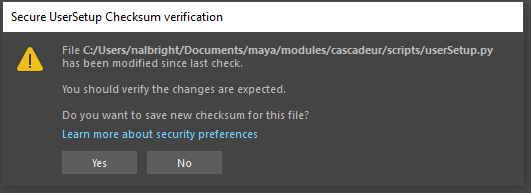
(you can say 'yes' to the question)
Revisions
1.6.3
'Dynamic' now trims off branches of a hierarchy that don't lead to any exportable content.
1.6.2
Fixed non-dynamic sets failing to export
Non-dynamic sets no longer automatically include children of set members.
1.6.1
Fixed bug with converting textures not working
Fixed bug where exports from Cascadeur would fail if export set included a namespace
Added a command to create a new HIK character definition from a proxy HIK character
1.6.0
Cascadeur now includes confirmation boxes, when there are multiple conflicts on how to send data to maya
Cascadeur now has options for creating and managing export sets
Tools in Maya and Cascadeur for syncing Export IDs between applications
Suppport for multiple running instances of Maya
Sped up Communication from Maya to Cascadeur
HIK Characters can now be associated with existing export sets
Fixed major bug in 1.5.x which could cause new characters to be added to Maya instead of updating existing data
1.5.0
New tools for cloning a rigged character to act as a proxy with Cascadeur
Support for multiple textures per mesh
Plug-in now uses Cascadeur's pycsc wrapper
1.1.3
Updated to support Maya 2025
1.1.2
Updated to support Cascadeur 2024.1 Updated package dependencies to be version specific
1.1.0
Updated the installer to support upgrading if a previous install is found.
Added a preferences menu.
Added support for exporting sparse key data.
Fixed textures not being sent to Cascadeur in certain situations.
1.0.1
Bug fixes for Maya 2022.
1 maintainer

Release files for cg3d-maya-casc 1.6.3
For a detailed explanation of source distributions (sdists) and built distributions (wheels), please see the package formats documentation.
Source distribution (sdist)
| File | Size | Uploaded | |
|---|---|---|---|
| cg3d_maya_casc-1.6.3.tar.gz | 5.2 MB | Details |
Built distribution (wheel)
| File | Interpreter | ABI | Platform | Reset |
|---|---|---|---|---|
| cg3d_maya_casc-1.6.3-py3-none-any.whl | Python 3 | none | any | Details |
Total release size: 5.4 MB
Release files / cg3d_maya_casc-1.6.3.tar.gz
| Download URL | cg3d_maya_casc-1.6.3.tar.gz |
|---|---|
| Size | 5.2 MB |
| Tags | Source |
|
SHA-256 checksum How to use checksums |
8ef4361fba4ada57ce29ab3d0ef0d1d84884859a70205db666047837433bb2d6
|
|
BLAKE2b-256 checksum How to use checksums |
ac57a101ce58dea44e9a7d5ca9d1a8829746c5de036e0b7ccc05a48b1b6157c7
|
| Upload date | |
|
Uploaded using Trusted Publishing? What is trusted publishing? |
No |
| Uploaded via |
twine/6.1.0 CPython/3.13.14
|
Release files / cg3d_maya_casc-1.6.3-py3-none-any.whl
| Download URL | cg3d_maya_casc-1.6.3-py3-none-any.whl |
|---|---|
| Size | 130.8 kB |
| Tags | Python 3 |
|
SHA-256 checksum How to use checksums |
d93bc122987f878140a680ab6c2116934b1e1574230105b96a03fadf29670642
|
|
BLAKE2b-256 checksum How to use checksums |
2d1d8393aae57c0a29bf7acea755567995216bc565d48df167b53b3a88922e13
|
| Upload date | |
|
Uploaded using Trusted Publishing? What is trusted publishing? |
No |
| Uploaded via |
twine/6.1.0 CPython/3.13.14
|














