
Conditional Game Data Analyse Tool (CGAT)
This package contains a simple csv data analyse GUI which I created for a friend of mine to help him with his data analysis.




Installation
Installation
Install using the python package index (PyPi)
OS X & Linux
pip install cgdat
Windows
pip install cgdat
Development setup
If you want to manually install the python package please fork from github and run the following commands:
python setup.py build
python setup.py develop
python setup.py install
A overview of the CGDAT GUI.
Usage
This package can both be imported as a python package or run as a stand alone gui (see fig 1). To import the python package use import cgdat. To use as a stand alone package run the cgdat-gui cmd.
Tool interface
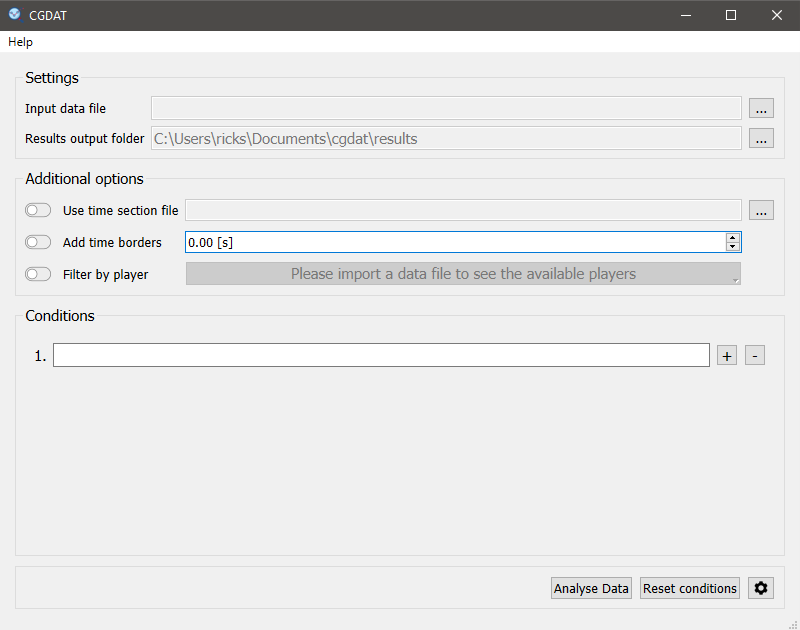
Fig 1: A overview of the CGDAT GUI.
Functions
This repository can be used to perform a simple csv game data filtering. The tool can filter a input data file based on:
- Conditions:
Example: Speed > 10 & Acceleration < 5
- A time section file:
A file containing a Start Time and End Time column specifying the sections where you want to apply the condition filter.
- Player name:
In the gui you can specify for which players you want to conduct the analysis. For this option to work the input_data.csv file needs to contain a Name column.
Further you can add also add a safety padding to the data filtering. Meaning that the program will also include a number of samples before and after the specified conditions are met.
Console commands
This package also installs some additional console commands:
cgdat-gui - This will launch the CGDAT gui.
cgdat-shortcut - This will create a shortcut to launch the GUI on your desktop folder.
Further documentation
Additional documentation can be loaded in the GUI by clicking the documentation option in the help menu or pressing the F2 shortcut.
Additional information
Licence
This tool is licensed under a MIT license.
Meta
Rick Staa - github page
Contributing
Fork it (<https://github.com/rickstaa/CGDAT>)
Create your feature branch (git checkout -b feature/fooBar)
Commit your changes (git commit -am ‘Add some fooBar’)
Push to the branch (git push origin feature/fooBar)
Create a new Pull Request
Contributors
Created by Rick Staa
Maintained by Wesley Bosman (wesleybosmann@gmail.com)
Credits
CDAT icon created by FreePis from www.flaticon.com.
1 maintainer

Metadata
1 maintainer
Release files for cgdat 2.4.2
For a detailed explanation of source distributions (sdists) and built distributions (wheels), please see the package formats documentation.
Source distribution (sdist)
| File | Size | Uploaded | Provenance | |
|---|---|---|---|---|
| cgdat-2.4.2.tar.gz | 7.5 MB | Without provenance | Details |
Built distribution (wheel)
| File | Interpreter | ABI | Platform | Reset |
|---|---|---|---|---|
| cgdat-2.4.2-py3-none-any.whl | Python 3 | none | any | Details |
Total release size: 15.1 MB
Release files / cgdat-2.4.2.tar.gz
| Download URL | cgdat-2.4.2.tar.gz |
|---|---|
| Size | 7.5 MB |
| Tags | Source |
|
SHA-256 checksum How to use checksums |
c87823af2d08a7a54ff740d4723f5e43bb101f905201cdabcc5709eb65590cdf
|
|
BLAKE2b-256 checksum How to use checksums |
2d54aff360269e8b42797f111fc7acc92bbee51d172b046dbed4c4c31a4909f0
|
| Upload date | |
|
Uploaded using Trusted Publishing? What is trusted publishing? |
No |
| Uploaded via |
twine/3.1.1 pkginfo/1.5.0.1 requests/2.22.0 setuptools/41.4.0 requests-toolbelt/0.9.1 tqdm/4.36.1 CPython/3.7.4
|
Release files / cgdat-2.4.2-py3-none-any.whl
| Download URL | cgdat-2.4.2-py3-none-any.whl |
|---|---|
| Size | 7.6 MB |
| Tags | Python 3 |
|
SHA-256 checksum How to use checksums |
7a356dc9cf9b1a94faaf3a1ea5db5cbdbe13b63c154028ba80268d57e80f35e1
|
|
BLAKE2b-256 checksum How to use checksums |
7ce5f98269de2cd85d79050cb5d5af04b8d76f583ca0af0bdf0d0e141b72fd23
|
| Upload date | |
|
Uploaded using Trusted Publishing? What is trusted publishing? |
No |
| Uploaded via |
twine/3.1.1 pkginfo/1.5.0.1 requests/2.22.0 setuptools/41.4.0 requests-toolbelt/0.9.1 tqdm/4.36.1 CPython/3.7.4
|
Security for cgdat 2.4.2
Provenance
Provenance describes where a file came from. On PyPI, provenance is shared via attestations, which provide a verifiable record of the build or publishing details. View details, limitations and caveats.
No provenance found
None of the files in this release were uploaded with provenance metadata.
A note on package security
PyPI is a repository for distributing packages, not a service for auditing them. While third-party security researchers and our staff do their best to detect and remove malicious packages, PyPI cannot guarantee the quality, security or suitability of any given package.
To learn more about protecting yourself from malicious actors, visit our package security documentation.














