


 UK Capital Gains Calculator
Use cgt-calc to calculate UK capital gains from your investment transaction history and generate a detailed report from a supported broker export.
Supported sources include Charles Schwab, Freetrade, Hargreaves Lansdown, Interactive Brokers, Morgan Stanley, Revolut, Sharesight, Trading 212, Vanguard, or a custom RAW format. Check your broker's guide before starting, especially for employer shares, because not every award export or transaction type is supported.
See the full documentation for installation, broker export guides, offshore funds (ERI), extra data and options, and Docker.
🚀 Quick Start
Install with uv (or pipx/pip) and generate a report for a tax year:
uv tool install cgt-calc
cgt-calc --year 2025 --schwab-file schwab_transactions.csv
Replace the Schwab option with the one for your broker. LaTeX is needed to create the PDF report. See Installation, Brokers, and Generate a report for the complete steps.
What cgt-calc calculates
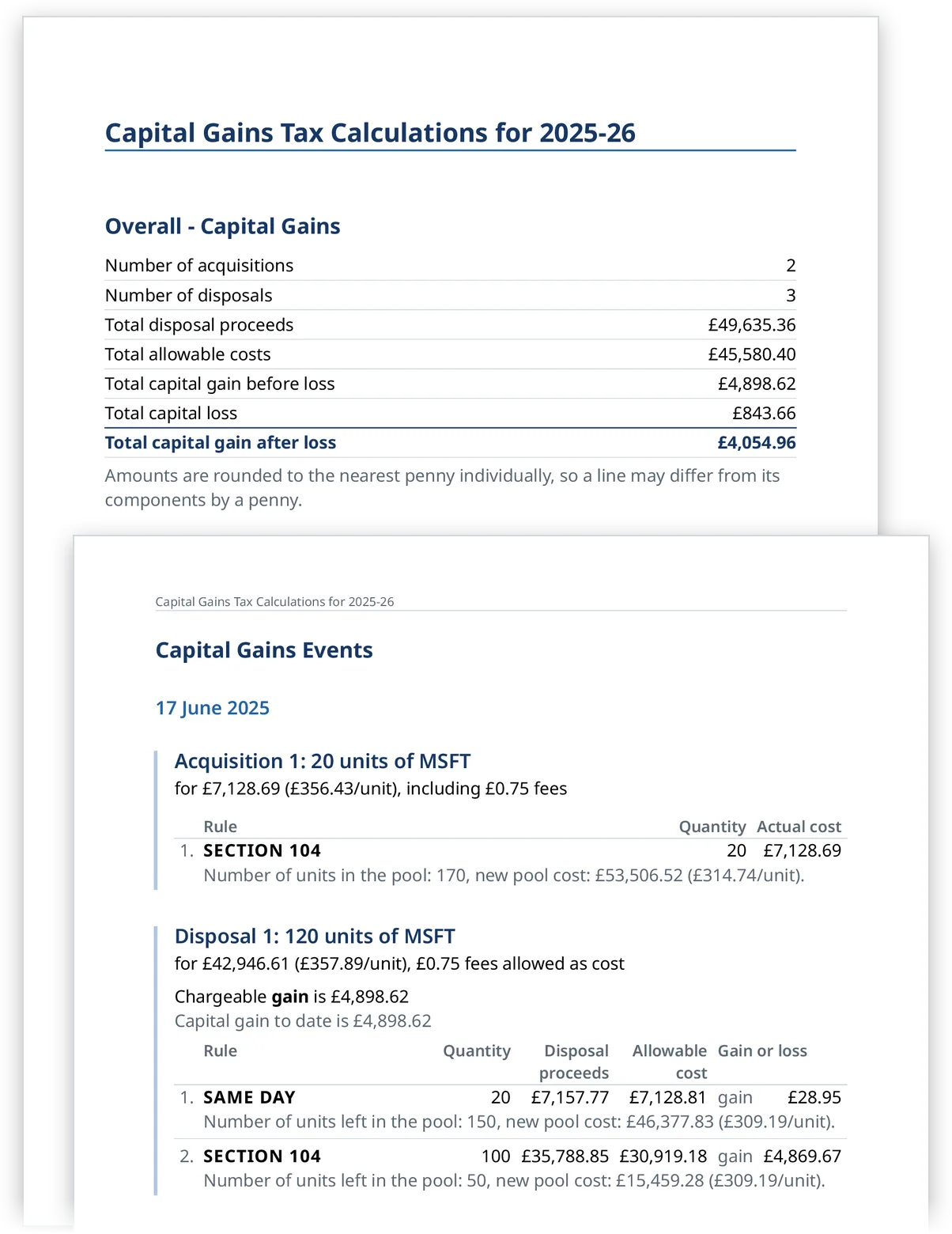
For supported transactions, cgt-calc calculates capital gains in GBP using the UK same-day, 30-day ("bed and breakfast") and Section 104 holding rules. The terminal summary and detailed PDF report show Disposal proceeds (sale amounts or values for other disposals), Allowable costs (costs deducted when calculating gains), gains, losses, dividends and interest. See Generate a report for how to create and check them.
For supported tax years, cgt-calc also provides tax estimates, which use your income if you give it. cgt-calc covers only the transactions you supply, does not work out your final tax bill and does not submit a return. Check your broker's limitations and the offshore funds limitations before relying on the result.
📊 Example Report
This compact 2025/26 example shows foreign-currency transactions, how sales are matched with shares acquired at different times, gains and losses, a dividend with overseas tax, and cash interest.
🤝 Contributing
Contributions are welcome! If you find a bug, have feature ideas, or want to add support for more brokers, please open an issue or pull request. See the development guide.
⚠️ Disclaimer
This tool is a calculation aid, not tax advice. It calculates capital gains figures from the transaction history you provide and is designed to apply the UK tax rules it supports, following the legislation and published HMRC guidance. Its authors and contributors are not acting as your tax advisers, the results may contain errors, and tax rules change.
You are responsible for providing complete data and checking the figures against your records and current HMRC guidance before using them in a tax return. For unusual or uncertain circumstances, consider consulting a suitably qualified tax adviser. The software is provided "as is", without warranty of any kind; see the MIT License.
1 maintainer

Metadata
1 maintainer
Release files for cgt-calc 3.0.0
For a detailed explanation of source distributions (sdists) and built distributions (wheels), please see the package formats documentation.
Source distribution (sdist)
| File | Size | Uploaded | Provenance | Actions |
|---|---|---|---|---|
| cgt_calc-3.0.0.tar.gz | 533.6 kB | Without provenance | Details for cgt_calc-3.0.0.tar.gz |
Built distribution (wheel)
| File | Interpreter | ABI | Platform | Actions Reset |
|---|---|---|---|---|
| cgt_calc-3.0.0-py3-none-any.whl | Python 3 | none | any | Details for cgt_calc-3.0.0-py3-none-any.whl |
Total release size: 1.1 MB
Release files / cgt_calc-3.0.0.tar.gz
| Download URL | cgt_calc-3.0.0.tar.gz |
|---|---|
| Size | 533.6 kB |
| Tags | Source |
|
SHA-256 checksum How to use checksums |
573a7ff81e633573eff7d4a5327ca290dee756da959c7324fdf8f949f39130c5
|
|
BLAKE2b-256 checksum How to use checksums |
0022877f824f31c4ed7bb282f82244b6e5f678e2cfe8b7ce0082782e1e263e6a
|
| Upload date | |
|
Uploaded using Trusted Publishing? What is trusted publishing? |
Yes |
| Uploaded via |
uv/0.13.6 {"installer":{"name":"uv","version":"0.13.6","subcommand":["publish"]},"python":null,"implementation":{"name":null,"version":null},"distro":{"name":"Ubuntu","version":"26.04","id":"resolute","libc":null},"system":{"name":null,"release":null},"cpu":null,"openssl_version":null,"setuptools_version":null,"rustc_version":null,"ci":true}
|
Release files / cgt_calc-3.0.0-py3-none-any.whl
| Download URL | cgt_calc-3.0.0-py3-none-any.whl |
|---|---|
| Size | 587.2 kB |
| Tags | Python 3 |
|
SHA-256 checksum How to use checksums |
4d73d308b15ba9495942f59d2d938ebc98d5634f953d6498831a31b50ed5b68b
|
|
BLAKE2b-256 checksum How to use checksums |
1271523d2cbe74179f03497b4709716cf1c0a60003aef9425f4d19f610df26f6
|
| Upload date | |
|
Uploaded using Trusted Publishing? What is trusted publishing? |
Yes |
| Uploaded via |
uv/0.13.6 {"installer":{"name":"uv","version":"0.13.6","subcommand":["publish"]},"python":null,"implementation":{"name":null,"version":null},"distro":{"name":"Ubuntu","version":"26.04","id":"resolute","libc":null},"system":{"name":null,"release":null},"cpu":null,"openssl_version":null,"setuptools_version":null,"rustc_version":null,"ci":true}
|
Security for cgt-calc 3.0.0
Provenance
Provenance describes where a file came from. On PyPI, provenance is shared via attestations, which provide a verifiable record of the build or publishing details. View details, limitations and caveats.
No provenance found
None of the files in this release were uploaded with provenance metadata.
A note on package security
PyPI is a repository for distributing packages, not a service for auditing them. While third-party security researchers and our staff do their best to detect and remove malicious packages, PyPI cannot guarantee the quality, security or suitability of any given package.
To learn more about protecting yourself from malicious actors, visit our package security documentation.














