
Chakra MCP Server



A native integration with Anthropic's Model Context Protocol (MCP). Allows you to interact with your database and subscribed data shares using natural language.
Features
- Natural Language Queries: Query your database using natural language.
- Data Share Interactions: Interact with subscribed data shares. For example, if you have subscribed to a financial data share, you can ask questions like "What is the stock price of Tesla?"
- Database Management: Create, update, and delete tables.
Demo
https://github.com/user-attachments/assets/0d1b3588-4dec-4fae-8396-d1794177a23c
Prerequisites
- Python 3.11+
- uv. On MacOS, you can install it using Homebrew:
brew install uv. - Claude Desktop
- Chakra Account - sign up here
Finding your DB Session Key
- Login to the Chakra Console
- Select Settings
- Navigate to the releveant database and copy the DB Session Key (not the access key or secret access key)
https://github.com/user-attachments/assets/9f1c1ab8-cb87-42a1-8627-184617bbb7d7
Installation
Automated Using OpenTools (Easier)
Install OpenTools prerequisites.
Then run:
npx opentools@latest i chakra
Manual Setup (More Work)
Add the following to your claude_desktop_config.json file:
- On MacOS:
~/Library/Application\ Support/Claude/claude_desktop_config.json - On Windows:
%APPDATA%/Claude/claude_desktop_config.json
{
  "mcpServers": {
    "chakra": {
      "command": "uvx",
      "args": ["chakra-mcp"],
      "env": {
        "db_session_key": "YOUR_DB_SESSION_KEY"
      }
    }
  }
}
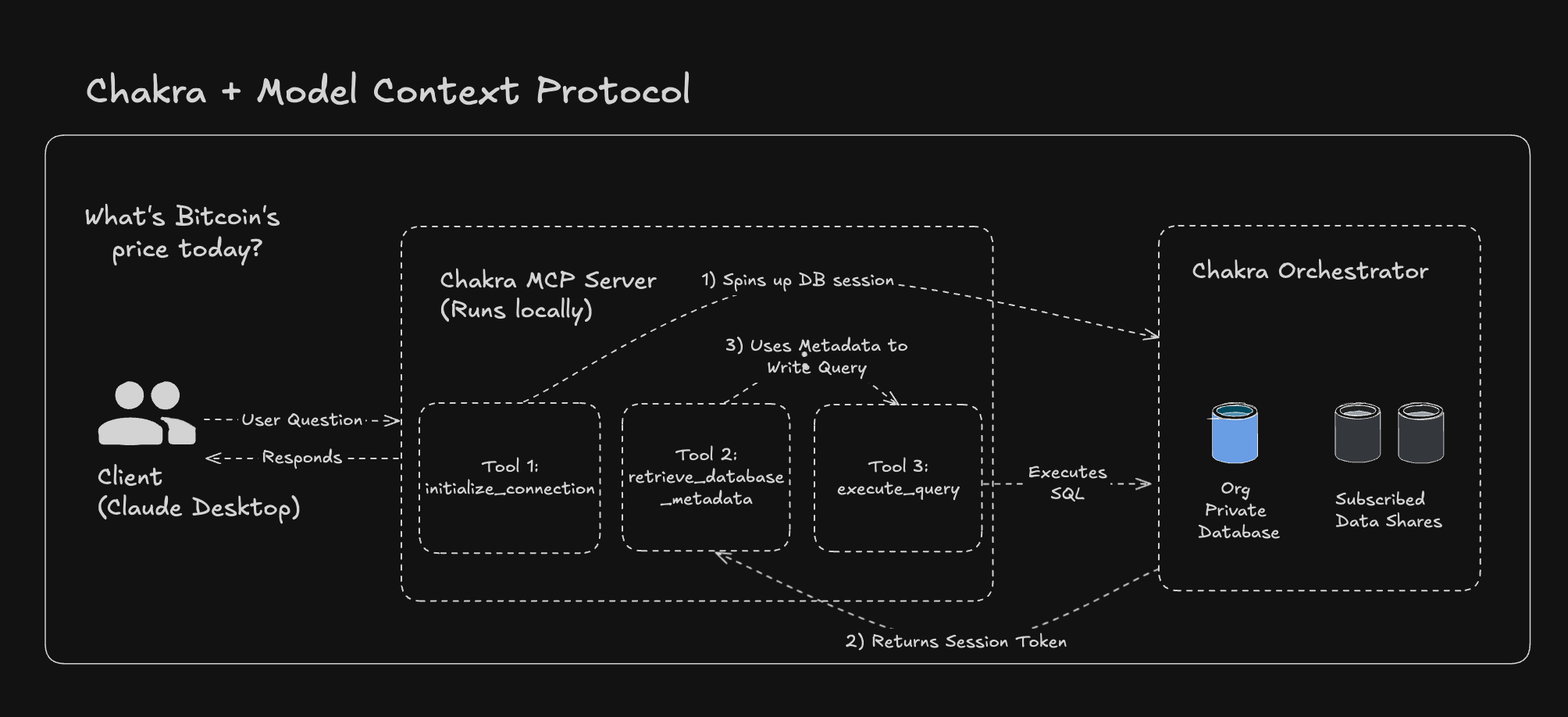
Architecture
Disclaimers
- MCP is extremely early. The experience in Claude Desktop is suboptimal - every time you use the server, you have to grant access explicitly. This is a design decision on Anthropic's part and is not yet configurable.
- Setup is rough around the edges. We have worked closely with the folks at OpenTools to make this as seamless as possible, but there is room for improvement. We are looking forward to an MCP GUI experience in the future, but for now, users must use the command-line.
- Today, the server runs on the user's local machine. Anthropic's roadmap includes a hosted server option, which we will support. This will make authentication, setup, and performance much better.
License
MIT License - see LICENSE file for details.
Support
For support and questions, please open an issue in the GitHub repository or reach out to us on Discord.


Release files for chakra-mcp 0.2.1
For a detailed explanation of source distributions (sdists) and built distributions (wheels), please see the package formats documentation.
Source distribution (sdist)
| File | Size | Uploaded | |
|---|---|---|---|
| chakra_mcp-0.2.1.tar.gz | 25.1 kB | Details |
Built distribution (wheel)
| File | Interpreter | ABI | Platform | Reset |
|---|---|---|---|---|
| chakra_mcp-0.2.1-py3-none-any.whl | Python 3 | none | any | Details |
Total release size: 48.7 kB
Release files / chakra_mcp-0.2.1.tar.gz
| Download URL | chakra_mcp-0.2.1.tar.gz |
|---|---|
| Size | 25.1 kB |
| Tags | Source |
|
SHA-256 checksum How to use checksums |
5edcf48e9337a31bbc9a8101476fd2aa328ca10bcfc186356f1e8acbad341488
|
|
BLAKE2b-256 checksum How to use checksums |
a992f5e0aaceb1b5bf764fc12b9fb942ca80dcda080772e3df6f54eeca131a4d
|
| Upload date | |
|
Uploaded using Trusted Publishing? What is trusted publishing? |
No |
| Uploaded via |
uv/0.6.2
|
Release files / chakra_mcp-0.2.1-py3-none-any.whl
| Download URL | chakra_mcp-0.2.1-py3-none-any.whl |
|---|---|
| Size | 23.6 kB |
| Tags | Python 3 |
|
SHA-256 checksum How to use checksums |
0d2bd49f4ae4a329deb52f3b990b2f2ba6b35fcbae4087b3d4ec7471a70f50d4
|
|
BLAKE2b-256 checksum How to use checksums |
d616a64fc4e2a1f95ae2f0c3d609782535a3fc374c17451a8fe0d30ae81cd572
|
| Upload date | |
|
Uploaded using Trusted Publishing? What is trusted publishing? |
No |
| Uploaded via |
uv/0.6.2
|














