
A batteries-included CLI UI kit on top of Rich

Project description

A batteries-included CLI UI kit on top of Rich







A batteries-included CLI UI kit built on top of Rich. ChalkBox provides consistent, themed, and composable components for building beautiful command-line interfaces with fail-safe defaults.
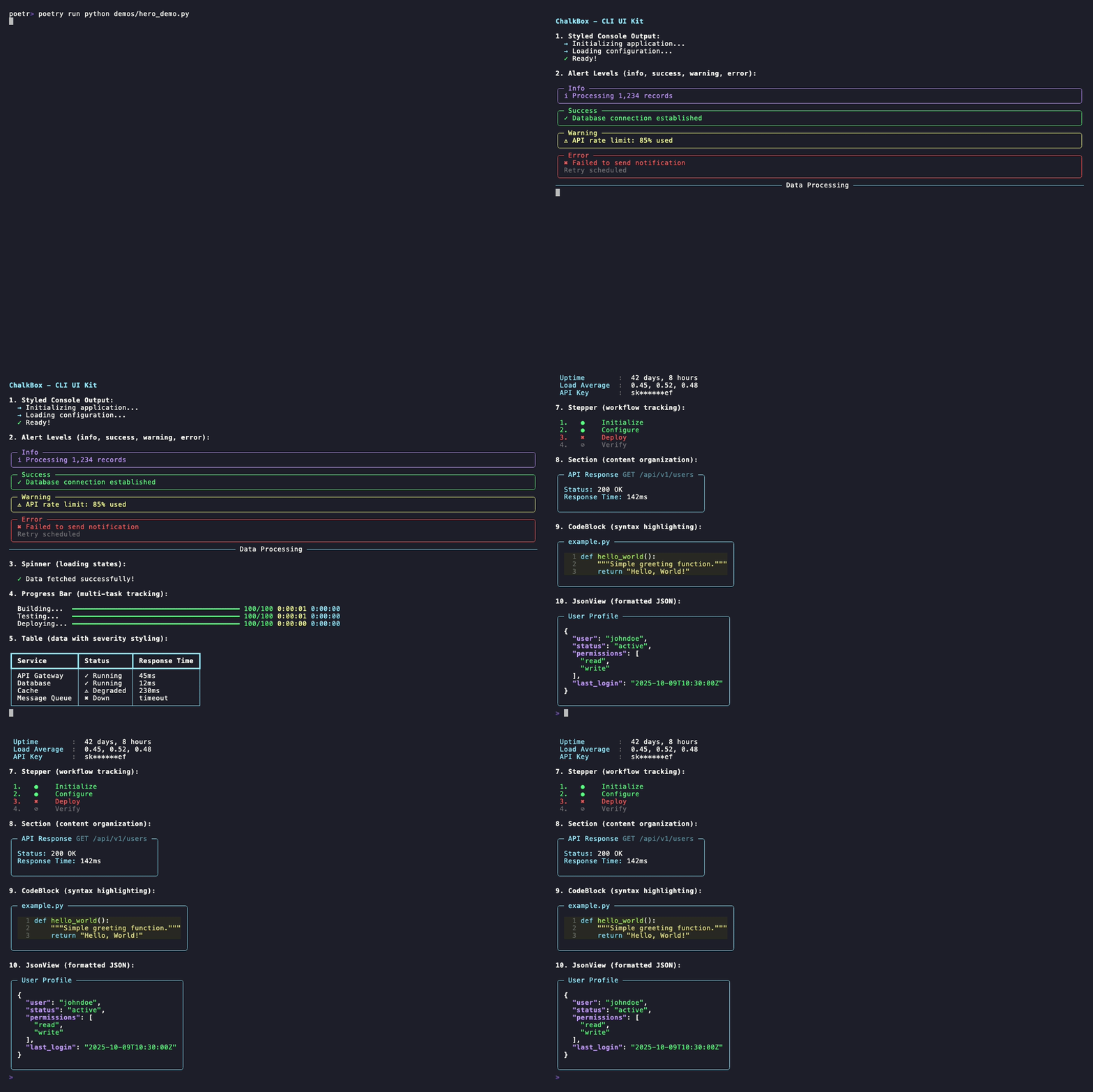
Why ChalkBox?
ChalkBox = Rich + Batteries Included + Fail-Safe + Smart Defaults
While Rich provides excellent terminal primitives, ChalkBox gives you production-ready components with graceful error handling, universal compatibility, and beautiful defaults out of the box.
Installation
pip install chalkbox
Quick Start
from chalkbox import get_console, Spinner, Alert, Table
import time

console = get_console()

# Spinner with success/error states
with Spinner("Loading data") as spinner:
    time.sleep(2)
    spinner.success("Data loaded!")

# Severity-based alerts (6 levels: debug, info, success, warning, error, critical)
console.print(Alert.debug("Verbose mode enabled"))
console.print(Alert.info("Processing 1,234 records"))
console.print(Alert.success("Deployment complete"))
console.print(Alert.warning("API rate limit: 850/1000"))
console.print(Alert.error("Connection failed", details="Check network settings"))
console.print(Alert.critical("System shutdown in 60s", details="Save all work immediately"))

# Tables with severity styling
table = Table(headers=["Service", "Status", "Response Time"], row_styles="severity")
table.add_row("API", "✓ Running", "45ms", severity="success")
table.add_row("Cache", "⚠ Degraded", "230ms", severity="warning")
table.add_row("Queue", "✗ Down", "timeout", severity="error")
console.print(table)
Key Features
- Fail-Safe Design - Graceful error handling with automatic fallbacks
- Batteries Included - Common patterns pre-built (alerts, spinners, steppers, etc.)
- Auto Secret Masking - Automatically masks passwords, keys, tokens
- Non-TTY Support - Works in CI/CD, Docker, piped output
- Live Dashboards - Real-time monitoring with terminal resize support
- Theming System - Consistent styling via config/env/code
- Context Managers - Clean resource handling for all stateful components
Components
Display & Content
| Component | Description |
|---|---|
| Alert | 6-level severity alerts (debug/info/success/warning/error/critical) |
| Table | Auto-sizing tables with severity-based row styling |
| Section | Organized content containers with optional subtitles |
| CodeBlock | Syntax-highlighted code display with file reading support |
| JsonView | JSON data visualization with pretty printing |
| Markdown | Markdown rendering component |
| KeyValue | Key-value displays with automatic secret masking |
| Tree | Hierarchical data visualization with file system support |
Progress & Status
| Component | Description |
|---|---|
| Spinner | Loading indicators with success/fail/warning states |
| Progress | Multi-task progress bars with ETA and thread-safe updates |
| Status | Non-blocking status indicators for background operations |
| Stepper | Multi-step workflow tracking with status indicators |
Layout & Structure
| Component | Description |
|---|---|
| MultiPanel | Complex layouts with grids and dashboards |
| ColumnLayout | Responsive column layouts with equal/custom sizing |
| Divider | Section dividers with multiple styles |
| Align | Content alignment (horizontal & vertical) |
| Padding | Theme-aware spacing wrapper with multiple patterns |
| Bar | Horizontal bar charts and metrics visualization |
Interactive Input
| Component | Description |
|---|---|
| Input | Text input with validation |
| IntInput | Integer input with range validation |
| FloatInput | Float input with range validation |
| Select | Choice selection from list |
| Confirm | Yes/no confirmation prompts |
View code examples for common components
Alert - Severity-based notifications
from chalkbox import Alert, get_console

console = get_console()

# 6 severity levels with automatic styling
console.print(Alert.debug("Verbose mode enabled"))
console.print(Alert.info("Processing 1,234 records"))
console.print(Alert.success("Deployment complete!"))
console.print(Alert.warning("API rate limit: 85% used"))
console.print(Alert.error("Connection failed", details="Check network settings"))
console.print(Alert.critical("System shutdown in 60s", details="Save all work"))
Spinner - Loading indicators
from chalkbox import Spinner
import time

# Context manager with automatic cleanup
with Spinner("Loading data") as spinner:
    time.sleep(2)
    spinner.success("Data loaded!")

# Or show errors
with Spinner("Connecting to database") as spinner:
    try:
        # connection logic
        spinner.success("Connected!")
    except Exception:
        spinner.error("Connection failed!")
Table - Structured data with severity styling
from chalkbox import Table, get_console

console = get_console()
table = Table(headers=["Service", "Status", "Uptime"], row_styles="severity")

# Severity determines row color (success=green, warning=yellow, error=red)
table.add_row("API Gateway", "Running", "99.9%", severity="success")
table.add_row("Cache", "Degraded", "85.2%", severity="warning")
table.add_row("Message Queue", "Down", "0%", severity="error")

console.print(table)
Progress - Multi-task tracking
from chalkbox import Progress
import time

# Track multiple tasks with ETA
with Progress() as progress:
    task1 = progress.add_task("Building", total=100)
    task2 = progress.add_task("Testing", total=50)
    task3 = progress.add_task("Deploying", total=25)

    for i in range(100):
        progress.update(task1, advance=1)
        if i < 50:
            progress.update(task2, advance=1)
        if i < 25:
            progress.update(task3, advance=1)
        time.sleep(0.01)
KeyValue - Configuration display with secret masking
from chalkbox import KeyValue, get_console

console = get_console()
kv = KeyValue(title="System Configuration")

kv.add("Region", "us-east-1")
kv.add("Environment", "production")
kv.add("API URL", "https://api.example.com")
kv.add("API Key", "sk-1234567890abcdef")        # Automatically masked as "sk******ef"
kv.add("Database Password", "super_secret_123") # Automatically masked

console.print(kv)
Stepper - Workflow tracking with mixed states
from chalkbox import Stepper, get_console

console = get_console()
stepper = Stepper()

stepper.add_step("Initialize environment")
stepper.add_step("Install dependencies")
stepper.add_step("Run migrations")
stepper.add_step("Deploy application")
stepper.add_step("Run health checks")

# Update step statuses
stepper.complete(0)  # ● Initialize environment
stepper.complete(1)  # ● Install dependencies
stepper.fail(2)      # ✖ Run migrations (failed!)
stepper.skip(3)      # ⊘ Deploy application (skipped due to failure)
stepper.skip(4)      # ⊘ Run health checks (skipped)

console.print(stepper)
Explore more examples: demos/components/ | demos/showcases/
Theming
Customize ChalkBox colors and glyphs by creating ~/.chalkbox/theme.toml:
[colors]
primary = "cyan"
success = "green"
warning = "yellow"
error = "red"
info = "blue"

[glyphs]
success = "✓"
error = "✗"
warning = "⚠"
info = "ℹ"

[spacing]
default = 1
section = 2

[borders]
default = "rounded"
You can also set theme values via environment variables using the pattern:
CHALKBOX_THEME_<CATEGORY>_<KEY>=<VALUE>
Examples:
export CHALKBOX_THEME_COLORS_PRIMARY=magenta
export CHALKBOX_THEME_GLYPHS_SUCCESS="[OK]"
export CHALKBOX_THEME_SPACING_DEFAULT=2
export CHALKBOX_THEME_BORDERS_STYLE=heavy
View all available environment variables
Colors (12 variables)
CHALKBOX_THEME_COLORS_PRIMARY=cyan
CHALKBOX_THEME_COLORS_SECONDARY=blue
CHALKBOX_THEME_COLORS_SUCCESS=green
CHALKBOX_THEME_COLORS_WARNING=yellow
CHALKBOX_THEME_COLORS_ERROR=red
CHALKBOX_THEME_COLORS_INFO=blue
CHALKBOX_THEME_COLORS_MUTED="dim white"
CHALKBOX_THEME_COLORS_ACCENT=bright_cyan
CHALKBOX_THEME_COLORS_BACKGROUND=default
CHALKBOX_THEME_COLORS_TEXT=default
CHALKBOX_THEME_COLORS_DEBUG="dim cyan"
CHALKBOX_THEME_COLORS_CRITICAL=bright_red
Glyphs (16 variables)
CHALKBOX_THEME_GLYPHS_SUCCESS=✓
CHALKBOX_THEME_GLYPHS_ERROR=✖
CHALKBOX_THEME_GLYPHS_WARNING=⚠
CHALKBOX_THEME_GLYPHS_INFO=i
CHALKBOX_THEME_GLYPHS_DEBUG=▪
CHALKBOX_THEME_GLYPHS_CRITICAL=‼
CHALKBOX_THEME_GLYPHS_ARROW=→
CHALKBOX_THEME_GLYPHS_BULLET=•
CHALKBOX_THEME_GLYPHS_CHECK=✓
CHALKBOX_THEME_GLYPHS_CROSS=✖
CHALKBOX_THEME_GLYPHS_SPINNER="⠋⠙⠹⠸⠼⠴⠦⠧⠇⠏"
CHALKBOX_THEME_GLYPHS_PENDING=○
CHALKBOX_THEME_GLYPHS_RUNNING=◔
CHALKBOX_THEME_GLYPHS_COMPLETE=●
CHALKBOX_THEME_GLYPHS_FAILED=✖
CHALKBOX_THEME_GLYPHS_SKIPPED=⊘
Spacing (6 variables)
CHALKBOX_THEME_SPACING_XS=0
CHALKBOX_THEME_SPACING_SM=1
CHALKBOX_THEME_SPACING_DEFAULT=1
CHALKBOX_THEME_SPACING_MD=2
CHALKBOX_THEME_SPACING_LG=3
CHALKBOX_THEME_SPACING_XL=4
Borders (4 variables)
CHALKBOX_THEME_BORDERS_STYLE=rounded
CHALKBOX_THEME_BORDERS_PANEL=rounded
CHALKBOX_THEME_BORDERS_TABLE=rounded
CHALKBOX_THEME_BORDERS_SECTION=rounded
Valid border styles: rounded, heavy, double, square, ascii
Or programmatically in your code:
from chalkbox import set_theme

# Set individual values
set_theme({
    "colors.primary": "magenta",
    "colors.success": "bright_green",
})

# Or load a custom theme file
from chalkbox.core.theme import Theme
from pathlib import Path

custom_theme = Theme.from_file(Path("~/.chalkbox/theme-dark.toml").expanduser())
set_theme(custom_theme)
Examples
See the demos directory on GitHub for examples including component demos, real-world showcases, and workflow simulations.
Documentation
Full documentation site coming soon! For now, explore the many examples in https://github.com/bulletinmybeard/chalkbox/demos/.
ChalkBox vs Rich
ChalkBox is built on top of Rich, not as a replacement:
| Feature | Rich | ChalkBox |
|---|---|---|
| Fail-Safe | Can raise exceptions | Handles errors gracefully |
| Patterns | Low-level primitives | High-level components |
| Configuration | Manual styling | Smart defaults + theming |
| Secret Masking | Manual | Automatic |
| Non-TTY | Manual handling | Automatic |
Use ChalkBox when: Building CLI tools, need consistency, want fail-safe components Use Rich when: Need maximum flexibility, building custom visuals, library development
Mix both freely! ChalkBox components return Rich renderables:
from chalkbox import Alert
from rich.panel import Panel
from rich.console import Console

console = Console()
panel = Panel(Alert.success("Done!"), title="Status")
console.print(panel)
Requirements
- Python 3.12+
- Rich >= 14.2.0
Why Python 3.12+? ChalkBox uses modern Python features for clean code and better type hints.
Contributing
I welcome contributions! See CONTRIBUTING.md for:
- Development setup and workflow
- Coding standards and best practices
- How to submit pull requests
- Testing and quality checks
License
MIT License - see LICENSE file for details.
ChalkBox is built on Rich by Textualize, also MIT licensed.
Credits
- Author: Robin Schulz (@bulletinmybeard)
- Built on: Rich by Will McGugan
- Inspired by: Chalk, Inquirer
Release history Release notifications | RSS feed


Download files
Download the file for your platform. If you're not sure which to choose, learn more about installing packages.
Source Distribution
Built Distribution
Filter files by name, interpreter, ABI, and platform.
If you're not sure about the file name format, learn more about wheel file names.
Copy a direct link to the current filters
File details
Details for the file chalkbox-1.2.0.tar.gz.
File metadata
- Download URL: chalkbox-1.2.0.tar.gz
- Upload date:
- Size: 42.5 kB
- Tags: Source
- Uploaded using Trusted Publishing? No
- Uploaded via: poetry/2.1.4 CPython/3.13.7 Darwin/24.6.0
File hashes
| Algorithm | Hash digest | |
|---|---|---|
| SHA256 |
8b91a600f368df0370f32ee79171c9e3f3463a817df818b1d340f08fd80488bb
|
|
| MD5 |
87f88bc03b7d72dcb18f4aea8305b166
|
|
| BLAKE2b-256 |
6b0a8650bc37db3bc74ec947a96af1233cb39a251938ddf1c7801471166f9c04
|
File details
Details for the file chalkbox-1.2.0-py3-none-any.whl.
File metadata
- Download URL: chalkbox-1.2.0-py3-none-any.whl
- Upload date:
- Size: 47.2 kB
- Tags: Python 3
- Uploaded using Trusted Publishing? No
- Uploaded via: poetry/2.1.4 CPython/3.13.7 Darwin/24.6.0
File hashes
| Algorithm | Hash digest | |
|---|---|---|
| SHA256 |
bb5770e7eca09ca10e26458f61f40f3d34d855cf65e03ef77efd8f3c61d01b43
|
|
| MD5 |
5069e476dbac0b29a2175f2a35515b31
|
|
| BLAKE2b-256 |
1c78ecd2a810803bcbedc83a823f2468cec6c2a1fd141652c146dfbc7a7e6d45
|






