
Colourful handlers for Logbook, based on Rich and Journald.

Project description

Colourful logging handlers for Logbook.






ChameleonLog provides colorful, structured logging for Python applications using the Logbook framework.
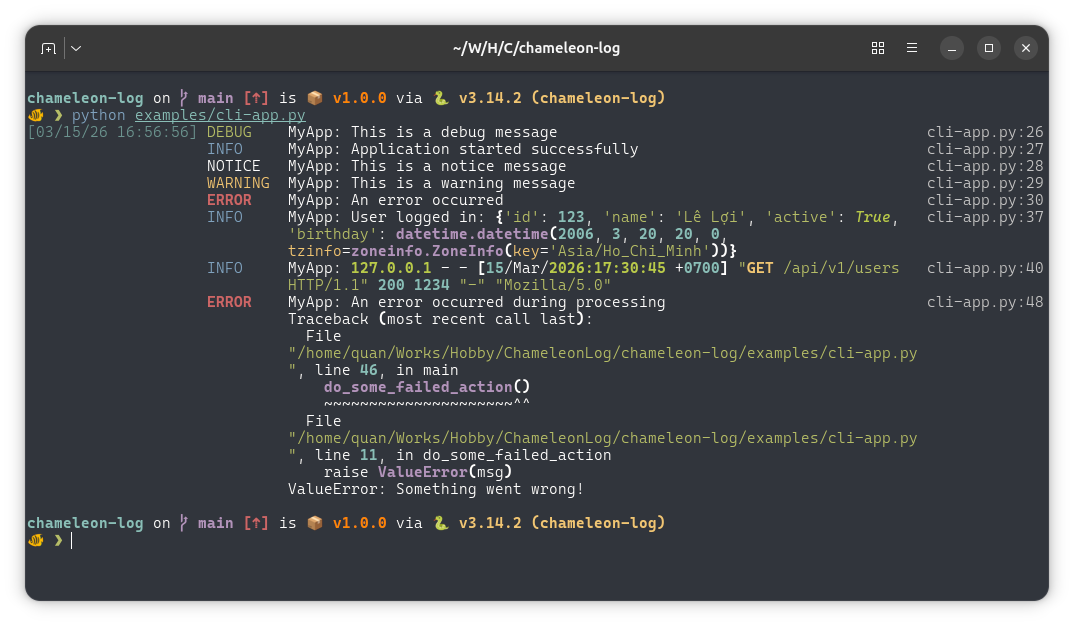
RichHandler: Beautiful console output with syntax highlighting and tracebacks using the Rich library (recommended for development).
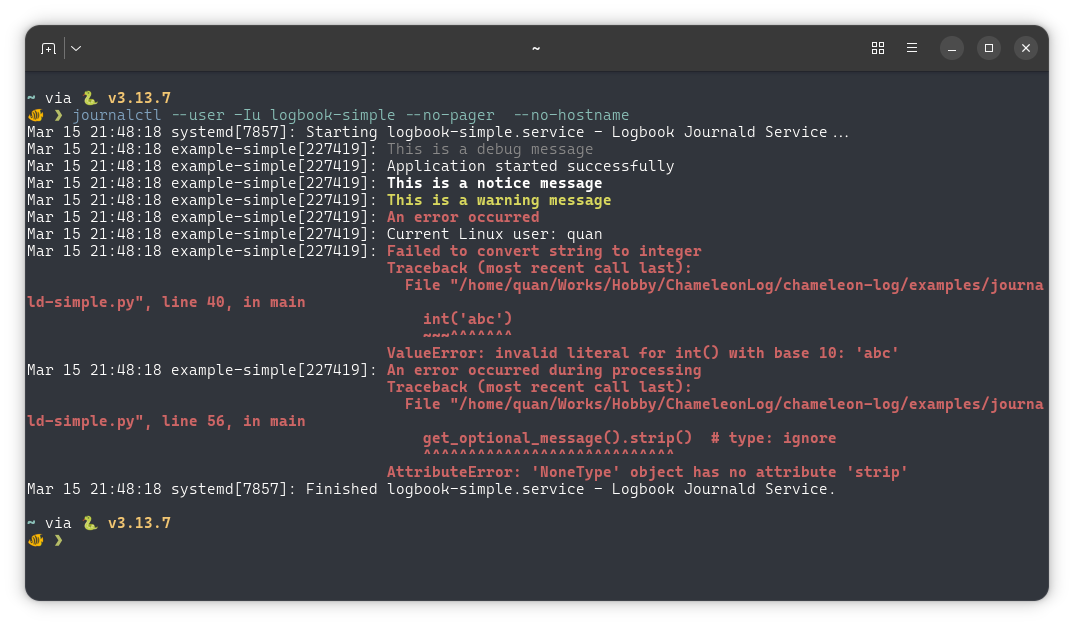
JournaldHandler: Structured logging to systemd journald with automatic level-based coloring and filtering (recommended for production/Live systems on Linux).
Installation
Install ChameleonLog using pip:
pip install chameleon_logOr using uv:
uv add chameleon_logOptional Dependencies
To use the JournaldHandler for sending logs to systemd journald (Linux only):
pip install chameleon_log[journald]Or using uv:
uv add chameleon_log --extra journaldThis will also install the systemd-python package, requiring systemd-based Linux distros.
Usage
RichHandler (Development)
For development and debugging in terminal environments, use RichHandler for colorful, formatted console output:
import logbook

from chameleon_log import RichHandler

# Create a RichHandler with default settings
handler = RichHandler()

with handler:
    logger = logbook.Logger(__name__)
    logger.info('Application started successfully')
    logger.warning('This is a warning message')
    logger.error('An error occurred')
This will produce beautiful console output with syntax highlighting and formatted tracebacks.
Example Output
JournaldHandler Usage (Production/Live Systems)
For applications deployed on Linux servers or in production environments, use JournaldHandler to write logs directly to systemd journald. This provides more efficient troubleshooting capabilities compared to file-based logging or stdout/stderr capture.
Basic usage:
import logbook
from chameleon_log.journald import JournaldHandler

handler = JournaldHandler(syslog_identifier='my-app')

with handler:
    logger = logbook.Logger(__name__)
    logger.info('Application started successfully')
    logger.warning('This is a warning message')
    logger.error('An error occurred')
Simple logging output:
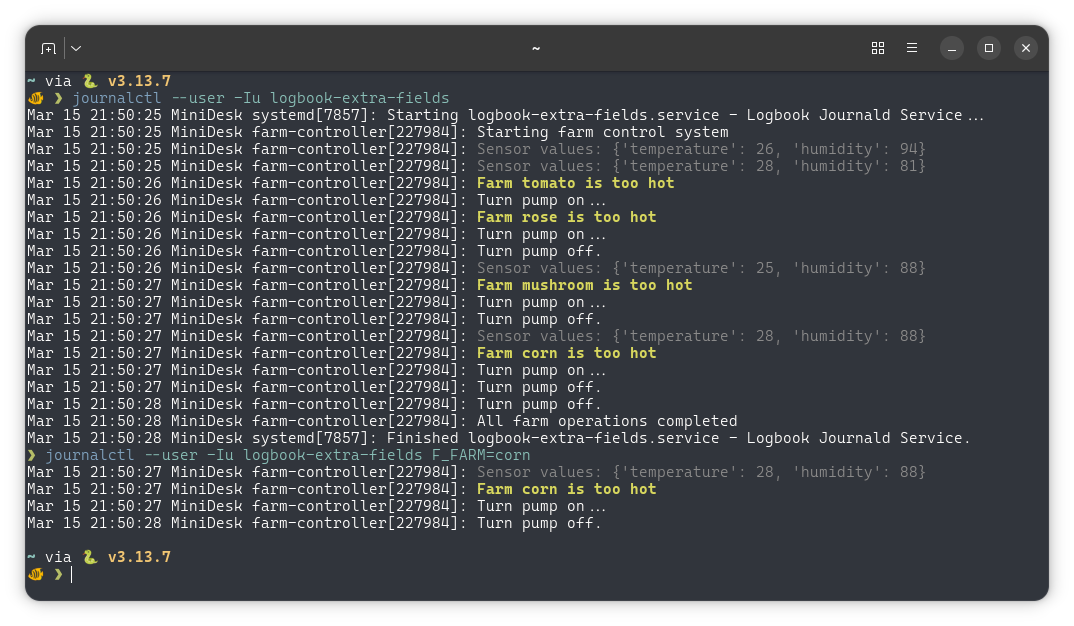
With extra fields for structured filtering:
Logbook provides two ways to attach extra fields:
Option 1: Use the extra= parameter (simple and direct)
import logbook
from chameleon_log.journald import JournaldHandler

handler = JournaldHandler(syslog_identifier='my-app')

with handler:
    logger = logbook.Logger(__name__)
    logger.info('User logged in', extra={'user_id': 123, 'action': 'login'})
Option 2: Use a Processor (for reusable context)
import logbook
from logbook import Logger, Processor
from chameleon_log.journald import JournaldHandler

handler = JournaldHandler()
    # or
handler = JournaldHandler(syslog_identifier='my-app')

# Use a Processor to inject context into multiple log records
def inject_request_context(record):
    record.extra['user_id'] = 123
    record.extra['request_id'] = 'abc-456'

with handler:
    logger = logbook.Logger(__name__)

    with Processor(inject_request_context):
        logger.info('User logged in')  # Fields injected automatically
        logger.info('Data processed')
View logs with journalctl:
journalctl -fu my-service
journalctl -t my-app F_USER_ID=123
journalctl -eu my-service -o json
Normally, you view your app logs with -u (unit), the syslog_identifier is helpful if your app scatters across many systemd units, you then can use journalctl -t to view all.
Documentation
Full documentation is available at: https://chameleon-log.readthedocs.io
License
This project is licensed under the Apache License 2.0 - see the LICENSE file for details.
Logo by Freepik.
Release history Release notifications | RSS feed


Download files
Download the file for your platform. If you're not sure which to choose, learn more about installing packages.
Source Distribution
Built Distribution
Filter files by name, interpreter, ABI, and platform.
If you're not sure about the file name format, learn more about wheel file names.
Copy a direct link to the current filters
File details
Details for the file chameleon_log-1.1.1.tar.gz.
File metadata
- Download URL: chameleon_log-1.1.1.tar.gz
- Upload date:
- Size: 395.3 kB
- Tags: Source
- Uploaded using Trusted Publishing? No
- Uploaded via: uv/0.10.10 {"installer":{"name":"uv","version":"0.10.10","subcommand":["publish"]},"python":null,"implementation":{"name":null,"version":null},"distro":{"name":"Ubuntu","version":"25.10","id":"questing","libc":null},"system":{"name":null,"release":null},"cpu":null,"openssl_version":null,"setuptools_version":null,"rustc_version":null,"ci":null}
File hashes
| Algorithm | Hash digest | |
|---|---|---|
| SHA256 |
5a0784272a3d4cf86b0dc0f698f1437fdc1a17c0ded9afc0e1eab8f7fa2eea70
|
|
| MD5 |
184dc5e540f428bcac42a075b2a8480a
|
|
| BLAKE2b-256 |
5e08386100a4b8eceb27ab2cb11f9fb104174e8580cbb34c0b1cf375ef022bc4
|
File details
Details for the file chameleon_log-1.1.1-py3-none-any.whl.
File metadata
- Download URL: chameleon_log-1.1.1-py3-none-any.whl
- Upload date:
- Size: 14.1 kB
- Tags: Python 3
- Uploaded using Trusted Publishing? No
- Uploaded via: uv/0.10.10 {"installer":{"name":"uv","version":"0.10.10","subcommand":["publish"]},"python":null,"implementation":{"name":null,"version":null},"distro":{"name":"Ubuntu","version":"25.10","id":"questing","libc":null},"system":{"name":null,"release":null},"cpu":null,"openssl_version":null,"setuptools_version":null,"rustc_version":null,"ci":null}
File hashes
| Algorithm | Hash digest | |
|---|---|---|
| SHA256 |
1d4076d39ef931cca2aea47cbaef33a197851de2659ff2955194be2ae09f6093
|
|
| MD5 |
817e544426645cb14062f1c9c8ad1bff
|
|
| BLAKE2b-256 |
ff19b19fbcb38a4bbfae2e93385ec67489fb0b3e40e725586d914c7005795b1e
|






