
🦎 ChameleonLog

Colourful logging handlers for Logbook.






ChameleonLog provides colorful, structured logging for Python applications using the Logbook.
📦 Installation
Install ChameleonLog using pip:
pip install chameleon-logOr using uv:
uv add chameleon-log🔧 Optional Dependencies
To use the JournaldHandler for sending logs to systemd journald:
pip install chameleon-log[journald]Or using uv:
uv add chameleon-log --extra journaldThis will also install the journald-send package, requiring systemd-based Linux distros.
🚀 Usage
✨ RichHandler
For development and debugging in terminal environments, use RichHandler for colorful, formatted console output:
import logbook

from chameleon_log import RichHandler

# Create a RichHandler with default settings
handler = RichHandler()

with handler:
    logger = logbook.Logger(__name__)
    logger.info('Application started successfully')
    logger.warning('This is a warning message')
    logger.error('An error occurred')
The console parameter controls Rich formatting:
True (default): Auto-detect based on isatty(). Use Rich rendering when the stream is a terminal.
False: Disable Rich formatting, render plain output.
A rich.Console instance: Use that Console directly. This is useful for sinking log output into an active Rich live display (e.g. a rich.progress.Progress bar).
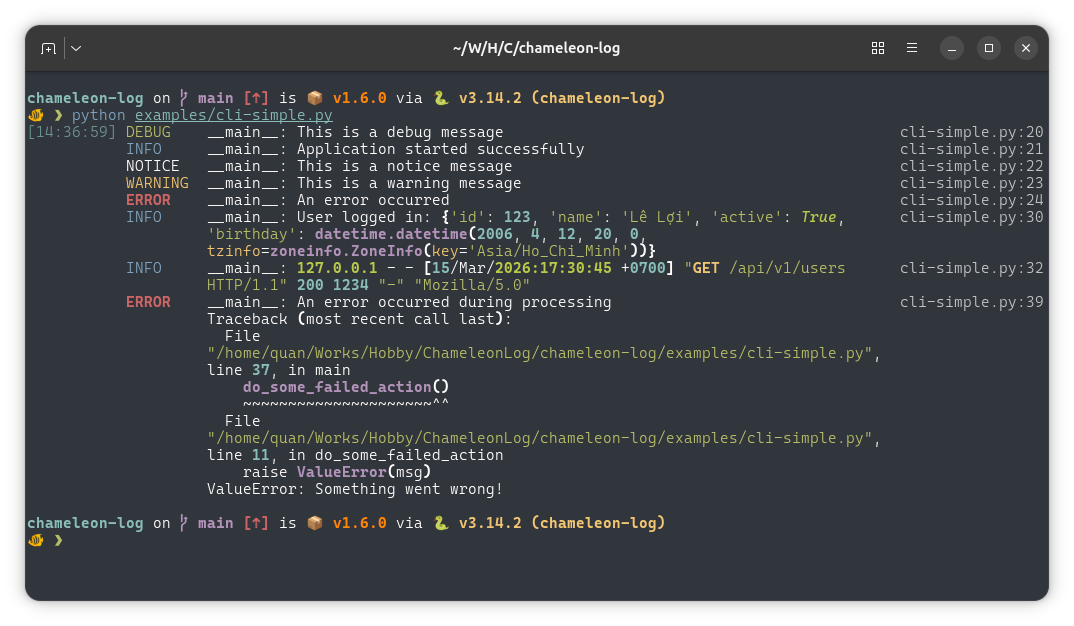
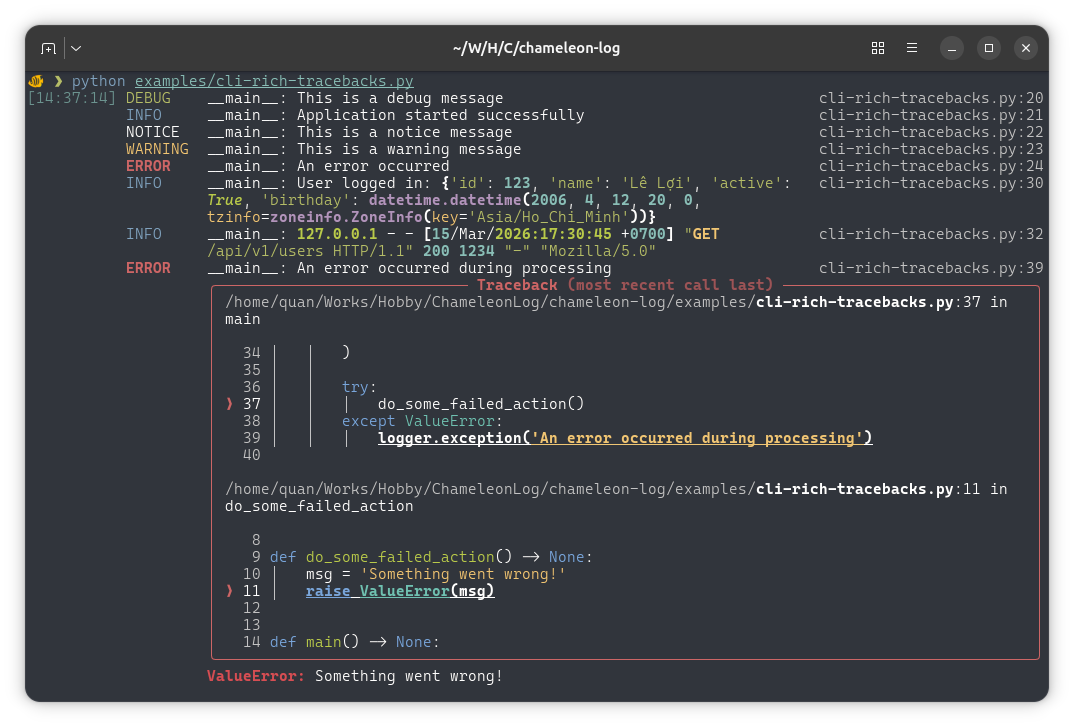
Additionally, RichHandler accepts a rich_tracebacks boolean to control how exceptions are rendered:
rich_tracebacks=True: Render exceptions using Rich Traceback objects when terminal rendering is enabled.
rich_tracebacks=False (default): Append the plain-text formatted traceback to the log message. This is useful when logs are captured to files or external systems that do not support Rich rendering.
🖼️ Example output
🐧 JournaldHandler
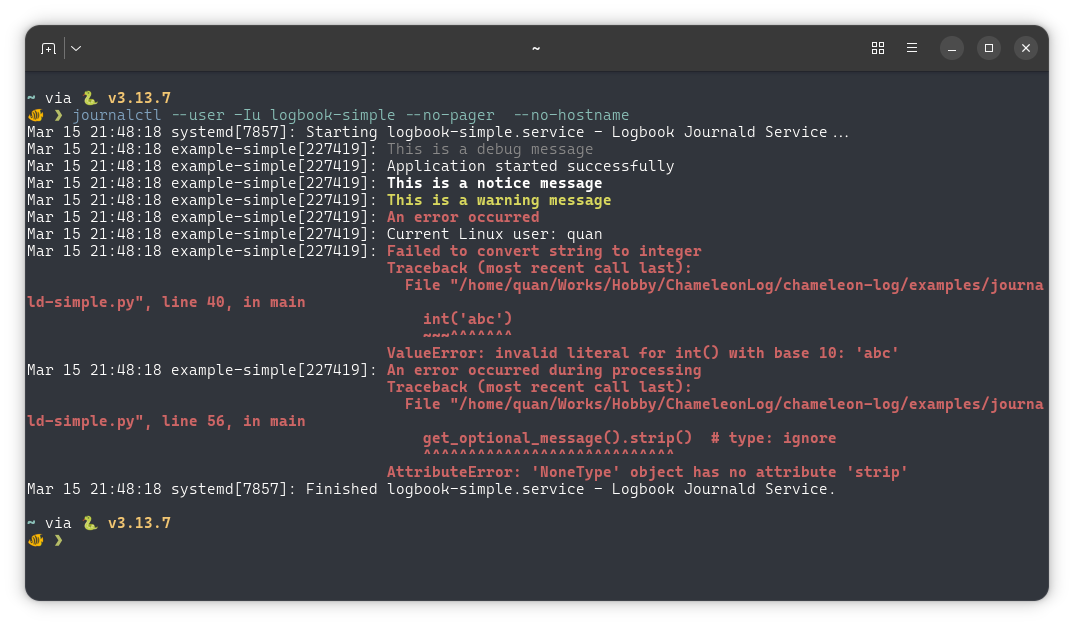
For applications deployed on Linux servers or in production environments, use JournaldHandler to write logs directly to journald, using its native protocol. This provides more efficient troubleshooting capabilities compared to file-based logging or stdout / stderr capture.
Basic usage:
import logbook
from chameleon_log.journald import JournaldHandler

handler = JournaldHandler(syslog_identifier='my-app')

with handler:
    logger = logbook.Logger(__name__)
    logger.info('Application started successfully')
    logger.warning('This is a warning message')
    logger.error('An error occurred')
📝 Simple logging output:
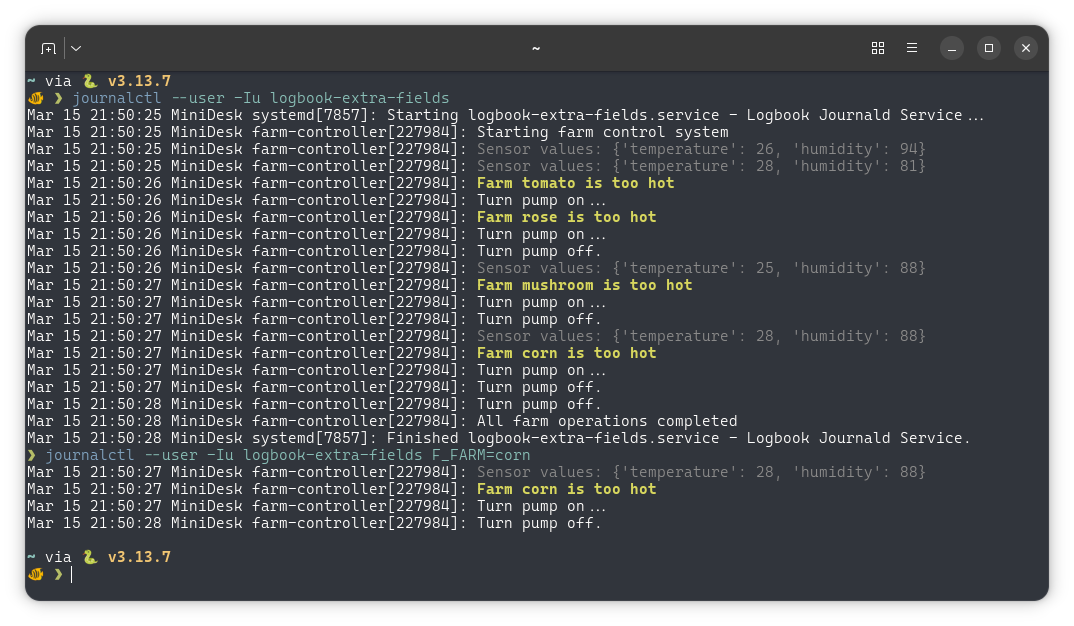
🏗️ With extra fields for structured filtering:
Logbook provides two ways to attach extra fields:
Option 1: Use the extra= parameter (simple and direct)
import logbook
from chameleon_log.journald import JournaldHandler

handler = JournaldHandler(syslog_identifier='my-app')

with handler:
    logger = logbook.Logger(__name__)
    logger.info('User logged in', extra={'user_id': 123, 'action': 'login'})
Option 2: Use a Processor (for reusable context)
import logbook
from logbook import Logger, Processor
from chameleon_log.journald import JournaldHandler

handler = JournaldHandler()
    # or
handler = JournaldHandler(syslog_identifier='my-app')

# Use a Processor to inject context into multiple log records
def inject_request_context(record):
    record.extra['user_id'] = 123
    record.extra['request_id'] = 'abc-456'

with handler:
    logger = logbook.Logger(__name__)

    with Processor(inject_request_context):
        logger.info('User logged in')  # Fields injected automatically
        logger.info('Data processed')
View logs with journalctl:
journalctl -fu my-service
journalctl -t my-app F_USER_ID=123
journalctl -eu my-service -o json
Normally, you view your app logs with -u (unit), the syslog_identifier is helpful if your app scatters across many systemd units, you then can use journalctl -t to view all.
📖 Documentation
Full documentation is available at: https://chameleon-log.readthedocs.io
logbook-stubs
If you come here for logbook-stubs source, it is already moved to a separate repository.
📄 License
This project is licensed under the Apache License 2.0 - see the LICENSE file for details.
Logo by Freepik.
1 maintainer

Metadata
1 maintainer
Release files for chameleon-log 3.2.0
For a detailed explanation of source distributions (sdists) and built distributions (wheels), please see the package formats documentation.
Source distribution (sdist)
| File | Size | Uploaded | |
|---|---|---|---|
| chameleon_log-3.2.0.tar.gz | 124.1 kB | Details |
Built distribution (wheel)
| File | Interpreter | ABI | Platform | Reset |
|---|---|---|---|---|
| chameleon_log-3.2.0-py3-none-any.whl | Python 3 | none | any | Details |
Total release size: 143.8 kB
Release files / chameleon_log-3.2.0.tar.gz
| Download URL | chameleon_log-3.2.0.tar.gz |
|---|---|
| Size | 124.1 kB |
| Tags | Source |
|
SHA-256 checksum How to use checksums |
94b1e9f9052fe3a46993cad940ac4e9f3247c247be8abb9a70112712e5965509
|
|
BLAKE2b-256 checksum How to use checksums |
96b91517674545eeee3274f992022c6d5fefdfbe39641280fe38661c8d5f4ad3
|
| Upload date | |
|
Uploaded using Trusted Publishing? What is trusted publishing? |
Yes |
| Uploaded via |
twine/7.0.0 CPython/3.13.14
|
Provenance
Provenance describes where a file came from. On PyPI, provenance is shared via attestations, which provide a verifiable record of the build or publishing details. View details, limitations and caveats.


PyPI Publish Attestation
PyPI verified that this artifact, at this checksum, originated from the publisher listed below.
Signed by GitHub Actions, verified by PyPI on Aug 13, 2026.
Transparency logRelease files / chameleon_log-3.2.0-py3-none-any.whl
| Download URL | chameleon_log-3.2.0-py3-none-any.whl |
|---|---|
| Size | 19.8 kB |
| Tags | Python 3 |
|
SHA-256 checksum How to use checksums |
cbca2d054c159b11c43a7f9ba6a91ab927fc62050ec068e630c9e395d7d73332
|
|
BLAKE2b-256 checksum How to use checksums |
b3c4489a0f6c22917fbea281c3f1ccc92520a1947284e8bc8b3ac7c68ccd1e6a
|
| Upload date | |
|
Uploaded using Trusted Publishing? What is trusted publishing? |
Yes |
| Uploaded via |
twine/7.0.0 CPython/3.13.14
|
Provenance
Provenance describes where a file came from. On PyPI, provenance is shared via attestations, which provide a verifiable record of the build or publishing details. View details, limitations and caveats.
PyPI Publish Attestation
PyPI verified that this artifact, at this checksum, originated from the publisher listed below.
Signed by GitHub Actions, verified by PyPI on Aug 13, 2026.
Transparency log













