

chapter_converter
Convert between several different video chapter file formats with ease.
Features
- Auto input format detection: including various chapter files and video files with chapters (
.mkvand.mp4) - Auto input encoding detection
- Can specify output format and filename
- Clipboard support (input and output) for editing purposes
Prerequisites
- MKVToolNix binaries
mkvextractandmkvmerge. You can download it via- Official website: https://mkvtoolnix.download/downloads.html
- Arch Linux
pacman -S mkvtoolnix-cli - Debian / Ubuntu
apt install mkvtoolnix - openSUSE / SLES
zypper in mkvtoolnix
Install
pip install -U chapter_converter
or from source:
pip install -U git+https://github.com/fireattack/chapter_converter
Usage
CLI script is named chap. Or you can use python -m chapter_converter.
usage: chap [-h] [-f {simple,pot,ogm,tab,xml}] [--mp4-charset MP4_CHARSET] [--charset CHARSET] [-o OUTPUT] [-c] [--lang LANG] [--yes] [filename]

positional arguments:
  filename              input filename

options:
  -h, --help            show this help message and exit
  -f {simple,pot,ogm,tab,xml}, --format {simple,pot,ogm,tab,xml}
                        output format (default: pot)
  --mp4-charset MP4_CHARSET
                        input chapter charset for mp4 file, since it can't be auto detected (default: utf-8)
  --charset CHARSET     output file charset. XML output will always be utf-8-sig (default: utf-8-sig)
  -o OUTPUT, --output OUTPUT
                        output filename (default: original_filename.format[.txt])
  -c, --clipboard       automatically process text in clipboard and save it back.
  --lang LANG           manually set language tag for XML chapter.
  --yes, -y             automatically overwrite existing file.
If you prefer a single file than a package, you can just download chapter_converter.py in chapter_converter/ and use it directly (chapter_converter.py -h).
A simple GUI is also provided as-is by running chapgui. You need to install module gooey in pip manually to make it work. See my comments for some caveats.
As a Python module:
from chapter_converter import chapter_converter

chapter_converter.main('input.pbf', '-o', 'output.xml')
Note
- Output by default saved as UTF-8-BOM for max compatibility on Windows. You can change it by passing in
--charsetargument. - When
-cis used, you can still pass in a file as input instead. - When
-cis used, you can still pass in an output filename (using-oand/or-f) as output instead.
Supported formats
See also: example files in examples/.
MKV and MP4 video containers (inputs only)
Guessed by suffix. Not idiot-proof, please only feed in file with chapters.
Simple format (simple)
I made it up.
Format:
- Each line:
{timestamp},{title}
Example:
0:17:02.148,Title1
0:42:19.976,Title2
0:58:10.114,Title3
...
Tab format (tab)
Similar to Simple, but separated by tab instead of comma.
Format:
- Each line:
{timestamp} {title}
Example:
0:17:02.148	Title1
0:42:19.976	Title2
0:58:10.114	Title3
...
OGM format (ogm)
Can be recognized by common video tools, such as MKVToolNix.
Format:
- Odd lines:
CHAPTER{i:02}={timestamp} - Even lines:
CHAPTER{i:02}NAME={tilte}
i starts at 1.
Example:
CHAPTER01=0:17:02.148
CHAPTER01NAME=Title1
CHAPTER02=0:42:19.976
CHAPTER02NAME=Title2
CHAPTER03=0:58:10.114
...
MediaInfo format (inputs only)
The way MediaInfo presents chapter information in text form. Input only. Supports both with or without the "Menu" line.
Format:
- Each line:
{timestamp}\s+: ({two_letter_lang_code})?:{title}
Example:
Menu
00:00:00.000                : en:Contours
00:02:49.624                : en:From the Sea
00:08:41.374                : en:Bread and Wine
00:12:18.041                : en:Faceless
...
XML format (xml)
XML chapter format defined by Matroska specification.
PotPlayer Bookmark format (.pbf) (pot)
A format PotPlayer uses for its bookmarks. If you put the file together with the video file (same name except extension, just like any external resources), it will be recognized by PotPlayer just like internal chapters - you can use "H" to view and select, and they will show up as markers on navigation bar too:
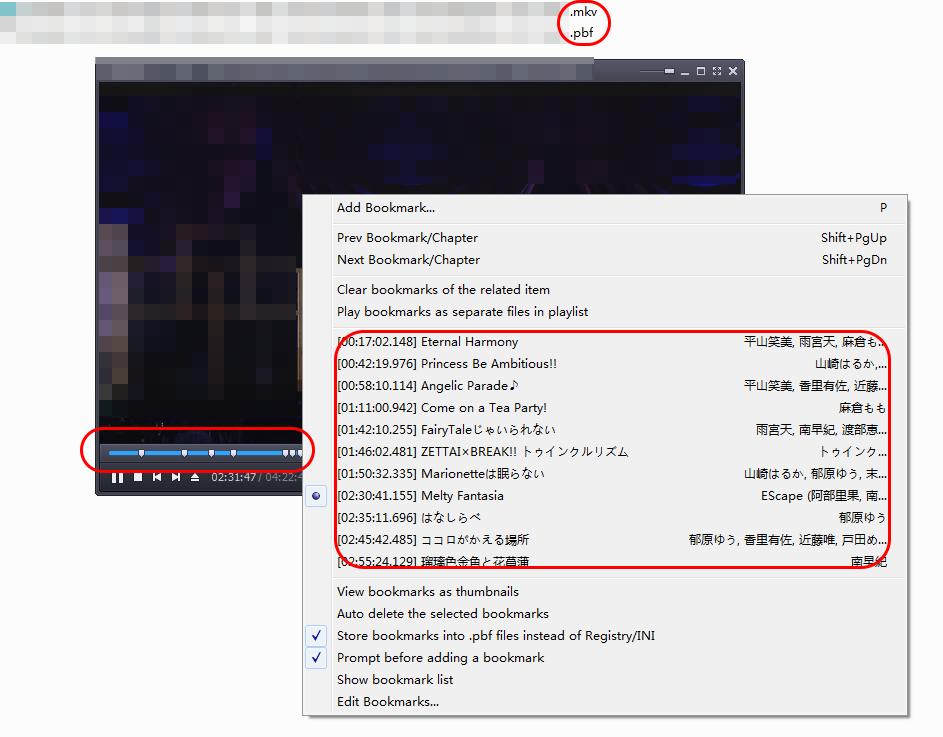
It is not ideal, but it's the closest thing to "external chapter file" to my knowledge.
Format:
- First line:
[Bookmark] - Other lines:
{i}={timestamp_in_ms}*{title}*{some_optional_hash_for_pot_internal_usage}
i starts at 0.
Example:
[Bookmark]
0=1022148*Title1*
1=2539976*Titile2*
...
1 maintainer

Metadata
1 maintainer
Release files for chapter-converter 1.2.1
For a detailed explanation of source distributions (sdists) and built distributions (wheels), please see the package formats documentation.
Source distribution (sdist)
| File | Size | Uploaded | |
|---|---|---|---|
| chapter_converter-1.2.1.tar.gz | 7.5 kB | Details |
Built distribution (wheel)
| File | Interpreter | ABI | Platform | Reset |
|---|---|---|---|---|
| chapter_converter-1.2.1-py3-none-any.whl | Python 3 | none | any | Details |
Total release size: 15.8 kB
Release files / chapter_converter-1.2.1.tar.gz
| Download URL | chapter_converter-1.2.1.tar.gz |
|---|---|
| Size | 7.5 kB |
| Tags | Source |
|
SHA-256 checksum How to use checksums |
f09e7a47bc1a94eb5f239927309511c1dff6b132ad319ce97dd67ddcb59e3eb9
|
|
BLAKE2b-256 checksum How to use checksums |
997232ea6377dee5e32c0dced347efba5264ef851a114bd96cb50db201f85586
|
| Upload date | |
|
Uploaded using Trusted Publishing? What is trusted publishing? |
No |
| Uploaded via |
twine/4.0.2 CPython/3.9.18
|
Release files / chapter_converter-1.2.1-py3-none-any.whl
| Download URL | chapter_converter-1.2.1-py3-none-any.whl |
|---|---|
| Size | 8.3 kB |
| Tags | Python 3 |
|
SHA-256 checksum How to use checksums |
c794820c129a3a5614060d0233b729faee40c69eb67d66922abae5a9a28c8829
|
|
BLAKE2b-256 checksum How to use checksums |
b6369c7d91b7a0107114f4d6f320190f3d72208c65ce4b6b53c3725bc2acaa0f
|
| Upload date | |
|
Uploaded using Trusted Publishing? What is trusted publishing? |
No |
| Uploaded via |
twine/4.0.2 CPython/3.9.18
|














