






🔎 charfinder
charfinder is a modern terminal and Python-based tool for searching and exploring Unicode characters by name — supporting both exact and advanced fuzzy matching — with Unicode normalization, efficient caching, structured logging.
Designed for both technical and non-technical users, CharFinder enables reliable Unicode search in terminals, scripts, automation workflows, and applications. It offers transparency and precise control over matching behavior, making it suitable for developer tooling, data pipelines, chatbots, and messaging interfaces.
📚 Table of Contents
🎥 1. Demo Video
https://github.com/user-attachments/assets/e19b0bbd-d99b-401b-aa29-0092627f376b
To see another demo of CLI usage, see subsection Demo
✨ 2. Features
CharFinder is a feature-rich Unicode character search tool, designed for both CLI and Python library usage. It combines exact and fuzzy matching with fast caching, robust environment management, and beautiful CLI output.
🔍 Unicode Character Search
-
Search Unicode characters by name:
- Exact match (
substringorword_subset) - Fuzzy match with configurable thresholds and algorithms
- Exact match (
-
Supported fuzzy algorithms:
simple_ratio— SequenceMatcher-based (fromdifflib)normalized_ratio— Normalized variant ofsimple_ratiolevenshtein_ratio— Based onpython-Levenshteintoken_sort_ratio— Word-order invariant (fromrapidfuzz)hybrid_score— Aggregates multiple algorithms
-
Hybrid fuzzy matching:
- Combines multiple algorithms using an aggregation function:
mean,median,max, ormin
- Combines multiple algorithms using an aggregation function:
📉 Unicode Normalization
- All matching is performed after Unicode normalization.
- Matching is case-insensitive, accent-insensitive, and format-insensitive
- Input and character names are normalized using configurable Unicode profiles (
--normalization-profile) - Alternate names (from
UnicodeData.txt) are supported
🔄 Caching
-
Unicode name cache:
- Built on first run
- Stored as a local JSON file for fast reuse
-
LRU cache:
- Internal normalization results are LRU-cached for performance
📊 Logging
- Rotating file logs under
logs/{ENV}/ - Console logging:
INFOlevel by defaultDEBUGlevel with--debug
- Each log record includes the current environment (
DEV,UAT,PROD) - Logging is modular and test-friendly
🔧 Environment-aware Behavior
.envsupport with layered resolution logic- Environment-specific behavior:
- Log directory changes by environment
- Test mode activates
.env.test
📚 See config_environment.md
💻 CLI Features
-
Rich CLI with argcomplete tab completion
-
Color output:
- Modes:
auto,always,never - Colors used for result rows, headers, and logs
- Modes:
-
Advanced CLI options:
-
Matching behavior:
--fuzzy— Enable fuzzy matching--threshold— Set similarity threshold (0.0–1.0)--fuzzy-algo— Select fuzzy algorithm (e.g.,token_sort_ratio)--fuzzy-match-mode— Choose fuzzy match mode:first,all, orhybrid--hybrid-agg-fn— Set aggregation function:mean,median,min, ormax--exact-match-mode— Specify exact match logic:word_subsetorsubstring
-
Output control:
--color— Control color output:auto,always, ornever--verbose— Display formatted results in the console--debug— Enable full diagnostics: dotenv resolution, config state, match algorithms and scores
-
-
Detailed CLI help with examples
📚 See cli_architecture.md and for examples see the subsection demo
🐍 Python Library Usage
-
Import and use the core API:
find_chars()— Yields formatted result rowsfind_chars_raw()— Returns structured data (for scripting / JSON)
-
Fully type-annotated
-
CLI dependencies are not required for library usage
📚 See core_logic.md
🧪 Testability & Quality
-
Code quality enforcement:
ruff(lint & format),mypy(type-check)
-
High test coverage
-
CLI tested via subprocess integration tests
-
Modular
conftest.pywith reusable fixtures -
Clean
pytest+coverage+pre-commitworkflow
📚 See unit_test_design.md
📑 Modern Packaging & Tooling
pyproject.toml-based (PEP 621)- GitHub Actions CI pipeline:
- Python 3.10 to 3.13
- Lint (Ruff), type-check (MyPy), test, coverage
- Easy publishing to PyPI
3. 📦 Project Structure
CharFinder follows a clean, layered architecture to ensure separation of concerns, maintainability, and testability.
The project is structured for ease of contribution and for flexible usage as both:
- A CLI tool (
charfindercommand). - An importable Python library.
3.1 📂 Structure
The project is organized as follows:
charfinder/
├── .github/workflows/               # GitHub Actions CI pipeline
├── .pre-commit-config.yaml          # Pre-commit hooks
├── publish/                         # Sample config for PyPI/TestPyPI
├── .env.sample                      # Sample environment variables
├── LICENSE.txt
├── Makefile                         # Automation tasks
├── MANIFEST.in                      # Files to include in sdist
├── pyproject.toml                   # PEP 621 build + dependencies
├── README.md                        # Project documentation (this file)
├── docs/                            # Detailed documentation (.md files)
├── data/                            # Downloaded UnicodeData and cache
│   ├── UnicodeData.txt              # Standard Unicode name definitions
│   └── cache/                       # Local character name cache
├── src/charfinder/                  # Main package code
│   ├── __init__.py                  # Package version marker
│   ├── __main__.py                  # Enables `python -m charfinder`
│   ├── fuzzymatchlib.py             # Fuzzy matching algorithm registry
│   ├── validators.py                # Input validation logic
│   │
│   ├── cli/                         # CLI logic (modularized)
│   │   ├── __init__.py
│   │   ├── args.py                  # CLI argument definitions
│   │   ├── cli_main.py              # CLI main entry point
│   │   ├── diagnostics.py           # Diagnostics and debugging info
│   │   ├── diagnostics_match.py     # Match strategy explanation
│   │   ├── handlers.py              # CLI command handlers
│   │   ├── parser.py                # CLI parser and argument preprocessing
│   │   └── utils_runner.py          # CLI runner and echo utilities
│   │
│   ├── config/                      # Configuration and constants
│   │   ├── __init__.py
│   │   ├── aliases.py               # Alias mappings for fuzzy algorithms
│   │   ├── constants.py             # Default values and valid options
│   │   ├── settings.py              # Environment/config management
│   │   └── types.py                 # Shared type definitions
│   │
│   ├── core/                        # Core Unicode search logic
│   │   ├── __init__.py
│   │   ├── core_main.py             # Public API entry point for core logic
│   │   ├── finders.py               # Output routing and formatting
│   │   ├── handlers.py              # Search coordination and config builder
│   │   ├── matching.py              # Exact and fuzzy matching logic
│   │   ├── name_cache.py            # Unicode name cache builder
│   │   └── unicode_data_loader.py   # UnicodeData.txt loader and parser
│   │
│   ├── utils/                       # Shared utilities
│   │   ├── __init__.py
│   │   ├── formatter.py             # Terminal and log formatting
│   │   ├── logger_helpers.py        # Custom logging helpers
│   │   ├── logger_setup.py          # Logger setup/teardown
│   │   ├── logger_styles.py         # Logging color/style definitions
│   │   └── normalizer.py            # Unicode normalization logic
│
└── tests/                           # Unit, integration, and manual tests
    ├── cli/                         # CLI interface and argument handling tests
    ├── config/                      # Tests for constants, settings, types, aliases
    ├── core/                        # Core Unicode search, cache, and matching logic
    ├── utils/                       # Terminal formatting, normalization, and logger utilities
    ├── helpers/                     # Internal testing utilities (not test files)
    ├── manual/                      # Manual testing and usage examples
    │   └── demo.ipynb               # Interactive demo notebook
    ├── test_fuzzymatchlib.py        # Tests for fuzzy algorithm registry and scoring
    ├── test_validators.py           # Input validation and config resolution logic
    └── conftest.py                  # Shared test fixtures and environment isolation
3.2 🧱 Architecture
CharFinder implements a layered architecture with clear boundaries:
📚 See section Internals and Architecture, and following documentatoins:
- docs/cli_architecture.md
- docs/core_logic.md
- docs/environment_config.md
- docs/logging_system.md
- docs/caching.md
4. 🌐 Unicode & Normalization
Unicode is the global standard for encoding text, defining unique code points for every letter, symbol, emoji, and script. It enables CharFinder to search across more than 140,000 characters—covering everything from Latin letters to CJK ideograms and emojis.
Why It Matters for CharFinder
- ✅ Multilingual coverage: Supports scripts from all major languages and symbol sets.
- ✅ Emoji and symbol support: All emoji and symbols are part of Unicode and fully searchable.
- ✅ Alternate name discovery: CharFinder indexes official names and alternate names (from field 10 of
UnicodeData.txt) to support queries like"underscore","slash", or"period".
🔄 Normalization
Characters that look the same can be encoded in different ways. For example:
é(U+00E9) vs.é(e+ U+0301) are visually identical but distinct Unicode sequences.
To ensure consistent matching, CharFinder applies Unicode normalization, case folding, whitespace cleanup, and optional accent/diacritic stripping depending on the selected profile.
You can customize this behavior using the --normalization-profile CLI argument:
| Profile | Unicode Form | Strip Accents | Collapse Whitespace | Remove Zero-Width | Transformation Summary |
|---|---|---|---|---|---|
raw |
— | ❌ | ❌ | ❌ | No changes |
light |
NFC | ❌ | ✅ | ❌ | Trim + collapse spaces + .upper() |
medium |
NFC, NFKD | ❌ | ✅ | ❌ | light + Unicode normalization |
aggressive |
NFC, NFKD | ✅ | ✅ | ✅ | medium + remove diacritics + zero-width characters |
The default profile is aggressive, which offers the most robust matching by removing visual and encoding differences.
🔍 Normalization in Action
| Input | Codepoints | Normalized | Matches? |
|---|---|---|---|
café |
U+0063 U+0061 U+0066 U+00E9 |
CAFE |
✅ |
café |
U+0063 U+0061 U+0066 U+0065 U+0301 |
CAFE |
✅ |
CAFÉ |
U+0043 U+0041 U+0046 U+00C9 |
CAFE |
✅ |
CAFÉ |
U+0043 U+0041 U+0046 U+0045 U+0301 |
CAFE |
✅ |
𝒸𝒶𝓻é (italic math) |
U+1D4B8 U+1D4B6 U+1D4FB U+00E9 |
CARE |
✅ (fallback) |
café (fullwidth) |
U+FF43 U+FF41 U+FF46 U+FF45 U+0301 |
CAFE |
✅ (folded) |
Even though the second input uses a decomposed form (e + combining acute), CharFinder normalizes and folds it to ensure a stable match.
🧪 Terminal Example with Emoji
CharFinder correctly matches Unicode emoji and symbols. For example:

Note: Composite emoji like
👩💻(woman technologist) are grapheme clusters, not individual Unicode code points, and are not listed inUnicodeData.txt. CharFinder focuses on official single-codepoint characters.
📚 See unicode_normalization.md
5. 🎯 Matching Engine (Exact + Fuzzy)
CharFinder uses a layered and configurable matching strategy to identify Unicode characters by name. It starts with exact matching for speed and precision, then optionally falls back to fuzzy matching if no exact hits are found or if --prefer-fuzzy is enabled.
🔹 Exact Matching
- Fast string comparisons using two match modes
substringorword-subset. - Controlled via
--exact-match-mode(default:word-subset). - Ideal for full or partial queries that directly appear in character names.
🔸 Fuzzy Matching
Fuzzy matching recovers from typos, partial input, or scrambled tokens. It supports following match modes:
- Single-algorithm mode (
--fuzzy-match-mode=single): uses the algorithm specified by--fuzzy-algo(e.g.,token_subset_ratio,token_sort_ratio,levenshtein_ratio, etc.) - Hybrid mode (
--fuzzy-match-mode=hybrid): combines multiple algorithms using weighted scores and an aggregation function (mean[default],median,max,min) - Controlled via
--fuzzy-match-mode(default:hybrid).
Fuzzy control options:
--fuzzy,--prefer-fuzzy— enable fallback or hybrid behavior--fuzzy-algo— select algorithm for single mode--fuzzy-match-mode {single, hybrid}— control fuzzy strategy--threshold— set minimum similarity score
Matching behavior can also be influenced by environment variables. See sample.env
⚙️ Normalization
Matching is applied after Unicode normalization, which includes case folding, accent removal, and Unicode normalization. This is configurable via --normalization-profile.
📚 See matching.md for full logic, algorithm details, and internal representation.
6. 🚀 Usage
The following usage guide shows how to install, run, and integrate CharFinder both via its command-line interface (CLI) and as a Python library. Whether you are an end user, developer, or automator, CharFinder is designed to fit seamlessly into your workflow.
6.1 Installation
👤 For Users
PyPI (Recommended)
pip install charfinder
GitHub (Development Version)
pip install git+https://github.com/berserkhmdvhb/charfinder.git
👨💼 For Developers
Clone and Install in Editable Mode
git clone https://github.com/berserkhmdvhb/charfinder.git
cd charfinder
make develop
Alternatively:
python -m venv .venv
source .venv/bin/activate  # or .venv\Scripts\activate on Windows
pip install -e .[dev]
6.2 💻 CLI Usage
CharFinder provides a CLI for exploring Unicode characters.
Basic Example
charfinder heart
Example output:
U+2764 ❤ HEAVY BLACK HEART (\u2764)
Full Help
charfinder --help
CLI Options
| Option | Description |
|---|---|
-q, --query |
Provide search query as an option (alternative to positional query) |
--fuzzy |
Enable fuzzy search if no exact matches are found |
--prefer-fuzzy |
Include fuzzy results even if exact matches are found (hybrid mode) |
--threshold |
Set fuzzy match threshold (0.0 to 1.0); applies to all algorithms |
--fuzzy-algo |
Select fuzzy algorithm: token_sort_ratio (default), simple_ratio, normalized_ratio, levenshtein |
--fuzzy-match-mode |
Fuzzy match mode: single, hybrid (default) |
--hybrid-agg-fn |
Aggregation function for hybrid mode: mean (default), median, max, min |
--exact-match-mode |
Exact match strategy: word-subset (default), substring |
--normalization-profile |
Normalization level: aggressive (default), medium, light, raw |
--format |
Output format: text (default) or json |
--color |
Color output mode: auto (default), always, never |
--show-score |
Display match scores alongside results (enabled by default for JSON output) |
-v, --verbose |
Enable terminal output (stdout/stderr); defaults to enabled in CLI, disabled in tests |
--debug |
Show detailed diagnostics, including config, strategy, and environment |
--version |
Show installed version of CharFinder |
Advanced CLI Tips
- Use
--fuzzyand--thresholdfor typo tolerance. - Use
--format jsonfor scripting and automation. - Enable diagnostics with
--debugor by settingCHARFINDER_DEBUG_ENV_LOAD=1.
Demo
Basic Example

Usage of --verbose or -v flag

Usage of --debug for diagnostics
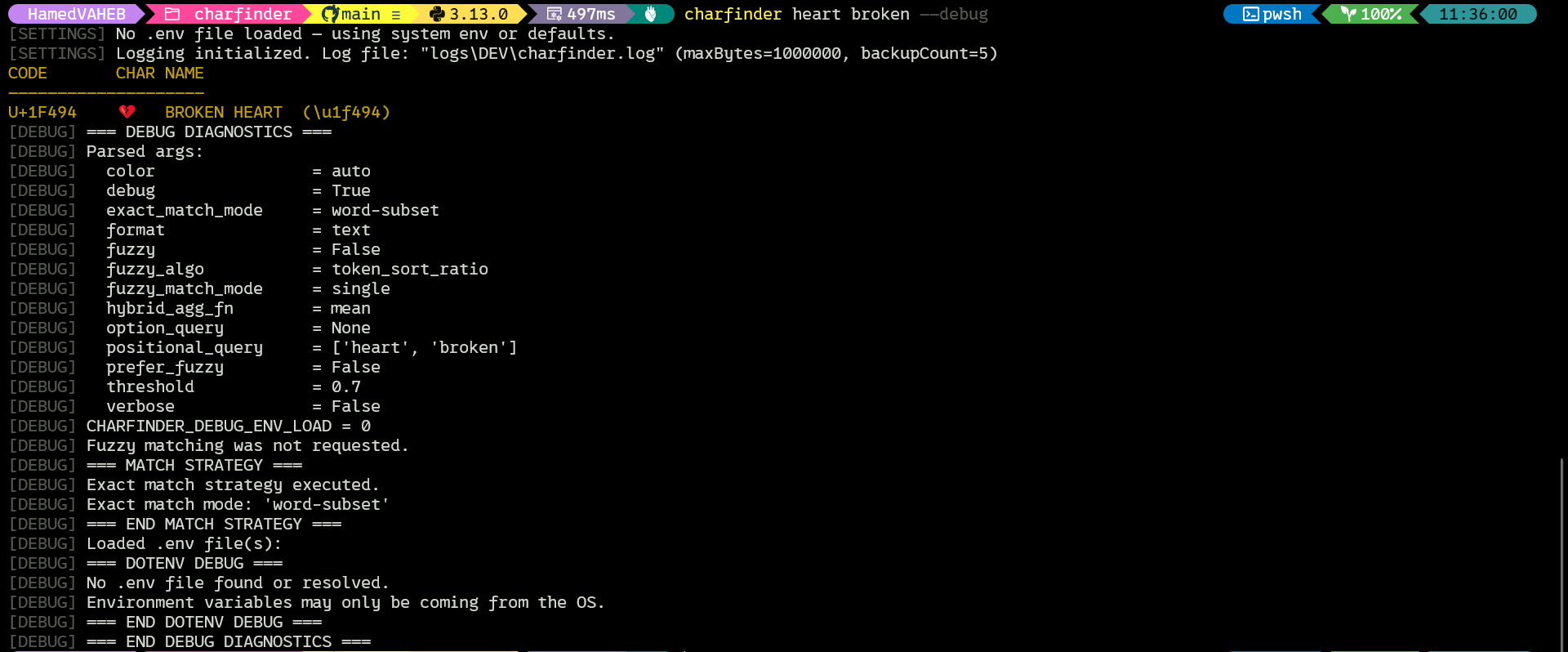
Fuzzy Match Example

Usage --format to export JSON Output
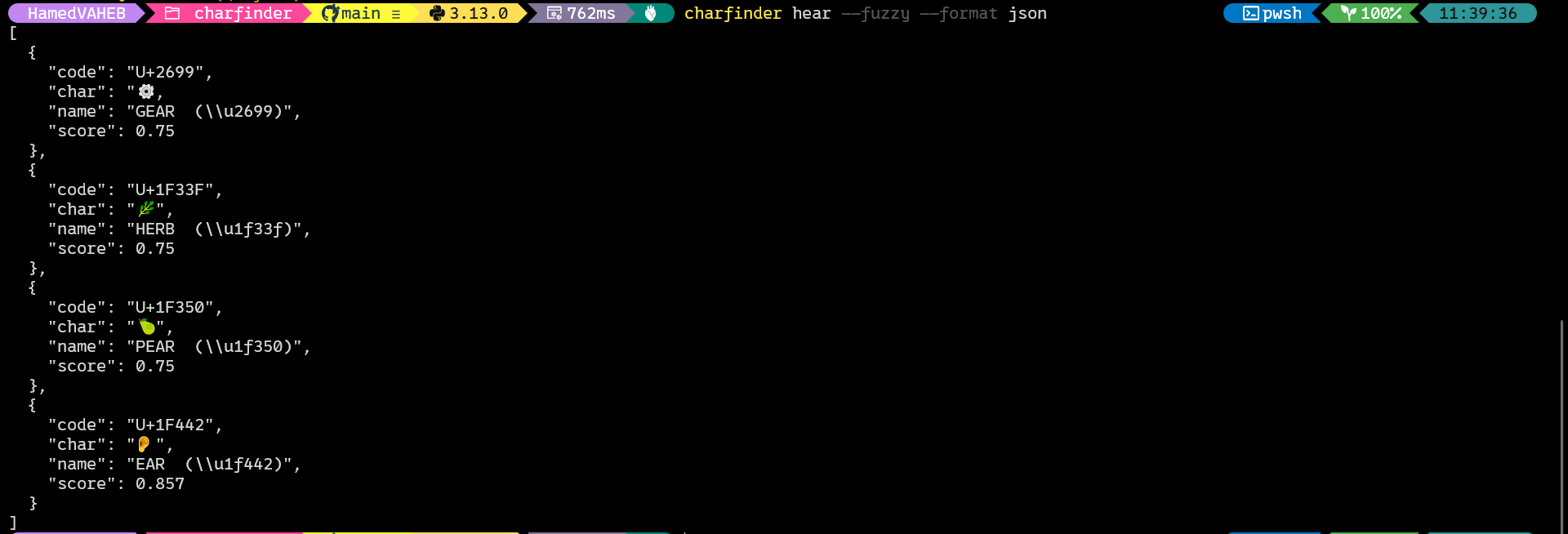
📚 See cli_architecture.md.
6.3 🐍 Python Library Usage
CharFinder can also be used as a pure Python library:
Example: Basic Search
from charfinder.core.core_main import find_chars

for line in find_chars("snowman"):
    print(line)
Example: Fuzzy Search with Options
from charfinder.core.core_main import find_chars

for line in find_chars(
    "snwmn",
    fuzzy=True,
    threshold=0.6,
    fuzzy_algo="rapidfuzz",
    fuzzy_match_mode="single",
    exact_match_mode="word-subset",
    agg_fn="mean",
):
    print(line)
Example: Raw Results (for Scripting)
from charfinder.core.core_main import find_chars_raw

results = find_chars_raw("grinning", fuzzy=True, threshold=0.7)

for item in results:
    print(item)
📚 See core_logic.md.
7. 🧱 Internals and Architecture
CharFinder is built with a layered, modular architecture designed for clarity, testability, and extensibility. It supports robust CLI interaction and Python API usage.
7.1 Architecture Overview
The system is structured into clearly defined layers:
1. Core Logic Layer (core/)
-
Implements the core Unicode search engine: exact/fuzzy matching, scoring, and normalization.
-
Fully decoupled from CLI and formatting logic.
-
Key modules:
finders.py— main search orchestratormatching.py— scoring logic for fuzzy and exact matches, uses matching libraryfuzzymatchlib.pyname_cache.py— Unicode name caching, loading, and savingunicode_data_loader.py— parses and validatesUnicodeData.txtand alternate names
📚 See core_logic.md, matching.md
2. Finder API Layer (core/core_main.py)
- Exposes public APIs:
find_chars(),find_chars_with_info(), etc. - Orchestrates validation, normalization, and config setup
- Consumed by CLI and external Python usage
3. CLI Layer (cli/)
- Argument parsing (
args.py,parser.py) - Execution and output routing (
cli_main.py,handlers.py) - Output formatting (
formatter.py,utils_runner.py) - Fully testable and modular CLI engine
📚 See cli_architecture.md
4. Diagnostics Layer (cli/diagnostics.py, cli/diagnostics_match.py)
-
Provides structured debug output for:
- Matching decisions, fallback logic, algorithm insights
-
Activated via
--debugorCHARFINDER_DEBUG_ENV_LOAD=1
📚 See debug_diagnostics.md
5. Utilities Layer (utils/)
-
Shared helpers:
normalizer.py— normalization, folding, and cachinglogger_helpers.py,logger_setup.py— terminal and file-based logging utilitiesformatter.py,logger_styles.py— console output styling
6. Configuration Layer (config/)
-
Centralized configuration:
settings.py— dotenv loading, environment mode detection, paths, log configconstants.py— global constant values (defaults, exit codes, env var names)types.py— shared types and protocols for core and CLI usagealiases.py— fuzzy algorithm aliases and canonical name resolution
📚 See
config_constants.md,config_environment.md,config_types_protocols.md
7. Validation Layer (validators.py)
-
Core + CLI shared validation
-
Ensures consistent input handling:
- Fuzzy algorithm names, match modes, thresholds, color modes
- CLI/environment/default priority resolution
📚 See validators.md
7.2 Key Components
🔁 Caching
CharFinder uses layered caching:
-
In-Memory:
cached_normalize()— memoizes normalization results for performance
-
Persistent:
unicode_name_cache.jsonstores normalized character name mappings- Auto-rebuilt from
UnicodeData.txt+ alternates if missing or outdated
📚 See caching.md
⚙️ Environment Management
Supports predictable, override-friendly config loading:
-
Runtime modes:
DEV,UAT,PROD,TEST -
Load order:
DOTENV_PATHif explicitly set.envfrom project root- Fallback to system environment
→ Enable CHARFINDER_DEBUG_ENV_LOAD=1 for detailed trace
📚 See config_environment.md
📋 Logging
Flexible logging system supports development, testing, and production:
- Rotating file logs per environment:
logs/{ENV}/charfinder.log - Console output respects
--verboseand--debug - Color detection adjusts automatically for terminals and scripts
- Logging setup via
setup_logging()inlogger_setup.py
📚 See logging_system.md
🧪 8. Testing
CharFinder has a comprehensive test suite covering core logic, CLI integration, caching, environment handling, and logging.
Testing Layer (tests/)
- Unit tests (core, CLI, utils)
- Integration tests (via CLI subprocess)
- Logging behavior tests
- All tests isolated and environment-aware
- High test coverage using
pytest - Test isolation enforced via Pytest fixtures and
.envcleanup
Running Tests
Run the full test suite:
make test
Run only failed or last tests:
make test-fast
Run tests with coverage:
make coverage
Generate HTML coverage report:
make coverage-html
Code Quality Enforcement
make lint-all
Applies Ruff formatting, Ruff checking, and MyPy static type checks. This runs all of the following commands:
Linting and Formatting
make lint-ruff
which is equivalent to
ruff check src/ tests/
make fmt
which is equivalent to
ruff format src/ tests/
Static Type Checks
make type-check
which is equivalent to
mypy src/ tests/
Coverage Policy
- Target: 100% coverage on all Python files under
src/ - CLI integration tests cover all major CLI scenarios via
subprocess.run - Logging behaviors,
.envloading, and edge cases are all tested
Test Layers
- Unit tests: test core logic in isolation (core, caching, normalization, settings, utils)
- CLI integration tests: test full CLI entrypoint via subprocess
- Logging tests: test rotating logging, suppression, environment filtering
- Settings tests: test different
.envand environment variable scenarios
📚 See unit_test_design.md
👨💻 9. Developer Guide
🔨 Cloning & Installation
For Users:
git clone https://github.com/berserkhmdvhb/charfinder.git
cd charfinder
python -m venv .venv
source .venv/bin/activate  # Windows: .venv\Scripts\activate
make install
For Developers (Contributors):
git clone https://github.com/berserkhmdvhb/charfinder.git
cd charfinder
python -m venv .venv
source .venv/bin/activate  # Windows: .venv\Scripts\activate
make develop
🔧 Makefile Commands
| Command | Description |
|---|---|
make install |
Install the package in editable mode |
make develop |
Install with all dev dependencies |
make fmt |
Auto-format code using Ruff |
make fmt-check |
Check code formatting (dry run) |
make lint-ruff |
Run Ruff linter |
make type-check |
Run MyPy static type checker |
make lint-all |
Run formatter, linter, and type checker |
make lint-all-check |
Dry run: check formatting, lint, and types |
make test |
Run all tests using Pytest |
make test-file FILE=... |
Run a single test file or keyword |
make test-file-function FILE=... FUNC=... |
Run a specific test function |
make test-fast |
Run only last failed tests |
make test-coverage |
Run tests and show terminal coverage summary |
make test-coverage-xml |
Run tests and generate XML coverage report |
make test-cov-html |
Run tests with HTML coverage report and open it |
make test-coverage-rep |
Show full line-by-line coverage report |
make test-coverage-file FILE=... |
Show coverage for a specific file |
make check-all |
Run format-check, lint, and full test suite |
make test-watch |
Auto-rerun tests on file changes |
make precommit |
Install pre-commit hook |
make precommit-check |
Dry run all pre-commit hooks |
make precommit-run |
Run all pre-commit hooks |
make env-check |
Show Python and environment info |
make env-debug |
Show debug-related env info |
make env-clear |
Unset CHARFINDER_* and DOTENV_PATH environment variables |
make env-show |
Show currently set CHARFINDER_* and DOTENV_PATH variables |
make env-example |
Show example env variable usage |
make dotenv-debug |
Show debug info from dotenv loader |
make safety |
Check dependencies for vulnerabilities |
make check-updates |
List outdated pip packages |
make check-toml |
Check pyproject.toml for syntax validity |
make clean-logs |
Remove DEV log files |
make clean-cache |
Remove cache files |
make clean-coverage |
Remove coverage data |
make clean-build |
Remove build artifacts |
make clean-pyc |
Remove .pyc and pycache files |
make clean-all |
Remove all build, test, cache, and log artifacts |
make build |
Build package for distribution |
make publish-test |
Upload to TestPyPI |
make publish |
Upload to PyPI |
make upload-coverage |
Upload coverage report to Coveralls |
📝 Onboarding Tips
- Always use
make developto install full dev dependencies. - Run
make check-allbefore pushing changes, or equivalently, runmake lint-all-checkandmake test-coverage. - Validate
.envloading withmake dotenv-debug.
⚡ 10. Performance
📚 See performance.md
🚧 11. Limitations and Known Issues
📚 See limitations_issues.md
📖 12. Documentation
This project includes detailed internal documentation to help both developers and advanced users understand its design, architecture, and internals.
The following documents are located in the docs/ directory:
| Document | Description |
|---|---|
caching.md |
Explanation of cache layers: Unicode name cache, cached_normalize(), performance considerations. |
cli_architecture.md |
Overview of CLI modules, their flow, entry points, and command routing logic. |
config_constants.md |
Centralized constants used across the project: default values, valid input sets, exit codes, environment variable names, normalization profiles, hybrid scoring weights, and logging defaults. |
config_environment.md |
Detailed explanation of environment variable handling and .env resolution priorities and scenarios |
config_types_protocols.md |
Project-wide types, Protocol interfaces, and their role in extensibility and static typing. |
core_logic.md |
Core logic and library API (find_chars, find_chars_raw): processing rules, transformations, architecture. |
debug_diagnostics.md |
Debug and diagnostic output systems: --debug, CHARFINDER_DEBUG_ENV_LOAD, dotenv introspection. |
logging_system.md |
Logging architecture: setup, structured logging, rotating files, and environment-based folders. |
matching.md |
Detailed explanation of exact and fuzzy matching algorithms and options. Includes mode combinations and flowcharts. |
unicode_normalization.md |
Unicode normalization explained: what is used (NFC), why, and implications for search. |
packaging.md |
Packaging and publishing: pyproject.toml, build tools, versioning strategy, and PyPI release process. |
unit_test_design.md |
Testing layers: unit tests, CLI integration tests, coverage strategy. |
validators.md |
Centralized validation logic shared across CLI and core. Type safety, fallbacks, source-aware behavior. |
These documents serve both as developer onboarding materials and technical audit references.
🙏 13. Acknowledgments
Special thanks to Luciano Ramalho @ramalho, author of Fluent Python.
The original charfinder function in his book (Chapter 4: Unicode Text Versus Bytes) directly inspired the creation of this project — both in concept and in name.
Luciano also provided critical early feedback through GitHub issues, which shaped major improvements, and the overall evolution of release v1.1.6. His insights on alternate Unicode names, query flexibility, and CLI UX were invaluable.
🧾 14. License
MIT License © 2025 berserkhmdvhb
1 maintainer

Metadata
1 maintainer
Release files for charfinder 1.1.9
For a detailed explanation of source distributions (sdists) and built distributions (wheels), please see the package formats documentation.
Source distribution (sdist)
| File | Size | Uploaded | |
|---|---|---|---|
| charfinder-1.1.9.tar.gz | 115.2 kB | Details |
Built distribution (wheel)
| File | Interpreter | ABI | Platform | Reset |
|---|---|---|---|---|
| charfinder-1.1.9-py3-none-any.whl | Python 3 | none | any | Details |
Total release size: 187.5 kB
Release files / charfinder-1.1.9.tar.gz
| Download URL | charfinder-1.1.9.tar.gz |
|---|---|
| Size | 115.2 kB |
| Tags | Source |
|
SHA-256 checksum How to use checksums |
ea88bc5c500801d4269a48e2c23fd5e00839a7df083e752f70ed5ab317b7b246
|
|
BLAKE2b-256 checksum How to use checksums |
2482e6fc6febeee32b2ef05621d423e6ec1c67683ee0bd857de161ef77cf8bc1
|
| Upload date | |
|
Uploaded using Trusted Publishing? What is trusted publishing? |
No |
| Uploaded via |
twine/6.1.0 CPython/3.13.0
|
Release files / charfinder-1.1.9-py3-none-any.whl
| Download URL | charfinder-1.1.9-py3-none-any.whl |
|---|---|
| Size | 72.3 kB |
| Tags | Python 3 |
|
SHA-256 checksum How to use checksums |
2030e72a9cf2ca8f5112218ca64ab57386b221eb2f1dde37f9956f557dffe876
|
|
BLAKE2b-256 checksum How to use checksums |
9fa777c73ac74198174ce554b72942d9cc7f1050df092ee18b6b18ee4cb33e05
|
| Upload date | |
|
Uploaded using Trusted Publishing? What is trusted publishing? |
No |
| Uploaded via |
twine/6.1.0 CPython/3.13.0
|














