
chart.xkcd
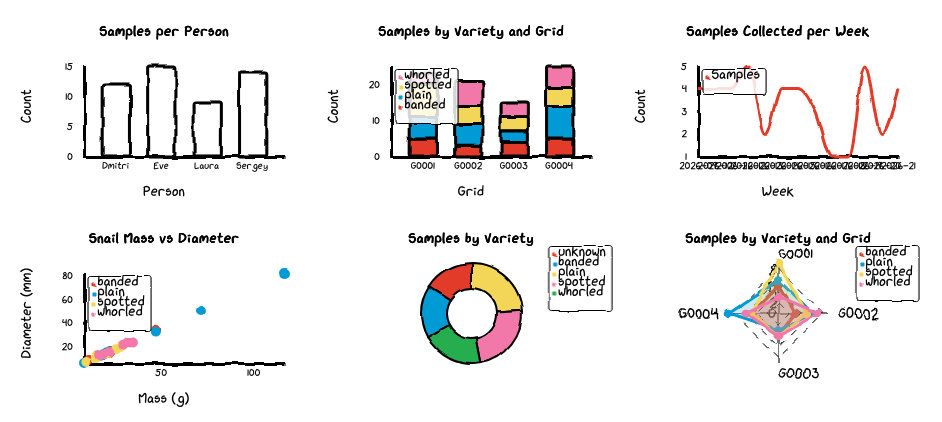
A Python + JavaScript library for creating xkcd-style charts. See this repository for the original code.
Examples
Python command-line examples (examples/*.py)
Each chart type has a standalone script that reads a CSV file and writes a static HTML page:
| Script | Chart type | Input CSV | Description |
|---|---|---|---|
bar.py |
Bar | data/bar.csv |
Samples per person |
heatmap.py |
Heatmap | data/heatmap.csv |
Pollution readings in sample grid |
line.py |
Line | data/line.csv |
Samples collected per week |
pie.py |
Pie | data/pie.csv |
Samples by variety |
radar.py |
Radar | data/radar.csv |
Samples by variety and grid |
scatter.py |
Scatter | data/scatter.csv |
Snail mass vs diameter |
stacked_bar.py |
StackedBar | data/stacked_bar.csv |
Samples by variety and grid |
Run them all at once with:
make ex_py
Or run one individually:
python examples/bar.py data/bar.csv tmp/bar.html
Marimo notebook (examples/notebook.py)
A marimo notebook that displays all six chart types as interactive
widgets. Each cell reads a CSV file from data/ and calls to_widget()
to render the chart.
marimo run examples/notebook.py
Selection test notebook (examples/test_selection.py)
A marimo notebook demonstrating click, shift-click, and box-select
interactions. Each chart is wrapped with mo.ui.anywidget() so that
selection changes trigger reactive cell updates.
marimo run examples/test_selection.py
JavaScript examples (js/examples/)
A standalone HTML page (example.html) that renders all six chart
types using the JavaScript library directly. The data is loaded
dynamically from CSV files via fetch(). A symlink
js/examples/data points to the project-level data/ directory.
To view the JavaScript examples with a dev server:
make ex_js
Then open the URL printed by the dev server in a browser.
Project structure
assets/                  xkcd-script.ttf font file
bin/                     build scripts (font_encode.py)
examples/                Python examples, SQL queries, marimo notebooks
js/src/                  JavaScript chart source
  Bar.js, Line.js, ...   chart classes
  config.js              shared constants
  widget.js              anywidget entry point
  index.js               standalone library entry point
  components/Tooltip.js  tooltip component
  utils/                 shared helpers (axes, labels, legend, font, filter)
pages/                   MkDocs documentation files
  pages/img/             screenshots of charts
src/chart_xkcd/          Python package
  bar.py, line.py, ...   chart classes
  charts.py              base classes and validation
  widget.py              anywidget adapter (ChartWidget, to_widget)
  renderer.py            HTML rendering (render, to_html)
  config.py              positionType constants
  main.py                CLI entry point
  static/                bundled JS (built artifact)
docs-requirements.txt    ReadTheDocs dependencies
mkdocs.yml               MkDocs configuration file
pyproject.toml           Python project file
1 maintainer

Metadata
1 maintainer
Release files for chart-xkcd 0.5.0
For a detailed explanation of source distributions (sdists) and built distributions (wheels), please see the package formats documentation.
Source distribution (sdist)
| File | Size | Uploaded | |
|---|---|---|---|
| chart_xkcd-0.5.0.tar.gz | 1.5 MB | Details |
Built distribution (wheel)
| File | Interpreter | ABI | Platform | Reset |
|---|---|---|---|---|
| chart_xkcd-0.5.0-py3-none-any.whl | Python 3 | none | any | Details |
Total release size: 1.6 MB
Release files / chart_xkcd-0.5.0.tar.gz
| Download URL | chart_xkcd-0.5.0.tar.gz |
|---|---|
| Size | 1.5 MB |
| Tags | Source |
|
SHA-256 checksum How to use checksums |
58caf15bc0e2158cb1dc80acb01714dc979007655f0b55fbfbc16bcef168fa80
|
|
BLAKE2b-256 checksum How to use checksums |
adb9f7a0dac53672b6987e87de2f908b5e7dc639eef5726bd57e706a5d6e8c7a
|
| Upload date | |
|
Uploaded using Trusted Publishing? What is trusted publishing? |
No |
| Uploaded via |
twine/6.2.0 CPython/3.12.12
|
Release files / chart_xkcd-0.5.0-py3-none-any.whl
| Download URL | chart_xkcd-0.5.0-py3-none-any.whl |
|---|---|
| Size | 99.9 kB |
| Tags | Python 3 |
|
SHA-256 checksum How to use checksums |
18c0ddaefceda6d9ad88b24090eb98af00f427ce4163f157552ccd7a51bb6983
|
|
BLAKE2b-256 checksum How to use checksums |
1c96959122a48cd3b6a2fddae5e004fff0eb6836ca071e59099d8d261cc7ea52
|
| Upload date | |
|
Uploaded using Trusted Publishing? What is trusted publishing? |
No |
| Uploaded via |
twine/6.2.0 CPython/3.12.12
|














