
Charted is a zero dependency SVG chart generator that aims to provide a simple interface for generating beautiful and customisable graphs. This project is inspired by chart libraries like mermaid.js.

Project description



Charted is a zero dependency SVG chart generator that aims to provide a simple interface for generating beautiful and customisable graphs. This project is inspired by chart libraries like mermaid.js.
All chart types support negative values with a proper zero baseline, multi-series data, and theming via a simple dict. Output is a single SVG string — write it to a file or inline it in HTML.
Why Charted?
- Zero runtime dependencies — pure Python, no numpy/pandas required
- 5 chart types — Bar, Column, Line, Scatter, Pie (with doughnut mode)
- Multi-series support — stacked, side-by-side, grouped layouts
- Negative values handled — proper zero baseline calculations
- Theme system — 3 built-in themes + custom dict overrides
- Data loading — CSV/JSON parsers built-in
- Markdown export — generate embed-ready markdown snippets
- CLI included — create charts without writing Python code
- Jupyter ready — charts render inline automatically
- Base Chart class — unified API for dynamic chart type selection
Chart Types
- Column (multi-series, stacked, side-by-side)
- Bar (single-series, multi-series, stacked, side-by-side)
- Line (single-series, multi-series, XY mode)
- Scatter (single-series, multi-series)
- Pie (doughnut mode, exploded slices)
CLI Usage
charted can be used from the command line to generate charts without writing Python code:
# Generate a single chart from CSV/JSON
python -m charted create bar output.svg --data data.csv

# Specify chart type and data file
python -m charted create column chart.svg -d sales.csv

# Batch generate charts from a directory
python -m charted batch input_data/ output_svg/

# Override chart type inference
python -m charted batch input_data/ output_svg/ -t line
Data File Formats
CSV:
Quarter,Revenue,Expenses
Q1,120,80
Q2,180,95
Q3,210,110
JSON:
{
  "labels": ["Q1", "Q2", "Q3"],
  "data": [[120, 180, 210], [80, 95, 110]],
  "series_names": ["Revenue", "Expenses"]
}
Jupyter Notebook Integration
charted works seamlessly in Jupyter notebooks — charts render inline automatically:
from charted.charts import BarChart

# Just create a chart, it displays inline
chart = BarChart(
    title="Sales by Quarter",
    data=[120, 180, 210, 150],
    labels=["Q1", "Q2", "Q3", "Q4"]
)
Charts are automatically compatible with markdown documentation — just embed the generated SVG:

Data Loading
Load data directly from CSV/JSON files without pandas:
from charted import load_csv, load_json, BarChart

# Load from CSV
x, y, labels = load_csv("sales.csv", x_col="Quarter", y_col="Revenue")
chart = BarChart(data=y, labels=x, title=labels[0])
chart.save("sales.svg")

# Load from JSON
x, y, labels = load_json("data.json")
chart = ColumnChart(data=y, labels=x)
chart.save("chart.svg")
Supported JSON formats: simple arrays, arrays of objects, or objects with data/labels keys.
Markdown Export
Generate embed-ready markdown for documentation:
from charted import BarChart
chart = BarChart(data=[120, 180, 210], labels=["Q1", "Q2", "Q3"], title="Sales")
# Save and get markdown with file path
chart.save("docs/sales.svg")
md = chart.to_markdown(path="docs/sales.svg")
# Output: 
# Get markdown with inline data URL
md = chart.to_markdown() # Inline SVG as data URL
Perfect for embedding charts in README files, documentation, or markdown-based wikis.
Base Chart Class
Use the unified Chart class for dynamic chart type selection:
from charted import Chart

# Create any chart type with the same interface
chart = Chart(
    data=[120, 180, 210],
    labels=["Q1", "Q2", "Q3"],
    title="Sales",
    chart_type="bar"  # or "column", "line", "scatter", "pie"
)
chart.save("chart.svg")

# Access all chart methods
svg = chart.to_svg()
md = chart.to_markdown()
html = chart._repr_html_()
CLI Documentation
Full CLI help is available via:
python -m charted --help
python -m charted create --help
python -m charted batch --help
See Configuration for comprehensive documentation on all configuration options including:
- Basic settings — fonts, dimensions, color palette
- Chart-specific defaults — bar_gap, column_gap, pie label settings
- Chart-specific themes — per-chart-type theme overrides
- CLI integration — how config works with command-line usage
Installation
pip install charted
Links
tkinter
I've tried to avoid using tkinter in this library as it can be fiddly to install depending on your OS. However, it's still partially used if you're looking to expand Charted. Instead of using tkinter to calculate text dimensions on the fly, font definitions are created in fonts/definitions/.
New font definitions can be created by using:
uv run python charted/commands/create_font_definition.py Helvetica
Examples
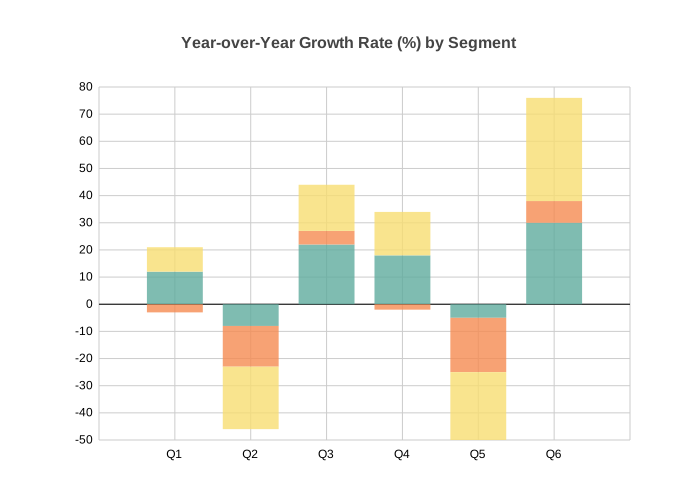
Column — multi-series with negatives
from charted.charts import ColumnChart

graph = ColumnChart(
    title="Year-over-Year Growth Rate (%) by Segment",
    data=[
        [12, -8, 22, 18, -5, 30],    # Revenue
        [-3, -15, 5, -2, -20, 8],    # Costs
        [9, -23, 17, 16, -25, 38],   # Net
    ],
    labels=["Q1", "Q2", "Q3", "Q4", "Q5", "Q6"],
    width=700,
    height=500,
    theme={
        "padding": {
            "v_padding": 0.12,
            "h_padding": 0.10,
        }
    },
)
Line — multi-series signal data
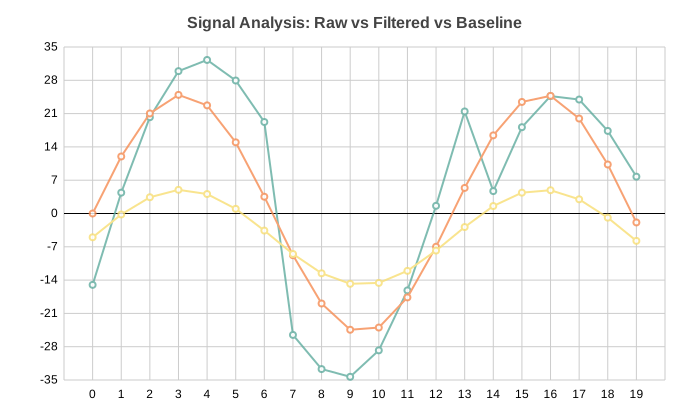
import math
from charted.charts import LineChart

n = 20
graph = LineChart(
    title="Signal Analysis: Raw vs Filtered vs Baseline",
    data=[
        [math.sin(i * 0.5) * 30 + (i % 7 - 3) * 5 for i in range(n)],  # Raw
        [math.sin(i * 0.5) * 25 for i in range(n)],                      # Filtered
        [math.sin(i * 0.5) * 10 - 5 for i in range(n)],                  # Baseline
    ],
    labels=[str(i) for i in range(n)],
    width=700,
    height=400,
)
Line — XY mode with temperature anomaly data
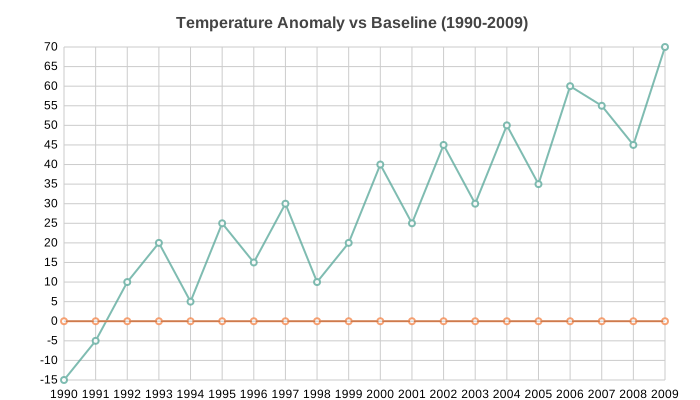
from charted.charts import LineChart

years = list(range(1990, 2010))
anomalies = [-15, -5, 10, 20, 5, 25, 15, 30, 10, 20, 40, 25, 45, 30, 50, 35, 60, 55, 45, 70]

graph = LineChart(
    title="Temperature Anomaly vs Baseline (1990-2009)",
    data=[anomalies, [0] * len(years)],
    x_data=years,
    labels=[str(y) for y in years],
    width=700,
    height=400,
)
Bar — single series with negatives
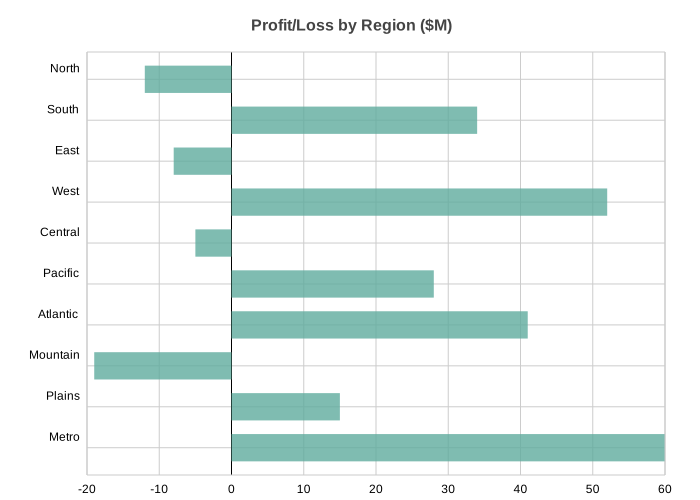
from charted.charts import BarChart

graph = BarChart(
    title="Profit/Loss by Region ($M)",
    data=[-12, 34, -8, 52, -5, 28, 41, -19, 15, 60],
    labels=["North", "South", "East", "West", "Central", "Pacific", "Atlantic", "Mountain", "Plains", "Metro"],
    width=700,
    height=500,
)
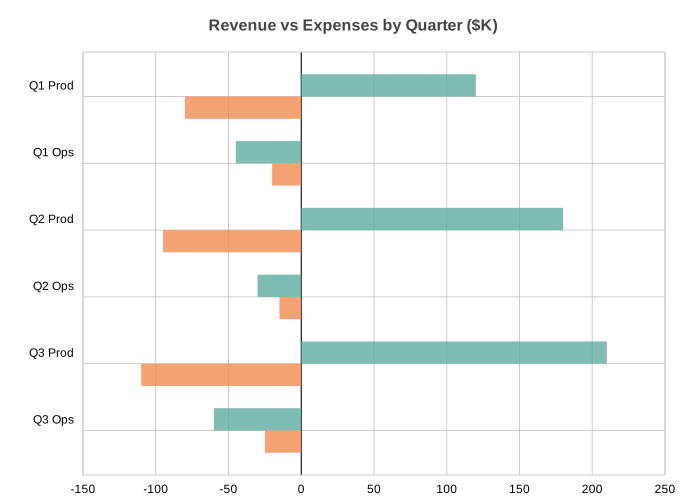
Bar — multi-series side-by-side
from charted.charts import BarChart

graph = BarChart(
    title="Revenue vs Expenses by Quarter ($K)",
    data=[
        [120, -45, 180, -30, 210, -60],   # Revenue
        [-80, -20, -95, -15, -110, -25],  # Expenses
    ],
    labels=["Q1 Prod", "Q1 Ops", "Q2 Prod", "Q2 Ops", "Q3 Prod", "Q3 Ops"],
    width=700,
    height=500,
)
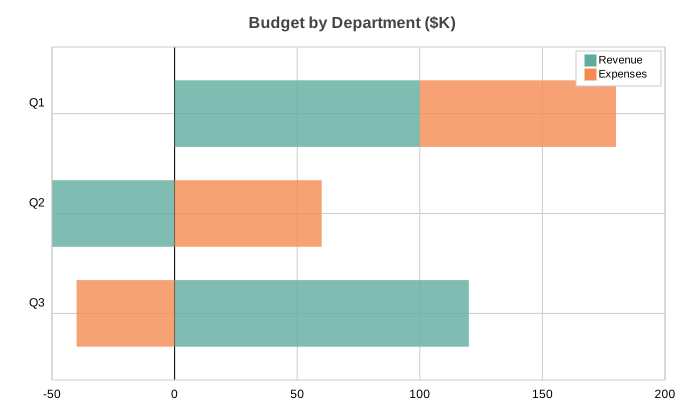
Bar — stacked
from charted.charts import BarChart

graph = BarChart(
    title="Budget by Department ($K)",
    data=[
        [100, -50, 120],    # Revenue
        [80, 60, -40],      # Expenses
    ],
    labels=["Q1", "Q2", "Q3"],
    series_names=["Revenue", "Expenses"],
    x_stacked=True,
    width=700,
    height=400,
)
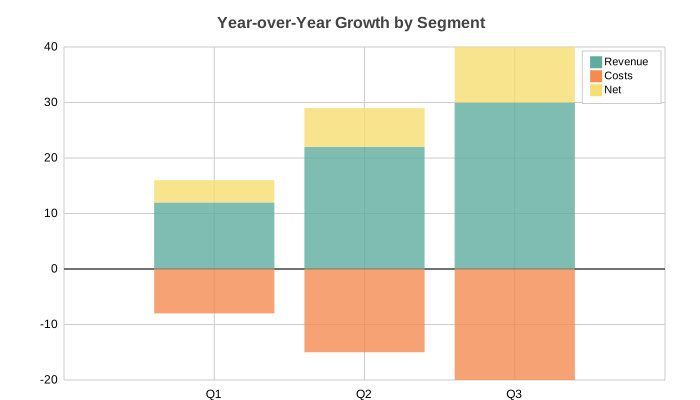
Column — stacked (default for multi-series)
from charted.charts import ColumnChart

graph = ColumnChart(
    title="Year-over-Year Growth by Segment",
    data=[
        [12, 22, 30],      # Revenue
        [-8, -15, -20],    # Costs
        [4, 7, 10],        # Net
    ],
    labels=["Q1", "Q2", "Q3"],
    series_names=["Revenue", "Costs", "Net"],
    width=700,
    height=400,
)
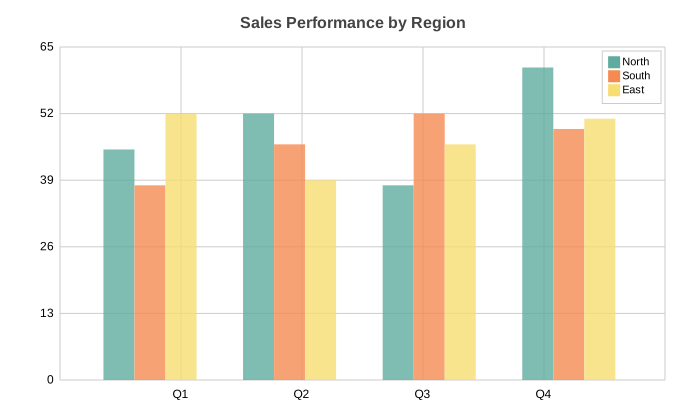
Column — side-by-side
from charted.charts import ColumnChart

graph = ColumnChart(
    title="Sales Performance by Region",
    data=[
        [45, 52, 38, 61],   # North
        [38, 46, 52, 49],   # South
        [52, 39, 46, 51],   # East
    ],
    labels=["Q1", "Q2", "Q3", "Q4"],
    series_names=["North", "South", "East"],
    width=700,
    height=400,
)
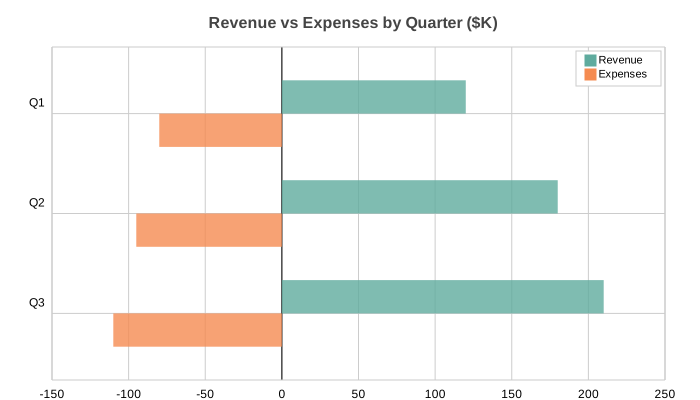
Bar — side-by-side with negatives
from charted.charts import BarChart

graph = BarChart(
    title="Revenue vs Expenses by Quarter ($K)",
    data=[
        [120, 180, 210],    # Revenue
        [-80, -95, -110],   # Expenses
    ],
    labels=["Q1", "Q2", "Q3"],
    series_names=["Revenue", "Expenses"],
    width=700,
    height=400,
)
Line — single series
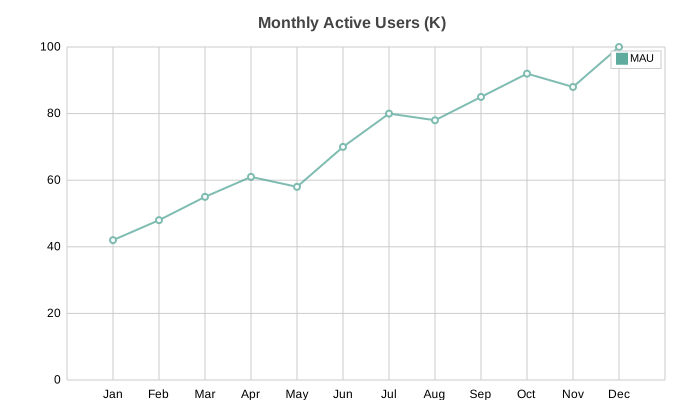
from charted.charts import LineChart

graph = LineChart(
    title="Monthly Active Users (K)",
    data=[[42, 48, 55, 61, 58, 70, 80, 78, 85, 92, 88, 100]],
    labels=["Jan", "Feb", "Mar", "Apr", "May", "Jun", "Jul", "Aug", "Sep", "Oct", "Nov", "Dec"],
    series_names=["MAU"],
    width=700,
    height=400,
)
Scatter — multi-series
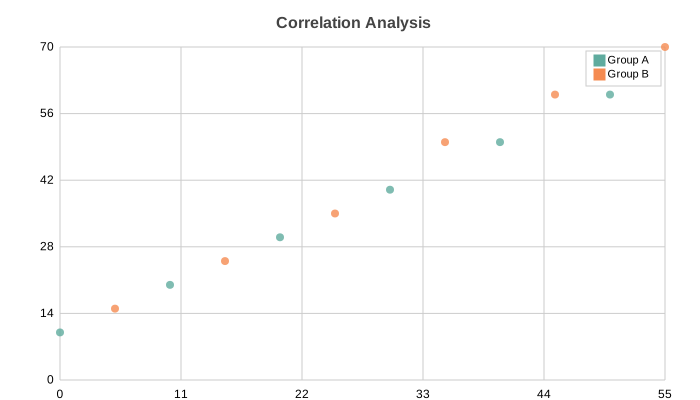
from charted.charts import ScatterChart

graph = ScatterChart(
    title="Correlation Analysis",
    x_data=[[0, 10, 20, 30, 40, 50], [5, 15, 25, 35, 45, 55]],
    y_data=[[10, 20, 30, 40, 50, 60], [15, 25, 35, 50, 60, 70]],
    series_names=["Group A", "Group B"],
    width=700,
    height=400,
)
Scatter — single series
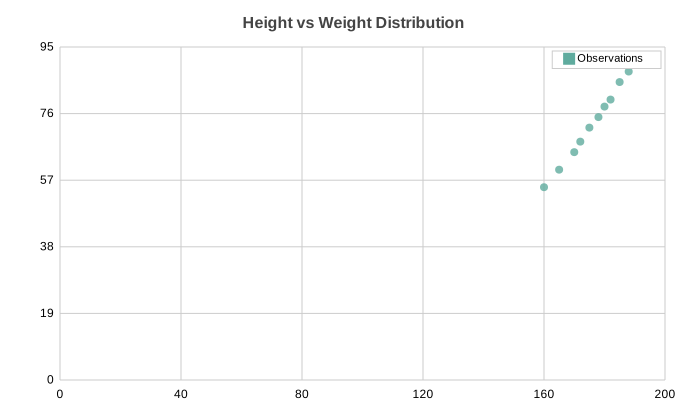
from charted.charts import ScatterChart

graph = ScatterChart(
    title="Height vs Weight Distribution",
    x_data=[160, 165, 170, 172, 175, 178, 180, 182, 185, 188, 190],
    y_data=[55, 60, 65, 68, 72, 75, 78, 80, 85, 88, 92],
)
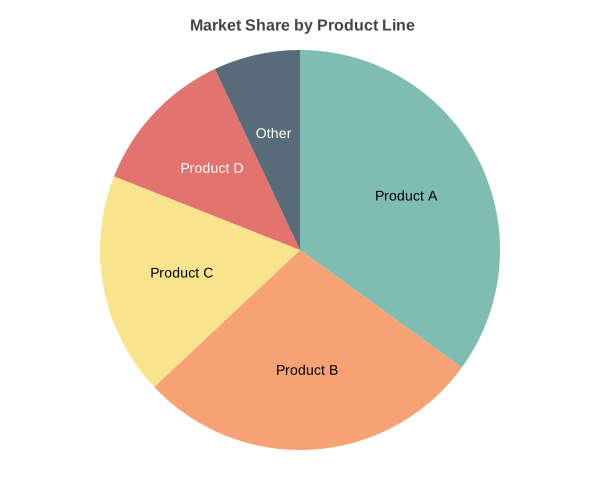
Pie — basic
from charted.charts import PieChart

graph = PieChart(
    title="Market Share by Product Line",
    data=[35, 28, 18, 12, 7],
    labels=["Product A", "Product B", "Product C", "Product D", "Other"],
    width=600,
    height=500,
)
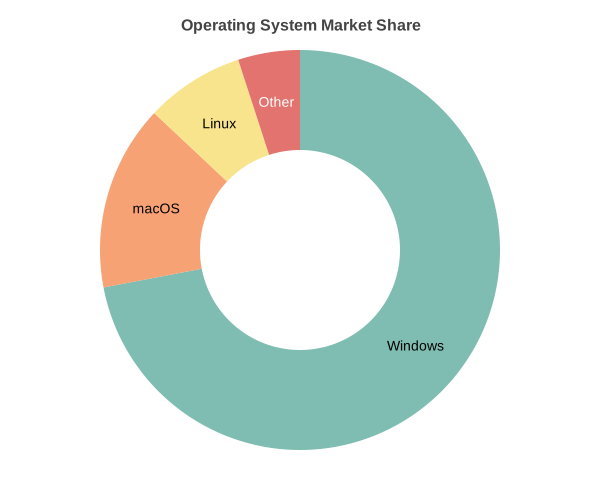
Pie — doughnut mode
from charted.charts import PieChart

graph = PieChart(
    title="Operating System Market Share",
    data=[45, 28, 15, 12],
    labels=["Windows", "macOS", "Linux", "Other"],
    inner_radius=0.5,  # Creates doughnut hole (0.0-1.0 ratio)
    width=600,
    height=500,
)
Release history Release notifications | RSS feed


Download files
Download the file for your platform. If you're not sure which to choose, learn more about installing packages.
Source Distribution
Built Distribution
Filter files by name, interpreter, ABI, and platform.
If you're not sure about the file name format, learn more about wheel file names.
Copy a direct link to the current filters
File details
Details for the file charted-1.0.1.tar.gz.
File metadata
- Download URL: charted-1.0.1.tar.gz
- Upload date:
- Size: 222.7 kB
- Tags: Source
- Uploaded using Trusted Publishing? No
- Uploaded via: uv/0.5.20
File hashes
| Algorithm | Hash digest | |
|---|---|---|
| SHA256 |
05fc1b1de75d83e0e8a1e712711fc0588ea433a5c63677d33a8c929ebf9dcf29
|
|
| MD5 |
10deef5945c43e3c721d8719f9c7f65d
|
|
| BLAKE2b-256 |
3fc2d5189e96028d3ab768997cb1e389c3cfdfe2454e3b32888e9a2a7e5fa174
|
File details
Details for the file charted-1.0.1-py3-none-any.whl.
File metadata
- Download URL: charted-1.0.1-py3-none-any.whl
- Upload date:
- Size: 98.8 kB
- Tags: Python 3
- Uploaded using Trusted Publishing? No
- Uploaded via: uv/0.5.20
File hashes
| Algorithm | Hash digest | |
|---|---|---|
| SHA256 |
4db4e60492b2b1e71a6ade08b60deb95fae78f72e5b86d9b4fc4e6c4e88ce481
|
|
| MD5 |
7d53cfb17e27b722e351a831873f6768
|
|
| BLAKE2b-256 |
b8353686804895d822915b10c8fef45be56927c1575be84241a9f1a02a8979cd
|






