
chase-pipeline
A modular calibration and flare-analysis pipeline for CHASE / HIS solar spectroscopy — with a TUI, a Python SDK, and a one-file config workflow.



CHASE (the Chinese Hα Solar Explorer) scans the full solar disk in Hα (118
wavelengths, 6559.4–6565.1 Å) and Fe I (46 wavelengths, ~6569 Å). The raw data is
scientifically rich but awkward to use — every frame drifts spatially and
spectrally, and turning a stack of RSM…_HA.fits cubes into a clean, aligned,
calibrated data product takes a lot of careful work. chase-pipeline does that
work for you, and lets you do as much or as little of it as you want.
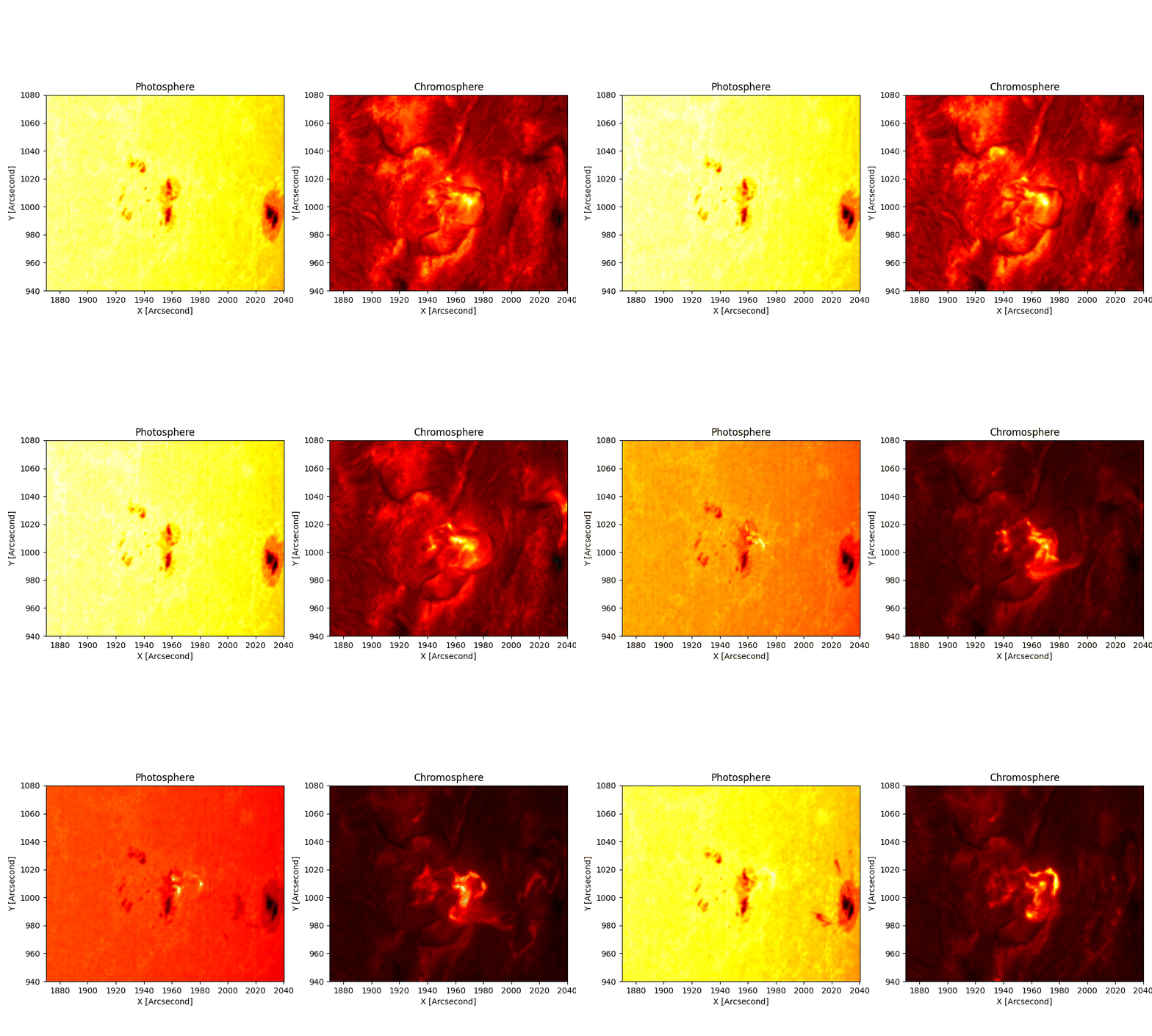
The 2023-03-29 X2.1 flare, stabilised by this pipeline:
photosphere (Hα continuum) | chromosphere (Hα core). 25 frames, per-frame colour scaling.
Rendered with --flow-method farneback: TV-L1 optical flow blocks at the flare peak
(its total-variation regularizer turns the brightening into a rigid motion block); Farneback stays
clean. See docs/FLARE_STABILIZATION.md.
Why this exists (statement of need)
CHASE data is under-used because it is hard to use: the portal ships full-disk
cubes with no co-alignment, a per-frame wavelength zero-point that drifts by ~0.8
channels, and no turnkey way to extract a science-ready region. Existing scripts
(including the original chase-pipeline and Finlay Davis's satprocess) each
solved part of the problem. This package unifies them into one installable
tool that:
- just works for the lazy user — point at a folder, set a field of view and a few true/false flags in a text file (or use the TUI), run once, get an aligned FITS/npz cube + images/GIF out;
- stays hackable for the power user — every stage is an importable function
(
import chase), nothing is a forced monolithic pipeline; - preserves the physics — shift-then-crop tracking, per-frame wavelength resampling, flare-free alignment, absolute atlas calibration, and the correct temperature inversions per line (it does not "simplify away" the hard-won fixes).
Install
From PyPI (the package is named chasepy; it installs the chase module and
the chase / chase-tui commands):
pip install chasepy              # core
pip install 'chasepy[tui]'       # + Textual TUI  (chase-tui)
pip install 'chasepy[atlas]'     # + ISPy for absolute Fe I temperature calibration
pip install 'chasepy[all]'       # everything, incl. test deps
Or for development, clone and install editable:
git clone https://github.com/Majboor/chase-pipeline.git
cd chase-pipeline
pip install -e '.[all]'
Three ways to use it
1. TUI — interactive, no flags to memorise
chase-tui
End-to-end walkthrough — the real TUI configured on the 2023-03-29 X2.1
flare (data source → field of view → calibration → temperature → a before/after
of the stabilisation → the actual flare.gif / temperature.gif /
contrast_profile.gif output):
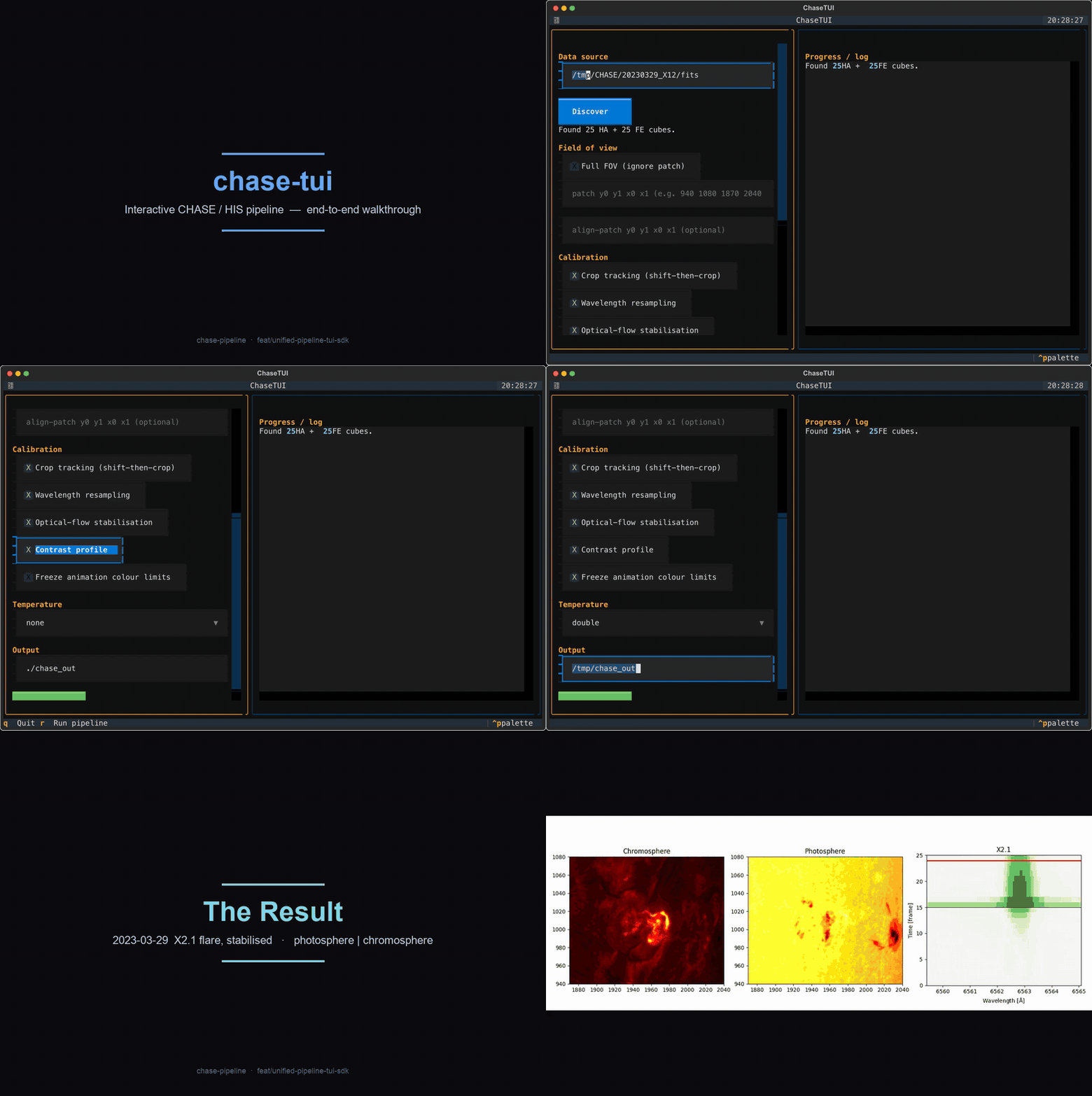
Prefer the full-resolution, scrubbable version? assets/tui_e2e_walkthrough.mp4.
Pick a data source, enter a full FOV or an arbitrary patch (and a separate, smaller alignment patch if you want), tick the calibrations you want, and hit Run — live progress streams into the log pane. The TUI is a thin front-end over the SDK; it duplicates no logic.
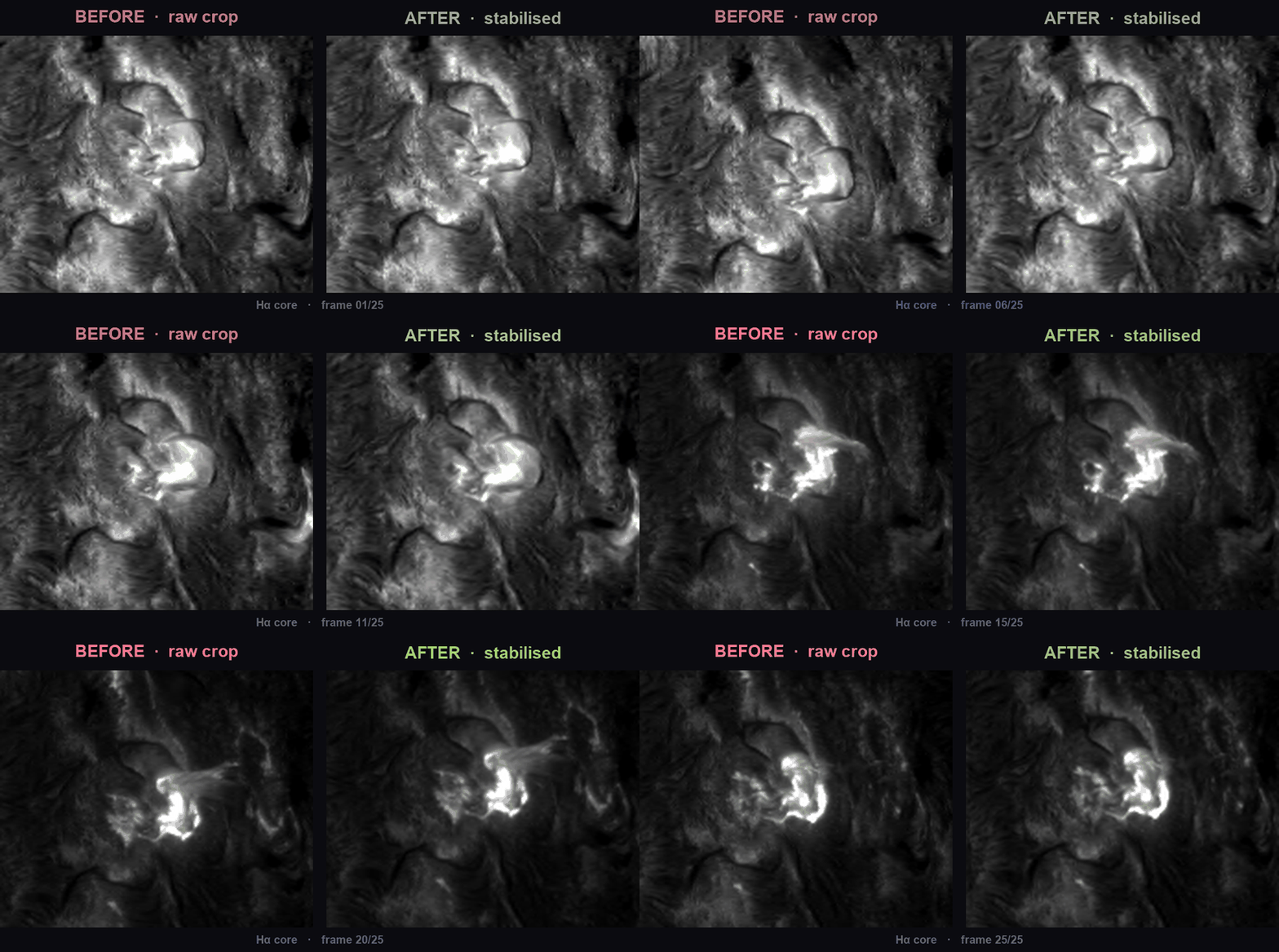
Before / after — what the spatial calibration buys you. Left: a raw fixed crop of the portal data, drifting frame to frame. Right: the same patch after shift-then-crop tracking + optical-flow stabilisation (Hα core):
2. Config file — the "lazy" one-shot workflow
chase --config examples/config.toml
# examples/config.toml
fits_dir = "/data/20230329_X12/fits"
out_dir  = "./chase_out"
patch    = [940, 1080, 1870, 2040]   # [y0, y1, x0, x1]; omit + full_fov=true for whole disk
contrast = true
temperature = "double"               # halpha + fe_planck
gif = true
freeze_clim = true
3. CLI — explicit flags (backward compatible)
chase /data/20230329_X12/fits \
      --patch 940 1080 1870 2040 \
      --align-patch 980 1040 1920 1990 \
      --contrast --temperature double --freeze-clim
Every run checkpoints the aligned cubes to out_dir/aligned_data.npz, so you
never have to redo the slow load + align stages just to tweak an output —
rerun a single step against the checkpoint with --only (implies --resume):
chase /data/20230329_X12/fits --out ./chase_out --only gif            # just re-render the animation
chase /data/20230329_X12/fits --out ./chase_out --only contrast,gif --no-drift
chase /data/20230329_X12/fits --out ./chase_out --only temperature --temperature fe_voigt
Steps: gif, contrast, temperature, npz, fits, diagnostics. Plain
--resume keeps your normal toggles and only skips load + align. (Changing the
patch or alignment options needs a fresh run without --resume — the
checkpoint stores the cubes as they were cropped and aligned.)
…and the SDK — call any single stage
import chase

# Load + crop-track a sequence (shift-then-crop, per-frame wavelength resample)
seq = chase.load_flare_sequence("/data/20230329_X12/fits",
                                patch=[940, 1080, 1870, 2040])

# Fine-stabilise with optical flow on the flare-free channel; HA stays float32
aligned = chase.optical_flow_align(seq["ha_cubes"], reference=seq["align_ref"])

# Science products
contrast, _ = chase.contrast_profile(aligned, background=seq["ha_bg"])
ha_T, _ = chase.halpha_width_temperature(aligned[24], seq["wavelength_ha"])  # Molnar 2019
Or run the whole thing in one call:
from chase import Config, run_pipeline
run_pipeline(Config(fits_dir="/data/.../fits", patch=[940,1080,1870,2040],
                    contrast=True, temperature="double"))

# Later: rerun only the outputs you care about, from the saved checkpoint
run_pipeline(Config(fits_dir="/data/.../fits", out_dir="./chase_out",
                    resume=True, gif=True, temperature="fe_voigt"))
What each subpackage does (one figure each)
| Subpackage | What it does | |
|---|---|---|
chase.io |
Resumable download, folder / list-file / URL discovery, cube + sequence loading |  |
chase.calib.spatial / .align |
Shift-then-crop tracking + optical-flow stabilisation |  |
chase.calib.wavelength |
Per-frame resampling onto a common grid; spectral-drift xcorr |  |
chase.calib.intensity |
QS norm, integral scaling, FTS-atlas absolute calibration (ISPy) |  |
chase.analysis.contrast |
(flare−bg)/bg − frame0 wavelength-vs-time profile |
 |
chase.analysis.temperature |
Hα width→T (Molnar) + Fe I →T (Planck/EB/Voigt) |  |
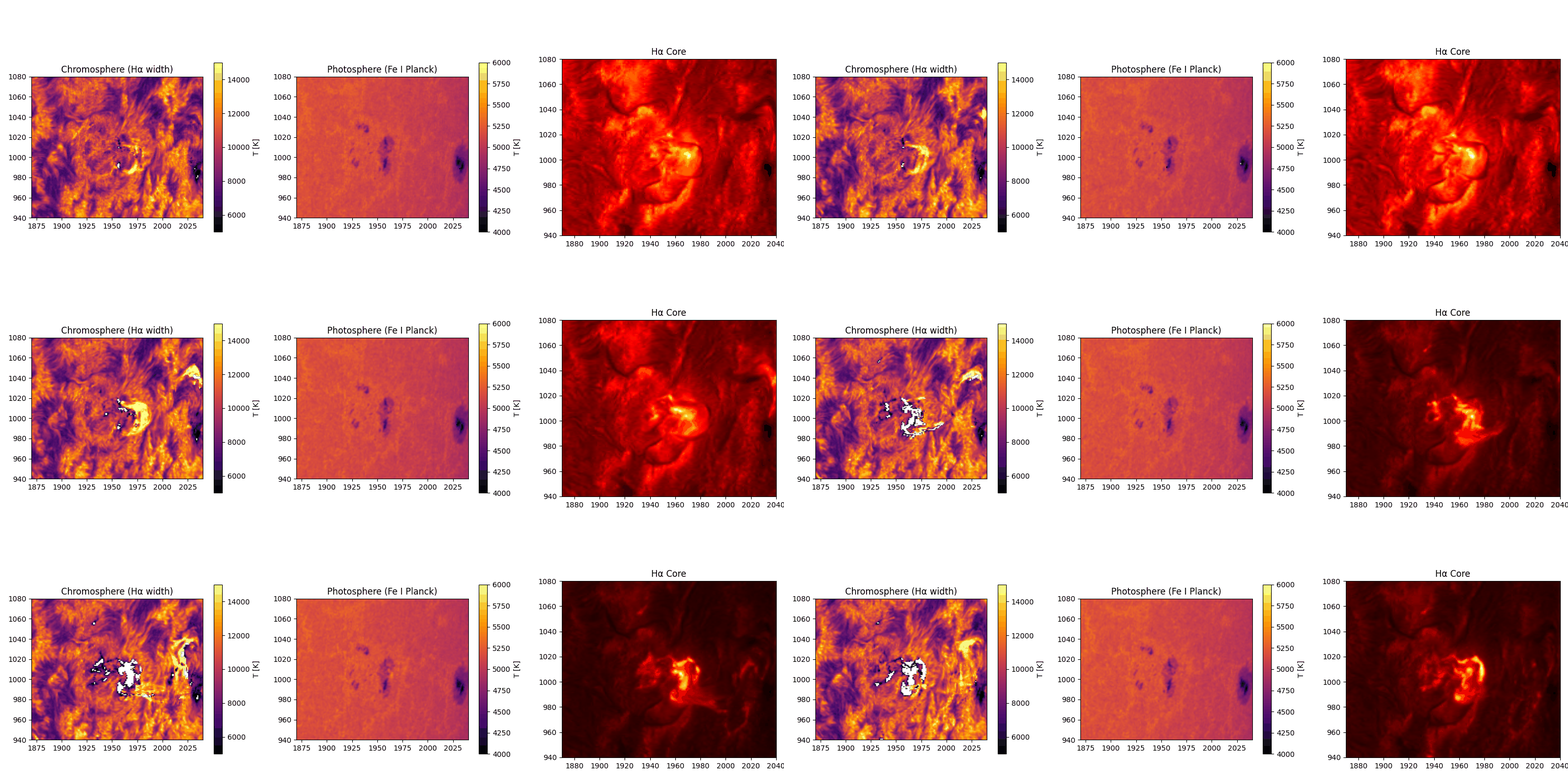
Double temperature map: chromosphere from Hα width (~10⁴ K) and photosphere
from Fe I Planck inversion (~5,100 K, absolute-calibrated against the FTS atlas).
Documentation
- docs/DATA_ACQUISITION.md — get from the CHASE portal to a processed cube, end to end.
- docs/SDK.md — the Python API, every function + parameters.
- docs/TUI.md — TUI walkthrough.
- docs/CALIBRATION.md — the science: what each calibration does and why.
- docs/CONTRIBUTING.md — dev setup, tests, style.
Tests
pip install -e '.[dev]' && pytest -q # 22 fast tests on synthetic FITS fixtures
Acknowledgements
Built with the guidance and corrections of Dr. Alexander Pietrow (AIP) and
Dr. Malcolm Druett. The Hough-circle limb centring, spectral
cross-correlation, integral intensity scaling, and CSV shift-cache are adapted
from Finlay Davis's satprocess
(BSD-3-Clause; see NOTICE). Affiliation support from Prof. Dr. Sayed
Amer Mahmood (University of the Punjab). Data courtesy of the CHASE/HIS
mission and the Solar Science Data Center, Nanjing University.
Citing
If you use this pipeline, please cite the methods it builds on:
- Molnar et al. 2019, ApJ 881, 99 — Hα width → temperature (10.3847/1538-4357/ab2ba3).
- The Eddington–Barbier photospheric inversion (A&A 2013, aa21259-13).
- The ISPy FTS solar-atlas calibration (ISP-SST/ISPy).
- CHASE/HIS: Li et al. 2022, Science China — the CHASE mission.
License
MIT © 2025-2026 Waleed Ajmal. Ported satprocess components are BSD-3-Clause © 2025
Finlay Davis — see NOTICE.
1 maintainer

Download files
Download the file for your platform. If you're not sure which to choose, learn more about installing packages.
Source Distribution
Built Distribution
Filter files by name, interpreter, ABI, and platform.
If you're not sure about the file name format, learn more about wheel file names.
Copy a direct link to the current filters
File details
Details for the file chasepy-2.0.0.tar.gz.
File metadata
- Download URL: chasepy-2.0.0.tar.gz
- Upload date:
- Size: 51.1 kB
- Tags: Source
- Uploaded using Trusted Publishing? No
- Uploaded via: twine/7.0.0 CPython/3.11.9
File hashes
| Algorithm | Hash digest | |
|---|---|---|
| SHA256 |
9974bc68eba75c7a5bce78d5b229113733e86b498d480c1bb3b91f54f68770ed
|
|
| MD5 |
18b4ca836970f56674f7822fdd872c0b
|
|
| BLAKE2b-256 |
db449efc60d48c70df5d01259a14b44648a814c02987ceba40b33023da6bfb25
|
File details
Details for the file chasepy-2.0.0-py3-none-any.whl.
File metadata
- Download URL: chasepy-2.0.0-py3-none-any.whl
- Upload date:
- Size: 53.2 kB
- Tags: Python 3
- Uploaded using Trusted Publishing? No
- Uploaded via: twine/7.0.0 CPython/3.11.9
File hashes
| Algorithm | Hash digest | |
|---|---|---|
| SHA256 |
70f703551e699406f2923bceced1af8236a3f78f97e55ec4e9fabd4827b0b402
|
|
| MD5 |
e3149db2efd63fb70238e38b5e1df6b2
|
|
| BLAKE2b-256 |
3c637189e5e0ddce7e42ec974d3963eebb382b67884636622e4919b2016078e8
|







