
chasqui
"El chasqui corría cientos de kilómetros llevando un mensaje que no podía leer. Transmitía sin entender. Conectaba sin pertenecer."
Real-time simultaneous translation. Speak your language. Be understood.
Install
You need: Python 3.11+, an OpenAI API key, and — for the modes that put translated audio into another app — VB-Audio Cable on Windows.
The package is chasqui-translate (plain chasqui on PyPI belongs to an
unrelated project). It is not published yet, so install from source:
git clone https://github.com/kvothesson/chasqui && cd chasqui
pip install -e .
Give it a key, either as an environment variable:
export OPENAI_API_KEY=sk-... # Windows: setx OPENAI_API_KEY sk-...
...or in a chasqui.yaml next to your project (chasqui init writes a starter
file). Then open the window:
chasqui ui
A desktop launcher
chasqui icon --shortcut
That writes the icon — drawn in code, there is no image file in the repo — and
puts a shortcut on your desktop. The shortcut runs chasqui-ui, a windowed
launcher. chasqui ui does the same thing but is a console script: fine from a
terminal, and from a double-click it parks a black console window behind the app
for the whole session.
Linux note
Tkinter ships with Python, so the UI adds no dependency. On Debian/Ubuntu it lives in a separate package:
sudo apt install python3-tk
The audio adapters are Windows-first and honest about it: headset and media
switch your Windows default devices through PowerShell. The text adapter runs
anywhere.
Using the interface
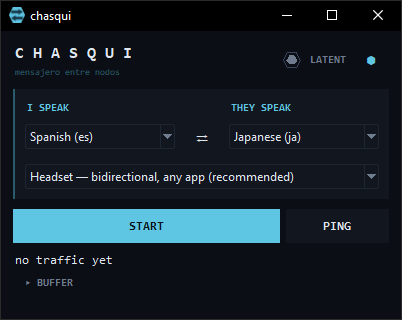
The window has two shapes. The one above is the default: small enough to park beside a call, and it shows only what you need mid-conversation.
The two language pickers
Your language is always the left box. The captions above them change with the mode and say whose language each box holds, so you never have to work it out:
| Mode | Left box | Right box |
|---|---|---|
headset, meet, bridge |
I SPEAK | THEY SPEAK |
virtual-mic, device |
I SPEAK | THEY HEAR |
media |
I HEAR | THEY SPEAK |
The arrow between them tells you which way the translation travels: ⇄ in the bidirectional modes, → when you are being broadcast one way, ← in media mode when audio is coming at you. Click it to swap the two languages.
Below them sits the mode picker. Headset — bidirectional, any app is the one
to start with.
Start, Ping, and the state light
START opens the session. PING runs the same round-trip smoke test as
chasqui check: no mic, no speakers, just "is the pipeline alive". The hexagon
in the header is the node's state:
| Light | What is happening |
|---|---|
LATENT |
Idle. Nothing is running. |
COMPILING |
Starting up: opening the socket, taking over your default devices. |
ON ROUTE |
Live. Audio is being translated in both directions if the mode is bidirectional. |
UNWINDING |
Stopping, and handing your Windows devices back. |
PING |
Running the round-trip check. |
GLITCH |
Something failed. Open BUFFER — the reason is in there. |
Stopping matters more than it looks. The headset and media modes take
over your Windows default mic and output while they run and hand them back on
exit, so use STOP, or just close the window — it waits up to 15 seconds for the
handover — instead of killing the process.
The hexagon at the top right (⬢ / ⬡) keeps the window above everything else. Filled means held on top, which is what you want beside a call.
What it is costing you
The line under the buttons is a running cost, and it stays visible in the small
shape on purpose. gpt-realtime-translate bills by the minute, so chasqui
counts the audio it streams and prices it — and a bidirectional session pays for
two directions at once, which is worth seeing before a long call. Set
pricing.budget in chasqui.yaml to get "$X left" alongside it.
OpenAI exposes no API for your remaining credit balance, so that budget is your own number, tracked locally — not a reading of your account. The
~in front of the figure is deliberate: seecore/pricing.pyfor what is measured and what is assumed.
BUFFER — the full panel
Click ▸ BUFFER and the window grows into the second shape: the voice picker, the audio devices, and the log.
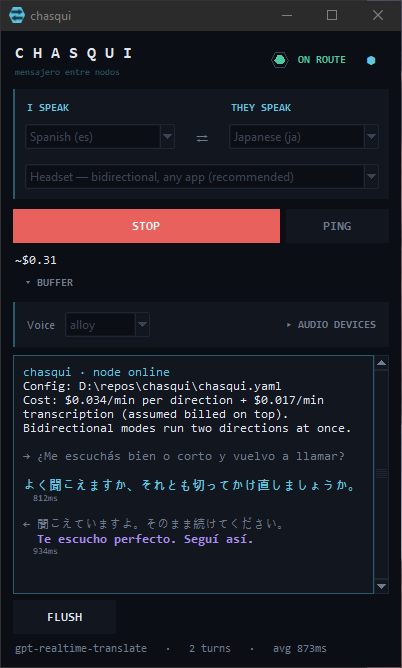
The log is where the conversation lands as it happens. Each turn shows the source line in grey, the translation under it, and the round-trip latency: ice for what goes out, violet for what comes back, so in a bidirectional call you can see at a glance which way a line travelled. It also holds the startup lines, the rate chasqui is pricing you at, and anything that went wrong.
Lines accumulate whether the panel is open or not, so opening it after a failure shows you everything from the beginning. FLUSH clears it. The footer keeps the model, the turn count and the average latency.
Audio devices
Devices stay on Auto, and Auto is right almost always. Open ▸ AUDIO DEVICES only when autodetection picks the wrong cable.
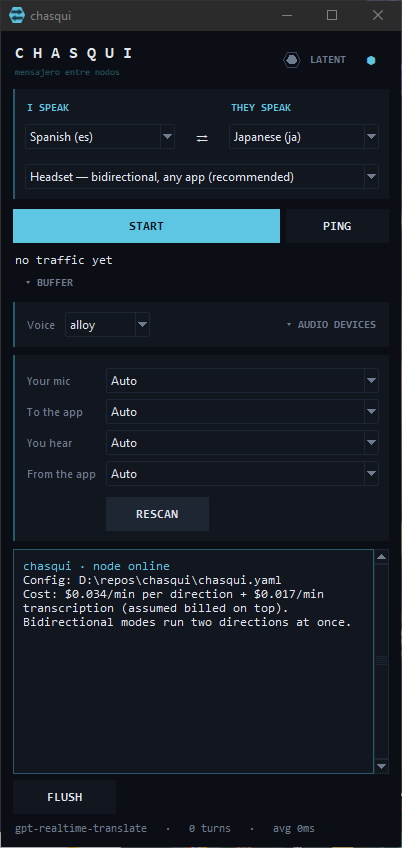
Each field names both ends of the wire, and the pickers you do not need in the current mode are greyed out:
| Field | What it is |
|---|---|
| Your mic | Where your voice goes in |
| To the app | The virtual cable Meet/Zoom/Discord listens to |
| You hear | Where the translation reaches you |
| From the app | Capture of what the app is saying |
RESCAN re-reads the device list — press it after plugging something in. Pick devices by name, never by index: Windows renumbers indices whenever a default changes, and chasqui's own adapters change defaults at startup.
Your languages, mode, voice, devices, window shape and running spend are all
remembered in ~/.chasqui/ui.json.
Adapters
| Adapter | Use case | Status |
|---|---|---|
text |
Keyboard in, terminal out — silent mode, accessibility, testing | ✅ Working |
virtual-mic |
Google Meet, Zoom, Teams, ChatGPT Voice (one-way: your voice, translated) | ✅ Working — validated end-to-end with ChatGPT Voice |
bridge / meet |
Bidirectional translation for any voice app (needs VB-Audio Cable) | OUT ✅ / IN ✅ (same plumbing as headset, validated there) |
headset |
Bidirectional for any app — Stereo Mix or Hi-Fi Cable for IN capture | ✅ Validated end-to-end with ChatGPT Voice (2026-07-05), both directions. Auto-switches default mic, restores on exit; separate mic/headphone via --mic / --earphone |
media |
YouTube, videos, any system audio → your language | ✅ Working — auto-switches Windows audio output to VB-Cable on start, restores on exit |
device |
Physical pendant (mic + speaker) — the eco hardware | Awaiting hardware |
Commands
chasqui ui                                     # desktop interface
chasqui icon --shortcut                        # desktop launcher + icon
chasqui translate "¿Dónde está la estación?"   # one-shot text translation
chasqui listen --adapter device                # live audio translation
chasqui listen --adapter headset --mic "USB Micro" --earphone "Auriculares"
                                               # separate mic + headphones
chasqui devices                                # list audio devices, detect virtual mics
chasqui langs                                  # supported language codes
chasqui init                                   # generate chasqui.yaml starter config
Configuration
Generate a starter config with chasqui init. Models are configurable per mode:
api:
  key: ${OPENAI_API_KEY}
  model: gpt-realtime-translate   # realtime model for audio adapters
  text_model: gpt-4o-mini         # chat model for the text adapter
403
model_not_found? Your OpenAI project doesn't have access to the configured model. Check which models are enabled for your project at platform.openai.com and setapi.model/api.text_modelaccordingly.
Development
pip install -e ".[dev]"
pytest
See SPEC.md for full architecture and AGENTS.md for contributor/agent notes.
License
MIT
1 maintainer

Metadata
1 maintainer
Release files for chasqui-translate 0.2.0
For a detailed explanation of source distributions (sdists) and built distributions (wheels), please see the package formats documentation.
Source distribution (sdist)
| File | Size | Uploaded | Provenance | |
|---|---|---|---|---|
| chasqui_translate-0.2.0.tar.gz | 79.0 kB | With provenance | Details |
Built distribution (wheel)
| File | Interpreter | ABI | Platform | Reset |
|---|---|---|---|---|
| chasqui_translate-0.2.0-py3-none-any.whl | Python 3 | none | any | Details |
Total release size: 144.5 kB
Release files / chasqui_translate-0.2.0.tar.gz
| Download URL | chasqui_translate-0.2.0.tar.gz |
|---|---|
| Size | 79.0 kB |
| Tags | Source |
|
SHA-256 checksum How to use checksums |
4a87920a6f9ec16df93bd404c8f565910c9ccdcbeb30143f0d3309135e7ef4c1
|
|
BLAKE2b-256 checksum How to use checksums |
00603bc08308c4eab42ac4b724439f25c4caf81e6e68d5344d75093d9f24a992
|
| Upload date | |
|
Uploaded using Trusted Publishing? What is trusted publishing? |
Yes |
| Uploaded via |
twine/7.0.0 CPython/3.13.16
|
Provenance
Provenance describes where a file came from. On PyPI, provenance is shared via attestations, which provide a verifiable record of the build or publishing details. View details, limitations and caveats.


PyPI Publish Attestation
PyPI verified that this artifact, at this checksum, originated from the publisher listed below.
Signed by GitHub Actions, verified by PyPI on Oct 21, 2026.
Transparency logRelease files / chasqui_translate-0.2.0-py3-none-any.whl
| Download URL | chasqui_translate-0.2.0-py3-none-any.whl |
|---|---|
| Size | 65.5 kB |
| Tags | Python 3 |
|
SHA-256 checksum How to use checksums |
f82464c157681c09729f06c93827e09d9edccc1607a15cb49f69ec79766c81e0
|
|
BLAKE2b-256 checksum How to use checksums |
fc2aa2b801ef9af83cf1cc670f3c716423ddba037467e82cd694599af4641b73
|
| Upload date | |
|
Uploaded using Trusted Publishing? What is trusted publishing? |
Yes |
| Uploaded via |
twine/7.0.0 CPython/3.13.16
|
Provenance
Provenance describes where a file came from. On PyPI, provenance is shared via attestations, which provide a verifiable record of the build or publishing details. View details, limitations and caveats.
PyPI Publish Attestation
PyPI verified that this artifact, at this checksum, originated from the publisher listed below.
Signed by GitHub Actions, verified by PyPI on Oct 21, 2026.
Transparency logSecurity for chasqui-translate 0.2.0
Provenance
Provenance describes where a file came from. On PyPI, provenance is shared via attestations, which provide a verifiable record of the build or publishing details. View details, limitations and caveats.
Full provenance
All 2 files in this release have been uploaded with provenance metadata.
Attestation for chasqui_translate-0.2.0.tar.gz
PyPI Publish Attestation
PyPI verified that this artifact, at this checksum, originated from the publisher listed below.
Signed by GitHub Actions, verified by PyPI on Oct 21, 2026.
Transparency logA note on package security
PyPI is a repository for distributing packages, not a service for auditing them. While third-party security researchers and our staff do their best to detect and remove malicious packages, PyPI cannot guarantee the quality, security or suitability of any given package.














