
Chatapult
A fast, Pythonic API wrapper for Google Chat webhooks.
Chatapult is designed to make sending automated notifications, CI/CD alerts, and rich UI cards to Google Workspace Spaces effortless. Whether you need a simple synchronous alert or a high-throughput async notification integration, Chatapult handles the boilerplate so you can focus on your application.





Features
- Zero Boilerplate: Send a message to a Google Chat Space in three lines of code.
- Async Ready: First-class support for
asyncio, making it perfect for FastAPI, Discord bots, and high-concurrency event loops. - Rich V2 Cards: Construct complex Google Chat Cards and Widgets using clean Python objects instead of nested JSON.
- Threaded Replies: Easily group related alerts by replying to specific message threads.
- Fully Typed: Built with standard Python type hints for excellent IDE autocomplete and static checking.
Installation
Install via pip:
pip install chatapult
Quick Start
Security Note: Never hardcode your webhook URLs. Always load them securely from environment variables or a secrets manager.
Synchronous Usage
Perfect for simple scripts, cron jobs, or basic data pipelines.
import os
from chatapult import ChatClient, APIError

webhook_url = os.environ.get("GOOGLE_CHAT_WEBHOOK_URL")

try:
    with ChatClient(webhook_url) as client:
        response = client.send_message("Hello from Chatapult!")
        print("Message sent successfully!")
except APIError as e:
    print(f"Failed to send message: {e}")

Asynchronous Usage
Ideal for web servers, async task queues, or applications where you cannot block the main thread.
import asyncio
import os
from chatapult import AsyncChatClient, NetworkError

async def main():
    webhook_url = os.environ.get("GOOGLE_CHAT_WEBHOOK_URL")

    try:
        async with AsyncChatClient(webhook_url) as client:
            await client.send_message("Hello from the async event loop!")
            print("Async message sent successfully!")
    except NetworkError as e:
        print(f"Network issue encountered: {e}")

if __name__ == "__main__":
    asyncio.run(main())

Advanced Usage: Sending Rich V2 Cards
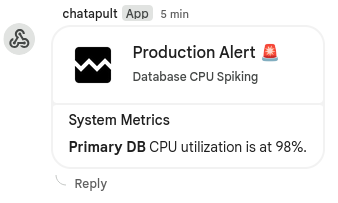
Google Chat's raw JSON for V2 Cards is heavily nested and prone to typos. Chatapult provides clean, typed dataclasses so you can build complex UI cards using standard Python objects.
import os
from chatapult import ChatClient
from chatapult.models import (
    CardWithId, Card, CardHeader, Section, Widget, TextParagraph
)

webhook_url = os.environ.get("GOOGLE_CHAT_WEBHOOK_URL")

# 1. Build your Card using Python dataclasses
alert_card = CardWithId(
    cardId="server-alert-123",
    card=Card(
        header=CardHeader(
            title="Production Alert 🚨",
            subtitle="Database CPU Spiking",
            imageUrl="https://example.com/alert-icon.png"
        ),
        sections=[
            Section(
                header="System Metrics",
                widgets=[
                    Widget(
                        textParagraph=TextParagraph(
                            text="<b>Primary DB</b> CPU utilization is at 98%."
                        )
                    )
                ]
            )
        ]
    )
)

# 2. Send the card!
with ChatClient(webhook_url) as client:
    client.send_message(cards=[alert_card])
    print("Rich card sent successfully!")
Or simply with
import os
from chatapult import ChatClient
from chatapult.models import CardWithId

webhook_url = os.environ.get("GOOGLE_CHAT_WEBHOOK_URL")

alert_card = CardWithId.create_simple(
    card_id="server-alert-1",
    title="Production Alert 🚨",
    subtitle="Database CPU Spiking",
    text="<b>Primary DB</b> CPU utilization is at 98%."
)

with ChatClient(webhook_url) as client:
    client.send_message(cards=[alert_card])
Contributing
Contributions are welcome! If you'd like to help improve Chatapult, please review our Contributing Guidelines and open an issue or pull request.
License
This project is licensed under the MIT License - see LICENSE for details.
1 maintainer

Download files
Download the file for your platform. If you're not sure which to choose, learn more about installing packages.
Source Distribution
Built Distribution
Filter files by name, interpreter, ABI, and platform.
If you're not sure about the file name format, learn more about wheel file names.
Copy a direct link to the current filters
File details
Details for the file chatapult-0.2.0.tar.gz.
File metadata
- Download URL: chatapult-0.2.0.tar.gz
- Upload date:
- Size: 851.8 kB
- Tags: Source
- Uploaded using Trusted Publishing? No
- Uploaded via:
twine/6.2.0 CPython/3.10.12
File hashes
| Algorithm | Hash digest | |
|---|---|---|
| SHA256 |
c928fd87ff47efb142e8866d165283f05471275b5f051e1ec0adb21f4b0eff8f
|
|
| MD5 |
834cdea00d65d7b4ba8db6c9935d76c3
|
|
| BLAKE2b-256 |
8fce4fcbefc4c9b7b9dc5bbd7264852c7a85a7a1ae6978bbd9438ea96aee099a
|
File details
Details for the file chatapult-0.2.0-py3-none-any.whl.
File metadata
- Download URL: chatapult-0.2.0-py3-none-any.whl
- Upload date:
- Size: 8.8 kB
- Tags: Python 3
- Uploaded using Trusted Publishing? No
- Uploaded via:
twine/6.2.0 CPython/3.10.12
File hashes
| Algorithm | Hash digest | |
|---|---|---|
| SHA256 |
cfc3b99241f1197ea8eb670401491c8717518f8609c12ec5fd61d3aec9d5bc4d
|
|
| MD5 |
bf11cc62d8c37e231ece09e571aa2202
|
|
| BLAKE2b-256 |
840ab8996750012ee07c1dd9721a51943a1e0f07642e3bca92b7f8f8d3d23ef2
|














