
chatdeck
A local dashboard for your Claude Code chats: see which chats are running and which need you, read and search old chats, track usage against your plan limits, and clean up transcripts. Python 3.9+ standard library only, no dependencies.
Features
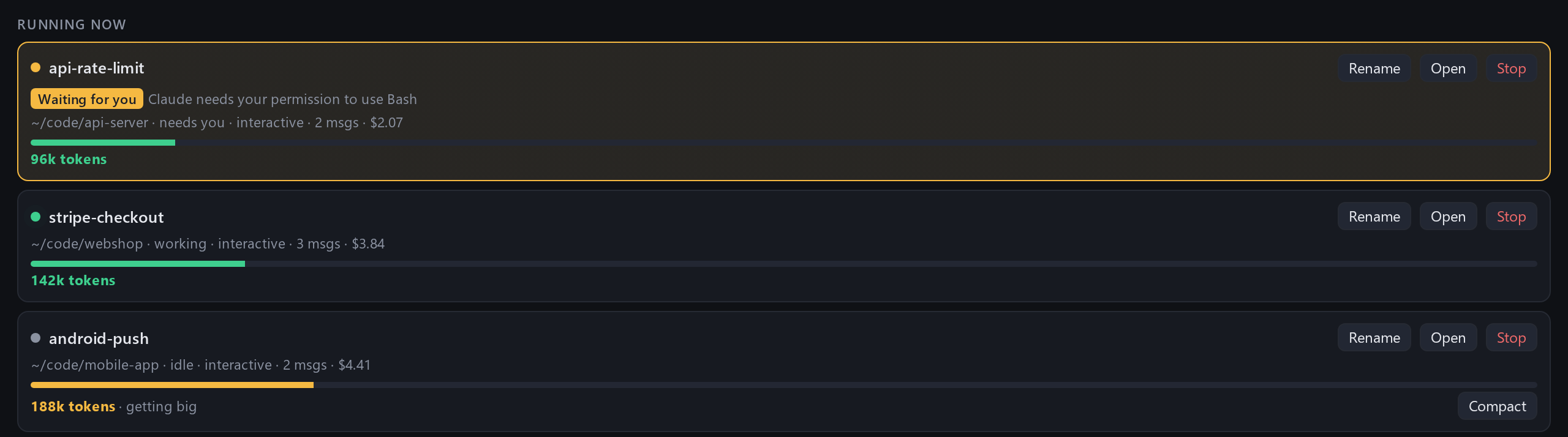
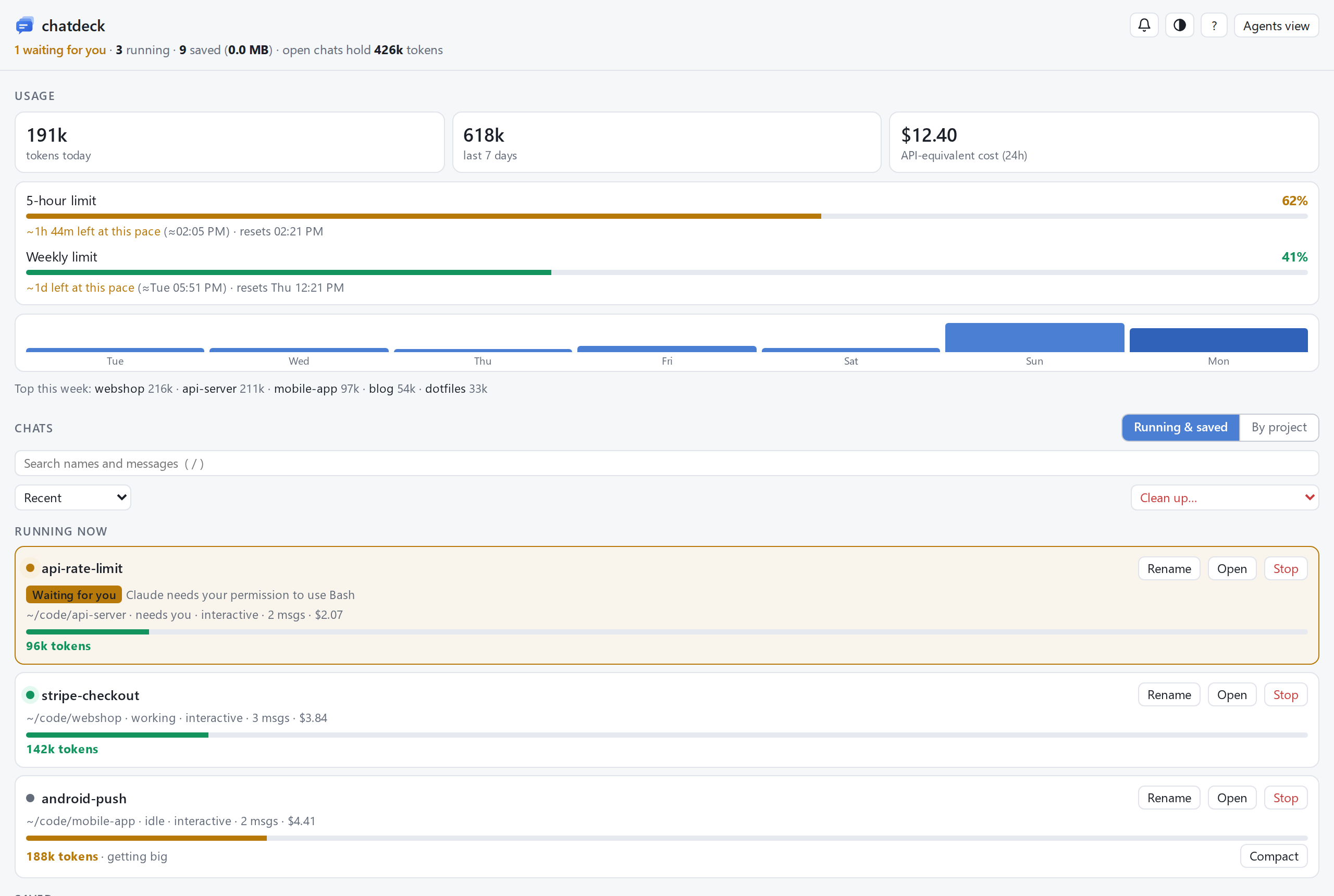
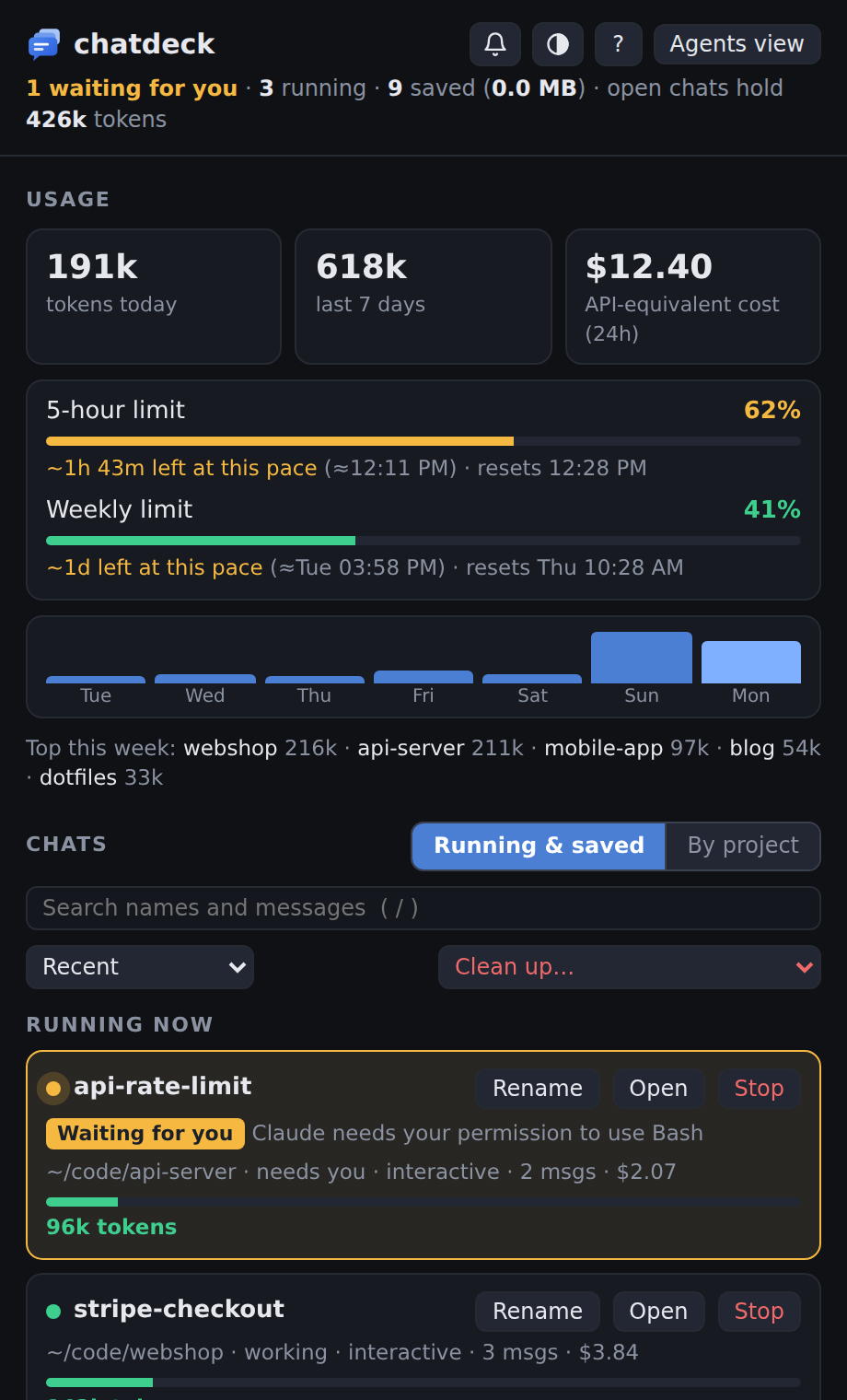
- Running now – every live session with its context size and cost. Sessions stuck on a
permission prompt or a question get an amber Waiting for you badge and an optional chime.
Open jumps to the chat's terminal tab, Rename runs
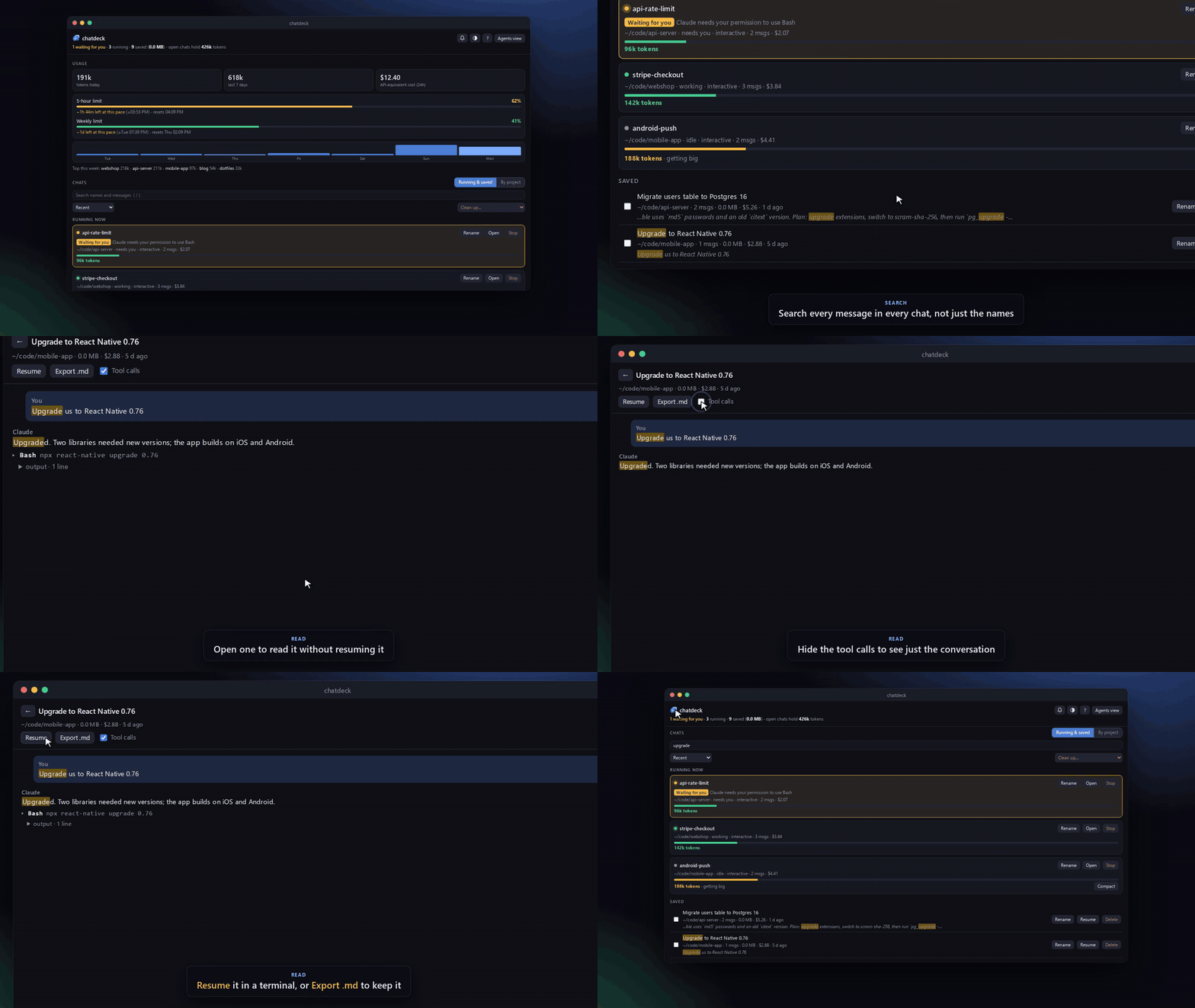
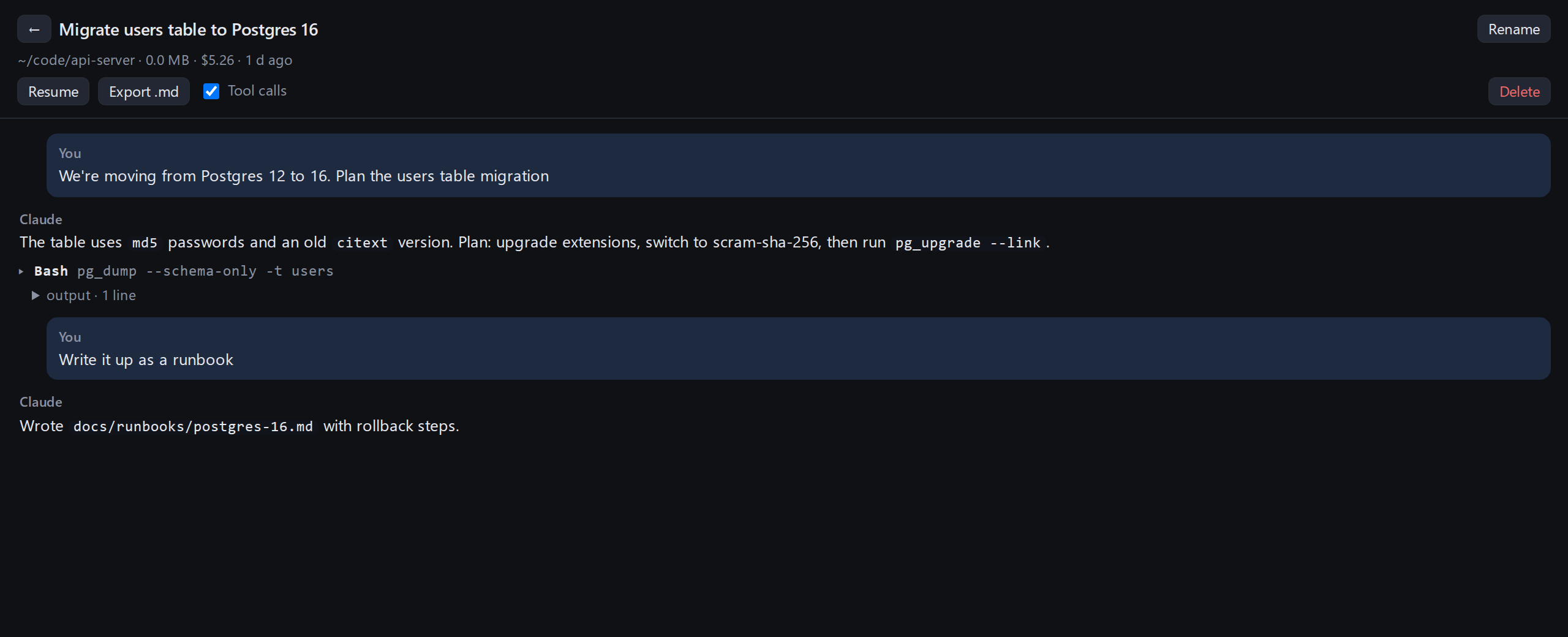
/renamein it so Claude names it after what it's about (double-click the name to type your own), and big chats get a Compact button that runs/compact. - Saved chats – read any chat without resuming it, search across all messages, rename (so you know what's in it), export to Markdown, resume in a terminal, delete.
- Usage – tokens today and this week, top projects, 24h cost, and your 5-hour and weekly limits with a forecast of when you'd hit them at the current pace.
- Cleanup – delete empty chats or chats older than 7, 30 or 90 days. Shows disk usage. Running chats are never deleted.
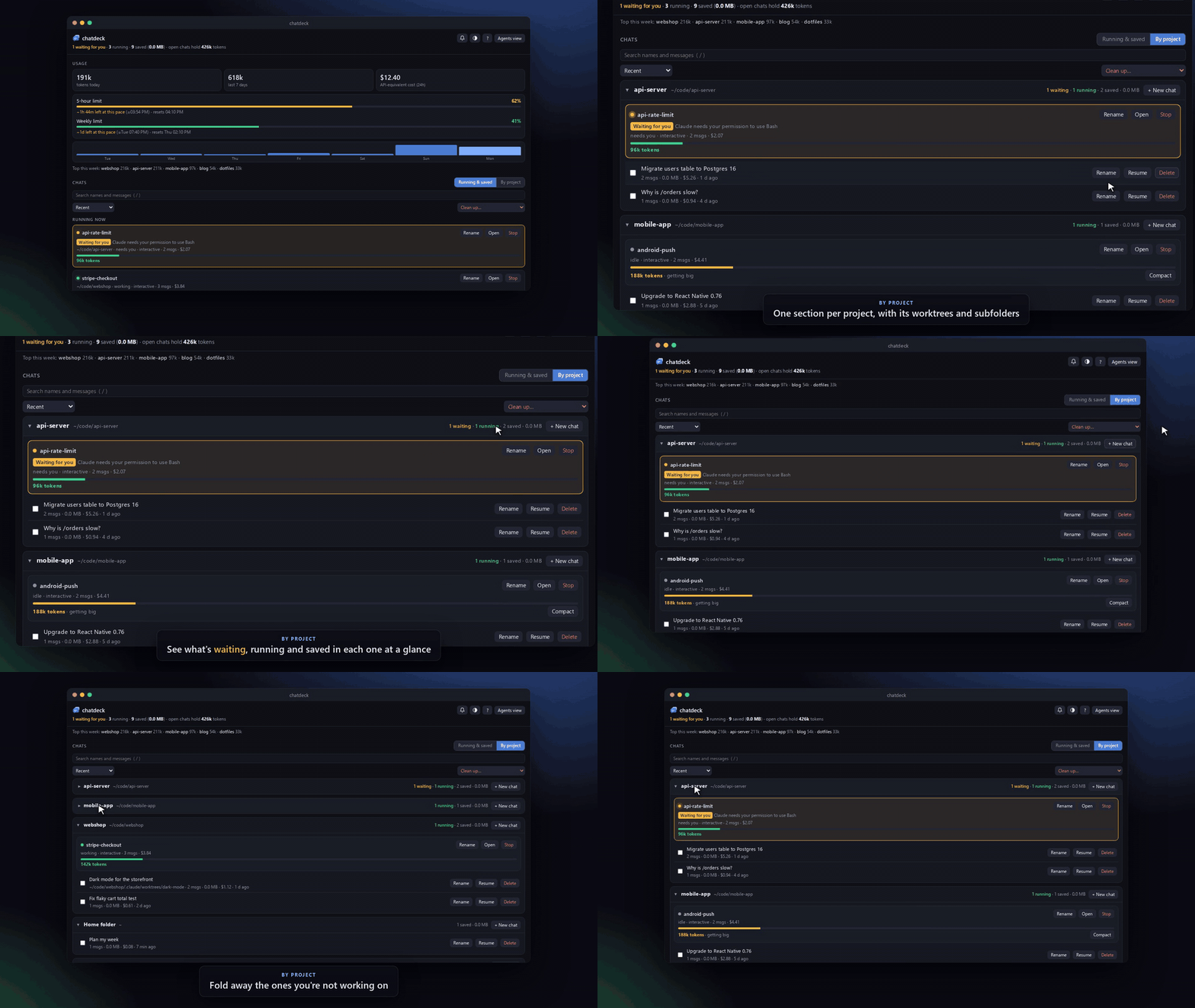
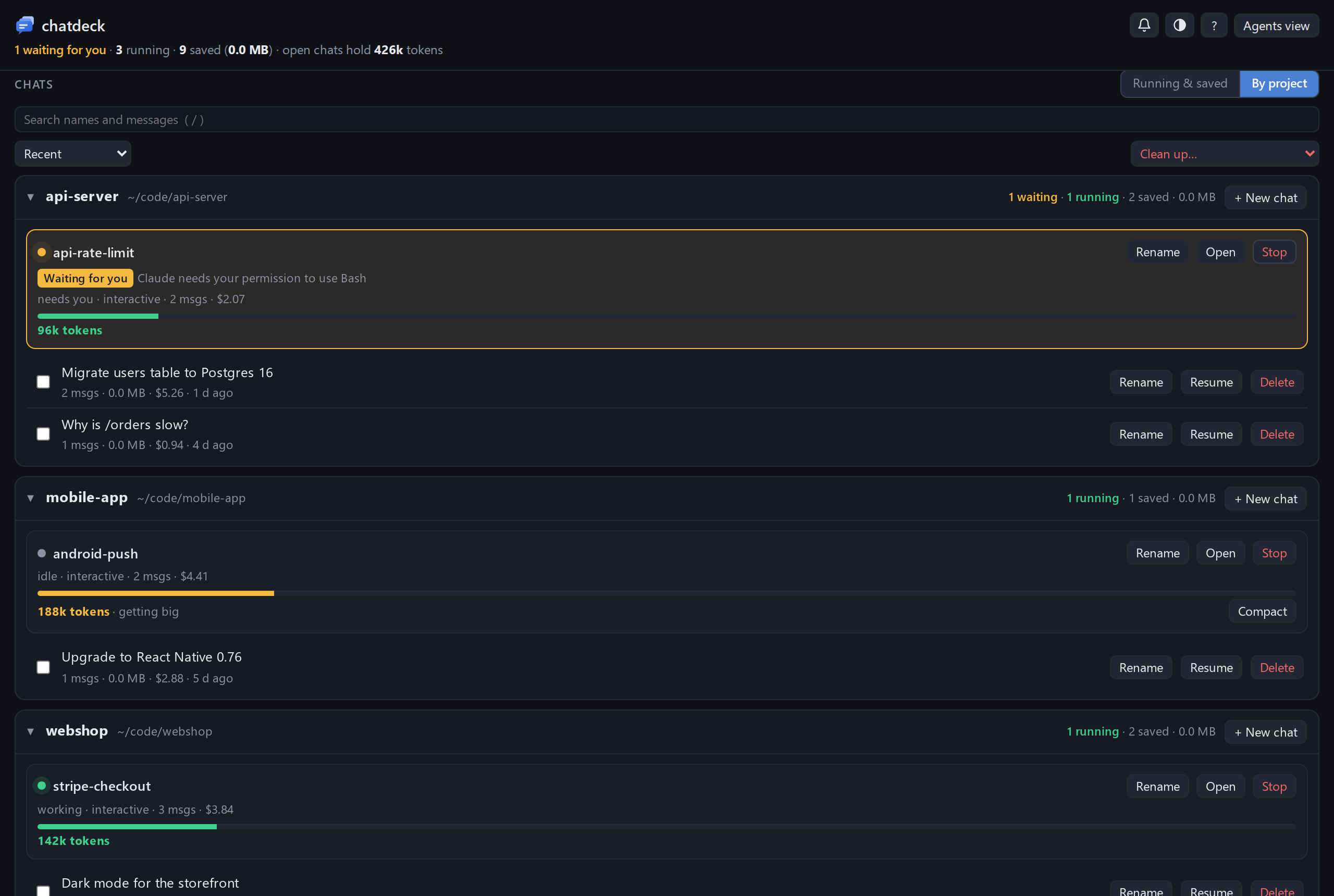
- By project view: one section per project (git repo, including its worktrees and subfolders)
with its running and saved chats, and a New chat button that starts Claude Code in that project. Sort by recent, size, cost or messages. Light and dark themes.
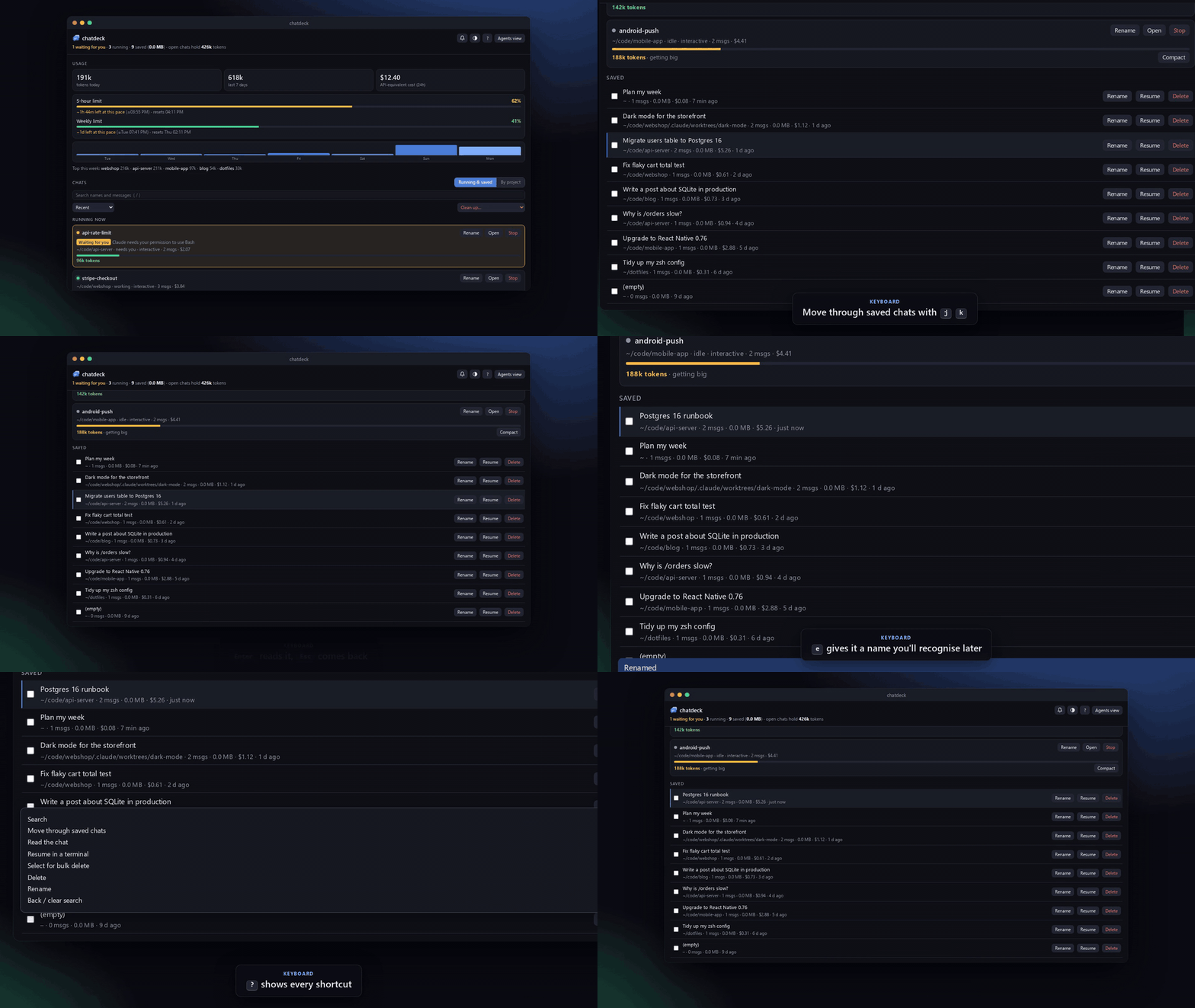
Keyboard shortcuts:
/search,j/kmove,Enterread,rresume,erename,xselect,Deldelete,?help. - Windows corner button and tray icon – pop the dashboard up from the corner of the screen.
Install
pipx install chatdeck          # once it's on PyPI; until then:
pipx install git+https://github.com/Abdifatah09/chatdeck
No pip? Clone the repo and run ./install.sh. It puts a chatdeck command in ~/.local/bin
that runs straight from the clone.
Try it first
chatdeck demo
opens chatdeck on a set of made-up chats (in a temporary folder, deleted when you stop it with Ctrl+C), so you can click around without touching your own. The screenshots here are from the demo.
Use
chatdeck                  # start the dashboard and open it
chatdeck setup            # add the Claude Code hooks for plan limits and "waiting for you"
chatdeck autostart on     # start it at login (Windows via WSL, macOS, Linux)
chatdeck bubble           # Windows: the corner button and tray icon
chatdeck demo             # try it with made-up chats
chatdeck stop             # stop the background server
chatdeck uninstall        # take the hooks and autostart out again
chatdeck setup keeps your existing status line: it saves the usage data first, then runs
yours, so your status line looks the same. chatdeck uninstall puts it back, and your previous
settings are backed up in ~/.chatdeck/backups.
Privacy and security
- Everything stays on your machine. chatdeck reads the transcripts Claude Code already writes to
~/.claude/projectsand sends nothing anywhere: no accounts, no telemetry, no network calls except to itself. - The server binds to 127.0.0.1 only. Every API call needs a token that changes each run, sent in a custom header, so other websites open in your browser can't call it.
- It only changes things you ask it to: deleting a chat removes its transcript (running chats are
never deleted), renaming adds a title line to it, and Rename and Compact on a running chat type
/renameor/compactinto that chat's terminal, only while it's idle. chatdeck setupedits~/.claude/settings.jsonand backs it up first;chatdeck uninstallundoes it.
See it in action
| Find any chat by what was said in it | Every project in one place |
|---|---|
 |
 |
Keyboard only: j/k, Enter, e to rename, ? for help |
Running chats, at a glance |
|---|---|
 |
 |
Screenshots
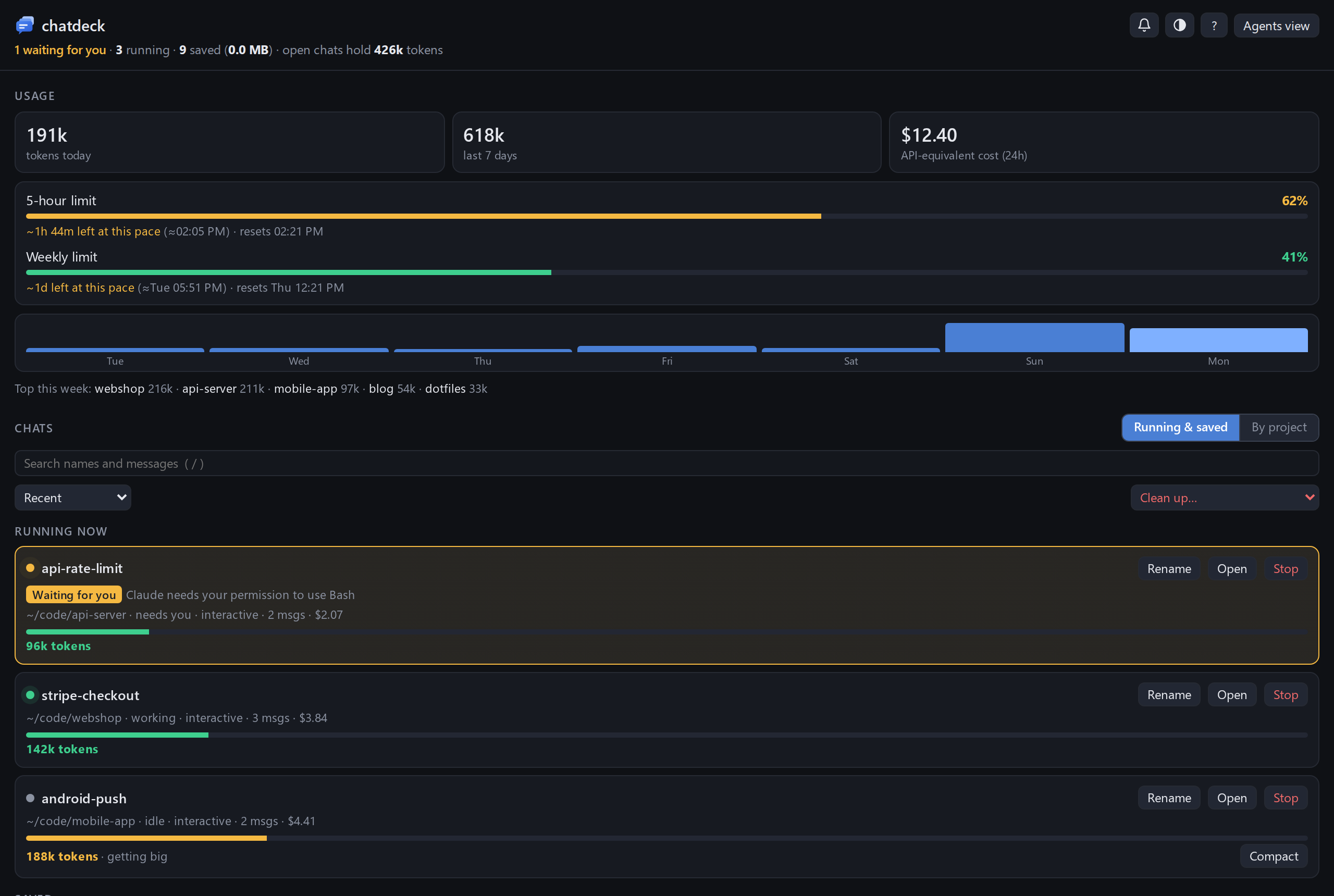
| By project | Reading a chat |
|---|---|
 |
 |
| Light theme | The Windows pop-up |
|---|---|
 |
 |
Windows corner button and tray icon
A small always-on-top button sits in the bottom-left corner of the screen. Click it and the
dashboard pops up above it; click again, or anywhere else, and it tucks away. The badge counts
running chats and turns amber, with a pulsing ring, when one is waiting for you. Drag it to move
it; right-click to hide it or for more. The same badge sits in the notification area by the
clock, where a click pops the dashboard up in the bottom-right corner. It needs Chrome or Edge.
Start it with chatdeck bubble, or let chatdeck autostart on start it at login.
Terminals
Resume, Open and Agents view open or find a terminal for you:
| Platform | Opens chats in | Open on a running chat |
|---|---|---|
| WSL | Windows Terminal (a new window each time) | finds its tab on any virtual desktop and switches to it |
| macOS | Terminal, or iTerm2 if you run the dashboard from it | finds its tab by tty |
| Linux | gnome-terminal, konsole, kitty, alacritty, wezterm, xfce4-terminal, tilix, foot or xterm | finds its window with wmctrl or xdotool (X11) |
When no terminal can be opened, the dashboard copies the command to paste instead.
Finding a running chat works by briefly giving its tab a unique title, so it doesn't work for
tabs whose title is locked (Windows Terminal's suppressApplicationTitle).
Settings
Settings live in ~/.chatdeck/config.json, and environment variables override them:
port/CHATDECK_PORT: default 47123terminal/CHATDECK_TERMINAL: which terminal to use, e.g.kittyoritermtabs/CHATDECK_TABS(WSL):trueopens chats as tabs in your last Windows Terminal window instead of a new window eachvdlib/CHATDECK_VDLIB(WSL): Windows path to VirtualDesktopLib.cs, which makes switching to a chat on another virtual desktop reliableCHATDECK_DIR: where chatdeck keeps its data, default~/.chatdeck
Tests
python3 -m unittest discover -s tests
Screenshots and videos
Everything in docs/ is recorded from chatdeck demo by a script, so it can be redone after UI changes
(needs Node; uses Segoe UI from /mnt/c/Windows/Fonts when run under WSL):
cd scripts/promo && npm install && npx playwright-core install chromium-headless-shell
npm run record                    # or just some: npm run record -- shots tour search projects keyboard
It writes the README screenshots to docs/ and the GIFs, MP4s, framed screenshots and a 1280×640
social preview card to docs/media/.
1 maintainer

Metadata
1 maintainer
Release files for chatdeck 0.1.0
For a detailed explanation of source distributions (sdists) and built distributions (wheels), please see the package formats documentation.
Source distribution (sdist)
| File | Size | Uploaded | Provenance | |
|---|---|---|---|---|
| chatdeck-0.1.0.tar.gz | 152.5 kB | With provenance | Details |
Built distribution (wheel)
| File | Interpreter | ABI | Platform | Reset |
|---|---|---|---|---|
| chatdeck-0.1.0-py3-none-any.whl | Python 3 | none | any | Details |
Total release size: 300.7 kB
Release files / chatdeck-0.1.0.tar.gz
| Download URL | chatdeck-0.1.0.tar.gz |
|---|---|
| Size | 152.5 kB |
| Tags | Source |
|
SHA-256 checksum How to use checksums |
decb0abeb6268cf40203f2fa204cd6d6f9a4dedea97202bd1172a0cab03c200d
|
|
BLAKE2b-256 checksum How to use checksums |
f88dd8ee2cd5a05882c8bd041e9f8fc43cffe9c704bf371913e7a149999e8be9
|
| Upload date | |
|
Uploaded using Trusted Publishing? What is trusted publishing? |
Yes |
| Uploaded via |
twine/7.0.0 CPython/3.13.16
|
Provenance
Provenance describes where a file came from. On PyPI, provenance is shared via attestations, which provide a verifiable record of the build or publishing details. View details, limitations and caveats.


PyPI Publish Attestation
PyPI verified that this artifact, at this checksum, originated from the publisher listed below.
Signed by GitHub Actions, verified by PyPI on Oct 26, 2026.
Transparency logRelease files / chatdeck-0.1.0-py3-none-any.whl
| Download URL | chatdeck-0.1.0-py3-none-any.whl |
|---|---|
| Size | 148.2 kB |
| Tags | Python 3 |
|
SHA-256 checksum How to use checksums |
c5738b65b26c5929d3ec9024f2cd3b723f82adea48e709147ce4503bb5796eb7
|
|
BLAKE2b-256 checksum How to use checksums |
fbaca41c3283025ccead985abb2abcab0cd20f1de37e795cfb0a3ac03b69e910
|
| Upload date | |
|
Uploaded using Trusted Publishing? What is trusted publishing? |
Yes |
| Uploaded via |
twine/7.0.0 CPython/3.13.16
|
Provenance
Provenance describes where a file came from. On PyPI, provenance is shared via attestations, which provide a verifiable record of the build or publishing details. View details, limitations and caveats.
PyPI Publish Attestation
PyPI verified that this artifact, at this checksum, originated from the publisher listed below.
Signed by GitHub Actions, verified by PyPI on Oct 26, 2026.
Transparency logSecurity for chatdeck 0.1.0
Provenance
Provenance describes where a file came from. On PyPI, provenance is shared via attestations, which provide a verifiable record of the build or publishing details. View details, limitations and caveats.
Full provenance
All 2 files in this release have been uploaded with provenance metadata.
Attestation for chatdeck-0.1.0.tar.gz
PyPI Publish Attestation
PyPI verified that this artifact, at this checksum, originated from the publisher listed below.
Signed by GitHub Actions, verified by PyPI on Oct 26, 2026.
Transparency logA note on package security
PyPI is a repository for distributing packages, not a service for auditing them. While third-party security researchers and our staff do their best to detect and remove malicious packages, PyPI cannot guarantee the quality, security or suitability of any given package.
To learn more about protecting yourself from malicious actors, visit our package security documentation.













