
ChatGPT 
ChatGPT playwright api,not openai api
一个不怎么使用网页的ChatGPT playwright api
待填坑 feature
- 使用网页版 chatgpt | use chatgpt
- 多人格预设与切换 | Multiple personality presets and switching
- 聊天记录存储与导出 | Chat history storage and export
- 自定义人设 | Customized persona
- 重置聊天或回到某一时刻 | Reset a chat or go back to a certain moment
- 多账号并发聊天 | Concurrent chatting with multiple accounts
- 使用账号登录(暂不支持苹果)| Log in with your account (Apple is not supported yet)
- GPT4 and PLUS
- GPT4 upload file
- GPT4 download file
- 代码过于混乱等优化 | The code is too confusing and other optimizations
- 抽空完善readme | Take the time to improve the readme
安装/Install
linux & Windows
pip install ChatGPTWeb
playwright_firefox install firefox
MsgData() 数据类型
from ChatGPTWeb.config import MsgData

class MsgData():
    status: bool = False,
    msg_type: typing.Optional[typing.Literal["old_session","back_loop","new_session"]] = "new_session",
    msg_send: str = "hi",
    # your msg
    gpt_model: typing.Literal["text-davinci-002-render-sha", "gpt-4", "gpt-4o"] = "text-davinci-002-render-sha",
    # if you use gpt4o by gptplus
    msg_recv: str = "",
    # gpt's msg
    conversation_id: str = "",
    # old session's conversation_id
    p_msg_id: str = "",
    # p_msg_id : the message's parent_message_id in this conversation id / 这个会话里某条消息的 parent_message_id
    next_msg_id: str = "",
    post_data: str = ""
    arkose_data: str = "",
    arkose_header: dict[str,str] = {},
    arkose: str|None = ""
    # if chatgpt use arkose
简单使用 / Simple practice
copy main.py or this code to start / 复制 main.py 或者以下code来开始
import asyncio
from ChatGPTWeb import chatgpt
from ChatGPTWeb.config import Personality, MsgData
import aioconsole

sessions = [
    {
        "session_token": ""

    },
    {
        "email": "xxx@hotmail.com",
        "password": "",
        # "mode":"openai" ,
        "session_token": "",
    },
        {
        "email": "xxx@outlook.com",
        "password": "",
        "mode": "microsoft",
        "help": "xxxx@xx.com"
    },
    {
        "email": "xxx@gmail.com",
        "password": "",
        "mode": "google"
    },
    ,
    {
        "email": "xxx@hotmail.com",
        "password": "",
        "gptplus": True
    }
]
# please remove account if u don't have | 请删除你不需要的登录方式
# if you only use session_token, automatic login after expiration is not supported | 仅使用session_token登录的话,不支持过期后的自动登录
# if you use an openai account to log in,
# pleases manually obtain the session_token in advance and add it together to reduce the possibility of openai verification
# 使用openai账号登录的话,请提前手动获取 session_token并一同添加,降低 openai 验证的可能性

personality_definition = Personality(
    [
        {
            "name": "Programmer",
            'value': 'You are python Programmer'
        },
    ])

chat = chatgpt(sessions=sessions, begin_sleep_time=False, headless=True, stdout_flush=True)
# "begin_sleep_time=False" for testing only
# When using for the first time, if cloudflare exists, use headless=False and manually click Verify. After the session file is generated, switch it to True
# 初次使用时,如果存在cloudflare,请使用headless=False,并手动点击验证。在session文件生成后,再将其切换为True

async def main():
    c_id = await aioconsole.ainput("your conversation_id if you have:")
    # if u don't have,pleases enter empty
    p_id = await aioconsole.ainput("your parent_message_id if you have:")
    # if u don't have,pleases enter empty
    data:MsgData = MsgData(conversation_id=c_id,p_msg_id=p_id)
    while 1:
        print("------------------------------")
        data.msg_send = await aioconsole.ainput("input:")
        print("------------------------------")
        if data.msg_send == "quit":
            break
        elif data.msg_send == "gpt4o":
            if data.gpt_model != "gpt-4o":
                data.gpt_model = "gpt-4o"
                data.conversation_id = ""
                data.p_msg_id = ""
            data.msg_send = await aioconsole.ainput("reinput:")
            if data.msg_send == "what's the png":
                with open("1.png","rb") as f:
                    file = IOFile(
                        content=f.read(),
                        name="1.png"
                    )
                    data.upload_file.append(file)
        elif data.msg_send == "gpt3.5":
            if data.gpt_model != "text-davinci-002-render-sha":
                data.gpt_model = "text-davinci-002-render-sha"
                data.conversation_id = ""
                data.p_msg_id = ""
            data.msg_send = await aioconsole.ainput("reinput:")
        elif data.msg_send == "re":
            data.msg_type = "back_loop"
            data.p_msg_id = await aioconsole.ainput("your parent_message_id if you go back:")
        elif data.msg_send == "reset":
            data = await chat.back_init_personality(data)
            print(f"ChatGPT:{data.msg_recv}")
            continue
        elif data.msg_send == "init_personality":
            data.msg_send = "your ..."
            data = await chat.init_personality(data)
            print(f"ChatGPT:{data.msg_recv}")
            continue
        elif data.msg_send == "history":
            print(await chat.show_chat_history(data))
            continue
        elif data.msg_send == "status":
            print(await chat.token_status())
            continue
        data = await chat.continue_chat(data)
        if data.msg_recv == '':
            print(f"error:{data.error_info}")
        else:
            print(f"ChatGPT:{data.msg_recv}")
        data.error_info = ""
        data.msg_recv = ""
        data.p_msg_id = ""


loop = asyncio.get_event_loop()
loop.run_until_complete(main())
chatgpt 类参数 / class chatgpt parameters
sessions: list[dict] = [],
# 参考 简单使用 ,暂不支持苹果账号,不写mode默认为openai账号
# Refer to Simple practice. Apple accounts are not supported for the time being.
# If you do not write "mode", the default is openai account.

proxy: typing.Optional[str] = None,
# proxy = "http://127.0.0.1:1090"
# proxy = "http://user:pass@127.0.0.1:1090"
# chatgpt(proxy=proxy)
# 要用代理的话就像这样 | proxy like it if u need use

storage_dir: Path = Path("data", "chatgptweb"),
# 聊天记录保存位置,一般不需修改
# Local runtime storage root for V2 session state, conversations, personas, and browser auth state.

personality: Optional[Personality] = Personality([{"name": "cat", "value": "you are a cat now."}]),
# 默认人格,用于初始化,推荐你使用类方法去添加你个人使用的
# The default personality is used for initialization. It is recommended that you use class methods to add your own personal

log_status: bool = True,
# 是否启用日志,默认开启,推荐在使用__main__.py进行测试时关闭
# Whether to enable logging. It is enabled by default. It is recommended to turn it off when using __main__.py for testing.

plugin: bool = False,
# 是否作为一个nonebot2插件使用(其实是插入进一个已经创建了的协程程序里)
# Whether to use it as a nonebot2 plug-in (actually inserted into an already created coroutine program)

headless: bool = True,
# 无头浏览器模式 | Headless browser mode

begin_sleep_time: bool = True,
# 启动时的随即等待时间,默认开启,推荐仅在少量账号测试时关闭
# The immediate waiting time at startup is enabled by default. It is recommended to turn it off only when testing with a small number of accounts.

logger_level: Literal["DEBUG", "INFO", "WARNING", "ERROR"] = "INFO"
# 日志等级,默认INFO
# logger_level

stdout_flush: bool = False
# shell流式传输
# command shell refresh output

save_screen: bool = False
# 发送消息与刷新cookie失败时保存异常截图到文件(登录失败的截图会一直保持开启)
# Save exception screenshots to files when sending messages and refreshing cookies fail (screenshots of login failures will always remain open)
chatgpt 类方法 / class chatgpt method
chat = chatgpt(sessions=sessions)
Local Control Dashboard
Enable the optional loopback dashboard in the same runtime process. It starts before account authentication, so it can accept an email verification code while a browser login is pending. The generated control API key is logged at startup unless you provide one explicitly.
chat = chatgpt(
    sessions=sessions,
    # Use OpenAI's explicit retry hint when present; otherwise estimate a Free-tier window.
    chat_rate_limit_cooldown_seconds=5 * 60 * 60,
    # Keep the default LRU behavior, or balance new conversations across a rolling window.
    account_selection_strategy="usage_balanced",
    account_selection_window_seconds=5 * 60 * 60,
    control_host="127.0.0.1",
    control_port=8765,
    control_api_key="local-only-secret",
    # Opt-in: create a missing ChatGPT Project for a named new conversation.
    project_auto_create=False,
)
The dashboard is disabled by default and closes with await chat.close(). It can submit/cancel a pending verification, manually disable or re-enable an account, explicitly retry a failed credential login, and refresh observed plan information from the authenticated browser page. Re-enabling only removes the local operator hold; Retry login is the separate action that schedules a new browser login and can produce an OTP challenge. The account table also shows conversation count, runtime recovery/login diagnostics, model usage observed during the current process, and a distinct chat-quota cooldown state. It projects safe operational states such as verification pending, rejected credentials, provider security checks, login cooldowns, browser bridge failures, runtime recovery, and session reauthentication. The dashboard deliberately does not display upstream page text, cookies, or raw browser errors. When an upstream response includes a retry delay, that delay is used; otherwise chat_rate_limit_cooldown_seconds is an estimate. Observed usage is not a remaining ChatGPT quota value. least_recently_used is the default new-conversation policy. Set account_selection_strategy="usage_balanced" to first choose the account with fewer new-conversation reservations inside account_selection_window_seconds, then break equal counts by idle time and a random tie-breaker. This affects new conversations only: an existing conversation_id always stays with its owner account. The rolling reservation counters are process-local scheduling signals, not upstream quota measurements. Recent Activity is a bounded in-memory, credential-free diagnostic feed and is cleared when the runtime stops.
The same loopback listener also exposes the OpenAI-compatible /v1 endpoints. The control key is an administrator key. In the API Client Keys section, create a revocable client key for OpenCode or another local consumer without restarting the runtime. The raw cwk_... value is shown only when created or rotated; only its digest is persisted in storage_dir/api_keys.json. A default client key has chat scope, which permits only /v1/models and /v1/chat/completions; it cannot inspect accounts, submit verification, control login, or manage other keys. Client keys have an independent in-process concurrency limit. The dashboard keeps its administrator key only in the current browser tab's session storage and automatically reconnects after a recoverable core restart or temporary network failure. Before a browser-stream request, the runtime verifies its injected bridge locally and rebuilds it when stale; Recent Activity records safe scheduling, bridge, and first-content timing without recording prompts or page text.
The built-in listeners are plain HTTP and do not configure TLS. Do not bind control_host or CHATGPTWEB_HTTP_HOST directly to a public address. For a remote OpenCode client, keep the core on 127.0.0.1, terminate HTTPS in a reverse proxy or use a private VPN, expose only the required /v1 routes, and give OpenCode a scoped cwk_... client key rather than the administrator key. Keep the control dashboard on loopback or behind a separate authenticated administrator-only route. HTTPS protects bearer keys and prompts while in transit; client-key digests at rest do not make a plaintext public listener safe.
ChatGPT Projects
ChatRequest(conversation_project="...") can place a new physical conversation into a named ChatGPT Project. Project routing is disabled unless a caller supplies a name; existing conversations are never moved or reassigned. The runtime resolves the Project separately for each selected ChatGPT account and stores only the account-scoped Project ID mapping in storage_dir/projects.json.
Projects are a ChatGPT web-product feature rather than a documented public API, so routing is deliberately best-effort: an unavailable page, an unknown Project, or an upstream change falls back to an ordinary root conversation and does not fail the chat. Set project_auto_create=True for an embedded runtime, or CHATGPTWEB_PROJECT_AUTO_CREATE=true for ChatGPTWeb.core_server, to create a missing named Project. Keep automatic creation off when you want the web UI to be the source of truth.
Be intentional with project names. ChatGPT Projects can carry project-level memory, instructions, and files, so putting unrelated users or roles into one Project may influence later answers. A caller should normally use separate Projects for separate tenants, personas, or task classes.
Local Console
example/local_console.py is the interactive manual test client. It uses ChatService.stream() and starts the dashboard in the same process. Configure example/local_sessions.json, then run uv run python example/local_console.py; open http://127.0.0.1:8765 and use the configured CHATGPTWEB_CONTROL_API_KEY when one is set. Use :new, :status, and :quit in the terminal. Set CHATGPTWEB_STORAGE_DIR to isolate a test run from another local runtime.
Verification Code Providers
Manual dashboard submission remains the default. For a local mailbox/API integration, implement VerificationCodeProvider.wait_for_code(challenge) and pass provider instances through verification_code_providers when constructing chatgpt. A provider may poll until challenge.expires_at, return one code, or return None when it cannot handle the account. The broker races it safely with manual submission and never persists or exposes codes in status responses.
ChatService (bot / HTTP / agent facade)
from ChatGPTWeb import ChatRequest, ChatService, chatgpt

runtime = chatgpt(sessions=sessions, plugin=True)
service = ChatService(runtime)

result = await service.send(ChatRequest(
    prompt="hello",
    model="auto",
    # Used only if this request creates a new physical conversation.
    conversation_project="Support bot chats",
))
print(result.text)
print(result.content.raw_markdown)
print(result.content.plain_text)
for link in result.content.links:
    print(link.label, link.url)

async for event in service.stream(ChatRequest(prompt="stream a short reply")):
    if event.type == "delta":
        print(event.text, end="", flush=True)
    elif event.type == "error":
        print(event.text)
For frameworks that consume callbacks instead of async generators:
async def on_event(event):
    if event.type == "delta":
        await update_existing_bot_message(event.text)

result = await service.stream_to_callback(
    ChatRequest(prompt="stream a short reply"),
    on_event,
)
ChatService is the recommended integration point for new bot, HTTP, and agent adapters. Existing MsgData callers remain supported.
result.content keeps the original Markdown and exposes optional plain-text, links, code blocks, citations, image URLs, and rich_items for platform-specific rendering. rich_items preserves upstream weather/tool/attachment payloads without assuming every bot platform can render them.
Optional MCP Server
pip install "ChatGPTWeb[mcp]"
from ChatGPTWeb import ChatService, chatgpt, create_mcp_server

runtime = chatgpt(sessions=sessions, plugin=True, log_status=False)
service = ChatService(runtime)
server = create_mcp_server(service)
server.run(transport="stdio")
The MCP server is intentionally an adapter over an already initialized runtime; it does not create a second browser or expose browser/session credentials. Its tools are chat_send, chat_stream, list_accounts, list_models, get_conversation, and agent_turn. Both chat tools require confirm=true because they can consume account quota. chat_stream forwards upstream text deltas as MCP progress notifications, then returns the final structured result. agent_turn is a model-decision primitive: it returns one validated tool_call or final decision, while the MCP host executes only its own registered tools and sends the result back in the next call. Keep protocol stdout clean when using the stdio transport; send application logs to stderr or a file.
Optional HTTP API
from aiohttp import web
from ChatGPTWeb import ChatService, chatgpt, create_http_app

runtime = chatgpt(sessions=sessions)
service = ChatService(runtime)
app = create_http_app(
    service,
    api_key="replace-with-a-local-secret",
    # Enables persisted, revocable client keys. The administrator key above
    # is still required for account control and key management.
    api_key_store=runtime.api_key_store,
    max_attachment_bytes=20 * 1024 * 1024,
)
web.run_app(app, host="127.0.0.1", port=8000)
The app factory does not start a listener itself. It exposes POST /v1/chat/completions with stream: true SSE support and the stateful POST /v1/responses API, plus /v1/models, /v1/account/status, /v1/usage, /v1/accounts/{account}/control, /v1/agent/turn, /v1/keys, and /health. Keep an API key when binding beyond localhost. JSON requests may include attachments entries with name and content_base64; decoded attachment bytes are capped by max_attachment_bytes. POST /v1/keys creates a client key, POST /v1/keys/{id}/rotate replaces it, and DELETE /v1/keys/{id} revokes it. Those management routes require the administrator key and are available only when api_key_store is supplied.
For /v1/responses, standard callers should continue with the returned previous_response_id. Some OpenCode versions instead replay their transcript without that field; when they supply X-OpenCode-Session, ChatGPTWeb binds that header to an in-memory, API-key-scoped cursor and forwards only the newest user turn to the existing physical ChatGPT conversation. A standard string or { "id": "..." } conversation value can provide the same named-session behavior for other clients. These compatibility cursors are local to one runtime process and expire after 24 hours; after a core restart, the client must replay its history or begin a new upstream conversation.
/v1/chat/completions also accepts the standard OpenAI tools: [{"type":"function","function":...}] shape. A tool round is deliberately non-streaming: the response returns ordinary choices[0].message.tool_calls, the host executes that one approved function, then sends a role: "tool" message with the same tool_call_id. The server recognizes the standard identifier directly, retains the narrow conversation cursor for ten minutes, and never executes the advertised function itself. Do not add or replace tools during a continuation; the initially accepted tool list remains authoritative.
Agent Host Protocol
/v1/agent/turn and the MCP agent_turn tool provide the same host-driven loop for Codex/OpenCode-style agent hosts or a custom local runner. ChatGPTWeb only decides the next step; it never receives permission to execute arbitrary commands, access a host filesystem, or open a network connection itself. By default, agent tasks first pass a local deny list and then an isolated JSON-only semantic review for legal, political, and other high-risk sensitive work; malformed or unavailable review responses fail closed. Ordinary chat requests are unaffected. A host may add terms or explicitly disable this local preflight with AgentSafetyPolicy(enabled=False), but that never relaxes its tool permissions, confirmation requirements, or upstream safeguards.
For repeated independent tasks, AgentService keeps two in-memory protocol anchors per requested model: one for safety review and one for tool-decision control. A new task always branches from the appropriate static anchor; user task text, tool catalogs, tool results, and ordinary chat are never stored in either root. The two anchors are intentionally separate, so a classifier prompt can never contaminate the Agent JSON protocol. Set AgentAnchorPolicy(enabled=False) when a host needs a completely fresh upstream conversation for every internal request. Anchors are discarded and rebuilt after an upstream failure or process restart.
- The host sends
taskand its own explicittoolslist. Each tool has a stablename, a human-readabledescription, and an object-shapedinput_schema. - The response contains
decision.type:tool_callwith validated arguments,finalwith the answer, orerror. - The host enforces its own permission policy, runs an approved requested tool, then sends the returned
stateplustool_resultto continue the same ChatGPT conversation.
An upper-layer adapter that intentionally starts an agent turn from an already established ChatGPT conversation may use AgentService.turn(..., continue_existing=True). This preserves its existing persona and context for the decision, but it does not change the host-owned tool boundary or permission requirements.
{
  "task": "Create a short release note in the workspace",
  "tools": [{
    "name": "workspace.write_text",
    "description": "Write a UTF-8 text file below the configured workspace.",
    "input_schema": {
      "type": "object",
      "properties": {"path": {"type": "string"}, "content": {"type": "string"}},
      "required": ["path", "content"],
      "additionalProperties": false
    }
  }]
}
After executing the returned tool call, continue with the response state and a bounded result such as {"tool":"workspace.write_text","ok":true,"output":"created release.md"}. Never pass credentials, raw browser state, or untrusted tool definitions from another user into this API. The API is a local LLM/decision bridge; whether a particular external product can use a custom OpenAI-compatible endpoint or custom MCP server depends on that product's own configuration and policy.
async def continue_chat(self, msg_data: MsgData) -> MsgData
# 聊天处理入口,一般用这个
# Message processing entry, please use this
msg_data = MsgData()
msg_data.msg_send = "your msg"
msg_data = await chat.continue_chat(msg_data)
print(msg_data.msg_recv)
async def show_chat_history(self, msg_data: MsgData) -> list
# 获取保存的聊天记录
# Get saved chat history
msg_data = MsgData()
msg_data.conversation_id = You want to read the conversation_id of the record | 你想要读取记录的conversation_id
chat_history_list:list = await chat.show_chat_history(msg_data)
async def back_chat_from_input(self, msg_data: MsgData) -> MsgData
# You can enter the text that appeared last time, or the number of dialogue rounds starts from 1 , or p_msg_id
# 通过输入来回溯,你可以输入最后一次出现过的文字,或者对话回合序号(从1开始),或者最后一次出现在聊天中的关键词,或者 p_msg_id

# Note: backtracking will not reset the recorded chat files,
# please pay attention to whether the content displayed in the chat records exists when backtracking again

# 注意:回溯不会重置记录的聊天文件,请注意再次回溯时聊天记录展示的内容是否存在

msg_data = MsgData()
...
msg_data.msg_send = "pleases call me Tom"
# 如果这是第5条消息 | If this is the 5th message
...

# 通过序号 | by index
msg_data.msg_send = "5"
# 通过关键词 | by keyword
msg_data.msg_send = "Tom"

msg_data.conversation_id = "xxx"
msg_data = await chat.back_chat_from_input(msg_data)
async def init_personality(self, msg_data: MsgData) -> MsgData
# 使用指定的人设创建一个新会话
# Create a new conversation with the specified persona
msg_data = MsgData()
person_name = "你保存的人设名|Your saved persona name"
msg_data.msg_send = person_name
msg_data = await chat.init_personality(msg_data)
print(msg_data.msg_recv)
async def back_init_personality(self, msg_data: MsgData) -> MsgData
# 回到刚初始化人设之后
# Go back to just after initializing the character settings
msg_data = MsgData()
msg_data.conversation_id = "xxx"
msg_data = await chat.back_init_personality()
print(msg_data.msg_recv)
async def add_personality(self, personality: dict)
# add personality,please input json just like this.
# 添加人格 ,请传像这样的json数据
personality: dict = {"name":"cat1","value":"you are a cat now1."}
await chat.add_personality(personality)
async def show_personality_list(self) -> str
# show_personality_list | 展示人格列表
name_list: str = await chat.show_personality_list()
async def del_personality(self, name: str) -> str
# del_personality by name | 删除人格根据名字
pserson_name = "xxx"
name_list: str = await chat.del_personality(person_name)
async token_status(self) -> dict
# get work status|查看session token状态和工作状态
status: dict = await chat.token_status()
# cid_num may not match the number of sessions, because it only records sessions with successful sessions, which will be automatically resolved after a period of time.
# cid_num 可能和session数量对不上,因为它只记录会话成功的session,这在允许一段时间后会自动解决
在协程中使用 | use in Coroutine
chat = chatgpt(sessions=sessions, begin_sleep_time=False, headless=True, log_status=False, plugin=True)

async def any_async_method():
    loop = asyncio.get_event_loop()
    asyncio.run_coroutine_threadsafe(chat.__start__(loop),loop)
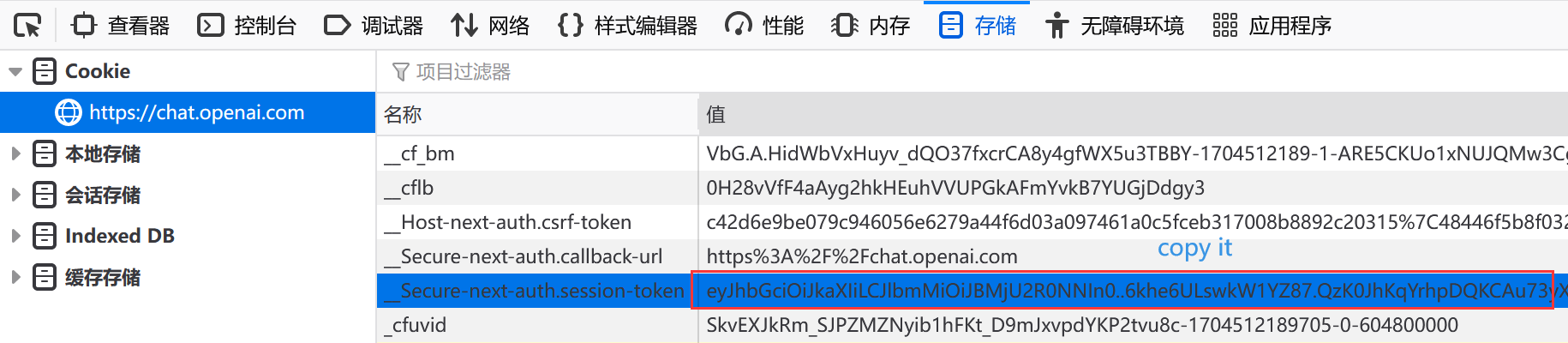
手动获取 session_token 的方法 | How to manually obtain session_token
After opening chat.openai.com and logging in, press F12 on the browser to open the developer tools and find the following cookies
打开chat.openai.com登录后,按下浏览器的F12以打开开发者工具,找到以下Cookie
可能遇到的问题 | possible problems
微软登录辅助邮箱验证 | microsoft email verify code
A file will be generated in the startup directory. Please put the verification code into it and save it. Pay attention to the log prompts.
启动目录下会生成文件,请将验证码填入其中并保存,注意日志提示
openai登录辅助邮箱验证 | openai email verify code
Same microsoft.A file will be generated in the startup directory. Please put the verification code into it and save it. Pay attention to the log prompts.
和上面微软邮箱一样。启动目录下会生成文件,请将验证码填入其中并保存,注意日志提示
谷歌登录 | google login
Google may block browser automation during sign-in. Do not export or paste Google cookies into this project. If direct Google OAuth cannot complete, log in to ChatGPT manually in a trusted browser and configure the resulting ChatGPT session token for reuse.
For a Google account that needs to survive ChatGPT session-token refreshes, set "persist_auth_state": true in its local session configuration. ChatGPTWeb then saves and restores the browser's authenticated storage state under the ignored local data directory. Treat that directory as account-sensitive; it is not for commits or sharing.
Google 可能拦截浏览器自动化登录。请不要把 Google Cookie 导出或粘贴到本项目中。若直接 Google OAuth 无法完成,请在可信浏览器中手动登录 ChatGPT,再配置生成的 ChatGPT session token 复用。
cloudflare checkbox 验证挑战
When using for the first time, if cloudflare exists, use headless=False and manually click Verify. After the session file is generated, switch it to True
初次使用时,如果存在cloudflare,请使用headless=False,并手动点击验证。在session文件生成后,再将其切换为True
2025.08 google and openai login
No longer working
1 maintainer

Download files
Download the file for your platform. If you're not sure which to choose, learn more about installing packages.
Source Distribution
Built Distribution
Filter files by name, interpreter, ABI, and platform.
If you're not sure about the file name format, learn more about wheel file names.
Copy a direct link to the current filters
File details
Details for the file chatgptweb-0.5.0.tar.gz.
File metadata
- Download URL: chatgptweb-0.5.0.tar.gz
- Upload date:
- Size: 305.2 kB
- Tags: Source
- Uploaded using Trusted Publishing? No
- Uploaded via:
twine/7.0.0 CPython/3.13.14
File hashes
| Algorithm | Hash digest | |
|---|---|---|
| SHA256 |
b1e0406d0f985212dc136fb81dd7215d4fa0308bc9094a9b0ba3e988552158a5
|
|
| MD5 |
9cc714b619da00c6d1a6982265f2ddef
|
|
| BLAKE2b-256 |
d65698df481cd07135fe353405516c47dc312549bb95963c03468abedece23ff
|
File details
Details for the file chatgptweb-0.5.0-py3-none-any.whl.
File metadata
- Download URL: chatgptweb-0.5.0-py3-none-any.whl
- Upload date:
- Size: 242.0 kB
- Tags: Python 3
- Uploaded using Trusted Publishing? No
- Uploaded via:
twine/7.0.0 CPython/3.13.14
File hashes
| Algorithm | Hash digest | |
|---|---|---|
| SHA256 |
51c0323954c14f3543e01d1e49b64fbc09a9cfa160d548549a92110abd71d027
|
|
| MD5 |
bc5153e098287147817b92abf4e7fa23
|
|
| BLAKE2b-256 |
19553d739309aa45cfeb23ce75f68d43d01d66c5beec02ffde4537513f89eb00
|














