
Chatify
A chat app for your documents. Ask a question, follow the citations, and keep the conversation going. Configure the model, sources and look in your browser.
It starts in offline Demo mode, with no API key or paid calls. Demo uses built-in answers, not a live AI model.
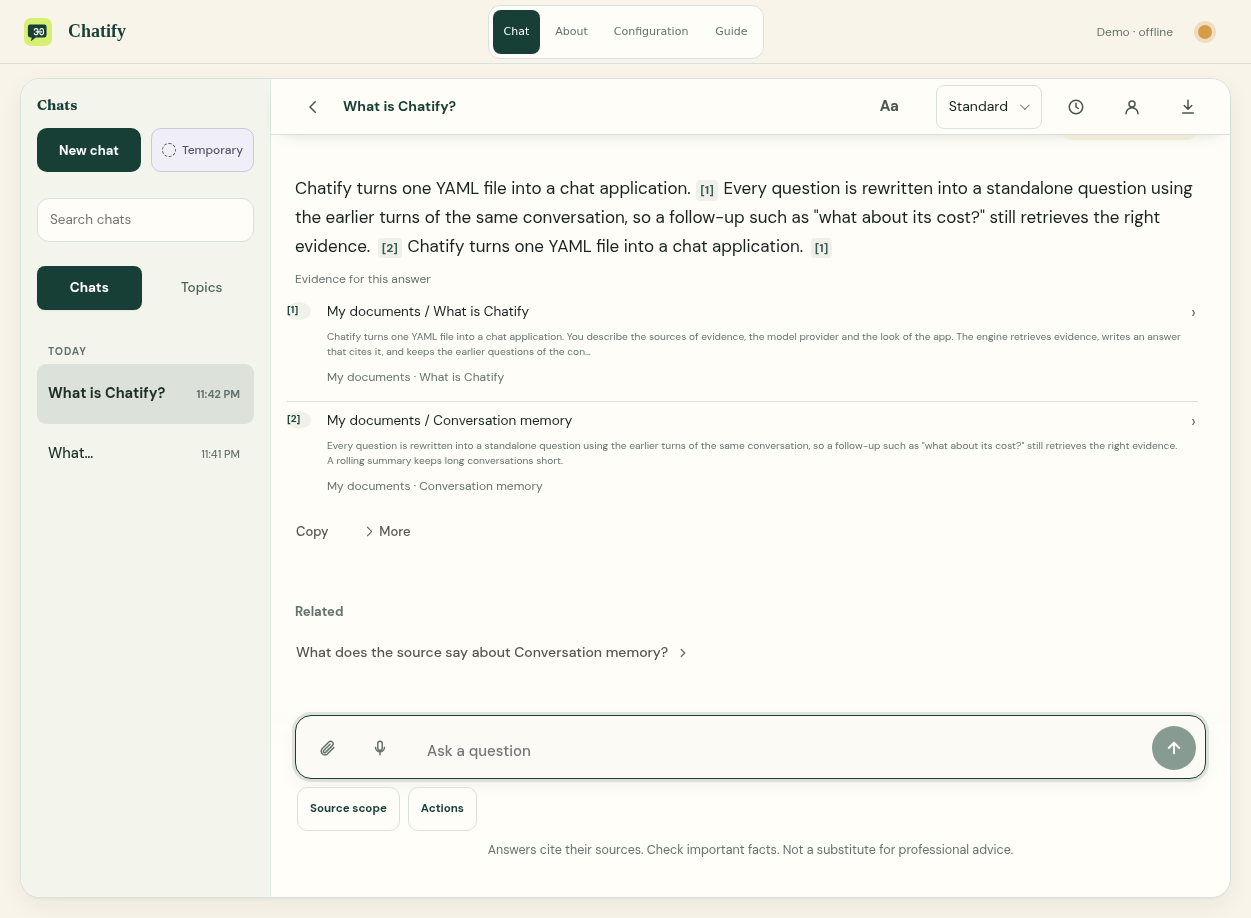
Try the hosted gallery
https://chatify-demo-779c.onrender.com/ - live demo apps built with Chatify (product guide, nutrition, peace, recipes, wireless research, space, exercise, F1, news), each answering from its own cited sources. Build with AI works for every visitor: describe an app and watch the setup assistant draft it. Free, no sign-up; fair-use limits apply. The free host sleeps when idle - the first visit can take a minute to wake.
Demo video
Watch the v6 laptop demo (MP4, 1:44)
A short tour: one-command start, manual configuration or Build with AI, and cited answers from your own sources.
Install and start
With uv installed, run:
uvx chatify-app start --directory my-chat
The app opens in your browser. Your settings, documents and chats stay in my-chat. Press Ctrl+C to stop; run the same command from the same folder to return.
Without uv, use the one-command installer for macOS, Linux or Windows. It installs what it needs without changing your system Python. For pip, install chatify-app in a virtual environment with Python 3.10 or newer. The package named chatify on PyPI is a different project.
Configure
- Open Configuration. In Answers, choose a provider, model and any required key, then test the connection and save.
- Add your documents or web links. Choose which sources the chat should use.
- In Appearance, choose a look and adjust the title, colors and fonts.
For help, type in Find a setting or open Guide. Ask AI asks your selected model about settings and may cost money.
Build with AI drafts a setup from your description. Choose a provider and model first, describe the app, then review, validate and save the draft. Restart to apply it. Generated code does not run automatically. Model requests may cost money.
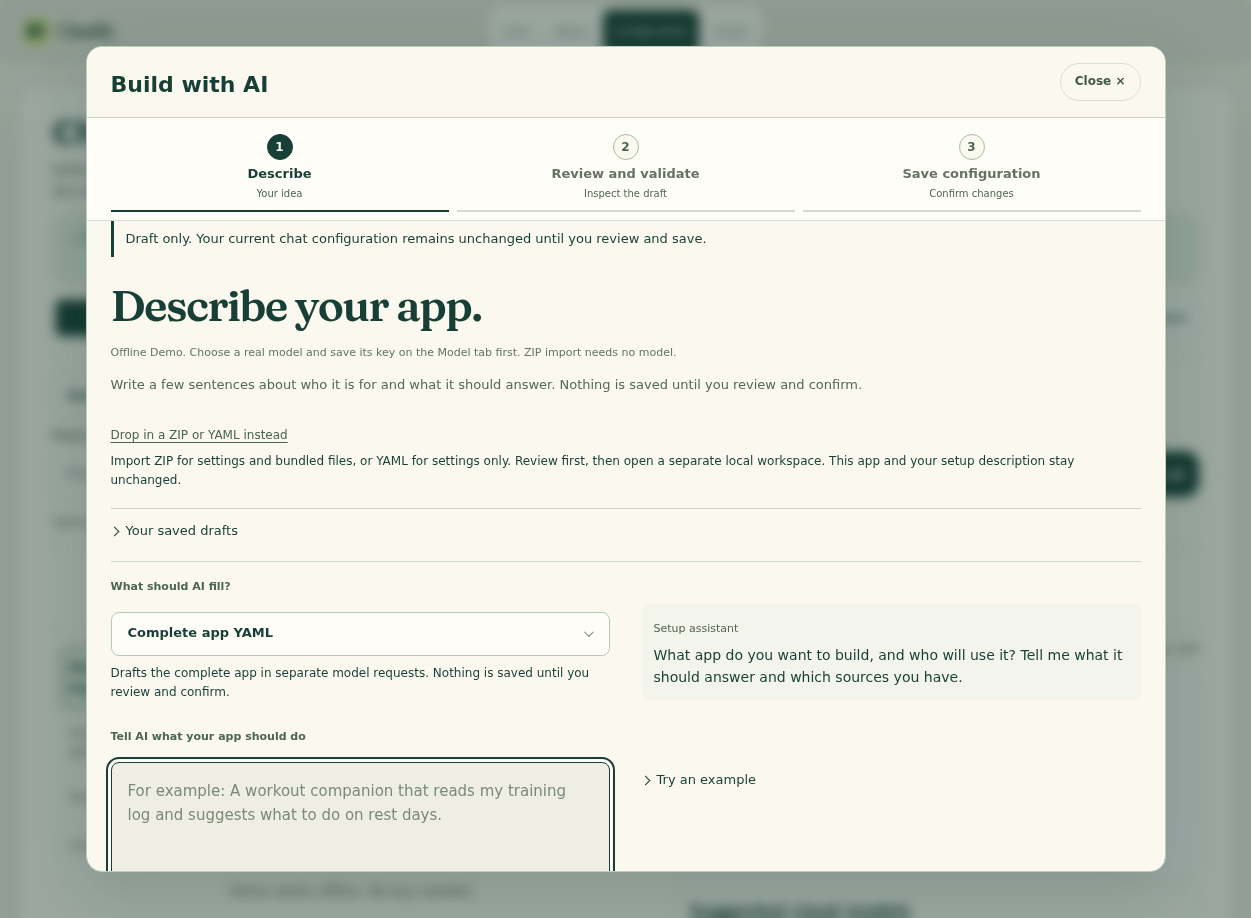
Keep keys out of YAML and Git. Check sources for important answers; citations are not a guarantee of correctness.
Install options · Configuration reference · Hosting
MIT license. Harsh Kashyap and Shela Wu. Advisor: Dennis Shasha. Related project: Custom-Nerd.
Fetch and start the latest release (uv installed):
uvx --refresh chatify-app start --directory my-chat
For pip: python -m pip install --upgrade --no-cache-dir chatify-app, then python -m chatify start --directory my-chat.
1 maintainer

Metadata
1 maintainer
Release files for chatify-app 0.4.35
For a detailed explanation of source distributions (sdists) and built distributions (wheels), please see the package formats documentation.
Source distribution (sdist)
| File | Size | Uploaded | Provenance | Actions |
|---|---|---|---|---|
| chatify_app-0.4.35.tar.gz | 33.2 MB | With provenance | Details for chatify_app-0.4.35.tar.gz |
Built distribution (wheel)
| File | Interpreter | ABI | Platform | Actions Reset |
|---|---|---|---|---|
| chatify_app-0.4.35-py3-none-any.whl | Python 3 | none | any | Details for chatify_app-0.4.35-py3-none-any.whl |
Total release size: 66.2 MB
Release files / chatify_app-0.4.35.tar.gz
| Download URL | chatify_app-0.4.35.tar.gz |
|---|---|
| Size | 33.2 MB |
| Tags | Source |
|
SHA-256 checksum How to use checksums |
3fdcc828cc8c472abb2f88e1051f814a779095ac4e0f2f975b68854d90f155ec
|
|
BLAKE2b-256 checksum How to use checksums |
96a47ff96a327cce8d254b0b318c7e9e008894fd8743b490c4dc627eadff0c5d
|
| Upload date | |
|
Uploaded using Trusted Publishing? What is trusted publishing? |
Yes |
| Uploaded via |
twine/7.0.0 CPython/3.13.16
|
Provenance
Provenance describes where a file came from. On PyPI, provenance is shared via attestations, which provide a verifiable record of the build or publishing details. View details, limitations and caveats.


PyPI Publish Attestation
PyPI verified that this artifact, at this checksum, originated from the publisher listed below.
Signed by GitHub Actions, verified by PyPI on Nov 10, 2026.
Transparency logRelease files / chatify_app-0.4.35-py3-none-any.whl
| Download URL | chatify_app-0.4.35-py3-none-any.whl |
|---|---|
| Size | 33.0 MB |
| Tags | Python 3 |
|
SHA-256 checksum How to use checksums |
82e0e5b3a5c578a13565453fec4a37b3287dc1d5339ef3e3a5652d257d406b1f
|
|
BLAKE2b-256 checksum How to use checksums |
97c00439c1496b92c356297ecdc5066ab7d7f6dc2df7d69e26c375abbe873e2a
|
| Upload date | |
|
Uploaded using Trusted Publishing? What is trusted publishing? |
Yes |
| Uploaded via |
twine/7.0.0 CPython/3.13.16
|
Provenance
Provenance describes where a file came from. On PyPI, provenance is shared via attestations, which provide a verifiable record of the build or publishing details. View details, limitations and caveats.
PyPI Publish Attestation
PyPI verified that this artifact, at this checksum, originated from the publisher listed below.
Signed by GitHub Actions, verified by PyPI on Nov 10, 2026.
Transparency logSecurity for chatify-app 0.4.35
Provenance
Provenance describes where a file came from. On PyPI, provenance is shared via attestations, which provide a verifiable record of the build or publishing details. View details, limitations and caveats.
Full provenance
Both files in this release have been uploaded with provenance metadata.
Attestation for chatify_app-0.4.35.tar.gz
PyPI Publish Attestation
PyPI verified that this artifact, at this checksum, originated from the publisher listed below.
Signed by GitHub Actions, verified by PyPI on Nov 10, 2026.
Transparency logA note on package security
PyPI is a repository for distributing packages, not a service for auditing them. While third-party security researchers and our staff do their best to detect and remove malicious packages, PyPI cannot guarantee the quality, security or suitability of any given package.
To learn more about protecting yourself from malicious actors, visit our package security documentation.














