
A simple and consistent interface for chatting with LLMs
Verified details
These details have been verified by PyPIProject links
GitHub Statistics
Maintainers

Project description
chatlas
chatlas provides a simple and unified interface across large language model (llm) providers in Python. It abstracts away complexity from common tasks like streaming chat interfaces, tool calling, structured output, and much more. chatlas helps you prototype faster without painting you into a corner; for example, switching providers is as easy as changing one line of code, but provider specific features are still accessible when needed. Developer experience is also a key focus of chatlas: typing support, rich console output, and built-in tooling are all included.
(Looking for something similar to chatlas, but in R? Check out elmer!)
Install
Install the latest stable release from PyPI:
pip install -U chatlas
Or, install the latest development version from GitHub:
pip install -U git+https://github.com/posit-dev/chatlas
Model providers
chatlas supports a variety of model providers. See the API reference for more details (like managing credentials) on each provider.
- Anthropic (Claude):
ChatAnthropic(). - GitHub model marketplace:
ChatGithub(). - Google (Gemini):
ChatGoogle(). - Groq:
ChatGroq(). - Ollama local models:
ChatOllama(). - OpenAI:
ChatOpenAI(). - perplexity.ai:
ChatPerplexity().
It also supports the following enterprise cloud providers:
- AWS Bedrock:
ChatBedrockAnthropic(). - Azure OpenAI:
ChatAzureOpenAI().
To use a model provider that isn't listed here, you have two options:
- If the model is OpenAI compatible, use
ChatOpenAI()with the appropriatebase_urlandapi_key(seeChatGithubfor a reference). - If you're motivated, implement a new provider by subclassing
Providerand implementing the required methods.
Model choice
If you're using chatlas inside your organisation, you'll be limited to what your org allows, which is likely to be one provided by a big cloud provider (e.g. ChatAzureOpenAI() and ChatBedrockAnthropic()). If you're using chatlas for your own personal exploration, you have a lot more freedom so we have a few recommendations to help you get started:
-
ChatOpenAI()orChatAnthropic()are both good places to start.ChatOpenAI()defaults to GPT-4o, but you can usemodel = "gpt-4o-mini"for a cheaper lower-quality model, ormodel = "o1-mini"for more complex reasoning.ChatAnthropic()is similarly good; it defaults to Claude 3.5 Sonnet which we have found to be particularly good at writing code. -
ChatGoogle()is great for large prompts, because it has a much larger context window than other models. It allows up to 1 million tokens, compared to Claude 3.5 Sonnet's 200k and GPT-4o's 128k. -
ChatOllama(), which uses Ollama, allows you to run models on your own computer. The biggest models you can run locally aren't as good as the state of the art hosted models, but they also don't share your data and and are effectively free.
Using chatlas
You can chat via chatlas in several different ways, depending on whether you are working interactively or programmatically. They all start with creating a new chat object:
from chatlas import ChatOpenAI

chat = ChatOpenAI(
  model = "gpt-4o",
  system_prompt = "You are a friendly but terse assistant.",
)
Interactive console
From a chat instance, it's simple to start a web-based or terminal-based chat console, which is great for testing the capabilities of the model. In either case, responses stream in real-time, and context is preserved across turns.
chat.app()
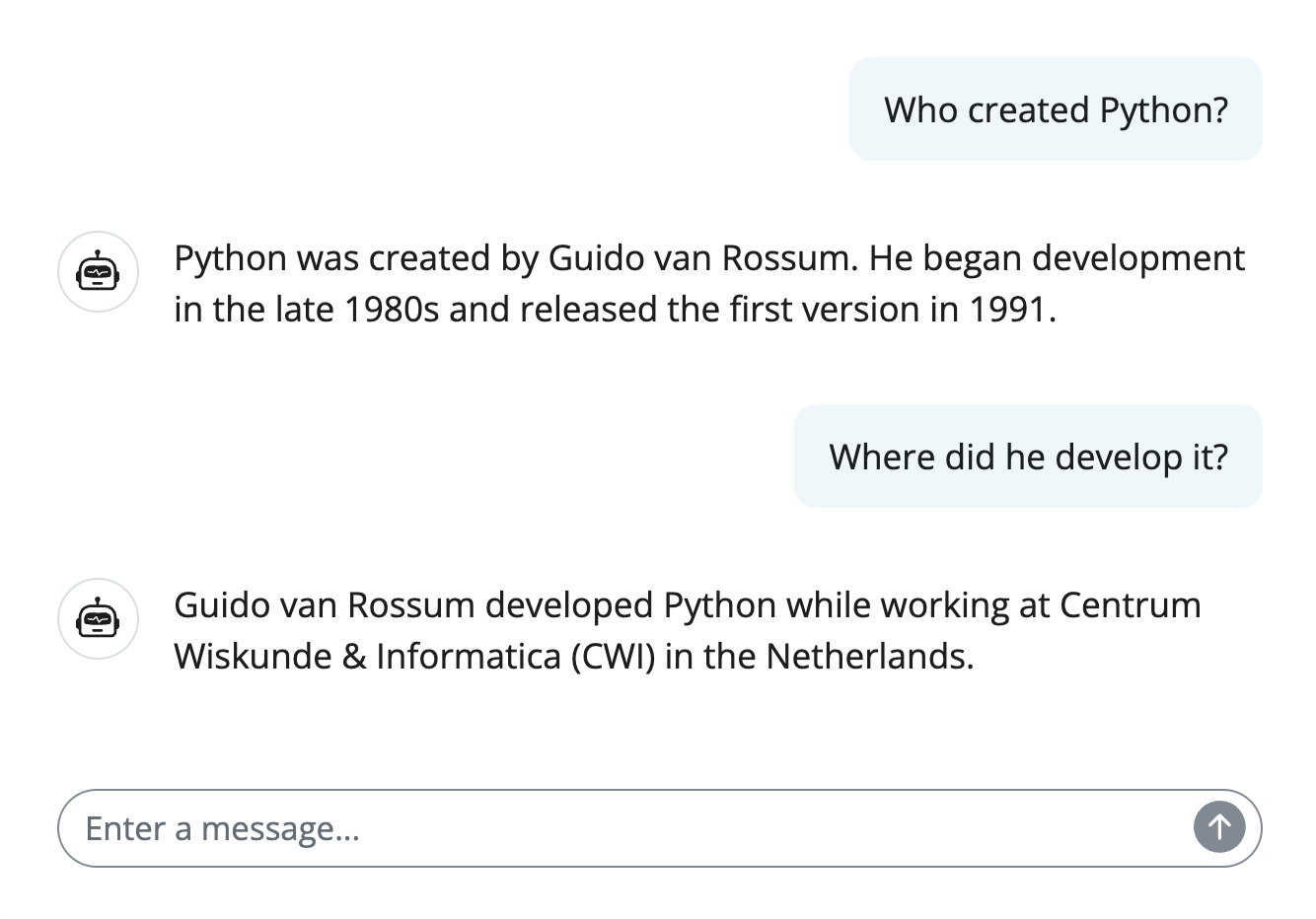
Or, if you prefer to work from the terminal:
chat.console()
Entering chat console. Press Ctrl+C to quit.

?> Who created Python?

Python was created by Guido van Rossum. He began development in the late 1980s and released the first version in 1991.

?> Where did he develop it?

Guido van Rossum developed Python while working at Centrum Wiskunde & Informatica (CWI) in the Netherlands.
The .chat() method
For a more programmatic approach, you can use the .chat() method to ask a question and get a response. By default, the response prints to a rich console as it streams in:
chat.chat("What preceding languages most influenced Python?")
Python was primarily influenced by ABC, with additional inspiration from C,
Modula-3, and various other languages.
To ask a question about an image, pass one or more additional input arguments using content_image_file() and/or content_image_url():
from chatlas import content_image_url

chat.chat(
    content_image_url("https://www.python.org/static/img/python-logo.png"),
    "Can you explain this logo?"
)
The Python logo features two intertwined snakes in yellow and blue,
representing the Python programming language. The design symbolizes...
To get the full response as a string, use the built-in str() function. Optionally, you can also suppress the rich console output by setting echo="none":
response = chat.chat("Who is Posit?", echo="none")
print(str(response))
As we'll see in later articles, echo="all" can also be useful for debugging, as it shows additional information, such as tool calls.
The .stream() method
If you want to do something with the response in real-time (i.e., as it arrives in chunks), use the .stream() method. This method returns an iterator that yields each chunk of the response as it arrives:
response = chat.stream("Who is Posit?")
for chunk in response:
    print(chunk, end="")
The .stream() method can also be useful if you're building a chatbot or other programs that needs to display responses as they arrive.
Tool calling
Tool calling is as simple as passing a function with type hints and docstring to .register_tool().
import sys

def get_current_python_version() -> str:
    """Get the current version of Python."""
    return sys.version

chat.register_tool(get_current_python_version)
chat.chat("What's the current version of Python?")
The current version of Python is 3.13.
Learn more in the tool calling article
Structured data
Structured data (i.e., structured output) is as simple as passing a pydantic model to .extract_data().
from pydantic import BaseModel

class Person(BaseModel):
    name: str
    age: int

chat.extract_data(
    "My name is Susan and I'm 13 years old",
    data_model=Person,
)
{'name': 'Susan', 'age': 13}
Learn more in the structured data article
Export chat
Easily get a full markdown or HTML export of a conversation:
chat.export("index.html", title="Python Q&A")
If the export doesn't have all the information you need, you can also access the full conversation history via the .get_turns() method:
chat.get_turns()
And, if the conversation is too long, you can specify which turns to include:
chat.export("index.html", turns=chat.get_turns()[-5:])
Async
chat methods tend to be synchronous by default, but you can use the async flavor by appending _async to the method name:
import asyncio

async def main():
    await chat.chat_async("What is the capital of France?")

asyncio.run(main())
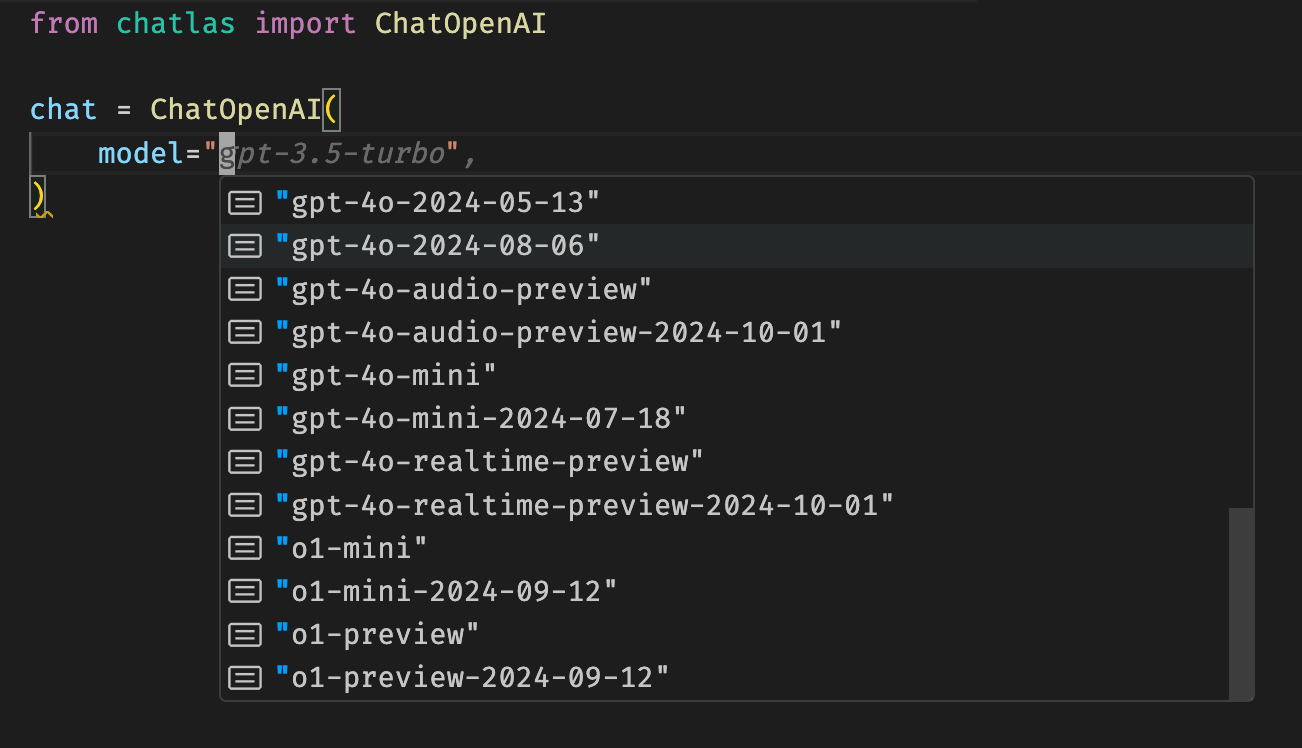
Typing support
chatlas has full typing support, meaning that, among other things, autocompletion just works in your favorite editor:
Troubleshooting
Sometimes things like token limits, tool errors, or other issues can cause problems that are hard to diagnose.
In these cases, the echo="all" option is helpful for getting more information about what's going on under the hood.
chat.chat("What is the capital of France?", echo="all")
This shows important information like tool call results, finish reasons, and more.
If the problem isn't self-evident, you can also reach into the .get_last_turn(), which contains the full response object, with full details about the completion.
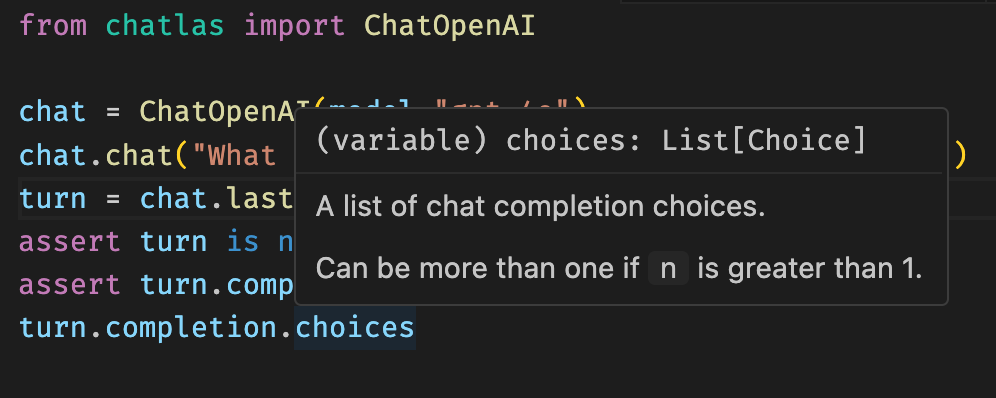
For monitoring issues in a production (or otherwise non-interactive) environment, you may want to enabling logging. Also, since chatlas builds on top of packages like anthropic and openai, you can also enable their debug logging to get lower-level information, like HTTP requests and response codes.
$ export CHATLAS_LOG=info
$ export OPENAI_LOG=info
$ export ANTHROPIC_LOG=info
Next steps
If you're new to world LLMs, you might want to read the Get Started guide, which covers some basic concepts and terminology.
Once you're comfortable with the basics, you can explore more in-depth topics like prompt design or the API reference.
Project details
Verified details
These details have been verified by PyPIProject links
GitHub Statistics
Maintainers
Release history Release notifications | RSS feed


Download files
Download the file for your platform. If you're not sure which to choose, learn more about installing packages.
Source Distribution
Built Distribution
Filter files by name, interpreter, ABI, and platform.
If you're not sure about the file name format, learn more about wheel file names.
Copy a direct link to the current filters
File details
Details for the file chatlas-0.2.0.tar.gz.
File metadata
- Download URL: chatlas-0.2.0.tar.gz
- Upload date:
- Size: 831.3 kB
- Tags: Source
- Uploaded using Trusted Publishing? Yes
- Uploaded via: twine/6.0.1 CPython/3.12.8
File hashes
| Algorithm | Hash digest | |
|---|---|---|
| SHA256 |
799fefed34e73f0bfb44160c4c134e55fc7bd661217c79ddcda545cb64e884af
|
|
| MD5 |
55a7d16c88097a359b5b835748f590a5
|
|
| BLAKE2b-256 |
0d3c4ee4d72c30f6920f76d44388036a9517628de153cb739876aaf382c9e26d
|
Provenance
The following attestation bundles were made for chatlas-0.2.0.tar.gz:
Publisher:
release.yml on posit-dev/chatlas
-
Statement:
-
Statement type:
https://in-toto.io/Statement/v1 -
Predicate type:
https://docs.pypi.org/attestations/publish/v1 -
Subject name:
chatlas-0.2.0.tar.gz -
Subject digest:
799fefed34e73f0bfb44160c4c134e55fc7bd661217c79ddcda545cb64e884af - Sigstore transparency entry: 154849456
- Sigstore integration time:
-
Permalink:
posit-dev/chatlas@b47b534f42d8ae259f806a5ddc011f268e57c54a -
Branch / Tag:
refs/tags/v0.2.0 - Owner: https://github.com/posit-dev
-
Access:
public
-
Token Issuer:
https://token.actions.githubusercontent.com -
Runner Environment:
github-hosted -
Publication workflow:
release.yml@b47b534f42d8ae259f806a5ddc011f268e57c54a -
Trigger Event:
release
-
Statement type:
File details
Details for the file chatlas-0.2.0-py3-none-any.whl.
File metadata
- Download URL: chatlas-0.2.0-py3-none-any.whl
- Upload date:
- Size: 61.8 kB
- Tags: Python 3
- Uploaded using Trusted Publishing? Yes
- Uploaded via: twine/6.0.1 CPython/3.12.8
File hashes
| Algorithm | Hash digest | |
|---|---|---|
| SHA256 |
e8c317f38994036ba485557d8fa23b70e6a45718021866fedfb1ca5e27a0a034
|
|
| MD5 |
37f2d699787e7a03a4afa8569c7a1b4a
|
|
| BLAKE2b-256 |
1ba54b5dd60aec7fa20d69565f4bf79c181d88b731c0c3c1d65eb94f00c2cc36
|
Provenance
The following attestation bundles were made for chatlas-0.2.0-py3-none-any.whl:
Publisher:
release.yml on posit-dev/chatlas
-
Statement:
-
Statement type:
https://in-toto.io/Statement/v1 -
Predicate type:
https://docs.pypi.org/attestations/publish/v1 -
Subject name:
chatlas-0.2.0-py3-none-any.whl -
Subject digest:
e8c317f38994036ba485557d8fa23b70e6a45718021866fedfb1ca5e27a0a034 - Sigstore transparency entry: 154849458
- Sigstore integration time:
-
Permalink:
posit-dev/chatlas@b47b534f42d8ae259f806a5ddc011f268e57c54a -
Branch / Tag:
refs/tags/v0.2.0 - Owner: https://github.com/posit-dev
-
Access:
public
-
Token Issuer:
https://token.actions.githubusercontent.com -
Runner Environment:
github-hosted -
Publication workflow:
release.yml@b47b534f42d8ae259f806a5ddc011f268e57c54a -
Trigger Event:
release
-
Statement type:






