
No project description provided

Project description
ChatMock





OpenAI & Ollama compatible API powered by your ChatGPT plan.
Use your ChatGPT Plus/Pro account to call OpenAI models from code or alternate chat UIs.
What It Does
ChatMock runs a local server that creates an OpenAI/Ollama compatible API, and requests are then fulfilled using your authenticated ChatGPT login with the oauth client of Codex, OpenAI's coding CLI tool. This allows you to use GPT-5, GPT-5-Codex, and other models right through your OpenAI account, without requiring an api key. You are then able to use it in other chat apps or other coding tools.
This does require a paid ChatGPT account.
Quickstart
Homebrew
brew tap RayBytes/chatmock
brew install chatmock
CLI
pipx install chatmock
GUI
If you're on macOS or Windows, you can download the GUI app from the GitHub releases.
Python
If you wish to just simply run this as a python flask server, you are also freely welcome too.
Clone or download this repository, then cd into the project directory. Then follow the instrunctions listed below.
- Sign in with your ChatGPT account and follow the prompts
python chatmock.py login
You can make sure this worked by running python chatmock.py info
- After the login completes successfully, you can just simply start the local server
python chatmock.py serve
Then, you can simply use the address and port as the baseURL as you require (http://127.0.0.1:8000 by default)
Reminder: When setting a baseURL in other applications, make you sure you include /v1/ at the end of the URL if you're using this as a OpenAI compatible endpoint (e.g http://127.0.0.1:8000/v1)
Docker
Read the docker instrunctions here
Examples
Python
from openai import OpenAI

client = OpenAI(
    base_url="http://127.0.0.1:8000/v1",
    api_key="key"  # ignored
)

resp = client.chat.completions.create(
    model="gpt-5.4",
    messages=[{"role": "user", "content": "hello world"}]
)

print(resp.choices[0].message.content)
curl
curl http://127.0.0.1:8000/v1/chat/completions \
  -H "Authorization: Bearer key" \
  -H "Content-Type: application/json" \
  -d '{
    "model": "gpt-5.4",
    "messages": [{"role":"user","content":"hello world"}]
  }'
What's supported
- Tool/Function calling
- Vision/Image understanding
- Thinking summaries (through thinking tags)
- Thinking effort
Notes & Limits
- Requires an active, paid ChatGPT account.
- Some context length might be taken up by internal instructions (but they dont seem to degrade the model)
- Use responsibly and at your own risk. This project is not affiliated with OpenAI, and is a educational exercise.
Supported models
gpt-5.4gpt-5.2gpt-5.1gpt-5gpt-5.3-codexgpt-5-codexgpt-5.2-codexgpt-5.1-codexgpt-5.1-codex-maxgpt-5.1-codex-minicodex-mini
Customisation / Configuration
Thinking effort
--reasoning-effort(choice of none,minimal,low,medium,high,xhigh)
GPT-5 has a configurable amount of "effort" it can put into thinking, which may cause it to take more time for a response to return, but may overall give a smarter answer. Applying this parameter afterserveforces the server to use this reasoning effort by default, unless overrided by the API request with a different effort set. The default reasoning effort without setting this parameter ismedium.
Thegpt-5.1family (including codex) supportslow,medium, andhighwhilegpt-5.1-codex-maxaddsxhigh. Thegpt-5.2andgpt-5.3families (including codex) supportlow,medium,high, andxhigh. GPT-5.4 supportsnone,low,medium,high, andxhigh.
Thinking summaries
--reasoning-summary(choice of auto,concise,detailed,none)
Models like GPT-5 do not return raw thinking content, but instead return thinking summaries. These can also be customised by you.
OpenAI Tools
--enable-web-search
You can also access OpenAI tools through this project. Currently, only web search is available. You can enable it by starting the server with this parameter, which will allow OpenAI to determine when a request requires a web search, or you can use the following parameters during a request to the API to enable web search:
responses_tools: supports[{"type":"web_search"}]/{ "type": "web_search_preview" }
responses_tool_choice:"auto"or"none"
Example usage
{
  "model": "gpt-5.4",
  "messages": [{"role":"user","content":"Find current METAR rules"}],
  "stream": true,
  "responses_tools": [{"type": "web_search"}],
  "responses_tool_choice": "auto"
}
Expose reasoning models
--expose-reasoning-models
If your preferred app doesn’t support selecting reasoning effort, or you just want a simpler approach, this parameter exposes each reasoning level as a separate, queryable model. Each reasoning level also appears individually under /v1/models, so model pickers in your favorite chat apps will list all reasoning options as distinct models you can switch between.
Notes
If you wish to have the fastest responses, I'd recommend setting --reasoning-effort to low, and --reasoning-summary to none.
All parameters and choices can be seen by sending python chatmock.py serve --h
The context size of this route is also larger than what you get access to in the regular ChatGPT app.
When the model returns a thinking summary, the model will send back thinking tags to make it compatible with chat apps. If you don't like this behavior, you can instead set --reasoning-compat to legacy, and reasoning will be set in the reasoning tag instead of being returned in the actual response text.
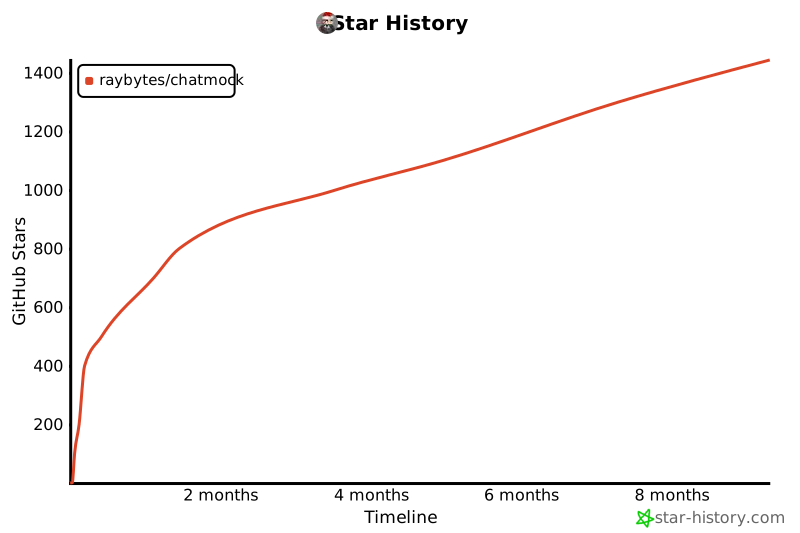
Star History
Release history Release notifications | RSS feed

Download files
Download the file for your platform. If you're not sure which to choose, learn more about installing packages.
Source Distribution
Built Distribution
Filter files by name, interpreter, ABI, and platform.
If you're not sure about the file name format, learn more about wheel file names.
Copy a direct link to the current filters
File details
Details for the file chatmock-1.36.tar.gz.
File metadata
- Download URL: chatmock-1.36.tar.gz
- Upload date:
- Size: 48.1 kB
- Tags: Source
- Uploaded using Trusted Publishing? Yes
- Uploaded via: twine/6.1.0 CPython/3.13.7
File hashes
| Algorithm | Hash digest | |
|---|---|---|
| SHA256 |
0d21e4242a5bba9c64c06b4ce8f72ebb8405bf382ba3f5cfc83a4bf04b40dc25
|
|
| MD5 |
2e550326486095d6af0dfca417d2422a
|
|
| BLAKE2b-256 |
a01749c929c711b69d6dac7cb73e495f5eada8689b4b5e7483422036132a40a2
|
Provenance
The following attestation bundles were made for chatmock-1.36.tar.gz:
Publisher:
release.yml on RayBytes/ChatMock
-
Statement:
-
Statement type:
https://in-toto.io/Statement/v1 -
Predicate type:
https://docs.pypi.org/attestations/publish/v1 -
Subject name:
chatmock-1.36.tar.gz -
Subject digest:
0d21e4242a5bba9c64c06b4ce8f72ebb8405bf382ba3f5cfc83a4bf04b40dc25 - Sigstore transparency entry: 1110231769
- Sigstore integration time:
-
Permalink:
RayBytes/ChatMock@d8ba913d73e04e3ef2763b88308cee2e6591f18c -
Branch / Tag:
refs/tags/v1.36 - Owner: https://github.com/RayBytes
-
Access:
public
-
Token Issuer:
https://token.actions.githubusercontent.com -
Runner Environment:
github-hosted -
Publication workflow:
release.yml@d8ba913d73e04e3ef2763b88308cee2e6591f18c -
Trigger Event:
push
-
Statement type:
File details
Details for the file chatmock-1.36-py3-none-any.whl.
File metadata
- Download URL: chatmock-1.36-py3-none-any.whl
- Upload date:
- Size: 54.2 kB
- Tags: Python 3
- Uploaded using Trusted Publishing? Yes
- Uploaded via: twine/6.1.0 CPython/3.13.7
File hashes
| Algorithm | Hash digest | |
|---|---|---|
| SHA256 |
a59d245d5b2843548c6b8df638837e7284a639fd41a8b6ff438c073f485fb3eb
|
|
| MD5 |
24b0ac4ba2d8d1c443d76d070cc1d62c
|
|
| BLAKE2b-256 |
9f79958683b3a879fe752ca5ed5e23b6dd0e8758e4fcf55117fa788f7504161b
|
Provenance
The following attestation bundles were made for chatmock-1.36-py3-none-any.whl:
Publisher:
release.yml on RayBytes/ChatMock
-
Statement:
-
Statement type:
https://in-toto.io/Statement/v1 -
Predicate type:
https://docs.pypi.org/attestations/publish/v1 -
Subject name:
chatmock-1.36-py3-none-any.whl -
Subject digest:
a59d245d5b2843548c6b8df638837e7284a639fd41a8b6ff438c073f485fb3eb - Sigstore transparency entry: 1110231806
- Sigstore integration time:
-
Permalink:
RayBytes/ChatMock@d8ba913d73e04e3ef2763b88308cee2e6591f18c -
Branch / Tag:
refs/tags/v1.36 - Owner: https://github.com/RayBytes
-
Access:
public
-
Token Issuer:
https://token.actions.githubusercontent.com -
Runner Environment:
github-hosted -
Publication workflow:
release.yml@d8ba913d73e04e3ef2763b88308cee2e6591f18c -
Trigger Event:
push
-
Statement type:






