






chatpdb
chatpdb is a drop-in replacement for ipdb or pdb that lets you ask questions while debugging.
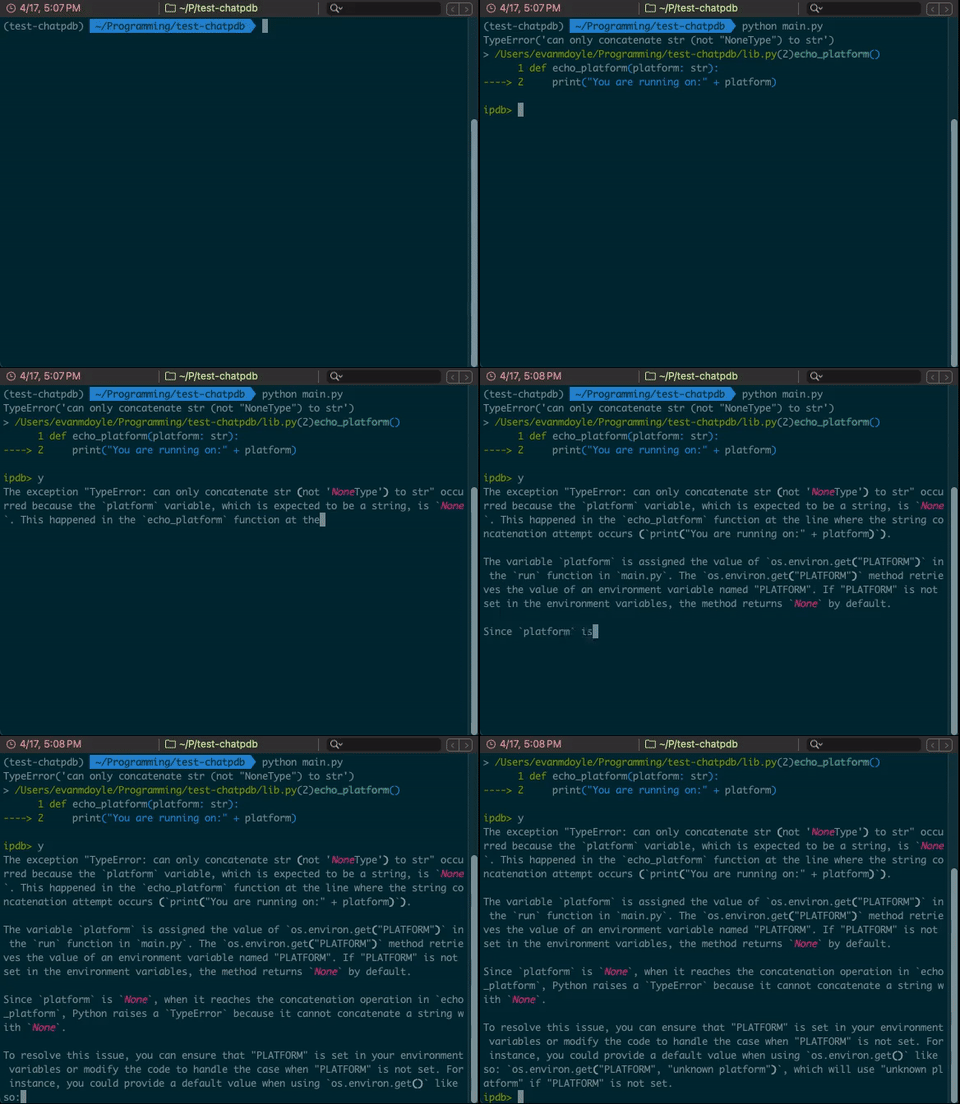
chatpdb meets you where you are - AI tooling that's only invoked when you need it.
Installation
pip install chatpdb
Ensure that you have OPENAI_API_KEY set in your environment.
export OPENAI_API_KEY=...```

## Usage
In your code:
```python3
import chatpdb; chatpdb.set_trace()
Simply type y to receive a summary of the current code and stack trace.
> /Programming/test-chatpdb/lib.py(2)echo_platform()
      1 def echo_platform(platform: str):
----> 2     print("You are running on:" + platform)
      3
ipdb> y
The exception occurred because the function `echo_platform` tries to concatenate the string "You are running on:" with the `platform` variable, which is `None`. [...]
Type y "prompt" to ask a question.
> /Programming/test-chatpdb/lib.py(2)echo_platform()
      1 def echo_platform(platform: str):
----> 2     print("You are running on:" + platform)
      3
ipdb> y "Why is platform coming through as None?"
The variable `platform` is coming through as `None` because the environment variable `"PLATFORM"` is not set in your system's environment variables. [...]
How does it work?
chatpdb uses the OpenAI API to generate responses to your questions. It uses the gpt-4-turbo model by default.
chatpdb will automatically include relevant context from the current frame and stack trace, as well as
exception information if one has been raised.
Advanced Usage
Just like ipdb and pdb, chatpdb supports many different entrypoints.
Running code:
import chatpdb; chatpdb.run('print("hello")')
import chatpdb; chatpdb.runcall(lambda x: x + 1, 1)
As a decorator:
@chatpdb.cex
def sample_cex_function():
    raise # any exception within the decorated function will trigger chatpdb
As a context manager:
with chatpdb.launch_chatpdb_on_exception():
    raise # any exception within the with block will trigger chatpdb
On files:
python3 -m chatpdb file.py
post-mortem support:
chatpdb.pm()
See the documentation of ipdb or pdb for the full api.
Configuration
You can use more specific environment variables to configure an OpenAI key and preferred model for chatpdb. The following environment variables are supported:
CHAT_PDB_OPENAI_API_KEY: Your OpenAI API keyCHAT_PDB_OPENAI_MODEL: The model to use for chatpdb. Default is 'gpt-4-turbo'
1 maintainer

Release files for chatpdb 0.1.14
For a detailed explanation of source distributions (sdists) and built distributions (wheels), please see the package formats documentation.
Source distribution (sdist)
| File | Size | Uploaded | |
|---|---|---|---|
| chatpdb-0.1.14.tar.gz | 26.6 kB | Details |
Built distribution (wheel)
| File | Interpreter | ABI | Platform | Reset |
|---|---|---|---|---|
| chatpdb-0.1.14-py3-none-any.whl | Python 3 | none | any | Details |
Total release size: 55.6 kB
Release files / chatpdb-0.1.14.tar.gz
| Download URL | chatpdb-0.1.14.tar.gz |
|---|---|
| Size | 26.6 kB |
| Tags | Source |
|
SHA-256 checksum How to use checksums |
18769882737c878925c28215871cdda05af5b5631bf7d890c337ceeac41469b4
|
|
BLAKE2b-256 checksum How to use checksums |
51c2b4b30b0c4e44aa9bce59e3d75c4144f5c924d2bfa68ec3f6cab6ce005254
|
| Upload date | |
|
Uploaded using Trusted Publishing? What is trusted publishing? |
No |
| Uploaded via |
twine/5.0.0 CPython/3.9.19
|
Release files / chatpdb-0.1.14-py3-none-any.whl
| Download URL | chatpdb-0.1.14-py3-none-any.whl |
|---|---|
| Size | 29.0 kB |
| Tags | Python 3 |
|
SHA-256 checksum How to use checksums |
6efe7e13fe9e8ff43cb76e00c190454f79b34e66678e20d50f005d8c7363eb0a
|
|
BLAKE2b-256 checksum How to use checksums |
4629fa76624edfbd7157802d9e1cb686c70711123e4d74242148a91eda827f08
|
| Upload date | |
|
Uploaded using Trusted Publishing? What is trusted publishing? |
No |
| Uploaded via |
twine/5.0.0 CPython/3.9.19
|














