

Chatterbox TTS




Made with ♥️ by

Chatterbox is a family of three state-of-the-art, open-source text-to-speech models by Resemble AI.
We are excited to introduce Chatterbox-Turbo, our most efficient model yet. Built on a streamlined 350M parameter architecture, Turbo delivers high-quality speech with less compute and VRAM than our previous models. We have also distilled the speech-token-to-mel decoder, previously a bottleneck, reducing generation from 10 steps to just one, while retaining high-fidelity audio output.
Paralinguistic tags are now native to the Turbo model, allowing you to use [cough], [laugh], [chuckle], and more to add distinct realism. While Turbo was built primarily for low-latency voice agents, it excels at narration and creative workflows.
If you like the model but need to scale or tune it for higher accuracy, check out our competitively priced TTS service (link). It delivers reliable performance with ultra-low latency of sub 200ms—ideal for production use in agents, applications, or interactive media.
⚡ Model Zoo
Choose the right model for your application.
| Model | Size | Languages | Key Features | Best For | 🤗 | Examples |
|---|---|---|---|---|---|---|
| Chatterbox-Turbo | 350M | English | Paralinguistic Tags ([laugh]), Lower Compute and VRAM |
Zero-shot voice agents, Production | Demo | Listen |
| Chatterbox-Multilingual (Language list) | 500M | 23+ | Zero-shot cloning, Multiple Languages | Global applications, Localization | Demo | Listen |
| Chatterbox (Tips and Tricks) | 500M | English | CFG & Exaggeration tuning | General zero-shot TTS with creative controls | Demo | Listen |
Installation
pip install chatterbox-tts
Alternatively, you can install from source:
# conda create -yn chatterbox python=3.11
# conda activate chatterbox

git clone https://github.com/resemble-ai/chatterbox.git
cd chatterbox
pip install -e .
We developed and tested Chatterbox on Python 3.11 on Debian 11 OS; the versions of the dependencies are pinned in pyproject.toml to ensure consistency. You can modify the code or dependencies in this installation mode.
Usage
Chatterbox-Turbo
import torchaudio as ta
import torch
from chatterbox_ng.tts_turbo import ChatterboxTurboTTS

# Load the Turbo model
model = ChatterboxTurboTTS.from_pretrained(device="cuda")

# Generate with Paralinguistic Tags
text = "Hi there, Sarah here from MochaFone calling you back [chuckle], have you got one minute to chat about the billing issue?"

# Generate audio (requires a reference clip for voice cloning)
wav = model.generate(text, audio_prompt_path="your_10s_ref_clip.wav")

ta.save("test-turbo.wav", wav, model.sr)
Chatterbox and Chatterbox-Multilingual
import torchaudio as ta
from chatterbox_ng.tts import ChatterboxTTS
from chatterbox_ng.mtl_tts import ChatterboxMultilingualTTS

# English example
model = ChatterboxTTS.from_pretrained(device="cuda")

text = "Ezreal and Jinx teamed up with Ahri, Yasuo, and Teemo to take down the enemy's Nexus in an epic late-game pentakill."
wav = model.generate(text)
ta.save("test-english.wav", wav, model.sr)

# Multilingual examples
multilingual_model = ChatterboxMultilingualTTS.from_pretrained(device=device)

french_text = "Bonjour, comment ça va? Ceci est le modèle de synthèse vocale multilingue Chatterbox, il prend en charge 23 langues."
wav_french = multilingual_model.generate(french_text, language_id="fr")
ta.save("test-french.wav", wav_french, model.sr)

chinese_text = "你好,今天天气真不错,希望你有一个愉快的周末。"
wav_chinese = multilingual_model.generate(chinese_text, language_id="zh")
ta.save("test-chinese.wav", wav_chinese, model.sr)

# If you want to synthesize with a different voice, specify the audio prompt
AUDIO_PROMPT_PATH = "YOUR_FILE.wav"
wav = model.generate(text, audio_prompt_path=AUDIO_PROMPT_PATH)
ta.save("test-2.wav", wav, model.sr)
See example_tts.py and example_vc.py for more examples.
Supported Languages
Arabic (ar) • Danish (da) • German (de) • Greek (el) • English (en) • Spanish (es) • Finnish (fi) • French (fr) • Hebrew (he) • Hindi (hi) • Italian (it) • Japanese (ja) • Korean (ko) • Malay (ms) • Dutch (nl) • Norwegian (no) • Polish (pl) • Portuguese (pt) • Russian (ru) • Swedish (sv) • Swahili (sw) • Turkish (tr) • Chinese (zh)
Original Chatterbox Tips
-
General Use (TTS and Voice Agents):
- Ensure that the reference clip matches the specified language tag. Otherwise, language transfer outputs may inherit the accent of the reference clip’s language. To mitigate this, set
cfg_weightto0. - The default settings (
exaggeration=0.5,cfg_weight=0.5) work well for most prompts across all languages. - If the reference speaker has a fast speaking style, lowering
cfg_weightto around0.3can improve pacing.
- Ensure that the reference clip matches the specified language tag. Otherwise, language transfer outputs may inherit the accent of the reference clip’s language. To mitigate this, set
-
Expressive or Dramatic Speech:
- Try lower
cfg_weightvalues (e.g.~0.3) and increaseexaggerationto around0.7or higher. - Higher
exaggerationtends to speed up speech; reducingcfg_weighthelps compensate with slower, more deliberate pacing.
- Try lower
Built-in PerTh Watermarking for Responsible AI
Every audio file generated by Chatterbox includes Resemble AI's Perth (Perceptual Threshold) Watermarker - imperceptible neural watermarks that survive MP3 compression, audio editing, and common manipulations while maintaining nearly 100% detection accuracy.
Watermark extraction
You can look for the watermark using the following script.
import perth
import librosa

AUDIO_PATH = "YOUR_FILE.wav"

# Load the watermarked audio
watermarked_audio, sr = librosa.load(AUDIO_PATH, sr=None)

# Initialize watermarker (same as used for embedding)
watermarker = perth.PerthImplicitWatermarker()

# Extract watermark
watermark = watermarker.get_watermark(watermarked_audio, sample_rate=sr)
print(f"Extracted watermark: {watermark}")
# Output: 0.0 (no watermark) or 1.0 (watermarked)
Official Discord
👋 Join us on Discord and let's build something awesome together!
Evaluation
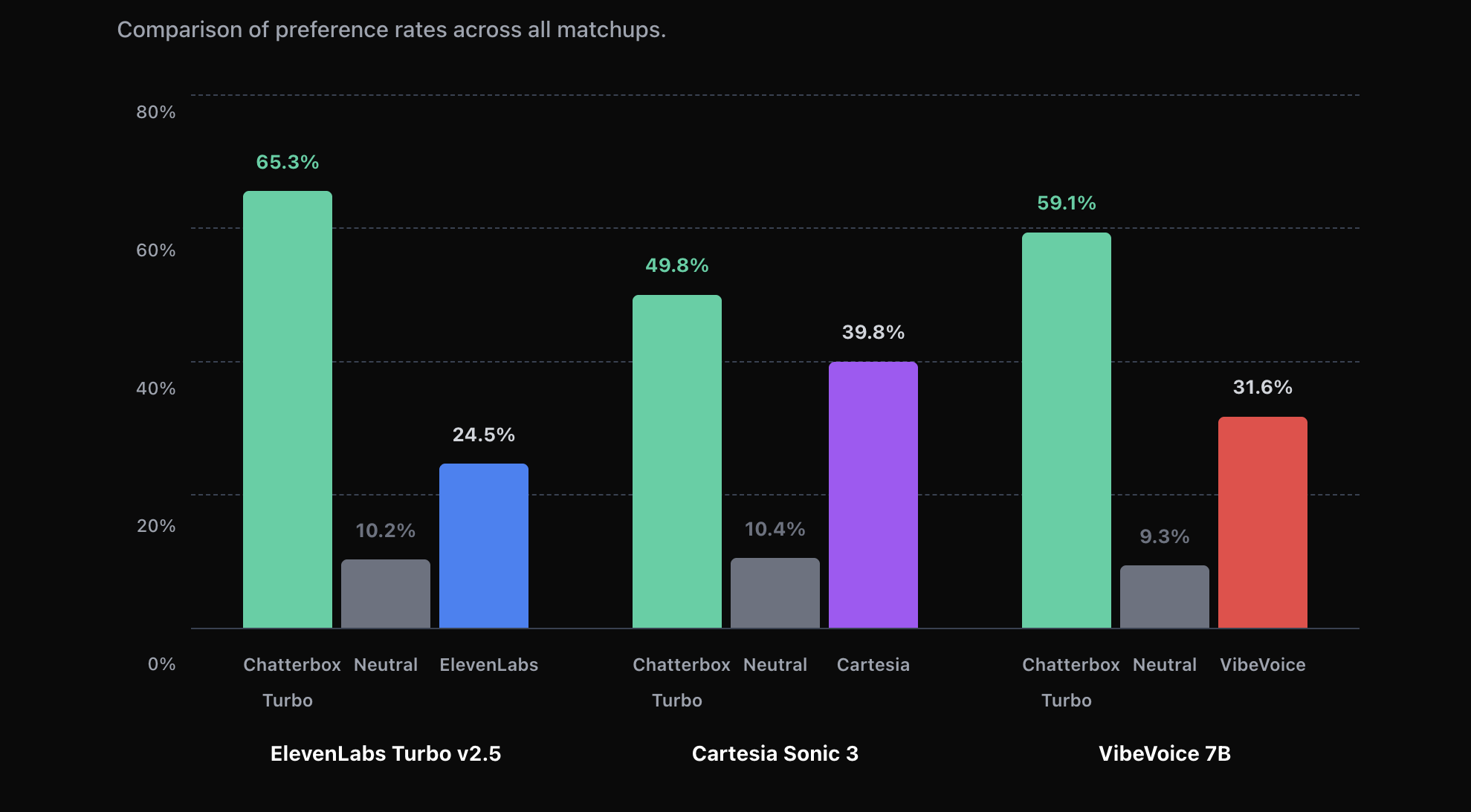
Chatterbox Turbo was evaluated using Podonos, a platform for reproducible subjective speech evaluation.
We compared Chatterbox Turbo to competitive TTS systems using Podonos' standardized evaluation suite, focusing on overall preference, naturalness, and expressiveness.
Evaluation reports:
- Chatterbox Turbo vs ElevenLabs Turbo v2.5
- Chatterbox Turbo vs Cartesia Sonic 3
- Chatterbox Turbo vs VibeVoice 7B
These evaluations were conducted under identical conditions and are publicly accessible via Podonos.
Acknowledgements
- Podonos — for supporting reproducible subjective speech evaluation
- Cosyvoice
- Real-Time-Voice-Cloning
- HiFT-GAN
- Llama 3
- S3Tokenizer
Citation
If you find this model useful, please consider citing.
@misc{chatterboxtts2025,
  author       = {{Resemble AI}},
  title        = {{Chatterbox-TTS}},
  year         = {2025},
  howpublished = {\url{https://github.com/resemble-ai/chatterbox}},
  note         = {GitHub repository}
}
Disclaimer
Don't use this model to do bad things. Prompts are sourced from freely available data on the internet.
1 maintainer

Metadata
1 maintainer
Release files for chatterbox-ng 0.1.11
For a detailed explanation of source distributions (sdists) and built distributions (wheels), please see the package formats documentation.
Source distribution (sdist)
| File | Size | Uploaded | Provenance | |
|---|---|---|---|---|
| chatterbox_ng-0.1.11.tar.gz | 1.4 MB | With provenance | Details |
Built distribution (wheel)
| File | Interpreter | ABI | Platform | Reset |
|---|---|---|---|---|
| chatterbox_ng-0.1.11-py3-none-any.whl | Python 3 | none | any | Details |
Total release size: 1.6 MB
Release files / chatterbox_ng-0.1.11.tar.gz
| Download URL | chatterbox_ng-0.1.11.tar.gz |
|---|---|
| Size | 1.4 MB |
| Tags | Source |
|
SHA-256 checksum How to use checksums |
49b6b46fc32f20dbbe574b03071c463362c1f9af2a9f7468016f31179adcae45
|
|
BLAKE2b-256 checksum How to use checksums |
587cc0b8da325977c05f5f56890e26ddb704d5503159d137a50d83f8f66eb851
|
| Upload date | |
|
Uploaded using Trusted Publishing? What is trusted publishing? |
Yes |
| Uploaded via |
twine/6.1.0 CPython/3.13.12
|
Provenance
Provenance describes where a file came from. On PyPI, provenance is shared via attestations, which provide a verifiable record of the build or publishing details. View details, limitations and caveats.


PyPI Publish Attestation
PyPI verified that this artifact, at this checksum, originated from the publisher listed below.
Signed by GitHub Actions, verified by PyPI on May 20, 2026.
Transparency logRelease files / chatterbox_ng-0.1.11-py3-none-any.whl
| Download URL | chatterbox_ng-0.1.11-py3-none-any.whl |
|---|---|
| Size | 108.5 kB |
| Tags | Python 3 |
|
SHA-256 checksum How to use checksums |
e711a2361ac1b0c152f56a94c9798934c1880cba1a92fe935131ed1a1a62b78e
|
|
BLAKE2b-256 checksum How to use checksums |
c71f124e3d40d8476d8a4b1c39dcec68ee2adea2dfeb3f48bb91c9d7c4fc79de
|
| Upload date | |
|
Uploaded using Trusted Publishing? What is trusted publishing? |
Yes |
| Uploaded via |
twine/6.1.0 CPython/3.13.12
|
Provenance
Provenance describes where a file came from. On PyPI, provenance is shared via attestations, which provide a verifiable record of the build or publishing details. View details, limitations and caveats.
PyPI Publish Attestation
PyPI verified that this artifact, at this checksum, originated from the publisher listed below.
Signed by GitHub Actions, verified by PyPI on May 20, 2026.
Transparency logSecurity for chatterbox-ng 0.1.11
Provenance
Provenance describes where a file came from. On PyPI, provenance is shared via attestations, which provide a verifiable record of the build or publishing details. View details, limitations and caveats.
Full provenance
All 2 files in this release have been uploaded with provenance metadata.
Attestation for chatterbox_ng-0.1.11.tar.gz
PyPI Publish Attestation
PyPI verified that this artifact, at this checksum, originated from the publisher listed below.
Signed by GitHub Actions, verified by PyPI on May 20, 2026.
Transparency logA note on package security
PyPI is a repository for distributing packages, not a service for auditing them. While third-party security researchers and our staff do their best to detect and remove malicious packages, PyPI cannot guarantee the quality, security or suitability of any given package.














