
chatterdome



This banner is AI-generated (Google Gemini) and carries its signed C2PA manifest
(trainedAlgorithmicMedia).
A control room for Claude Code. It shows every session running on your machines, gives each one a name, lets them hand each other tasks, and tells you what they cost, what they remember and how full their context is. And it lets several agents debate a question until there is a decision.
Everything stays on your own machines. No service, no open port, no cloud account, no telemetry. What crosses machine boundaries goes over SSH inside your own Tailnet.
A playground. Chatterdome is an experiment to get to know Claude Code better: what it writes into its transcripts, how its memory works, what a session really costs, and how sessions can talk to each other. Some of it is polished, some of it is a first attempt. Expect rough edges, and read Limits before relying on it.
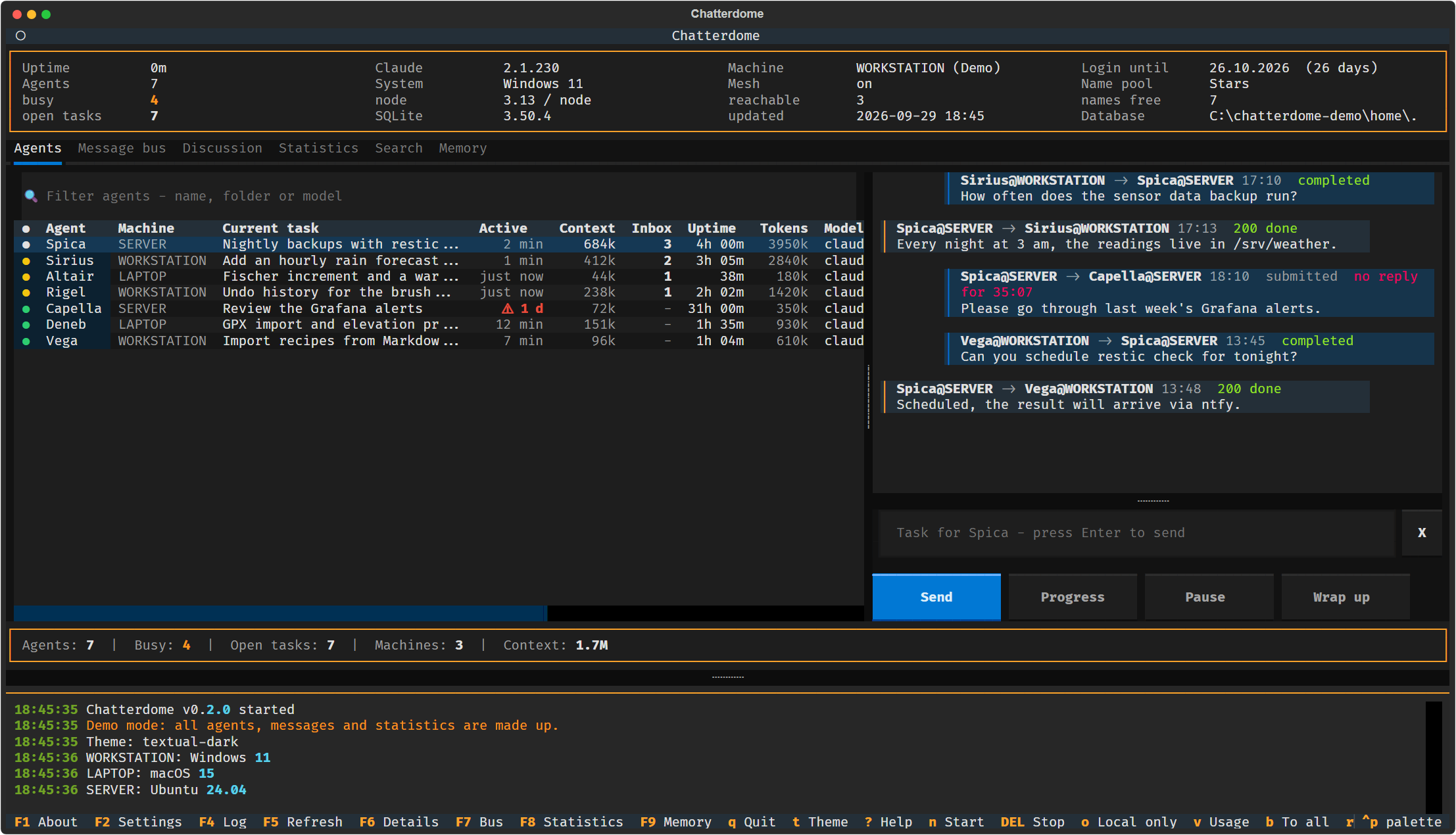
All screenshots come from the built-in demo mode with made-up data.
Features
- Every agent gets a name. Sessions are addressed as
VegaorVega@LAPTOPinstead of a process id. The name shows up in the terminal tab, in the table and in every message. - Name pools you can extend. Four themes are shipped: saints, actors, stars and singers. Your own themes go into a local file that git ignores, see Agent names.
- Across machines with Tailscale. One table for the sessions on all your machines. Send tasks to an agent on another machine, restart a session there (the conversation stays), update Claude Code remotely and take a screenshot of a remote screen. All of it runs over SSH inside your Tailnet.
- Visual warnings. A context above 600k tokens turns yellow, above 800k it blinks red. A session that has done nothing for 24 hours gets a blinking ⚠ in the activity column.
- Memory analysis. How full
MEMORY.mdis against its hard limits, what the index costs in every session, broken links, notes missing from the index, and how often each note was actually recalled. - Context and token analysis. Context and tokens per session, what was processed per day and per folder, and how much of it came from the cache.
- Statistics and cost control. How many sessions ran at the same time, spend by day, folder and session length, and an early warning for the message bus. Discussions count their tokens live, and the model (Haiku, Sonnet, Opus) is chosen per discussion.
- Discussions and debates. Several agents argue PRO and CONTRA or work as a team towards a decision, optionally after a research round on the web. You can chime in while it runs, continue it later with new information or another model, and every discussion lands in an archive. The name of this app was found this way.
- Full-text search across all transcripts of Claude Code and the Codex CLI.
- A message bus between sessions, with state, receipts and expiry.
- Theming. 62 themes,
tcycles through them. - SQLite as storage. The message bus, the search index and the discussion archive are local SQLite files. No database server.
- macOS, Linux and Windows. Tested on Linux and Windows in CI, release builds for all three.
- Demo mode with made-up data for screenshots and presentations.
Screenshots
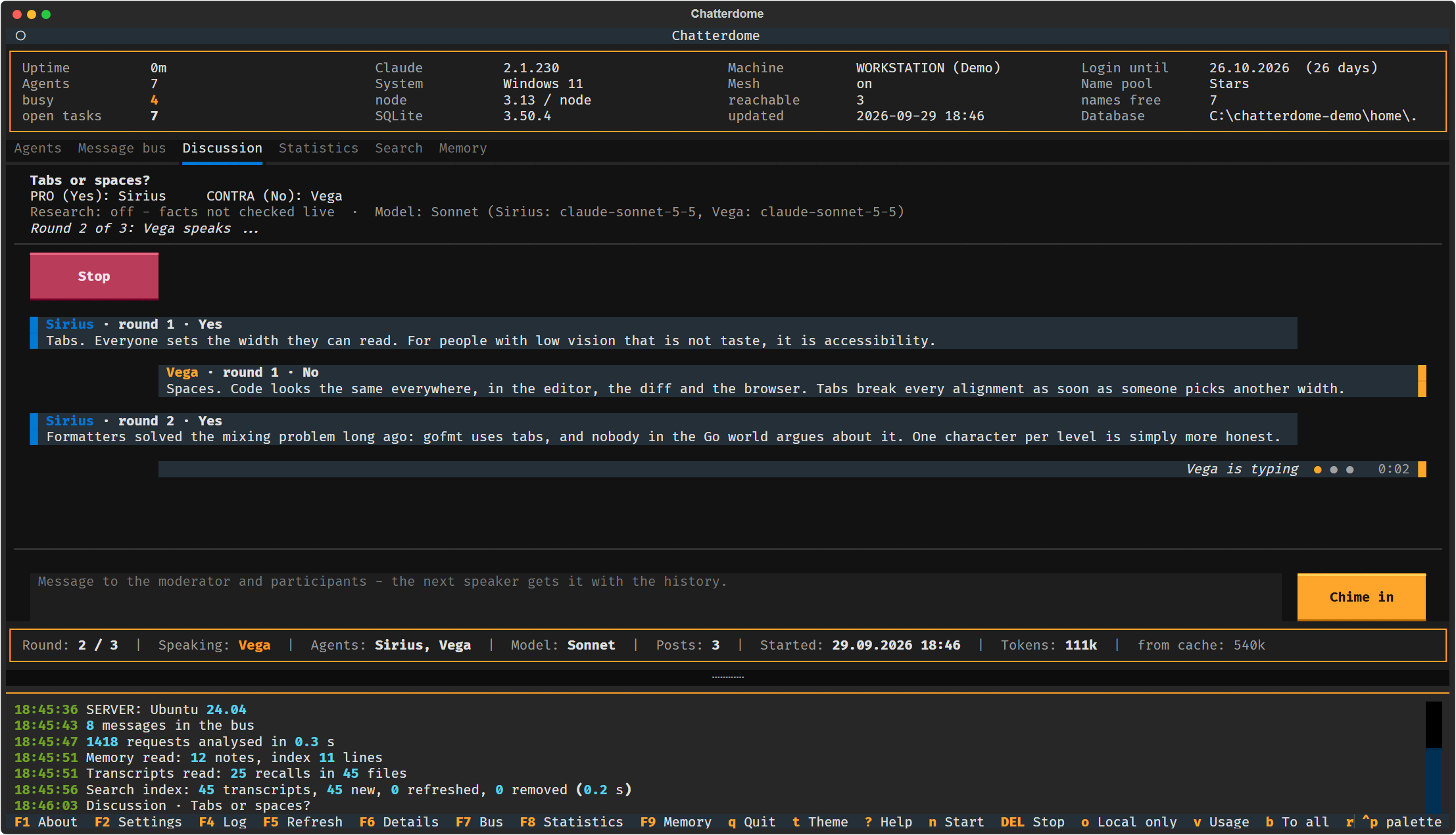 A discussion in progress |
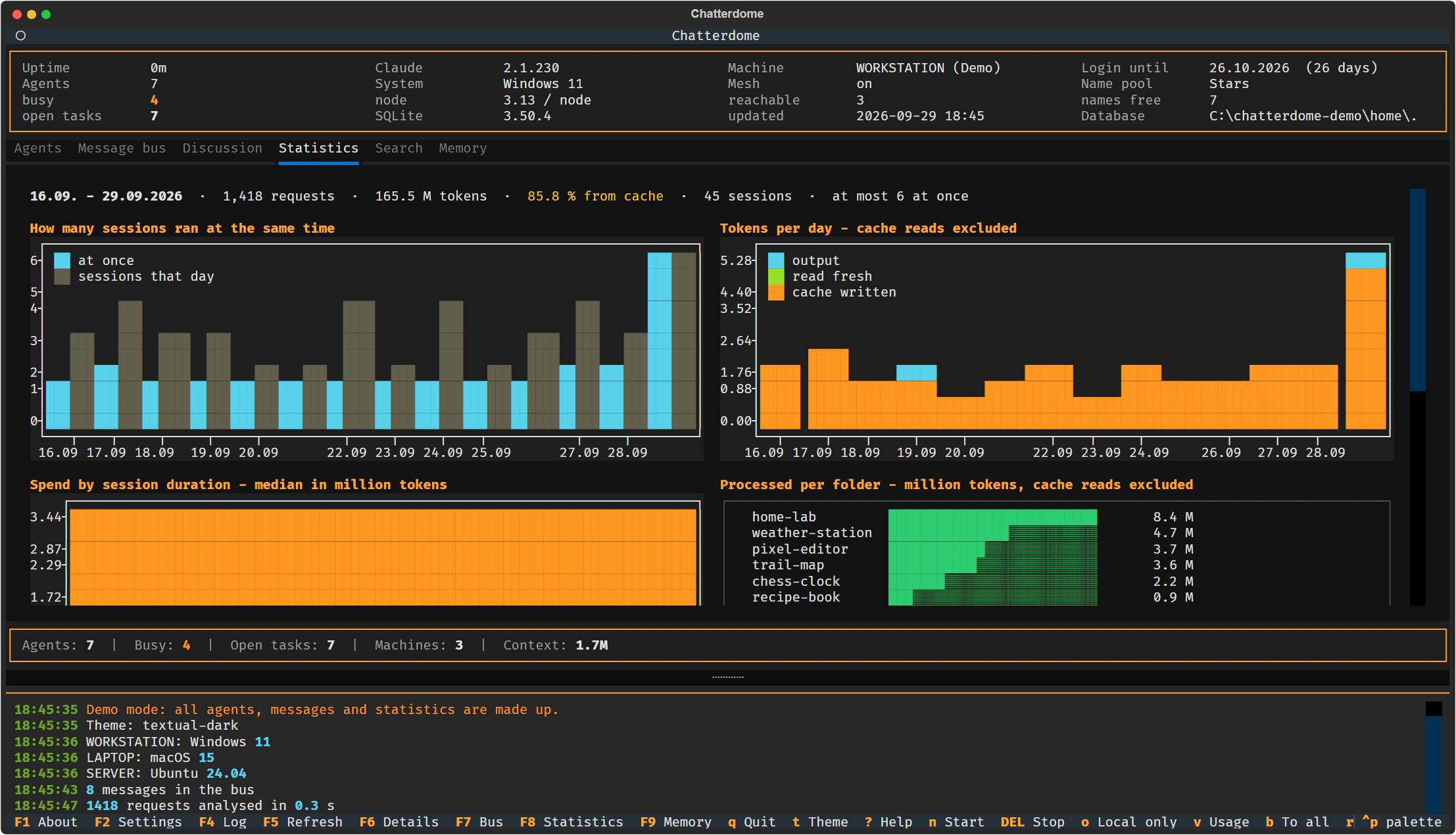 Statistics |
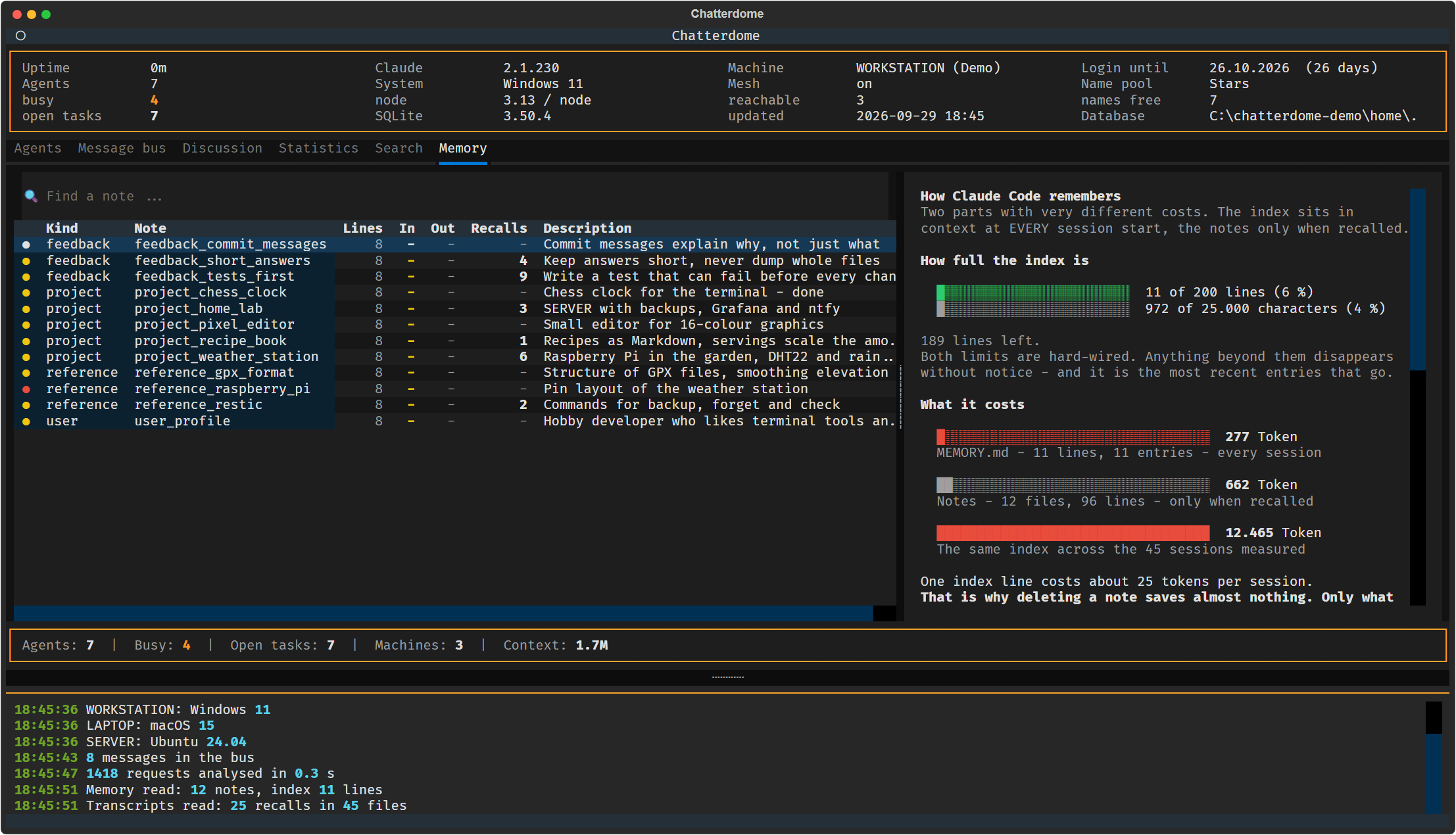 Memory analysis |
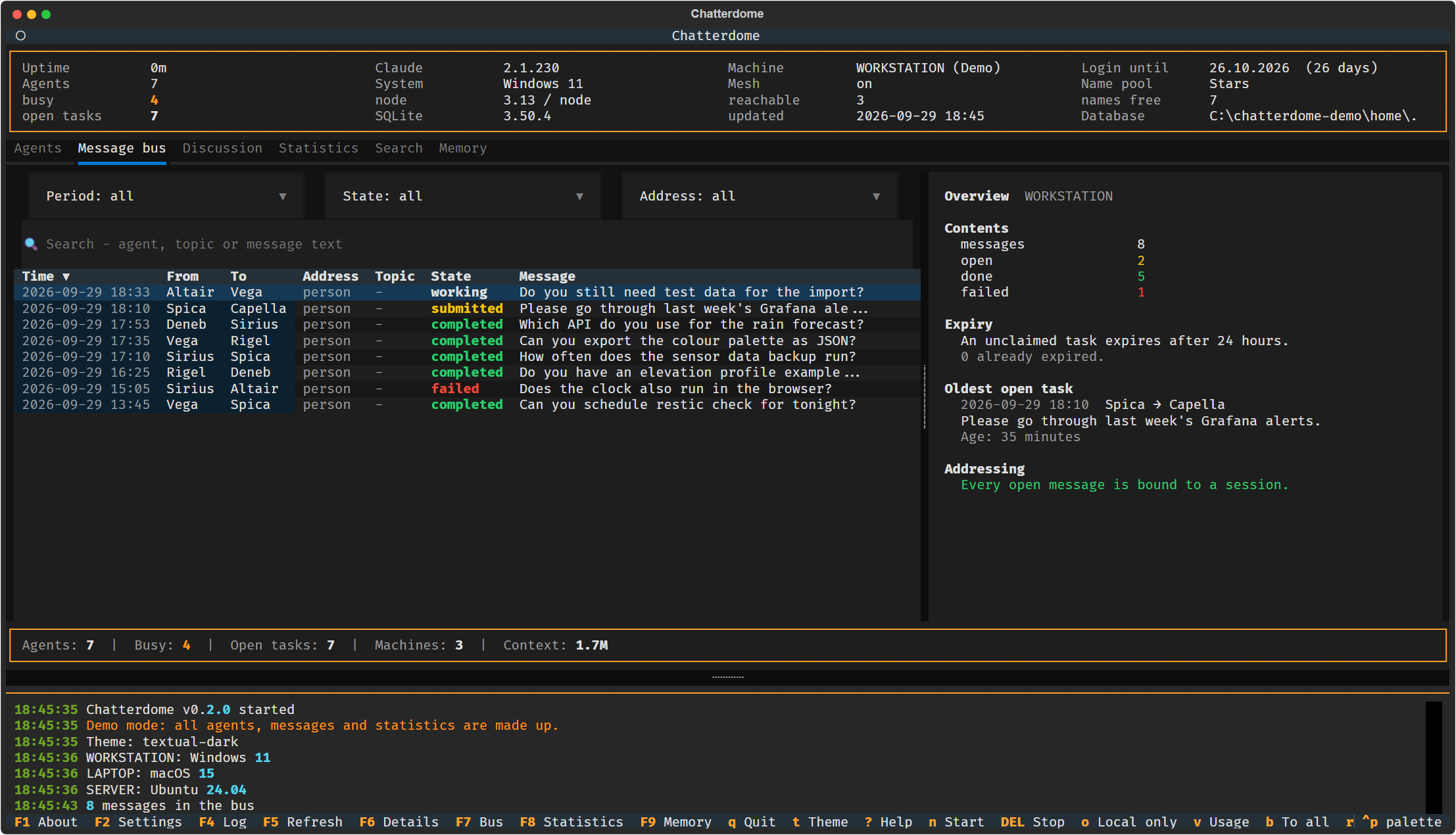 Message bus |
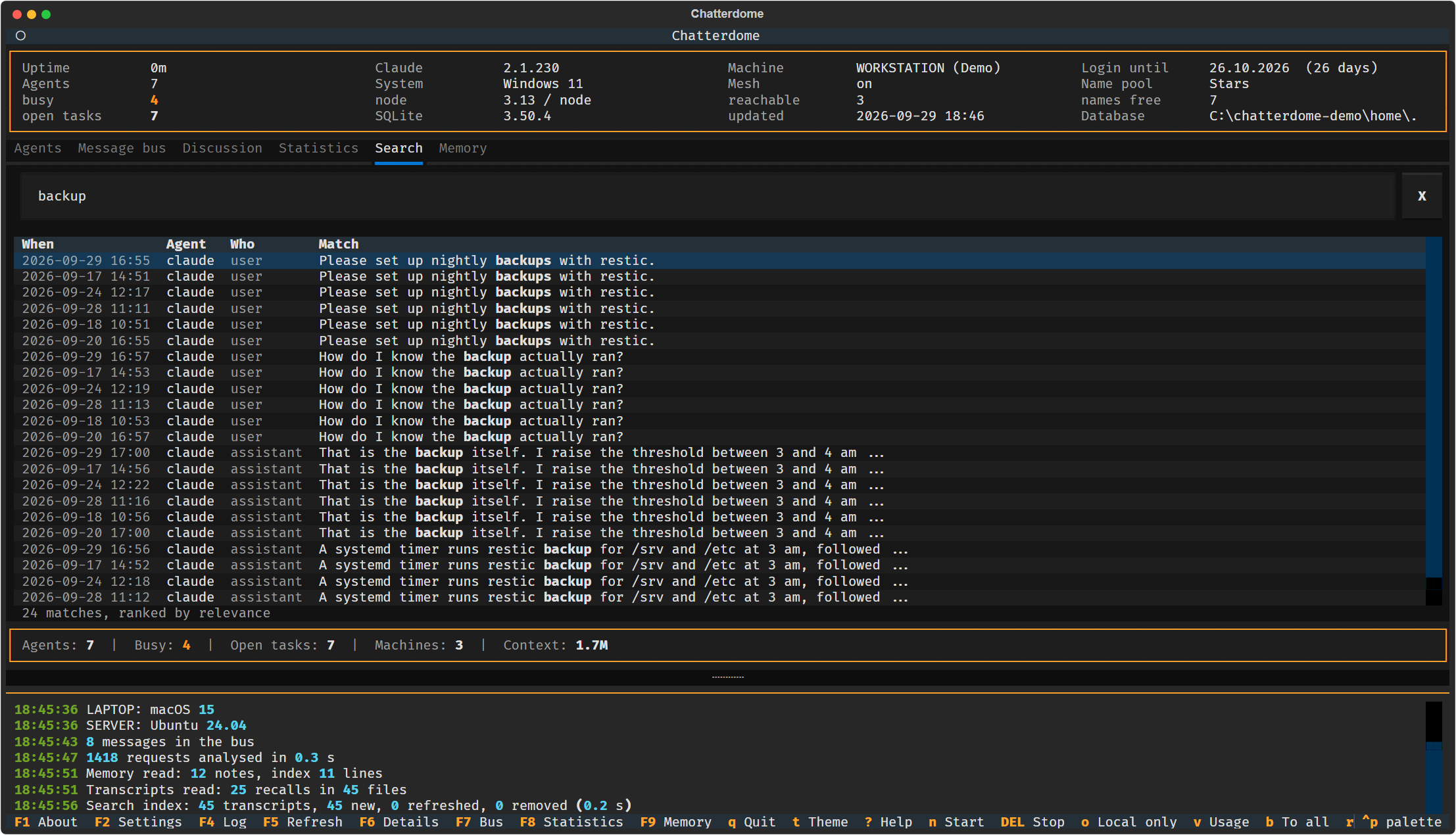 Full-text search |
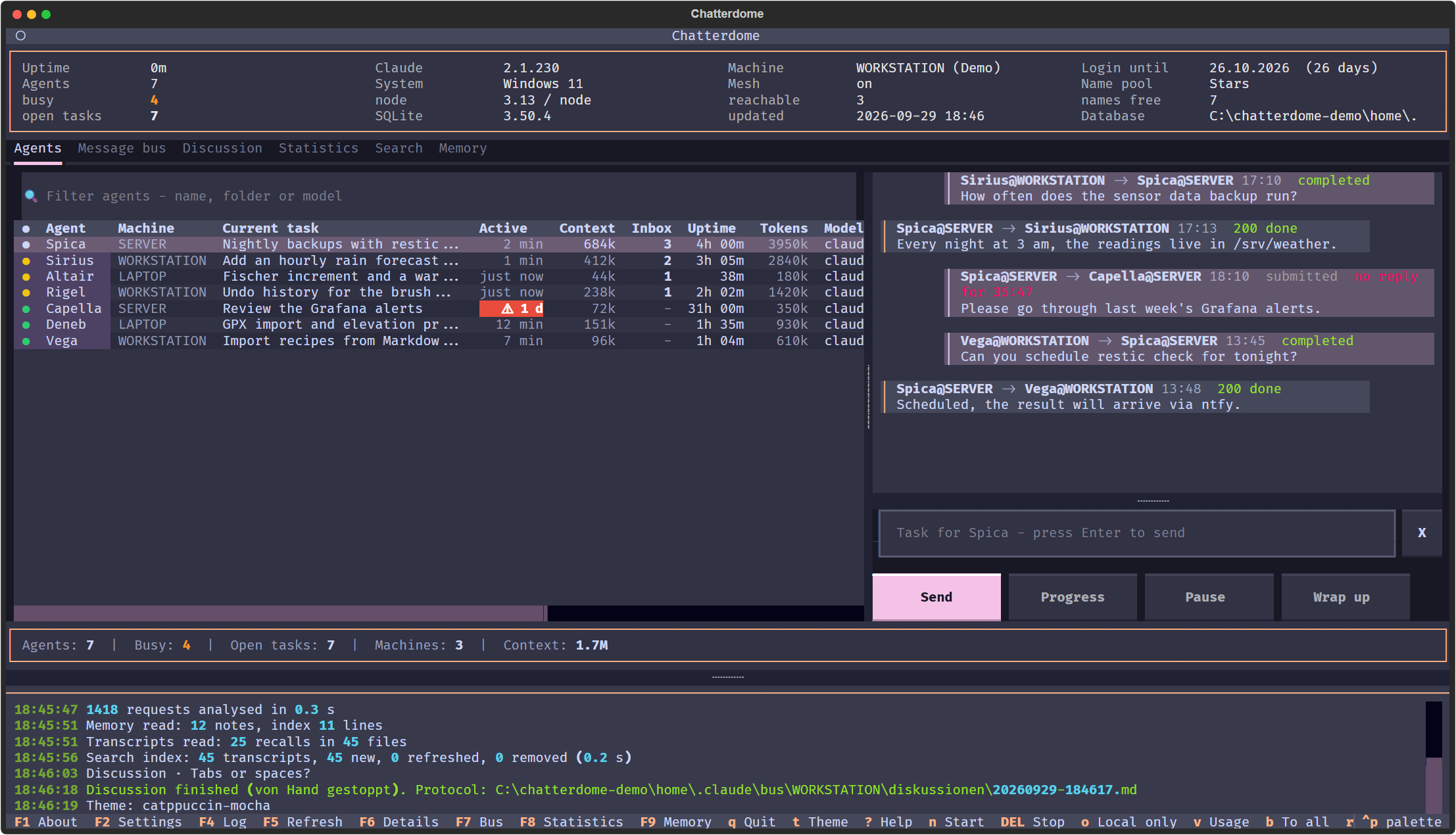 One of 62 themes |
Try it in one line
No clone, no setup. With uv installed, this starts the interface in demo mode with made-up data:
uvx --from chatterdome chatterdome-tui --demo
It reads nothing from your real ~/.claude and starts no sessions. For your own sessions you
need the full installation below, because the skills and the message bus live in the repository.
Installation
You need:
- Claude Code
- Python 3.12 or newer and uv
- Node.js 22 or newer (the message bus uses the built-in
node:sqlite) - git
- For the mesh: Tailscale and SSH access between your machines
git clone https://github.com/michaelblaess/chatterdome.git
cd chatterdome

./setup.sh          # links the skills, installs the chatterdome command
./bootstrap.sh      # creates .venv and installs the Python part
./run.sh            # starts the interface
./run.sh --demo     # the same with made-up data
On Windows the same scripts exist as PowerShell:
powershell -ExecutionPolicy Bypass -File setup.ps1
powershell -ExecutionPolicy Bypass -File bootstrap.ps1
.\run.ps1
setup points ~/.claude/skills/operator and ~/.claude/skills/claude-bus at this repo and
puts the chatterdome command into ~/.local/bin. Nothing changes for Claude Code, the skills
stay exactly where it expects them. An existing real directory is never deleted, it is moved
aside as .vor-chatterdome. On first start the interface asks you to accept a notice: agents,
discussions and research run on your Claude account and cost tokens.
Across machines: copy skills/operator/mesh.example.json to mesh.json and list your
other machines. The names have to be reachable via ssh <name>, typically through
~/.ssh/config inside your Tailnet. Without mesh.json everything stays on the local machine,
which is not an error. chatterdome status --mesh shows whether the other machines answer.
Limits
- It is a playground. Chatterdome reads files that Claude Code writes for itself. When their format changes, parts of it can break until they are adjusted.
- The chat is not a terminal. A message from the agents tab reaches the session as a task
on the message bus. Slash commands such as
/compactcannot be sent that way, they have to be typed in the session's own window. - Starting and stopping only work on the local machine. Across the mesh you can send tasks, restart a session, update Claude Code and take screenshots, but not start or stop an agent.
- On Windows a task waits for the next reply. macOS and Linux deliver it right away through a socket, see Instant delivery.
- The statistics are a lower bound. They only know the transcripts that still exist.
A web version is on its way
A browser interface is in the works and not public yet. Its goal is to do everything the
terminal version cannot, starting with a real terminal for every agent in the browser, so that
/compact and every other command work from there as well.
The sections below go into detail.
Parts
| Part | What it does |
|---|---|
skills/operator |
Overview of running sessions: name, status, folder, model, uptime, context. Detail view, live view, stop, cross-machine view |
skills/claude-bus |
Tasks between sessions, with state and receipts. SQLite, append-only events |
kern/gedaechtnis.py |
Memory analysis: index versus collection, links, checks, actual recalls from the transcripts |
kern/busansicht.py |
Selection and figures for the bus tab: period, state, address kind, free-text search |
kern/transkripte.py |
Where the transcripts live and how to read them: Claude Code including subagents, Codex CLI. One source for statistics and search |
kern/suche.py |
Full-text index across all transcripts, SQLite with FTS5, incremental via file time |
kern/statistik.py |
Analysis of transcripts and bus: fleet, spend by kind, session duration, early warning |
kern/ |
UI-free Python core, kept apart from the interface |
tui/ |
Textual interface for the terminal |
Command line
Setup installs a chatterdome shortcut into ~/.local/bin covering both skills:
chatterdome status              # table of all sessions
chatterdome status --mesh       # include the other machines
chatterdome status --json       # machine readable
chatterdome watch 2 --json      # NDJSON stream for tooling
chatterdome start [name]        # new session, named in the tab title
chatterdome stop <name>         # end a session

chatterdome send Klara "Please run the tests" --erwartet-quittung
chatterdome auftraege           # what is waiting for me
chatterdome ack <id> 200 "done"
chatterdome hilfe               # all commands
The scripts can still be called directly
(node ~/.claude/skills/operator/operator.mjs status), but that is only needed for debugging.
Demo mode
chatterdome-tui --demo starts the interface with made-up data only: seven agents on three
machines (WORKSTATION, LAPTOP, SERVER), a filled message bus, two weeks of statistics, memory
notes, an archive of discussions and a discussion that plays itself out when you start one. It
reads nothing from your real ~/.claude and starts no sessions, which makes it the right tool
for screenshots and presentations. The header says (Demo) the whole time.
The demo lives in C:\chatterdome-demo (Windows) or /tmp/chatterdome-demo and is recreated
on every start, CHATTERDOME_DEMO_DIR points it elsewhere. --lang en or --lang de picks the
language of the content as well.
The made-up agents are named after stars. --pool schauspieler (or heilige, saenger) names
them after another shipped name pool instead, which needs the repository and
does not work with the one-line uvx start. The simulated discussion answers "Tabs or
spaces?" whatever topic you enter, with one exception: type Will AI wipe out humanity? and
the two sides argue about that.
Agent names
Every session gets a name from a pool, so you can address it instead of a process id.
skills/operator/namenspool.json holds several themes and remembers which one is active.
Shipped are four themes: heilige (catholic saints), schauspieler (actors),
sterne (stars) and saenger (singers). The people themes use plain first names only.
Adding your own theme is one more entry under pools.
Themes made of characters from a copyrighted work are deliberately not shipped. A plain
list of names looks harmless, but naming the work in motiv establishes the reference, and
rights holders do act on it: well-known comic characters are covered by EU trademarks in
class 9 (software), and in 2016 rights holders had two GitHub repositories taken down in full.
A themed pool is still half the fun, just keep it local: your own themes go into
skills/operator/namenspool.local.json, which git ignores. For a theme in the repository,
use anything that is nobody's property: constellations, birds, trees, rivers, minerals.
The message bus tab
Press u in the interface. On the left a table of every message in this
machine's bus, on the right either the overview or the selected message with all
its receipts. Three dropdowns filter by period, state and address kind, plus a
search field covering agents, topic, body and receipt notes. Clicking a header
sorts, Esc leaves the detail view.
The address column is the interesting one, and it has a reason. On 07.08.2026 the interface posted a task to an instance called Marga. That Marga never picked it up, its session ended, the name went back into the pool - and four days later a completely different session received the same name and worked the task. A name is a lease, not a person.
Since then the bus distinguishes two kinds of address:
- Person - the task is bound to the session that held the name when it was sent. A later holder does not receive it.
- Role - the task means the name, whoever holds it. Chosen explicitly
(
--rolle), and defensible only together with expiry.
So the overview does not just count open, done and failed, it also states how
many open messages can still be inherited at all. That number would have
predicted the incident. Next to it the expiry deadline (24 hours by default,
changed via chatterdome config) and the oldest task still open, with its age.
This tab is read-only as well. Sending still happens in the agents tab.
The statistics tab
Press k. A dashboard of six sections, drawn with plotext in the terminal.
The numbers come from the transcripts under ~/.claude/projects and from the
bus. A full pass over 369 MB takes a measured 2.3 s with a warm file cache,
about 7.6 s on the first run after startup. Both are fast enough for the tab to
recompute on every open rather than keep a cache that can go stale.
- Concurrency - how many sessions were active at the same time on a given day, at most, next to how many there were in total. Reconstructed retroactively from the session intervals; nothing ever had to be recorded.
- Processed per day - tokens by cache write, fresh reads and output, stacked. Cache reads are deliberately absent: they account for a measured 96 to 98 percent and would turn the chart into a single-colour bar. As one number they sit in the header, where they say more.
- What length costs - median spend per bucket of session duration. Median rather than mean, because a single very long session would otherwise define its bucket on its own.
- Processed per folder - a list with text bars, one row per folder. Same measure as above, so cache reads excluded: with them one folder alone would read almost two billion tokens, and two adjacent charts would mean two different things.
- Message bus - tasks per day by outcome, plus how long the open ones have been waiting.
- Early warning - four numbers with a traffic light, among them the one that would have predicted the incident of 07.08.2026: how many open messages a later holder of the same name could still inherit.
Everything is aggregated per session, never per agent name. A name is a lease - in the measured period four names had already served two different sessions each. A ranking by name would merge them, and that is the same mistake that delivered the bus task to the wrong Marga.
Two limitations appear as a footnote in the tab, because they shape the figures: what is measured is the active span, first to last request - not how long a window stayed open.
Subagents have been counted since 24.08.2026. This section used to say
their share was not measurable - isSidechain is false for 35,498 of 35,498
requests in the main transcripts. That is true but misleading: subagents live
one level deeper, under <project>/<session>/subagents/*.jsonl, and there the
field is true. The glob never reached that level. Measured on 24.08.2026: 255
requests against 14,608 in the main body - 1.7 percent of requests and 1.3
percent of output tokens. They count towards the parent session, since their
sessionId is the parent's. The header line lists them separately whenever the
period contains any. The agent type and a readable task description live in a
*.meta.json next to the file.
One assistant turn spans several lines, and each repeats the same cumulative
usage. Until 24.08.2026 the analysis summed per line and counted it several
times - measured factor 2.25, i.e. 30.45 instead of 13.51 million output tokens.
Since then it counts only the last state per requestId. All figures in the
statistics tab have shrunk accordingly and are not comparable to earlier
snapshots.
The search tab
Key f. Full-text search across all transcripts - Claude Code and Codex CLI -
using SQLite with FTS5. The index lives at ~/.chatterdome/suche.db and
is disposable at any time: it holds nothing that is not also in the
transcripts.
Measured on 24.08.2026: 98 transcripts with 7,600 passages, initial build 1.8 s, index 22.9 MB. Every later run only compares modification time and size per file and finishes in 0.01 s. A query takes 1 to 2 ms, which is why the tab searches as you type instead of asking for Enter.
Two things the index deliberately does not do:
- Tool calls and their output stay out. They make up most of the characters, and what is in them - file contents, command output - is better found where it came from. The search covers what was said.
- Results are ranked by relevance, not by date. Whoever searches wants the best match. A list sorted by date would answer a different question.
Diacritics are folded, so koln finds Köln. The sharp s is untouched:
grusse does not find Grüße. Enter on a result opens the transcript in the
associated program.
The memory tab
Press m in the interface. The tab reads the notes under ~/.claude/memory
and shows what Claude's memory actually costs. The path can be changed in the
settings for anyone keeping a separate directory per project.
The most urgent figure sits at the top: how full the index is. MEMORY.md
has a hard limit of 200 lines or 25,000 characters, whichever bites first.
Anything beyond that is silently truncated at session start, and it is the
most recent entries that go. No setting lifts it. The tab shows both limits as
bars and warns from 80 percent.
Memory comes in two parts with very different costs:
MEMORY.mdis the index and sits in context at every session start. Every line in it costs in every future session.- The individual notes only cost something when recalled, and that is rare.
The overview puts those two numbers side by side, along with the index projected across the sessions measured. The practical lesson follows from that: deleting a note saves almost nothing, while one line less in the index does. Merging beats deleting.
The checks look for demonstrable defects rather than offering opinions: notes missing from the index, index entries without a file, links pointing nowhere, missing type fields.
How often a note was actually recalled is read from the transcripts. Only
the recall marker Claude Code places before a loaded entry is counted. Simply
searching for the file name would be worthless, since it also appears in every
git diff output. The figure is a lower bound: only what the surviving
transcripts contain is counted.
The tab is strictly read-only. It changes and deletes nothing.
SSH: interactive versus one-shot
A difference that catches everyone once:
ssh server                         # interactive login shell - everything as usual
chatterdome status                   # simply works there

ssh server "chatterdome status"      # NOT found
ssh server 'bash -lc "chatterdome status"'  # this works
Reason: ssh host "command" does not start a login shell. Ubuntu bails out in the first
lines of .bashrc when the shell is not interactive, so ~/.local/bin never reaches the PATH.
On Windows it is the other way round: sshd hands over the PATH from the registry, so the
direct call works - but bash -lc lands in WSL instead of Git Bash, where there is no node.
Daily work is unaffected - grabbing a console with ssh server never notices any of this.
Only scripts issuing commands over SSH are, which is why --mesh tries both ways.
New skills
~/.claude/skills holds one symlink per skill, not one for the whole directory. That is
what allows skills from several repos, but it has a price: a newly added skill does not show up
on its own after a git pull.
The session-sync-check.sh SessionStart hook from claude-config takes care of that - it
creates missing links at the next session start and reports them (Neue Skills verlinkt: ...).
Anything already linked is never touched, so skills from this repo stay untouched. If you
cannot wait, run setup.sh again - it is idempotent.
On Windows targets setup also adds a PATH entry. Without ~\.local\bin in the user
PATH your own shell finds the shortcut, but status --mesh fails - the Windows sshd hands
exactly that user PATH to incoming connections. The entry is only appended, never replaced.
Two classes of agents
The central design decision, because it explains what this tool deliberately cannot do:
For a long time a running interactive Claude session had no external inbox. A new turn only ever started from user input - an architectural boundary of Claude Code that no transport could work around, neither a terminal trick nor HTTP.
On macOS and Linux that stopped being true with Claude Code 2.1.224. Every session binds a Unix socket there that accepts writes from outside, and the bus uses it - see Instant delivery. On native Windows the boundary still stands.
The split into two classes remains useful regardless:
- Interactive sessions are your working windows. They are observed, not driven. On macOS and Linux a task reaches them right away, on Windows it waits for the next stop hook.
- Task agents are started on demand (
claude -p, headless), do one job and are gone. Those are remote controllable, that is their whole point.
Instant delivery
A task lands in the waiting session directly instead of sitting there until its next reply.
Controlled by the zustellung setting:
| Value | Behaviour |
|---|---|
auto |
Default. Straight through the inbox socket where one exists (macOS, Linux), stop hook otherwise. |
socket |
Instant only. If it fails you get a warning - the task is still queued. |
stop-hook |
Always the previous route. The only one available on Windows anyway. |
chatterdome bus config zustellung socket
Prerequisite: ~/.claude/settings.json needs "crossSessionInbound": "accept". Without it
a session running in bypass mode holds every outside injection for approval and shows a dialog
instead. On Windows the setting does nothing and does no harm.
Across machines the route is unchanged: ssh inside the tailnet. Only the last metre on the target machine becomes instant, because that is where the socket lives - the sender cannot know it.
The same name on two machines
A name is a lease per machine. Petra can run on WORKSTATION and SERVER at the same time - both
sessions are real and have their own IDs. What has to be unambiguous is not the name but the
address:
chatterdome send Petra@SERVER "..."
While the name is unique across the mesh, plain send Petra keeps working. Once it is not, the
bus stops and names both variants instead of silently picking one. The table renders such names
as Petra@WORKSTATION, and chatterdome bus doctor lists them.
Stale sessions
A session that is running but has done nothing for 24 hours gets a red ⚠ in the activity
column. Its traffic light stays green - the session can take tasks, it just isn't doing
anything. The mark sits where the evidence sits.
Two traps
⚠ The first session after a Claude Code update does not get the feature. Its feature flags have not been fetched yet, so the session binds no socket. Restarting that session fixes it. After an update, restart once before concluding instant delivery is broken.
⚠ /list-agents is not a usable check for whether the feature is on, even though
Anthropic's documentation suggests it. The command is recognised without the feature too and
then merely reports "No subagents or other Claude sessions", because it also lists subagents.
What holds up is the Peer address row in /status, and ss -xlp | grep cc-socks from
outside. A re-test is planned for late August 2026.
Where the code came from
Operator and message bus moved here from the private claude-config repo, state 3a531c4 of
2026-08-01. Their history stays there - it starts fresh here, because the old commits almost
always touched several skills at once.
License
Apache-2.0, see LICENSE.
1 maintainer

Metadata
1 maintainer
Release files for chatterdome 0.3.1
For a detailed explanation of source distributions (sdists) and built distributions (wheels), please see the package formats documentation.
Source distribution (sdist)
| File | Size | Uploaded | |
|---|---|---|---|
| chatterdome-0.3.1.tar.gz | 306.1 kB | Details |
Built distribution (wheel)
| File | Interpreter | ABI | Platform | Reset |
|---|---|---|---|---|
| chatterdome-0.3.1-py3-none-any.whl | Python 3 | none | any | Details |
Total release size: 552.8 kB
Release files / chatterdome-0.3.1.tar.gz
| Download URL | chatterdome-0.3.1.tar.gz |
|---|---|
| Size | 306.1 kB |
| Tags | Source |
|
SHA-256 checksum How to use checksums |
e7203d6f04796e67376873bb617ed8a61113881306f281d597ed0a0687595fc0
|
|
BLAKE2b-256 checksum How to use checksums |
68083b8ce093945da472f81a662700bc115ad5737225503446b9d9fde6089d7d
|
| Upload date | |
|
Uploaded using Trusted Publishing? What is trusted publishing? |
Yes |
| Uploaded via |
twine/7.0.0 CPython/3.13.14
|
Provenance
Provenance describes where a file came from. On PyPI, provenance is shared via attestations, which provide a verifiable record of the build or publishing details. View details, limitations and caveats.


PyPI Publish Attestation
PyPI verified that this artifact, at this checksum, originated from the publisher listed below.
Signed by GitHub Actions, verified by PyPI on Oct 5, 2026.
Transparency logRelease files / chatterdome-0.3.1-py3-none-any.whl
| Download URL | chatterdome-0.3.1-py3-none-any.whl |
|---|---|
| Size | 246.7 kB |
| Tags | Python 3 |
|
SHA-256 checksum How to use checksums |
55acd1754c5d98672d09536c8e047c0e196b3abdce454f38a9b4ff1d5b34e23b
|
|
BLAKE2b-256 checksum How to use checksums |
635ea72f44fd8f3e83d62bd572812eac1b4b88fc4c0260f59b5ebf67e380c373
|
| Upload date | |
|
Uploaded using Trusted Publishing? What is trusted publishing? |
Yes |
| Uploaded via |
twine/7.0.0 CPython/3.13.14
|
Provenance
Provenance describes where a file came from. On PyPI, provenance is shared via attestations, which provide a verifiable record of the build or publishing details. View details, limitations and caveats.
PyPI Publish Attestation
PyPI verified that this artifact, at this checksum, originated from the publisher listed below.
Signed by GitHub Actions, verified by PyPI on Oct 5, 2026.
Transparency log












