
Terminal-based AI coding agent with typer+rich
Verified details
These details have been verified by PyPIProject links
GitHub Statistics
Maintainers

Project description
ChCode
 ███████╗  ██╗   ██╗   ███████╗   ██████╗   █████╗     ████████╗
██╔═════╝  ██║   ██║  ██╔═════╝  ██╔═══██╗  ██╔══██╗   ██╔═════╝
██║        ████████║  ██║        ██║   ██║  ██║   ██╗  ████████╗
██║        ██╔═══██║  ██║        ██║   ██║  ██║  ██╔╝  ██╔═════╝
████████╗  ██║   ██║  ████████╗  ╚██████╔╝  █████╔═╝   ████████╗
 ╚══════╝  ╚═╝   ╚═╝   ╚══════╝   ╚═════╝   ╚════╝      ╚══════╝
Terminal-based AI coding agent, built with LangChain + Typer + Rich.
Why "ChCode"? The original prototype was a tkinter + LangChain app called chat-agent (chagent). When it evolved into a CLI tool, the name became ChCode — chat-agent, meet code.
📸 chagent — the original tkinter prototype
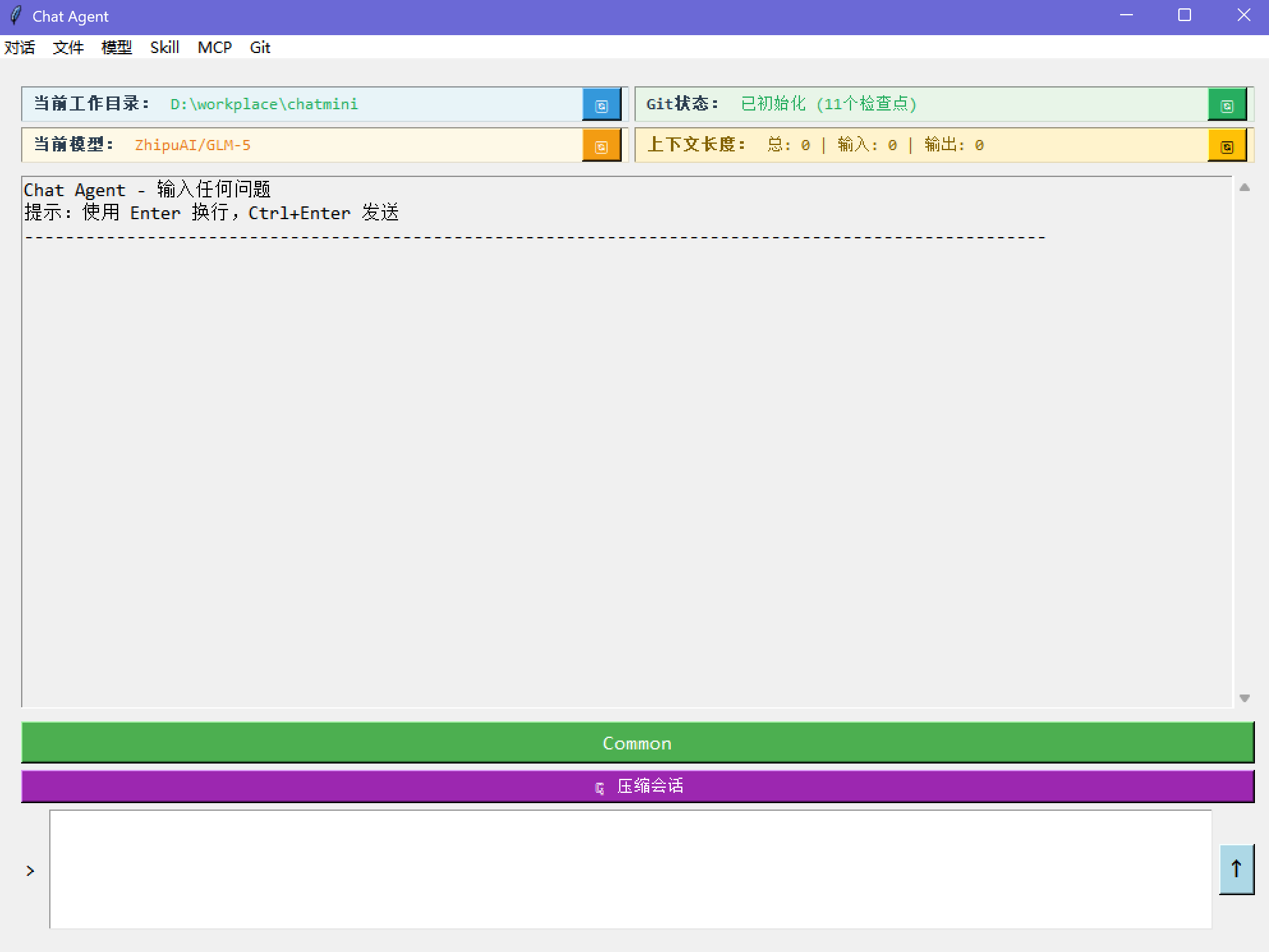
6000+ lines of Python, 14 built-in tools, full session persistence, git-aware workflow.


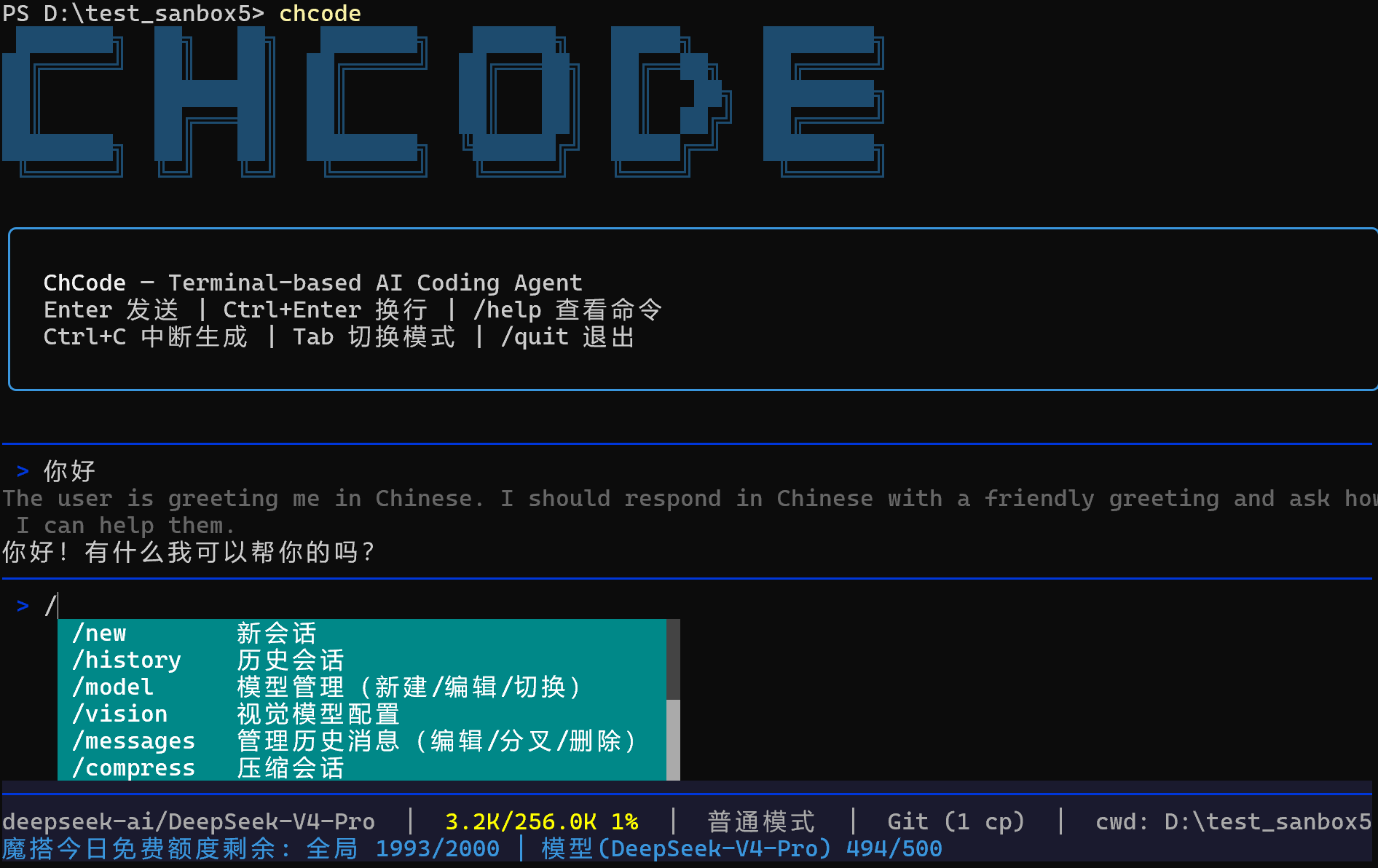
Features
Model Management
- Compatible with all OpenAI-compatible APIs (OpenAI, DeepSeek, Qwen, GLM, Claude via proxy, etc.)
- Built-in quick setup for ModelScope, LongCat, and major providers
- ModelScope: 2000 free model calls/day
- LongCat: 50M+ free tokens/day minimum
- First-run wizard with env auto-detection (scans
OPENAI_API_KEY,DEEPSEEK_API_KEY,ZHIPU_API_KEY,ModelScopeToken, etc.) - Native reasoning/thinking model support — thinking tokens displayed in real time
- Create / edit / switch models at runtime
- Per-model hyperparameter tuning (temperature, top_p, top_k, max_completion_tokens, stop_sequences, etc.)
- Automatic retry with exponential backoff (3/10/30/60s) and fallback model switching on persistent failure
Vision & Multimodal
- Dedicated vision model configuration via
/visioncommand (independent from main model) - Image analysis with automatic media encoding and base64 embedding
- Video support — send videos directly to vision models for analysis (MP4, MOV, AVI, MKV, WebM)
- Automatic image resizing for oversized inputs
- Supported image formats: PNG, JPG, JPEG, GIF, BMP, WebP, TIFF
Session & History
- Persistent sessions with SQLite-backed checkpoints (LangGraph)
- Session list, switch, rename, delete
- Context compression — auto-summarize when approaching token limit
- Real-time context usage display in status bar
Git Integration
- Working directory rolls back with message edits
- Create branches from any message (fork)
- Edit / fork / delete history messages via
/messages - Checkpoint counter in status bar
Human-in-the-Loop
- Common mode — every tool call requires approval, with diff preview for edits
- YOLO mode — auto-approve everything
- Toggle with
Tabkey or/modecommand
Work Environment Isolation
- Per-project
.chat/directory for sessions, skills, agents - Global
~/.chat/for shared skills and settings /workdirto switch project root
Cross-Platform
- Windows — defaults to Git Bash, falls back to PowerShell
- Linux / Mac — native bash/zsh
- Persistent shell sessions with automatic CWD tracking
Rich Terminal UI
- Real-time status bar — context usage %, git checkpoint count, ModelScope API quota
- Streaming output with token-by-token rendering
- Slash command auto-completion
- Color-coded tool approval UI with inline diff preview for file edits
Observability
- LangSmith tracing — toggle on/off via
/langsmithcommand - Auto-disable tracing on 429 rate limit with user notification
Sub-Agent System
- Three built-in agent types: Explore (codebase search, read-only), Plan (architecture design), General (full-capability coding)
- Parallel execution — launch multiple agents concurrently for independent tasks
- Sub-agents run with isolated context, protecting the main conversation from context pollution
- Custom agents — define your own agent types in
.chat/agents/with dedicated tools and instructions
Skill System
- Install / delete / manage skills via
/skill - Skills are injected into system prompt via LangChain middleware
- Supports project-level and global skill directories
ModelScope Rate Limit
- Real-time API quota display in status bar (daily limit remaining, per-model remaining)
- Auto-enabled when using ModelScope models
Built-in Tools (14)
| Tool | Description |
|---|---|
read |
Read file content with line numbers and offset |
write |
Create or overwrite files |
edit |
Surgical string replacement in existing files |
glob |
Find files by name pattern |
grep |
Search file contents with regex |
list_dir |
Browse directory structure |
bash |
Execute shell commands (Git Bash / PowerShell / bash) |
load_skill |
Dynamically load skill instructions via middleware |
web_fetch |
Fetch and convert URL content to markdown |
web_search |
Web search via Tavily |
ask_user |
Single-select, multi-select, batch questions for user interaction |
agent |
Launch sub-agents (explore, plan, general-purpose, custom), supports parallel execution |
todo_write |
Structured task tracking for complex multi-step work |
vision |
Analyze images and videos via ModelScope vision models |
Quick Start
Install
# Option 1: Install with pip
pip install chcode

# Option 2: Install with uv (recommended)
uv tool install chcode

# Option 3: Install with pipx
pipx install chcode
Run
# Start interactive session
chcode

# Start in YOLO mode
chcode --yolo

# Model management
chcode config new    # add new model
chcode config edit   # edit current model
chcode config switch # switch model
First Run
On first launch, ChCode will:
- Scan environment variables for known API keys
- Guide you through model configuration
- Optionally configure Tavily for web search
Commands
| Command | Description |
|---|---|
/new |
Start new session |
/history |
Browse and switch sessions |
/model |
Model management (new / edit / switch) |
/vision |
Visual model configuration |
/messages |
Edit / fork / delete history messages |
/compress |
Compress current session |
/skill |
Manage skills |
/search |
Configure Tavily API key |
/workdir |
Switch working directory |
/mode |
Toggle Common / YOLO mode |
/git |
Show git status |
/langsmith |
Toggle LangSmith tracing |
/tools |
List built-in tools |
/quit |
Exit |
Keybindings
| Key | Action |
|---|---|
Enter |
Send message |
Ctrl+Enter |
New line |
Tab |
Toggle Common/YOLO mode (when input empty) |
Ctrl+C |
Interrupt generation |
Why No MCP?
ChCode intentionally does not integrate MCP (Model Context Protocol). The combination of Skills + CLI tools covers 95%+ of real-world coding agent scenarios. Skills provide structured, reusable instructions injected via middleware — simpler, faster, and more portable than MCP servers.
Architecture
chcode/
├── cli.py                  # Typer CLI entry
├── chat.py                 # REPL main loop, slash commands, HITL
├── agent_setup.py          # Agent construction, middleware, model retry with fallback
├── config.py               # Model config, Tavily, env detection
├── display.py              # Rich rendering, streaming, status bar
├── prompts.py              # Interactive prompts (select/confirm/text)
├── session.py              # Session manager (SQLite)
├── skill_manager.py        # Skill install/delete UI
├── agents/
│   ├── definitions.py      # Agent types (explore, plan, general)
│   ├── loader.py           # Load custom agents from .chat/agents/
│   └── runner.py           # Sub-agent execution with middleware
└── utils/
    ├── tools.py            # 14 built-in tools
    ├── shell/              # Shell abstraction (Bash/PowerShell providers)
    ├── enhanced_chat_openai.py  # Extended ChatOpenAI with reasoning support
    ├── git_manager.py      # Git checkpoint management
    ├── skill_loader.py     # Skill discovery and loading
    ├── modelscope_ratelimit.py  # ModelScope API rate limit monitor
    └── tool_result_pipeline.py  # Output truncation and budget enforcement
License
MIT
Project details
Verified details
These details have been verified by PyPIProject links
GitHub Statistics
Maintainers
Release history Release notifications | RSS feed


Download files
Download the file for your platform. If you're not sure which to choose, learn more about installing packages.
Source Distribution
Built Distribution
Filter files by name, interpreter, ABI, and platform.
If you're not sure about the file name format, learn more about wheel file names.
Copy a direct link to the current filters
File details
Details for the file chcode-0.1.0.tar.gz.
File metadata
- Download URL: chcode-0.1.0.tar.gz
- Upload date:
- Size: 9.0 MB
- Tags: Source
- Uploaded using Trusted Publishing? Yes
- Uploaded via: twine/6.1.0 CPython/3.13.12
File hashes
| Algorithm | Hash digest | |
|---|---|---|
| SHA256 |
5090b803be878ebed963e7628e557342052a146396d51c5c2e7e2eb86a0a9d8c
|
|
| MD5 |
59be96955d4c28dce70d14d602028c27
|
|
| BLAKE2b-256 |
1663357fac4fc43d3665411040401c7337463721d8ebee93c00c4574abf7f828
|
Provenance
The following attestation bundles were made for chcode-0.1.0.tar.gz:
Publisher:
publish.yml on ScarletMercy/chcode
-
Statement:
-
Statement type:
https://in-toto.io/Statement/v1 -
Predicate type:
https://docs.pypi.org/attestations/publish/v1 -
Subject name:
chcode-0.1.0.tar.gz -
Subject digest:
5090b803be878ebed963e7628e557342052a146396d51c5c2e7e2eb86a0a9d8c - Sigstore transparency entry: 1400057242
- Sigstore integration time:
-
Permalink:
ScarletMercy/chcode@36a8fe641d9152f64abc2281415b05c7c238ab52 -
Branch / Tag:
refs/heads/main - Owner: https://github.com/ScarletMercy
-
Access:
public
-
Token Issuer:
https://token.actions.githubusercontent.com -
Runner Environment:
github-hosted -
Publication workflow:
publish.yml@36a8fe641d9152f64abc2281415b05c7c238ab52 -
Trigger Event:
workflow_dispatch
-
Statement type:
File details
Details for the file chcode-0.1.0-py3-none-any.whl.
File metadata
- Download URL: chcode-0.1.0-py3-none-any.whl
- Upload date:
- Size: 94.6 kB
- Tags: Python 3
- Uploaded using Trusted Publishing? Yes
- Uploaded via: twine/6.1.0 CPython/3.13.12
File hashes
| Algorithm | Hash digest | |
|---|---|---|
| SHA256 |
fb3ae616a08cc87de62f73c25eba99e471604a6a4d4e1be400cad75a9cc595d3
|
|
| MD5 |
a4a626c18d19ac9f62b791c5fb4ef682
|
|
| BLAKE2b-256 |
6abddd7bbca50c5ffa8d31def21891d531c560f97740f0e21a2f355b615f7d9d
|
Provenance
The following attestation bundles were made for chcode-0.1.0-py3-none-any.whl:
Publisher:
publish.yml on ScarletMercy/chcode
-
Statement:
-
Statement type:
https://in-toto.io/Statement/v1 -
Predicate type:
https://docs.pypi.org/attestations/publish/v1 -
Subject name:
chcode-0.1.0-py3-none-any.whl -
Subject digest:
fb3ae616a08cc87de62f73c25eba99e471604a6a4d4e1be400cad75a9cc595d3 - Sigstore transparency entry: 1400057291
- Sigstore integration time:
-
Permalink:
ScarletMercy/chcode@36a8fe641d9152f64abc2281415b05c7c238ab52 -
Branch / Tag:
refs/heads/main - Owner: https://github.com/ScarletMercy
-
Access:
public
-
Token Issuer:
https://token.actions.githubusercontent.com -
Runner Environment:
github-hosted -
Publication workflow:
publish.yml@36a8fe641d9152f64abc2281415b05c7c238ab52 -
Trigger Event:
workflow_dispatch
-
Statement type:






