
- check-opencloud-security
- Try it online
- Quick start
- Features
- Prerequisites
- Installation
- CLI Usage
- Options:
- Checking multiple hosts
- Prometheus & Kubernetes integration
- Environment variables
- The built-in scanner
- Update check
- Configuration file and secrets
- Rating thresholds
- Hardening checks
- Explaining a rating
- What would raise the rating
- Webhook notifications
- Reporting only what changed
- Is the plugin itself up to date?
- Retries and backoff
- Performance data
- Caching
- Example output
- Deployment guides
- Examples
- Contributing
- License
check-opencloud-security
Check the security level of your OpenCloud, instance from your own monitoring system.
This plugin ships its own built-in scanner and runs every check
locally: it talks to the instance directly, reads the
endpoints OpenCloud exposes without authentication, probes for the
misconfigurations that actually occur in OpenCloud deployments, and rates the
result on a 0-5 scale. The ratings follow the scale of the Nextcloud scan
API, so existing thresholds, graphs and alert rules keep their meaning.
Important: The scanner is not exhaustive. Its rating does not mean an OpenCloud instance is completely secure or that no vulnerability, misconfiguration, or other issue has been overlooked.
Nothing about your instance is ever sent to a third party. The only optional outbound request is the update check, which asks GitHub for the newest OpenCloud release - and even that can be pinned, bundled or turned off entirely for an air-gapped setup.
Try it online
👉 scan.okxo.de - scan an instance in your browser, nothing to install
A hosted instance of the web application in this repository. Paste the address of a publicly reachable OpenCloud, watch the scan run and read the same findings the plugin reports, graded A+ to F. No account, no API key, no sign-up.
It is the fastest way to see what this project does before deciding whether to install anything, and it is genuinely useful on its own for a one-off look at a server.
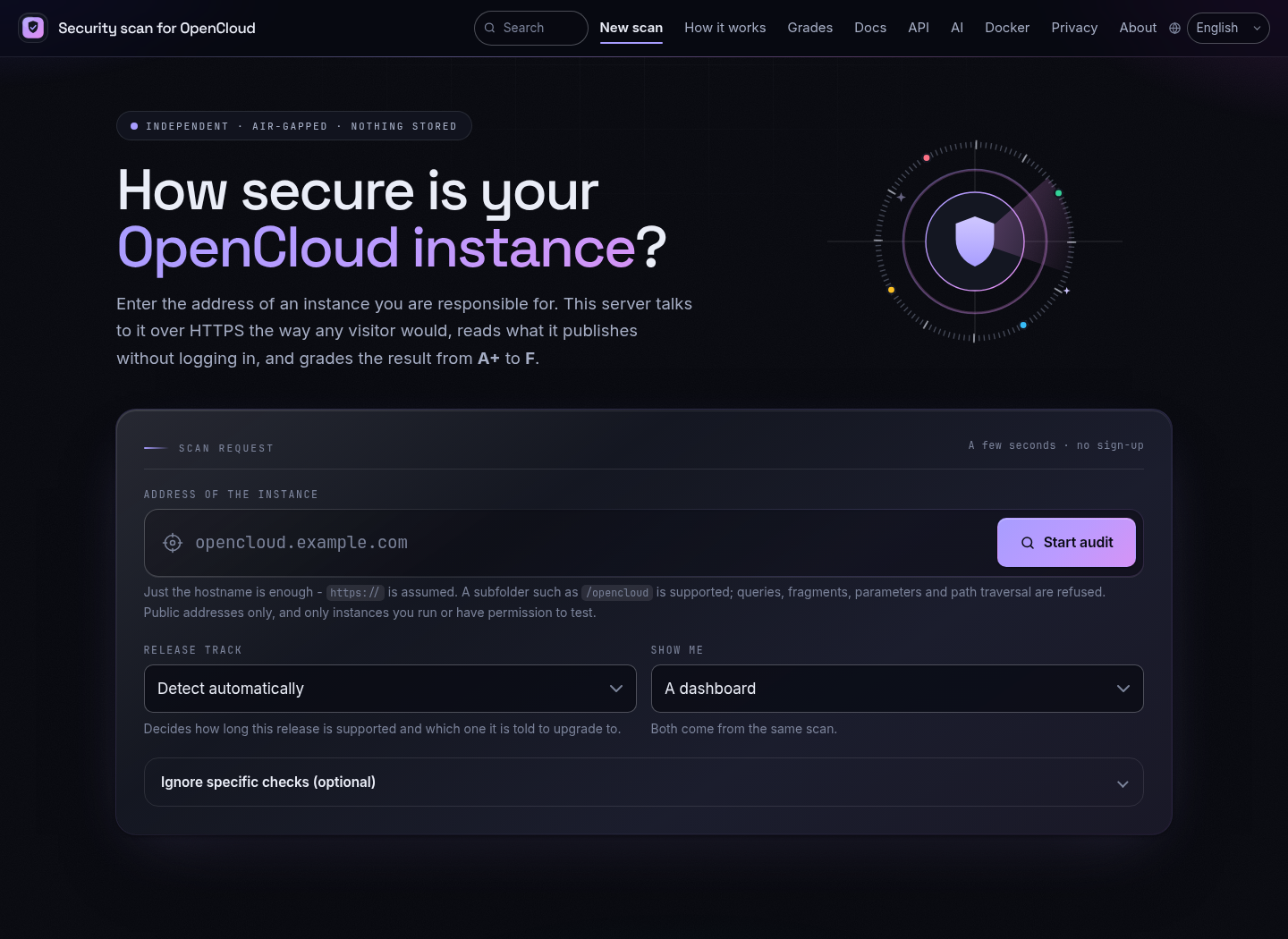
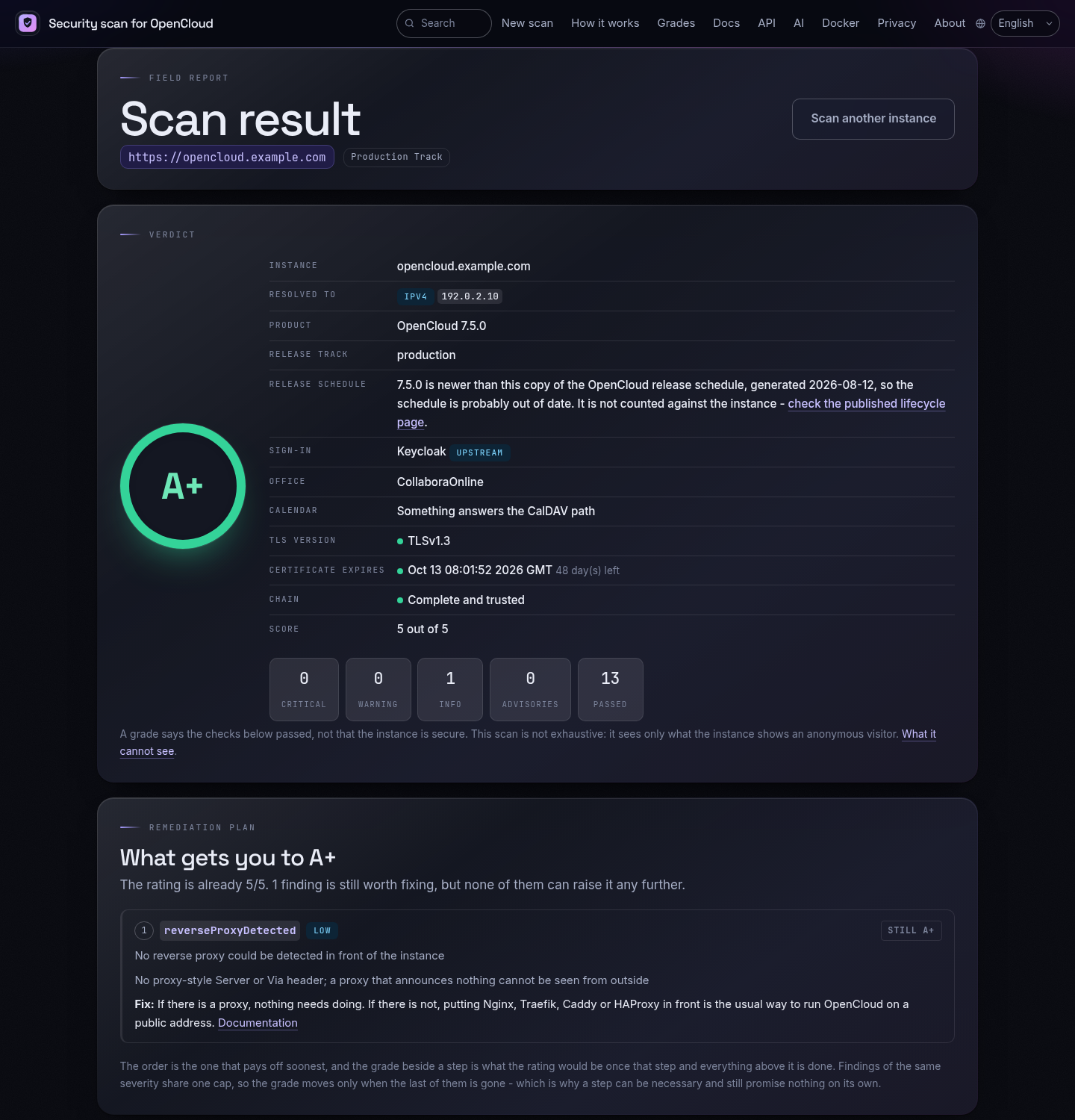
Two things worth knowing, because the paragraph above just said nothing is ever sent to a third party - and using a hosted service is exactly that:
- The scan runs from that server, not from yours. It sees what any anonymous visitor on the internet sees, which is the point, but it cannot reach an instance behind a VPN or on a private network. For those, and for anything you would rather not hand to someone else's machine, run the plugin or host the service yourself - it is the same code, with no rate limit.
- A result lives for an hour, then Redis drops it. The link is the only way to reach it, nothing is written to disk, and the target address is never logged.
Quick start
Install the plugin and run a check - one command each:
pipx install check-opencloud-security     # or: uv tool install / pip install
check-opencloud-security --host opencloud.example.com
A fresh OpenCloud created with opencloud init serves TLS on port 9200 with a
self-signed certificate. Point the check at it and tell it not to hold the
certificate against the instance:
check-opencloud-security --host opencloud.example.com:9200 --insecure
For a permanent setup (Icinga2, systemd timer, cron, Docker, ...) see Installation below.
Features
- No API, no third party. Every check runs in the plugin process, against your instance. IP addresses, custom ports and internal hostnames all work, and there are no rate limits
- OpenCloud-specific checks: unauthenticated Graph/WebDAV/OCS endpoints,
exposed
opencloud.yaml,proxy/server.keyand boltdb files, reachable service debug ports (/metrics,/config,/debug/pprof), enabled basic auth, version disclosure and maintenance mode - TLS inspection: handshake, protocol version, certificate expiry and trust, plus an automatic HTTPS -> HTTP fallback that reports the downgrade instead of hiding it
- Hardening derived from what the instance actually reports, not guessed from its version number: HSTS strength, CSP quality, public-link password and expiry enforcement, user-enumeration and password-policy settings
- Update check against the OpenCloud release feed, with offline
pinnedandbundledmodes - Configuration from a YAML file, environment variables or a secret provider (Docker/Kubernetes secrets, files, environment, commands)
- Standard Nagios/Icinga exit codes (OK, WARNING, CRITICAL, UNKNOWN) and performance data (rating, vulnerability count, scan duration)
- Configurable rating thresholds for WARNING and CRITICAL
- Optional hardening and security-header checks (
--check-hardening) - Optional webhook notification when a check turns critical
- Automatic retry with exponential backoff on transient network errors
- Web proxy support, debugging, multi-host runs
- Installable with pipx/uv/pip - or as a ready-to-use Docker image
Prerequisites
- Python 3.10 or newer - or Docker, if you prefer the containerised route.
requestsandPyYAML, installed automatically by pipx/uv/pip.- Network access from the monitoring host to the OpenCloud instance. Unlike a hosted scanner, this plugin needs to reach the instance itself - which is exactly what makes it work for instances that are not on the internet.
Installation
Installing with pipx, uv or pip is the recommended route; Docker is available as an alternative if you don't want Python on the host.
Using pipx / uv / pip (recommended)
The package is published on
PyPI and installs two
commands onto your PATH: check-opencloud-security (the check itself) and
check-opencloud-scanner (the same scanner as a one-shot JSON tool or a
long-running service).
pipx - recommended for CLI tools, keeps the plugin in its own virtualenv:
pipx install check-opencloud-security
uv - same idea, faster:
uv tool install check-opencloud-security
pip - into the system or an existing virtualenv:
pip install check-opencloud-security
Every release ships a CycloneDX SBOM and a Sigstore provenance attestation; see Verifying what you downloaded if you would rather not take the artifact on trust.
To install the latest unreleased changes, point any of them at the repository
instead: pipx install git+https://github.com/sowoi/check-opencloud-security.git
(likewise uv tool install git+https://... and pip install git+https://...).
Updating
check-opencloud-security --upgrade-self
That works out how the plugin was installed and runs the right command for it.
Use --upgrade-self=check to see what it would run without running it. A git
checkout is refused - update that with git pull.
The commands it picks between, if you would rather run them yourself:
pipx upgrade check-opencloud-security          # pipx
pipx upgrade-all                               # ... or every pipx tool at once

uv tool upgrade check-opencloud-security       # uv
uv tool upgrade --all                          # ... or every uv tool at once

pip install --upgrade check-opencloud-security # pip
Check what you are running with check-opencloud-security --version, and see
CHANGELOG.md for what changed. A git installation is updated by
re-running the same install command with --force (pipx/uv) or
--upgrade --force-reinstall (pip).
Keeping the package current matters more here than for a plugin that asks a hosted service: the OpenCloud release schedule and the newest known release ship inside the package (see End-of-life detection).
To remove the plugin again: pipx uninstall check-opencloud-security,
uv tool uninstall check-opencloud-security or
pip uninstall check-opencloud-security.
From a checkout (development or air-gapped install):
The project uses uv as its dependency manager;
uv.lock pins every dependency, so an install is reproducible:
git clone https://github.com/sowoi/check-opencloud-security.git
cd check-opencloud-security

uv sync                                       # create .venv from uv.lock
uv run check-opencloud-security --host opencloud.example.com
Without uv, install the checkout with pip - the dependencies are declared in
pyproject.toml, no separate requirements file is needed:
pip install .
# or, without installing, run the script in place:
pip install requests PyYAML
python3 check_opencloud_security.py --host opencloud.example.com
If some deployment tool of yours insists on a requirements.txt, generate one
from the lock file instead of maintaining it by hand:
uv export --no-dev --no-emit-project --format requirements.txt -o requirements.txt

# without the hashes, if your tooling cannot handle them:
uv export --no-dev --no-emit-project --no-hashes --format requirements.txt -o requirements.txt

# including the development and test dependencies:
uv export --no-emit-project --format requirements.txt -o requirements-dev.txt
Such a file is a build artefact - do not commit it, it goes stale the moment
uv.lock changes.
Shell completion
Completion is optional and off by default; it needs one extra dependency:
pipx install 'check-opencloud-security[completion]'
uv tool install 'check-opencloud-security[completion]'
# or, into an existing install:
pipx inject check-opencloud-security argcomplete
uv tool install --with argcomplete check-opencloud-security --force
Then register the two commands with your shell. For bash, in ~/.bashrc:
eval "$(register-python-argcomplete check-opencloud-security)"
eval "$(register-python-argcomplete check-opencloud-scanner)"
For zsh, the same two lines in ~/.zshrc, preceded once by
autoload -U bashcompinit && bashcompinit. For fish, write the output to a
completion file instead:
register-python-argcomplete --shell fish check-opencloud-security \
  > ~/.config/fish/completions/check-opencloud-security.fish
Completion knows the option names, the values of the options that take a fixed
set (--webhook-on, --release-track, --update-source, --upgrade-self),
and - the one that saves real typing - the hardening identifiers accepted by
--ignore-hardening and their long, camel-cased names.
Without argcomplete installed, nothing is registered and the plugin behaves
exactly as before; it is never a hard dependency of a monitoring plugin.
Docker
Use this if you would rather not install anything on the host. The image also ships the scan service (see Running the scanner as a service).
The published image carries both entry points, so a check is one command with nothing built and nothing installed:
docker run --rm --entrypoint check-opencloud-security \
  okxo/opencloud-scanner:latest --host opencloud.example.com
That one line, its JSON variant and the useful flags around it are collected in
Scanning from the command line, in one line. The
image's default command starts the web application, which is why the plugin is
selected with --entrypoint.
Build the image yourself instead when you want to run your own checkout.
Everything Docker-related lives in docker/, and the build context
is the repository root:
git clone https://github.com/sowoi/check-opencloud-security.git
cd check-opencloud-security
docker build -f docker/Dockerfile -t check-opencloud-security .
Run a check:
docker run --rm check-opencloud-security --host opencloud.example.com
Or configure it entirely through environment variables
(handy since you don't need to edit the docker run command per host):
docker run --rm -e COS_HOST=opencloud.example.com check-opencloud-security
The image carries a HEALTHCHECK that verifies the image rather than any
instance: that the package imports and that the release schedule and bundled
advisory database parse. It needs no network, so it also passes on an
air-gapped host. It is there for the long-running scan service; a one-shot
check container exits before Docker gets round to running it. The service in
docker/docker-compose.monitoring.yml overrides it with the HTTP /healthz
probe, which is the
more useful check once something is actually listening.
The check container needs no network ports, but it does need to reach the
OpenCloud instance itself. If the
instance is only reachable on the Docker host's own network, add
--network host or the appropriate --add-host. It runs as an unprivileged
nagios user and exits with the same Nagios-style codes (0/1/2/3) as
the native script, so it can be dropped straight into any monitoring pipeline
that already understands docker run as a check command (see
Icinga2 / Nagios and Icinga Director
below).
If you'd rather not build locally, push the built image to your own registry
(e.g. docker tag check-opencloud-security registry.example.com/check-opencloud-security
followed by docker push ...) and reference that image on your monitoring
host(s) instead.
Icinga2 / Nagios
- If you installed the package with pipx/uv/pip, locate the installed
check-opencloud-securityexecutable (e.g.which check-opencloud-security) and reference that path inPluginDir, or copy/symlink it into your plugin folder (usually/usr/lib/nagios/plugins/). - If you're running the script manually, put
check_opencloud_security.pyinto your plugin folder instead. - Create a new custom command:
object CheckCommand "check_opencloud_security" {
    import "plugin-check-command"
    command = [ PluginDir + "/check-opencloud-security" ]

    arguments += {
        "--host" = {
            description = "OpenCloud hostname, IP or URL"
            required = true
            value = "$address$"
        }

        "--port" = {
            description = "Port the instance listens on, e.g. 9200 (optional)"
            value = "$opencloud_port$"
        }

        "--proxy" = {
            description = "HTTP/HTTPS proxy (optional)"
            required = false
        }

        "--insecure" = {
            description = "Do not verify the instance's TLS certificate (optional)"
            set_if = "$opencloud_insecure$"
        }

        "--no-debug-ports" = {
            description = "Skip probing the OpenCloud debug ports (optional)"
            set_if = "$opencloud_no_debug_ports$"
        }

        "--debug" = {
            description = "Enable debugging output (optional)"
            set_if = "$opencloud_debug$"
        }

        "--warning" = {
            description = "Rating (0-5) at or below which the check warns (optional)"
            value = "$opencloud_warning$"
        }

        "--critical" = {
            description = "Rating (0-5) at or below which the check is critical (optional)"
            value = "$opencloud_critical$"
        }

        "--check-hardening" = {
            description = "Also check hardening measures and security headers (optional)"
            set_if = "$opencloud_check_hardening$"
        }

        "--update-source" = {
            description = "Where the newest release is looked up: auto, feed, pinned, bundled, off"
            value = "$opencloud_update_source$"
        }
    }
}
- Create a new Service object.
object Service "Service: OpenCloud Security Scan" {
   import               "generic-service"
   host_name =          "YOUR OPENCLOUD HOST"
   check_command =      "check_opencloud_security"
   check_interval = 24h
}
The scan only talks to your own instance, so there is no external rate limit to respect and a shorter interval than 24h is technically fine. A full scan does issue a few dozen requests plus the debug-port probes, though, so an hourly check is a sensible floor - and if the update check uses the GitHub feed, keep it at a few times a day or supply a token.
Using the Docker image instead
If you installed via Docker, point the CheckCommand at docker
and let it run the container on demand instead of a local binary:
object CheckCommand "check_opencloud_security_docker" {
    import "plugin-check-command"
    command = [ "/usr/bin/docker" ]

    arguments += {
        "run" = {
            order = -5
            value = "run"
        }
        "--rm" = {
            order = -4
            value = "--rm"
        }
        "image" = {
            order = -3
            skip_key = true
            value = "check-opencloud-security"
        }
        "--host" = {
            description = "OpenCloud hostname, IP or URL"
            required = true
            value = "$address$"
        }
        "--port" = {
            description = "Port the instance listens on, e.g. 9200 (optional)"
            value = "$opencloud_port$"
        }
        "--proxy" = {
            description = "HTTP/HTTPS proxy (optional)"
            required = false
        }
        "--insecure" = {
            description = "Do not verify the instance's TLS certificate (optional)"
            set_if = "$opencloud_insecure$"
        }
        "--debug" = {
            description = "Enable debugging output (optional)"
            set_if = "$opencloud_debug$"
        }
        "--warning" = {
            description = "Rating (0-5) at or below which the check warns (optional)"
            value = "$opencloud_warning$"
        }
        "--critical" = {
            description = "Rating (0-5) at or below which the check is critical (optional)"
            value = "$opencloud_critical$"
        }
        "--check-hardening" = {
            description = "Also check hardening measures and security headers (optional)"
            set_if = "$opencloud_check_hardening$"
        }
    }
}
This assumes the check-opencloud-security image has already been built (or
pulled) on the Icinga2 host, that the user running the Icinga2 daemon has
permission to talk to the Docker socket, and that the container can reach the
OpenCloud instance.
CLI Usage
check-opencloud-security -hwill show you a manual.
Command
check-opencloud-security --host <Hostname> --check-hardening
Options:
| Option | Description | Default | Environment variable |
|---|---|---|---|
-H, --host |
OpenCloud server address(es): hostname, IP or URL, optionally with a port. Accepts a comma-separated list to check multiple hosts in one run | required | COS_HOST |
-P, --proxy |
Proxy server address | None | COS_PROXY |
-d, --debug |
Explain the rating and every finding; verbose logging | False | COS_DEBUG |
-w, --warning |
Rating (0-5) at or below which the check warns | 3 (C) |
COS_WARNING |
-c, --critical |
Rating (0-5) at or below which the check is critical | 1 (E) |
COS_CRITICAL |
--check-hardening |
Also report missing hardening measures and security headers | False | COS_CHECK_HARDENING |
--timeout |
HTTP timeout in seconds per request | 10 |
COS_TIMEOUT |
--port |
Port the instance listens on (OpenCloud's own proxy uses 9200) |
from --host, else 443 |
COS_SCANNER_TARGET_PORT |
--scheme |
https or http; https falls back to http automatically |
https |
COS_SCANNER_SCHEME |
--insecure |
Do not verify the instance's TLS certificate | False | COS_INSECURE |
--no-extra-checks |
Only check product, version and security headers | False | COS_NO_EXTRA_CHECKS |
--no-debug-ports |
Skip probing the OpenCloud debug ports | False | COS_NO_DEBUG_PORTS |
--concurrency |
Maximum parallel host workers; one is used per host up to this ceiling | 5 |
COS_CONCURRENCY |
--format |
One-shot output format: nagios or prometheus |
nagios |
COS_FORMAT |
--prometheus-listen-port |
Serve native /metrics on this port until stopped |
disabled | COS_PROMETHEUS_LISTEN_PORT |
--prometheus-listen-addr |
Bind address for the native Prometheus exporter | 127.0.0.1 |
COS_PROMETHEUS_LISTEN_ADDR |
--scrape-interval |
Seconds to cache exporter scan results (0 scans on every scrape) |
60 |
COS_SCRAPE_INTERVAL |
--ignore-hardening |
Hardening measure or check to accept, repeatable, comma-separated and wildcard capable | None | COS_SCANNER_IGNORE_HARDENINGS |
--release-track |
Release track this instance follows: rolling, production, lts or auto |
auto |
COS_SCANNER_RELEASE_TRACK |
--update-source |
Where the newest release comes from: auto, feed, pinned, bundled, off |
auto |
COS_UPDATE_SOURCE |
--release-feed |
URL of the release feed | GitHub releases API of opencloud-eu/opencloud |
COS_RELEASES_FEED_URL |
--release-token |
Token for the release feed (raises GitHub's rate limit) | None | COS_RELEASES_TOKEN |
--latest-version |
Newest release, given explicitly; implies --update-source pinned |
None | COS_RELEASES_LATEST_VERSION |
--no-update-check |
Disable the update check (same as --update-source off) |
False | COS_NO_UPDATE_CHECK |
--update-warning |
Report WARNING when a newer release is available | False | COS_UPDATE_WARNING |
--baseline |
File that remembers the findings of the last run, one entry per host | None | COS_BASELINE |
--warn-on-new |
Only alert on findings that are new or worse than the baseline; needs --baseline |
False | COS_WARN_ON_NEW |
--diff-format |
Render baseline changes as text, markdown, or Slack Block Kit slack/json |
text |
COS_DIFF_FORMAT |
--self-update-check |
Note when a newer version of the plugin is published on PyPI; never changes the exit code | False | COS_SELF_UPDATE_CHECK |
--webhook-url |
Optional endpoint notified when the check reaches the configured state | None (disabled) | COS_WEBHOOK_URL |
--webhook-on |
Lowest state that triggers the webhook (critical, warning, unknown, always) |
critical |
COS_WEBHOOK_ON |
--webhook-header |
Extra header for the webhook request, repeatable | None | COS_WEBHOOK_HEADERS |
--webhook-timeout |
HTTP timeout in seconds for the webhook call | 10 |
COS_WEBHOOK_TIMEOUT |
--allow-private-webhooks |
Permit webhooks to private, loopback, or link-local addresses | False | COS_ALLOW_PRIVATE_WEBHOOKS |
--retries |
Retry attempts for transient network errors | 2 |
COS_RETRIES |
--backoff-factor |
Exponential backoff factor (seconds) between retries | 0.5 |
COS_BACKOFF_FACTOR |
--config |
Path to the configuration file (.json as JSON, else YAML) |
auto-discovered | COS_CONFIG_FILE |
--configure |
Ask for the settings interactively and save them, then exit | — | — |
--upgrade-self [run|check] |
Upgrade the plugin with pipx, uv or pip, then exit; check prints the command instead of running it |
run when given without a value |
— |
--check-only |
Only with --upgrade-self: another spelling of --upgrade-self check |
— | — |
-V, --version |
Show the installed version and exit | — | — |
-h, --help |
Show help and exit | — | — |
Settings that have no command-line flag of their own - the TLS expiry window,
the debug-port list, the advisory sources - are configured through the
configuration file or their COS_SCANNER_*
environment variables.
Checking multiple hosts
--host (and COS_HOST) accepts a comma-separated list of hostnames, e.g.:
check-opencloud-security --host opencloud1.example.com,opencloud2.example.com
Hosts run concurrently: the plugin creates one worker per host, up to the
default ceiling of five. A single-host check remains strictly single-threaded,
with no host worker pool. Set --concurrency or COS_CONCURRENCY to lower or
raise the ceiling (up to 32), for example --concurrency 2 for at most two
hosts at a time. Each worker keeps its result and Nagios perfdata separate;
the output starts with a one-line summary
(e.g. Checked 2 host(s): overall CRITICAL (1 CRITICAL, 1 OK)), followed by
one result block per host in the same order as the input. The plugin exits with the worst status found
across all hosts, using the usual Nagios/Icinga priority: CRITICAL >
WARNING > UNKNOWN > OK. A single host still produces the original,
single-block output and exit code, so existing single-host setups are
unaffected. Once the instances stop resembling each other, one configuration
file per instance scales better - see
Checking a fleet of instances.
Whitespace around each hostname is ignored, and empty entries (e.g. from a
trailing comma) are dropped. Because there is no hosted API involved, each
entry may be a hostname, an IPv4 address, a bracketed IPv6 address or a full
URL, with or without a port:
--host 10.0.0.5:9200,[2001:db8::1],https://cloud.example.com/.
Prometheus & Kubernetes integration
Use --format=prometheus to produce a one-shot Prometheus text payload:
check-opencloud-security --host opencloud.example.com --format=prometheus
For pull-based monitoring, run the built-in exporter. It serves /metrics,
refreshing each configured target on the first scrape and then at the
--scrape-interval (60 seconds by default). Set it to 0 only when every
scrape should trigger a scan:
check-opencloud-security --host opencloud.example.com \
  --prometheus-listen-port 9102
The exporter binds only to 127.0.0.1 by default. Set
--prometheus-listen-addr 0.0.0.0 only when a firewall or network policy
limits who can scrape it.
The Docker image needs no extra package or sidecar:
docker run --rm -p 9102:9102 check-opencloud-security \
  --host opencloud.example.com --prometheus-listen-port 9102 \
  --prometheus-listen-addr 0.0.0.0
In Kubernetes, set --prometheus-listen-addr 0.0.0.0 in the Deployment,
expose port 9102, and point a ServiceMonitor or scrape configuration at
/metrics. The exporter publishes opencloud_security_rating_score,
opencloud_security_vulnerabilities_total,
opencloud_security_hardenings_missing_total,
opencloud_security_failed_extra_checks_total,
opencloud_security_support_days_remaining,
opencloud_security_update_available,
opencloud_security_scan_duration_seconds, and
opencloud_security_scrape_success. The host label identifies the configured
target; rating also carries domain, product, and version.
For Grafana, show opencloud_security_rating_score in a stat panel with
thresholds at 3 (warning) and 1 (critical), graph
opencloud_security_support_days_remaining, and alert when
opencloud_security_scrape_success == 0. See the
Prometheus and Grafana guide for alerting and legacy
textfile/Pushgateway patterns.
Environment variables
Every option has a COS_-prefixed environment variable equivalent (see the
table above). This is especially useful for Docker, systemd, and cron, where
setting environment variables is often more convenient than editing a command
line. An explicit command-line flag always takes precedence over its
environment variable.
export COS_HOST=opencloud.example.com
export COS_PROXY=http://proxy.example.com:3128
check-opencloud-security
Boolean variables (COS_DEBUG, COS_CHECK_HARDENING, COS_INSECURE, ...)
accept 1, true, yes, or on (case-insensitive) to enable the
corresponding flag; any other value (including unset/empty) is treated as
disabled.
The same values can also come from a YAML file or a secret provider - see Configuration file and secrets.
The built-in scanner
The plugin has one backend: the scanner in
opencloud_local_scan/, which runs in the
plugin process and works the verdict out itself.
That is deliberate. A hosted scanner can only see what is reachable from the internet, refuses IP addresses and internal hostnames, rate-limits its callers and learns about your instance in the process. Scanning locally has none of those constraints.
There is nothing to enable and no --scan-backend flag to pass. Everything
below describes what the built-in scanner does and how to tune it.
What the scanner checks
Read from the instance itself:
- product,
productversionand edition from/status.php, plusmaintenanceandneedsDbUpgrade; a server whose product name says ownCloud or Nextcloud is refused rather than rated, because it serves the same endpoint but is not the same software - the IPv4 and IPv6 addresses the name resolved to while the scan ran,
reported as
addressesin the result document and shown as Resolved to on a web result page - context, never a finding, and empty when a name does not resolve or an address was scanned directly - capabilities from
/ocs/v1.php/cloud/capabilities(both endpoints are unauthenticated in OpenCloud) - the security headers
Strict-Transport-Security,Content-Security-Policy,X-Content-Type-Options,X-Frame-Options,X-Permitted-Cross-Domain-Policies,X-Robots-Tag,X-XSS-ProtectionandReferrer-Policy, reported assetup.headers hardeningsderived from those headers and capabilities- known vulnerabilities from the advisory database and
the resulting rating (
0-5)
Plus the additional checks (extraChecks in the JSON, disable with
--no-extra-checks):
| Check | Severity | Purpose |
|---|---|---|
httpsAvailable, tlsHandshake, tlsProtocol |
critical/high | Instance only reachable over HTTP, broken TLS, or a protocol older than TLS 1.2 |
tlsCertificate, tlsTrusted |
high/medium | Certificate expired, expiring within scanner.tls_min_days, or not trusted |
tlsDeprecatedProtocol |
high | The server still accepts TLS 1.0 or 1.1 even though it negotiated something newer with us |
tlsHostname |
high | The certificate does not cover the name it was asked for |
tlsChain |
medium | The chain is missing an intermediate, so it validates only for clients that happen to have one cached |
tlsCertificateLifetime |
low | The certificate is valid for longer than the 398 days browsers accept |
tlsOcspStapling |
low | No OCSP response stapled to the handshake, although the certificate names a responder |
header:<name> |
high - low | One of the headers above missing or too weak |
authentication:/remote.php/dav/files/, /graph/v1.0/users, /ocs/v1.php/cloud/user |
critical/high | An endpoint that must demand authentication answered anyway |
exposed:/opencloud.yaml, /proxy/server.key, /idm/opencloud.boltdb, /.env, /docker-compose.yml, /storage/users/, /.git/config |
critical/high | Deployment internals published by a misconfigured reverse proxy |
directoryListing |
critical | A directory index served instead of the web frontend |
demoUsersDisabled |
critical | The built-in identity provider still accepts the documented demo accounts, one of which is an administrator |
debugEndpoint:/metrics, /config, /debug/pprof/ |
critical/high | Debug handlers reachable on the public address |
debugPort:<port> |
high | A service debug port answering from the outside |
backendPortClosed |
high | The same OpenCloud instance is reachable directly on backend port 9200, bypassing its reverse proxy |
webEmbedDelegatedAuthenticationRestricted |
critical | Delegated iframe authentication accepts messages without an explicit trusted origin |
webEmbedMessageOriginRestricted |
high | The web client's embed messages trust every parent origin |
basicAuthDisabled |
medium | The proxy still offers HTTP basic authentication |
identityProviderDetected |
low | No OpenID Connect discovery document and no redirect from it, so who signs users in cannot be established |
reverseProxyDetected |
low | Nothing suggests a reverse proxy in front of the instance |
versionDisclosure:Server, webfingerVersionDisclosure |
low | Exact versions leaked to unauthenticated callers |
maintenanceMode, databaseUpgrade |
medium/high | Instance in maintenance mode or waiting for a database upgrade |
A failed additional check caps the rating (critical -> D, high -> C, medium
-> A, low -> A+); set scanner.extra_checks_rating: false to report them
without touching the rating.
OpenCloud is a single Go binary that serves its web frontend from embedded
assets, and its frontend is a single-page application: unknown paths return the
app shell with HTTP 200 rather than a 404. A naive "does /opencloud.yaml
return 200?" check would therefore flag every healthy instance. The scanner
first probes a path that cannot exist, learns what the catch-all response looks
like, and only reports an exposed path whose response actually differs from it.
Who signs users in
The scan also reads /.well-known/openid-configuration - the OpenID Connect
discovery document, or the redirect the instance answers it with - to find out
which identity provider issues its tokens. An issuer on a different host means
an external provider such as Keycloak, Authentik or Authelia is in front of the
instance, and the result document records it:
{"identityProvider": {"detected": true, "external": true,
                      "issuer": "https://id.example.com", "vendor": "Keycloak"}}
This is context, never a verdict: using the built-in provider fails nothing,
and no check requires an external one. It only softens basicAuthDisabled,
which is medium normally and low when the interactive login goes through an
external provider.
Nothing is submitted to the instance to establish this. The discovery document
and the Location header are read, and no login form is ever filled in - a
scanner that guesses credentials against somebody's instance is a scanner
nobody should point at their server, and an identity provider is the worst
place to start.
When no provider can be found at all, identityProviderDetected fails at
severity low and --debug points at OpenCloud's own
documentation - the usual cause is a reverse proxy that does
not forward /.well-known/.
The demo accounts
When the discovery document names the instance's own provider - the built-in
identity management rather than a Keycloak or Authentik in front of it - the
scan additionally checks whether the demo users are still on.
IDM_CREATE_DEMO_USERS=true creates five accounts whose names and passwords
are printed in OpenCloud's documentation, and dennis
is an administrator. Left enabled on a reachable instance, that is an admin
account whose password everybody already knows, so demoUsersDisabled is a
critical finding: it fails the check and caps the rating at D.
This is the one place the scan sends a credential, and it does so because there is no other way to see those accounts from outside - nothing OpenCloud exposes unauthenticated lists its users. What is sent is a published default rather than a guess at anybody's password, only the documented pairs are tried, and they go only to the instance's own provider: with an external identity provider the accounts come from there, the check does not apply, and no login is ever pushed at a third party. Switching the setting off does not delete accounts that already exist, so a failing instance needs them removed as well.
What is in front of the instance
reverseProxy records whether anything answers before OpenCloud does: a
Server header naming Nginx, Caddy, Cloudflare or another proxy, or a header
only a forwarder adds such as Via.
{"reverseProxy": {"detected": true, "vendor": "Nginx", "evidence": "Server: nginx"}}
reverseProxyDetected fails when nothing was found, and does so at severity
low on purpose: Traefik and HAProxy announce nothing by default, and
stripping the Server header is itself good practice, so a well-run
deployment can look bare from outside. The finding is worth showing and is
never worth a grade.
Office and calendar integrations
Two integrations are visible without logging in, and both are reported as observations rather than verdicts:
/app/listis unprotected by OpenCloud's own proxy policy and names the app providers actually registered with the app registry - Collabora, OnlyOffice and the like. Theapp_providersblock in the capabilities document is hardcoded and says nothing, so it is not used./.well-known/caldavanswers with a redirect or an authentication challenge only when something is wired to it, which is how a proxied Radicale shows up. A stock instance answers 404.
{"integrations": {"office": {"detected": true, "apps": ["Collabora"], "groupware": false},
                  "calendar": {"detected": true, "advertised": true}}}
Neither becomes a check and neither can move the rating.
What the scan deliberately does not answer
- Audit logging. OpenCloud's audit service only consumes the internal event bus. It publishes no endpoint, and no unauthenticated document mentions it, so whether it is enabled cannot be established from outside at all. It is not checked, and a clean report says nothing about it.
- Whether an integration is configured correctly. The scan reports that an app provider is registered, or that something answers the CalDAV path. WOPI secrets, share permissions and the other service's own configuration live behind a login and are not checked.
- Anything requiring credentials. No login form is ever submitted and no password is ever guessed. The single exception is the demo accounts above: the passwords OpenCloud publishes are sent, as published, to the instance's own identity provider, because that is the only way to see from outside whether those accounts still exist.
Reading the version correctly
/status.php reports three version fields, and two of them are traps:
{"version":"0.1.0.0","versionstring":"0.1.0","productversion":"7.4.0"}
version and versionstring are hardcoded constants OpenCloud sends to keep
old sync clients happy - they are the same on every instance and say nothing
about the release. The real release is productversion only. The scanner
uses productversion, falls back to the capabilities endpoint, and reports
legacyVersion: true in the result document when an instance offers nothing
but the placeholder. Anything comparing versions from /status.php by hand
(including other monitoring scripts you may already run) is almost certainly
reading the wrong field.
TLS and self-signed certificates
OpenCloud's proxy terminates TLS itself on port 9200, and opencloud init
generates a self-signed certificate for it. Many deployments then put a reverse
proxy with a real certificate in front; many others do not.
The scanner handles both without needing to be told which one it is looking at:
- HTTPS with certificate verification. If that works, everything is fine.
- HTTPS without verification. The scan continues and reports
tlsTrustedas a failed check - you still get the full result, plus the fact that the chain is not trusted. - Plain HTTP, reported as
httpsAvailable(critical).
--insecure (COS_INSECURE) skips step 1. The untrusted chain is still
listed in the output; it just stops counting against the rating. Use it for an
instance you know is self-signed, so that a genuinely broken certificate
elsewhere still stands out.
Debug ports
Every OpenCloud service has a debug listener that serves /healthz,
/readyz, /metrics, /config and /debug/pprof. /metrics includes
opencloud_proxy_build_info (exact version), /config dumps the effective
service configuration, and /debug/pprof allows anyone to trigger profiling.
These listeners bind to loopback by default, so a debug port that answers from your monitoring host is a genuine finding - usually a container that published the whole port range. The scanner probes the five most informative ones:
| Port | Service |
|---|---|
| 9205 | proxy |
| 9141 | frontend |
| 9124 | graph |
| 9134 | idp |
| 9239 | idm |
Each probe is a single TCP connect with a three second timeout, so a firewalled
host costs up to 15 seconds. Turn the probes off with --no-debug-ports, run
them in parallel with --concurrency, or tune them:
scanner:
  check_debug_ports: true
  debug_ports: [9205, 9141]
  debug_port_timeout: 1
Speeding the scan up
A scan spends nearly all of its time waiting for the instance to answer: around
twenty HTTP requests and five TCP connects, one after the other.
scanner.concurrency runs those probes in parallel for a single-host scan;
raising it shortens a run considerably, at the price of a burst of parallel
requests against the instance, and is most noticeable when debug-port probing
runs into a firewall that swallows the connections. --concurrency instead
controls the outer host-worker ceiling described in
Checking multiple hosts.
The setting changes only the timing, never the verdict: the result document
lists the same findings in the same order whatever the value is. Values above
32 are clamped. It can also be set once for every host:
scanner:
  concurrency: 8
End-of-life detection
A version number on its own does not tell you whether an OpenCloud instance is still receiving security fixes, because OpenCloud maintains three kinds of releases at the same time:
| Track | Cadence | Supported until | Support |
|---|---|---|---|
| Rolling | about every 3 weeks | its successor is released | community |
| Production | about every 6 months | the next production release | professional |
| LTS | a production line | 2 years after the line opened | professional |
See the OpenCloud release lifecycle for the authoritative description.
Where the tracks stand today, straight from the bundled schedule:
| Track | Current release | Line | Line opened | Supported until |
|---|---|---|---|---|
| Rolling | 7.5.0 |
7.5 |
2026-08-25 | the next rolling release |
| Production | 7.2.4 |
7.2 |
2026-06-25 | the next production release |
| LTS | 4.0.8 |
4.0 |
2025-12-01 | 2027-12-01 |
Read from the OpenCloud release lifecycle on 2026-08-26.
The consequence for monitoring is that the same version can be perfectly
current or long dead depending on the track it was published on. 7.2.3 is the
current production release even though the rolling track is already at 7.4.0,
while 7.3.0 - a higher version - stopped receiving fixes the day 7.4.0
appeared.
The plugin therefore works in release lines (MAJOR.MINOR), which is the
unit OpenCloud maintains: 7.2.3 is a patch of the 7.2 line. A line can
belong to more than one track - 7.2 shipped as a rolling release before it
was promoted to production, and 4.0 is both the previous production line and
the current LTS line - and it is judged by whichever track supports it longest.
The schedule ships in opencloud_local_scan/data/release_schedule.json and is
scraped from the release dates in the OpenCloud admin documentation, the only
source that states the release type; the GitHub release list cannot tell a
rolling release from a production one. It is refreshed on every release and
weekly by a scheduled workflow, and
the same run rewrites the table above - so the versions quoted here are the
ones the plugin actually judges against, not the ones that were current when
this page was written. Everything else in this section, including the worked
examples below, is written by hand and may name older releases to make a
point.
A line that is out of support is rated F and reported as CRITICAL:
CRITICAL: The 7.3 rolling release line is end-of-life and has no security fixes. Upgrade to 7.4.0.
OpenCloud 7.3.0 on cloud.example.com, rating: F, last scanned: 2026-08-12 15:18:08.839323
Release lifecycle: 7.3 (rolling), out of support since 2026-08-03, upgrade to 7.4.0
A supported line reports how much time is left, which is what makes an LTS instance worth monitoring at all:
Release lifecycle: 4.0 (lts), supported until 2027-12-01 (476 days left)
The remaining window is also published as the support_days_left performance
value, so a graph shows it shrinking - and going negative once the line is
overdue.
scanner:
  use_release_schedule: true      # false disables the EOL check entirely
  # release_schedule: /etc/check-opencloud-security/schedule.json
Or via the environment: COS_SCANNER_USE_RELEASE_SCHEDULE,
COS_SCANNER_RELEASE_SCHEDULE.
Two things are worth knowing about the bundled schedule:
-
LTS releases are only available with a subscription, so an LTS line is recognised from the documentation but its releases may never appear publicly. If your vendor has committed to a different window, point
release_scheduleat your own file rather than letting the bundled one decide. -
A release newer than the schedule is never rated
F, and never counted against the instance. The file ages between updates of this package, so an instance that was patched promptly is routinely newer than the data it is compared against. It keeps its rating, gets no upgrade recommendation and is never called end of life for it. -
It says so when that happens. A version ahead of the newest release recorded for its line - or on a line newer than every line on record - sets
lifecycle.scheduleStalein the result document, fills inscheduleNote,scheduleUpdatedandscheduleSource, and adds a line to the plugin's output:Release schedule: 7.4.1 is newer than anything in the bundled release schedule (generated 2026-08-12), so that schedule is probably out of date. This is not counted against the instance. Check the current support window at https://docs.opencloud.eu/docs/admin/resources/lifecycle/, and regenerate the schedule with scripts/update_release_schedule.py.It is a statement about the bundled file, not about the instance: the support window it worked out came from data older than the release it judged, so it is worth re-reading at the source. Upgrading the package, or running
python scripts/update_release_schedule.py, clears it. A line that genuinely expired stays expired - patching inside a dead line does not reopen it, and the note explains the data rather than overturning the verdict.
Advisory database
Known vulnerabilities are matched against the version range
[introduced, fixed) of a local advisory database. Sources are merged in this
order and de-duplicated by id:
- the file bundled with the package,
- every file in
scanner.vulnerability_db, - the JSON feed in
scanner.vulnerability_feed.
The native format ({"advisories": [{"id": ..., "introduced": ..., "fixed": ...}]}), the GitHub Advisory API format and OSV documents are all
understood, so an air-gapped setup can mirror a feed to a file without
conversion. A feed that is unreachable is logged and ignored - it never turns a
healthy instance into UNKNOWN.
The bundled database is empty. At the time of writing no CVE or GHSA has been published for OpenCloud, so
vulnerabilities: []means "nothing in the database you configured matched", not "this version is known to be safe". The rating you get is driven by the configuration checks above. Pointscanner.vulnerability_feedat OSV or your own advisory mirror to make that part of the check meaningful.
Running the scanner as a service
The package ships a second entry point, check-opencloud-scanner. It runs the
very same scanner, either once or as a service:
# one-shot: print the full result document as JSON
check-opencloud-scanner scan opencloud.example.com

# as a service
check-opencloud-scanner serve --port 8811
| Endpoint | Behaviour |
|---|---|
POST /api/queue (url=<host>) |
Scan the host, return {"uuid": ...} |
GET /api/result/<uuid> |
Return the stored result |
POST /api/requeue (url=<host>) |
Discard the cache and scan again |
GET /api/scan?url=<host> |
Convenience: scan and return the document |
GET /healthz |
Liveness probe |
The plugin does not talk to this service - it has no remote backend and
always scans in process. The service exists so that several consumers (a
dashboard, a script, a second monitoring system) can share one cached result,
and so that scans can run from a host closer to the instance than the
monitoring server is. Results are cached per host for service.cache_ttl
seconds, 15 minutes by default.
Protect it with a token whenever it is reachable by others - without
service.token every endpoint is open to anyone who can connect, and the
scanner will happily scan any host they name:
docker run -d --name opencloud-scanner -p 127.0.0.1:8811:8811 \
  -e COS_SERVICE_TOKEN="$(openssl rand -hex 32)" \
  --entrypoint check-opencloud-scanner \
  check-opencloud-security serve

curl -H "Authorization: Bearer <token>" \
  'http://127.0.0.1:8811/api/scan?url=opencloud.example.com'
A ready-made docker/docker-compose.monitoring.yml
starts the scanner plus a check container, including a health check and Docker
secrets:
# 1. create the secret files from the templates
cp secrets/scanner_token.example  secrets/scanner_token
cp secrets/releases_token.example secrets/releases_token

# 2. fill them with real values
openssl rand -hex 32 > secrets/scanner_token          # protects the service
printf '%s' '<github-token>' > secrets/releases_token
chmod 600 secrets/scanner_token secrets/releases_token

# 3. adjust COS_HOST in docker/docker-compose.monitoring.yml, then:
cd docker
docker compose -f docker-compose.monitoring.yml up -d scanner
docker compose -f docker-compose.monitoring.yml run --rm check
The plain docker compose up in that directory is the public web application
instead - see the web application. A deployment of it that
needs different answers can be generated rather than edited:
docker/setup-wizard.py asks what the service should be reachable at, how
hard it may scan and who may erase a result, then writes a compose file and a
.env holding the credentials it refers to - see
docker/README.md.
Everything in secrets/ except the *.example templates is git-ignored - see
secrets/README.md.
Update check
There is no update endpoint on an OpenCloud instance, so "is this the newest
release?" is answered by comparing the productversion the instance reports
against the OpenCloud release feed on GitHub. --update-source selects where
that number comes from:
| Mode | Behaviour |
|---|---|
auto (default) |
Try the feed; on any failure fall back to the release bundled with the package |
feed |
Only the feed. A failure is reported as unknown rather than silently ignored |
pinned |
Use --latest-version. No network access |
bundled |
Use the release recorded in the shipped data file. No network access |
off |
Skip the update check entirely (same as --no-update-check) |
# ask GitHub, with a token to stay clear of the anonymous rate limit
check-opencloud-security --host opencloud.example.com \
  --release-token 'secret://releases_token'

# fully offline: compare against a version you control
check-opencloud-security --host opencloud.example.com --latest-version 7.4.0
The anonymous GitHub API allows sixty requests per hour and IP address, shared
with everything else on that address. A token - a fine-grained one without any
permission is enough - raises that considerably. In auto mode a rate-limited
lookup is not an error: the check falls back to the bundled release, which is
as new as the installed package.
The result is reported as an extra output line and as the update_available
performance metric; with --update-warning a pending update turns an otherwise
OK result into WARNING. A failing update check never aborts the security
check.
The recommended release follows your track
A release feed only knows the newest release overall, and on OpenCloud that is always a rolling one. Recommending it to a production or LTS instance would quietly move it onto a track with a three-week support window - the opposite of what an operator on the production track signed up for.
The update check therefore uses the release schedule to pick a target on the instance's own track:
| Installed | Track | Recommended | Why |
|---|---|---|---|
7.2.3 |
production | nothing | Current production release, even though rolling is at 7.4.0 |
7.2.0 |
production | 7.2.3 |
The newest patch of the same line |
7.3.0 |
rolling | 7.4.0 |
On rolling, the newest release is the right one |
4.0.0 |
LTS | 4.0.8 |
Where the backports are |
The newest release overall is still reported, as newestRelease in the JSON
result and the webhook payload, so nothing is hidden - it is just not
presented as the thing to install. If the feed reports a newer patch of the
line you are already on, the feed wins, because it is fresher than the bundled
schedule.
Declaring your release track
By default the release schedule works out which track a version belongs to and
judges it as generously as the truth allows: 7.2.3 appears on both the
rolling and the production track, so it is treated as a production release and
is current.
That is the right answer when nobody has said otherwise, but it is not the
right answer for everyone. If you deliberately follow the rolling track, then
7.2.3 went out of support the day 7.4.0 shipped, and you want to be told
so. --release-track says which track you are on, and the version is then
judged on that track alone:
check-opencloud-security --host opencloud.example.com --release-track rolling
--release-track auto is the default: the release schedule is asked which
track the installed release belongs to. It is the same answer as leaving the
flag out, said out loud, and it is what keeps one configuration usable across
instances on different tracks:
check-opencloud-security --host opencloud.example.com --release-track auto
| Installed | Declared | Verdict |
|---|---|---|
7.2.3 |
nothing or auto |
Supported - current production release |
7.2.3 |
production |
Supported - current production release |
7.2.3 |
rolling |
End of life - superseded by 7.4.0, upgrade to 7.4.0 |
7.4.0 |
production |
Supported - ahead of the production track, whose current release is 7.2.3 |
2.3.0 |
production |
End of life - behind the production track, upgrade to 7.2.3 |
4.0.8 |
lts |
Supported until the two-year window closes |
Two consequences are worth knowing about in advance:
- Being ahead of your track is not a finding. A production instance that
has moved on to the current rolling release has everything the production
track ships and more, so it is reported as ahead of its track rather than
rated
F. Only a release behind the current release of your track is out of support. - The check never recommends a downgrade. If your declared track has no
release you could move up to, the update recommendation stays empty and
the reason explains the situation instead. Moving from
7.4.0back to7.2.3is a decision for a human, not for a monitoring plugin.
The declared track also steers the update recommendation described in the section above, and the output marks it as declared so it can be told apart from an inferred one:
Release lifecycle: 7.2 (rolling track declared), out of support since 2026-07-14, upgrade to 7.4.0
An unknown value is ignored rather than treated as an error, so a typo in a config file degrades to the default behaviour instead of taking the check down.
Configuration file and secrets
All settings can live in a file instead of the command line, and the quickest way to write one is to let the plugin ask:
check-opencloud-security --configure
The wizard asks for the one required setting - the host - explains what it is
for, and shows an example. Everything else has a working default, so the
optional settings are offered group by group and only asked for if you say
yes. The result is written as JSON with mode 0600, and found automatically
from then on:
check-opencloud-security # no arguments needed any more
Use --config to say where it should go, e.g.
--configure --config /etc/check-opencloud-security/.env.json. An existing
file is shown and confirmed before it is replaced. The equivalent for the
scanner on its own is check-opencloud-scanner configure.
The file is read from --config, COS_CONFIG_FILE, ./.env.json,
./check-opencloud-security.yml, ~/.config/check-opencloud-security/.env.json
or /etc/check-opencloud-security/ (first match wins). A .json suffix is
read as JSON, anything else as YAML - the two are interchangeable. See
config/check-opencloud-security.example.yml
for a fully commented example.
host: opencloud.example.com
check_hardening: true

scanner:
  verify_tls: false        # self-signed instance
  target_port: 9200
  tls_min_days: 21
  check_debug_ports: true

releases:
  mode: auto
  token: secret://releases_token
Nested keys map one to one onto the environment variables: scanner.target_port
is COS_SCANNER_TARGET_PORT, releases.token is COS_RELEASES_TOKEN,
scanner.tls_min_days is COS_SCANNER_TLS_MIN_DAYS. Precedence is
command line > environment variable > configuration file > default.
Secrets never have to be written into the file or the process environment. Any value may be a reference:
| Reference | Resolves to |
|---|---|
secret://name |
<secrets.dir>/name, i.e. /run/secrets/name for Docker and Kubernetes secrets |
file:///path/to/file |
The contents of that file |
env://VARIABLE |
The value of that environment variable |
exec://command --arg |
The stdout of that command (requires secrets.allow_exec: true) |
Alternatively append _file to any key or variable:
COS_RELEASES_TOKEN_FILE=/run/secrets/token or token_file: /run/secrets/token.
Trailing newlines are stripped, so echo secret > file works as expected.
secret://name looks below secrets.dir (COS_SECRETS_DIR), which defaults to
/run/secrets - exactly where Docker and Kubernetes mount their secrets.
Outside a container, point it at your own directory:
mkdir -p /etc/check-opencloud-security/secrets
printf '%s' '<github-token>' > /etc/check-opencloud-security/secrets/releases_token
chmod 600 /etc/check-opencloud-security/secrets/*

export COS_SECRETS_DIR=/etc/check-opencloud-security/secrets
check-opencloud-security --host opencloud.example.com \
  --release-token 'secret://releases_token'
The repository ships templates for both files in
secrets/; copy them and replace the placeholder values.
Rating thresholds
The scanner grades an instance from A+ (best) down to F. The plugin maps
that grade to a numeric rating and compares it against two inclusive
thresholds:
| Rating | 5 | 4 | 3 | 2 | 1 | 0 |
|---|---|---|---|---|---|---|
| Grade | A+ |
A |
C |
D |
E |
F |
-c, --critical/COS_CRITICAL(default1, i.e.E) - a rating at or below this value isCRITICAL.-w, --warning/COS_WARNING(default3, i.e.C) - a rating at or below this value isWARNING.
Two rules always apply on top of the thresholds:
- Known vulnerabilities raise the state to at least
WARNING, even when the overall rating still looks acceptable. The reported identifiers are listed in the output. - An end-of-life version is always
CRITICAL, because it receives no security fixes at all.
A single critical finding does not page by default. The worst finding caps the rating rather than setting it: critical caps at
2(D), which the default--critical 1still reports asWARNING. That is deliberate - it keeps one exposed path from being indistinguishable from an end-of-life instance. If a critical finding should wake somebody up, run with--critical 2.
A rating outside the documented 0-5 range yields UNKNOWN. --critical
must not be higher than --warning, and both must be within 0-5; otherwise
the plugin refuses to run.
# Only alert once the instance is actually end-of-life
check-opencloud-security --host opencloud.example.com --warning 1 --critical 0

# Page on any critical finding
check-opencloud-security --host opencloud.example.com --warning 4 --critical 2
Hardening checks
Besides the pass/fail checks above, the scanner reports which hardening
measures the instance has in place. With --check-hardening /
COS_CHECK_HARDENING these are evaluated as well.
The names are terse because they end up in alert text, so here is what each
one means and what to change. Every setting below is an OpenCloud environment
variable; run the plugin with --debug to get the same explanation printed
next to the finding.
| Hardening | What a failure means | Setting to change |
|---|---|---|
basicAuthDisabled |
The instance offers HTTP Basic auth, so credentials can be replayed on every request and single sign-on (with any second factor) is bypassed. Often deliberate: CalDAV, CardDAV and WebDAV clients cannot speak OpenID Connect, which is why this is rated medium, and low when an external identity provider handles the interactive login. |
PROXY_ENABLE_BASIC_AUTH=false if nothing needs it; otherwise keep it and hand those clients app tokens rather than account passwords. |
cspWithoutUnsafeInline |
The Content-Security-Policy contains 'unsafe-inline', so injected markup may execute. This is OpenCloud's shipped default - see the note below. |
PROXY_CSP_CONFIG_FILE_LOCATION pointing at your own csp.yaml (or PROXY_CSP_CONFIG_FILE_OVERRIDE_LOCATION to replace the default outright). |
publicLinkPasswordEnforced |
Public links may be created without a password, so the URL alone grants access. OpenCloud enforces a password on read-only links but not on writable ones. | OC_SHARING_PUBLIC_SHARE_MUST_HAVE_PASSWORD=true and OC_SHARING_PUBLIC_WRITEABLE_SHARE_MUST_HAVE_PASSWORD=true. |
passwordPolicyEnforced |
Public link passwords may be shorter than 8 characters. (This policy covers link passwords, not account passwords - those belong to your identity provider.) | OC_PASSWORD_POLICY_MIN_CHARACTERS (default 8), plus the MIN_LOWERCASE/MIN_UPPERCASE/MIN_DIGITS/MIN_SPECIAL_CHARACTERS companions. |
hstsLongMaxAge |
Strict-Transport-Security carries a max-age below a year. |
None in OpenCloud - its proxy sends ten years, so a short value comes from a reverse proxy in front of it. |
hstsPreload |
The same header has no preload directive, so the very first request to the host is unprotected. |
None in OpenCloud - again a reverse proxy rewriting the header. Only add preload once every subdomain is HTTPS-only. |
publicLinkExpirationEnforced |
Nothing about your instance: OpenCloud hardcodes this capability to false. Never alerted on - see below. |
None exists. |
userEnumerationRestricted |
Account search is not limited to shared groups. OpenCloud hardcodes the restricted state, so this passes everywhere. | None exists. |
Two further entries can show up in the "Missing hardening" line: httpsEnforced
when the instance does not enforce HTTPS, and the name of any security header
from setup.headers that is absent or too weak (e.g.
Strict-Transport-Security). --debug explains those too.
Anything reported as missing is listed in the output and exported as the
hardenings_missing performance metric. A result that would otherwise be OK
is raised to WARNING; an existing WARNING/CRITICAL is never downgraded.
check-opencloud-security --host opencloud.example.com --check-hardening
Measures that are not settings
Two of the rows above cannot be influenced by anyone:
publicLinkExpirationEnforcedis reported asfalseby every OpenCloud instance. The capability is a hardcoded constant in the frontend service, not a configuration value, so there is no variable to set and no version that passes.userEnumerationRestrictedis the same story with the opposite sign: hardcoded to the restricted state, so it always passes.
They are still recorded in the result document, because the observation is
real, but they are left out of the "Missing hardening" line, out of the
hardenings_missing metric and out of the webhook. A warning nobody can
ever clear is noise, and noise is how genuine findings get ignored. --debug
still lists them, with the explanation.
cspWithoutUnsafeInline is a milder version of the same problem: OpenCloud's
default CSP contains 'unsafe-inline', so it fails on a stock instance.
That one is changeable, so it is reported rather than excused - but be aware
that the web interface currently relies on inline scripts and styles, so a
strict policy is likely to break the UI and any connected office or IDP
service. Test before rolling it out.
The capability-derived rows only appear when the instance actually reports the corresponding capability, so an older release does not accumulate phantom findings.
Accepting a finding you are not going to fix
Some findings are real but not actionable in your environment: a CSP you cannot tighten without breaking the web UI, an HSTS header your reverse proxy owns, or basic auth you genuinely need for a migration tool. Left alone they keep the rating down and the check yellow, and a check that is permanently yellow is a check nobody reads.
--ignore-hardening accepts a finding by name. The rating is recalculated
without it, so accepting a finding really does change the grade:
check-opencloud-security --host opencloud.example.com --check-hardening \
    --ignore-hardening cspWithoutUnsafeInline \
    --ignore-hardening basicAuthDisabled
The option is repeatable, also takes a comma-separated list, and understands shell-style wildcards for the identifiers that carry a path or a port:
--ignore-hardening 'debugPort:*,exposed:/status.php'
It matches hardening measures, security header names, httpsEnforced and the
ids of the additional checks - one option for all of them, because
basicAuthDisabled is both a hardening measure and an additional check, and
accepting it in one place but not the other would be surprising.
A waived finding:
- no longer lowers the rating,
- no longer appears in
Missing hardening:orAdditional checks failed, - no longer counts towards the
hardenings_missingandextra_checks_failedmetrics, - is left out of the webhook payload,
- but stays in the JSON result document, flagged with
"ignored": true, and is listed in the plugin output asIgnored by configuration (n): ....
That last point is deliberate. A waiver suppresses an alert, not the evidence:
the scan still records what it saw, --debug still explains it, and anyone
reading the output can see exactly what is being skipped.
Two things a waiver will not do:
- It cannot waive something that passes. A waiver is only applied to a finding that actually failed, so it cannot quietly turn into a blind spot the day the measure regresses.
- It cannot waive an end-of-life release. Running a version that receives
no security fixes overrides every other signal, including
--ignore-hardening '*'.
Waivers are a good fit for a config file, where they can carry a comment explaining why each one is there:
scanner:
  release_track: production
  ignore_hardenings:
    - cspWithoutUnsafeInline   # default csp.yaml, tightening it breaks the web UI
    - hstsPreload              # the reverse proxy sets its own HSTS header
Explaining a rating
A rating on its own is a verdict without an argument. -d / --debug (or
COS_DEBUG=1) adds the reasoning to the output: where the rating started, what
pulled it down, and what every identifier in the report means.
check-opencloud-security --host opencloud.example.com --check-hardening --debug
--- Why this rating ---
Starting point: 5/5 - the installed release is current and no advisory matches this version
Failed check basicAuthDisabled [medium] caps the rating at 4/5 - WWW-Authenticate: Basic realm="..."
Final rating: 4/5 (B). WARNING at or below C, CRITICAL at or below E.

--- Missing hardening measures ---
basicAuthDisabled: HTTP Basic authentication is enabled
    The instance answers with a 'WWW-Authenticate: Basic' challenge, so usernames
    and passwords can be replayed on every request without going through the
    identity provider ... It is often deliberate: CalDAV, CardDAV and WebDAV
    clients cannot speak OpenID Connect and have nothing else to authenticate
    with, which is why this counts as a medium finding rather than a serious one.
    Setting: PROXY_ENABLE_BASIC_AUTH
    Fix: Set PROXY_ENABLE_BASIC_AUTH=false (the default) if nothing needs it. If
    calendar, contact or WebDAV clients do, keep it on and give them app tokens
    rather than account passwords.
    Docs: https://docs.opencloud.eu/docs/dev/server/services/proxy/environment-variables
--- end of explanation ---
The starting point is what the version and the advisory database alone would
give: 5 up to date, 4 a patch update pending, 3 a whole release line
behind, 2 known vulnerabilities, 1 critical or high ones, 0 end of life.
Failed additional checks then cap it by severity - critical to 2, high to
3, medium to 4, low to 5. A check that failed but did not decide the
outcome is still listed, marked as such, so nothing looks quietly dropped.
Without --debug the output stays the size a monitoring system wants. The
same breakdown is always present in the scan result as ratingExplanation, so
it can be read without rerunning the check:
python -m opencloud_local_scan.cli scan opencloud.example.com | jq .ratingExplanation
Note that --debug also switches logging to DEBUG, so HTTP-level detail
goes to stderr while the explanation goes to stdout with the rest of the
plugin output.
What would raise the rating
Knowing why a rating is a C is only half of what an operator wants. The other half is which two things to fix to make it an A+, and in which order.
Every scan result carries a remediationPlan, worked out by replaying the
rating arithmetic with one finding removed at a time. Because it is a replay
of the same code that produced the rating, the predicted grades cannot drift
away from the real ones - and because it is derived, nothing extra is stored.
python -m opencloud_local_scan.cli scan opencloud.example.com | jq .remediationPlan
--debug prints the same list under the explanation:
--- What would raise the rating ---
Two fixes would raise this instance from 3/5 to 5/5.
1. exposed:/opencloud.yaml [high] - then 4/5 (B)
    A deployment file is publicly readable (/opencloud.yaml)
    Observed: HTTP 200 with 4.1 kB of YAML
    Fix: Stop serving the deployment directory. Proxy to OpenCloud's own
    address rather than exposing the filesystem ...
2. basicAuthDisabled [medium] - then 5/5 (A+)
    HTTP Basic authentication is enabled
    Fix: Set PROXY_ENABLE_BASIC_AUTH=false (the default) if nothing needs it ...
Three things about that list are worth knowing before acting on it:
- The order is not arbitrary. Findings of the same severity share one
ceiling, so fixing the first of three medium findings changes nothing at
all. Steps that gain nothing on their own are still listed - with
still 4/5rather thanthen 5/5- because leaving them out would suggest they can be skipped. - An update can be one of the steps. Fixing findings can never lift a rating above what the installed version allows, so the plan inserts the upgrade at the point where it actually starts to gain something.
- Some findings can never be fixed. Flags OpenCloud hardcodes are listed separately as blocked, and they bound how far the plan can reach. See Measures that are not settings.
Waived findings are listed too, marked as waived: a waiver silences an alert, it does not fix anything, and the plan says so.
The same plan appears on the web dashboard, in the JSON, CSV, SARIF and PDF
exports, and as the plan_remediation MCP tool.
Webhook notifications
The plugin can post a JSON notification to an HTTP(S) endpoint when a check
reaches a critical level. The feature is optional and disabled by default -
it activates only once --webhook-url (or COS_WEBHOOK_URL) is set.
check-opencloud-security --host opencloud.example.com \
  --webhook-url https://hooks.example.com/opencloud
--webhook-on/COS_WEBHOOK_ON(defaultcritical) selects the lowest state that triggers a notification. Each level includes the more severe ones:critical,warning(WARNING + CRITICAL),unknown(UNKNOWN + WARNING + CRITICAL) andalways.--webhook-header/COS_WEBHOOK_HEADERSadds request headers, e.g. for authentication. Repeat the flag, or separate entries with;in the environment variable:COS_WEBHOOK_HEADERS="X-Auth-Token: abc; X-Env: prod".--webhook-timeout/COS_WEBHOOK_TIMEOUT(default10) limits the webhook call; it is independent of the scan--timeout.- Webhook destinations that resolve to private, loopback, or link-local
addresses are blocked to prevent server-side request forgery. Set
--allow-private-webhooksorCOS_ALLOW_PRIVATE_WEBHOOKS=trueonly for an intentional internal receiver.
Delivery reuses --retries / --backoff-factor. A failing webhook never
changes the check result - the plugin appends Webhook delivery failed to
its output and still exits with the state it measured, so a broken
notification channel cannot hide (or fake) a vulnerable instance.
When several hosts are checked in one run, each host that reaches the
configured state produces its own notification. Scans that fail outright
(unreachable host, broken TLS) notify as well when --webhook-on is set to
unknown or always.
Example payload:
{
  "plugin": "check-opencloud-security",
  "plugin_version": "1.0.0",
  "timestamp": "2026-08-07T10:12:33.123456+00:00",
  "host": "opencloud.example.com",
  "status": "CRITICAL",
  "exit_code": 2,
  "message": "CRITICAL: The 7.3 rolling release line is end-of-life and has no security fixes. Upgrade to 7.4.0.",
  "rating": 0,
  "rating_label": "F",
  "product": "OpenCloud",
  "product_version": "7.3.0",
  "domain": "opencloud.example.com",
  "scanned_at": "2026-08-12 15:24:13.978540",
  "eol": true,
  "release_type": "rolling",
  "lifecycle": {
    "line": "7.3",
    "releaseType": "rolling",
    "state": "endOfLife",
    "released": "2026-07-14",
    "endOfLife": "2026-08-03",
    "daysRemaining": -9,
    "latestOnLine": null,
    "upgradeTo": "7.4.0",
    "reason": "rolling release, unsupported since 2026-08-03",
    "scheduleStale": false,
    "scheduleUpdated": "2026-08-12",
    "scheduleSource": "https://docs.opencloud.eu/docs/admin/resources/lifecycle/",
    "scheduleNote": null
  },
  "vulnerability_count": 0,
  "vulnerabilities": [],
  "missing_hardenings": [],
  "failed_extra_checks": ["exposed:/opencloud.yaml"],
  "scan_backend": "local",
  "scan_uuid": "6a1d1bd0-...",
  "update": {"available": true, "version": "7.3.0", "availableVersion": "7.4.0", "releasedAt": "2026-08-03", "source": "feed", "error": null, "track": "rolling", "newestRelease": null},
  "duration_seconds": 1.234
}
scan_backend is always "local" - it records how the result was obtained,
so a receiver that also handles payloads from scanners with a remote backend
can tell them apart without special-casing the plugin name.
Notifications sent for a failed scan carry only the common fields (plugin,
plugin_version, timestamp, host, status, exit_code, message).
Note: treat the webhook as a supplement to your monitoring system, not a replacement. It is fire-and-forget and is not retried beyond the configured retry budget.
Receivers that want their own JSON - Slack, Discord, ntfy, Alertmanager - need a few lines of translation in between. Webhook recipes has one for each.
Uptime Kuma
Uptime Kuma has no plugin system, but its Push monitor is a URL that expects to be called regularly - which is exactly what the webhook does. The check becomes a monitor in three steps.
1. Create the monitor. In Uptime Kuma choose Add New Monitor, monitor
type Push, and name it after the instance. Uptime Kuma shows a Push URL
of the form https://kuma.example.com/api/push/<token>. Set Heartbeat
Interval a little longer than the interval you will run the check at - 300
seconds for a check every four minutes - so a single slow scan does not
already count as down.
2. Point the webhook at it, and set --webhook-on always so that a
healthy result also reports in. Without it Uptime Kuma would only ever hear
from the check when something is wrong, and treat silence as down:
check-opencloud-security --host opencloud.example.com \
  --webhook-url 'https://kuma.example.com/api/push/<token>' \
  --webhook-on always
Or in the configuration file, so the token is not in the process list:
host: opencloud.example.com
webhook:
  url: secret://kuma_push_url
  on: always
3. Run it on a schedule - see systemd timer or cron. Uptime Kuma goes red when no push arrives within the heartbeat interval, so a plugin that cannot run at all shows up as well.
Uptime Kuma stores the JSON body it receives and shows it on the monitor, so the rating, the OpenCloud version and the reason for the state are visible in the heartbeat detail. To surface the state in the message column too, use the push URL's own query parameters alongside the webhook:
| Field in the payload | What it tells you in Uptime Kuma |
|---|---|
status / exit_code |
OK, WARNING, CRITICAL or UNKNOWN |
message |
The one-line reason, ready to paste into an alert |
rating, rating_label |
The 0-5 score and its A-F label |
product_version, eol |
Which OpenCloud release, and whether it still gets fixes |
update.availableVersion |
What to upgrade to |
duration_seconds |
How long the scan took |
If you would rather have Uptime Kuma go down on any problem, keep
--webhook-on always and add a keyword check on the JSON, or run a second
Push monitor fed by a wrapper that only pushes when the plugin exits 0:
check-opencloud-security --host opencloud.example.com \
  && curl -fsS 'https://kuma.example.com/api/push/<token>?status=up' \
  || curl -fsS 'https://kuma.example.com/api/push/<token>?status=down&msg=opencloud'
The webhook route is the better one of the two: it pushes on every outcome and carries the detail, while the wrapper only carries up or down.
Reporting only what changed
A check that runs every five minutes reports the same finding until someone
fixes it, which is how people learn to acknowledge an alert and stop reading
it. --baseline writes the findings of each run to a file and compares the
next run against it:
check-opencloud-security -H opencloud.example.com \
    --check-hardening \
    --baseline /var/lib/check_opencloud/baseline.json
On its own this only adds a line to the output (Baseline: ...). Add
--warn-on-new to act on it:
check-opencloud-security -H opencloud.example.com \
    --check-hardening \
    --baseline /var/lib/check_opencloud/baseline.json \
    --warn-on-new
The check then reports OK while the picture is unchanged, and its normal
status as soon as anything is new or worse. The full state is still printed
either way - only the alert is suppressed, never the evidence:
OK: nothing new since the last run (WARNING state unchanged).
OpenCloud 7.2.3 on opencloud.example.com, rating: C, last scanned: 2026-01-14
Missing hardening: cspWithoutUnsafeInline (run with --debug for what each means and how to fix it)
Baseline: No new findings since 2026-01-14T09:00:00+00:00 (1 known issue(s) unchanged)
Suppressed by --warn-on-new: this run would otherwise be WARNING (WARNING: 1 hardening measure(s) missing, but no known vulnerabilities.)
Every comparison also lists added and resolved CVEs, hardening and additional
check changes, rating/EOL/support-horizon changes, and installed or target
version shifts. text is the default for logs. For a GitHub Actions step
summary or pull-request comment, select Markdown:
check-opencloud-security -H opencloud.example.com \
  --baseline /var/lib/check_opencloud/baseline.json \
  --diff-format markdown >> "$GITHUB_STEP_SUMMARY"
Use --diff-format slack (or json) for Slack Block Kit JSON. When a webhook
is configured, every baseline comparison is included as baseline_diff; Slack
format additionally puts the blocks and color banner at the top level for
incoming webhooks:
check-opencloud-security -H opencloud.example.com \
  --baseline /var/lib/check_opencloud/baseline.json \
  --diff-format slack --webhook-url 'https://hooks.slack.com/services/<token>' \
  --webhook-on always
What counts as a regression, and therefore still alerts:
- a finding that was not there last time - a new advisory, a hardening measure that has regressed, an additional check that started failing, a newly available update;
- a rating lower than the one recorded;
- a release past its end of life, always. It receives no security fixes, so it gets worse every day it stays in production and can never be grandfathered in by a baseline.
Points worth knowing:
- The first run has nothing to compare against, so it reports normally and becomes the baseline. Starting to use the flag never hides anything.
- One file holds one entry per host, so a comma-separated
--hostlist can share it. - Findings that are waived with
--ignore-hardening, and measures OpenCloud hardcodes, are left out - exactly as they are left out of the alert line. --warn-on-newwithout--baselineis rejected: with nowhere to remember the last run it would report "nothing new" forever.- A baseline that cannot be written is reported as a line of output and nothing more. Bookkeeping never decides the verdict on an instance.
- The file is written atomically with owner-only permissions. Put it somewhere
the monitoring user owns, e.g.
/var/lib/check_opencloud/.
Is the plugin itself up to date?
The plugin reports on OpenCloud's updates but says nothing about its own age,
and a check running an old advisory database is a blind spot. --self-update-check
asks PyPI once a day and appends a note:
Plugin update available: check-opencloud-security 1.2.0 is published, this is 1.1.0 (upgrade with --upgrade-self)
It is off by default, cached under ${XDG_CACHE_HOME:-~/.cache}/check-opencloud-security/,
and never changes the exit code: whether PyPI answered says nothing about
the health of the instance being monitored. Every failure - no network, a
proxy in the way, PyPI down - is silent.
Upgrade with --upgrade-self, or look at what it would do first
with --upgrade-self check (--upgrade-self --check-only is the same thing).
Retries and backoff
Transient network errors (timeouts, connection resets, 5xx responses from the
instance) are retried automatically with exponential backoff before the check
gives up and reports UNKNOWN.
--retries/COS_RETRIES(default2) - number of retry attempts after the initial try (so the default performs up to 3 attempts total).--backoff-factor/COS_BACKOFF_FACTOR(default0.5) - base delay in seconds; the wait before each retry doubles (backoff_factor * 2^attempt), e.g.0.5s,1s,2s, ...--timeout/COS_TIMEOUT(default10) - how long a single request may take before it counts as a failure. Raise it on slow links or when scanning through a proxy.
Set --retries 0 to disable retries entirely and fail fast. A retry re-runs
the whole scan, so a high retry count on an unreachable host makes the check
take noticeably longer than the timeout alone suggests.
Performance data
Output includes standard Nagios/Icinga performance data after a |
character, so Icinga2/Grafana/etc. can graph results over time:
rating=5;@0:3;@0:1;0;5 vulnerabilities=0;;;0; time=1.234s;;;0;
The rating metric carries the configured WARNING and CRITICAL thresholds in
Nagios range syntax (@0:3 means "warn inside 0-3"), so Icinga2 draws them on
the graph without extra configuration.
| Metric | Meaning |
|---|---|
rating |
Numeric scan rating, 0-5 (5=A+ ... 0=F), U if unknown |
vulnerabilities |
Number of known vulnerabilities reported for the scanned version |
time |
Time spent on the scan, in seconds |
hardenings_missing |
Missing hardening measures (only with --check-hardening) |
extra_checks_failed |
Number of failed additional checks |
update_available |
1 when a newer OpenCloud release exists |
support_days_left |
Days until the release line loses support (negative when overdue) |
Outside Icinga2, the same numbers reach Prometheus through the node_exporter textfile collector or a Pushgateway - see Prometheus and Grafana.
Caching
The plugin holds no cache: every run scans the instance afresh, so there is nothing to invalidate and no flag to force a fresh scan.
The one place caching does happen is the optional
scan service, which reuses a result for
service.cache_ttl seconds. POST /api/requeue discards it and scans again.
Example output
A healthy instance:
$ check-opencloud-security -H opencloud.example.com
OK: Server is up to date. No known vulnerabilities.
OpenCloud 7.4.0 on opencloud.example.com, rating: A+, last scanned: 2026-05-29 08:50:58.000000
Additional checks: all passed | rating=5;@0:3;@0:1;0;5 vulnerabilities=0;;;0; time=0.731s;;;0; extra_checks_failed=0;;;0;
A major release that no longer receives fixes - always CRITICAL, regardless of the thresholds:
$ check-opencloud-security -H opencloud.example.com
CRITICAL: The 7.3 rolling release line is end-of-life and has no security fixes. Upgrade to 7.4.0.
OpenCloud 1.0.0 on opencloud.example.com, rating: F, last scanned: 2026-05-30 07:48:58.000000
Additional checks: all passed | rating=0;@0:3;@0:1;0;5 vulnerabilities=0;;;0; time=0.842s;;;0; extra_checks_failed=0;;;0;
A single critical finding caps the rating at D, which the default thresholds
report as WARNING - see Rating thresholds:
$ check-opencloud-security -H opencloud.example.com
WARNING: Rating D is at or below the warning threshold C, but no known vulnerabilities.
OpenCloud 7.4.0 on opencloud.example.com, rating: D, last scanned: 2026-05-29 08:51:33.000000
Additional checks failed (1): exposed:/opencloud.yaml | rating=2;@0:3;@0:1;0;5 vulnerabilities=0;;;0; time=0.860s;;;0; extra_checks_failed=1;;;0;
With --check-hardening on a production instance whose proxy still offers
HTTP Basic authentication:
$ check-opencloud-security -H opencloud.example.com --check-hardening
WARNING: 3 hardening measure(s) missing, but no known vulnerabilities.
OpenCloud 7.2.3 on opencloud.example.com, rating: B, last scanned: 2026-08-12 15:58:04.138671
Release lifecycle: 7.2 (production), current release
Missing hardening: basicAuthDisabled, cspWithoutUnsafeInline, publicLinkPasswordEnforced (run with --debug for what each means and how to fix it)
Additional checks failed (1): basicAuthDisabled
Update check (feed, installed 7.2.3): up to date | rating=4;@0:3;@0:1;0;5 vulnerabilities=0;;;0; time=1.835s;;;0; hardenings_missing=3;;;0; extra_checks_failed=1;;;0; update_available=0;;;0;1
The rating dropped to B because basicAuthDisabled is also an additional
check, and a failed medium check caps the rating at 4. A hardening measure
that is only a hardening measure raises the state to WARNING without
lowering the grade. Add --debug to have the check spell that out, along with
what each identifier means - see
Explaining a rating.
Deployment guides
The longer deployment walk-throughs live in docs/, so that
this file stays the reference for the options themselves.
| Guide | What it covers |
|---|---|
| Icinga Director | The CheckCommand, data fields, service template and apply rule, through the web UI |
| Automated deployment with Ansible | The native and Docker roles, their variables, and deploying the Icinga2 objects unattended |
| Scanning from the command line, in one line | The published image as a single docker run, for whoever would rather not use the web interface: JSON output, private networks, waivers and a shell function |
| Scheduling without Icinga2 / Nagios | systemd timer and cron, using the files in contrib/ |
| Kubernetes | A CronJob for scheduled scans, and the scan service as a Deployment with probes |
| Running the check from CI | GitHub Actions and GitLab CI, and gating a pipeline on the result document |
| The public scan service | The web application: FastAPI, an ARQ worker and Redis, with queueing, SSRF protection and rate limits |
| Using the scanner from an AI agent | The MCP endpoint: configuring Claude Code, Claude Desktop, GitHub Copilot, Cursor, Zed and Windsurf against the hosted or a self-hosted service, and turning it off |
| A sign-in on the MCP endpoint | The whole stack with Authentik in it, the self-provisioning OIDC provider, the COS_WEB_MCP_AUTH_* settings, adding the users and service accounts that may use it, getting a token, sending mail, and backing it up |
| Reverse proxies | nginx, Apache, Caddy, Traefik and HAProxy - in front of an OpenCloud instance, and in front of the scan service |
| Checking a fleet of instances | One configuration file per instance, and keeping waivers honest |
| Prometheus and Grafana | Textfile collector, Pushgateway, alerting rules and what to graph |
| Webhook recipes | Adapters for Slack, Discord, ntfy and Alertmanager |
| Troubleshooting | The errors people actually hit, and the exit code reference |
Something not working? Start with Troubleshooting, which also carries the exit code reference.
Examples
A collection of complete, copy-and-paste invocations for the situations that
come up most often. Every example uses opencloud.example.com as the host.
Longer, platform-specific examples live in docs/:
Kubernetes, CI pipelines,
Prometheus and Grafana,
webhook adapters and
fleets of instances.
The basics
# The smallest useful check
check-opencloud-security --host opencloud.example.com

# Include hardening measures and security headers in the report
check-opencloud-security --host opencloud.example.com --check-hardening

# Explain the verdict: where the rating started, what pulled it down,
# and what every identifier in the output means
check-opencloud-security --host opencloud.example.com --check-hardening --debug

# Several instances in one run; the worst state is reported
check-opencloud-security --host cloud-a.example.com --host cloud-b.example.com
Release track examples
# You follow the production track: only production releases and their
# patches count, and you are never sent to a rolling release
check-opencloud-security --host opencloud.example.com --release-track production

# You follow the rolling track: a release is out of support as soon as the
# next one ships, and you want to know about it the same day
check-opencloud-security --host opencloud.example.com --release-track rolling

# An LTS instance, where two years of backports are the whole point
check-opencloud-security --host opencloud.example.com --release-track lts

# You do not want to say: the release schedule works the track out from the
# version the instance reports
check-opencloud-security --host opencloud.example.com --release-track auto

# Warn as soon as an update is available on your track, rather than only
# when support has actually run out
check-opencloud-security --host opencloud.example.com \
    --release-track production --update-warning
Remember that a newer version is not automatically a better supported one:
declaring production on an instance running a rolling release reports it as
ahead of its track, not as current on it - and never as end of life, which
is reserved for a release behind the current one of your track.
Accepting findings you are not going to fix
# The reverse proxy owns the HSTS header, and the default CSP cannot be
# tightened without breaking the web UI
check-opencloud-security --host opencloud.example.com --check-hardening \
    --ignore-hardening cspWithoutUnsafeInline \
    --ignore-hardening hstsPreload

# The same thing as a single comma-separated value, which is what you want
# in an Icinga command definition or an environment variable
check-opencloud-security --host opencloud.example.com --check-hardening \
    --ignore-hardening 'cspWithoutUnsafeInline,hstsPreload'

# Wildcards, for the identifiers that carry a path or a port
check-opencloud-security --host opencloud.example.com \
    --ignore-hardening 'debugPort:*'

# Basic auth is deliberately enabled for a migration tool, and the rating
# should reflect that decision rather than stay red for weeks
check-opencloud-security --host opencloud.example.com --check-hardening \
    --ignore-hardening basicAuthDisabled

# Check what a waiver is actually doing before you commit to it: --debug
# lists every waived finding and marks it in the explanation
check-opencloud-security --host opencloud.example.com --check-hardening \
    --ignore-hardening basicAuthDisabled --debug
Both together, in a configuration file
This is the form to prefer for anything permanent, because a waiver can carry a comment explaining why it exists and when it should be revisited:
# /etc/check-opencloud-security/config.yml
host: opencloud.example.com
check_hardening: true
update_warning: true

scanner:
  release_track: production
  ignore_hardenings:
    - cspWithoutUnsafeInline   # default csp.yaml; tightening it breaks the web UI
    - hstsPreload              # the reverse proxy sets its own HSTS header
    - 'debugPort:*'            # debug ports are firewalled at the perimeter
check-opencloud-security --config /etc/check-opencloud-security/config.yml
The same settings as environment variables, for a container or a systemd unit:
export COS_HOST=opencloud.example.com
export COS_CHECK_HARDENING=1
export COS_SCANNER_RELEASE_TRACK=production
export COS_SCANNER_IGNORE_HARDENINGS='cspWithoutUnsafeInline;hstsPreload'
check-opencloud-security
Instances that are not on the public internet
# OpenCloud's own proxy, with a self-signed certificate
check-opencloud-security --host 10.0.0.5 --port 9200 --insecure

# Plain HTTP behind a terminating load balancer
check-opencloud-security --host opencloud.internal --scheme http

# An IPv6 address
check-opencloud-security --host '[2001:db8::1]'

# Air-gapped: no release feed, verdicts from the bundled schedule only
check-opencloud-security --host opencloud.example.com --update-source bundled

# Rate-limited by GitHub, or simply offline: pin the newest release yourself
check-opencloud-security --host opencloud.example.com --latest-version 7.2.3

# Skip the debug-port probes, which cost up to 15 seconds on a firewalled host
check-opencloud-security --host opencloud.example.com --no-debug-ports --timeout 5
Thresholds and notifications
# Stricter than the default: warn at A, go critical at C
check-opencloud-security --host opencloud.example.com --warning 4 --critical 3

# Post to a webhook when the check goes critical
check-opencloud-security --host opencloud.example.com \
    --webhook-url https://hooks.example.com/opencloud \
    --webhook-header 'Authorization: Bearer secret://webhook_token'

# A production instance, hardening reported, two findings accepted,
# notified on anything worse than OK - a realistic complete invocation
check-opencloud-security --host opencloud.example.com \
    --release-track production \
    --check-hardening \
    --ignore-hardening 'cspWithoutUnsafeInline,hstsPreload' \
    --update-warning \
    --warning 4 --critical 2 \
    --webhook-url https://hooks.example.com/opencloud \
    --webhook-on warning
Icinga2 command definition
apply Service "opencloud-security" {
  import "generic-service"
  check_command = "check_opencloud_security"

  vars.opencloud_host           = host.address
  vars.opencloud_check_hardening = true
  vars.opencloud_release_track  = "production"
  vars.opencloud_ignore_hardening = "cspWithoutUnsafeInline,hstsPreload"

  assign where host.vars.opencloud == true
}
The scanner on its own
# One-shot JSON, for a script or an ad-hoc look at the raw result
check-opencloud-scanner scan opencloud.example.com | jq '.rating, .lifecycle'

# Which findings were waived, and which are recorded but not alerted on
check-opencloud-scanner scan opencloud.example.com | jq '.ignored, .extraChecks'
Contributing
Bug reports, feature requests and pull requests are welcome. ARCHITECTURE.md is the map: the three layers, the agent-facing surfaces, where a new check, setting, endpoint or MCP tool belongs, and which decisions already have an architectural record. See CONTRIBUTING.md for the development setup, the test suite, the linting rules and how releases are cut, and CODE_OF_CONDUCT.md for what to expect from everyone involved.
The issue templates ask for the --debug output, which is usually what a fix
depends on. Redact tokens and real hostnames before you paste anything -
use opencloud.example.com, as the codebase does throughout.
Found a vulnerability in the plugin? Do not open an issue - report it privately, as described in SECURITY.md.
License
Licensed under the terms of GNU General Public License v3.0. See LICENSE file.
This project is built for OpenCloud, whose work makes secure, self-hosted collaboration possible. Thank you to the OpenCloud team.
Trademarks and affiliation
This is an independent community project. It is not affiliated with, endorsed by, sponsored by or supported by OpenCloud GmbH, and nothing it reports is an official statement about OpenCloud software.
"OpenCloud", the OpenCloud logo and all related names and marks are the property of their respective owners. They appear here only to identify the software this tool checks, which is nominative use and implies no relationship. All rights in OpenCloud remain with OpenCloud GmbH.




1 maintainer

Download files
Download the file for your platform. If you're not sure which to choose, learn more about installing packages.
Source Distribution
Built Distribution
Filter files by name, interpreter, ABI, and platform.
If you're not sure about the file name format, learn more about wheel file names.
Copy a direct link to the current filters
File details
Details for the file check_opencloud_security-1.11.2.tar.gz.
File metadata
- Download URL: check_opencloud_security-1.11.2.tar.gz
- Upload date:
- Size: 376.3 kB
- Tags: Source
- Uploaded using Trusted Publishing? Yes
- Uploaded via:
uv/0.12.6 {"installer":{"name":"uv","version":"0.12.6","subcommand":["publish"]},"python":null,"implementation":{"name":null,"version":null},"distro":{"name":"Ubuntu","version":"24.04","id":"noble","libc":null},"system":{"name":null,"release":null},"cpu":null,"openssl_version":null,"setuptools_version":null,"rustc_version":null,"ci":true}
File hashes
| Algorithm | Hash digest | |
|---|---|---|
| SHA256 |
97a652e12d7907e1c6b20dcfd3771676dd0aeab54c55f63015606afb7a9a6b6a
|
|
| MD5 |
869879262e5384dc5347463013964c39
|
|
| BLAKE2b-256 |
b803f310b024322938fe77b168f28666b5f09f86b77ae35b549fe8bddcb7375e
|
File details
Details for the file check_opencloud_security-1.11.2-py3-none-any.whl.
File metadata
- Download URL: check_opencloud_security-1.11.2-py3-none-any.whl
- Upload date:
- Size: 217.5 kB
- Tags: Python 3
- Uploaded using Trusted Publishing? Yes
- Uploaded via:
uv/0.12.6 {"installer":{"name":"uv","version":"0.12.6","subcommand":["publish"]},"python":null,"implementation":{"name":null,"version":null},"distro":{"name":"Ubuntu","version":"24.04","id":"noble","libc":null},"system":{"name":null,"release":null},"cpu":null,"openssl_version":null,"setuptools_version":null,"rustc_version":null,"ci":true}
File hashes
| Algorithm | Hash digest | |
|---|---|---|
| SHA256 |
62ae3e37a9ae0fd1f5e82a98b508d6fc8c9df06bff969aca6da186a966eaaac8
|
|
| MD5 |
4c2134a7c91fbc667f4c6f1476c6e19d
|
|
| BLAKE2b-256 |
5a1864567db2dd6d3aa76182ccb39e268c54bd61e77b13ad6867adcb568a97f1
|







