
ChecklistFabrik is a Python 3 tool to simplify and automate process management using HTML checklists backed by YAML files.


Project description
Linuxfabrik ChecklistFabrik
Python tool that generates interactive HTML checklists from YAML templates. Jinja conditionals, reusable includes, pluggable modules, built-in web server. Ideal for SOPs, deployments & recurring ops. • made by Linuxfabrik







ChecklistFabrik - Open Source Checklist Maker Tool
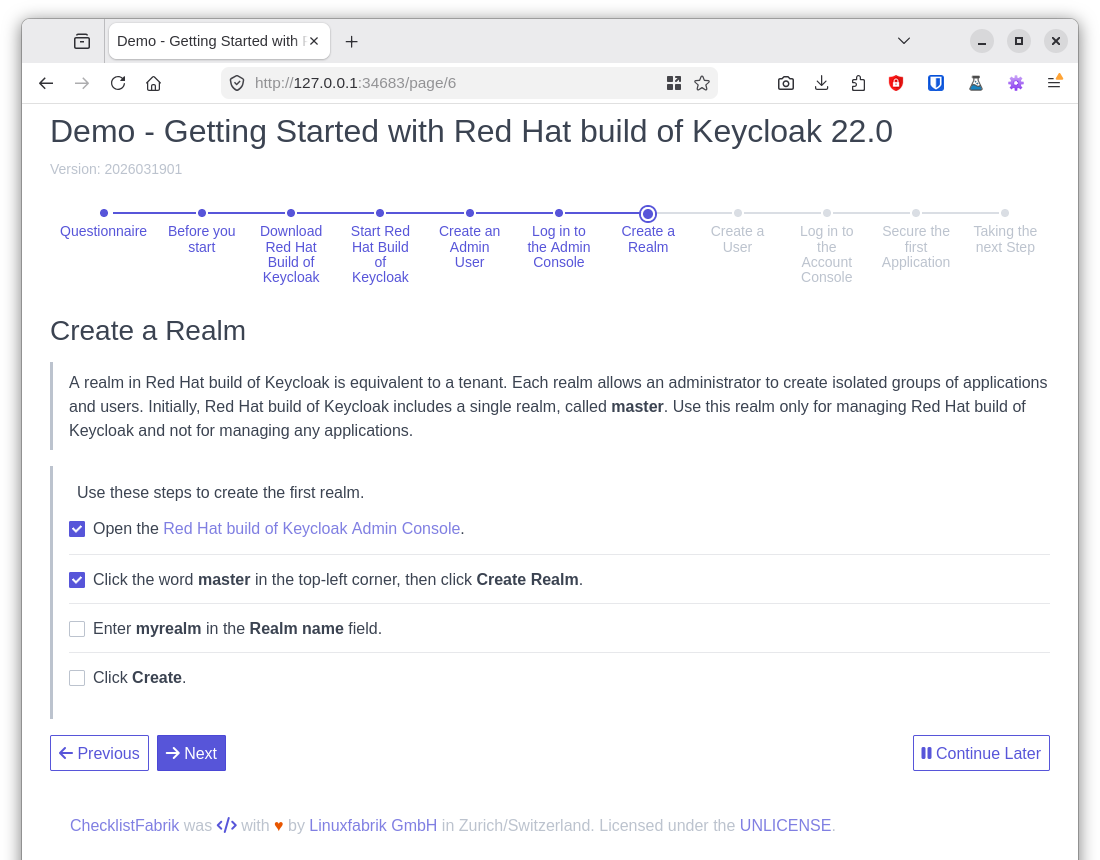
ChecklistFabrik (clf-play) is a Python 3 tool designed to manage your team's recurring checklists, processes, and procedures. It leverages simple yet powerful YAML templates to create interactive HTML forms for an enhanced user experience. Utilize variables and logic through the Jinja templating language to define adaptive procedures, and enjoy seamless progress tracking.
Features
-
Dashboard: Run
clf-playwithout arguments to open a web dashboard that lists all your templates and reports. Start new checklists or re-open previous ones with a single click. -
Dynamic Item Exclusion: Automatically mark pages or tasks as inapplicable using conditional
whenexpressions. (See the User Guide for details.) -
HTML Interface with Built-In Web Server: View and complete checklists via a user-friendly HTML interface powered by a built-in local web server.
-
Jinja Templating Support: Create dynamic checklists using variables and Boolean expressions enabled by the Jinja templating language.
-
Simple YAML Checklists: Define templates and generate reports with plain YAML, making version control with systems such as Git straightforward.
-
Template Includes for Rapid Checklist Generation: Reuse checklist templates to quickly generate multiple checklists from a single file, eliminating the need to start from scratch each time.
Definitions and Terms
-
Checklist:
A series of tasks outlining a procedure, organized into pages. -
Page:
A collection of tasks displayed simultaneously to the user. -
Report:
The output of a checklist run—a YAML file generated from a template. -
Task: A description of work to be performed. Tasks can appear in various forms, such as text fields, checkboxes, radio buttons, or non-interactive text blocks (see the User Guide for details).
-
Checklist Template: A YAML file used to create checklists, intended for reuse rather than direct execution.
-
Task Module: To support an extensible architecture, ChecklistFabrik delegates task rendering to separate, pluggable Python modules. A valid task module is any Python module within the
checklistfabrik.modulesnamespace that provides amainmethod returning a dictionary that includes anhtmlkey with the rendered HTML as its value.
Installation
From PyPI (Recommended)
ChecklistFabrik releases are available from PyPI.
Using pipx:
pipx install checklistfabrik
Using standard pip (user install):
pip install --user checklistfabrik
Please note that on certain Linux systems --break-system-packages
might need to be added when using the system's Python/Pip.
From Git (For Development or Power Users)
Clone this repository and run pip install . at the root of the repo to install ChecklistFabrik.
For development use --editable to install ChecklistFabrik in
Development/Editable Mode.
The usage of a virtual environment is strongly recommended.
Quick Start
A checklist template is a simple YAML file:
title: 'Server Maintenance'
description: 'Monthly maintenance procedure for production servers.'
version: '2025031901'

pages:
  - title: 'Preparation'
    tasks:
      - linuxfabrik.clf.text_input:
          label: 'Ticket number'
          required: true
        fact_name: 'ticket'

      - linuxfabrik.clf.checkbox_input:
          values:
            - label: 'Notify users about the maintenance window'
            - label: 'Create a full backup'
          required: true

  - title: 'Maintenance'
    tasks:
      - linuxfabrik.clf.markdown:
          content: 'Working on ticket **{{ ticket }}**.'

      - linuxfabrik.clf.checkbox_input:
          label: 'Apply updates and reboot'
          required: true
Run it:
# Open the dashboard (auto-detects templates/ and reports/ subdirectories):
clf-play

# Or run a template directly:
clf-play --template server-maintenance.yml
To explore the bundled examples in a dashboard, run:
cd examples/
clf-play
For the full guide on creating checklists—including conditional pages, imports, and all task modules—see the User Guide.
Usage
Open the Dashboard
clf-play
The dashboard scans for *.yml files and lists them as templates and reports:
- If
templates/and/orreports/subdirectories exist in the current working directory, they are used automatically. - If only one of them exists, the other falls back to the current directory.
- If both point to the same directory, all files are shown in both sections — use "Run" to start a new checklist or "View" to re-open an existing one.
You can override this with explicit paths:
clf-play --templates-dir ./my-templates --reports-dir ./my-reports
Create a New Checklist From a Template
clf-play --template path/to/template.yml path/to/report.yml
The destination file may be omitted; in that case:
- If the template specifies a
report_path, then that field is used to generate a new filename. - Otherwise, a generic, timestamped filename is generated.
Re-Open an Existing Checklist
clf-play path/to/existing_checklist.yml
Credits, License
- Authors: Linuxfabrik GmbH, Zurich
- License: The Unlicense, see LICENSE file
Release history Release notifications | RSS feed


Download files
Download the file for your platform. If you're not sure which to choose, learn more about installing packages.
Source Distribution
Built Distribution
Filter files by name, interpreter, ABI, and platform.
If you're not sure about the file name format, learn more about wheel file names.
Copy a direct link to the current filters
File details
Details for the file checklistfabrik-1.4.0.tar.gz.
File metadata
- Download URL: checklistfabrik-1.4.0.tar.gz
- Upload date:
- Size: 408.6 kB
- Tags: Source
- Uploaded using Trusted Publishing? No
- Uploaded via: twine/6.2.0 CPython/3.14.3
File hashes
| Algorithm | Hash digest | |
|---|---|---|
| SHA256 |
87507e97c696f982c3889cf0c2d0ddc897e2faf4b0a0d8c996fe424cf203eb76
|
|
| MD5 |
3fa75d0509055812d380aee2396b5240
|
|
| BLAKE2b-256 |
9c50f4585788876d66a2f9fd17934509592e6c132afa6294f0ee95469e39ad64
|
File details
Details for the file checklistfabrik-1.4.0-py3-none-any.whl.
File metadata
- Download URL: checklistfabrik-1.4.0-py3-none-any.whl
- Upload date:
- Size: 415.9 kB
- Tags: Python 3
- Uploaded using Trusted Publishing? No
- Uploaded via: twine/6.2.0 CPython/3.14.3
File hashes
| Algorithm | Hash digest | |
|---|---|---|
| SHA256 |
065f37a21a511ffb53cc342e7aa85ed399da8ce504d2f9b6ade074300b897aee
|
|
| MD5 |
da74d1462107f2d2542538430abfe1cf
|
|
| BLAKE2b-256 |
064e514de49987a55eaa4377865c43202026089b3e2dd3f20b94e2e6940d3a41
|






