
Fast and differentiable particle accelerator optics simulation for reinforcement learning and optimisation applications.


Project description







Cheetah

Cheetah is a high-speed differentiable beam dynamics code specifically designed to support machine learning applications for particle accelerators.
Its speed helps generate data fast, for example for extremely data-hungry reinforcement learning algorithms, while its differentiability can be used for a variety of applications, including accelerator tuning, system identification and physics-informed prior means for Bayesian optimisation. Its native integration with machine learning toolchains around PyTorch also makes Cheetah an ideal candidate for coupling of physics-based and neural network beam dynamics models that remain fast and differentiable.
To learn more about what Cheetah can do, we recommend reading our PRAB paper. To learn how to use Cheetah, we refer to the example notebooks in the Cheetah documentation. We also have a public Discord server where you can ask questions and get help.
Installation
Simply install Cheetah from PyPI by running the following command.
pip install cheetah-accelerator
How To Use
You can run the following example in Binder by clicking here or on the badge above.
In this example, we create a custom lattice and track a beam through it. We start with some imports.
import cheetah
import torch
Lattices in Cheetah are represented by Segments. A Segment is created as follows.
segment = cheetah.Segment(
    elements=[
        cheetah.Drift(length=torch.tensor(0.175)),
        cheetah.Quadrupole(length=torch.tensor(0.122), name="AREAMQZM1"),
        cheetah.Drift(length=torch.tensor(0.428)),
        cheetah.Quadrupole(length=torch.tensor(0.122), name="AREAMQZM2"),
        cheetah.Drift(length=torch.tensor(0.204)),
        cheetah.VerticalCorrector(length=torch.tensor(0.02), name="AREAMCVM1"),
        cheetah.Drift(length=torch.tensor(0.204)),
        cheetah.Quadrupole(length=torch.tensor(0.122), name="AREAMQZM3"),
        cheetah.Drift(length=torch.tensor(0.179)),
        cheetah.HorizontalCorrector(length=torch.tensor(0.02), name="AREAMCHM1"),
        cheetah.Drift(length=torch.tensor(0.45)),
        cheetah.Screen(name="AREABSCR1"),
    ]
)
Alternatively you can load lattices from Cheetah's variant of LatticeJSON or convert them from an Ocelot cell
lattice_json_segment = cheetah.Segment.from_lattice_json("lattice_file.json")
segment = cheetah.Segment.from_ocelot(cell)
Note that many values must be passed to lattice elements as torch.Tensors. This is because Cheetah uses automatic differentiation to compute the gradient of the beam position at the end of the lattice with respect to the element strengths. This is necessary for gradient-based magnet setting optimisation.
Named lattice elements (i.e. elements that were given a name keyword argument) can be accessed by name and their parameters changed like so.
segment.AREAMQZM1.k1 = torch.tensor(8.2)
segment.AREAMQZM2.k1 = torch.tensor(-14.3)
segment.AREAMCVM1.angle = torch.tensor(9e-5)
segment.AREAMQZM3.k1 = torch.tensor(3.142)
segment.AREAMCHM1.angle = torch.tensor(-1e-4)
Cheetah has two different beam classes: ParticleBeam and ParameterBeam. The former tracks multiple individual macroparticles for high-fidelity results, while the latter tracks the parameters of a particle distribution to save on compute time and memory.
You can create a beam manually by specifying the beam parameters of a Gaussian distributed beam
parameter_beam = cheetah.ParameterBeam.from_twiss(beta_x=torch.tensor(3.14))
particle_beam = cheetah.ParticleBeam.from_twiss(
    beta_x=torch.tensor(3.14), beta_y=torch.tensor(42.0), num_particles=10_000
)
or load beams from other codes and standards, including openPMD, Ocelot and Astra.
astra_beam = cheetah.ParticleBeam.from_astra(
    "../../tests/resources/ACHIP_EA1_2021.1351.001"
)
In order to track a beam through the segment, simply call the segment's track method.
outgoing_beam = segment.track(astra_beam)
You may plot a segment with reference particle traces by calling
segment.plot_overview(incoming=astra_beam, resolution=0.05)
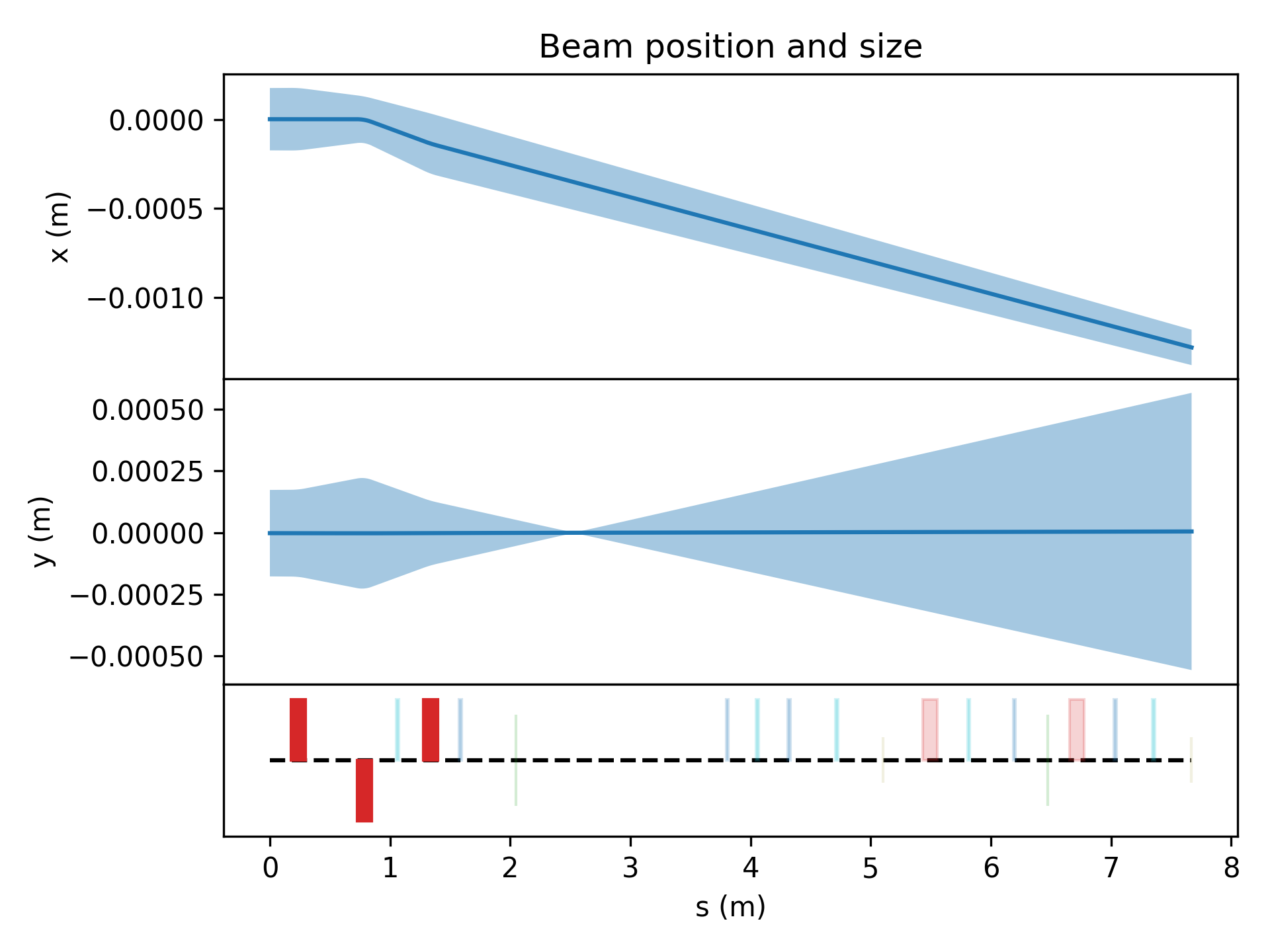
where the keyword argument incoming is the incoming beam represented by the reference particles.
You can also visualise your segment in 3D. Note that this requires that you installed Cheetah as pip install cheetah-accelerator[3d-visualization].
Use mesh.show to view the mesh and mesh.export to export it to a file.
mesh, _ = segment.to_mesh(
    cuteness={cheetah.HorizontalCorrector: 2.0, cheetah.VerticalCorrector: 2.0}
)
mesh.show()

mesh.export(file_obj="my_first_cheetah_mesh.glb", file_type="glb")
For more demos and examples check out the Examples section in the Cheetah documentation and the cheetah-demos repository.
Cite Cheetah
If you use Cheetah, please cite the two papers below.
If you use 3D meshes generated by Cheetah, please respect the licencing terms of the 3D Assets for Particle Accelerators repository.
@article{kaiser2024cheetah,
    title        = {Bridging the gap between machine learning and particle accelerator physics with high-speed, differentiable simulations},
    author       = {Kaiser, Jan and Xu, Chenran and Eichler, Annika and Santamaria Garcia, Andrea},
    year         = 2024,
    month        = {May},
    journal      = {Phys. Rev. Accel. Beams},
    publisher    = {American Physical Society},
    volume       = 27,
    pages        = {054601},
    doi          = {10.1103/PhysRevAccelBeams.27.054601},
    url          = {https://link.aps.org/doi/10.1103/PhysRevAccelBeams.27.054601},
    issue        = 5,
    numpages     = 17
}
@inproceedings{stein2022accelerating,
    title        = {Accelerating Linear Beam Dynamics Simulations for Machine Learning Applications},
    author       = {Stein, Oliver and Kaiser, Jan and Eichler, Annika},
    year         = 2022,
    booktitle    = {Proceedings of the 13th International Particle Accelerator Conference}
}
For Developers
Activate your virtual environment. (Optional)
Install the cheetah package as editable
pip install -e .
We suggest installing pre-commit hooks to automatically conform with the code formatting in commits:
pip install pre-commit
pre-commit install
Acknowledgements
Author Contributions
The following people have contributed to the development of Cheetah:
- Jan Kaiser (@jank324)
- Chenran Xu (@cr-xu)
- Annika Eichler (@AnEichler)
- Andrea Santamaria Garcia (@ansantam)
- Christian Hespe (@Hespe)
- Oliver Stein (@OliStein523)
- Grégoire Charleux (@greglenerd)
- Remi Lehe (@RemiLehe)
- Axel Huebl (@ax3l)
- Juan Pablo Gonzalez-Aguilera (@jp-ga)
- Ryan Roussel (@roussel-ryan)
- Auralee Edelen (@lee-edelen)
- Zihan Zhu (@zihan-zh)
- Christian Contreras-Campana (@chrisjcc)
- Sucheth Shenoy (@SuchethShenoy)
- Amelia Pollard (@amylizzle)
- Julian Gethmann (@smartsammler)
Institutions
The development of Cheetah is a joint effort by members of the following institutions:









Funding
The work to develop Cheetah has in part been funded by the IVF project InternLabs-0011 (HIR3X) and the Initiative and Networking Fund by the Helmholtz Association (Autonomous Accelerator, ZT-I-PF-5-6). Further, we gratefully acknowledge funding by the EuXFEL R&D project "RP-513: Learning Based Methods". This work is also supported by the U.S. Department of Energy, Office of Science under Contract No. DE-AC02-76SF00515, the Center for Bright Beams, NSF Award No. PHY-1549132, and the U.S. DOE Office of Science-Basic Energy Sciences, under Contract No. DE-AC02-06CH11357. In addition, we acknowledge support from DESY (Hamburg, Germany) and KIT (Karlsruhe, Germany), members of the Helmholtz Association HGF as well as from the Hamburg Open Online University (HOOU) and the Science and Technology Facilities Council (UK).
Release history Release notifications | RSS feed


Download files
Download the file for your platform. If you're not sure which to choose, learn more about installing packages.
Source Distribution
Built Distribution
Filter files by name, interpreter, ABI, and platform.
If you're not sure about the file name format, learn more about wheel file names.
Copy a direct link to the current filters
File details
Details for the file cheetah_accelerator-0.8.0.tar.gz.
File metadata
- Download URL: cheetah_accelerator-0.8.0.tar.gz
- Upload date:
- Size: 149.7 kB
- Tags: Source
- Uploaded using Trusted Publishing? No
- Uploaded via: twine/6.2.0 CPython/3.14.0
File hashes
| Algorithm | Hash digest | |
|---|---|---|
| SHA256 |
f51be4ba32fda899566c87a11c523c66d96cbedd530f0e30a29428d791eebc2d
|
|
| MD5 |
bea57529aaed1855f98a52b02837ddee
|
|
| BLAKE2b-256 |
691e59aa012294d4fe60426bccd50970595721a4712f33242576b266e50fa5a2
|
File details
Details for the file cheetah_accelerator-0.8.0-py3-none-any.whl.
File metadata
- Download URL: cheetah_accelerator-0.8.0-py3-none-any.whl
- Upload date:
- Size: 135.0 kB
- Tags: Python 3
- Uploaded using Trusted Publishing? No
- Uploaded via: twine/6.2.0 CPython/3.14.0
File hashes
| Algorithm | Hash digest | |
|---|---|---|
| SHA256 |
9c6ab726ec6b70ce111ed7a6c9bf4747104616ace76ca9fc6931c93074d69868
|
|
| MD5 |
b77a27f65e7cc0635b71129c3fc3743c
|
|
| BLAKE2b-256 |
d43e78b8919e36036d39a38927aed8d8d39ad4feff520a89795fec483108062c
|






