
English | 中文 | 한국어 | 日本語 | Français | Deutsch | Español | Português

CheetahClaws: A Fast and Easy-to-Use Agent Harness Infrastructure for Long-Horizon, Multi-Model, and Tool-Using AI Systems
Website
·
Scaling the Harness
·
Issue
·

Quick Install
pip install cheetahclaws
Then just run:
cheetahclaws # start chatting!
Other install methods: one-line install script | install from source | uv install | run from source install | full install details | docker install
🖥️ Prefer a native app? A desktop build (Electron) wraps the full chat UI in a window — no terminal needed. See
desktop/.
🔥🔥🔥 News (Pacific Time)
- July 10, 2026 (v3.5.85): REPL quality-of-life. Live typing-time completion now works on every install —
prompt_toolkitis a core dependency (no[autosuggest]extra needed, sopip install/uv tool installboth get it out of the box);/modelgained a Tab-completion picker (provider/model + a two-level LiteLLM tree, PR #166); and sessions now autosave every turn (atomic write +fsync) so a crash or power-loss mid-conversation stays recoverable via/resume— the loud daily/history save still happens once on exit. Details - July 9, 2026: Official Docker image + one-command publish. Pre-built image on Docker Hub (
docker pull chauncygu/cheetahclaws) so you can run the Web UI without cloning; fixes a first-runPermissionErrorby pre-creating the.cheetahclaws/workspacedirs owned by the non-root user, makes the composeimageoverridable viaCHEETAH_IMAGE, and addsscripts/docker-publish.sh(auto-reads the version, multi/single-arch). New docs sections: Pull from Docker Hub and Interactive setup / CLI mode. Details - July 8, 2026: New
/workspacecommand manages isolated working directories under~/.cheetahclaws/workspaces(list/switch/default/create/delete) (PR #162); startup auto-switching is opt-in viaworkspace_auto(off by default, so launching in a project directory is unchanged), anddefaultis now a sticky key separate from last-used. Details - July 6, 2026 (v3.5.84):
/imagenow enriches the prompt with local OCR text so even non-vision models can act on clipboard screenshots (error dumps, code, tables); runs only whenpytesseract/tesseractare installed and is fully opt-out viaCHEETAHCLAWS_IMAGE_OCR=0. Details - June 28, 2026: New
accept-editspermission mode (auto-run file edits, still ask before non-allow-listed Bash) — the middle ground betweenautoandaccept-all; also exposes the existingplanmode in/permissionsand corrects the prompt's misleadingautodescription. Details - June 28, 2026: Memory staleness now anchors to a
last_verifieddate instead of file mtime, so reading a memory can't fake-refresh a stale one (PR #150); newMemoryVerifytool is the only thing that resets the clock, the prompt tells the agent to call it after re-checking, and the injected memory manifest ranks by verified recency. Details - June 23, 2026 (v3.5.83): Docs slimmed (README news → one line each, Atlas 59-model list → usage.md, FAQ trimmed) and a native desktop app (Electron shell wrapping the web UI) added under
desktop/; version-string format unified tov3.5.x. Details - June 16, 2026: All internal modules now live under a single
cheetahclawspackage (from cheetahclaws import kernel), removingsys.pathname-collision crashes at startup — breaking only if you import internals directly; full suite green (2449 passed). Details - June 6, 2026 (v3.5.82): macOS install now reliably puts
cheetahclawson PATH, and local Ollama models that emit tool calls as text now actually execute them (two fixes from #131). Details - June 5, 2026: User-controllable token/cost budgets —
/budget $5//budget daily $20cap spend per session or day, enforced before each model call. Details - June 5, 2026: Adaptive Markdown streaming keeps live output correct on every device by auto-selecting a per-device tier; also adds a visual
/contextgrid and 1M context fordeepseek-v4-flash. Details
For more news, see here.
Sponsor

CheetahClaws
CheetahClaws: A Fast and Easy-to-Use Python native Agent Harness Infrastructure, Supporting Any Model, such as Claude, GPT, Gemini, Kimi, Qwen, Zhipu, DeepSeek, MiniMax, and local open-source models via Ollama or any OpenAI-compatible endpoint.
Content
- Why CheetahClaws
- CheetahClaws vs OpenClaw
- Features
- Supported Models
- Installation
- Usage: Closed-Source API Models
- Usage: Open-Source Models (Local)
- Model Name Format
- Trading Agent
- Web UI
- Documentation (guides for all features)
- Contributing · FAQ · Citation
Demos
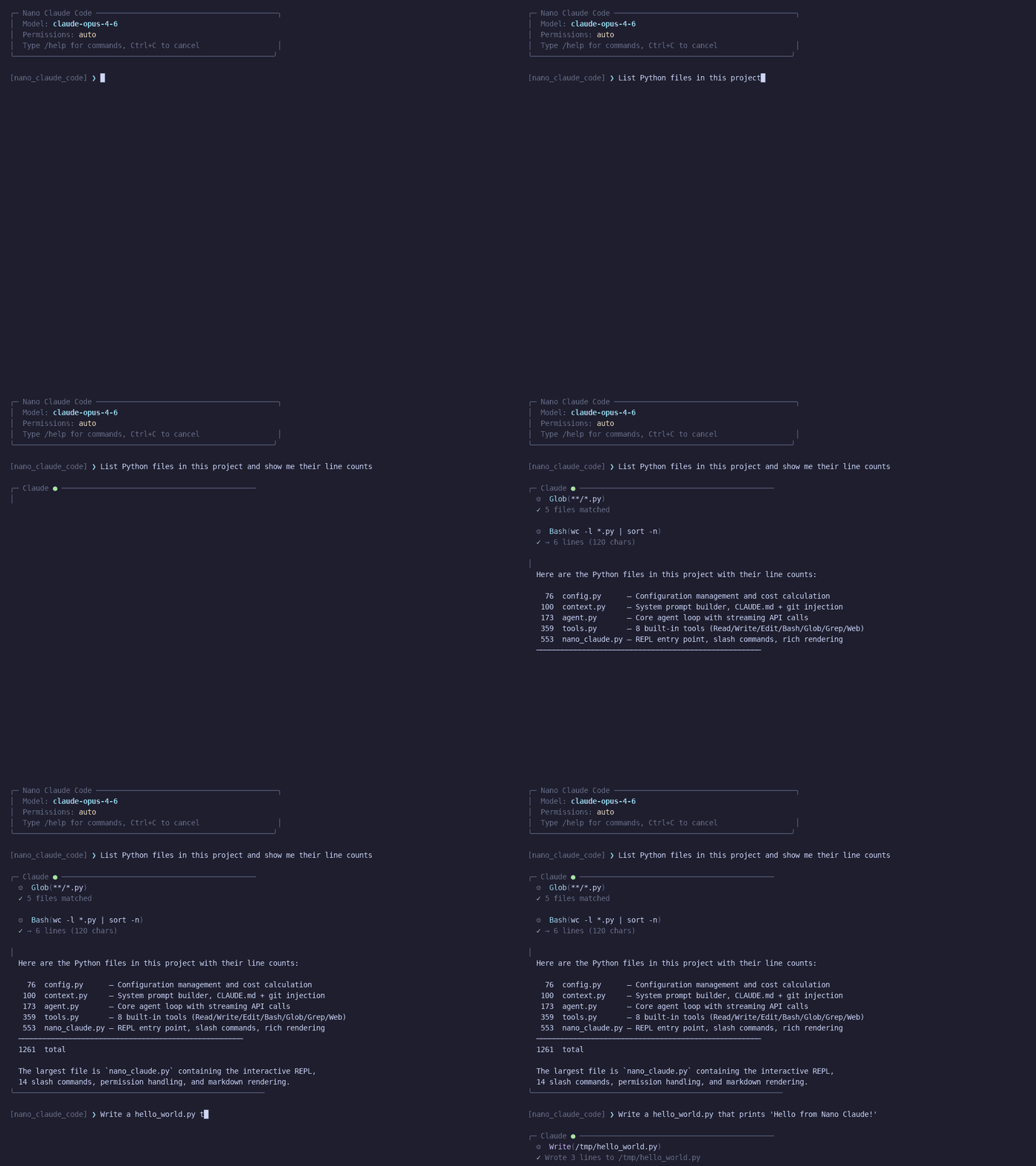
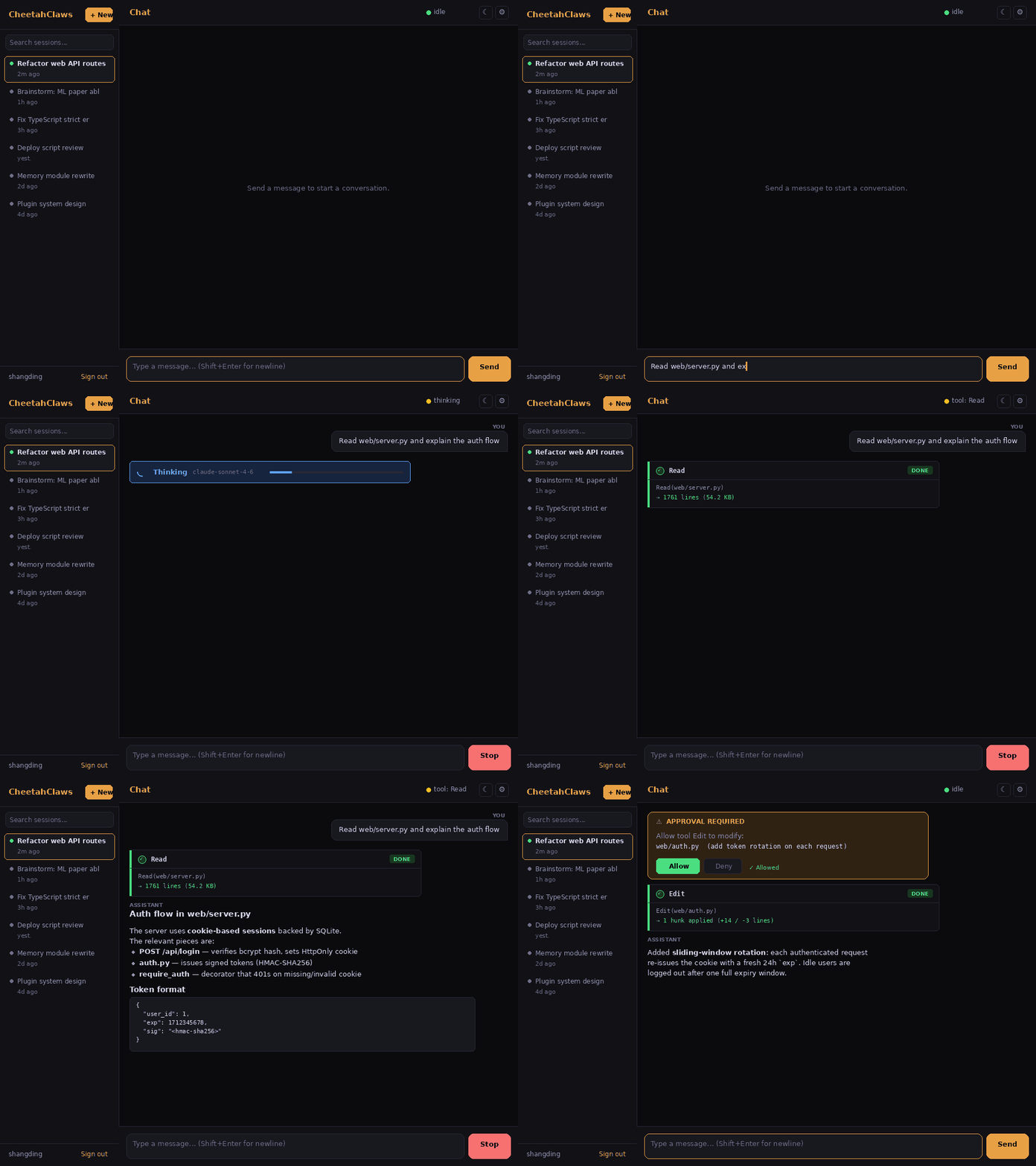
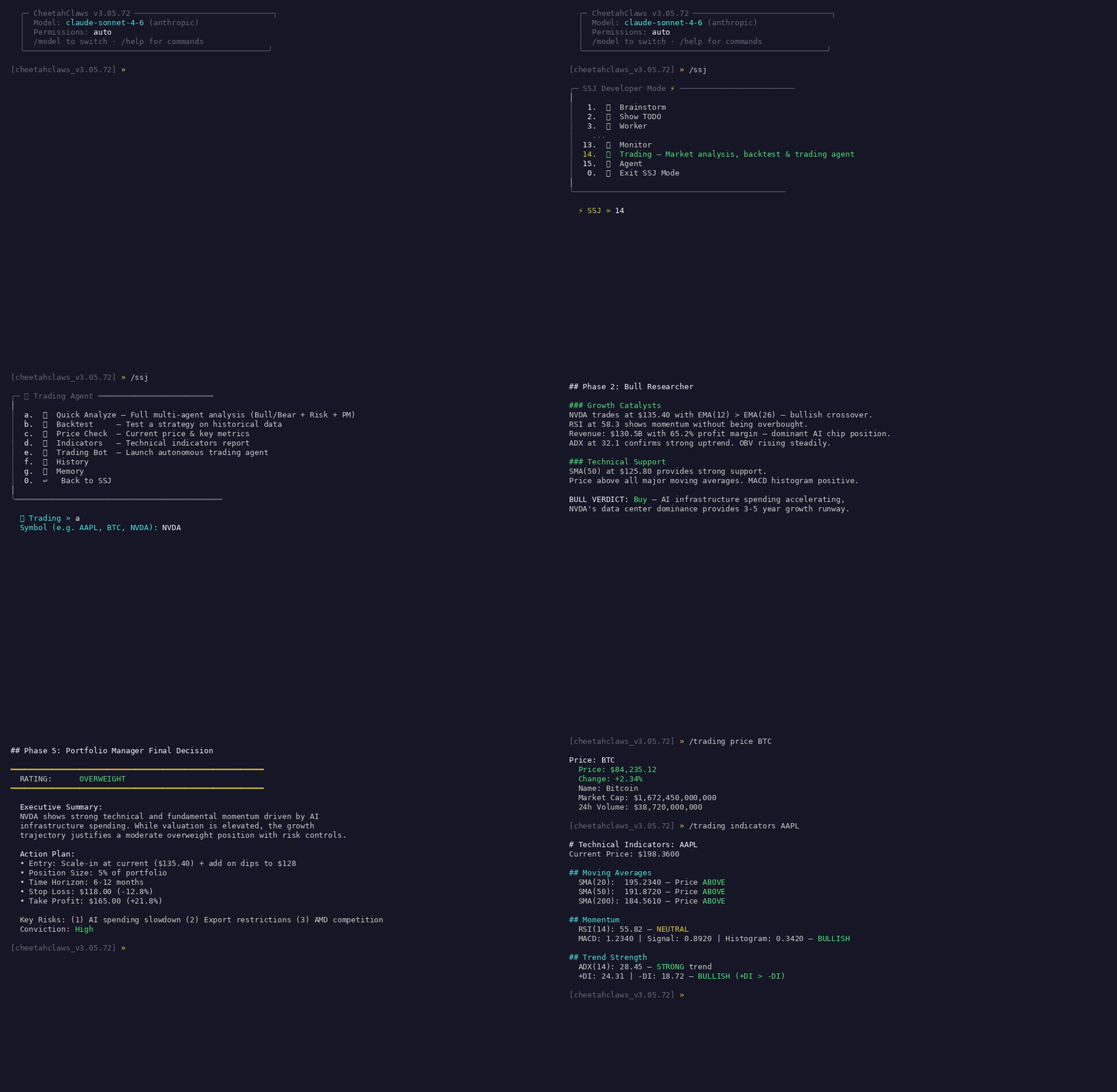
More animated demos (code review,
/research,/brainstorm,/lab, Telegram/WeChat/Slack bridges) live indocs/media/.
Why CheetahClaws
Claude Code is a powerful, production-grade AI coding assistant — but its source is a compiled ~12 MB TypeScript/Node bundle (~1,300 files, ~283K lines), tightly coupled to the Anthropic API, hard to modify, and impossible to run against a local or alternative model.
CheetahClaws reimplements the same core loop in ~90K lines of readable Python — keeping what you need, dropping what you don't, and adding multi-provider + local-model support. Full comparison: docs/guides/comparison.md.
| Dimension | Claude Code (TypeScript) | CheetahClaws (Python) |
|---|---|---|
| Language | TypeScript + React/Ink | Python 3.8+ |
| Source files / LoC | ~1,332 files / ~283K | ~315 files / ~90K (core; ~127K with tests) |
| Built-in tools / commands | 44+ / 88 | 27 / 50+ |
| Model providers | Anthropic only | 8+ (Anthropic · OpenAI · Gemini · Kimi · Qwen · DeepSeek · MiniMax · …) |
| Local models | No | Yes — Ollama, LM Studio, vLLM, any OpenAI-compatible endpoint |
| Build step | Yes (Bun + esbuild) | No — python cheetahclaws.py |
| Extensibility | Closed (compile-time) | Open — register_tool() at runtime, Markdown skills, git plugins, MCP |
| Voice input | Proprietary WebSocket (OAuth) | Local Whisper / OpenAI — works offline |
Where Claude Code wins: richer React/Ink UI, more built-in tools, enterprise features (MDM, team permission sync, OAuth/keychain), AI-driven memory extraction, single-binary production reliability.
Where CheetahClaws wins: any-model switching (--model//model, no recompile) incl. full local/offline support; a readable agent loop in one file (agent.py, ~740 lines); zero build; runtime tool registration + MCP + git plugins + Markdown skills; task dependency graph (blocks/blocked_by); two-layer context compression; offline voice; cloud session sync; bridges to Telegram/WeChat/Slack/QQ.
Who it's for: developers who want a local/non-Anthropic coding assistant, researchers studying how agentic assistants work, and teams who need a hackable baseline — without a Node.js build chain.
CheetahClaws vs OpenClaw
OpenClaw is another popular open-source assistant (TypeScript/Node). The two have different primary goals — OpenClaw is a personal life-assistant across messaging channels; CheetahClaws is a developer/coding tool.
| Dimension | OpenClaw (TypeScript) | CheetahClaws (Python) |
|---|---|---|
| Lines of code | ~245K (~10,349 files) | ~90K core (~315 files) |
| Primary focus | Personal assistant across channels | AI coding assistant / dev tool |
| Architecture | Always-on Gateway daemon + apps | Zero-install terminal REPL |
| Messaging channels | 20+ (WhatsApp · Signal · iMessage · Discord · Matrix · …) | Terminal + Telegram · WeChat · Slack · QQ bridges |
| Local / offline models | Limited | Full — Ollama · vLLM · LM Studio · any OpenAI-compatible |
| Code editing tools | Browser control, Canvas | Read · Write · Edit · Bash · Glob · Grep · NotebookEdit · GetDiagnostics |
| Mobile / Live Canvas | Yes (menu bar + iOS/Android, A2UI) | — |
| MCP support | — | Yes (stdio/SSE/HTTP) |
| Hackability | 245K lines, harder to modify | ~90K lines — agent loop in one file |
| If you want… | Use |
|---|---|
| A personal assistant on WhatsApp/Signal/Discord, mobile-first, browser automation + Canvas | OpenClaw |
| An AI coding assistant in your terminal, full offline/local models, multi-provider switching, source you can read in an afternoon | CheetahClaws |
Full comparison — both sides' wins + key design differences (agent loop, tool registration, context compression, memory): docs/guides/comparison.md.
Features
| Feature | Details |
|---|---|
| Multi-provider | Anthropic · OpenAI · Gemini · Kimi · Qwen · Zhipu · DeepSeek · MiniMax · Ollama · LM Studio · Custom endpoint |
| Agent loop | Streaming API + automatic tool-use loop; the whole loop is in agent.py |
| 28 built-in tools | Read · Write · Edit · Bash · Glob · Grep · WebFetch · WebSearch · NotebookEdit · GetDiagnostics · Memory* · Agent/SendMessage · Skill · AskUserQuestion · Task* · SleepTimer · EnterPlanMode/ExitPlanMode · (MCP + plugin tools auto-added) |
| MCP integration | Connect any MCP server (stdio/SSE/HTTP); tools auto-registered — see extensions guide |
| Plugin system | Install/enable/update plugins from git URLs or local paths; multi-scope; recommendation engine |
| Task management | TaskCreate/Update/Get/List, sequential IDs, dependency edges, persisted to .cheetahclaws/tasks.json |
| Context compression | Four cooperating layers — dynamic max_tokens cap, per-model context-window registry, two-layer snip + AI summarize at 70%, and auto-fanout for oversized tool outputs. Details |
| Persistent memory | Dual-scope (user + project), 4 types, confidence/source metadata, conflict detection, recency-weighted search, /memory consolidate. Verification-anchored staleness — freshness tracks a last_verified date (not file mtime), so reading a memory can't fake-refresh it; only MemoryVerify resets the clock. Details |
| Multi-agent | Spawn typed sub-agents (coder/reviewer/researcher/…), git-worktree isolation, background mode |
| Permission system | auto / accept-edits / accept-all / manual / plan modes (accept-edits = auto-run edits, still ask for other Bash; hard denylist blocks host-destroying commands in every mode) |
| Checkpoints & plan mode | Auto-snapshot conversation + files each turn (/checkpoint, /rewind); /plan read-only analysis mode |
| Slash commands & themes | 50+ slash commands with Tab-complete; /theme offers 15 curated palettes |
| Brainstorm → Worker | /brainstorm runs an N-persona debate → todo_list.txt; /worker auto-implements the pending tasks |
| SSJ Developer Mode | /ssj — persistent power menu chaining Brainstorm, Worker, Review, Trading, Agent, Video/TTS, Monitor, etc. |
| Trading agent | /trading multi-agent analysis, backtesting, paper-trade calibration, MV portfolios. Guide |
| Monitor | /monitor subscribes to AI-monitored topics on a schedule (arxiv / stock / crypto / news / custom), pushes reports to bridges/console |
| Research (multi-source) | /research fans out to 20 sources with attention heat table, entity extraction, trend sparkline, comparison mode. Guide |
| Autonomous agents | /agent background loops from Markdown templates; iteration summaries pushed via bridge; stagnation-stop guard |
| Bridges + remote control | Telegram · WeChat · Slack · QQ — chat round-trip, slash passthrough, per-bridge job queue (!jobs/!retry/!cancel). Guide |
| Voice / Vision / Video / TTS | Offline Whisper /voice; /image clipboard vision (local + cloud); /video + /tts content factories. Guide |
| Web UI | --web — multi-user browser chat + PTY terminal. Guide |
| More | Tmux integration · !cmd shell escape · proactive monitoring · 3×Ctrl+C force-quit · crash-safe session autosave (every turn, fsync + atomic write; /resume to recover) · /cloudsave GitHub-Gist sync · cost tracking · --print non-interactive mode |
Full feature reference — every row above with complete detail (context-compression layers, auto-fanout, 15 themes, the full Trading/Research/Agents writeups, …): docs/guides/features.md.
Supported Models
Closed-Source (API)
| Provider | Example models | Context | API Key Env |
|---|---|---|---|
| Anthropic | claude-opus-4-6 · claude-sonnet-4-6 · claude-haiku-4-5-20251001 |
200k | ANTHROPIC_API_KEY |
| OpenAI | gpt-4o · gpt-4.1 · gpt-5 · o3 · o4-mini |
128–200k | OPENAI_API_KEY |
gemini-2.5-pro · gemini-2.0-flash · gemini-1.5-pro |
1–2M | GEMINI_API_KEY |
|
| Moonshot (Kimi) | moonshot-v1-8k / -32k / -128k |
8–128k | MOONSHOT_API_KEY |
| Alibaba (Qwen) | qwen-max · qwen-plus · qwen-turbo · qwq-32b |
32k–1M | DASHSCOPE_API_KEY |
| Zhipu (GLM) | glm-4-plus · glm-4 · glm-4-flash (free tier) |
128k | ZHIPU_API_KEY |
| DeepSeek | deepseek-chat · deepseek-reasoner |
64k | DEEPSEEK_API_KEY |
| MiniMax | MiniMax-Text-01 · MiniMax-VL-01 · abab6.5s-chat |
256k–1M | MINIMAX_API_KEY |
| AWS Bedrock / Azure / Vertex (via litellm) | litellm/<provider>/<model> |
varies | provider-specific |
litellm/adapter: routes to 100+ providers behind one SDK — mainly for upstreams with awkward auth (Bedrock SigV4, Azure deployment routing, Vertex service-account JWTs). For plain OpenAI-shaped endpoints, prefer the zero-dependencycustom/adapter. Install withpip install ".[litellm]". See recipes.md.
Open-Source (Local via Ollama)
| Model | Size | Strengths | Pull |
|---|---|---|---|
qwen2.5-coder |
7B / 32B | Best for coding | ollama pull qwen2.5-coder |
llama3.3 / llama3.2 |
70B / 3B–11B | General purpose | ollama pull llama3.3 |
deepseek-r1 |
7B–70B | Reasoning, math | ollama pull deepseek-r1 |
mistral / mixtral |
7B / 8x7B | Fast / strong MoE | ollama pull mistral |
phi4 · gemma3 · codellama |
14B · 4–27B · 7–34B | Reasoning / open / code | ollama pull phi4 |
llava · llama3.2-vision |
7–13B · 11B | Vision | ollama pull llava |
Tool calling needs a function-calling model — recommended:
qwen2.5-coder,llama3.3,mistral,phi4. Models that emit tool calls as text (<tool_call>…</tool_call>,[TOOL_CALLS]…) instead of Ollama's structured field are auto-recovered, so they execute tools out of the box rather than just chatting about it. Reasoning models (deepseek-r1,qwen3,gemma4) stream native<think>blocks; enable with/verbose+/thinking.
Installation
pip install cheetahclaws
Works on Linux, macOS, WSL2, and Android (Termux) (Python 3.10+). First run guides you through provider + API-key setup; re-run anytime with cheetahclaws --setup.
Windows: native Windows is not supported — use WSL2. Android/Termux:
pkg install python git && pip install cheetahclaws.
Alternative: one-line install script
curl -fsSL https://raw.githubusercontent.com/SafeRL-Lab/cheetahclaws/main/scripts/install.sh | bash
After installation, reload your shell so cheetahclaws is on PATH:
source ~/.zshrc     # macOS
# or: source ~/.bashrc   # Linux
cheetahclaws        # start chatting!
Alternative: install with pip from source code
git clone https://github.com/SafeRL-Lab/cheetahclaws.git
cd cheetahclaws
pip install .                       # then: cheetahclaws
git pull && pip install --force-reinstall .   # to update
Optional extras
pip install ".[voice]"      # voice input (sounddevice + faster-whisper)
pip install ".[vision]"     # clipboard image capture (Pillow)
# note: typing-time completion (prompt_toolkit) is now built in — no extra needed.
#       the [autosuggest] extra is kept as a no-op alias for backward compat.
pip install ".[browser]"    # headless browser (playwright); then: playwright install chromium
pip install ".[files]"      # PDF + Excel reading (pymupdf, openpyxl)
pip install ".[ocr]"        # image OCR (pytesseract)
pip install ".[trading]"    # trading agent (yfinance, rank-bm25)
pip install ".[qq]"         # QQ bot bridge (qq-botpy)
pip install ".[litellm]"    # AWS Bedrock / Azure / Vertex auth via litellm
pip install ".[all]"        # everything above
Alternative: install with uv
git clone https://github.com/SafeRL-Lab/cheetahclaws.git && cd cheetahclaws
uv tool install ".[all]"            # minimal: uv tool install .
uv tool install ".[all]" --reinstall   # update   ·   uv tool uninstall cheetahclaws
Alternative: run directly from source (no install)
git clone https://github.com/SafeRL-Lab/cheetahclaws.git && cd cheetahclaws
pip install -r requirements.txt
python cheetahclaws.py              # changes take effect immediately
Usage: Closed-Source API Models
Every cloud provider follows the same pattern — export its API key (see the Supported Models table for the env-var name), then select a model:
export ANTHROPIC_API_KEY=sk-ant-...     # or OPENAI_API_KEY / GEMINI_API_KEY / DEEPSEEK_API_KEY / …
cheetahclaws                            # default model
cheetahclaws --model gpt-4o             # pick any model
cheetahclaws --model deepseek-chat --thinking --verbose
Provider get-key pages: Anthropic · OpenAI · Gemini · Kimi · Qwen · Zhipu · DeepSeek · MiniMax.
AWS Bedrock / Azure / Vertex use the litellm/<provider>/<model> form (pip install ".[litellm]") — full env-var recipes in recipes.md.
Full per-provider guide — every provider's get-key page + example model commands, plus Bedrock/Azure/Vertex env-var recipes: docs/guides/usage.md.
Usage: Open-Source Models (Local)
Ollama (recommended)
curl -fsSL https://ollama.com/install.sh | sh   # install
ollama pull qwen2.5-coder                        # pull a tool-calling model
ollama serve                                     # http://localhost:11434 (auto-starts on macOS)
cheetahclaws --model ollama/qwen2.5-coder        # run (use `ollama list` to see local models)
LM Studio
Download LM Studio, grab a GGUF model, start its Local Server (port 1234), then:
cheetahclaws --model lmstudio/<model-name>
vLLM / self-hosted OpenAI-compatible server
python -m vllm.entrypoints.openai.api_server \
    --model Qwen/Qwen2.5-Coder-32B-Instruct --port 8000 \
    --enable-auto-tool-choice --tool-call-parser hermes

export CUSTOM_BASE_URL=http://localhost:8000/v1
export CUSTOM_API_KEY=token-abc123      # any non-empty string if the server has no auth
cheetahclaws --model custom/Qwen2.5-Coder-32B-Instruct
The name after custom/ must match the server's --served-model-name. For the Web UI, --web --model custom/<name> persists the model before the server starts. Remote server? Point CUSTOM_BASE_URL at its IP.
Full local-model guide — Ollama step-by-step, LM Studio, vLLM + Web UI: docs/guides/usage.md.
Atlas Cloud (hosted, OpenAI-compatible)
🎁 Atlas Cloud serves DeepSeek, Qwen, GLM, Kimi, MiniMax and more behind one OpenAI-compatible endpoint, via the zero-dependency
custom/adapter:
export CUSTOM_BASE_URL=https://api.atlascloud.ai/v1
export CUSTOM_API_KEY=your_atlascloud_api_key
cheetahclaws --model custom/deepseek-ai/deepseek-v4-pro
Any Atlas chat model id works the same way — full list of all 59 models: docs/guides/usage.md.
Model Name Format
Three equivalent forms are accepted:
cheetahclaws --model gpt-4o                  # 1. auto-detect by prefix
cheetahclaws --model ollama/qwen2.5-coder    # 2. provider/model
cheetahclaws --model kimi:moonshot-v1-32k    # 3. provider:model
Auto-detection by prefix: claude-→anthropic · gpt-/o1/o3→openai · gemini-→gemini · moonshot-/kimi-→kimi · qwen/qwq-→qwen · glm-→zhipu · deepseek-→deepseek · MiniMax-/abab→minimax · llama/mistral/phi/gemma/mixtral/codellama→ollama.
Tab-completion (PR #166): inside the REPL, type /model and press Tab for a provider/model picker — one default per provider, plus a two-level litellm/<backend>/<model> tree you can drill into. Completions appear as you type when prompt_toolkit is present (now a core dependency, so always); otherwise readline serves them on Tab.
Trading Agent
A built-in AI trading analysis + backtesting module (pip install "cheetahclaws[trading]").
/trading analyze NVDA            # 5-phase pipeline: data → Bull/Bear debate → Judge → Risk panel → PM decision
/trading backtest AAPL dual_ma   # backtest a strategy (or let AI pick); Sharpe/Sortino/Calmar/drawdown/win-rate
4 strategies (dual_ma, rsi_mean_reversion, bollinger_breakout, macd_crossover), BM25 memory of past situations, US/HK/A-share + crypto markets with no-API-key data fallbacks. Guided sub-menu via /ssj → Trading.
Full guide: docs/guides/trading.md
Web UI
A production-ready browser interface — real user accounts (bcrypt + JWT), SQLite-backed history, ops endpoints — served by Python stdlib + ten vanilla-JS modules (no Node.js / React / build step).
pip install 'cheetahclaws[web]'
cheetahclaws --web                  # auto-picks a free port (tries 8080)
cheetahclaws --web --port 9000 --host 0.0.0.0   # bind explicitly / open to LAN
cheetahclaws --web --no-auth        # skip login (localhost dev only)
Open http://localhost:<port>/chat — first account becomes admin. Includes streaming chat (WS) + SSE slash commands, persistent sessions with folders/search/Markdown export, tool cards, inline permission approval, settings panel, light/dark/system theme, and /health + /metrics endpoints. A full xterm.js PTY terminal lives at / (100% CLI parity).
Full guide: docs/guides/web-ui.md · Docker / home server: docs/guides/docker.md · Native desktop app: desktop/README.md
Documentation
Detailed guides live in docs/guides/ to keep this README focused:
| Guide | What's inside |
|---|---|
| Features (full) | The complete feature table — every row with full detail (context compression, auto-fanout, themes, Trading/Research/Agents writeups) |
| Usage (all providers) | Per-provider setup + example commands: Anthropic/OpenAI/Gemini/Kimi/Qwen/Zhipu/DeepSeek/MiniMax/litellm, and local Ollama/LM Studio/vLLM |
| Web UI | Chat UI, PTY terminal, API endpoints, settings, auth, SSE streaming |
| Desktop app | Native-window shell (Electron) that wraps the local web UI; build a self-contained .dmg/.exe/.AppImage |
| Docker / Home Server | Dockerfile + compose: web UI + bridges in one container, host Ollama, workspace mount |
| Reference | CLI, 50+ commands, 33 built-in tools, session search, error classification, tool cache |
| Extensions | Memory, Skills, Sub-Agents, MCP servers, Plugins, Monitor, Autonomous Agents |
| Bridges | Telegram, WeChat, Slack, QQ setup + remote control from your phone |
| Security & env vars | Threat model, CHEETAHCLAWS_* vars, bot-token handling, Bash denylist, fs sandbox, CSRF |
| Voice & Video | Offline Whisper voice input, Video factory, TTS factory |
| Trading | Multi-agent analysis, backtesting, BM25 memory, data fallbacks, SSJ integration |
| Advanced | Brainstorm, SSJ, Tmux, proactive monitoring, checkpoints, plan mode, sessions, cloud sync |
| Comparison | Full positioning vs Claude Code and OpenClaw — at-a-glance tables, both sides' wins, key design differences |
| Recipes | 12 step-by-step examples: code review, remote control, research, bug fix, browse, email, PDF/Excel |
| FAQ | The full FAQ (MCP, models/providers, CLI/scripting, voice) |
| Plugin Authoring · Example | Build a plugin: tools, commands, skills, MCP; starter template |
| Research Lab | /lab start <topic> — autonomous multi-agent paper writing with sandboxed experiments |
| Agent OS · RFC index | The kernel/ layer + all design notes (RFC 0001-0032) |
| Contributing | Project structure, architecture guide, PR checklist |
Quick Reference
cheetahclaws [OPTIONS] [PROMPT]

  -p, --print          Non-interactive: run prompt and exit
  -m, --model MODEL    Override model (e.g. gpt-4o, ollama/llama3.3)
  --accept-all         Auto-approve all operations (no permission prompts)
  --verbose            Show thinking blocks and per-turn token counts
  --show-tools         Show each tool call instead of a per-turn summary
                       (alias: --no-quiet; compact summary is the default)
  --thinking           Enable Extended Thinking (Claude only)
  --web                Start web server (Chat UI + PTY terminal in browser)
  --port / --host      Web server port / host (default 8080 / 127.0.0.1)
  --no-auth            Disable web password (local use only)
  --version / -h       Print version / show help
cheetahclaws                                          # interactive REPL, default model
cheetahclaws -m ollama/deepseek-r1:32b                # pick a model
cheetahclaws -p "Write a Python fibonacci function"   # non-interactive
cheetahclaws --accept-all -p "Init a pyproject.toml"  # CI / automation
cheetahclaws --web --port 8008 --no-auth              # browser chat + terminal
See the Reference Guide for all 50+ slash commands, tools, and config options.
Contributing
We welcome contributions! See the Contributing Guide for architecture, conventions, and the PR checklist.
git clone https://github.com/SafeRL-Lab/cheetahclaws.git && cd cheetahclaws
pip install -r requirements.txt && pip install pytest
python -m pytest tests/ -x -q       # 341+ tests should pass
python cheetahclaws.py              # run the REPL
Building a plugin? See the Plugin Authoring Guide and the example template.
FAQ
A few common questions — the full FAQ is in docs/guides/faq.md.
Q: How do I add an MCP server?
/mcp add git uvx mcp-server-git # or create .mcp.json in your project, then /mcp reload
Q: Tool calls don't work with my local Ollama model (it just keeps describing what it would do instead of doing it).
CheetahClaws now auto-recovers tool calls that local models emit as text (<tool_call>…</tool_call>, [TOOL_CALLS]…) instead of in Ollama's structured field, so most function-calling models execute tools out of the box. For best reliability use a tool-calling model — qwen2.5-coder, llama3.3, mistral, or phi4. Small models are also weaker at agentic tool use than cloud models, so expect them to need clearer, more concrete prompts.
Q: After installing on macOS, cheetahclaws: command not found and no ~/.zshrc was created.
Reload your shell first: source ~/.zshrc (zsh) or source ~/.bash_profile (bash). The installer creates ~/.zshrc if missing, symlinks the binary into ~/.local/bin, and adds it to PATH. If you installed an older version, either re-run the installer or add this line yourself: echo 'export PATH="$HOME/.local/bin:$PATH"' >> ~/.zshrc && source ~/.zshrc.
More — remote vLLM, API cost (/cost), multiple keys per session, default model across projects, piping input, voice setup, garbled-text fixes — are all answered in docs/guides/faq.md.
Citation
If you find the repository useful, please cite the study
@article{gu2026model,
  title={From Model Scaling to System Scaling: Scaling the Harness in Agentic AI},
  author={Gu, Shangding},
  journal={arXiv preprint arXiv:2605.26112},
  year={2026}
}

@article{cheetahclaws2026,
  title={CheetahClaws: Agent Harness Infrastructure for Long-Horizon, Multi-Model, and Tool-Using AI Systems},
  author={CheetahClaws Team},
  journal={github},
  year={2026}
}
Thanks to all contributors:









1 maintainer

Download files
Download the file for your platform. If you're not sure which to choose, learn more about installing packages.
Source Distribution
Built Distribution
Filter files by name, interpreter, ABI, and platform.
If you're not sure about the file name format, learn more about wheel file names.
Copy a direct link to the current filters
File details
Details for the file cheetahclaws-3.5.85.tar.gz.
File metadata
- Download URL: cheetahclaws-3.5.85.tar.gz
- Upload date:
- Size: 1.4 MB
- Tags: Source
- Uploaded using Trusted Publishing? No
- Uploaded via:
twine/6.2.0 CPython/3.13.5
File hashes
| Algorithm | Hash digest | |
|---|---|---|
| SHA256 |
9329513a96ea5397e63a756567228ba63a14f212ca430aea3c94d5a2ce3c8872
|
|
| MD5 |
d2d4bdba751d7989de5b0723e8c953a5
|
|
| BLAKE2b-256 |
30cfdd2c16e9dea67a5c621f536bfc82d7b100ae52f6e451c359edebaada7eaf
|
File details
Details for the file cheetahclaws-3.5.85-py3-none-any.whl.
File metadata
- Download URL: cheetahclaws-3.5.85-py3-none-any.whl
- Upload date:
- Size: 1.2 MB
- Tags: Python 3
- Uploaded using Trusted Publishing? No
- Uploaded via:
twine/6.2.0 CPython/3.13.5
File hashes
| Algorithm | Hash digest | |
|---|---|---|
| SHA256 |
9ebe67cf1c9e4d70f8c8066698318ff1fa5939166f2eaa03dfc8fe4a9cdc9203
|
|
| MD5 |
53432d178fc2f3c9a2aade9feef59055
|
|
| BLAKE2b-256 |
23270029507115117ea5f8c5e1d06e1284c71c70578e122b1c86515cacd5faaa
|







