
ChemGlyph
Publication-quality chemical structure and reaction rendering for AI agents. ChemGlyph is the KaTeX of chemistry: a rendering layer, a validation layer, and an MCP interface on top of RDKit.

Install
pip install chemglyph
Render a molecule
import chemglyph

result = chemglyph.render_molecule("c1ccccc1")  # benzene
open("benzene.svg", "w").write(result.data)
render_molecule takes SMILES, InChI, or molblock and returns SVG (or PNG)
plus canonical_smiles, mol_formula, mol_weight, and warnings.
Styles
Three styles, same molecule (benzoic acid, caffeine, (S)-ibuprofen):
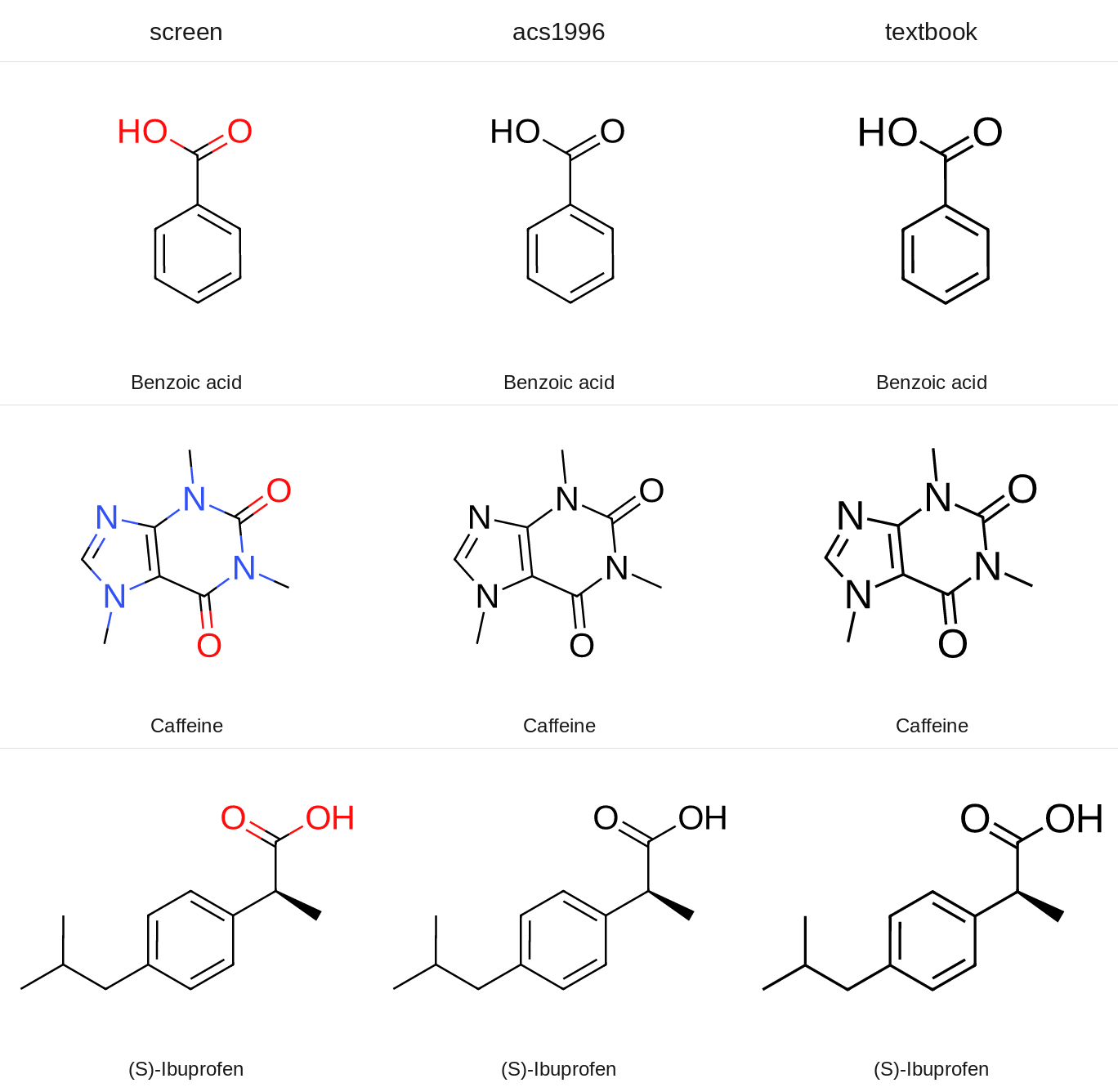
chemglyph.render_molecule(smiles, style="acs")  # black/white, ACS journal
chemglyph.render_molecule(smiles, style="modern")  # colored heteroatoms, screens
chemglyph.render_molecule(smiles, style="textbook-cn")  # bold monochrome, textbook
All styles default to a transparent background (transparent=True) and
support fmt="png".
Reactions
spec = {
    "steps": [
        {
            "reactants": ["OC(=O)c1ccccc1O", "CC(=O)OC(C)=O"],
            "products": ["CC(=O)Oc1ccccc1C(=O)O", "CC(=O)O"],
            "conditions": {"above": "H₂SO₄ (cat.)", "below": "rt, 15 min"},
            "yield": "89%",
            "arrow": "forward",
        }
    ],
    "style": "modern",
}
svg = chemglyph.render_reaction(spec)
Conditions are pre-formatted Unicode text, so pass H₂SO₄, not H2SO4.
ChemGlyph does not parse formulas out of text. The full schema
(multi-step chains, equilibrium and retro arrows, line wrapping) is in
docs/reaction_schema.md.
The aspirin demo writes a two-step route:
python examples/aspirin_synthesis.py # writes examples/aspirin_synthesis.svg
Validation
validate_structure reports parse errors and applies four quick fixes:
unmatched brackets and ring closures (reported, not guessed), kekulization
failures of lowercase aromatic atoms, and nitrogen valence errors via a
formal [N+]. Anything else passes RDKit's message through unchanged.
report = chemglyph.validate_structure("c1cccc1")
report.fixes[0].description  # 'lowercase aromatic atoms could not be kekulized...'
report.fixes[0].fixed_smiles  # 'C1CCCC1'
Naming
chemglyph.parse_name("aspirin") # 'CC(=O)Oc1ccccc1C(=O)O'
English IUPAC and common names resolve offline through OPSIN
(pip install 'chemglyph[opsin]', plus a Java runtime). Chinese names use
the built-in dictionary, and the library API accepts a translator callable
for names that are not in it:
chemglyph.parse_name("阿司匹林")  # 'CC(=O)Oc1ccccc1C(=O)O'
chemglyph.parse_name("六甲基苯", translator=to_english)
ChemGlyph itself never calls an online service, including for translation.
MCP server
Run the bundled console script (stdio transport):
chemglyph-mcp
Claude Desktop registration (macOS:
~/Library/Application Support/Claude/claude_desktop_config.json):
{
  "mcpServers": {
    "chemglyph": {
      "command": "chemglyph-mcp"
    }
  }
}
| Tool | Use it when | Returns |
|---|---|---|
render_molecule |
the user asks to draw one structure from SMILES/InChI/molblock | PNG image plus formula, MW, warnings (SVG source on request) |
render_reaction |
the user asks for a reaction or synthesis route | PNG image of the reaction scheme |
validate_structure |
a SMILES may be malformed and you need a repair | validation report JSON |
parse_name |
the user gives a name like "aspirin" instead of SMILES | canonical SMILES or an error |
One thing to know about clients. Some MCP clients, LM Studio included, only
pass the text part of a tool result to the model and never display the
attached image. The render tools write their PNG to ~/Downloads/chemglyph/
and return that path in the text, so you can always open the file yourself.
If a model claims it rendered a figure but nothing shows up, ask it for the
saved path rather than having it redraw the structure by hand.
Benchmarks
benchmarks/ holds the fixed 20-molecule blind test and a generator that
writes shuffled, numbered PNG/SVG figures plus answer_key.json:
python benchmarks/generate_blind_test.py --seed 1234
The deck, methodology, and scoring tooling are all open-sourced: the fixed molecule list, the A/B deck generator (which pairs ChemGlyph against an open-source reference renderer), the runbook, and the scorer live in benchmarks/. Anyone can run the protocol and contribute results. The pass threshold and procedure are documented in benchmarks/RUNBOOK.md.

Blind test vs ChemDraw: pending. The image above is an author-generated
comparison of ChemGlyph modern against the open-source reference renderer
(Indigo, the engine behind Ketcher) - it is not an independent review.
Known limitations
- Blind-test figures for ferrocene (metal complex) and the free-base porphyrin (large conjugated macrocycle) are excluded from the benchmark denominator and recorded separately.
- RDKit has no clean 2D layout for paclitaxel: its gem-dimethyl substituent placement inside the central 8-membered ring is a documented layout limitation.
- Full automatic Chinese name-to-structure parsing is not implemented; Chinese names resolve through a small built-in dictionary plus an optional translator hook. English names resolve through OPSIN.
Roadmap
Work proceeds in phases, and each phase ships as a minor version once its exit criteria pass. The plan, the standards ChemGlyph follows, and the quality gates are in docs/SPEC.md; release notes are in CHANGELOG.md.
- 0.1.3: fixes and release hygiene.
- 0.2: molecules done right. One fixed physical scale for every drawing, style profiles measured against published standards (ACS Document 1996 settings first), a verification report with every render, automated layout checks, PDF and MOL output.
- 0.3: formulas and equations in mhchem syntax, with atom and charge balance checks.
- 0.4: reaction schemes on the shared scale, with compound numbering.
- 0.5: mechanism (curved) arrows anchored to atoms and bonds.
Non-goals
No structure editor GUI (Ketcher/ChemDraw competition), no 3D visualization, no retrosynthesis or property prediction, no online database queries, and no automatic mechanism generation. The full list is in the project specification.
Development
python -m venv .venv
.venv/bin/pip install -e ".[dev]"
.venv/bin/ruff check . && .venv/bin/ruff format . && .venv/bin/pytest
Python 3.11+, RDKit 2024.9+, MIT license. All errors derive from
chemglyph.errors.ChemGlyphError.
1 maintainer

Metadata
1 maintainer
Release files for chemglyph 0.1.3
For a detailed explanation of source distributions (sdists) and built distributions (wheels), please see the package formats documentation.
Source distribution (sdist)
| File | Size | Uploaded | Provenance | Actions |
|---|---|---|---|---|
| chemglyph-0.1.3.tar.gz | 296.9 kB | With provenance | Details for chemglyph-0.1.3.tar.gz |
Built distribution (wheel)
| File | Interpreter | ABI | Platform | Actions Reset |
|---|---|---|---|---|
| chemglyph-0.1.3-py3-none-any.whl | Python 3 | none | any | Details for chemglyph-0.1.3-py3-none-any.whl |
Total release size: 330.1 kB
Release files / chemglyph-0.1.3.tar.gz
| Download URL | chemglyph-0.1.3.tar.gz |
|---|---|
| Size | 296.9 kB |
| Tags | Source |
|
SHA-256 checksum How to use checksums |
560aa19b2378e674b821998df3a72c369f89096dbcdd5ff23b4dfb07563950ec
|
|
BLAKE2b-256 checksum How to use checksums |
865b5a4f7e65644c7ef612aa3d4295d4f17f72bfde5c5c188712e3770b587ab2
|
| Upload date | |
|
Uploaded using Trusted Publishing? What is trusted publishing? |
Yes |
| Uploaded via |
twine/7.0.0 CPython/3.13.16
|
Provenance
Provenance describes where a file came from. On PyPI, provenance is shared via attestations, which provide a verifiable record of the build or publishing details. View details, limitations and caveats.


PyPI Publish Attestation
PyPI verified that this artifact, at this checksum, originated from the publisher listed below.
Signed by GitHub Actions, verified by PyPI on Oct 27, 2026.
Transparency logRelease files / chemglyph-0.1.3-py3-none-any.whl
| Download URL | chemglyph-0.1.3-py3-none-any.whl |
|---|---|
| Size | 33.2 kB |
| Tags | Python 3 |
|
SHA-256 checksum How to use checksums |
aa6255eb18fc2082be89e1342b676b7973dcb8ba8607cf00550c3596de5aea77
|
|
BLAKE2b-256 checksum How to use checksums |
c715b9cdc6bdad414ab2a6c2c7b05fdf1bfa90313091838bc1cbc99cb489a493
|
| Upload date | |
|
Uploaded using Trusted Publishing? What is trusted publishing? |
Yes |
| Uploaded via |
twine/7.0.0 CPython/3.13.16
|
Provenance
Provenance describes where a file came from. On PyPI, provenance is shared via attestations, which provide a verifiable record of the build or publishing details. View details, limitations and caveats.
PyPI Publish Attestation
PyPI verified that this artifact, at this checksum, originated from the publisher listed below.
Signed by GitHub Actions, verified by PyPI on Oct 27, 2026.
Transparency logSecurity for chemglyph 0.1.3
Provenance
Provenance describes where a file came from. On PyPI, provenance is shared via attestations, which provide a verifiable record of the build or publishing details. View details, limitations and caveats.
Full provenance
Both files in this release have been uploaded with provenance metadata.
Attestation for chemglyph-0.1.3.tar.gz
PyPI Publish Attestation
PyPI verified that this artifact, at this checksum, originated from the publisher listed below.
Signed by GitHub Actions, verified by PyPI on Oct 27, 2026.
Transparency logA note on package security
PyPI is a repository for distributing packages, not a service for auditing them. While third-party security researchers and our staff do their best to detect and remove malicious packages, PyPI cannot guarantee the quality, security or suitability of any given package.
To learn more about protecting yourself from malicious actors, visit our package security documentation.














