
chess-coach-mcp


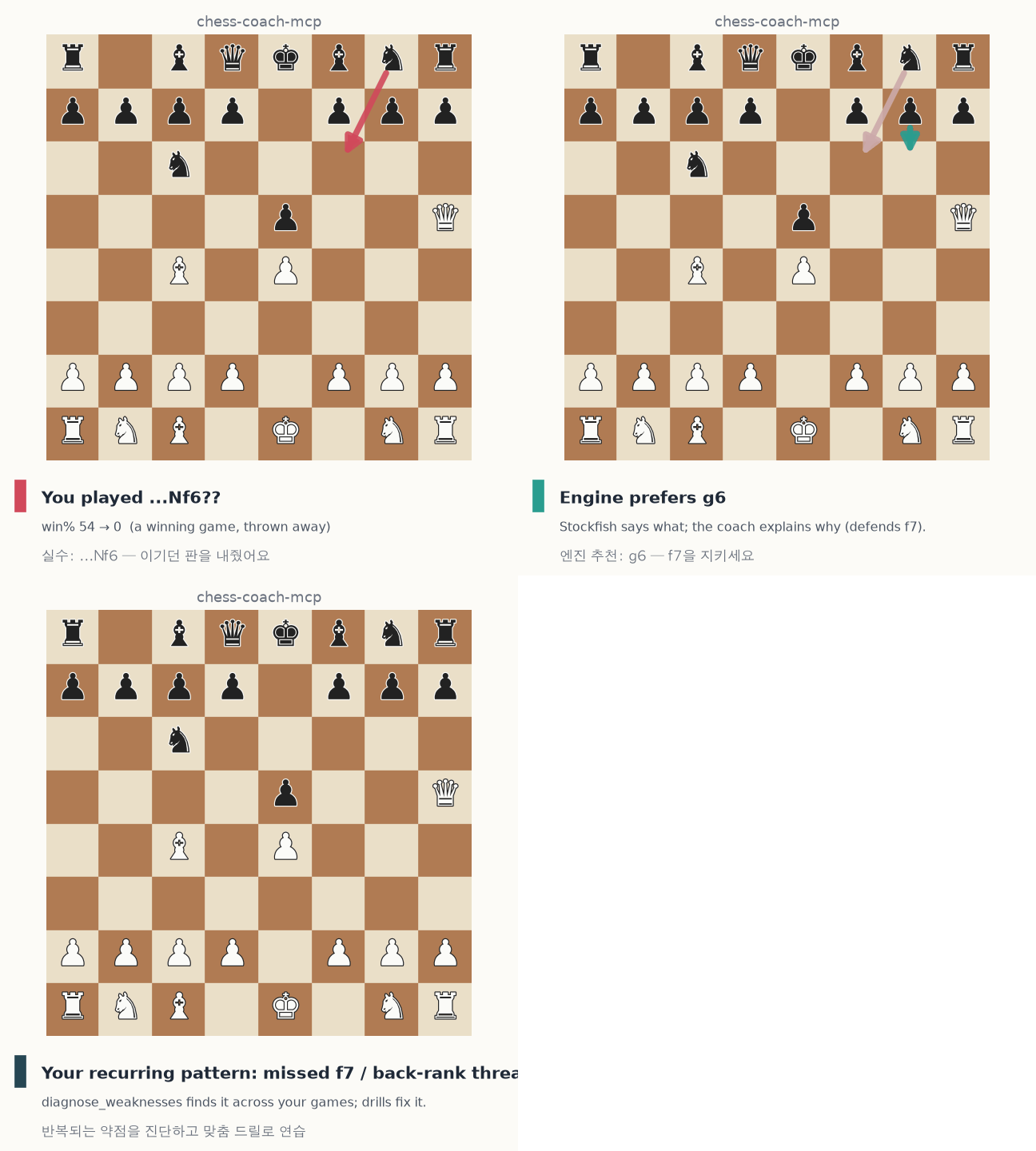
A hybrid AI chess coach exposed as an MCP server. A local Stockfish engine supplies grounded evaluations, mistake classifications and tactical motifs; your MCP host model (e.g. Claude) turns those facts into natural-language — Korean or English — coaching.
The engine knows what the best move is. The model explains why. This project wires the two together and adds the piece neither does alone: "here is your recurring mistake, drilled from your own games."
pip install chess-coach-mcp # or: uvx chess-coach-mcp (needs a local Stockfish)
See it in action
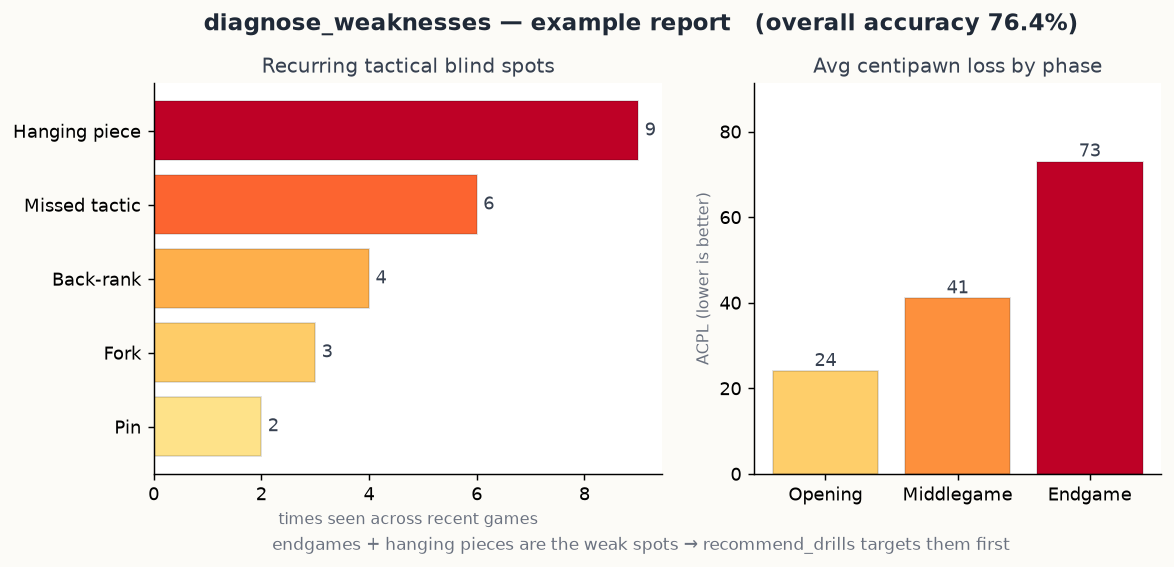
diagnose_weaknesses turns your recent games into a weakness report — recurring
tactical blind spots and where you lose the most (by phase):
…then recommend_drills hands back the exact positions you went wrong in — your
move in red, the engine's in green — so you re-solve your own mistakes:
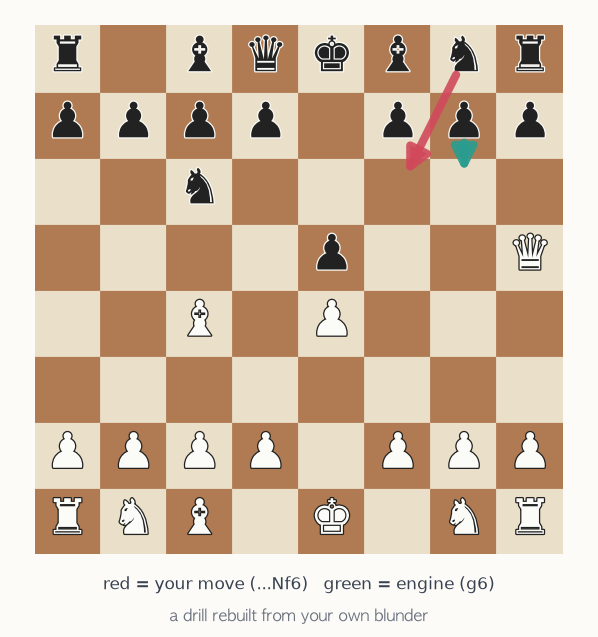
Numbers above are real Stockfish output; the weakness report uses an example dataset. Regenerate everything with
uv run --with matplotlib --with pillow python docs/generate_assets.py.
Why this exists
Engines (Stockfish) tell you the best move but not the reason. Raw LLMs explain
fluently but play/evaluate chess poorly and hallucinate lines. Existing trainers
are fragmented (one app for stats, one for explanations, one for courses) and
rarely give a personalised, guided path. chess-coach-mcp is the grounding
layer: every claim the coach makes is backed by Stockfish, and the weakness
diagnosis is computed from the player's actual games.
What it does
- Fetch recent games from Lichess or Chess.com (public APIs, no key).
- Analyse a game: per-move classification (best / good / inaccuracy / mistake / blunder, with Korean labels), win% before/after, centipawn loss, the engine's preferred move, tactical-motif tags, and per-phase summary.
- Analyse a position (FEN): top engine lines in SAN, win%, material, and fork/pin flags — so the model can explain the why.
- Diagnose weaknesses across many games: phase weaknesses (opening/middlegame/endgame), recurring tactical blind spots with example positions, leaky openings, a time-trouble proxy, and a ranked top-weakness list.
- Recommend drills: re-solvable positions taken from the player's own blunders, ordered to target their top weaknesses, plus a Lichess daily puzzle warm-up.
What makes it different (차별점)
Most chess tools do one thing well, so you end up stitching several together.
chess-coach-mcp is the missing grounding + personalisation layer, delivered
right where you already work — inside your AI assistant.
| chess-coach-mcp | Stockfish alone | DecodeChess | Aimchess | Chessable | |
|---|---|---|---|---|---|
| Best move (what) | ✅ | ✅ | ✅ | ◐ | – |
| Explains the why in prose | ✅ | ❌ | ✅ | ❌ | – |
| Personal weakness diagnosis across your games | ✅ | ❌ | ❌ | ✅ | ❌ |
| Drills from your own blunders | ✅ | ❌ | ❌ | ◐ | ❌ |
| Korean (bilingual) coaching | ✅ | ❌ | ❌ | ❌ | ❌ |
| Local / private (your engine, no account) | ✅ | ✅ | ❌ cloud | ❌ cloud | ❌ cloud |
| Lives inside your AI assistant (MCP) | ✅ | ❌ | ❌ | ❌ | ❌ |
| Cost | free, OSS | free | subscription | subscription | paid courses |
The five things that set it apart:
- Hybrid & grounded — Stockfish is the judge, the LLM is the explainer. Every coaching claim is backed by the engine, so there are no hallucinated evaluations or made-up lines (the failure mode of asking a raw LLM about chess).
- Personal, not generic —
diagnose_weaknessesaggregates your games into phase weaknesses, recurring tactical blind spots and leaky openings;recommend_drillsquizzes you on your own blunder positions — not random puzzles at your rating. - Bilingual EN/KO — every structured fact carries a Korean label, so the coaching reads naturally in Korean (한국어 코칭).
- Local-first & private — your own Stockfish binary + public read-only APIs. No account, no API key, nothing about your games is uploaded anywhere.
- Inside your assistant — it's an MCP server, so coaching happens in the same chat you already use, composable with everything else your assistant can do.
Tools
| Tool | Purpose |
|---|---|
engine_status |
Check the local Stockfish binary is available. |
render_board(fen, orientation) |
Show a position as a text board + Lichess link (no engine). |
fetch_recent_games(username, source, max_games, speed) |
List recent games (no analysis). |
analyze_position(fen, depth, multipv) |
Evaluate one position; top lines + flags. |
analyze_game(pgn, depth, user_color, max_plies) |
Full per-move game review. |
diagnose_weaknesses(username, source, max_games, depth, speed) |
Cross-game weakness report. |
recommend_drills(username, source, max_games, depth, num_drills, include_daily_puzzle) |
Personalised drill set. |
source is lichess (default) or chesscom. Every numeric/categorical fact
ships with a *_ko Korean label for natural Korean coaching. Positions in tool
output also carry a board_ascii text board and a lichess_url, so the coach
can draw the board right in the chat or link you to an interactive one.
Does a board show up in chat?
This is an MCP server: it returns data (FENs, evaluations, a board_ascii
text board, a lichess_url), and your assistant turns that into coaching. So a
graphical board doesn't pop up by itself — but the model can print the
board_ascii board in any client, you can click the lichess_url for a real
interactive board, and on claude.ai the model can draw an SVG board from the
FEN. (The demo GIF above is a generated README asset, not the live chat UI.)
Requirements
- Python ≥ 3.11
- Stockfish on your
PATH(or setSTOCKFISH_PATH):- macOS:
brew install stockfish - Debian/Ubuntu:
apt install stockfish
- macOS:
Install & run
From PyPI:
pip install chess-coach-mcp
chess-coach-mcp               # run the MCP server over stdio
# …or run without installing:
uvx chess-coach-mcp
From source:
uv sync                      # install dependencies
uv run chess-coach-mcp       # run the MCP server over stdio
Register with Claude Code
claude mcp add chess-coach -- uv --directory /ABS/PATH/TO/chess-coach-mcp run chess-coach-mcp
Or add to an MCP client config:
{
  "mcpServers": {
    "chess-coach": {
      "command": "uv",
      "args": ["--directory", "/ABS/PATH/TO/chess-coach-mcp", "run", "chess-coach-mcp"],
      "env": { "STOCKFISH_PATH": "/opt/homebrew/bin/stockfish" }
    }
  }
}
Example coaching flow
"내 리체스 약점 좀 진단해줘. 아이디
myname."
The host calls diagnose_weaknesses("myname"), gets back per-phase ACPL,
recurring motifs (e.g. hanging_piece ×4, missed_tactic ×3) with example
FENs, then explains in Korean why those positions went wrong and calls
recommend_drills("myname") to quiz the user on their own blunders.
Configuration (environment variables)
| Variable | Default | Meaning |
|---|---|---|
STOCKFISH_PATH |
autodetect | Path to the Stockfish binary. |
CHESS_COACH_ENGINE_THREADS |
1 | Engine threads. |
CHESS_COACH_ENGINE_HASH_MB |
128 | Engine hash size (MB). |
CHESS_COACH_POSITION_DEPTH |
16 | Default depth for analyze_position. |
CHESS_COACH_GAME_DEPTH |
14 | Default depth for analyze_game. |
CHESS_COACH_DIAGNOSE_DEPTH |
12 | Default depth for diagnosis (lower = faster). |
How move classification works
Moves are classified by the drop in win percentage, not raw centipawns, using Lichess' logistic model — far more meaningful in already-winning or already-losing positions. A move is a blunder if it loses ≥20% win probability, a mistake at ≥10%, an inaccuracy at ≥5%. Mate-aware: a move that throws away a forced mate or walks into one is flagged accordingly.
Tactical motifs are heuristic labels (depth-1 static exchange for hanging pieces, geometric detection for forks/pins/back-rank). They exist to group engine-found mistakes into human themes, not to replace the engine's judgement.
Development
uv run pytest                       # unit + engine tests (skips engine tests if no Stockfish)
uv run python examples/mcp_smoke.py # boot the server over MCP and call tools
uv run python examples/live_check.py <lichess_username>  # live network E2E
Tests marked engine require a Stockfish binary; live tests (none by
default) hit the network and are deselected unless you pass -m live.
License
MIT
1 maintainer

Metadata
1 maintainer
Release files for chess-coach-mcp 0.1.1
For a detailed explanation of source distributions (sdists) and built distributions (wheels), please see the package formats documentation.
Source distribution (sdist)
| File | Size | Uploaded | |
|---|---|---|---|
| chess_coach_mcp-0.1.1.tar.gz | 28.2 kB | Details |
Built distribution (wheel)
| File | Interpreter | ABI | Platform | Reset |
|---|---|---|---|---|
| chess_coach_mcp-0.1.1-py3-none-any.whl | Python 3 | none | any | Details |
Total release size: 62.5 kB
Release files / chess_coach_mcp-0.1.1.tar.gz
| Download URL | chess_coach_mcp-0.1.1.tar.gz |
|---|---|
| Size | 28.2 kB |
| Tags | Source |
|
SHA-256 checksum How to use checksums |
844c560a2e69d01fc4b76fad9adb524ef002771b481e0c1d79f81ce4c85dfb1f
|
|
BLAKE2b-256 checksum How to use checksums |
5e7dc61603a49080521fccb5edb09d6ad9a534d95228d2d557980954ebd26d02
|
| Upload date | |
|
Uploaded using Trusted Publishing? What is trusted publishing? |
No |
| Uploaded via |
uv/0.11.15 {"installer":{"name":"uv","version":"0.11.15","subcommand":["publish"]},"python":null,"implementation":{"name":null,"version":null},"distro":{"name":"macOS","version":null,"id":null,"libc":null},"system":{"name":null,"release":null},"cpu":null,"openssl_version":null,"setuptools_version":null,"rustc_version":null,"ci":null}
|
Release files / chess_coach_mcp-0.1.1-py3-none-any.whl
| Download URL | chess_coach_mcp-0.1.1-py3-none-any.whl |
|---|---|
| Size | 34.3 kB |
| Tags | Python 3 |
|
SHA-256 checksum How to use checksums |
48920421bdbadd1075d3f107e115be31515c619d452ac972a4c242b3ccfa0850
|
|
BLAKE2b-256 checksum How to use checksums |
973b4996ac30522b45f8b01125968f623189486356860141a18297192f30b159
|
| Upload date | |
|
Uploaded using Trusted Publishing? What is trusted publishing? |
No |
| Uploaded via |
uv/0.11.15 {"installer":{"name":"uv","version":"0.11.15","subcommand":["publish"]},"python":null,"implementation":{"name":null,"version":null},"distro":{"name":"macOS","version":null,"id":null,"libc":null},"system":{"name":null,"release":null},"cpu":null,"openssl_version":null,"setuptools_version":null,"rustc_version":null,"ci":null}
|














