






A fast, lightweight chess board and piece recognition toolkit.
Install
# With uv (recommended)
uv tool install chessvision

# With pipx
pipx install chessvision
# As a library
uv add chessvision

# or
pip install chessvision
Browser Extension
| Browser | Install from |
|---|---|
 |
Firefox Add-ons |
 |
Build from source |
 |
Build from source |
Build from source
- Clone the repository:
git clone https://github.com/harshitpawar64/chessvision.git
cd chessvision
- Build the browser extension bundles:
uv run python extension/build.py
Chromium (Chrome, Edge, Brave, etc.)
- Open your browser's extensions page (ex:
chrome://extensions). - Toggle on Developer mode in the top-right corner.
- Click Load unpacked and select the
extension/directory.
Firefox
- Open
about:debugging#/runtime/this-firefox. - Click Load Temporary Add-on....
- Select the
dist/chessvision-firefox-v*.zipfile.
Usage
CLI
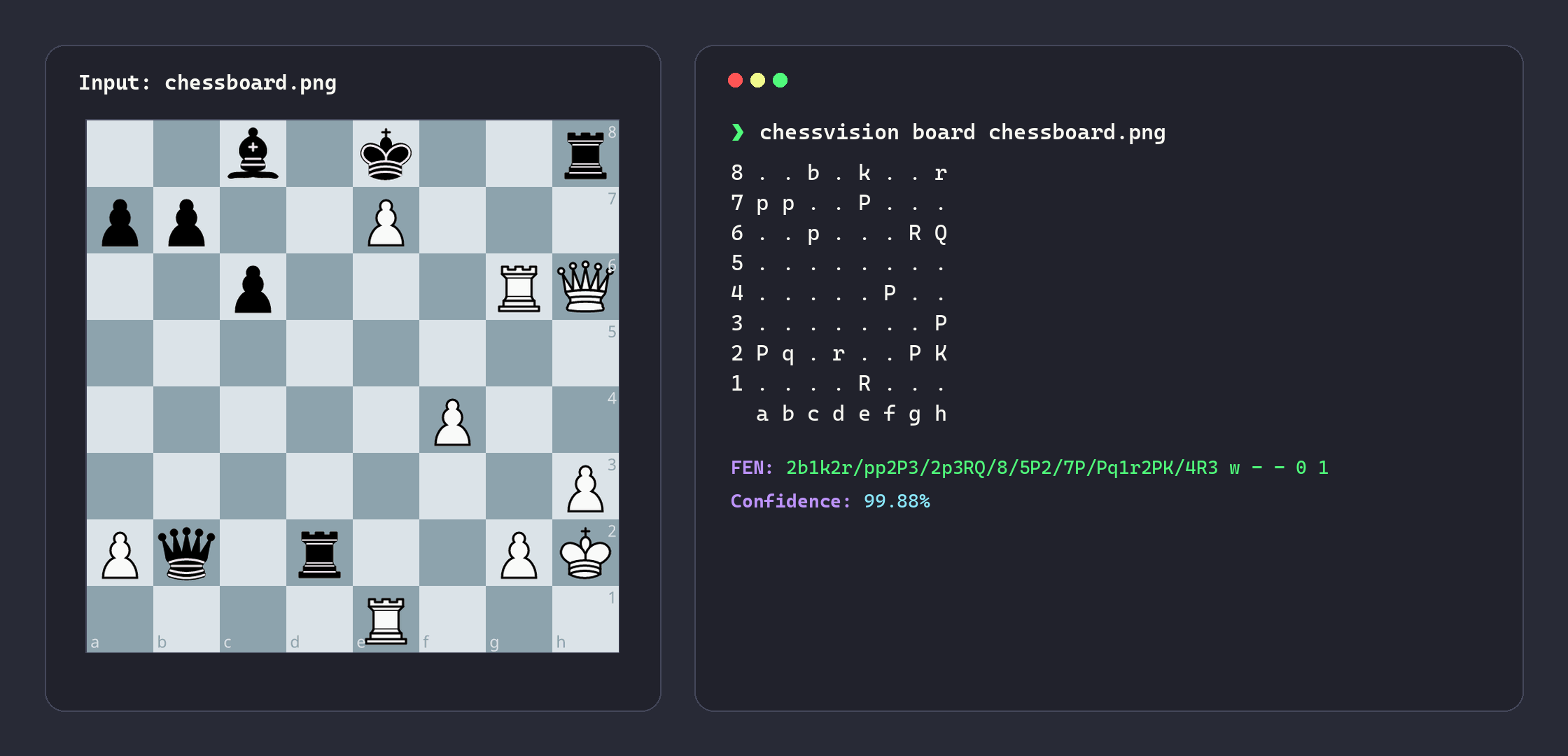
# Predict chess positions from a board, screenshot, or book page
chessvision board chessboard.png

# Predict directly from clipboard (screenshot or copied image)
chessvision board

# Predict chess positions from a PDF document
chessvision pdf document.pdf

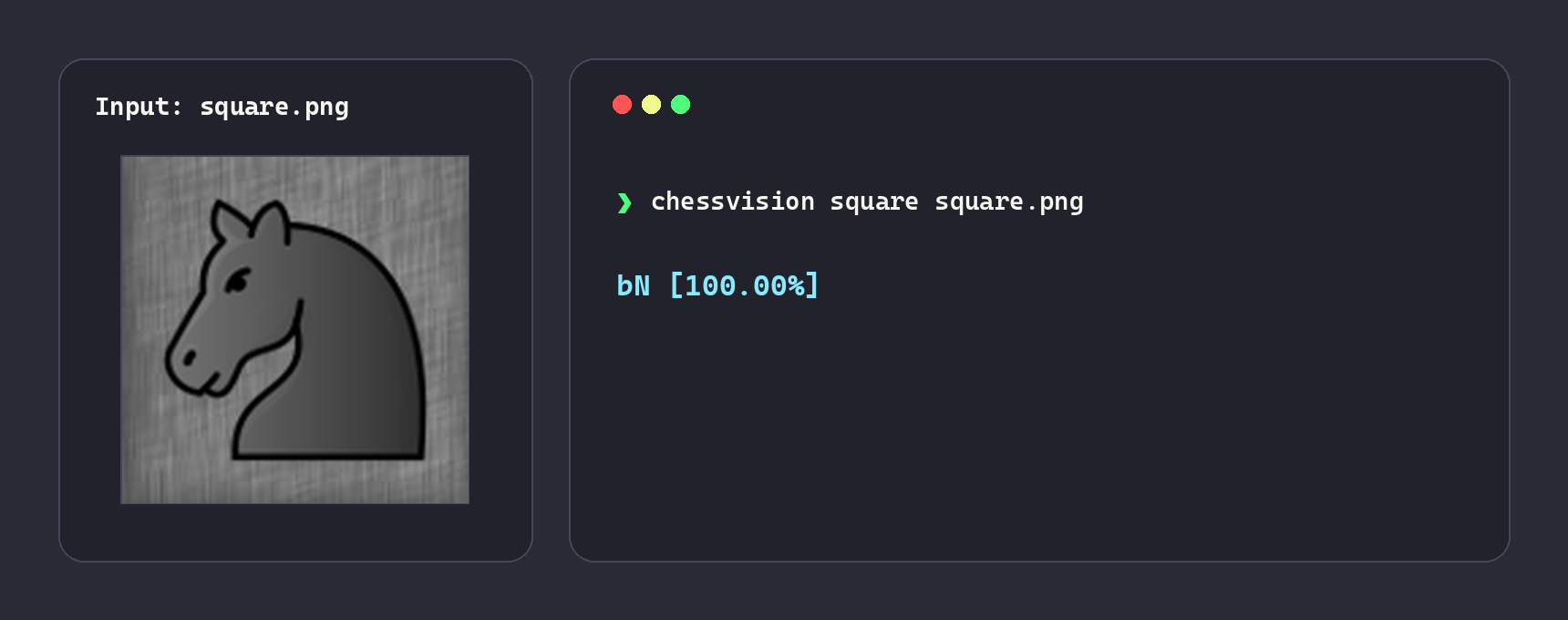
# Predict a single square image
chessvision square square.png
Python API
from chessvision import (
    BoardDetector,
    BoardPredictor,
    Orientation,
    PDFPredictor,
    PieceClassifier,
    Turn,
)

# 1. Full Board Recognition
predictor = BoardPredictor()
prediction = predictor.predict(
    "chessboard.png", orientation=Orientation.AUTO, turn=Turn.AUTO, castling="auto"
)

print(prediction.ascii_board)
print(f"FEN: {prediction.fen}")
print(f"Confidence: {prediction.confidence:.2%}")
print(f"Valid: {prediction.is_valid}")
if not prediction.is_valid:
    print(f"Errors: {prediction.validation_errors}")
print(f"Lichess URL: {prediction.lichess_url}")
print(f"Chess.com URL: {prediction.chesscom_url}")

# Access the chess.Board object directly
board = prediction.board

# 2. Multi-Board Detection
detector = BoardDetector()
boards = detector.detect("page.png")  # Returns list of DetectedBoard objects

for board in boards:
    prediction = predictor.predict(board)
    print(f"Box: {board.box}, FEN: {prediction.fen}")

# 3. Multi-Page PDF Prediction
pdf_predictor = PDFPredictor()
for result in pdf_predictor.predict("document.pdf"):
    print(f"{result.label}: {result.prediction.fen}")

# 4. Single Square Classification
classifier = PieceClassifier()
square_prediction = classifier.predict_square("square.png")
print(f"{square_prediction.name} [{square_prediction.confidence:.2%}]")

# 5. Batch Squares Classification
batch_predictions = classifier.predict_squares(["e4.png", "e5.png"])
for prediction in batch_predictions:
    print(f"{prediction.name} [{prediction.confidence:.2%}]")
CLI Subcommands
chessvision board
| Flag | Short | Default | Description |
|---|---|---|---|
--orientation |
-o |
auto |
Board perspective (auto, white, or black). |
--turn |
-t |
auto |
Side to move (auto, white or black). |
--castling |
-c |
auto |
Castling availability (see options below). |
--open |
False |
Open position directly in analysis board. | |
--site |
-s |
lichess |
Analysis platform (chess.com or lichess). |
--verbose |
-v |
False |
Enable verbose logging. |
Castling Options
| Value | Description |
|---|---|
auto |
Automatically infer castling (default) |
- |
No castling for both sides |
[KQkq] |
Specific castling rights (e.g. KQkq, KQ, Qk) |
# Predict from clipboard (screenshot or copied image)
chessvision board

# Specify board perspective explicitly
chessvision board chessboard.png --orientation black
chessvision board chessboard.png -o white

# Specify castling availability explicitly
chessvision board chessboard.png --castling KQkq
chessvision board chessboard.png -c KQ

# Specify side to move explicitly
chessvision board chessboard.png --turn black
chessvision board chessboard.png -t white

# Specify analysis platform explicitly
chessvision board chessboard.png --open --site chess.com
chessvision board chessboard.png --open -s lichess
chessvision pdf
| Flag | Short | Default | Description |
|---|---|---|---|
--output |
-o |
None |
Path to output PGN file. |
--verbose |
-v |
False |
Enable verbose logging. |
# Predict chess positions from a PDF document
chessvision pdf document.pdf

# Export detected positions to a PGN file
chessvision pdf document.pdf --output positions.pgn
chessvision pdf document.pdf -o positions.pgn
chessvision square
| Flag | Short | Default | Description |
|---|---|---|---|
--verbose |
-v |
False |
Enable verbose logging. |
# Predict piece on a square image
chessvision square square.png
Attributions
Training assets were extracted and preprocessed from:
- Lichess open-source piece sets and board themes (see their COPYING.md for individual asset licenses).
- Chess.com piece sets and board themes (all rights reserved by Chess.com, LLC).
License
This project is licensed under the GNU GPL v3.0.
1 maintainer

Metadata
1 maintainer
Release files for chessvision 0.13.0
For a detailed explanation of source distributions (sdists) and built distributions (wheels), please see the package formats documentation.
Source distribution (sdist)
| File | Size | Uploaded | Provenance | |
|---|---|---|---|---|
| chessvision-0.13.0.tar.gz | 5.7 MB | Without provenance | Details |
Built distribution (wheel)
| File | Interpreter | ABI | Platform | Reset |
|---|---|---|---|---|
| chessvision-0.13.0-py3-none-any.whl | Python 3 | none | any | Details |
Total release size: 11.3 MB
Release files / chessvision-0.13.0.tar.gz
| Download URL | chessvision-0.13.0.tar.gz |
|---|---|
| Size | 5.7 MB |
| Tags | Source |
|
SHA-256 checksum How to use checksums |
52712f2a2f55065f4a41bf9ee838c8eeae12e88058674292a118bf41082627b0
|
|
BLAKE2b-256 checksum How to use checksums |
f8757f60d04565b9e519cea1d0a3a66a2cbebe366d34607390c608c8baf0bee6
|
| Upload date | |
|
Uploaded using Trusted Publishing? What is trusted publishing? |
Yes |
| Uploaded via |
uv/0.12.17 {"installer":{"name":"uv","version":"0.12.17","subcommand":["publish"]},"python":null,"implementation":{"name":null,"version":null},"distro":{"name":"Ubuntu","version":"24.04","id":"noble","libc":null},"system":{"name":null,"release":null},"cpu":null,"openssl_version":null,"setuptools_version":null,"rustc_version":null,"ci":true}
|
Release files / chessvision-0.13.0-py3-none-any.whl
| Download URL | chessvision-0.13.0-py3-none-any.whl |
|---|---|
| Size | 5.7 MB |
| Tags | Python 3 |
|
SHA-256 checksum How to use checksums |
9de37ed0d769c19dbeb30ce24f1efebf052da8631ad4102070eb88818207098d
|
|
BLAKE2b-256 checksum How to use checksums |
7c38fea46ce32a4b8ce3f72d518fbb49f4c36ad2eace691f85581fbc69858b04
|
| Upload date | |
|
Uploaded using Trusted Publishing? What is trusted publishing? |
Yes |
| Uploaded via |
uv/0.12.17 {"installer":{"name":"uv","version":"0.12.17","subcommand":["publish"]},"python":null,"implementation":{"name":null,"version":null},"distro":{"name":"Ubuntu","version":"24.04","id":"noble","libc":null},"system":{"name":null,"release":null},"cpu":null,"openssl_version":null,"setuptools_version":null,"rustc_version":null,"ci":true}
|
Security for chessvision 0.13.0
Provenance
Provenance describes where a file came from. On PyPI, provenance is shared via attestations, which provide a verifiable record of the build or publishing details. View details, limitations and caveats.
No provenance found
None of the files in this release were uploaded with provenance metadata.
A note on package security
PyPI is a repository for distributing packages, not a service for auditing them. While third-party security researchers and our staff do their best to detect and remove malicious packages, PyPI cannot guarantee the quality, security or suitability of any given package.














