
Chief of Staff
English · 简体中文



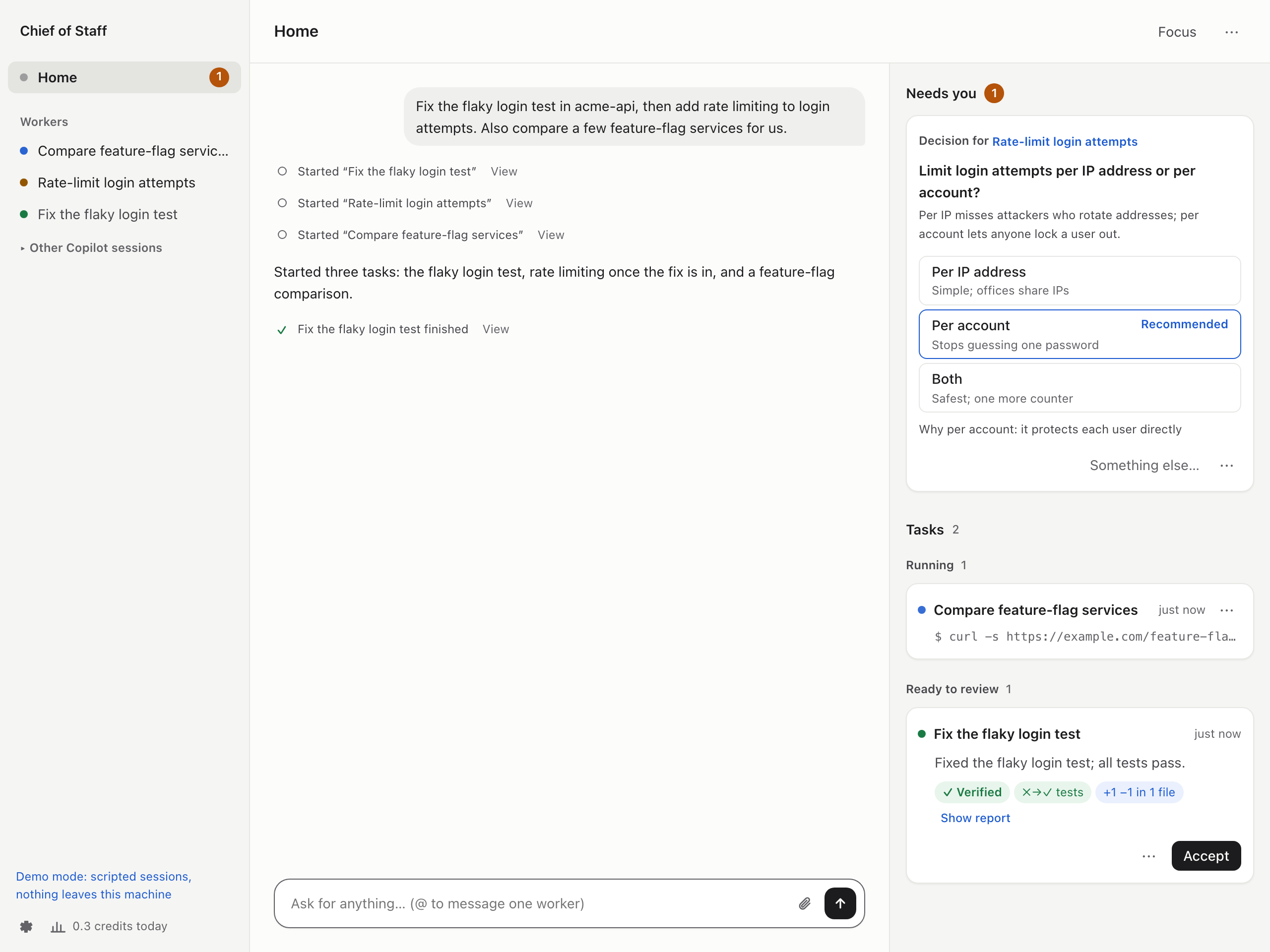
One home for all your GitHub Copilot sessions. Say what you need: each task gets its own Copilot session, follow-ups go to the session that already has the context, and you are asked only when a decision is yours or something is ready to review.
uvx chiefofstaff --demo # try it with scripted sessions, no sign-in needed
Why
I run several Copilot sessions at once: one fixing a test, one reviewing a PR, one reading logs. I kept switching terminals to see which was stuck, which had a question and which had finished, while Slack kept pinging me. Now I talk to one session, the Router, and Chief of Staff keeps track of the rest.
What it does
All your work in one place
- Splits a request into tasks and runs each in its own Copilot session, in parallel or in order.
- Sends a follow-up to the session that did the work, with its history and checkout.
- Shows every task live on one board: what it is doing now, what waits and why, what is done.
Results you can check
- Shows what was observed next to each report (test runs, commits, diff, PR checks), and flags claims nothing backs.
- Lets you comment on the diff, send it back, and open the PR in one click.
Asks only when it needs you
- One card per thing: a decision with options and a recommendation, a question, a draft.
- Reaches you when you are away from your desk (through your company's Slack bot, say) and takes your answers from there.
- Focus mode: notifications wait, and you get one summary at the end.
Speaks for you, once you approve
- Drafts Slack replies and PR reviews, approvals included, in your voice.
- Watches what you ask it to (Slack mentions, doc comments, mail) with any tool your Copilot has, Glean or your company's search included.
- React 🤖 to any Slack message to hand it over as a task.
Learns how you work
- Picks up how you write and what you keep asking for. Your style applies at once; habits wait for your OK.
- Turns mistakes workers fixed into checks that catch them next time.
Your Copilot, your machine
- Uses the Copilot you already have: your plan, models, plugins, skills, MCP servers and your company's policies, plus anything you add in Settings. No other AI service or API key.
- Every worker gets its own folder and git worktree, so your checkouts stay untouched. Workers run like your own Copilot sessions; turn on permission checks or an OS sandbox in Settings.
Install
You need macOS or Linux, Python 3.11+, uv (or pipx) and the GitHub Copilot CLI:
npm install -g @github/copilot
copilot login
uvx chiefofstaff           # or: pipx install chiefofstaff && chiefofstaff
Your browser opens Chief of Staff through a private link printed in the terminal (keep it to
yourself). Tell it where your code lives, like ~/workspace, and type what you need.
Everything runs on your machine; data stays in ~/Library/Application Support/chiefofstaff
(macOS) or ~/.local/share/chiefofstaff (Linux). Ctrl+C stops it, and sessions pick up where
they left off next time. Options: --port, --data-dir, --no-browser, --demo. Update with
uvx chiefofstaff@latest.
Optional sign-ins
- GitHub:
gh auth loginwith every account you use, to review PRs and open them. - Slack: paste a user token in Settings (how), or reach Slack through a tool your Copilot already has, such as Glean.
- Other services (docs, issue trackers): a sign-in card appears when a worker needs one.
How it works
Each session is a regular Copilot CLI session, driven through the Copilot SDK; copilot --resume
lists them as "Chief of Staff · …". Sessions never talk to each other directly: they call tools
such as spawn_worker, report and tell_session, and Chief of Staff delivers each message,
labeled with who sent it, so a Slack message cannot pass itself off as you. Workers that work
together pass what the other needs straight to it; the Router gets a copy.
you ── Home ── Router ── tasks ──► worker · worker · worker
                 ▲                 (own folder and worktree)
Slack, GitHub, ──┘    drafts ────► wait for your approval
your watches          Watchdog ──► nudges stuck workers
Learn more
- User guide
- Architecture
- Security: what the OS sandbox, Chief of Staff and the model each enforce
- Changelog
Status
Early (0.1): expect rough edges. Copilot usage counts against your plan, and Home shows the credits each task used. Issues and ideas are welcome; to contribute, see CONTRIBUTING.md.
License
MIT. Chief of Staff is an independent project, not made by or affiliated with GitHub. GitHub Copilot is a trademark of GitHub, Inc.
1 maintainer

Metadata
1 maintainer
Release files for chiefofstaff 0.1.35
For a detailed explanation of source distributions (sdists) and built distributions (wheels), please see the package formats documentation.
Source distribution (sdist)
| File | Size | Uploaded | Provenance | Actions |
|---|---|---|---|---|
| chiefofstaff-0.1.35.tar.gz | 1.5 MB | With provenance | Details for chiefofstaff-0.1.35.tar.gz |
Built distribution (wheel)
| File | Interpreter | ABI | Platform | Actions Reset |
|---|---|---|---|---|
| chiefofstaff-0.1.35-py3-none-any.whl | Python 3 | none | any | Details for chiefofstaff-0.1.35-py3-none-any.whl |
Total release size: 2.2 MB
Release files / chiefofstaff-0.1.35.tar.gz
| Download URL | chiefofstaff-0.1.35.tar.gz |
|---|---|
| Size | 1.5 MB |
| Tags | Source |
|
SHA-256 checksum How to use checksums |
03b75465e6866f7b6b0a3dd2d19cf8bfbd11e10dca51286fc429bffc25b1ef85
|
|
BLAKE2b-256 checksum How to use checksums |
88ffc939558b82f4b3ca7462aaef3b7d129e8f30db0a5e7faafc92f734c57e94
|
| Upload date | |
|
Uploaded using Trusted Publishing? What is trusted publishing? |
Yes |
| Uploaded via |
twine/7.0.0 CPython/3.13.16
|
Provenance
Provenance describes where a file came from. On PyPI, provenance is shared via attestations, which provide a verifiable record of the build or publishing details. View details, limitations and caveats.


PyPI Publish Attestation
PyPI verified that this artifact, at this checksum, originated from the publisher listed below.
Signed by GitHub Actions, verified by PyPI on Nov 9, 2026.
Transparency logRelease files / chiefofstaff-0.1.35-py3-none-any.whl
| Download URL | chiefofstaff-0.1.35-py3-none-any.whl |
|---|---|
| Size | 641.4 kB |
| Tags | Python 3 |
|
SHA-256 checksum How to use checksums |
47a6352dea57f33c7b1a72b9c3c6b9d9741505fdc3f85c67d8a5f938696fc881
|
|
BLAKE2b-256 checksum How to use checksums |
33b1a3d0b7fcd81a32f26f667564de96887fb6745f3e30c6f80085063ee1e0a0
|
| Upload date | |
|
Uploaded using Trusted Publishing? What is trusted publishing? |
Yes |
| Uploaded via |
twine/7.0.0 CPython/3.13.16
|
Provenance
Provenance describes where a file came from. On PyPI, provenance is shared via attestations, which provide a verifiable record of the build or publishing details. View details, limitations and caveats.
PyPI Publish Attestation
PyPI verified that this artifact, at this checksum, originated from the publisher listed below.
Signed by GitHub Actions, verified by PyPI on Nov 9, 2026.
Transparency logSecurity for chiefofstaff 0.1.35
Provenance
Provenance describes where a file came from. On PyPI, provenance is shared via attestations, which provide a verifiable record of the build or publishing details. View details, limitations and caveats.
Full provenance
Both files in this release have been uploaded with provenance metadata.
Attestation for chiefofstaff-0.1.35.tar.gz
PyPI Publish Attestation
PyPI verified that this artifact, at this checksum, originated from the publisher listed below.
Signed by GitHub Actions, verified by PyPI on Nov 9, 2026.
Transparency logA note on package security
PyPI is a repository for distributing packages, not a service for auditing them. While third-party security researchers and our staff do their best to detect and remove malicious packages, PyPI cannot guarantee the quality, security or suitability of any given package.
To learn more about protecting yourself from malicious actors, visit our package security documentation.














